

The Best Camera Settings for Architectural Photography: Tips for Stunning Building Shots
Discover the best camera settings for architectural photography and learn how to capture stunning images of buildings. From mastering aperture, ISO, and shutter speed to tips on composition, lighting, and perspective, this guide provides essential techniques to enhance detail, minimize distortion, and create visually compelling shots, making ordinary structures come alive in extraordinary ways.
 Bahattin Duran14 January 20256 Mins read639

Table of Contents Show
Capturing the beauty of architecture requires more than just pointing a camera at a building. It’s about highlighting intricate details, playing with light and shadows, and showcasing the structure’s personality. To do this effectively, we need the right camera settings that bring out the best in every shot.
Whether we’re photographing towering skyscrapers, historic landmarks, or cozy interiors, understanding how to adjust our camera is key. From aperture to ISO, each setting plays a critical role in shaping the final image. By mastering these, we can elevate our architectural photography and create stunning visuals that tell a story.
Let’s dive into the essential camera settings that’ll help us capture architecture in all its glory. With the right techniques, we can turn ordinary structures into extraordinary works of art.
Understanding The Basics Of Architectural Photography
Architectural photography relies on showcasing the building’s design, structure, and details in a visually engaging way. Composing the image thoughtfully enhances the visual impact of the subject. Aligning elements, avoiding distortion, and balancing foreground and background are crucial techniques.
Lighting significantly affects architectural photos. Using natural light during golden hours highlights textures and shadows, while overcast conditions reduce harsh contrasts. For interior shots, balancing artificial and natural light avoids color casts and improves clarity.
Perspective is a defining factor in architectural photography. Low angles emphasize height and grandeur, while symmetry draws attention to intricate designs. Maintaining straight vertical lines prevents distortion and keeps the geometry intact.

Key Elements To Consider For The Best Camera Settings
Architectural photography demands precision and attention to detail. Understanding the interplay between light, composition, perspective, and lens choice ensures high-quality images.

Lighting And Time Of Day
Lighting determines the mood and detail in architectural photography. Soft natural light during golden hours enhances textures and shadows on exteriors, while overcast skies create evenly lit conditions with minimal contrast. For interiors, combining natural light from windows with artificial sources achieves balanced exposure and minimizes color imbalance. Avoid harsh midday sunlight, as it can create unappealing shadows and overexposed areas.
| Time of Day | Lighting Condition | Best For | Key Benefit |
|---|---|---|---|
| Golden Hour (Sunrise) | Warm, soft, directional light | Exterior facades, detail shots | Long shadows enhance texture and depth |
| Mid-Morning / Late Afternoon | Moderate, angled light | Balanced exterior shots | Good contrast without harsh shadows |
| Midday | Harsh, overhead light | Generally avoid for exteriors | Useful for covered or shaded interiors |
| Overcast / Cloudy | Soft, diffused, even light | Symmetrical compositions, white buildings | Minimal contrast, no harsh shadows |
| Golden Hour (Sunset) | Warm, dramatic light | Dramatic exterior shots, skylines | Rich warm tones and long shadows |
| Blue Hour (Twilight) | Cool ambient + artificial lights | Cityscapes, illuminated buildings | Interior lights glow against blue sky |
| Night | Artificial lighting only | Illuminated landmarks, light trails | Dramatic mood, requires long exposure |
Composition And Perspective
Effective composition highlights a structure’s design and symmetry. Aligning vertical lines with the frame avoids distortion, preserving the building’s proportions. Low angles emphasize height, while centered perspectives draw attention to intricate details and balance in symmetrical designs. Including leading lines, such as pathways or walls, helps guide the viewer’s eyes towards focal points. Framing architectural features with foreground objects ensures depth and visual interest.
Lens Selection And Focal Length
Using the right lens enhances clarity and captures intricate architectural details. Wide-angle lenses, like 16-35mm range, are ideal for expansive exteriors and compact interiors, though caution is needed to prevent distortion at the edges. Tilt-shift lenses correct vertical lines, maintaining geometry in tall structures. Medium focal lengths, like 50mm, work well for preserving accurate proportions in detail-focused shots. Opt for prime lenses with a fixed focal length to achieve sharper image quality.

| Lens Type | Focal Length | Best Use Case | Pros | Cons |
|---|---|---|---|---|
| Ultra Wide-Angle | 10-16mm | Tight interiors, dramatic perspectives | Captures entire rooms and large facades | Significant barrel distortion at edges |
| Wide-Angle Zoom | 16-35mm | Exteriors, interiors, general architecture | Versatile range, great depth of field | Moderate edge distortion possible |
| Tilt-Shift | 17mm / 24mm | Tall buildings, correcting converging lines | Eliminates perspective distortion in-camera | Expensive, manual focus only |
| Standard Prime | 35mm / 50mm | Detail shots, accurate proportions | Sharp, natural perspective, minimal distortion | Limited field of view for large structures |
| Medium Telephoto | 70-105mm | Isolated details, compressed perspectives | Flattens perspective, highlights patterns | Cannot capture full building views |
| Telephoto Zoom | 70-200mm | Distant details, ornamental features | Compresses layers, isolates elements | Requires more distance from subject |
Essential Camera Settings For Architectural Photography
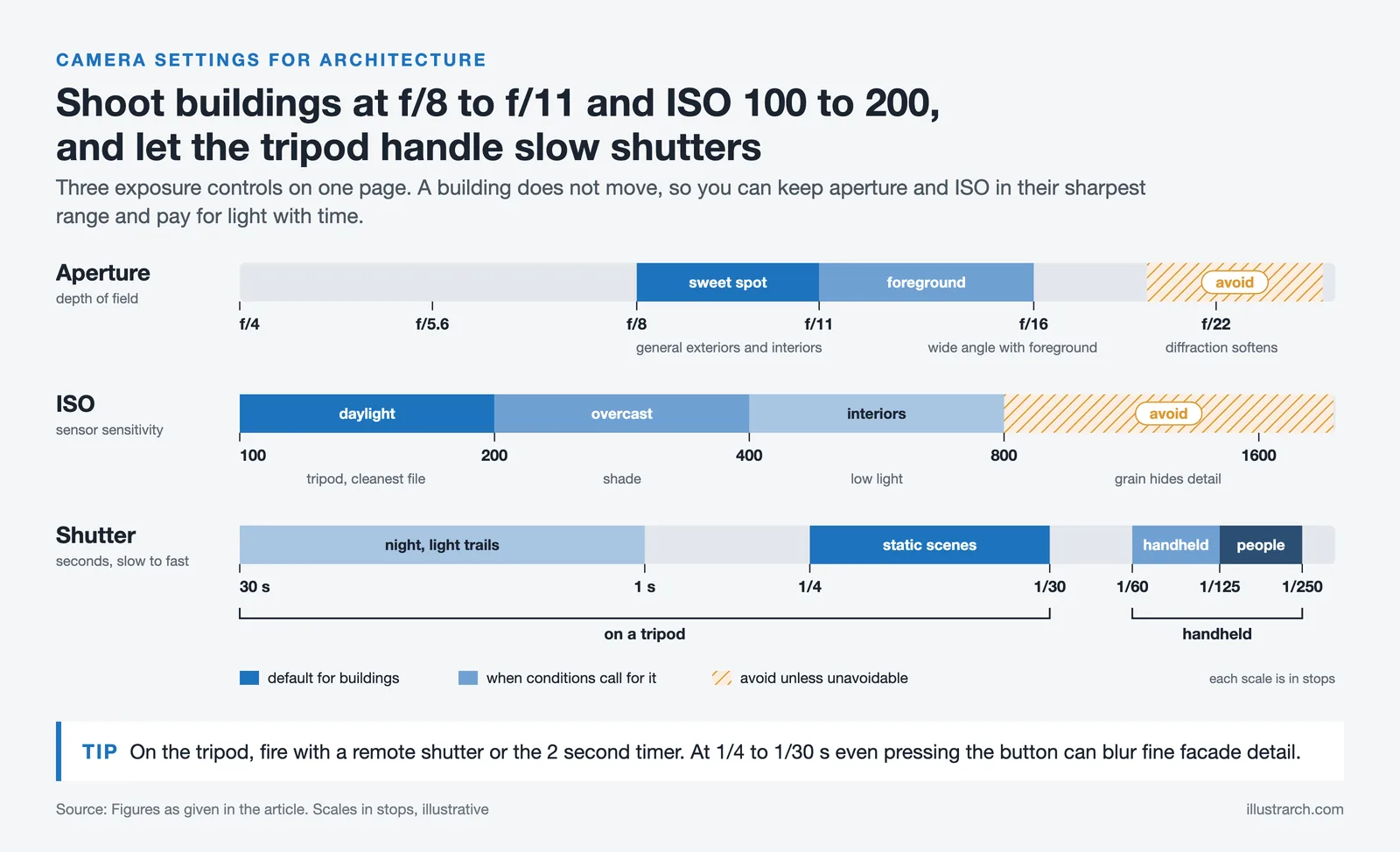
Achieving exceptional architectural photographs requires precise camera settings. Adjustments to aperture, ISO, and shutter speed play a key role in capturing sharp, detailed, and well-lit images.
Aperture Settings For Sharpness And Depth
Using the appropriate aperture ensures both sharpness and control over depth of field. For exterior and interior shots, f/8 to f/11 is ideal to maintain sharpness across the frame while maximizing depth. Narrow apertures like f/16 provide clarity in distant elements, especially in wide-angle compositions. Avoid using extremes like f/22, as diffraction could reduce sharpness.
ISO Settings To Minimize Noise
Lower ISO settings maintain image quality by reducing digital noise. ISO 100 to 200 is optimal for architectural photography, offering clean and detailed results in well-lit conditions. When shooting interiors or low-light scenes, consider slightly increasing ISO only when you cannot use a tripod, to avoid compromising quality. Avoid ISO above 800 unless unavoidable, as grain can obscure architectural details.
Shutter Speed For Stability
Shutter speed ensures proper exposure and prevents motion blur. For static architectural scenes, slower speeds like 1/4 to 1/30 seconds work well, provided a tripod is used to stabilize the camera. Faster speeds, such as 1/125 to 1/250 seconds, are crucial if handheld shots include moving elements like people or vehicles. Stabilization aids, like image stabilization or remote shutters, enhance clarity with slower speeds.

| Setting | Recommended Range | Scenario | Notes |
|---|---|---|---|
| Aperture | f/8: f/11 | General exteriors and interiors | Sweet spot for maximum sharpness across the frame |
| Aperture | f/11: f/16 | Wide-angle landscapes with foreground | Greater depth of field; avoid f/22 due to diffraction |
| ISO | 100-200 | Daylight exteriors (tripod) | Cleanest image quality with minimal noise |
| ISO | 200-400 | Overcast days, shaded areas | Slight increase acceptable with good cameras |
| ISO | 400-800 | Interiors, low-light (no tripod) | Use only when necessary; noise becomes visible |
| Shutter Speed | 1/4-1/30 sec | Static scenes on tripod | Use remote shutter or 2-sec timer to avoid shake |
| Shutter Speed | 1/60-1/125 sec | Handheld, no moving subjects | Minimum for sharp handheld shots |
| Shutter Speed | 1/125-1/250 sec | Scenes with people or vehicles | Freezes moderate motion in the frame |
| Shutter Speed | 1-30 sec | Night architecture, light trails | Tripod mandatory; use ND filter if needed |
Advanced Techniques For Capturing Architectural Details
Architectural photography benefits significantly from advanced techniques that enhance detail, color, and lighting. These methods help showcase intricate designs and achieve greater visual impact.
Using Bracketing And HDR
Bracketing captures multiple exposures of the same scene to balance highlights and shadows. In architectural photography, we use this technique when dealing with challenging lighting, such as bright exteriors paired with darker interiors. We can take three or more shots at different exposure levels and merge them through high dynamic range (HDR) processing to create a single image with balanced light and color. HDR works effectively for scenes with high contrast, helping retain architectural details in both the brightest and darkest areas.
Adjusting White Balance For Accurate Colors
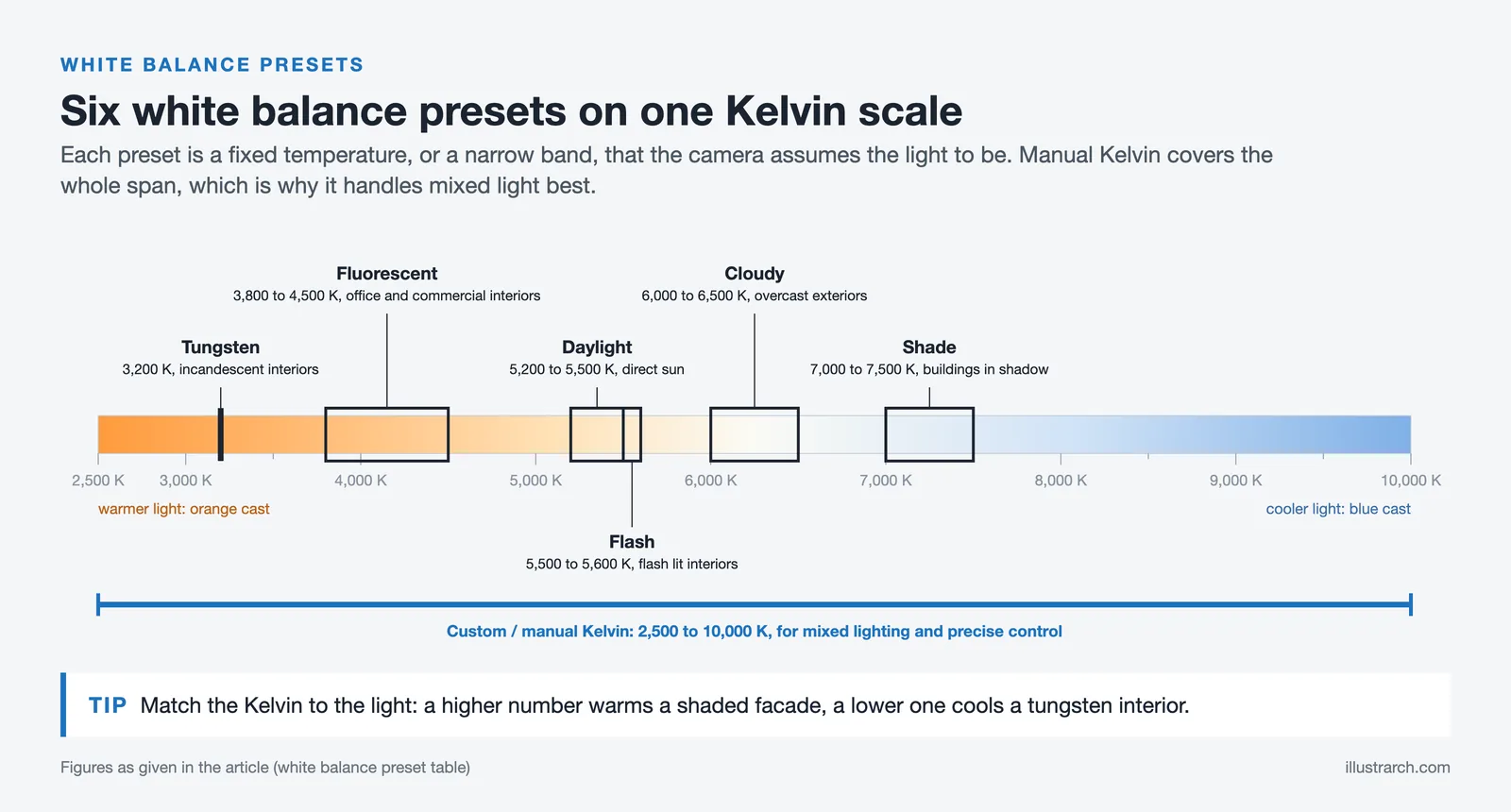
Accurate white balance ensures color precision in architectural images. We adjust white balance depending on the lighting conditions: daylight settings for natural light, tungsten for warm artificial light, or custom settings for mixed lighting environments. Balancing white tones prevents color casts, preserving the building’s original material hues. For example, using manual Kelvin adjustments allows fine-tuned correction, especially in interiors where artificial lighting influences color accuracy.
| White Balance Preset | Color Temperature (Kelvin) | Best For | Effect on Image |
|---|---|---|---|
| Daylight / Sunny | 5200-5500K | Outdoor shots in direct sunlight | Neutral, accurate colors |
| Cloudy | 6000-6500K | Overcast exteriors | Slightly warm tone to compensate for blue cast |
| Shade | 7000-7500K | Buildings in shadow | Warmer tones to offset cool blue shadows |
| Tungsten | 3200K | Interiors with incandescent lights | Cools down warm orange color casts |
| Fluorescent | 3800-4500K | Office interiors, commercial buildings | Corrects green tint from fluorescent tubes |
| Flash | 5500-5600K | Flash-lit interiors | Balanced for flash color temperature |
| Custom / Manual Kelvin | 2500-10000K | Mixed lighting, precise control | Full creative control; ideal for complex scenes |
Recommended Post-Processing Tips
Optimizing architectural images in post-processing enhances their visual appeal and preserves accurate details. Using professional software like Adobe Lightroom or Photoshop simplifies adjustments and corrections.
- Straighten Geometry: Correcting perspective distortion maintains straight vertical and horizontal lines. Tools like the Perspective Warp in Photoshop or Transform Tools in Lightroom help restore accurate geometry.
- Enhance Details: Adjusting clarity, sharpness, and texture strengthens the building’s intricate elements. Careful application ensures details stand out without overprocessing.
- Manage Exposure: Balancing highlights and shadows using tools like the Histogram avoids overexposed skies and underexposed areas. HDR techniques merge multiple exposures for high contrast scenes.
- Refine Colors: Tweaking white balance ensures accurate color representation based on lighting conditions. HSL (Hue, Saturation, Luminance) adjustments refine specific tones, emphasizing architectural accents.
- Noise Reduction: Reducing noise without losing details improves clarity, especially for low-light or high-ISO images. Dedicated settings in Lightroom achieve clean results.
- Fine-Tune Lighting: Dodging and burning highlight important sections and suppress distractions. Subtle use directs focus without altering the intended look.
- Crop Precisely: Adjusting framing aligns key elements and removes unnecessary distractions. Maintaining original aspect ratios is critical for consistency.
Integrating these post-processing techniques enhances composition, clarity, and overall image quality, reflecting professionalism in architectural photography.
Conclusion
Mastering architectural photography requires a deep understanding of camera settings, composition, and lighting. By applying the principles outlined in this guide, we can capture sharp, detailed, and visually compelling images that highlight the unique character of structures. Selecting appropriate aperture, ISO, and shutter speed settings ensures clarity and depth, while advanced techniques like bracketing and HDR enhance image quality in challenging lighting scenarios.
Post-processing plays a vital role in refining images. Tools like Adobe Lightroom or Photoshop allow us to correct perspective distortions, enhance details, balance highlights and shadows, and fine-tune colors. By combining meticulous camera techniques with thoughtful editing, we can elevate our architectural photography to professional standards.
- architectural photography tips
- best architectural photography camera settings
- best camera settings for buildings
- best camera setup for building shots
- best DSLR settings architecture
- best settings for architecture photography
- building photography settings
- camera settings for architecture
- low light architectural photography
- stunning building photography




Award-Winning Architectural Photography Works: Sony World Photography Awards
From the Sony World Photography Awards to the Architecture Photography MasterPrize, award-winning...
 Elif Ayse Sen11 Mins read
Famous Architectural Photographers You Should Know
Famous architectural photographers you should know: Stoller to Baan. Learn their styles,...
 Sinan Ozen23 Mins read
How to Restore Old Photos of Historical Buildings with AI Tools
Restoring old photos of historical buildings using AI tools is essential for...
Bahattin Duran4 Mins read

From Las Vegas to Rome: A Visual Journey by Iwan Baan at Princeton University
The Princeton University School of Architecture presents “From Las Vegas to Rome”...
Elif Ayse Sen2 Mins read


Leave a comment