

Cloud Rendering vs Local Rendering: What Actually Costs Less for Architects?
Architects weighing cloud rendering vs local rendering face a real tradeoff between upfront hardware costs and ongoing subscription fees. This breakdown covers speed, cost structure, Revit cloud rendering options, and the hybrid approach most firms now use to control budgets without sacrificing output quality.
 Sinan Ozen19 April 20269 Mins read301
Table of Contents Show
Cloud rendering vs local rendering is one of the most practical decisions an architecture firm makes when setting up its visualization workflow. Cloud rendering offloads processing to remote servers, eliminating the need for expensive workstation hardware, while local rendering keeps everything in-house on your own GPU-equipped machine. Each approach carries different cost structures, speed profiles, and workflow implications depending on your project volume and firm size.

How Does Each Rendering Method Work?
Local rendering processes all 3D scene calculations directly on your workstation using its CPU or GPU. You have full control over the rendering environment, no internet dependency, and no per-render usage costs beyond electricity. The tradeoff is that the machine is often tied up for hours during heavy renders, blocking other work on the same system.
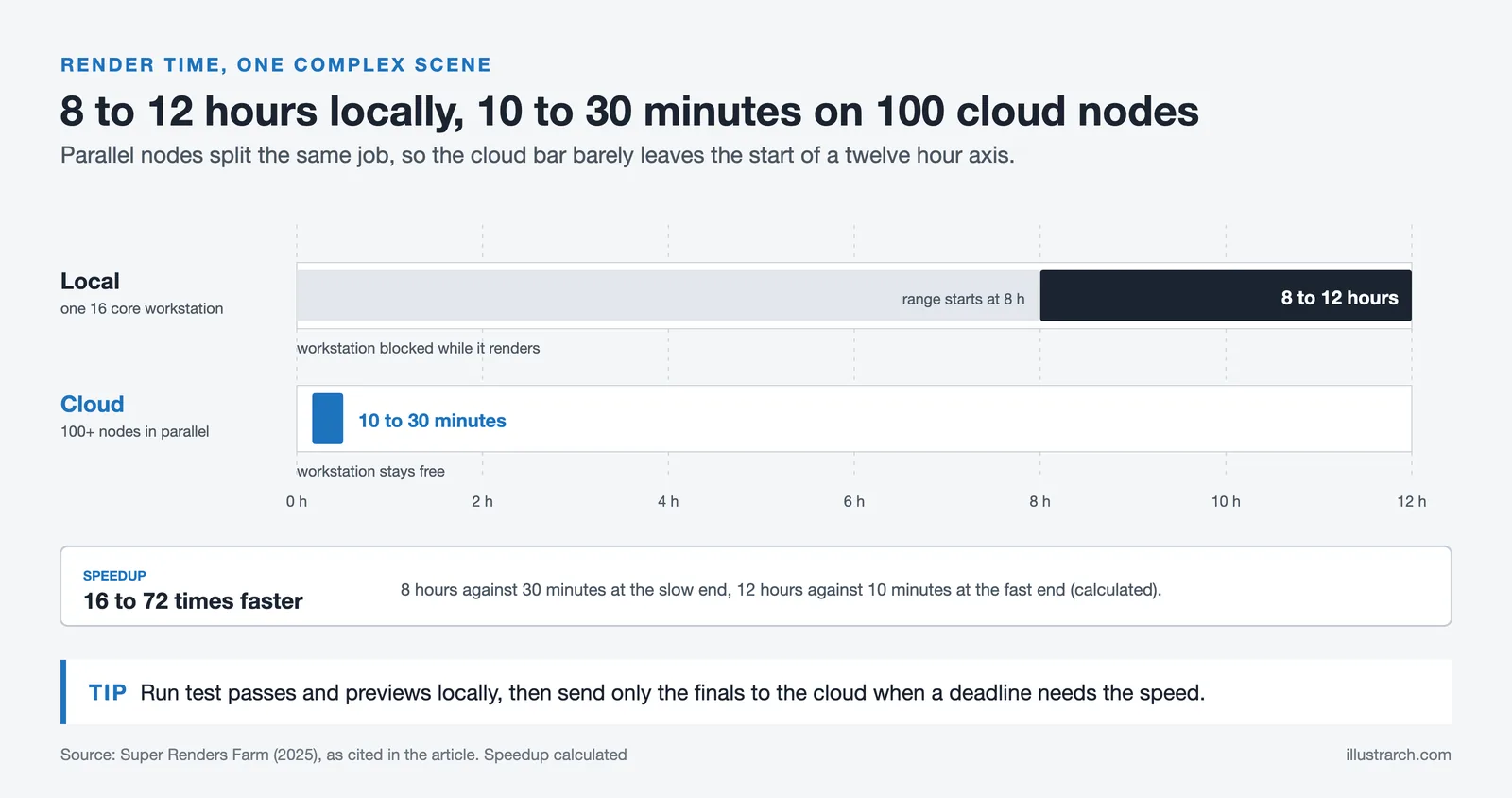
Cloud-based rendering sends your scene files to remote server clusters, where dozens or even hundreds of nodes can work on the same job in parallel. Once the render is complete, the output is sent back to your machine. The parallel computing advantage is significant: a scene that takes 8 to 12 hours on a single 16-core workstation can complete in 10 to 30 minutes using 100 or more cloud nodes simultaneously.
Both methods support major architectural software, including Revit, SketchUp, 3ds Max, Rhino, and Blender, though compatibility varies by platform. For real-time rendering tools like Enscape, which integrates directly into BIM environments, cloud support has expanded considerably in recent years.
Cost Breakdown: Upfront vs Ongoing
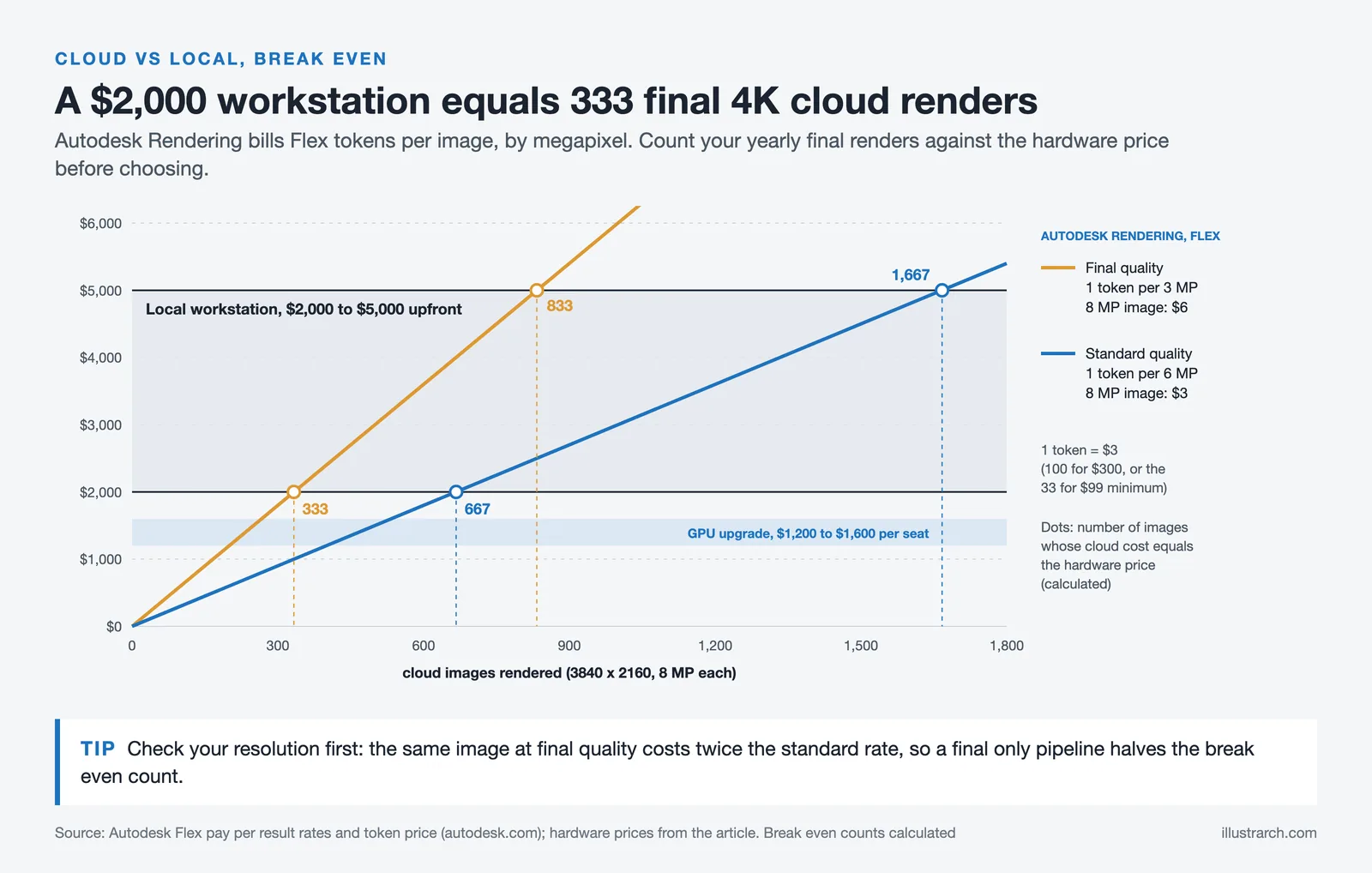
The cost comparison between cloud and local rendering shifts depending on how you frame it. Local rendering involves high upfront investment but near-zero ongoing costs. A capable architectural rendering workstation typically runs between $2,000 and $5,000 or more, and for GPU-heavy workflows, studios pursuing AI-enhanced local setups should budget $1,200 to $1,600 per seat for GPU upgrades, according to Ravelin3D’s 2025-2026 industry assessment.
Cloud rendering flips this model. Upfront costs are zero, and you pay only for what you use. Rates on dedicated render farms typically start around $0.01 to $0.05 per core-hour for CPU rendering, while GPU instances run higher. For Revit users specifically, Autodesk Rendering via the Flex token system costs $3 per token (minimum purchase 33 tokens for $99 as of October 2026), and each image is billed by resolution: 1 token per 6 megapixels at standard quality or per 3 megapixels at final quality.
💡 Pro Tip
Before committing to cloud rendering for your full production pipeline, run a one-month cost test using your actual project load. Track the number of renders, average complexity, and time spent. For firms with steady, daily rendering needs, a local workstation often pays for itself within 12 to 18 months. For firms with irregular or deadline-clustered projects, cloud tends to win on cost efficiency.

Comparison: Cloud Rendering vs Local Rendering for Architecture Firms
The following table summarizes the key differences across the factors that matter most when deciding between these two approaches:
| Factor | Cloud Rendering | Local Rendering |
|---|---|---|
| Upfront Cost | None (pay-per-use) | $2,000-$5,000+ workstation |
| Ongoing Cost | Per render or subscription | Electricity + maintenance |
| Render Speed | 10-30 min (100+ nodes) | 8-12 hours (single machine) |
| Scalability | Virtually unlimited | Limited to hardware specs |
| Internet Required | Yes | No |
| Workstation Availability | Free during render | Blocked during render |
| Best For | Large projects, tight deadlines | Continuous, small-volume work |
| Data Security | Dependent on provider | Fully in-house |
Cloud Rendering for Revit: How Autodesk Rendering Works
For firms using Revit, cloud rendering for Revit is built directly into the Autodesk ecosystem. Autodesk Rendering uses the Flex token payment model, where tokens function as a pay-as-you-go currency. Tokens cost $3 each, with a minimum purchase of 33 tokens for $99 as of October 2026, and each rendered image uses 1 token per 6 megapixels at standard quality or 1 token per 3 megapixels at final quality, so a 3840 x 2160 image costs 1 or 2 tokens. Students and educators can access the service free for 12 months.
The Flex system replaces the older cloud credits model and lets firms mix subscriptions with pay-per-use access across Autodesk products. For Revit-heavy BIM workflows, this means you can run a full Revit subscription while treating rendering in the cloud as an on-demand service charged only when you need it. This is particularly useful during client presentation periods when render volume spikes.
🔢 Quick Numbers
- Local rendering: A 16-core workstation renders a complex architectural scene in 8-12 hours (Super Renders Farm, 2025)
- Cloud rendering: The same scene renders in 10-30 minutes using 100+ parallel nodes (Super Renders Farm, 2025)
- AI-assisted workflows save an estimated 30-50% of GPU time across typical client review cycles (Transparent House, 2025)
- 46% of architecture firms already use AI at some point in their visualization workflow, with 74% planning to increase usage within 12 months (Chaos and Architizer survey of 1,227 architects, 2024)
Third-party cloud render farms like RebusFarm, Fox Renderfarm, and GarageFarm fill the gap for tools that don’t have native cloud support. RebusFarm bills CPU rendering per GHz hour (from 1.20 euro cents per GHzh as of October 2026) and GPU rendering per OctaneBench hour, using AMD Threadripper CPUs and NVIDIA Quadro RTX 6000 GPUs, and new users receive a free trial of 25 RenderPoints. Fox Renderfarm is positioned for enterprise-scale projects at approximately $1.20 per GPU hour. For Revit and BIM-centered workflows, comparing these against native Autodesk Rendering costs is worth doing before committing to a third-party service.
When Local Rendering Still Makes More Sense
Despite the clear speed advantage of cloud rendering, local rendering is genuinely more cost-effective in specific situations. For solo practitioners or small firms with steady, daily rendering work on relatively simple scenes, a workstation can pay for itself quickly. Once the hardware is paid off, the per-render cost drops to near zero, while cloud fees continue to accumulate with each project.
Local rendering also makes sense when data security is non-negotiable. Government, healthcare, and sensitive commercial projects may have contractual restrictions that prevent uploading model files to external servers. For these cases, keeping everything in-house is not just a preference but a requirement.
⚠️ Common Mistake to Avoid
Many architects assume cloud rendering is always cheaper because it has no upfront cost. This is only true for irregular or project-based rendering needs. Firms running three or more final renders per week throughout the year will often find that cloud costs exceed the annualized cost of owning a mid-range workstation. Calculate your actual monthly render volume before choosing a model, not just the per-render rate.
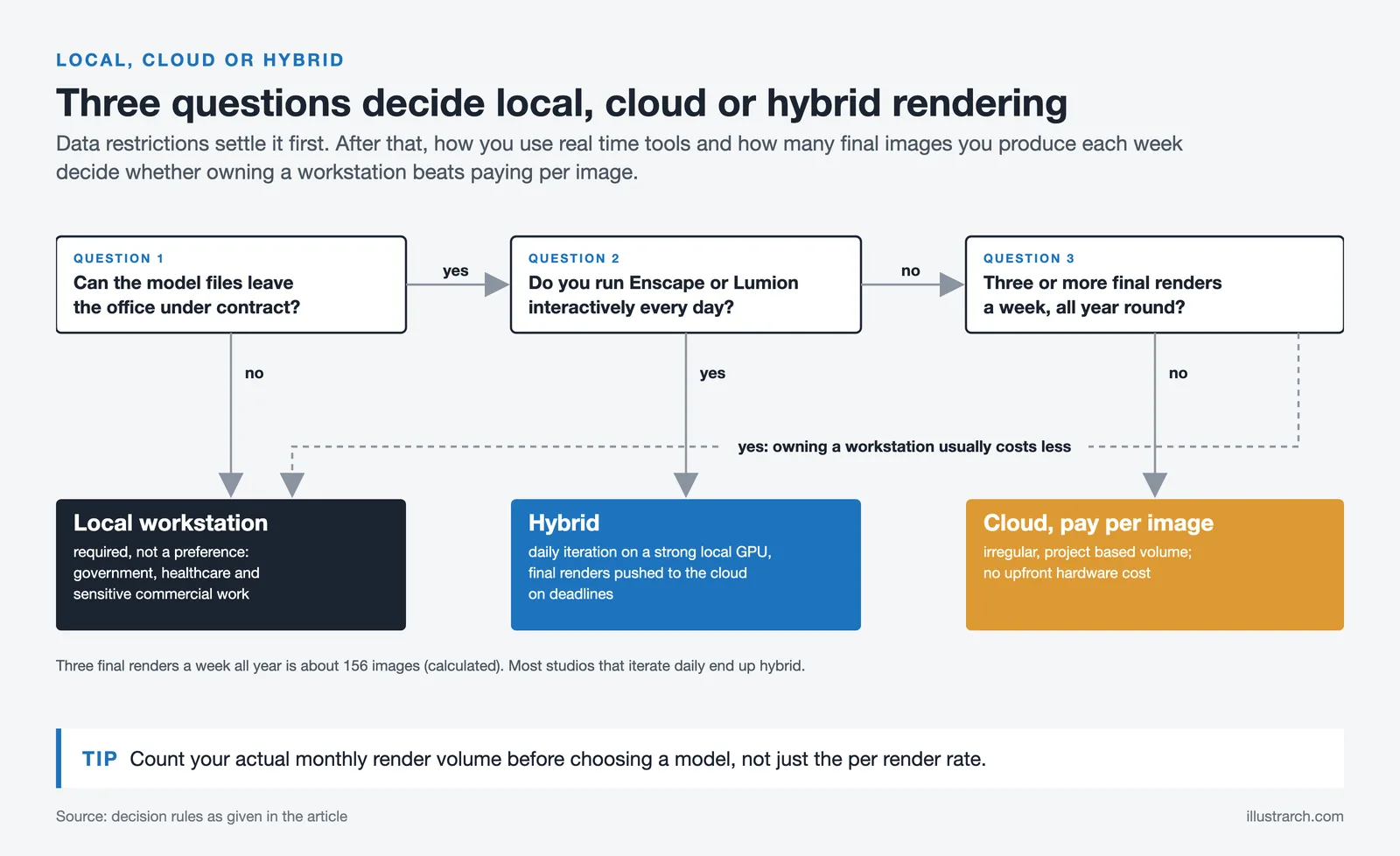
Firms using real-time rendering tools like Enscape or Lumion on a daily basis also get more value from a strong local GPU. These tools are designed to run interactively on local hardware, and their real-time feedback loop is the main reason architects choose them. Cloud-based alternatives serve a different use case, primarily final output for large or deadline-sensitive projects. For an overview of how these tools fit together, see our guide to AI render tools vs traditional rendering.
The Hybrid Approach: How Most Firms Actually Work
The most practical answer to the cloud rendering vs local rendering question is usually not one or the other. Most production-focused studios use local rendering for test passes, previews, and daily iteration, then push final renders to the cloud when they need speed or are facing a deadline crunch. This keeps ongoing cloud costs low while ensuring the local machine stays available for modeling work.
This approach also matches how tools like Enscape are used in practice. Architects use Enscape locally for rapid design iteration, then hand off final scene files to V-Ray or a dedicated render farm for photorealistic marketing output. Autodesk’s own ecosystem supports this split model through the Flex token structure, which charges only for the images actually rendered rather than maintaining a separate subscription.
💡 Pro Tip
If you use Revit and already pay for an Autodesk subscription, start with native Autodesk Rendering before signing up for a third-party cloud render farm. The Flex token integration is built in and keeps your scene data within the Autodesk ecosystem. Reserve third-party farms for non-Autodesk pipelines or when you need faster GPU instances than Autodesk Rendering provides.
For firms exploring AI-based rendering as an addition to this workflow, cloud-native AI tools like those covered in our roundup of the best AI architectural rendering tools offer another layer of cloud-based processing at subscription prices well below a GPU workstation. These tools are particularly strong during concept phases and client presentations where production-grade precision matters less than speed and visual clarity.
Choosing the Right Cloud Rendering Service for Architects
If you decide cloud rendering is the right fit, software compatibility is the first filter. Your chosen platform must support the rendering engine you already use. Revit users have native access through Autodesk Rendering. V-Ray users can access Chaos Cloud directly from their V-Ray interface. Enscape, after Service Pack 4.1.1, integrates with Chaos Cloud for cloud-based output. For tools without native cloud support, such as Lumion or Twinmotion, third-party render farms step in.
Pricing model matters almost as much as compatibility. Pay-as-you-go works well for firms with unpredictable volume. Reserved instances, where available, can cut costs by 50 to 75% compared to on-demand rates for firms with steady rendering loads. Spot instances offer discounts up to 90% but may pause during peak demand periods, which creates risk on tight deadlines.
⚖️ Pros & Cons at a Glance
✔️ Cloud Rendering Pros: No upfront hardware cost, massively faster for complex scenes, workstation stays free, scales to any project size, automatic software updates
✖️ Cloud Rendering Cons: Ongoing per-render costs, requires stable internet, data leaves your network, not all software natively supported, costs can spike on high-volume months
Security and compliance are worth investigating before finalizing a provider. Enterprise-grade platforms use encryption and security protocols comparable to financial services, but the standard of protection varies by provider. For projects involving sensitive client data or contractual confidentiality requirements, verify the provider’s data handling policies and whether their infrastructure meets your contractual obligations.
Comparing Render Farm Services for Architecture
Render farm services for architecture fall into three models. Managed farms take your scene file, distribute it across their nodes, and return finished frames. Native cloud services sit inside a renderer or design tool. Server rental gives you a remote GPU machine that you control yourself. Which model fits depends mainly on the software you render with.
| Service | Model | Best fit for architects |
|---|---|---|
| Chaos Cloud | Native cloud | V-Ray users who want to submit jobs directly from V-Ray |
| Autodesk Rendering | Native cloud | Revit users rendering with Flex tokens |
| RebusFarm | Managed farm | 3ds Max, Cinema 4D, Maya, and Blender pipelines with V-Ray, Corona, Redshift, Octane, or Arnold |
| GarageFarm | Managed farm plus server rental | Studios using its plugins for Blender, 3ds Max, Maya, or Cinema 4D |
| Fox Renderfarm | Managed farm | Large animation and film-style jobs across 3ds Max, Maya, Cinema 4D, Blender, and Unreal Engine |
| iRender | GPU server rental | Real-time tools such as Lumion, Twinmotion, D5 Render, and Enscape that farms do not support |
The managed farms differ less in raw speed than in workflow. RebusFarm and GarageFarm both provide plugins or submission software that work from inside the 3D application and prepare the scene for upload, which saves manual packaging of textures and assets. Fox Renderfarm promotes its accreditation by the Trusted Partner Network, the security program run by the Motion Picture Association, RebusFarm states ISO 27001 certification, and GarageFarm says its infrastructure provider holds the same standard. These are useful points when a client contract restricts where model files may go.
Server rental works differently. iRender provides dedicated multi-GPU machines accessed over Remote Desktop, where you install and run your own software. That makes it the practical route for Lumion, Twinmotion, D5 Render, or Enscape, which cannot be split across a traditional render farm, but billing follows machine time rather than finished frames, so close the session as soon as the job is done.
Before committing to any service, run the same test scene on two providers using free trial credits where they are offered, confirm that they support the exact version of your host application and render engine, and compare the final cost per frame rather than the advertised hourly rate.
For a broader look at how cloud-based tools fit into modern visualization workflows, this comparison of AI render tools and traditional rendering covers how different approaches handle speed, quality, and cost across the full project lifecycle. The official Autodesk Flex pricing page is the best source for current Revit cloud rendering token rates, as pricing is subject to change. For third-party cloud rendering options, Chaos Cloud and RebusFarm both offer free trial credits to test your specific scenes before committing.
The most cost-effective rendering setup for most architecture firms is not a single method but a structured combination: local hardware for daily work and iteration, cloud rendering for final output and deadline-critical jobs, and AI-based cloud tools for concept and client-facing visualization. Mapping your actual render volume and project types to each tier is the most reliable way to keep visualization costs predictable without sacrificing output quality.
✅ Key Takeaways
- Cloud rendering vs local rendering is primarily a cost structure question: cloud spreads costs across usage, local concentrates them upfront. Firms with steady, high-volume work often find local more economical long-term.
- Cloud rendering delivers dramatically faster output for complex scenes, completing in minutes what a single workstation takes hours to process.
- Revit users can access cloud rendering natively through Autodesk Rendering using the Flex token system, starting at $99 for 33 tokens as of October 2026.
- Local rendering remains the better choice for sensitive projects with data confidentiality requirements, and for firms with predictable, continuous rendering workloads.
- Most firms benefit from a hybrid model: local machines handle daily iteration, cloud handles final delivery and deadline peaks.
Cost figures for cloud rendering services and Autodesk Flex tokens are approximate and subject to change. Always verify current pricing directly with service providers before budgeting for a project.







Python or Grasshopper: Which Should Architecture Students Learn First?
Grasshopper teaches parametric logic through visual feedback, while Python handles data, repetition,...
Sinan Ozen6 Mins read

Parafin 3D Review: AI-Driven Site Acquisition That Generates Budgets and Proformas Instantly
Parafin 3D now trades as Parafin and sells only to hotel developers....
 Elif Ayse Sen7 Mins read
Twinmotion Render: Free Downloadable Assets and PBR Materials for Simpler 3D Workflows
A practical guide to producing architectural visualizations with Twinmotion using its built-in...
Elif Ayse Sen14 Mins read

AI Render Tools vs Traditional Rendering: Speed, Cost, and Quality Compared
This article compares AI render tools with traditional architectural rendering engines like...
Sinan Ozen6 Mins read


Leave a comment