

AI Render Tools vs Traditional Rendering: Speed, Cost, and Quality Compared
This article compares AI render tools with traditional architectural rendering engines like V-Ray and Lumion, examining real time savings, output quality, cost differences, and practical workflow integration. Learn where AI rendering excels, where traditional methods still lead, and how architects are blending both approaches in 2026 to stay competitive.
 Sinan Ozen9 March 20266 Mins read332

Table of Contents Show
AI render tools use machine learning to transform sketches, 3D models, and CAD screenshots into photorealistic architectural visuals within seconds. Compared to traditional rendering engines that often require hours of setup and processing, these tools offer architects significant time and cost savings, particularly during concept development, client presentations, and design iteration phases.
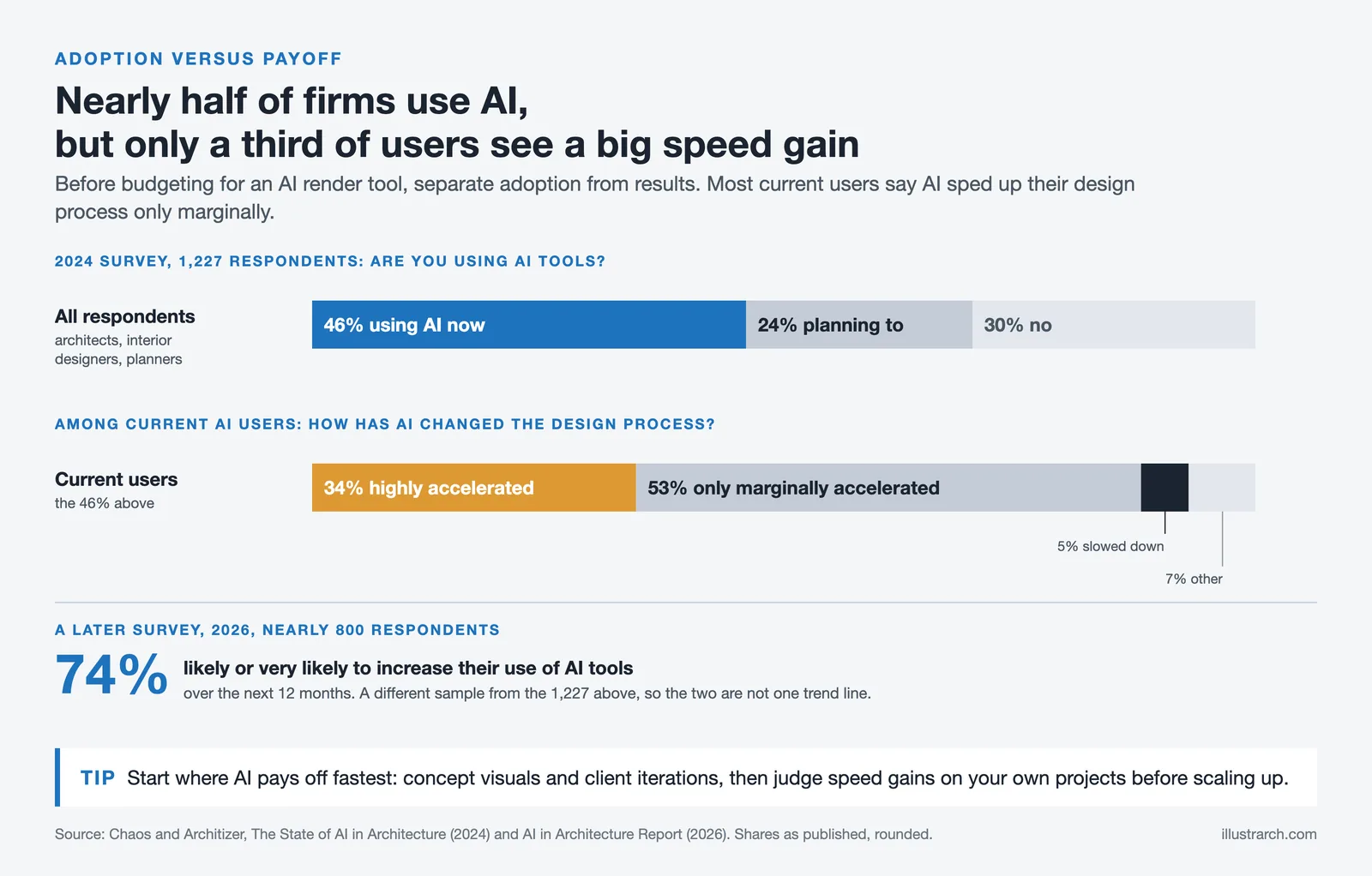
The architectural visualization landscape has shifted fast. Two years ago, most firms treated AI rendering as an experiment. Today, according to the 2024-25 State of Architectural Visualization report by Chaos and Architizer, 11% of firms actively use AI in their visualization workflows, and excitement around AI experimentation has grown by 20% year over year. A separate Chaos and Architizer survey of 1,227 architecture professionals found that 46% of firms already use AI at some point in their visual workflow, with another 24% planning to adopt it. In the follow-up 2026 AI in Architecture Report (about 800 respondents), 74% said they plan to increase their use of AI within the next 12 months.
But here is the real question: are AI render tools genuinely saving architects time, or are they just producing faster results at the cost of quality? Let’s break it down.

How Do AI Render Tools Work in Architecture?
AI render tools for architecture and interior design rely on trained neural networks rather than physically based light simulation. You upload a screenshot from SketchUp, Revit, or any CAD software, write an optional text prompt describing the desired aesthetic, and the AI generates a styled, photorealistic image in seconds. Tools like Veras, ArchiVinci, LookX, and MyArchitectAI follow this general workflow, though each platform handles geometry preservation, material application, and style transfer differently.
Traditional architectural rendering software like V-Ray, Corona Renderer, and Lumion takes a fundamentally different approach. These engines simulate how light physically interacts with materials and surfaces through ray tracing or rasterization. Setting up a single V-Ray scene properly can require hours of work: configuring materials, adjusting lighting rigs, positioning cameras, and waiting for the render to process. The results are unmatched in precision, but the time investment is substantial.
The distinction matters because it determines where each approach fits in your workflow. AI architecture render tools are not replacing the physics engine; they are offering an alternative path for specific use cases.

AI Render Tools vs Traditional Rendering: Speed and Cost Compared
The speed difference between AI and traditional rendering is not marginal. It is transformative. Cloud-based AI render tools produce images in roughly 5 to 30 seconds on most platforms. Traditional rendering, depending on scene complexity and hardware, can take anywhere from 30 minutes to several hours per image. According to Transparent House, a professional visualization studio, AI-assisted workflows save an estimated 30 to 50% of GPU time across typical client review cycles.
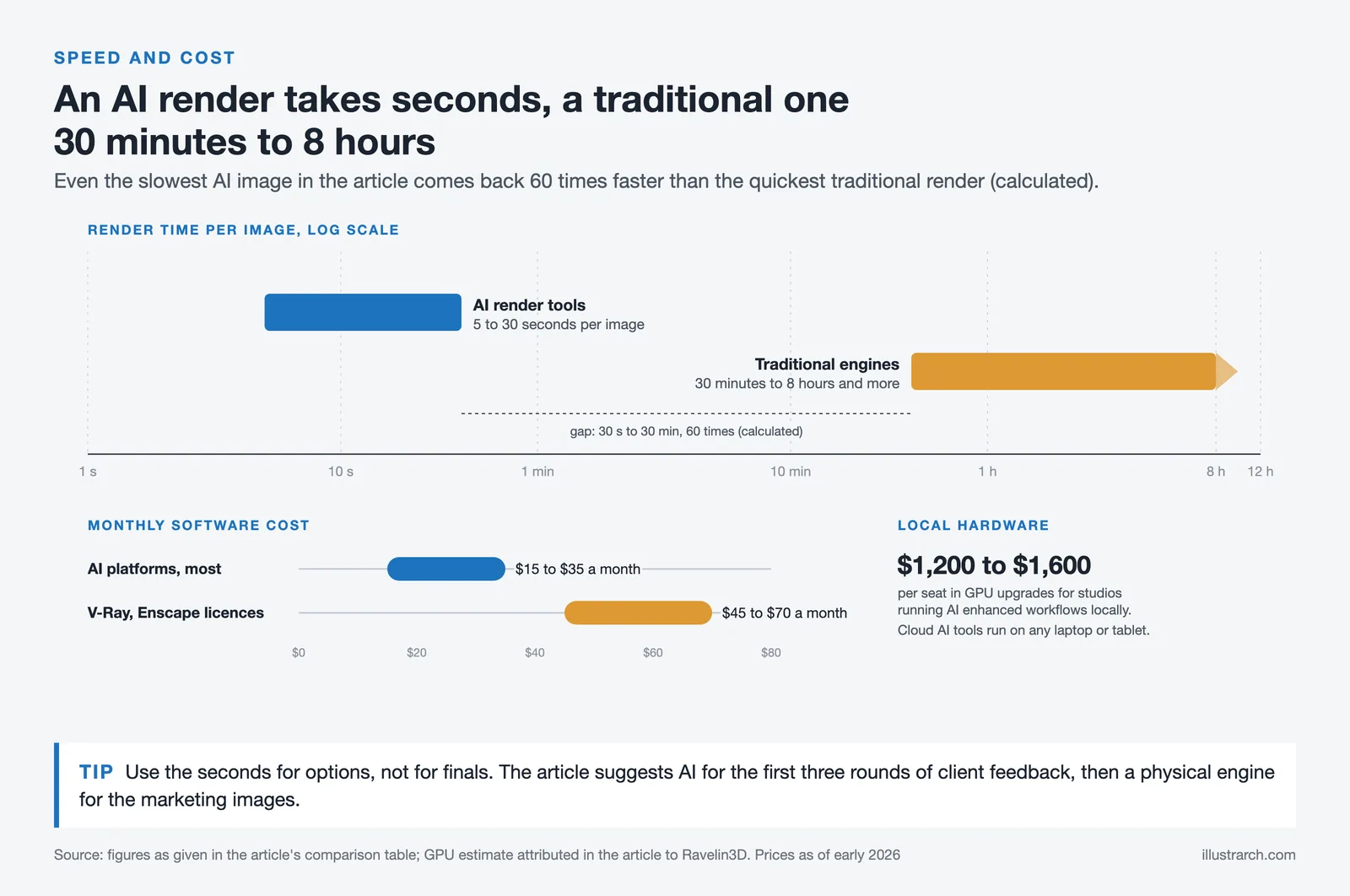
Comparison of AI Render Tools vs Traditional Rendering
The following table summarizes the key differences between AI-powered and traditional architectural rendering approaches:
| Feature | AI Render Tools | Traditional Rendering |
|---|---|---|
| Render Time per Image | 5-30 seconds | 30 minutes to 8+ hours |
| Monthly Cost | $15-$35/month (most platforms) | $45-$70/month (V-Ray, Enscape licenses) |
| Hardware Requirements | Cloud-based, any device | High-end GPU (RTX 4070 Ti+ recommended) |
| Learning Curve | Minutes to hours | Weeks to months |
| Photorealistic Quality | High (concept-level, improving rapidly) | Very high (competition-grade) |
| Geometry Accuracy | Moderate (may alter details) | Exact (physically based) |
| Revision Speed | Instant re-generation | Re-render required (minutes to hours) |
| Best Use Case | Concept design, client iterations, feasibility | Final deliverables, marketing, competitions |
Cost differences extend beyond software subscriptions. Traditional rendering demands powerful hardware. Studios pursuing AI-enhanced workflows on local machines should budget $1,200 to $1,600 per seat for GPU upgrades, according to Ravelin3D’s 2025-2026 industry assessment. Cloud-based AI render tools, by contrast, handle processing on remote servers, so a standard laptop or even a tablet is sufficient.
Where AI Architecture Rendering Excels
The strongest case for AI architecture rendering is in the early design phases. The 2024 Chaos and Architizer survey of 1,227 architects found that professionals see the greatest AI potential during conceptual and pre-design work, with perceived utility decreasing as projects demand more detail and precision.
This aligns with how these tools actually perform. AI render tools excel at rapid concept visualization, where an architect uploads a rough massing model and generates multiple style variations in minutes. They allow instant material swaps (brick versus timber versus concrete) without rebuilding materials in a render engine. Client feedback loops tighten dramatically: instead of waiting days for a revised render, you can produce a new visual during the meeting itself.
For small firms and solo practitioners, free AI render tool options and affordable subscriptions remove the barrier to professional-quality presentations. Platforms like ArchiVinci, D5 Render, Rendair AI, and ArchRender have built interfaces that require no 3D expertise. ArchRender stands out by accepting actual 3D model files (such as OBJ and FBX) rather than just screenshots, giving architects full camera control before rendering, enabling architects to handle visualization in-house rather than outsourcing.
“Benefits of AI cited in the survey included faster workflows, enhanced creativity, and lower costs.”
Roderick Bates, Director of Corporate Development at Chaos, State of ArchViz Webinar (2025)

Where Traditional Architectural Rendering Still Leads
For all the speed gains, traditional architectural rendering software retains clear advantages in scenarios that demand absolute precision. Competition-grade renderings, regulatory submissions, and high-end marketing visuals still require the level of control that V-Ray, Corona, or Lumion provide.
AI render tools occasionally misinterpret geometry. A window mullion might merge, a material edge could blur, or shadows may fall in physically impossible directions. These are minor issues for a concept presentation, but unacceptable for a planning application or a luxury property brochure. Traditional engines simulate real physics, so every reflection, refraction, and shadow is calculable and adjustable.
Post-production control is another gap. With V-Ray’s LightMix feature, you can adjust lighting after a render is complete. Traditional tools also integrate with established post-production pipelines in Photoshop and After Effects. Most AI platforms offer limited editing, typically basic inpainting or style adjustments, rather than granular compositing control.
How Are Architects Blending Both Approaches?
The most effective firms in 2026 are not choosing between AI and traditional rendering. They are layering both into a single pipeline. A common workflow emerging across studios looks like this: use AI render tools during schematic design to generate quick concept visuals, switch to 3D architecture rendering in Enscape or Lumion for design development presentations, then bring in V-Ray or Corona for final deliverables and competition entries.
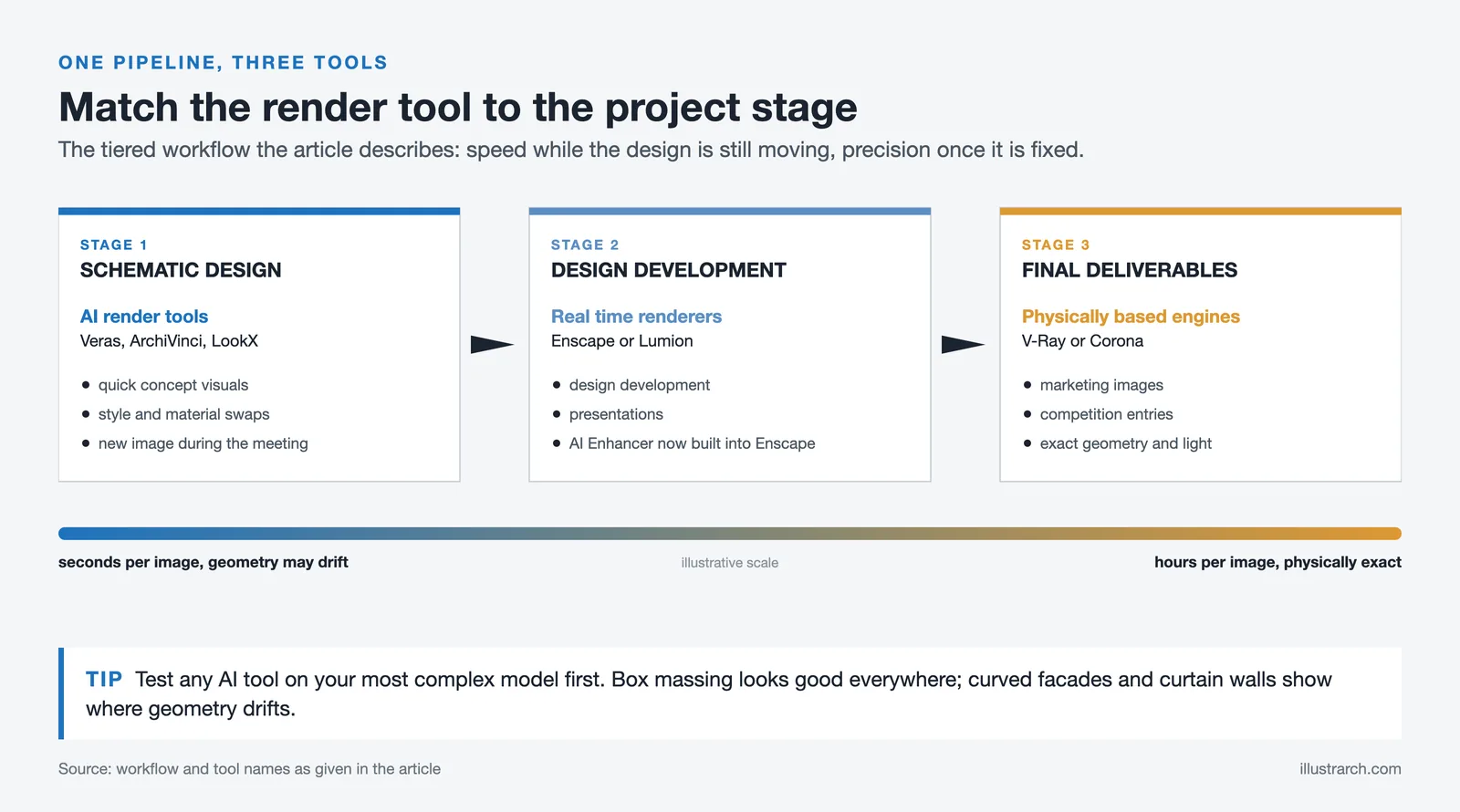
This tiered approach reflects a broader industry pattern. According to the Chaos and Architizer research, while large firms lead in AI adoption due to greater resources, smaller firms and freelancers are finding creative approaches that balance cost and capability. The key is matching the visualization tool to the project stage rather than committing to a single solution.
Chaos Group itself has moved in this direction. Their acquisition of EvolveLAB and integration of the AI Enhancer into Enscape signal that even traditional rendering companies view AI as a complement, not a competitor. These built-in AI features improve asset realism and reduce render noise without requiring architects to leave their existing workflow.

What Should Architects Consider Before Switching to AI Render Tools?
Before committing budget to any ai render tool, evaluate these practical factors:
First, consider your typical deliverable. If your firm primarily produces concept visuals and client presentations, AI tools will deliver immediate ROI. If your work centers on photorealistic marketing materials for luxury developers, traditional rendering remains essential for final output.
Second, assess your team’s capacity. A traditional rendering pipeline often requires a dedicated visualization specialist. AI rendering can be operated by the designing architect directly, which changes staffing dynamics and project budgets. The 2024 Chaos survey noted that only 34% of AI users said AI had highly accelerated their design process, while 53% saw only marginal gains, suggesting that results vary based on how deeply firms integrate the tools.
Third, watch the quality trajectory. AI architectural rendering is improving at a pace that traditional engines cannot match. Purpose-built AI models trained specifically on architecture rendering data are expected to emerge from major vendors like Autodesk and Chaos throughout 2026, producing outputs that understand building codes, construction logic, and material properties far better than current general-purpose generators.
Note: Software pricing, AI output quality, and platform features referenced in this article reflect conditions as of early 2026 and are subject to change. Always verify current pricing and capabilities directly with vendors before making purchasing decisions.






From SketchUp View to Client-Ready Render: A Hands-On Look at Vizbase
Vizbase co-founder Mikus Zarāns shows how the browser-based AI renderer turns SketchUp...
 illustrarch Editoral Team4 Mins read

OpenAI’s Astra Model Aims to Turn AI Into an Architecture Workflow Operator
OpenAI's Astra model, launched Sept. 3, 2026, runs multi-step tasks across software,...
illustrarch Editoral Team3 Mins read

JLL Design Rolls Out AI Floor Plan Tool laiout Across 65 Studios Worldwide
JLL Design has adopted AI floor plan tool laiout across all 65...
illustrarch Editoral Team3 Mins read

Python or Grasshopper: Which Should Architecture Students Learn First?
Grasshopper teaches parametric logic through visual feedback, while Python handles data, repetition,...
Sinan Ozen6 Mins read


Leave a comment