

8 Best Gadgets for Architects: Essential Tools That Transform Design
The best gadgets for architects include graphic tablets, 3D printers, laser distance measurers, and AR glasses, enhancing design workflows from concept to construction.
 Elif Ayse Sen16 November 202326 Mins read457

Table of Contents Show
The best gadgets for architects include graphic tablets for digital sketching, 3D printers for physical model-making, laser distance measurers for accurate site surveys, and AR glasses for real-time BIM visualization. These eight tools cover the full design workflow, from early concept work to construction-site coordination, and each category includes budget, mid-range, and premium options for 2026.
Choosing the right technology can sharpen your accuracy, speed up your design process, and give you a real edge during client presentations and site visits. This guide covers 8 essential gadgets every modern architect should consider, with detailed comparison tables, expert recommendations, and practical tips based on real architectural use cases. Whether you work at a large firm or run a solo practice, you will find options here that match your workflow and budget.
Our team of architects and design technologists has hands-on experience with the tools featured in this guide. We test, compare, and regularly update our recommendations based on real-world architectural workflows. This article was originally published in September 2023 and has been updated with 2026 models, pricing, and specifications.
🔢 Quick Numbers
- The global construction technology market is projected to reach $35.4 billion by 2029, growing at 15.3% CAGR (MarketsandMarkets, 2024)
- 73% of architecture firms plan to increase technology spending in the next two years (AIA Firm Survey Report, 2024)
- Architects using BIM-integrated devices report 25-30% fewer on-site coordination errors (Dodge Construction Network, 2024)
1. Graphic Tablets for Architects
Also known as drawing tablets, these tools have reshaped the architectural drafting process. Whether you are sketching conceptual designs, rendering perspectives, or annotating construction documents, a quality graphic tablet replaces the clunky mouse with a natural pen-on-paper experience. If you want a deeper comparison of tablet options across all platforms, our best tablets for architects and students guide covers the full range of choices.
Why Architects Need a Graphic Tablet
- Precision and Fluidity: Unlike using a mouse, a graphic tablet allows for more precise drawing movements, mimicking the experience of pen on paper. This ensures a more natural feel while sketching or rendering, significantly reducing hand fatigue during long design sessions.
- Efficiency: With programmable buttons and varying pressure sensitivities (up to 8,192 levels on professional models), architects can quickly shift between tools or adjust brush strokes, speeding up the design process by 30 to 50% compared to mouse-based workflows.
- Software Integration: Most professional graphic tablets are compatible with leading architectural software including AutoCAD, Revit, SketchUp, Rhino, and Adobe Creative Suite, making it a smooth transition for architects accustomed to digital design.
- Presentation Quality: Hand-drawn digital sketches convey a personal touch in client presentations that computer-generated linework cannot replicate, an increasingly valued skill in competitive pitches.

Top Graphic Tablets for Architects
The Wacom Cintiq Pro 27 is the industry benchmark for studio-based precision work, known for its accuracy and vibrant 4K display with 99% Adobe RGB coverage. On the portable end, the Apple iPad Pro 13″ (M4) paired with Apple Pencil Pro delivers an unmatched combination of performance and portability for architects on-the-go. For Windows-native CAD workflows, the Microsoft Surface Pro 11 offers full desktop software support, including Revit and Rhino, in a tablet form factor. And for large-screen Android sketching, the Samsung Galaxy Tab S10 Ultra draws attention with its 14.6″ Dynamic AMOLED 2X display and included S Pen. If you are also shopping for a dedicated workstation, our best laptops for architects and students guide can help you pair the right laptop with your tablet.
Ultimately, the best tablet for an architect will depend on individual preferences, specific software requirements, and budgetary considerations. For more on drawing-focused tablets, see our review of the 6 best drawing tablets for architects.
Graphic Tablet Comparison for Architects (2026)
| Feature | Wacom Cintiq Pro 27 | Apple iPad Pro 13″ (M4) | Microsoft Surface Pro 11 | Samsung Galaxy Tab S10 Ultra |
|---|---|---|---|---|
| Display Size | 26.9″ | 13″ | 13″ | 14.6″ |
| Resolution | 3840 × 2160 (4K UHD) | 2752 × 2064 (Ultra Retina XDR) | 2880 × 1920 (PixelSense) | 2960 × 1848 (Dynamic AMOLED 2X) |
| Display Type | IPS LCD | Tandem OLED | OLED / IPS (variant) | Dynamic AMOLED 2X |
| Color Accuracy | 99% Adobe RGB | P3 Wide Color Gamut | 100% sRGB, 100% DCI-P3 | 120% DCI-P3 |
| Stylus | Wacom Pro Pen 3 (included) | Apple Pencil Pro (sold separately) | Surface Slim Pen 2 (sold separately) | S Pen (included) |
| Pressure Levels | 8,192 | N/A (tilt + force sensing) | 4,096 | 4,096 |
| Operating System | Requires Mac/PC | iPadOS | Windows 11 | Android (One UI) |
| Portability | Desktop only (7.2 kg) | Highly portable (0.58 kg) | Portable 2-in-1 (0.88 kg) | Portable (0.72 kg) |
| CAD Software Support | Full desktop CAD (AutoCAD, Revit, SketchUp) | AutoCAD Web, SketchUp, Morpholio, Shapr3D | Full desktop CAD (AutoCAD, Revit, Rhino) | AutoCAD Mobile, SketchUp Viewer |
| Battery Life | N/A (powered via USB-C/HDMI) | ~10 hours | ~12 to 15 hours | ~14 to 16 hours |
| Starting Price (approx.) | $3,499 | $1,299 | $999 | $1,199 |
| Best For | Studio-based precision work | On-the-go sketching & presentations | Full Windows CAD workflows | Large-screen Android sketching |
💡 Pro Tip
If you primarily use Revit, AutoCAD, or Rhino as your main design tools, the Microsoft Surface Pro 11 or Wacom Cintiq Pro are your best options since they run full desktop software natively. If your workflow leans more toward conceptual sketching, client presentations, and Morpholio Trace, the iPad Pro offers unmatched app quality and portability. Don’t overlook the Samsung Galaxy Tab S10 Ultra if you want the largest portable screen with the included S Pen.
🏗️ Real-World Example
Dual-Device Strategy in Practice: Most architecture firms benefit from pairing a Wacom Cintiq Pro or Surface Pro at the desk for detailed production work with an iPad Pro for site visits and client meetings. This combination covers roughly 95% of architectural tablet use cases and eliminates the compromise of choosing a single device for all tasks.
Our Quick Picks:
- Best Overall: Wacom Cintiq Pro 27, unmatched studio precision
- Best Portable: Apple iPad Pro 13″ (M4), unbeatable app ecosystem
- Best Value: Microsoft Surface Pro 11, full Windows CAD at $999
- Best Large Screen: Samsung Galaxy Tab S10 Ultra, 14.6″ AMOLED
2. 3D Printers for Architectural Models
3D printers have taken tangible prototyping to an entirely new level. They have transformed the way architects communicate spatial ideas, making it possible to hold a physical representation of a design within hours rather than days. For a focused look at printer choices, visit our guide to the best 3D printers for architectural model making.
Why Architects Need a 3D Printer
- Visualization: By creating detailed 3D models, architects can present an accurate, tangible representation of their designs, making it significantly easier for clients to visualize the final structure. Physical models reveal spatial relationships that 2D drawings and even 3D renders simply cannot.
- Iterative Design: Quick prototyping means designs can be tweaked and re-printed multiple times, helping architects to refine and perfect their projects. A concept that takes 3 weeks with traditional model-making can be printed overnight.
- Cost-effective: While the initial investment ranges from about $730 to $7,000, over time producing multiple models becomes far more affordable than traditional foam board, basswood, and acrylic modeling materials.
- Client Engagement: Practitioners, including members of the American Institute of Architects (AIA), widely report that physical models shown alongside digital renderings help clients understand and approve a design more readily than digital-only presentations.

Top 3D Printers for Architecture
The Ultimaker S5 stands prominently in the professional segment with its dual-extrusion capabilities, high-quality builds, and integration with design software, making it ideal for large-scale architectural models. For those seeking an optimal balance between cost and performance, the Prusa MK4S (successor to the long-running i3 MK3S+) is a strong choice: an open-source printer known for its reliability and a supportive community. The Formlabs Form 4 offers a different approach with resin (masked stereolithography) printing, delivering exceptionally detailed and smooth surface finishes that are crucial for competition-level architectural models.
With the rapid evolution of 3D printing in architecture, architects should prioritize factors such as build volume, material compatibility, and post-processing requirements when choosing the right printer.
3D Printer Comparison for Architectural Models (2026)
| Feature | Ultimaker S5 | Prusa MK4S | Formlabs Form 4 |
|---|---|---|---|
| Print Technology | FDM (Fused Deposition Modeling) | FDM (Fused Deposition Modeling) | MSLA resin (Low Force Display) |
| Build Volume | 330 × 240 × 300 mm | 250 × 210 × 220 mm | 200 × 125 × 210 mm |
| Layer Resolution (Min) | 20 microns (0.4mm nozzle) | 50 microns | 25 microns |
| Extruders | Dual extrusion | Single extrusion | N/A (LCD light engine) |
| Material Compatibility | PLA, ABS, Nylon, CPE, PC, TPU, PVA, composites (200+ materials) | PLA, PETG, ABS, ASA, Nylon, Flex, composites | Standard, engineering, and specialty resins |
| Surface Finish | Good (visible layer lines) | Good (visible layer lines) | Excellent (smooth, near-injection-mold quality) |
| Connectivity | Wi-Fi, Ethernet, USB | Wi-Fi, Ethernet, USB drive | Wi-Fi, USB, Ethernet |
| Software | UltiMaker Cura (free) | PrusaSlicer (free, open-source) | PreForm (free) |
| Auto Bed Leveling | Yes (active leveling) | Yes (load cell probing) | N/A (resin-based) |
| Post-Processing Required | Minimal (support removal) | Minimal (support removal) | Significant (washing + UV curing) |
| Open Source | Open filament system | Fully open source | Proprietary resins |
| Approximate Price | ~$5,995 to $6,950 | ~$999 (assembled) / ~$729 (kit) | From ~$2,625 (Basic Package) |
| Best For | Large-scale professional architectural models | Budget-friendly prototyping & iteration | Highly detailed, smooth-finish scale models |
💡 Pro Tip
FDM printers (Ultimaker, Prusa) are best for massing models, site models, and iterative concept studies where speed and size matter more than surface finish. SLA printers (Formlabs) excel at competition models, detailed facade studies, and 1:50 or smaller scale models where every mullion and reveal needs to be crisp. Many professional firms own both types for different project phases.

⚠️ Common Mistake to Avoid
Many architects forget to factor in ongoing material costs when budgeting for a 3D printer. FDM filament costs roughly $20 to $40 per kg, while SLA resin runs $40 to $150 per liter. A typical 1:100 scale building model uses approximately 200 to 500g of FDM filament ($4 to $20) or 150 to 300ml of resin ($6 to $45). SLA resins also require well-ventilated spaces due to fumes, which may need additional setup investment.
3. Laser Distance Measurers
Goodbye tape measure, hello laser precision. Laser distance measurers have become one of the most important tools in an architect’s kit, transforming how measurements are taken during site surveys, renovations, and as-built documentation.
Why Architects Need a Laser Measurer
- Accuracy: These devices offer pinpoint precision (plus or minus 1.0mm to 1.5mm), ensuring measurements are exact. In renovation projects where even a centimeter can mean the difference between a door fitting or not, this accuracy is critical.
- Rapid Measurements: Measuring large distances becomes a task of seconds, not minutes. A single architect can measure an entire room in under 2 minutes, a task that traditionally required two people with a tape measure.
- Safety and Accessibility: Measuring high ceilings or across large open spaces no longer requires ladders or scaffolding. Indirect Pythagorean measurement modes calculate heights without direct access.
- BIM Integration: Premium models like the Leica DISTO series export measurements directly to AutoCAD and BIM software, eliminating transcription errors entirely.

Laser Distance Measurer Comparison for Architects (2026)
| Feature | Bosch GLM165-27CGL | Leica DISTO D2 | Leica DISTO X6 | DeWalt DW0165N |
|---|---|---|---|---|
| Maximum Range | 165 ft (50 m) | 330 ft (100 m) | 820 ft (250 m) | 165 ft (50 m) |
| Accuracy | ±1.5 mm | ±1.5 mm | ±1.0 mm | ±1.5 mm |
| Laser Type | Green beam (Class 2) | Red beam (Class 2) | Red beam (Class 2) | Red beam (Class 2) |
| Bluetooth | Yes | Yes (Bluetooth Smart) | Yes (Bluetooth Smart) | Yes (Tool Connect) |
| Built-in Camera/Viewfinder | No | No | Yes (4× zoom camera) | No |
| Inclinometer | Yes | No | Yes (360°) | No |
| Measurement Modes | Distance, area, volume, indirect (Pythagorean) | Distance, area, volume, Pythagorean, stake-out | Distance, area, volume, Pythagorean, Smart Horizontal, height tracking | Distance, area, volume, indirect |
| IP Rating | IP65 (dust & water resistant) | IP54 | IP65 (dust & water resistant) | IP54 |
| Companion App | Bosch MeasureOn (free) | Leica DISTO Plan | Leica DISTO Plan | DeWalt Tool Connect |
| CAD Integration | Via app export | Direct AutoCAD / BIM export | Direct AutoCAD / BIM export | Via app export |
| Approximate Price | ~$119 | ~$199 | ~$599 | ~$99 |
| Best For | Best overall value with green laser visibility | Indoor precision with AutoCAD integration | Professional surveying & outdoor long-range use | Budget-friendly option with app connectivity |
📌 Did You Know?
Green laser beams (like the Bosch GLM165-27CGL) are up to 4x more visible to the human eye than red beams under the same conditions. This makes green-beam devices significantly easier to use in bright indoor environments and on construction sites with strong ambient light, reducing the need to walk to the target point to confirm dot placement.

For most architects, the Leica DISTO D2 ($199) hits the sweet spot between capability and price. Its direct AutoCAD/BIM export alone saves hours of manual data entry per project. Upgrade to the DISTO X6 only if you regularly work outdoors, need the built-in camera for long-range targeting, or require the 360° inclinometer for complex site surveys.
4. Digital Smart Pens
Bridging the gap between analog and digital, smart pens are a genuine advantage for architects who love the feel of pen-on-paper sketching but need their work in digital formats. These tools capture every stroke as you draw on physical paper and instantly convert them into editable digital files.
Why Architects Need a Digital Smart Pen
- Digital Archiving: While many architects love the tactile feel of sketching on paper, digital smart pens record these sketches and convert them into SVG, PDF, or PNG files. This ensures that all ideas, from napkin sketches to detailed concept drawings, are archived and easily accessible.
- On-the-go Designing: Compact and easy to carry, these pens allow architects to sketch anywhere, anytime, without worrying about scanning or redrawing later. Capture design ideas during site visits, client meetings, or brainstorming sessions.
- Cloud Integration: Many digital smart pens sync with Google Drive, Evernote, Adobe Creative Cloud, and OneNote, allowing for further editing, annotation, or sharing directly from any device.
- Video Replay: Some models (like the Neo Smartpen N2) record the entire drawing sequence, enabling time-lapse replays, a powerful presentation tool that shows clients the design evolution process.
Digital Smart Pen Comparison for Architects (2026)
| Feature | Neo Smartpen N2 | Livescribe Symphony | Moleskine Pen+ Ellipse | Wacom Bamboo Slate |
|---|---|---|---|---|
| Technology | Ncode™ (infrared camera) | Infrared camera + dot paper | Ncode™ (infrared camera) | Electromagnetic resonance (EMR) |
| Requires Special Paper | Yes (N-coded paper/notebooks) | Yes (Livescribe dot paper) | Yes (Moleskine N-coded notebooks) | No (works with any paper) |
| Digital Output Formats | SVG, PDF, PNG, video replay | PDF, Pencast (audio-linked) | SVG, PDF, PNG, JPG | JPG, PNG, PDF, WILL file |
| Audio Recording | No | Yes (synced with notes) | No | No |
| Connectivity | Bluetooth | Bluetooth | Bluetooth | Bluetooth / USB |
| Companion App | Neo Studio | Livescribe+ | Moleskine Notes (Neo Studio) | Wacom Inkspace |
| Cloud Sync | Google Drive, Evernote, OneNote, Adobe CC | Evernote, OneNote, Google Drive | Adobe CC, Google Drive, Evernote | Dropbox, Evernote, OneNote, Inkspace |
| Internal Storage | ~1,000 pages offline | ~1,200 pages offline | ~1,000 pages offline | ~100 pages (in slate device) |
| Battery Life | ~5 hours writing | ~10 hours writing | ~5 hours writing | ~8 hours |
| Approximate Price | ~$120 to $150 | ~$80 to $110 | ~$179 to $199 (with notebook) | ~$100 to $130 |
| Best For | Precise sketch digitization with CAD export | Meeting notes with audio sync | Premium notebook experience with digital backup | Paper-agnostic digital sketching |
Most smart pens require proprietary dot-pattern paper, which adds ongoing cost ($10 to $25 per notebook). The Wacom Bamboo Slate is the only option that works with any standard paper, a significant advantage if you already have preferred sketchbooks. However, the tradeoff is slightly lower precision compared to Ncode-based pens. For architects who value sketch accuracy, the Neo Smartpen N2 with its SVG export is the best choice for CAD-ready output.
The Livescribe Symphony is an underrated option for architects who attend frequent client meetings and design charrettes. The audio-synced note recording means you can tap on any sketch point and hear exactly what was being discussed at that moment, which is valuable for accurately translating meeting notes into design revisions.

5. Color Capturing Devices
Precise color matching is now as simple as a single scan. Color capturing devices have become essential for architects and interior designers who need to precisely match materials, finishes, and paint colors across different environments and lighting conditions.
Why Architects Need Color Capturing Devices
- Precision Color Matching: Devices like the Nix Pro 2 and Datacolor ColorReader Pro allow architects to capture and identify colors from any surface instantly (fabrics, stone, wood, painted walls, tiles), ensuring designs maintain color consistency from concept through construction.
- Palette Generation: Beyond just identification, these tools suggest color palettes and harmonies (complementary, triadic, analogous, monochromatic), proving invaluable when determining the aesthetics of a space.
- Digital Archiving: Captured colors can be saved in standard color systems (Pantone, RAL, RGB, CMYK, Lab) and directly integrated into design software like Adobe Creative Cloud, streamlining the specification process.
- Client Communication: Instead of describing a color verbally or relying on phone camera photos (which are notoriously inaccurate), architects can capture the exact color and share the precise digital values with contractors and suppliers.

Color capturing devices like the Nix Pro and Datacolor ColorReader scan surfaces and match them to standard color libraries, eliminating guesswork from material specifications.
Here are the most notable color capturing devices for architectural professionals:
- Pantone Capsure™: A portable device from the reputable color experts at Pantone, the Capsure can capture color from a wide variety of surfaces and materials. It then matches the captured color to any of the thousands of Pantone colors stored in its memory, and even captures up to 4 dominant colors from patterned surfaces. Note that Pantone now lists the Capsure as discontinued, so it is only available as remaining or second-hand stock.
- Nix Pro 2 Color Sensor: A pocket-sized sensor (just 43g) that provides accurate color matching by fully blocking ambient light and using its own calibrated light source. Its accompanying app integrates with the widest range of color systems, making it a versatile tool for multi-industry workflows.
- Datacolor ColorReader Pro: A compact device with a built-in OLED display that provides accurate color reading without needing your smartphone. Paired with its dedicated app, it allows users to match, coordinate, and save colors with ease, and its SDK enables custom integration for firms with proprietary workflows.
Color Capturing Device Comparison for Architects (2026)
| Feature | Pantone Capsure™ (discontinued) | Nix Pro 2 Color Sensor | Datacolor ColorReader Pro |
|---|---|---|---|
| Preloaded Colors | 10,000+ Pantone Colors | 200,000+ (via app) | 10,000 onboard colors |
| Color Systems | Pantone Libraries, sRGB, Adobe RGB, HTML, Lab, XYZ | RGB, HEX, CMYK, CIELAB, LCH(ab), XYZ, ACES, ACEScg, Linear sRGB | CIE Lab, RGB, Hex, CMYK, LCH, LRV, RAL® |
| Connectivity | USB (Bluetooth on BT model) | Bluetooth 4.0, Micro-USB | Bluetooth LE, Micro-USB |
| Weight | ~170 g (6 oz) | ~43 g (1.5 oz) | ~45 g |
| Display | Built-in 1.75″ color screen | Smartphone app only | Built-in OLED screen |
| Color Storage | Up to 100 captures with audio notes | Unlimited (via app, CSV export) | Unlimited (via app palettes) |
| Palette/Harmony Suggestions | Yes | Yes (via Nix Digital app) | Yes (complementary, triad, analogous, monochromatic) |
| Multi-Color Pattern Capture | Yes (up to 4 dominant colors) | No (single point) | No (single point) |
| Ambient Light Blocking | Built-in illumination & compensation | Full ambient light blocking with calibrated source | 6 high CRI white LEDs with isolation |
| Software Integration | Adobe CC sync, Pantone Connect | Nix Pro App, Nix Paints, Nix Digital | ColorReader App (iOS & Android), SDK for custom integration |
| Best For | Pantone-centric workflows, textiles & patterns | Multi-industry use, digital color workflows | Paint matching, architects & facility managers |
| Approx. Price (USD) | $650 to $800 | $249 to $349 | $129 to $179 |
Never rely on your smartphone camera for color matching. Phone cameras apply white balance correction, HDR processing, and color profiles that distort the actual color by up to 20 to 30% Delta E (a large margin). Dedicated color sensors block ambient light entirely and use calibrated internal illumination, achieving accuracy within ΔE of 1.0 or less, which is indistinguishable to the human eye. For material specifications in architecture, this level of precision prevents costly reorders and client disputes.
Our Quick Picks:
- Best for Pantone Workflows: Pantone Capsure™ was the long-time standard, but Pantone now lists it as discontinued, so consider it only if you can find remaining stock
- Best Value: Datacolor ColorReader Pro, excellent accuracy at $129
- Most Versatile: Nix Pro 2, 200K+ colors, widest format support
6. AR (Augmented Reality) Glasses
Merging the virtual with the real, AR/MR glasses are changing design visualization in architecture. They enable architects to overlay full-scale BIM models onto real construction sites, conduct immersive client walkthroughs, and validate designs against actual site conditions, all in real-time. Architects already using BIM software will find AR headsets a natural extension of their digital workflow. For a broader look at how augmented and virtual reality are reshaping the profession, see our article on the impact of VR in architecture.
Why Architects Need AR Glasses
- Real-time Visualization: Architects can overlay digital BIM models onto real-world environments at 1:1 scale, aiding in design validation and providing clients with an unprecedented understanding of how a project will look and feel in its actual context.
- Interactive Design Changes: With software integration (Trimble Connect, Unity, Unreal Engine), modifications can be made on-the-fly, providing a dynamic and interactive design review process that drastically reduces revision cycles.
- Site Analysis & Construction Coordination: AR provides valuable insights into spatial relationships between new construction and existing conditions, helping detect clashes between MEP systems and structural elements before they become costly on-site problems.
- Remote Collaboration: Multiple stakeholders can join AR sessions remotely, viewing the same holographic model simultaneously, reducing the need for travel while maintaining design review quality.
 AR glasses enable architects to overlay full-scale BIM models onto real-world environments, providing immersive design validation and client presentation capabilities. Credit: Parametric Architecture
AR/MR Glasses Comparison for Architectural Use (2026)
| Feature | Microsoft HoloLens 2 (discontinued) | Magic Leap 2 (discontinued) | Apple Vision Pro |
|---|---|---|---|
| Display Type | Optical see-through waveguide | Optical see-through waveguide | Video see-through (micro-OLED) |
| Field of View | 52° diagonal | 70° diagonal | ~100° (estimated) |
| Weight | 566 g | 260 g (headset) + compute pack | ~600 to 650 g |
| Hand Tracking | Yes (fully articulated) | Yes | Yes (advanced gesture control) |
| Eye Tracking | Yes | Yes | Yes |
| Spatial Mapping | Yes (real-time mesh) | Yes (6DoF tracking) | Yes (LiDAR + cameras) |
| Dimmable Lenses | No | Yes (patented technology) | N/A (video passthrough) |
| Tethered/Standalone | Standalone | Tethered (pocket compute pack) | Tethered (external battery pack) |
| Architecture Software | Trimble Connect, Bentley, Unity, Autodesk | Unity, Unreal Engine, WebXR | Unity, Reality Composer Pro, USDZ |
| Construction/Site Use | Yes (Trimble hard hat adapter available) | Yes (lightweight for extended wear) | Limited (indoor-focused) |
| Target Market | Enterprise (construction, healthcare, manufacturing) | Enterprise (architecture, healthcare, engineering) | Pro-sumer / Enterprise |
| Approx. Price (USD) | $3,500 (production ended Oct 2024) | $3,299 (sales ended Mar 2026) | $3,499 |
🎓 Expert Insight
“AR is not about replacing drawings. It is about giving everyone on site a shared spatial understanding of the design intent.”
Aviad Almagor, Director of Mixed Reality, Trimble
Trimble’s XR10 pairs HoloLens 2 with a hard hat for use on active construction sites. Because Microsoft ended HoloLens 2 production in October 2024 and plans critical security updates only until December 31, 2027, firms that already own one can keep using it, but new purchases should weigh that support window.
AR glasses are a significant investment (~$3,300 to $3,500). Before purchasing, ask resellers about rental or pilot programs, and check the support timeline of the device: Microsoft has ended HoloLens 2 production and Magic Leap has ended Magic Leap 2 sales, with support for both scheduled to end in 2027. Start with a pilot project, ideally a large commercial renovation where clash detection and as-built comparison deliver the highest ROI. The technology pays for itself when it prevents even one major MEP/structural clash on-site.
As of October 2026, the Apple Vision Pro is the only headset in this comparison still on sale; it offers the most immersive visual experience for client presentations but is best suited to indoor use. The Microsoft HoloLens 2 still has the most mature ecosystem of construction-specific software (Trimble Connect, Bentley SYNCHRO) and a hard hat version for site work, so it remains useful for firms that already own one until support ends in 2027.
7. Portable Digital Projectors
Turning any space into an instant presentation hub, portable digital projectors enable architects to show their designs anywhere, from boardrooms and client living rooms to construction site trailers and community meetings.
Why Architects Need a Portable Projector
- Mobility: Compact and lightweight (some under 1 lb), these projectors enable architects to ditch the dependence on meeting room equipment. Present your designs wherever the conversation happens.
- High-Quality Displays: Modern portable projectors offer Full HD resolution and up to 650 ANSI lumens, providing sharp and bright displays even in partially lit rooms.
- Wireless Connectivity: Wi-Fi and Bluetooth mirroring from smartphones, tablets, or laptops eliminates cable hassles. Walk in, connect, and present.
- Smart OS Integration: Models with built-in Android OS can run presentation apps, video players, and even web browsers without needing a connected laptop.
Portable Digital Projector Comparison for Architects (2026)
| Feature | AAXA P7 | AAXA P7+ | PicoGenie M550 Plus 4.0 | PicoGenie Impact 4.0 Plus |
|---|---|---|---|---|
| Native Resolution | 1920 × 1080 (Full HD) | 1920 × 1080 (Full HD) | 1920 × 1080 (Full HD) | 960 × 540 (QHD) |
| Brightness | 600 LED Lumens | 550 LED Lumens | 650 ANSI Lumens | 500 ANSI Lumens |
| Projection Technology | DLP (TI 4th Gen) | DLP (TI 5th Gen) | DLP LED | DLP LED |
| Max Screen Size | 120″ diagonal | 200″ diagonal | 150″ diagonal | 120″ diagonal |
| Battery Life | ~90 min (optional battery) | ~2.5 hrs (eco mode) | Up to 3 hours | Built-in battery |
| Weight | ~0.75 lbs | ~1.1 lbs | Ultra-compact | Ultra-compact (~5 cm³ form) |
| Wireless Mirroring | Bluetooth 4.0 | Wi-Fi + Bluetooth 5.0 | Wi-Fi + Bluetooth | Wi-Fi + Bluetooth 5.0 |
| Smart OS | No (media player only) | Android 10.0 | Android 9.0 | Android 9.0 |
| Connectivity Ports | HDMI, VGA, AV, 3.5mm | HDMI, USB-C, 3.5mm | HDMI, USB, USB-C, AUX | HDMI, USB-C, USB, AUX |
| LED Lamp Life | 30,000 hours | 30,000 hours | 30,000 hours | 30,000 hours |
| Auto Keystone Correction | No | No | Yes (auto-focus included) | Yes (auto + manual 4-corner) |
| Approx. Price (USD) | $299 to $349 | $329 to $389 | ~$400 to $500 | ~$300 to $400 |
For architectural presentations, brightness (lumens) is more important than resolution. In semi-lit meeting rooms, where most client presentations happen, a 650 ANSI lumen projector will produce a far more readable image than a 1080p projector with only 300 lumens. Always look for ANSI lumens ratings (an industry standard), as “LED lumens” numbers are often inflated by 2 to 3x.
8. Solar Charger Backpacks
Powering devices on-the-go the sustainable way, solar charger backpacks have become an increasingly practical tool for architects who spend significant time on construction sites, especially in remote locations where power outlets are scarce.
Why Architects Need Solar Charging Gear
- Constant Power Supply: With built-in solar panels, these backpacks provide a continual power source for smartphones, tablets, laser measurers, and other essential devices, especially beneficial during full-day site visits in areas without reliable power infrastructure.
- Eco-friendly: Harnessing solar energy reduces dependence on grid electricity and promotes sustainable practices within the architectural profession, an increasingly important consideration for firms seeking B Corp certification or LEED project involvement.
- Multi-Functionality: Beyond charging, these backpacks offer ample storage with compartments designed to safely store architectural tools, gadgets, notebooks, hard hats, and even laptops.
- Emergency Preparedness: On remote sites, having a backup power source can be critical for maintaining communication, accessing digital plans, and keeping safety devices charged.
Solar Charger Backpacks & Panels for Architects (2026)
| Feature | GoSun Solar Panel Backpack | BigBlue SolarPowa 28 | Outdoor Tech Mountaineer | BioLite SolarPanel 5+ |
|---|---|---|---|---|
| Solar Wattage | 10W | 28W | 6.5W | 5W |
| Type | Backpack with detachable panel | Foldable solar panel (backpack-mountable) | Backpack with integrated panel | Compact panel with built-in battery |
| USB Ports | 1 USB | 1 USB-A + 2 USB-C | 1 USB | 1 USB |
| Built-in Battery | Yes (small battery pack included) | No (pairs with power bank) | No | Yes (2,200 mAh) |
| Weight | ~9 lbs (full kit) | ~1.3 lbs (panel only) | ~3 to 4 lbs | ~0.86 lbs (390 g) |
| Backpack Storage | Yes (laptop compartment, organizer pockets) | Accessory pocket only | Yes (full backpack with laptop sleeve) | No (panel only, clips to pack) |
| Water Resistance | Water-resistant | IPX4 | Water-resistant | Weather-resistant (PET laminate) |
| Can Charge Laptop? | No (smartphones & small devices) | Slow (via USB-C with power bank) | No (smartphones only) | No (smartphones & small devices) |
| Approx. Price (USD) | $129 | $50 to $70 | $80 to $120 | $50 to $80 |
The most practical setup for architects is the BigBlue SolarPowa 28 ($50 to $70) paired with a 20,000mAh USB-C power bank (~$30 to $50). The 28W panel charges the power bank in 3 to 5 hours of direct sunlight, and the power bank can fully recharge a smartphone 4 to 5 times, a tablet 1 to 2 times, or keep a laser distance measurer running for weeks. Total cost: about $100 for a system that works with any backpack you already own.


How to Choose the Right Gadgets for Your Architecture Practice
Picking the right tools depends on three factors: your current workflow bottlenecks, your budget, and the type of projects you typically handle. A solo practitioner focused on residential renovation has very different needs than a mid-size firm doing commercial BIM work. Here is a practical framework:
Start by identifying where you lose the most time each week. If you spend hours manually entering site measurements into CAD, a laser measurer with direct BIM export will pay for itself within a single project. If clients struggle to visualize your designs from 2D drawings alone, investing in a 3D printer or AR headset will immediately improve your approval rates.
Consider your software ecosystem. Architects working primarily in Revit or ArchiCAD will benefit most from gadgets that integrate directly with those platforms: the Surface Pro 11 for native Revit workflows, Leica DISTO for direct BIM export, or a mixed reality headset running Trimble Connect for model visualization. Firms using SketchUp or Morpholio Trace will find the iPad Pro ecosystem more aligned.
Budget-wise, focus on the two gadgets that deliver the biggest productivity gains per dollar: a drawing tablet and a laser distance measurer. These two categories consistently rank highest in architect satisfaction surveys because they address daily pain points rather than occasional needs.
📐 Technical Note
When selecting gadgets for BIM workflows, check that the device supports IFC (Industry Foundation Classes) or direct Revit/ArchiCAD file exchange. Devices that only export in proprietary formats add conversion steps and risk data loss. The Leica DISTO series, for example, exports directly into AutoCAD DXF format, while Trimble Connect on HoloLens 2 natively reads IFC and Revit models.
What Are the Must-Have Gadgets for Architecture Students?
Architecture students face the same challenges as professionals, but with tighter budgets and different workflow priorities. The good news is that you do not need to spend $15,000 to be productive. A targeted starter kit of three devices will cover most studio needs. For a more detailed breakdown, see our guide to tech gadgets that make architecture school easier.
The essential trio for students: a Microsoft Surface Pro 11 (~$999) that doubles as both laptop and drawing tablet with full desktop CAD support, a DeWalt DW0165N laser measurer (~$99) for site visits and measured drawing assignments, and a Livescribe Symphony smart pen (~$80) that syncs audio with sketches during critiques and lectures. This combination costs roughly $1,178 and covers sketching, CAD work, site measurement, and meeting documentation.
If you can stretch the budget, add a Prusa MK4S kit (~$729) for physical model-making. The kit version teaches you 3D printing fundamentals while producing models good enough for design reviews and portfolio photography.
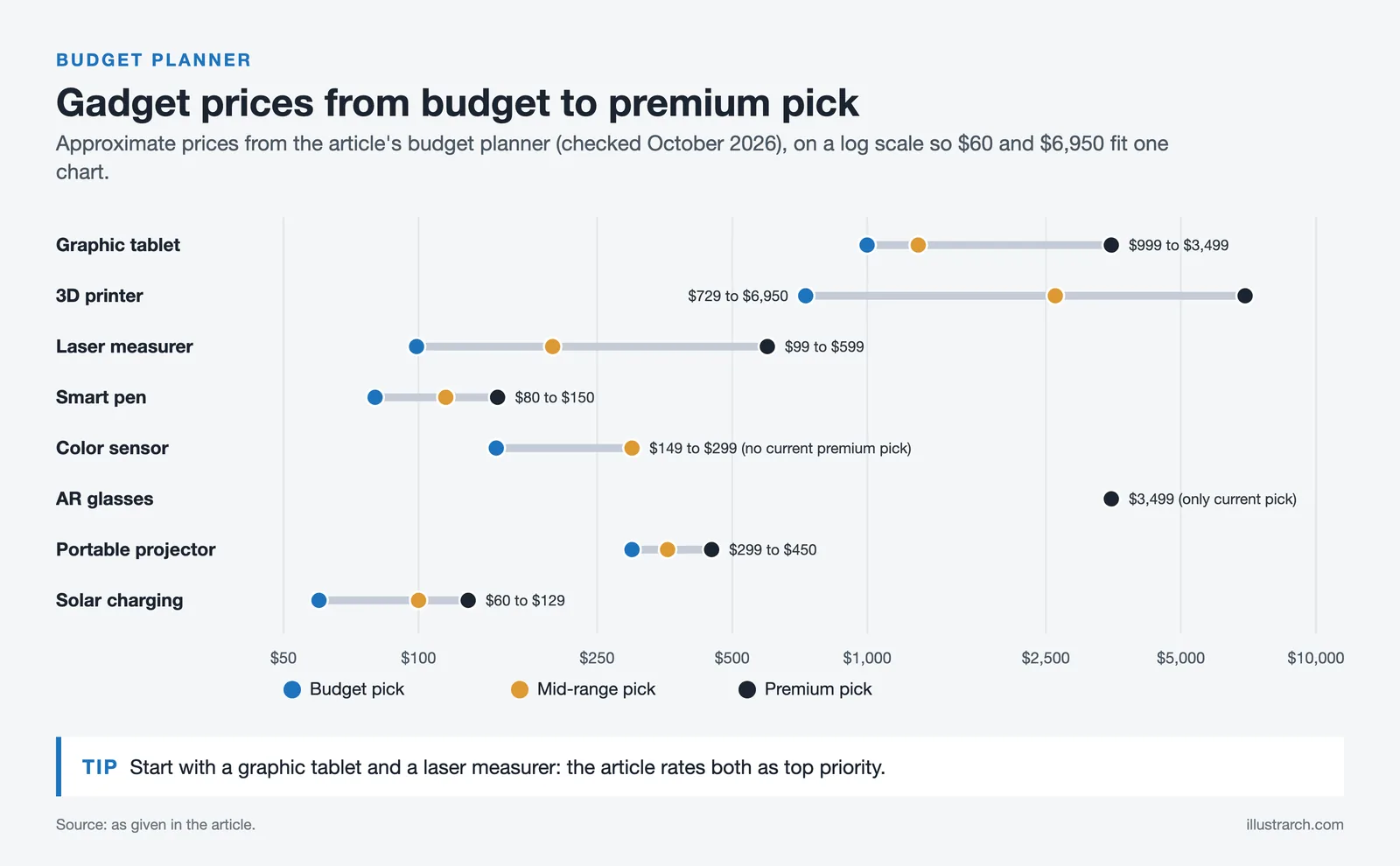
Complete Budget Guide: All 8 Gadgets at Every Price Point
Below is an overview to help you plan your technology investment based on budget and priority. Prices are approximate and based on 2026 market data.
Architecture Gadget Budget Planner (2026)
| Gadget Category | Budget Pick | Mid-Range Pick | Premium Pick | Priority Level |
|---|---|---|---|---|
| Graphic Tablet | Surface Pro 11 (~$999) | iPad Pro 13″ M4 (~$1,299) | Wacom Cintiq Pro 27 (~$3,499) | ⭐⭐⭐⭐⭐ |
| 3D Printer | Prusa MK4S kit (~$729) | Formlabs Form 4 (from ~$2,625) | Ultimaker S5 (~$6,950) | ⭐⭐⭐⭐ |
| Laser Measurer | DeWalt DW0165N (~$99) | Leica DISTO D2 (~$199) | Leica DISTO X6 (~$599) | ⭐⭐⭐⭐⭐ |
| Smart Pen | Livescribe Symphony (~$80) | Wacom Bamboo Slate (~$115) | Neo Smartpen N2 (~$150) | ⭐⭐⭐ |
| Color Sensor | Datacolor ColorReader Pro (~$149) | Nix Pro 2 (~$299) | Pantone Capsure™ (discontinued) | ⭐⭐⭐ |
| AR Glasses | None current (Magic Leap 2 sales ended in 2026) | Apple Vision Pro (~$3,499) | ⭐⭐ | |
| Portable Projector | AAXA P7 (~$299) | AAXA P7+ (~$359) | PicoGenie M550 Plus (~$450) | ⭐⭐⭐ |
| Solar Charging | BigBlue SolarPowa 28 (~$60) | Outdoor Tech Mountaineer (~$100) | GoSun Solar Backpack (~$129) | ⭐⭐ |
Total Investment Scenarios
Essential Starter Kit (Student/Intern): Surface Pro 11 + DeWalt laser measurer + Livescribe pen = ~$1,178
Professional Core Kit: iPad Pro + Prusa MK4S kit + Leica D2 + Nix Pro 2 + AAXA P7 = ~$2,825
Full Studio Setup: Wacom Cintiq Pro + Ultimaker S5 + Leica X6 + Neo Smartpen + Nix Pro 2 + Apple Vision Pro + PicoGenie M550 + GoSun Backpack = ~$15,575
If you are building your toolkit from scratch, start with the two highest-priority categories: a graphic tablet and a laser distance measurer. These two tools deliver the most immediate productivity gains for the lowest investment. A Surface Pro 11 ($999) and Leica DISTO D2 ($199) for under $1,200 will transform your daily workflow more than any other combination.
✅ Key Takeaways
- A graphic tablet and laser distance measurer are the two highest-priority gadgets for any architect, delivering the best productivity-to-cost ratio.
- FDM 3D printers suit massing models and iterations; SLA printers excel at competition-quality, fine-detail work.
- Green-beam laser measurers are up to 4x more visible than red-beam models, making them better for bright environments.
- AR glasses are most cost-effective on large commercial projects where preventing a single MEP clash pays for the device.
- A student starter kit (tablet + laser measurer + smart pen) costs around $1,178 and covers 90% of studio needs.
- Pair a foldable solar panel ($50 to $70) with a power bank for the most flexible and affordable on-site charging solution.
How We Evaluated These Gadgets
Our evaluation process is based on real-world architectural workflows, not lab benchmarks. For each gadget category, we consider:
- Workflow Integration: How well does the tool fit into existing architectural workflows (CAD, BIM, rendering, presentation)?
- Durability & Build Quality: Can it withstand the demands of construction site visits and daily professional use?
- Value for Money: Does the performance justify the price for architecture-specific use cases?
- Software Ecosystem: Is there strong software support and active development for architectural applications?
- Peer Feedback: We incorporate feedback from practicing architects, BIM managers, and architecture students across multiple firms and academic institutions.
This guide is updated regularly. Specifications and prices were last verified in early 2026. We do not accept sponsored placements; all recommendations are editorial.
Frequently Asked Questions
What is the best graphic tablet for architects?
For studio-based precision work, the Wacom Cintiq Pro 27 is the gold standard with 8,192 pressure levels and 4K UHD display. For portability, the Apple iPad Pro 13″ (M4) with Apple Pencil Pro offers the best balance of performance and mobility. Architects needing full Windows CAD software should consider the Microsoft Surface Pro 11.
Which 3D printer is best for architectural models?
The Ultimaker S5 is best for large-scale professional models with its dual-extrusion and 330x240x300mm build volume. For budget-friendly prototyping, the Prusa MK4S at ~$999 assembled (~$729 as a kit) offers excellent quality. For ultra-detailed, smooth-finish scale models, the Formlabs Form 4 resin printer delivers near-injection-mold surface quality.
Do architects need AR glasses?
Mixed reality headsets such as the Apple Vision Pro, and the now discontinued Microsoft HoloLens 2 and Magic Leap 2 that many firms still use, allow architects to overlay BIM models onto real construction sites, validate designs in real-time, and conduct immersive client presentations. They are especially valuable for large commercial projects where the cost of on-site errors far exceeds the device investment.
What is the most accurate laser distance measurer for architecture?
The Leica DISTO X6 offers the highest accuracy at ±1.0mm with an 820ft range and direct AutoCAD/BIM export. For best overall value with green laser visibility, the Bosch GLM165-27CGL provides ±1.5mm accuracy at just ~$119.
What gadgets do architects use on construction sites?
Essential on-site gadgets include laser distance measurers for precise measurements, AR glasses for overlaying BIM models, portable digital projectors for presentations, solar charger backpacks for power in remote locations, tablets for accessing and annotating drawings, and color capturing devices for matching existing finishes.
How much should an architect spend on technology gadgets?
A practical starter kit (tablet + laser measurer + smart pen) costs around $1,200. A professional setup ranges from $2,500 to $5,000. Full studio setups with AR glasses and professional 3D printers can reach $15,000+. Most firms amortize these costs over 3 to 5 years of use.
What are the best budget gadgets for architecture students?
The top budget-friendly picks for architecture students are the Microsoft Surface Pro 11 ($999) as a combined laptop and drawing tablet, the DeWalt DW0165N laser measurer ($99) for site work, and the Livescribe Symphony smart pen ($80) for digitizing sketches and syncing audio notes during lectures. This $1,178 combination covers sketching, CAD drafting, site measurement, and meeting documentation, which is roughly 90% of what students need through school.
How do gadgets improve architectural workflow?
Architecture gadgets reduce time spent on repetitive tasks and minimize errors at every stage of a project. A laser measurer with BIM export eliminates manual data entry from site surveys. A drawing tablet speeds up concept sketching by 30 to 50% compared to mouse-based input. 3D printers turn overnight what traditional model-making takes weeks to produce. AR headsets catch coordination clashes before construction begins, saving potentially thousands of dollars in rework. Each tool addresses a specific friction point, and the combined effect is a faster, more accurate workflow from concept to construction.
As technology continues to shape every aspect of architecture practice, these 8 best gadgets for architects address the most common workflow needs, from concept sketching to construction coordination. Whether you are a seasoned architect or just starting out, matching your tool choices to your actual daily workflow will always give you a better return than chasing the most expensive option.
Product specifications sourced from official manufacturer websites: Wacom, Apple, Microsoft, Samsung, UltiMaker, Prusa Research, Formlabs, Bosch Professional, Leica Geosystems, DeWalt, Neo Lab, Livescribe, Moleskine, Pantone, Nix Sensor, Datacolor, Microsoft HoloLens, Magic Leap, Apple, AAXA Technologies, PicoGenie, GoSun, BigBlue, BioLite. Prices are approximate and based on retail listings; 3D printer, AR headset and color sensor availability was rechecked in October 2026. All trademarks belong to their respective owners.
Disclaimer: Prices and specifications mentioned in this article are based on manufacturer data available at the time of publication and may change. Always verify current pricing before making purchasing decisions.
What Other Gadgets Are Worth Considering?
Beyond the core picks, a few extra gadgets earn their place. A quality portable scanner digitises sketches and site notes on the go, noise-cancelling headphones help concentration in busy studios, and a compact power bank keeps devices running during long site visits. None is essential, but each removes a small daily friction, making them worthwhile additions as your workflow and budget grow.






Futuro House Production Revived in Finland After Decades-Long Hiatus
A Facebook listing for abandoned moulds led to the first new Futuro...
 illustrarch Editoral Team3 Mins read

Building Your Dream Home in NSW: What You Should Know About Montgomery Homes
Montgomery Homes has been building across Sydney, Newcastle, the Hunter, Wollongong and...
illustrarch Editoral Team4 Mins read

Designing a Home Theater: Where Drapery Fits Into the Plan
In a media room the curtains are a performance layer, not decoration....
illustrarch Editoral Team3 Mins read

Oscar Niemeyer’s Cathedral of Brasília: The Hyperboloid Concrete Hymn
The Cathedral of Brasília reads as a single gesture, yet it stood...
 Furkan Sen7 Mins read


Leave a comment