

Best Construction Estimating Software in 2026: 10 Cost Estimating Tools Compared
Ten estimating tools for commercial, heavy civil, trade, remodeling and insurance work, from ProEst, Sage Estimating and HeavyBid to Clear Estimates and Xactimate, with October 2026 list prices, free trial options and the weak spot of each.
 Muhammad Abdullatef - Tifa Studio28 July 202514 Mins read364
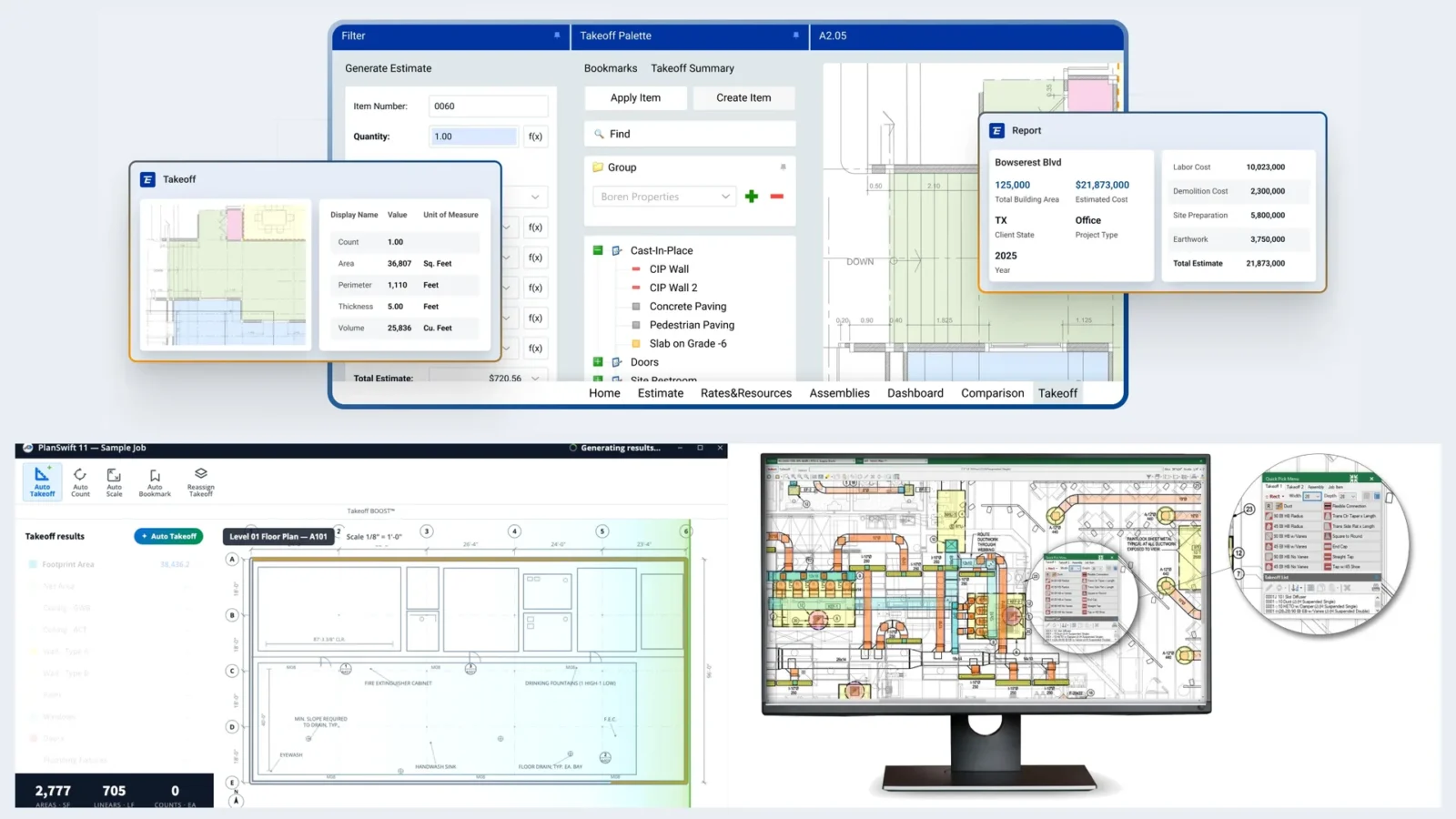
Table of Contents Show
Construction estimating software turns drawings, quantities and unit costs into a priced bid you can defend line by line. In 2026 the right pick depends on the work you bid: ProEst, Sage Estimating and DESTINI Estimator serve commercial general contractors, HeavyBid serves heavy civil, and Clear Estimates, Buildxact and Xactimate cover remodeling and insurance repair.
Contractors usually go one of two ways. Some hand the numbers to Construction Estimating Companies for minimal hassle, while others buy cost estimating software and build every estimate in house. Both routes beat a spreadsheet that nobody else on the team can audit, and the second one only pays off if the tool fits your trade and your bid volume.
Good cost estimating software earns its keep twice: once on bid day, when the number has to go out on time, and again on site, where a missed line item turns into change orders and budget overruns. Vendors now also sell AI construction estimating software that drafts line items from plans, photos or a voice note, so it pays to know which features are mature and which are still marketing.
This update for October 2026 rechecks every product from the earlier version of this list, drops the ones that are really takeoff or markup tools, adds five estimating platforms, and lists only prices printed on each vendor’s own site.
What Is Construction Estimating Software?
Construction estimating software is a program that combines quantities with labor, material, equipment and subcontractor costs, then adds markups, alternates and allowances to produce a bid or a budget. The core of every product is a cost database: a library of unit prices and crew productivity rates that you either buy (RSMeans, Xactimate pricing, the FastEST catalog) or build from your own past jobs.
It is not the same thing as takeoff software. Takeoff measures the drawings; estimating prices what was measured. Many products do both, but the strengths sit on one side. A takeoff tool with a basic price column will not level 40 subcontractor bids on bid day, and a heavy civil estimating system will not count light fixtures on a PDF faster than a dedicated takeoff app.
Estimates also mature in stages. AACE International’s guide to cost estimate classification sorts them into five classes, from Class 5 (least defined, early concept) to Class 1 (most defined), and its recommended practice 56R-08 applies that scale to building and general construction. Software that handles square foot models and historical costs helps at Class 5 and 4; software with detailed assemblies and bid leveling earns its money at Class 2 and 1.

Why Contractors Move Estimating Off Spreadsheets
If you are still pricing jobs in a workbook or by hand, the problem is rarely the math. It is everything around the math. Many contractors now rely on building estimating firms or invest in digital tools that save time and money, and the reasons tend to be the same five:
- Time: templates, saved assemblies and copied past jobs turn a two-day estimate into a few hours, and a price change updates every line that uses it.
- Accuracy: formulas are locked, missing scopes get flagged, and the cost database is refreshed by the vendor every quarter instead of whenever someone remembers.
- Organization: estimates, notes, quotes and proposals sit in one searchable file, so a revision six months later starts from the right version.
- Collaboration: cloud products let two estimators work on one bid while a project manager reviews it from another office.
- Scale: as bids get larger, you need cost codes, bid packages and an export to accounting, not another tab in the workbook.
🔢 Quick Numbers
- Cost estimators held about 226,400 jobs in the US in 2025 (BLS Occupational Outlook Handbook).
- Their median annual wage was $78,740 in May 2025; in heavy and civil engineering construction it was $99,910 (BLS).
- BLS projects a 3 percent decline in estimator jobs from 2025 to 2035, yet about 17,600 openings a year from retirements and job changes.
- About 15 percent of US cost estimators work in construction of buildings and 5 percent in heavy and civil engineering construction (BLS).
A shrinking estimator workforce is the real case for software: the tool has to carry part of the load that used to sit with a second person.
Features That Matter in Construction Cost Estimating Software
Every vendor claims accuracy and ease of use. The questions below separate the products in practice, and they map to what you will see in a demo.
| Feature | What to check in the demo | Why it matters |
|---|---|---|
| Cost database | Whose data, how many regions, how often updated | Stale unit costs are the main source of bad bids |
| Assemblies | Can one wall type price studs, board, tape and labor at once? | Cuts line entry and keeps estimators consistent |
| Bid leveling | Side-by-side sub quotes with scope gaps plugged | Where commercial GCs win or lose on bid day |
| Historical data | Can past jobs feed a new conceptual estimate? | Early budgets rely on your own cost history |
| Integrations | Export to accounting, project management, Excel | The estimate should become the budget without retyping |
| Deployment and support | Cloud or Windows desktop, training hours included | Setup quality decides whether the tool gets used |
Cloud access matters most if you run several offices or estimate while on site. If you work alone on one machine, a desktop program with a good catalog can be faster and cheaper.

Ten Estimating Software Tools, Named
Demand for Construction Estimating Services and estimating software keeps growing. A KBV Research report projects that the global construction estimating software market will reach $2.2 billion by 2028, growing at a CAGR of 8.5%, which is why the shortlist changes every year.
Below are ten products, grouped from large commercial work down to remodeling and insurance repair. Nobody needs all ten: most contractors shortlist two from their own segment, run a trial or a scripted demo on a recent job, and pick the one their estimators actually finish the bid in. Prices are list prices as of October 2026; quote-only products are marked as such.
ProEst (Autodesk)
ProEst was founded in San Diego in 1976, and in December 2021 Autodesk announced it was acquiring the company to strengthen the preconstruction side of its construction cloud. Today ProEst is a cloud estimating product that combines cost databases, 2D digital takeoff, custom proposals and bid-day reporting. Its ProEst Costbook ships with more than 23,000 lines of regionalized costing data, and each line starts from a national baseline that location factors adjust to a city or region.
The big 2026 change is how you buy it. ProEst is now sold only inside the Forma for Preconstruction bundle, alongside Forma Takeoff, Forma Estimate, BuildingConnected Pro, Bid Board Pro and TradeTapp, and pricing is by quote. Autodesk’s own Forma Estimate vs. ProEst comparison (April 2026) says Forma Estimate does not replace ProEst: ProEst keeps the deeper formulas, triggers and reports, plus integrations with Procore, Acumatica, Buildertrend, Sage and Intacct.
Best for: mid-sized and large general contractors who want custom formulas and heavily tailored reports.
Watch for: no standalone purchase and no public price; you pay for the whole preconstruction bundle.
Sage Estimating
Sage Estimating, the product long sold as Timberline Estimating, is Sage’s estimating system for commercial contractors and has been in the market for more than 30 years. Sage pitches it for teams from one estimator to a preconstruction group of 200, with trade-specific cost databases, multiple estimators in one estimate and a cloud bid analysis tool that processes thousands of subcontractor bid paths to find the lowest valid combination.
Recent releases add Sage Ai features that flag outlier bids, predict bidder participation and compare bids to history adjusted for time and location. Takeoff runs through the companion eTakeoff Dimension, which reads native PDFs, and estimates move without re-entry into Sage Intacct Construction, Sage 300 CRE and Sage 100 Contractor. Pricing is by quote through Sage or a reseller.
Best for: commercial GCs and subcontractors already on Sage accounting.
Watch for: the desktop heritage shows; setup and database tuning usually need a reseller or consultant.
DESTINI Estimator (Beck Technology)
DESTINI Estimator comes from Beck Technology, which started in 1996 as an internal group of the Dallas general contractor The Beck Group. That origin shows: the product is built around how a GC preconstruction team works, with centralized cost history, assemblies, alternates, multi-user estimates and an audit trail. Beck lists Balfour Beatty, Gilbane and Swinerton among its users.
The current version adds AI-assisted takeoff that detects, counts and measures drawing elements, BIM model quantities for 2D and 3D scope checks, and DESTINI Bid Day for subcontractor leveling. The strongest feature for early budgets is conceptual estimating from your own historical project data: pick a project type, area and location, and the estimate starts from what similar jobs really cost. Pricing is by quote.
Best for: preconstruction teams at commercial GCs that price from design development onward.
Watch for: it only shines once your historical data is clean and loaded, which takes months, not days.

HCSS HeavyBid
HeavyBid is the flagship of HCSS, a company in Sugar Land, Texas, that has built software for contractors since 1986. HCSS says HeavyBid has more than 3,000 customer companies and over 50,000 estimators, and that 43 of the ENR top 50 heavy civil contractors use HCSS products. It is built for self-performing contractors: roads, bridges, utilities, earthwork and site work.
Instead of unit prices alone, HeavyBid builds costs from crews, equipment rates and production, so an estimate reflects how many days a spread will actually take. It also handles pay item imports, quote management, error alerts and project handoff, where the bid becomes a budget in HeavyJob or accounting. HeavyBid Desktop has native interfaces to more than 30 back-office systems, including Vista, QuickBooks and Sage 300. Pricing is by quote.
Best for: heavy civil and self-performing contractors bidding public work.
Watch for: long setup; HCSS customers on its own site say it pays off only if you invest the effort up front.
RSMeans Data Online (Gordian)
RSMeans Data Online is the cost database that much of North America benchmarks against, published by Gordian. The data started in the early 1940s as one engineer’s handwritten cost books and now covers more than 85,000 line items, with quarterly updates to every cost element. Architects, owners and cost consultants use it as often as contractors do.
It is sold in three tiers as of October 2026: Core from $408 a year (unit costs, a basic estimate builder), Complete from $1,049 a year (assemblies, square foot models, three years of history) and Complete Plus from $5,973 a year (full history, predictive costs, renovation models and life cycle costing). A free trial is offered, and the same data plugs into HeavyBid and other estimating systems.
Best for: early budgets, owner-side checks and anyone without a cost history of their own.
Watch for: national averages adjusted by location are a starting point; your subs’ real quotes will differ.
PlanSwift
PlanSwift, owned by ConstructConnect, has been on the market since 2007 and says more than 43,000 construction professionals use it. It is a Windows program that does takeoff and estimating in one: you drag pre-built assemblies onto the plan, and each area or count prices its materials and labor. It integrates with tools such as Procore and Buildertrend, and exports go to Excel, DWG, image files and PDFs.
The 2026 pricing page lists two annual plans as of October 2026: Essential at $2,000 a year for one seat (takeoff, estimating, Auto Count, Auto Scale, two hours of live training) and Core at $3,000 a year, which adds Auto Takeoff for a first-pass takeoff of areas, lengths and counts. A 14-day free trial needs no credit card.
Best for: trade contractors and small GCs who want takeoff and pricing in one desktop tool.
Watch for: no proposal management or project management, and multi-estimator collaboration is limited.
FastDUCT
FastDUCT is HVAC estimating software from FastEST, Inc., built for commercial and industrial sheet metal contractors. Its catalog holds more than 250,000 items, from rectangular, round and oval duct to fittings, hangers and named manufacturer products, with labor rates based on industry standards that you can adjust for job conditions. Specs generate liner, joints, stiffeners and hangers automatically as you take off duct, and a group of rectangular runs converts to round in a few clicks for alternate pricing.
It runs on Windows and finishes the quote in an Excel workbook, and it pairs with FastPIPE for mechanical piping. The FastEST pricing page lists $4,995 one time for the first application (first year of maintenance included, then $1,250 a year) or a $250 monthly lease that you own after 36 payments, as of October 2026. Both come with a 60-day money-back guarantee.
Best for: HVAC and sheet metal contractors, including first-time estimating software buyers.
Watch for: Windows only, single-trade, and official PHCC, MCAA or SMACNA labor rate tables cost extra.

Xactimate
Xactimate from Verisk is the estimating standard for property insurance claims: damage repair, water and fire restoration, and the remodeling that follows. Most insurance carriers and adjusters write in it, so a restoration contractor who estimates in Xactimate speaks the same line-item language as the person approving the claim. Verisk researches pricing for more than 460 geographic regions.
Recent versions add Sketch AR for measuring rooms with a phone, a 3D cutaway view in Xactimate Sketch, and XactAI for suggested line items and photo labeling. As of October 2026 Verisk lists $2,390 for an annual subscription or $1,575 for six months, each covering one platform (desktop, mobile or online).
Best for: restoration contractors and adjusters working on insurance claims.
Watch for: a steep learning curve, and its line items fit claims better than new construction bids.
Clear Estimates
Clear Estimates is built for residential remodelers, handymen and small general contractors, and the company says more than 50,000 contractors have used it over two decades. Its database prices more than 12,000 parts with labor and material costs adjusted for 400 US areas and updated every quarter, and over 500 templates cover kitchens, baths, additions, roofs, decks and painting. That narrow focus makes it the most direct answer for anyone looking for renovation estimating software rather than a commercial bid system.
It runs in a browser and produces branded proposals with built-in e-signature. As of October 2026 Standard costs $59 a month billed yearly or $79 month to month, and Pro costs $99 a month billed yearly or $119 monthly, adding AI plan and photo uploads, Buildertrend and CRM integrations and extra users at $9 a month. Every plan starts with a 30-day free trial.
Best for: remodelers who want a priced kitchen or bath estimate in minutes.
Watch for: no real plan takeoff and no commercial scope; it is a remodeling tool by design.
Buildxact
Buildxact was founded in Melbourne, Australia, in 2011 and now sells to residential builders and remodelers in the US, Canada, the UK, Australia and New Zealand. It covers digital takeoff, estimating, quotes and purchase orders, with its Blu AI assistants building assemblies, generating estimates and reviewing them before they go out. US users can order materials from Home Depot inside the app.
As of October 2026 the US price list has a free Go plan with five AI credits, Foundation at $169 a month billed yearly ($2,030 a year, $199 month to month) with unlimited users, Pro at $339 a month billed yearly with job management and schedules, and Master at $509 a month billed yearly with all Blu tools. Add-ons such as the Blu Estimate Generator cost $99 a month on Foundation.
Best for: custom home builders and remodelers who want estimating plus light job management.
Watch for: the best AI features sit in the top plans or paid add-ons, so the real price climbs fast.
At a Glance
The table compares the ten tools on the points that usually decide a shortlist.
| Software | Built for | Price (as of October 2026) | Trial | Best for |
|---|---|---|---|---|
| ProEst | Cloud, commercial | Quote, Forma bundle only | Demo | Custom formulas and reports |
| Sage Estimating | Desktop plus cloud bid tools | Quote | Demo | GCs on Sage accounting |
| DESTINI Estimator | Cloud, GC preconstruction | Quote | Demo | Conceptual budgets from history |
| HCSS HeavyBid | Desktop, heavy civil | Quote | Demo | Crew and equipment based bids |
| RSMeans Data Online | Web, cost database | From $408/year | Free trial | Early budgets and checks |
| PlanSwift | Windows, takeoff plus pricing | $2,000 to $3,000/year | 14 days | Trade contractors |
| FastDUCT | Windows, HVAC | $4,995 once or $250/month | 60-day refund | Sheet metal contractors |
| Xactimate | Desktop, mobile or online | $2,390/year | No | Insurance restoration |
| Clear Estimates | Web, remodeling | From $59/month yearly | 30 days | Kitchen and bath remodelers |
| Buildxact | Web, residential builders | Free; paid from $169/month yearly | Free plan | Custom home builders |
Where Takeoff Tools and AI Fit in an Estimate
Two kinds of products often get listed as estimating software but do a different job. The first is plan markup and measurement. Bluebeam Revu is the best known: estimators use it to measure areas, lengths and counts on PDFs and to mark up drawings with a team, and as of October 2026 Bluebeam’s plans run from $260 to $590 per user per year. It produces quantities, not a priced bid, so most firms pair it with one of the estimating systems above or with a spreadsheet of unit costs.
The second is AI estimating for small residential firms. Handoff drafts a remodeling estimate from a scope description, job photos, a voice note or a plan, using your own pricing catalog, and turns it into a client proposal. As of October 2026 its Flex plan costs $119 a month billed yearly ($149 monthly) for two users and 50 AI credits, Pro costs $239 a month billed yearly, and Scale ($719 a month billed yearly) adds AI takeoffs for residential plans up to 7,000 square feet. A 7-day trial is free.

💡 Pro Tip
Before trusting any AI-drafted estimate, re-price one job you already built and won by hand. Compare totals by trade, not just the bottom line: a tool can land within 5 percent overall while missing demolition, permits or dumpsters entirely and making it up in inflated finishes.
Treat AI output as a first draft. The estimator still owns the scope, the exclusions and the markup, and those three things decide whether a job makes money.
How Much Does Estimating Software Cost?
Estimating software costs from nothing to well over $5,000 a year per seat, and the price tracks the market you bid. As of October 2026, residential tools publish their prices: Clear Estimates from $59 a month billed yearly, Buildxact from $169 a month billed yearly (with a free plan), PlanSwift from $2,000 a year and Xactimate at $2,390 a year. RSMeans data starts at $408 a year. Commercial and heavy civil platforms (ProEst, Sage Estimating, DESTINI Estimator and HeavyBid) are sold by quote, usually with paid implementation and training.
If you are searching for construction estimate software you can download free, the honest answer is that the useful products offer trials rather than free licenses. The free routes that hold up are Buildxact’s Go plan (five AI estimate credits), the 14-day PlanSwift trial, the 30-day Clear Estimates trial and the RSMeans Data Online trial. Run a real job through the trial instead of the vendor’s sample project, or you will learn nothing about fit.
Budget for more than the license. Database packs (SMACNA or MCAA labor rates for FastDUCT, extra RSMeans datasets), add-on AI modules, and the estimator’s time to build assemblies all belong in the first-year cost. For a sense of how project costs themselves move, see this guide to home renovation costs and the notes on estimating building materials.
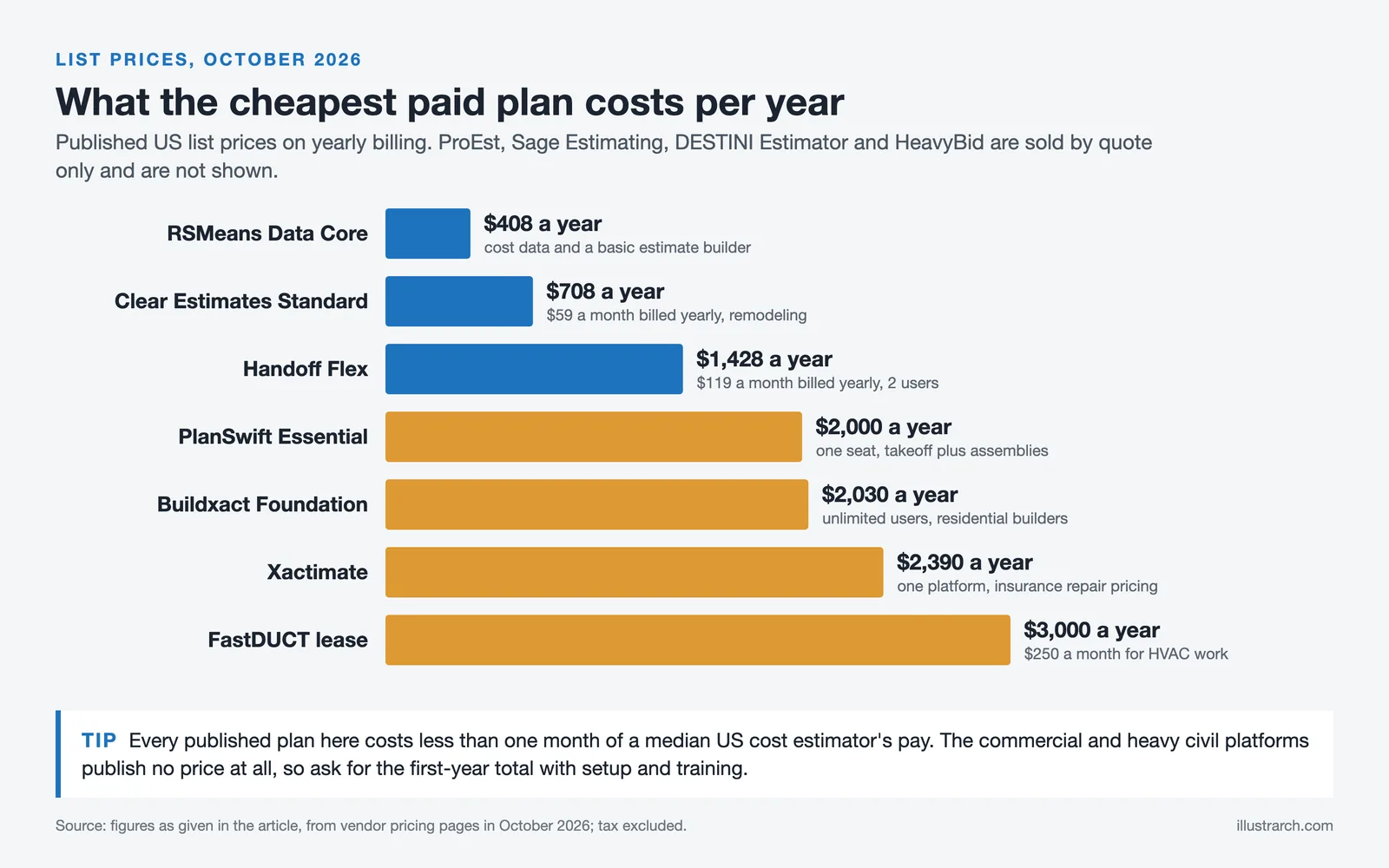
Prices are vendor list prices in US dollars checked in October 2026, excluding tax; quoted products vary by company size, seats and region.
How to Choose the Best Estimating Software for Your Project
If none of the tools above is an obvious match, compare the project’s requirements with the software’s strengths step by step.
Compare Project Scope and Boundaries
Your project type determines the tool. Public heavy civil work needs crew-based costing like HeavyBid; commercial building work needs bid leveling and assemblies like ProEst, Sage Estimating or DESTINI; a small residential project works fine in Clear Estimates or Buildxact. Insurance repair is its own world, and that means Xactimate. Trade estimators should look for a trade catalog first, which is where FastDUCT or a mistake checklist like this one on electrical estimating errors earns its place.
Company Size
If you are part of a multi-million-dollar construction company, simple software won’t do you any good. You’ll need a system such as HeavyBid or Sage Estimating and a dedicated team to run all your estimates. A two-person remodeling firm, on the other hand, will drown in a platform built for 200 estimators. Check how the estimate hands off to the rest of the business, too: the bid should become the budget in your construction management software without retyping, and bids should come in through a bid management platform your subs already use.
📌 Did You Know?
The first AACE guideline of any kind, written by its Estimating Methods Committee in 1958, was titled “Estimate Types” and proposed four: order of magnitude, preliminary, definitive and detailed. The five-class system estimators use today grew out of it in 1997 (AACE International).
Budget Assessment
Decide the most you will spend in year one, including setup, data and training, before you take a single demo. Then shortlist only the software inside that range and compare features. A quoted platform that never gets configured costs more than a modest tool your estimators use every day.
Get a Free Trial and Check Usability
Almost every vendor gives a trial or a guided demo. PlanSwift, for instance, has a 14-day free trial with no credit card required. Use it to rebuild a bid you already submitted: if the trial number lands near your real one and your estimator finished it without calling support, you have a candidate. If not, move on.

Which Software Should You Pick? (Recommendation by Use Case)
| Your situation | Recommended software | Why it fits |
|---|---|---|
| Remodeler pricing kitchens and baths | Clear Estimates | Local costs for 400 US areas, 500+ templates |
| Custom home builder | Buildxact | Takeoff, estimate and purchase orders in one |
| HVAC or sheet metal contractor | FastDUCT | 250,000-item HVAC catalog with labor rates |
| Insurance or property damage claims | Xactimate | The line-item language carriers already use |
| Trade contractor on a budget | PlanSwift | Takeoff and assemblies from $2,000 a year |
| Commercial GC with a preconstruction team | DESTINI Estimator or ProEst | Cost history, bid leveling, custom reports |
| GC already running Sage accounting | Sage Estimating | Estimate to job cost without re-entry |
| Heavy civil contractor | HCSS HeavyBid | Crew, equipment and production based costing |
| Architect or owner checking a budget | RSMeans Data Online | Square foot models and independent unit costs |
Free Online Home Remodel Cost Calculator
For a quick ballpark before you open any estimating software, try the calculator below. It gives a rough range for a home remodel; a real estimate still needs measured quantities and local quotes.
Planning a home renovation? Our free calculator helps you estimate remodeling costs based on your specific project. Simply select your location, choose the room or area you want to renovate, specify the size and finish level, and get an instant cost estimate with detailed breakdowns for materials, labor, and other expenses.
Where is your project located?
Location affects material and labor costs significantly.
What are you remodeling?
Select the room or area you want to renovate.
Project Details
Tell us more about your project.
📐 Room Size
💎 Renovation Level
➕ Additional Features (Optional)
Your Estimated Renovation Cost
📊 Cost Breakdown
✅ What's Typically Included
📄 Download Your Detailed Report
Get a complete PDF report with your renovation cost estimate, breakdown, and planning tips.
Disclaimer: These estimates are for general guidance only. Actual costs vary based on specific conditions, contractor pricing, material selection, and local factors. Always get multiple quotes from licensed contractors for accurate pricing.
Where to Go From Here
The best estimating tool is the one your estimators finish bids in, priced against your own cost history rather than a vendor’s sample job. Clean drawings help every tool on this list: if your plans come from an outside CAD Drafter, ask for vector PDFs with consistent layer names, because they scale and measure faster than scans.
Your next step: pick the one bid you lost last quarter by the widest margin, rebuild it in the trial of the two tools closest to your segment, and compare where each one lands by trade. The tool that shows you why you lost is the one to buy.


1 Comment





Interior Design for Commercial Spaces: Enhancing Functionality and Brand Identity
Commercial interior design has to serve brand, function and regulation at once....
 Begum Gumusel4 Mins read

From Architectural Design to Everyday Use: Why Post-Construction Inspection Matters
A building can look finished long before it works as intended. This...
 illustrarch Editoral Team6 Mins read
Material Management Tips for Concrete Contractors
Eight practical concrete material management habits for contractors, from ordering ready-mix against...
illustrarch Editoral Team4 Mins read

Futuro House Production Revived in Finland After Decades-Long Hiatus
A Facebook listing for abandoned moulds led to the first new Futuro...
illustrarch Editoral Team3 Mins read


I really appreciate the detailed breakdown of why construction estimating software is essential. The points about saving time and improving accuracy resonate with my experience. I’ve been using manual methods, and it’s clear that switching to software could prevent a lot of errors. I’m curious though, how do I determine which features are most important for my specific project type?