

5 Things to Consider Before Designing Your Portfolio
Designing a portfolio requires careful project selection, appropriate file size, personalization, effective cover design, and consistent formatting for clarity and impact.
 Muhammad Abdullatef - Tifa Studio6 July 20213 Mins read400
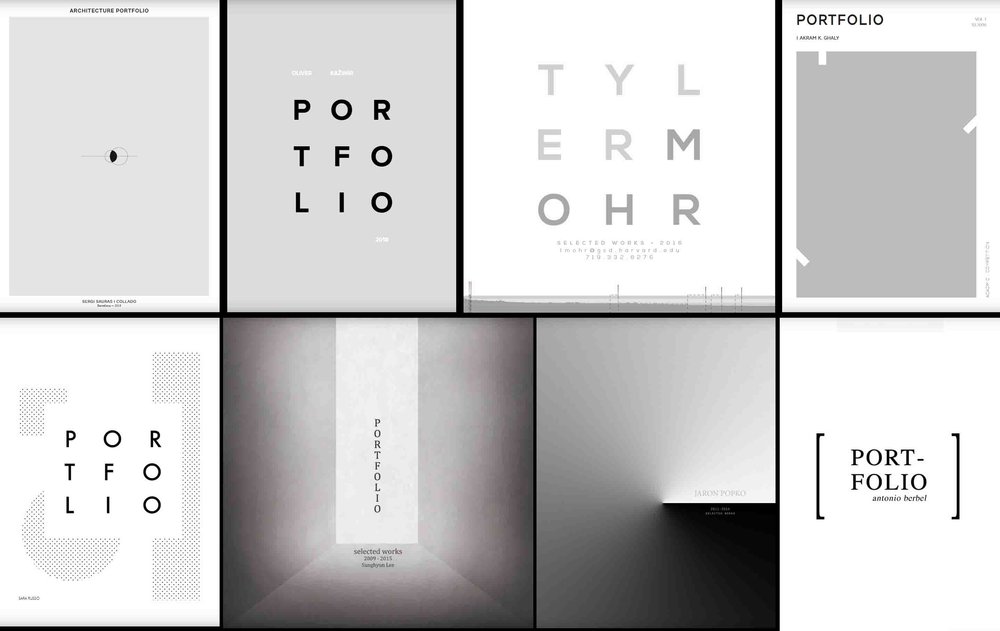
Table of Contents Show
Before starting your portfolio, there are some considerations we should follow to make a great step into achieving its goal, Here are 5 things to consider when you start your next portfol
– Project Selection:
You should only use your most successful work, a portfolio is not an archive of your work, it is a showcase for the best of the best! Show them your talents, skills and experiences and convince them why they should hire or accept you!

– File size:
Some offices or universities require as minimal size as 5mb, be sure that your file size meets the requirements. Generally no one would like to download 30mb file or even more, so try to make it as small as possible.
– Don’t forget to introduce yourself:
It would be professional if you personalize your portfolio to each position you’re applying to. So you may include the name of the office/university in your cover letter, and attach it to your portfolio. Easy but effective. 
– Design your cover:
The cover is the first thing they are going to look at, you have to design it really well, it should get to the point and clarify to them your style and character.
– Work with a template:
Working with templates will create consistency in your portfolio and it will make it easier for you when you want to re-arrange it or put a new project. Less is more, don’t put too much information in less pages, that will be confusing!
Reach Our Portfolio Templates!


Choose the Right Format and Orientation
Decide early whether your portfolio will be viewed on screen or printed, because that choice shapes everything that follows. Landscape spreads suit on screen reading and let you place a large image beside a column of text, while portrait pages often read better when printed and bound. If you expect both uses, design in landscape and export a tidy PDF that prints two pages per sheet. Keep a consistent page size throughout, typically A3 or A4 for print and 1920 by 1080 for screen, so nothing has to be resized awkwardly later.
Tell a Clear Story With Each Project
A reviewer should understand a project in seconds, so lead each one with a short brief that states the site, the programme and the problem you set out to solve. Follow it with the concept, then the resolution, using diagrams to show your thinking before you reveal polished renders. Two or three sentences per project are usually enough. Order your work so the strongest scheme opens the section and a memorable one closes it, since first and last impressions carry the most weight.
Mind Typography and White Space
Limit yourself to one or two typefaces and a small set of sizes for headings, body text and captions. Generous margins and white space give drawings room to breathe and signal confidence, whereas a crowded page reads as anxious. Align text and images to an invisible grid so the eye travels smoothly down each spread. Aim for a clear hierarchy where the reader always knows what to look at first, and keep captions short and factual rather than decorative.
Tailor Print and Digital Versions
For digital submissions, export at 150 dpi to balance sharpness against file size, embed your fonts and flatten layers so the document opens the same way on any machine. For print, work at 300 dpi, add a few millimetres of bleed where images run to the edge and proof a sample page before committing to a full run. Name the file professionally, for example surname_portfolio_2026.pdf, and always keep an editable master so you can update a single project without rebuilding the whole document.
Common Mistakes to Avoid
Avoid padding the portfolio with weaker projects to make it longer, as quality always beats quantity. Do not rely on renders alone, since reviewers want to see process drawings, sketches and models that prove how you think. Proofread every caption, because a single spelling error undermines an otherwise careful document. Finally, never submit without testing the file on a different device first, so you can be sure images load, fonts display correctly and the page order is exactly as you intended.
- architectural portfolio design
- architectural portfolio templates
- architecture portfolio application
- architecture portfolio cover
- architecture portfolio examples
- architecture portfolio issuu
- architecture portfolio pdf
- architecture portfolio template
- illustrarch portfolio designs
- portfolio design for architects







Futuro House Production Revived in Finland After Decades-Long Hiatus
A Facebook listing for abandoned moulds led to the first new Futuro...
 illustrarch Editoral Team3 Mins read

Building Your Dream Home in NSW: What You Should Know About Montgomery Homes
Montgomery Homes has been building across Sydney, Newcastle, the Hunter, Wollongong and...
illustrarch Editoral Team4 Mins read

Designing a Home Theater: Where Drapery Fits Into the Plan
In a media room the curtains are a performance layer, not decoration....
illustrarch Editoral Team3 Mins read

Oscar Niemeyer’s Cathedral of Brasília: The Hyperboloid Concrete Hymn
The Cathedral of Brasília reads as a single gesture, yet it stood...
 Furkan Sen7 Mins read


Leave a comment