

Lumion 12.5 vs Lumion 2023: What’s Best?
Lumion 2023 features a new hybrid rendering engine with ray tracing, while Lumion 12.5 retains a proven perpetual license model and lacks ray tracing capabilities.
 Elif Ayse Sen26 December 20258 Mins read1.2k
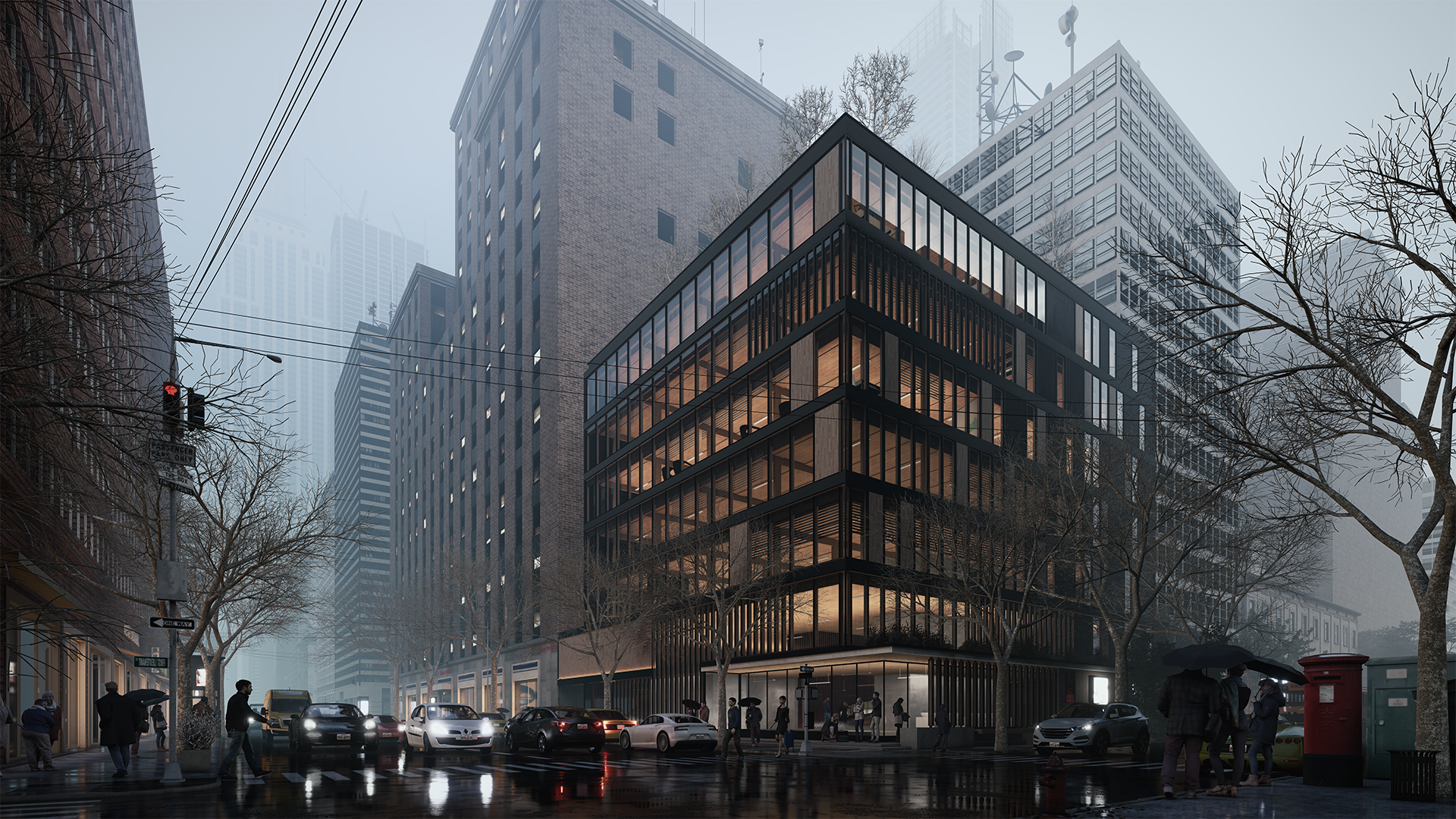
Table of Contents Show
What Are the Biggest Differences Between Lumion 12.5 and Lumion 2023?
The single most significant change between the two versions is the rendering engine. Lumion 2023 ships with a hybrid rasterization and ray tracing pipeline, which was not available in 12.5 at all. Beyond that, the materials system was overhauled with full PBR support, the lighting system was restructured around physical units (Lumens and Nits), and the licensing model switched from perpetual to subscription only. For architects who rely on accurate light simulation and photorealistic glass and reflection rendering, the gap between these two versions is substantial.Common Features of Lumion Versions
Both versions share the foundation that has made Lumion a go-to tool for architectural visualization: a user-friendly interface, an extensive library of materials and objects, real-time rendering capabilities, and wide CAD software compatibility. The interface in Lumion has always prioritized speed over complexity. Architects with no dedicated 3D rendering background can produce presentation-quality output without a steep learning curve. The library covers realistic textures, vegetation, people, and props that add environmental depth to any scene.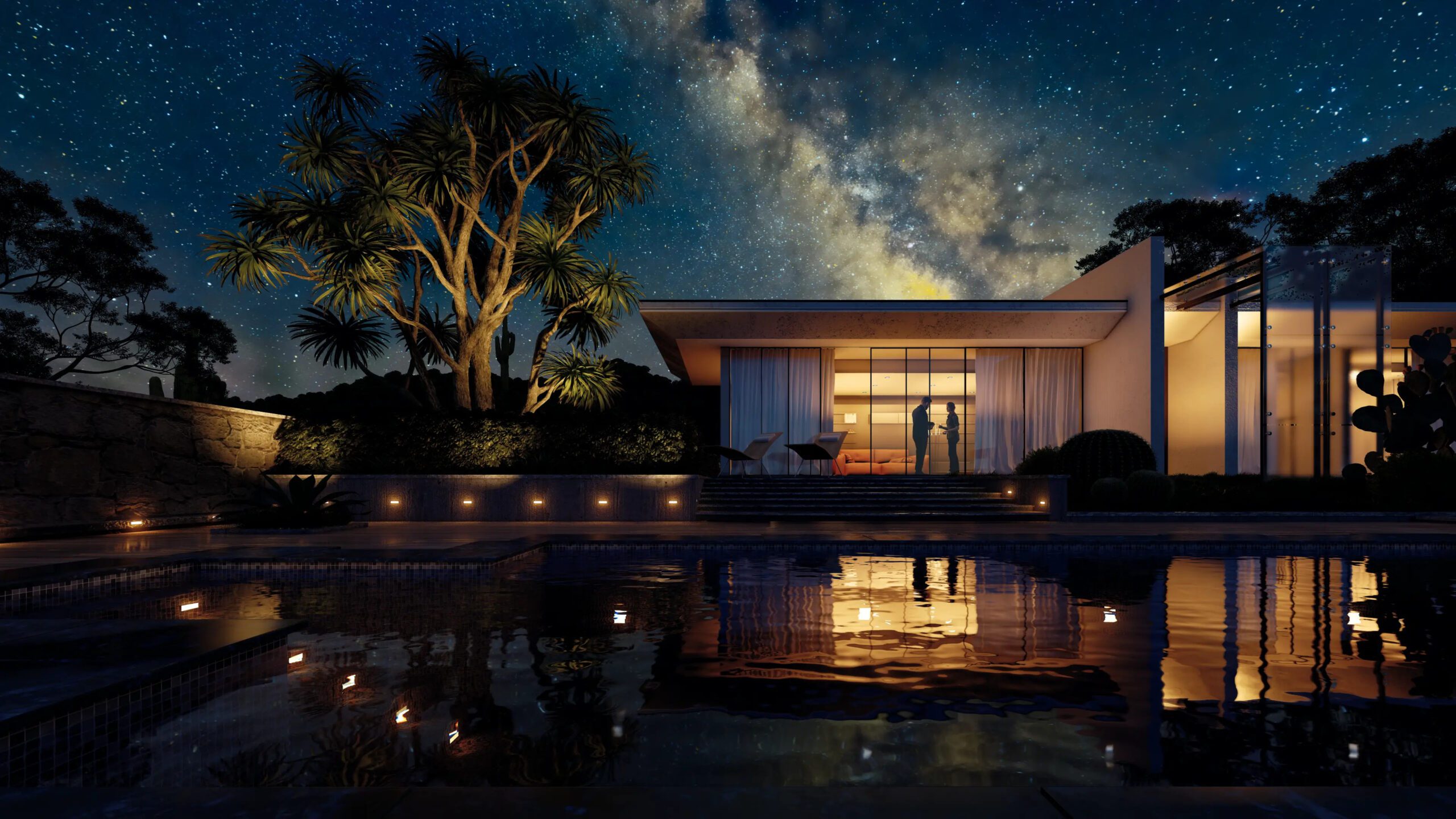

Comparison of Lumion 12.5 vs Lumion 2023
Rendering Engine and Ray Tracing
Lumion 12.5 uses rasterization only. This means reflections, shadows, and glass behavior are all approximated rather than physically calculated. Manual reflection planes are required to simulate mirror-like surfaces, and glass materials are handled by two separate shaders (Standard Glass and PureGlass), each with different limitations. Lumion 2023 introduces a hybrid engine combining rasterization with ray tracing (version 0.9 at launch). According to Lumion’s official release documentation, ray tracing in 2023 enables automatic accurate reflections on curved surfaces, physically correct glass behavior with a unified material, and shadow casting from area lights without workarounds. The tradeoff is that animated characters and some decal effects are not yet fully converted to the ray tracing pipeline at the 2023 launch, though subsequent updates addressed several of these limitations.💡 Pro Tip
\nFor the full picture, see our complete guide to the best AI architectural rendering tools.
If you’re upgrading an existing Lumion 12.5 project to Lumion 2023, open it in the new version before your deadline — not during it. The PBR and lighting engine changes mean older project files can look significantly different after conversion, especially scenes with heavy glass use or complex interior lighting setups. Budget time to readjust materials and effects.
Materials and Texture Workflow
The materials overhaul in Lumion 2023 is one of the most workflow-impacting changes. Lumion 12.5 uses a standard material system with limited map support. Lumion 2023 adopts a full PBR pipeline with eight dedicated map slots: Color, Normal, Roughness, Reflectiveness, Metalness, Emissive, Displacement, and Opacity. This aligns Lumion’s workflow with industry-standard tools like Substance Designer and ShaderMap, meaning texture packs created for other PBR renderers can be imported and used directly. Subsurface scattering is also fully supported in the 2023 PBR editor, replacing the approximate “Waxiness” property from older versions. This matters for skin, translucent fabrics, marble, and similar materials where light penetration affects surface appearance. The material library grew from 1,357 materials in Lumion 12.5 to 1,452 materials at Lumion 2023 launch, with 98 new materials added across wood, stone, metal, plaster, concrete, brick, asphalt, grass, and soil categories.⚠️ Common Mistake to Avoid
A common mistake when moving from Lumion 12.5 to 2023 is assuming material conversions will be automatic and faithful. While Lumion 2023 does auto-convert materials from older project files, the Waxiness property is converted to 50% of its original value as Subsurface Scattering. Any material with high Waxiness settings will appear noticeably different. Always do a visual review of converted materials, especially on skin textures, marble, and translucent surfaces, before handing off renders.
Lighting System
Lumion 12.5 handles lighting through Hyperlight and Skylight effects, which produce good results but operate on an abstract scale rather than physical light values. Area lights do not cast shadows in this version. Lumion 2023 restructures the lighting system around physical units: Lumens for light source output and Nits for surface brightness. Area lights cast shadows in 2023, which changes how interior scenes read in terms of depth and contrast. The RGB Histogram display in color correction is also new, giving more precise control over exposure and tone during post-processing.
📌 Did You Know?
Lumion 2023 improved the editor’s GPU upsampling system significantly: Lumion 12.5 had a 50% minimum editor resolution, while Lumion 2023 dropped this to 33% while delivering a sharper, cleaner image. According to Lumion’s official transition documentation, this change results in noticeably better viewport quality at lower resolution settings, which helps maintain performance on mid-range hardware without sacrificing visual feedback.
Object and Material Library
The Pro content library expanded from approximately 6,903 objects in Lumion 12.5 to 7,130 objects at Lumion 2023 launch, with further additions through updates bringing the count to over 9,000. The organization of the library was also improved in 2023, with better categorization and search. Lumion 2023 also introduced camera path presets — Orbit, Dolly, Pan/Tilt, and Follow Object — which were not available in 12.5. For architects producing walkthrough animations, this eliminates a lot of manual keyframe work. The Transform Gizmo and enhanced AutoSnap also make object placement more precise in the 2023 scene editor.Workflow and Usability
One practical difference is the software updater. Lumion 12.5 and earlier versions required full application reinstalls for each new version. Lumion 2023 introduces a built-in updater that delivers patches and version updates as smaller, faster downloads. For studios running Lumion across multiple workstations, this reduces IT overhead considerably. Editor performance also improved. The GPU upsampling in Lumion 2023 uses AMD FSR 2 technology, producing sharper previews at lower resolutions than the approach used in 12.5. The new Transform Gizmo gives direct axis control over object placement and rotation, which speeds up scene setup. CAD compatibility is broadly the same across both versions — SketchUp, Revit, ArchiCAD, Rhino, AutoCAD, and others are supported. Lumion 2023 brings improvements to the LiveSync plugin, automatic material recognition on import, and an improved .DWG importer. You can find more detail on Lumion’s integration with modeling tools in this overview of Lumion as a rendering software, and rendering quality tips are covered in the best features of Lumion 12.5 article on Illustrarch.Pricing and Licensing
This is where the decision gets harder for some practices. Lumion 12.5 was sold under a perpetual license model: Standard at €1,499 and Pro at €2,999 as a one-time purchase. Lumion 2023 moved entirely to subscription pricing: Standard at €749/year and Pro at €1,499/year. There is no perpetual license option for 2023 or later versions. For a solo architect or small studio, the subscription model breaks even with the perpetual price within two years. For larger firms running multiple seats, the ongoing annual cost adds up faster. This shift also means access to new features and updates is continuous under subscription, whereas perpetual license holders would need to purchase upgrades separately. For further context on how Lumion compares to other rendering tools in terms of workflow and output quality, ArchDaily’s Lumion coverage provides a useful reference point, and AEC Magazine’s Lumion 2023 launch review goes deep on the ray tracing implementation. The official Lumion website has current pricing and trial access, and the Lumion support knowledge base contains detailed transition documentation for moving projects between versions.Lumion 12.5 vs Lumion 2023: Detailed Feature Comparison Table
| Feature | Lumion 12.5 | Lumion 2023 |
|---|---|---|
| Rendering Engine | Rasterization only | Hybrid (Rasterization + Ray Tracing v0.9) |
| Ray Tracing | ❌ Not available | ✅ Built-in (Nvidia & AMD GPUs) |
| Material Workflow | Standard Material with limited maps | Full PBR with 8 Map slots (Color, Normal, Roughness, Reflectiveness, Metalness, Emissive, Displacement, Opacity) |
| Total Object Library (Pro) | ~6,903 objects | 7,130+ objects (9,000+ with updates) |
| Total Materials (Pro) | 1,357 materials | 1,452+ materials (98 new at launch) |
| Subsurface Scattering | Limited (Waxiness property) | ✅ Full SSS support in PBR editor |
| Lighting System | Standard lighting with Hyperlight & Skylight effects | Unified lighting system with Lumens & Nits values; Area Lights cast shadows |
| Reflections | Requires manual Reflection Planes | ✅ Automatic with Ray Tracing; accurate curved surface reflections |
| Orthographic Views | ✅ Available | ✅ Available (enhanced) |
| Custom IES Spotlights | ✅ Available | ✅ Improved + OmniLight IES support |
| Glass Material | Separate Standard Glass & PureGlass | ✅ Unified Glass Material with frostiness, relief, distortion controls |
| Camera Path Presets | ❌ Not available | ✅ Orbit, Dolly, Pan/Tilt, Follow Object + Import Camera Path |
| Rendering Aspect Ratios | Limited options | ✅ 16:9, 9:16, 3:2, 5:4, 1:1, 1.91:1 and more |
| Scene Editor UI | Updated in Lumion 12 | ✅ Redesigned with Transform Gizmo, improved AutoSnap, AMD FSR 2 upscaling |
| Software Updater | ❌ Full reinstall required | ✅ Built-in automatic updater |
| Editor Performance (GPU Upsampling) | 50% minimum resolution | 33% minimum with sharper & cleaner image quality |
| Licensing Model | Perpetual license available (Standard: €1,499 / Pro: €2,999) | Subscription only (Standard: €749/yr / Pro: €1,499/yr) |
| CAD Compatibility | SketchUp, Revit, ArchiCAD, Rhino, AutoCAD, etc. | Same + improved LiveSync, auto material recognition, improved .DWG importer |
| Depth of Field | Standard DOF effect | ✅ Refined DOF with improved focus control |
| Color Correction | Basic color correction | ✅ Enhanced with RGB Histogram display |
Watch: Lumion 2023 ‒ See the Future of 3D Rendering
Which Version Should You Choose?
For most active practices doing client-facing visualization work, Lumion 2023 is the better choice. The ray tracing engine, full PBR materials, and physical lighting values all produce more convincing renders with less manual workaround. Camera path presets save time on animation work, and the built-in updater means you stay current without reinstalling. Lumion 12.5 still makes sense if you have an existing perpetual license, a library of established project files, or a hardware setup that predates ray tracing GPU support. The rasterization pipeline is fast and reliable, and for many project types the output quality difference is minimal. It is also the right choice if subscription costs are a concern for a solo practice or small studio. For architects who want to see where Lumion has continued to develop beyond the 2023 release, the Lumion 2024 feature overview on Illustrarch covers the NRD Denoiser, expanded ray tracing for nature assets, and glass rendering improvements that build on the 2023 foundation. The Lumion tips guide for architecture students is also worth reading for practical rendering advice that applies across both versions.💡 Pro Tip
Before committing to an upgrade, request a Lumion Pro trial from the official website and run one of your existing project files through it. Pay close attention to glass-heavy facades, interior lighting setups, and any surfaces that used the Waxiness property. This direct comparison on your own work is far more useful than benchmark tests or sample scene comparisons.
Final Thoughts
The Lumion 12.5 vs Lumion 2023 decision comes down to two core questions: do you need physically accurate rendering, and are you comfortable moving to a subscription model? If the answer to both is yes, Lumion 2023 is a clear step forward. If you’re on perpetual and your current workflow delivers what clients expect, staying on 12.5 until you have a clear reason to upgrade is a reasonable choice. Both versions remain capable tools for architectural visualization. The gap between them is meaningful for studios doing high-end residential or commercial rendering where material realism and lighting accuracy are priorities. For conceptual work or early-stage presentations, that gap narrows considerably.
✅ Key Takeaways
- Lumion 2023 introduces built-in ray tracing and a full PBR materials pipeline that Lumion 12.5 does not have
- The lighting system in Lumion 2023 uses physical units (Lumens and Nits), making scene lighting more accurate and predictable
- Lumion 2023 is subscription-only; Lumion 12.5 was the last version available as a perpetual license
- Existing Lumion 12.5 project files can look different when opened in 2023 due to the PBR and lighting engine changes — always do a visual review before rendering
- Camera path presets, the Transform Gizmo, and the built-in updater are 2023-exclusive workflow improvements with real time savings
Last updated:






Building Your Dream Home in NSW: What You Should Know About Montgomery Homes
Montgomery Homes has been building across Sydney, Newcastle, the Hunter, Wollongong and...
 illustrarch Editoral Team4 Mins read

Oscar Niemeyer’s Cathedral of Brasília: The Hyperboloid Concrete Hymn
The Cathedral of Brasília reads as a single gesture, yet it stood...
 Furkan Sen7 Mins read

Python or Grasshopper: Which Should Architecture Students Learn First?
Grasshopper teaches parametric logic through visual feedback, while Python handles data, repetition,...
 Sinan Ozen6 Mins read

Notion Alternatives for Architects: 7 Tools That Fit Studio Work
Notion works until a studio needs fee tracking, phase budgets and timesheets....
Furkan Sen7 Mins read


Leave a comment