

Notion vs Trello vs Monday: Best Project Management Tools for Architecture Firms
A focused comparison of Notion, Trello, and Monday for architects and design studios. Covers task tracking, documentation, pricing, and which tool suits each stage of practice growth, from solo work to multi-disciplinary teams managing complex project phases.
 Sinan Ozen15 April 20268 Mins read295

Table of Contents Show
Notion vs Trello vs Monday is one of the most common software debates among architects and design studio owners right now. Each tool handles project coordination differently: Trello keeps things visual and fast, Notion doubles as a knowledge base, and Monday gives teams structured dashboards with automation. The right pick depends on your firm’s size, workflow complexity, and how you actually use documentation day to day.

Why Project Management Software Matters in Architecture Practice
Architecture projects involve multiple overlapping phases, client revisions, consultant coordination, and deadline-heavy deliverable cycles. A basic to-do list stops working fast. Studios that rely on scattered email threads and spreadsheets lose visibility into where projects stand, who owns what task, and which deadlines are at risk.
Structured project management software solves these problems by centralizing task tracking, communication, and documentation in one place. The question is not whether to use a tool, but which one matches how your team actually works. Among the most widely used options for small-to-mid-size firms right now are Trello, Notion, and Monday.com.
Architects using productivity apps consistently rank these three platforms above most alternatives for general practice management, largely because of their accessible interfaces, free tiers, and flexibility for non-software-developer teams.
💡 Pro Tip
Before committing to any platform, spend two weeks running a real project inside the free tier. Architecture workflows are irregular — a tool that looks good in a demo can feel frustrating when you’re tracking consultant markups and client comment rounds simultaneously. Testing with actual work beats testing with sample data.

What Is Trello and How Do Architects Use It?
Trello is a Kanban-based task management tool built around boards, lists, and cards. Each card represents a task or deliverable; cards move across columns as work progresses. The interface is almost entirely visual, which makes it fast to learn and easy to hand off to collaborators who are not technically inclined.
For architecture firms, Trello works well for tracking design milestones — concept approval, schematic design sign-off, permit submission, construction documentation — where each task has a clear start and end state. Project managers can assign cards to team members, attach files, add checklists, and set due dates without any setup complexity.
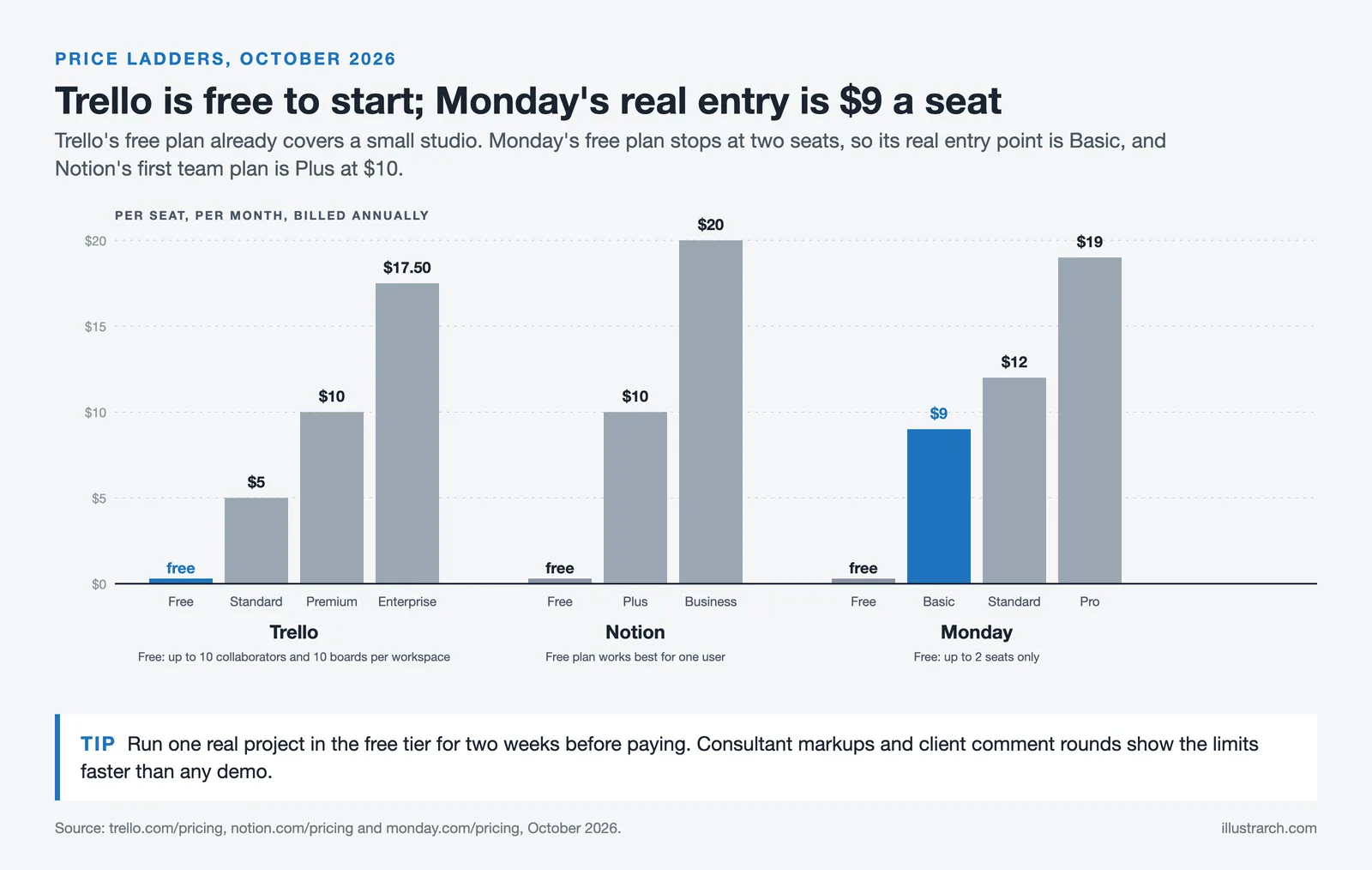
Trello’s free plan is genuinely usable. Unlimited cards and up to 10 boards per workspace are available at no cost, making it one of the few full-featured free options for small studios. The paid Standard tier ($5/user/month billed annually) adds unlimited boards; Power-Ups, which are integrations that extend Trello’s functionality — connecting it to Google Drive, Slack, or Figma, for example.
The main limitation is scale. Trello’s card-based system becomes hard to manage when projects multiply or when a single project has dozens of interdependent sub-tasks. It also lacks built-in documentation features, so meeting notes, design specs, and client briefs have to live elsewhere.
📌 Did You Know?
Trello was originally developed by Fog Creek Software and launched in 2011 before being acquired by Atlassian in 2017 for $425 million. It now serves over 50 million registered users globally, making it one of the most widely adopted Kanban tools across industries including architecture, software development, and media production.
What Is the Notion App and Why Are Architects Adopting It?
The Notion app is an all-in-one workspace that combines note-taking, databases, project tracking, and documentation. Unlike Trello, Notion does not start with a predefined structure. You build your workspace using blocks — text, tables, galleries, calendars, and Kanban boards — arranging them however your workflow requires.
Architecture studios use Notion primarily as a knowledge base paired with project management. A firm might maintain a Notion workspace that holds client briefs, material research, meeting notes, design standards, and project timelines all in one environment. This eliminates the constant context-switching between a task tool, a notes app, and a shared drive.
Notion templates accelerate setup considerably. The Notion community has published thousands of pre-built templates, including architecture-specific project trackers, client onboarding pages, and design review logs. As noted in our guide to digital tools for independent architects in 2026, Notion has become particularly popular among solo practitioners for organizing project documentation and maintaining design libraries alongside active client work.
The tradeoff is setup time. Notion’s flexibility means it requires more configuration before it becomes useful. Teams without a clear information structure can end up with inconsistent pages and hard-to-find documents. The platform rewards deliberate organization.
🎓 Expert Insight
“I have been working with Notion, Monday, ClickUp, Asana, Airtable, and Trello for the past years across different clients and projects, and Notion proved to be the most flexible, easy to use, and powerful. I feel it is almost limitless. Whatever I decided to do with it, it turned out to have a way to do it.” — Boril, multi-tool PM practitioner (via Motion/Usemotion.com user review)
This reflects what many architecture studio managers report after trialling multiple platforms: Notion’s learning curve is front-loaded, but its flexibility pays off once a workspace is properly structured around a firm’s specific project phases.

What Is Monday App and When Does It Make Sense for Firms?
The Monday app (monday.com) is a work management platform built around structured boards with customizable columns. Each row represents a task or project item; columns track status, assignee, deadline, priority, budget, and any other field the team defines. Unlike Trello’s fixed Kanban format or Notion’s open canvas, Monday gives teams structure without requiring them to build it from scratch.
For architecture firms managing multiple active projects simultaneously, Monday’s dashboard view is a significant advantage. A principal can see every project’s status across the entire practice on a single screen — which tasks are behind, who is over-allocated, and which deadlines are approaching. This visibility is hard to replicate in Trello or Notion without significant workarounds.
Monday also includes Gantt chart views, time tracking, and budget columns that are directly relevant to architectural project management. Firms coordinating with structural engineers, MEP consultants, and contractors benefit from Monday’s notification and automation features, which can trigger reminders when task statuses change or deadlines are missed.
The pricing model is worth noting. Monday’s free plan is limited to two users. Paid plans start at around $9/user/month (Basic, billed annually) and scale up through Standard and Pro tiers. For small studios of three to five people, this is more expensive than Trello or Notion, so the cost needs to be justified by the workflow complexity it solves.
⚠️ Common Mistake to Avoid
Many architecture firms adopt Monday because of its visual appeal and then underuse it by only tracking tasks in a single board. Monday’s real value comes from multi-board dashboards that connect project tracking, resource planning, and client communication in one view. Using it as a glorified checklist is a common pattern that leads firms to conclude the tool is overpriced — when the actual issue is underutilization.
Notion vs Trello vs Monday: Head-to-Head Comparison
The following table compares the three platforms across criteria that are directly relevant to architecture practice management.

Comparison: Notion vs Trello vs Monday for Architecture Firms
Key differences across features that matter most to design studios and architecture practices:
| Feature | Trello | Notion | Monday |
|---|---|---|---|
| Primary Use Case | Visual task tracking | Docs + project management | Structured work management |
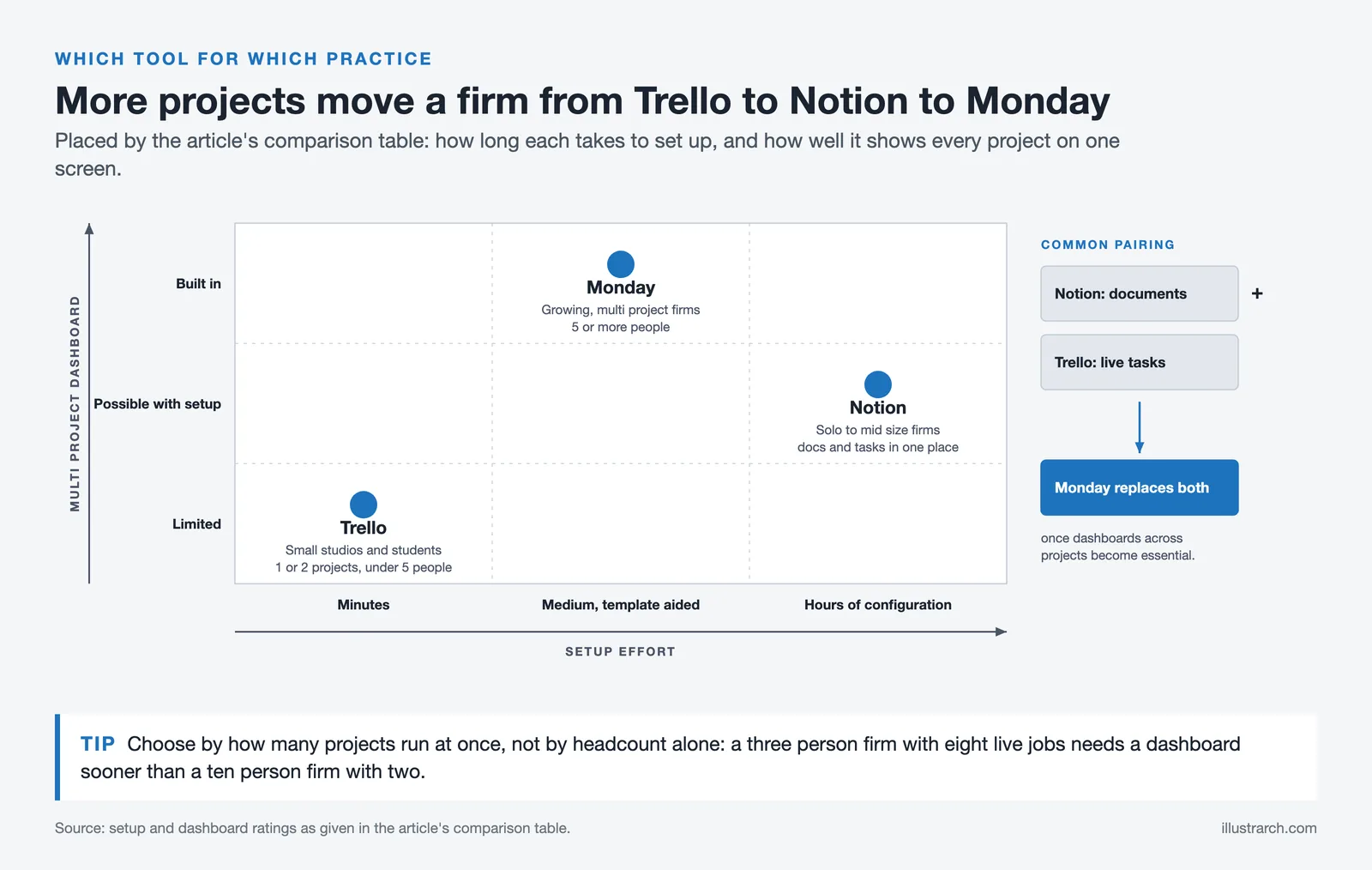
| Ease of Setup | Very fast (minutes) | Medium (hours of config) | Medium (template-aided) |
| Documentation | Card attachments only | Full wiki + databases | Basic doc updates |
| Gantt / Timeline View | Paid (Power-Up) | Paid (Plus+) | Yes (Standard+) |
| Multi-Project Dashboard | Limited | Possible with setup | Built-in |
| Free Plan Usability | Strong (unlimited cards) | Strong (solo users) | Very limited (2 users) |
| Starting Paid Price | $5/user/mo | $10/user/mo | $9/user/mo |
| Best Fit | Small studios, students | Solo to mid-size firms | Growing firms, multi-project |
Which Tool Fits Which Type of Architecture Practice?
The honest answer is that no single platform wins across all practice sizes and project types. The right choice depends on three variables: how many active projects you’re running, whether your team needs documentation alongside task tracking, and how much time you’re willing to invest in initial setup.
Trello works best for small studios and architecture students managing one or two projects at a time. Its Kanban board maps directly to phase-based workflows — Pre-Design, Schematic, Design Development, Construction Documents, Construction Administration — and the free plan is genuinely capable for teams under five people. If you are already exploring collaboration tools for architecture team projects, Trello is often the lowest-friction starting point.
Notion is the strongest option for firms that want a single system for both knowledge management and project tracking. A studio that maintains material libraries, client briefs, design standards, and research databases alongside active project timelines will get more value from Notion than from either Trello or Monday. The 2026 digital tools overview highlights Notion specifically for independent architects building custom workflows around project documentation and consultant coordination.
Monday makes the most sense for practices with five or more team members, multiple concurrent projects, and a need for real-time visibility across the portfolio. Its automation features reduce manual status updates — for example, automatically notifying a project manager when a consultant marks their drawing set as complete — which is particularly useful when coordinating with structural, MEP, and landscape teams across several sites at once.
💡 Pro Tip
Many mid-size architecture firms run Notion and Trello in parallel rather than choosing one: Notion holds all project documentation, research, and meeting records, while Trello manages the live task board for each project. This combination keeps the documentation system clean and the task view simple. Monday tends to replace both once a firm reaches the point where cross-project dashboards and automation become essential.

How Does the Notion App Handle Architecture-Specific Workflows?
Notion’s database feature is the key to making it work for architecture. You can build a Projects database where each entry links to sub-pages containing the brief, consultant contacts, drawing logs, fee schedule, and task tracker for that project. When a new project starts, duplicating a master template takes less than a minute and gives the whole team a consistent structure from day one.
Notion templates for architecture firms typically include a project status tracker (with fields for phase, deadline, client name, and fee status), a material research database, a meeting notes log, and a consultant tracker. The Notion setup for independent architects covered in our 2026 tools guide recommends starting with a published architecture template rather than building from scratch, then customizing it over the first few projects.
For practices that use diagram tools alongside their project management workflow, Notion integrates well with Miro and Figma, allowing diagram embeds directly inside project pages. This keeps visual references close to the documentation that contextualizes them.
Trello vs Notion vs Monday: Pricing Summary for Small Firms
Pricing is often the deciding factor for small architecture studios. All three platforms offer free tiers, but their limits differ significantly.
Trello’s free plan is the most capable of the three. Unlimited cards, up to 10 boards per workspace, and unlimited Power-Ups cover most small studio needs without a paid subscription. The $5/user/month Standard plan unlocks unlimited boards, custom fields, and an advanced checklist feature.
Notion’s free plan works well for individual users but limits collaboration slightly for teams. The Plus plan at $10/user/month (billed annually, as of October 2026) adds unlimited file uploads, 30-day page history, and team sharing without friction. For most architecture practices with two to ten people, the Plus plan is the entry point worth paying for.
Monday’s free plan is genuinely limited at two users, making it largely impractical for any firm with more than one person. The Basic plan ($9/user/month billed annually) is the real starting point, and the Standard plan ($12/user/month) adds timeline views and integrations that are important for architecture workflows. Note that Monday prices in seat increments, so a team of four pays for a five-seat plan.
For firms comparing project management costs alongside their broader digital tools investment in architecture practice, Trello offers the highest value at zero cost, Notion offers the best value paid, and Monday justifies its cost only when multi-project visibility and automation genuinely save staff time.
✅ Key Takeaways
- Trello is the fastest to set up and the most capable free option; best for small studios and individual project tracking using Kanban boards.
- Notion combines documentation and project management in one workspace; best suited to firms that need to maintain design research, client records, and task tracking together.
- Monday provides structured dashboards, Gantt views, and automation; most valuable for practices running five or more projects simultaneously with multi-disciplinary teams.
- All three tools can be used alongside architecture-specific software like Revit, SketchUp, and BIM platforms — none of them replaces CAD or BIM, they manage the work around the design.
- The most common mid-size studio setup is Notion for documentation plus Trello for active task boards, with Monday as a natural upgrade path as the practice grows.







Futuro House Production Revived in Finland After Decades-Long Hiatus
A Facebook listing for abandoned moulds led to the first new Futuro...
 illustrarch Editoral Team3 Mins read

Building Your Dream Home in NSW: What You Should Know About Montgomery Homes
Montgomery Homes has been building across Sydney, Newcastle, the Hunter, Wollongong and...
illustrarch Editoral Team4 Mins read

Designing a Home Theater: Where Drapery Fits Into the Plan
In a media room the curtains are a performance layer, not decoration....
illustrarch Editoral Team3 Mins read

Oscar Niemeyer’s Cathedral of Brasília: The Hyperboloid Concrete Hymn
The Cathedral of Brasília reads as a single gesture, yet it stood...
 Furkan Sen7 Mins read


Leave a comment