

What is BIM?
Building Information Modeling (BIM) is a 3D model-based process that enhances collaboration among architects, engineers.
 Elif Ayse Sen25 February 20223 Mins read453
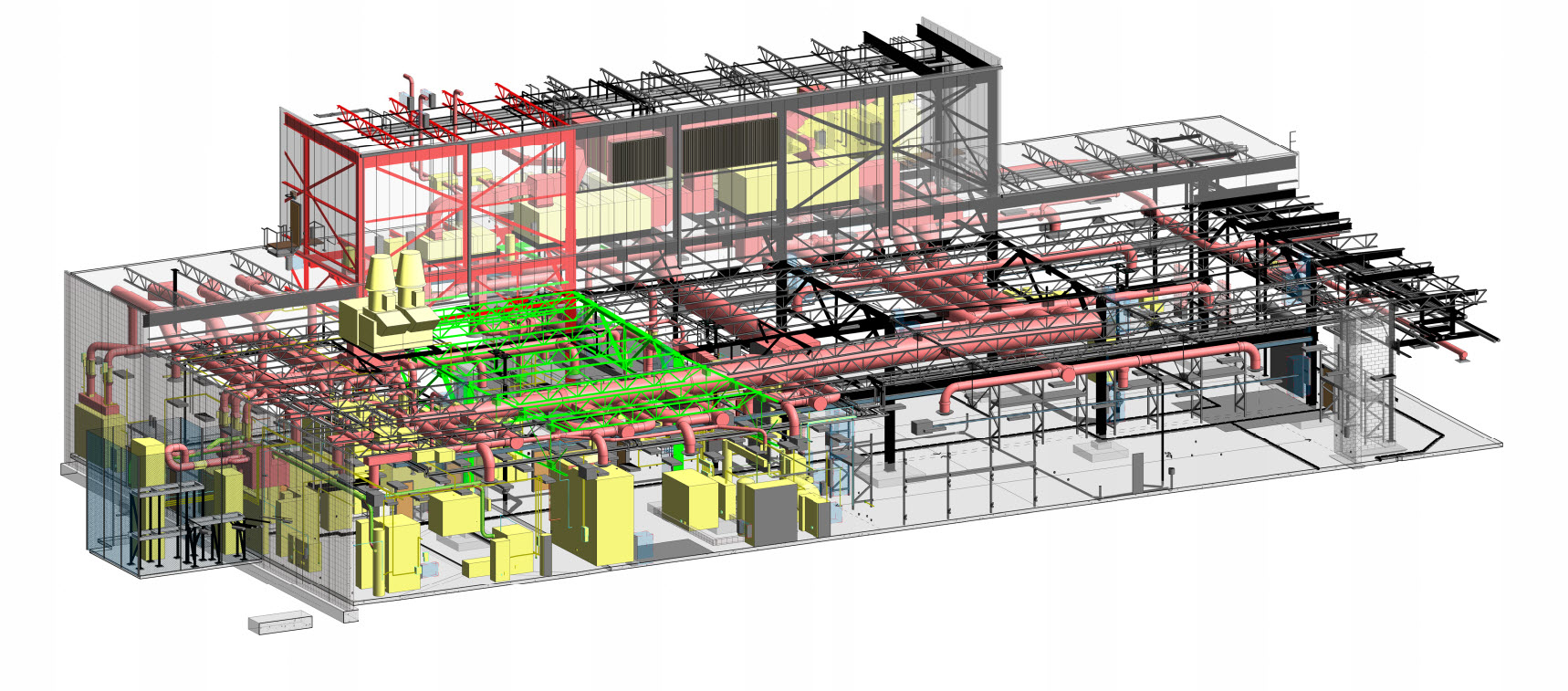
Table of Contents Show
Building Information Modeling is the foundation of digital transformation in architecture, engineering, and construction industry.
BIM has evolved greatly over the years and is currently the construction industry’s present embodiment of digital innovation. It is a smart 3D model-based procedure that typically necessitates a BIM execution plan for owners, architects, engineers who come from different disciplines, architects and construction professionals to more efficiently plan, design, construct, and manage buildings and infrastructure.
Everything from connected to information on materials, structures, and other technical factors is included in the BIM technique. More agents and information have been added to the process as BIM deployment has progressed.

BIM encompasses a wide range of data, including geographic information, work geometry, material supplies, and so on, and spans the project’s whole production process, including building maintenance. The BIM platforms automatically update changes made in any component of the project, which is a significant benefit of the approach. These updates affect all levels and sections, ensuring that no information is inconsistent or outdated.

Autodesk is the BIM industry’s partner in realizing new ways of working and better outcomes for business and the built world as the leader in BIM. Architects and engineers mostly develop BIM Projects by Autodesk software.
Do you know that? According to data from Autodesk, 60% of BIM-using architects say BIM is used on more than half of their projects, with 89% predicted by 2024.


See also our guide to Revit vs Archicad.
How BIM Differs From Traditional CAD
Traditional computer-aided design produces lines, arcs, and surfaces that represent a building geometrically but carry no meaning. A wall drawn in CAD is simply a set of parallel lines. In BIM, that same wall is a data-rich object that knows its thickness, material layers, fire rating, thermal value, and cost. Because every element holds information, a BIM model behaves like a coordinated database rather than a static drawing. When you move a door, every plan, section, and schedule that references it updates at once, which removes the manual cross-checking that consumes so much time in 2D workflows.
The Dimensions of BIM: 3D to 7D
Practitioners describe BIM in terms of dimensions that layer extra information onto the model. 3D covers the geometric model itself. 4D adds time, linking elements to a construction schedule so teams can simulate the build sequence. 5D introduces cost, connecting quantities to budgets for live estimating. 6D, sometimes called sustainability, tracks energy performance and lifecycle analysis. 7D supports facilities management once the building is occupied, holding asset data, warranties, and maintenance records. Most projects begin in 3D and adopt further dimensions as the team and the client mature in their use of the technology.
BIM Maturity Levels
The UK BIM framework popularised a scale that many countries now reference. Level 0 is unmanaged CAD, typically paper-based. Level 1 mixes 2D drawings with some 3D modelling but with little collaboration between parties. Level 2 requires each discipline to work in its own model and exchange data through a common file format such as IFC, which is where most regulated projects sit today. Level 3, still emerging, envisions a single shared model held in the cloud and edited in real time by every stakeholder. Knowing the target level early helps a team agree on software, file standards, and responsibilities.
Benefits and Common Challenges
The advantages are substantial. Clash detection catches conflicts between structural, mechanical, and electrical systems before they reach the site, cutting costly rework. Accurate quantities improve cost certainty, and the shared model reduces disputes because everyone references the same source of truth. The challenges are mostly cultural and financial rather than technical. Software licences and training represent a real upfront cost, smaller practices can struggle to justify the investment, and a project succeeds only when every party commits to working in a coordinated way. Setting clear modelling standards at the outset is the single most effective way to avoid problems later.
Getting Started With BIM
If you are new to BIM, begin by learning one authoring tool well, with Autodesk Revit and Graphisoft Archicad being the two most widely used in architecture. Practise modelling a small project from foundations to roof so you understand how objects, families, and schedules relate. Next, study the IFC open standard, since it governs how models move between disciplines and software. Agree a BIM execution plan on every project that names file formats, naming conventions, and who owns each model. Treat the model as a living asset rather than a deliverable, and its value will grow well beyond design into construction and long-term building management.








Futuro House Production Revived in Finland After Decades-Long Hiatus
A Facebook listing for abandoned moulds led to the first new Futuro...
 illustrarch Editoral Team3 Mins read

Building Your Dream Home in NSW: What You Should Know About Montgomery Homes
Montgomery Homes has been building across Sydney, Newcastle, the Hunter, Wollongong and...
illustrarch Editoral Team4 Mins read

Designing a Home Theater: Where Drapery Fits Into the Plan
In a media room the curtains are a performance layer, not decoration....
illustrarch Editoral Team3 Mins read

Oscar Niemeyer’s Cathedral of Brasília: The Hyperboloid Concrete Hymn
The Cathedral of Brasília reads as a single gesture, yet it stood...
 Furkan Sen7 Mins read


Leave a comment