

Understanding Architectural Programmatic Diagrams: A Visual Guide
Discover how programmatic diagrams help architects visualize spatial relationships, circulation, and building functions. Explore diagram types for architecture including volumetric and sectional diagrams, with step-by-step creation tips.
 Furkan Sen22 May 202618 Mins read1k

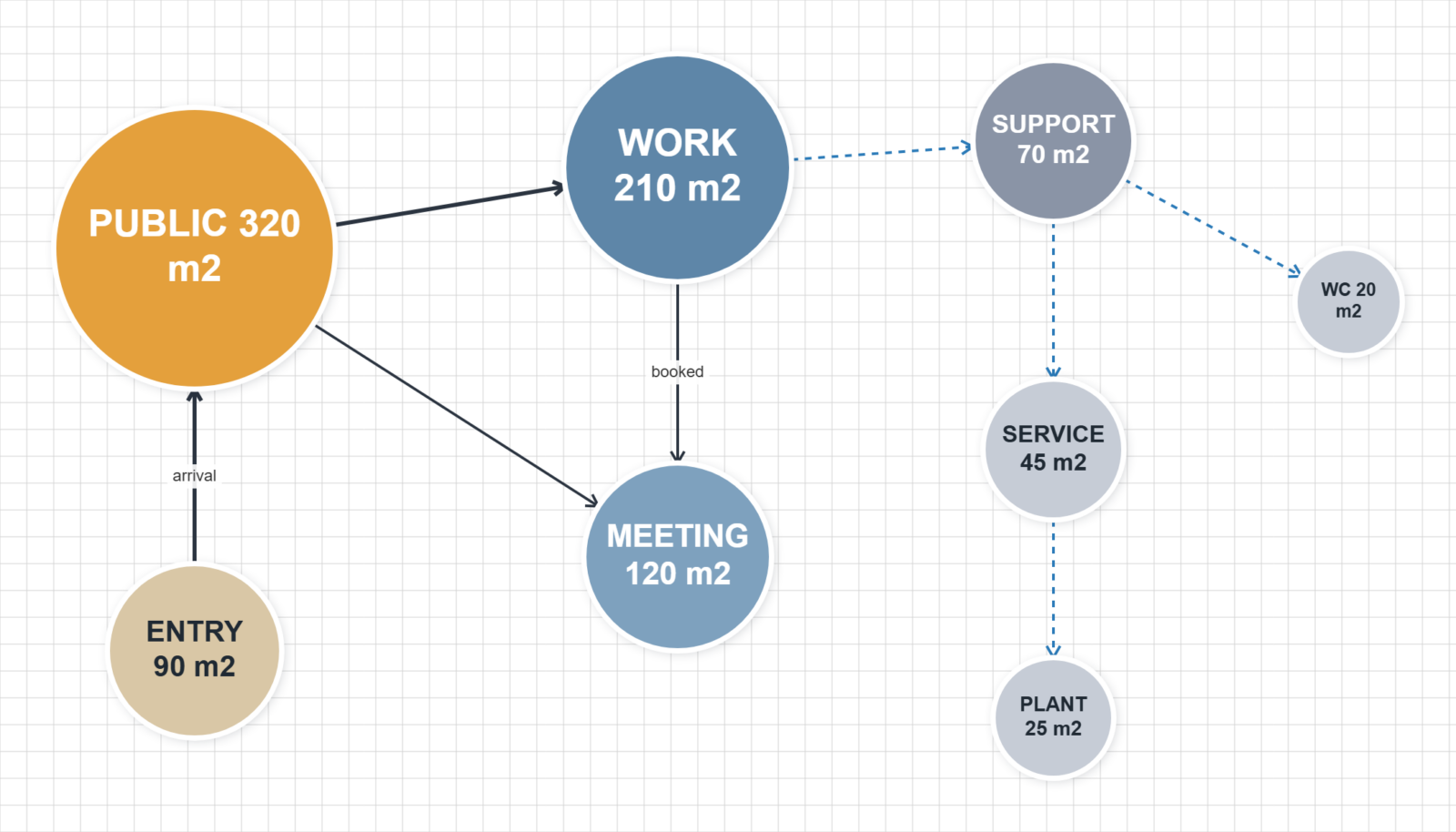
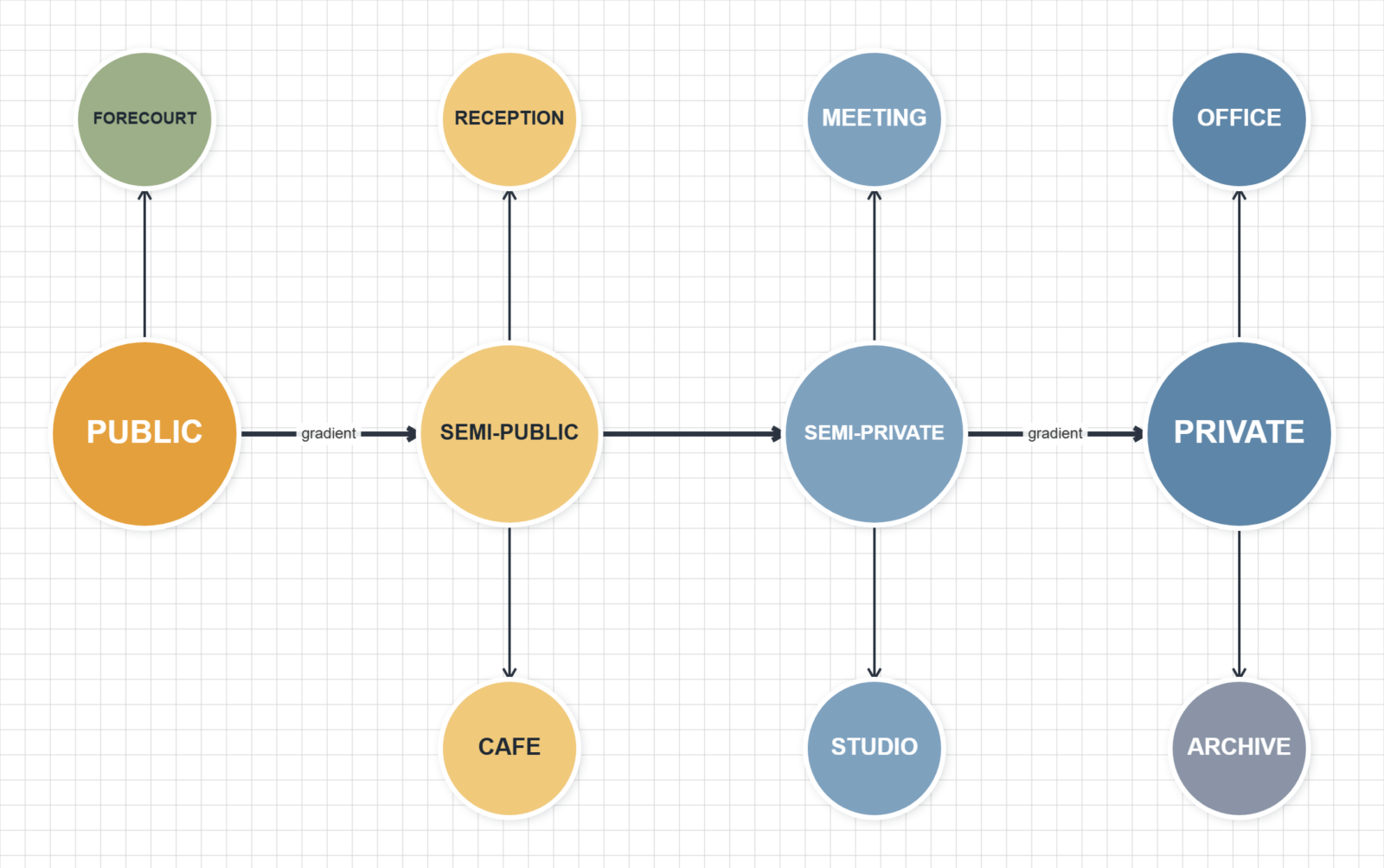


Table of Contents Show
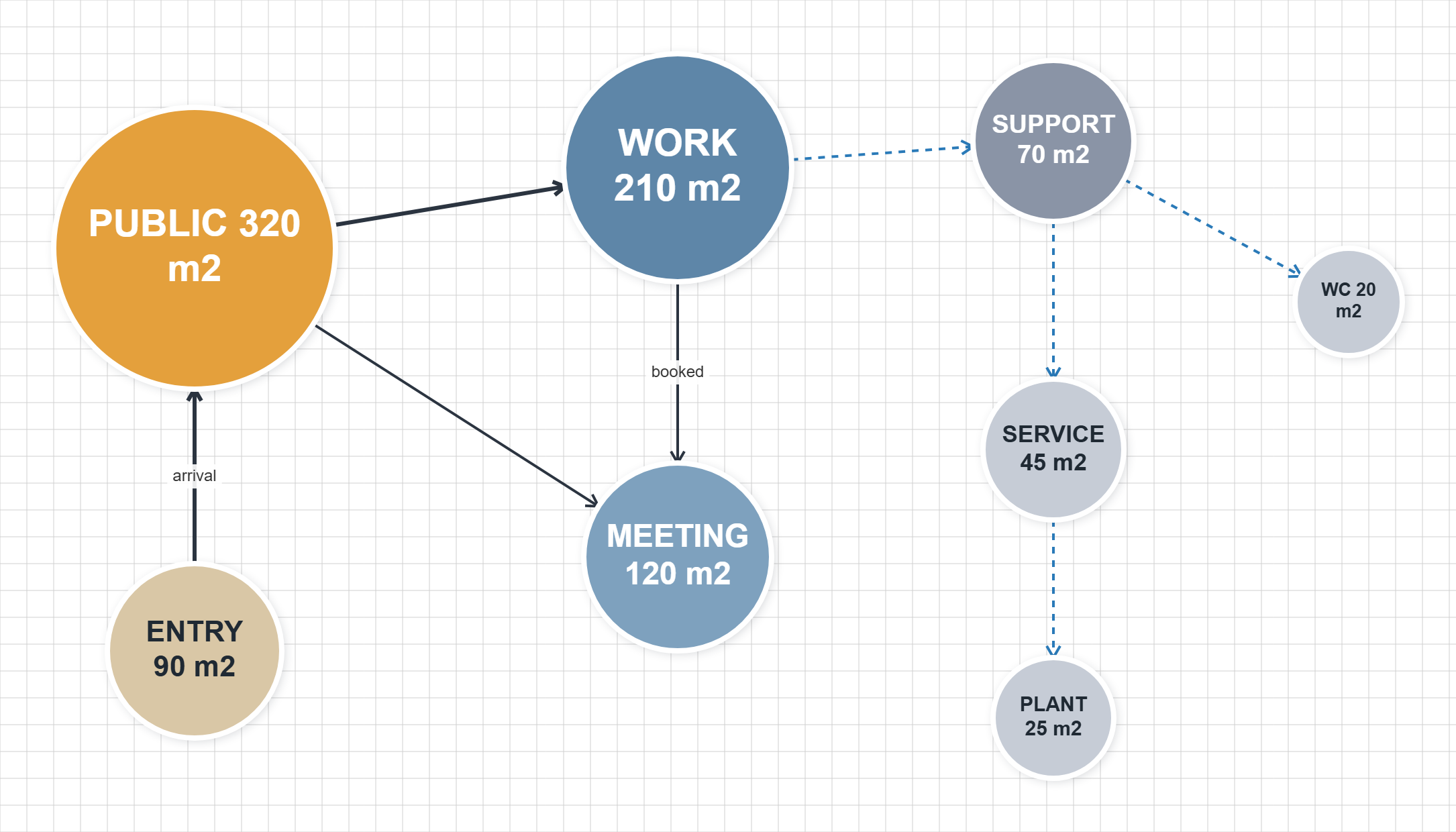
Quick answer: A programmatic diagram in architecture maps a building’s spaces and how they relate before any form is fixed. It shows each function as a zone or bubble, with links for circulation and adjacency, helping architects organize the program logically early in design.
A programmatic diagram in architecture is a visual tool that maps the spatial organization, functional relationships, and circulation patterns within a building. Architects use programmatic diagrams during the earliest design stages to translate a client’s requirements into a clear spatial layout, showing how rooms, zones, and movement paths connect before any detailed floor plans are drawn.
In the world of architecture, conveying complex ideas and the interplay of spaces within a building requires more than just words. This is where the programmatic diagram architecture approach comes into play, serving as a bridge between abstract concepts and concrete designs. A programmatic diagram is not just a drawing; it is a visual language that architects use to express the spatial organization, circulation, and relationships between different parts of a building or site. Whether you are working on a residential project or a large-scale commercial development, understanding how to use a diagram for architecture projects is essential for translating design intent into built form.
Programmatic diagrams are essential tools in the early stages of design, allowing us to explore and communicate the functional requirements of a project. They help us map out the flow of movement, the allocation of spaces, and the integration of the site’s context. By distilling vast amounts of information into digestible visual formats, these diagrams enable us to share our vision with clients, collaborators, and stakeholders in a clear and compelling way. In 2026, with advancements in digital design tools, the role of the programmatic diagram has become even more central to contemporary architectural diagramming workflows.
Understanding architectural programmatic diagrams is key to appreciating how buildings are planned and how they function. They are not just about aesthetics; they are about making spaces work harmoniously for the people who use them. This guide covers the purpose, types, creation process, and practical tools behind programmatic diagrams, giving you a clear framework for applying them in your own projects.
Understanding the Basics of Architectural Programmatic Diagrams
The Role of Programmatic Diagrams in Architecture
Programmatic diagrams play a central role in the architectural design process, serving as the bridge between an architect’s conceptual vision and the physical realization of a building. These diagrams are instrumental in the early stages of design, enabling architects, designers, and clients to explore and communicate functional requirements, space allocation, and the integration of a building within its site. By distilling complex ideas and spatial relationships into visual formats, programmatic diagrams provide a clear and accessible means for stakeholders to understand and evaluate the proposed layout and configuration of spaces. They highlight the designated functions within a building, such as reception areas, waiting rooms, and offices, and use text, colors, and icons to represent various activities. This visualization helps in brainstorming potential layouts, ultimately guiding the decision-making process to ensure that the building meets both the aesthetic and functional needs of its users.
The Whole Building Design Guide (WBDG) defines architectural programming as “the research and decision-making process that identifies the scope of work to be designed.” Programmatic diagrams are the visual output of this research, translating written requirements into spatial logic that the entire project team can evaluate and refine.
💡 Pro Tip
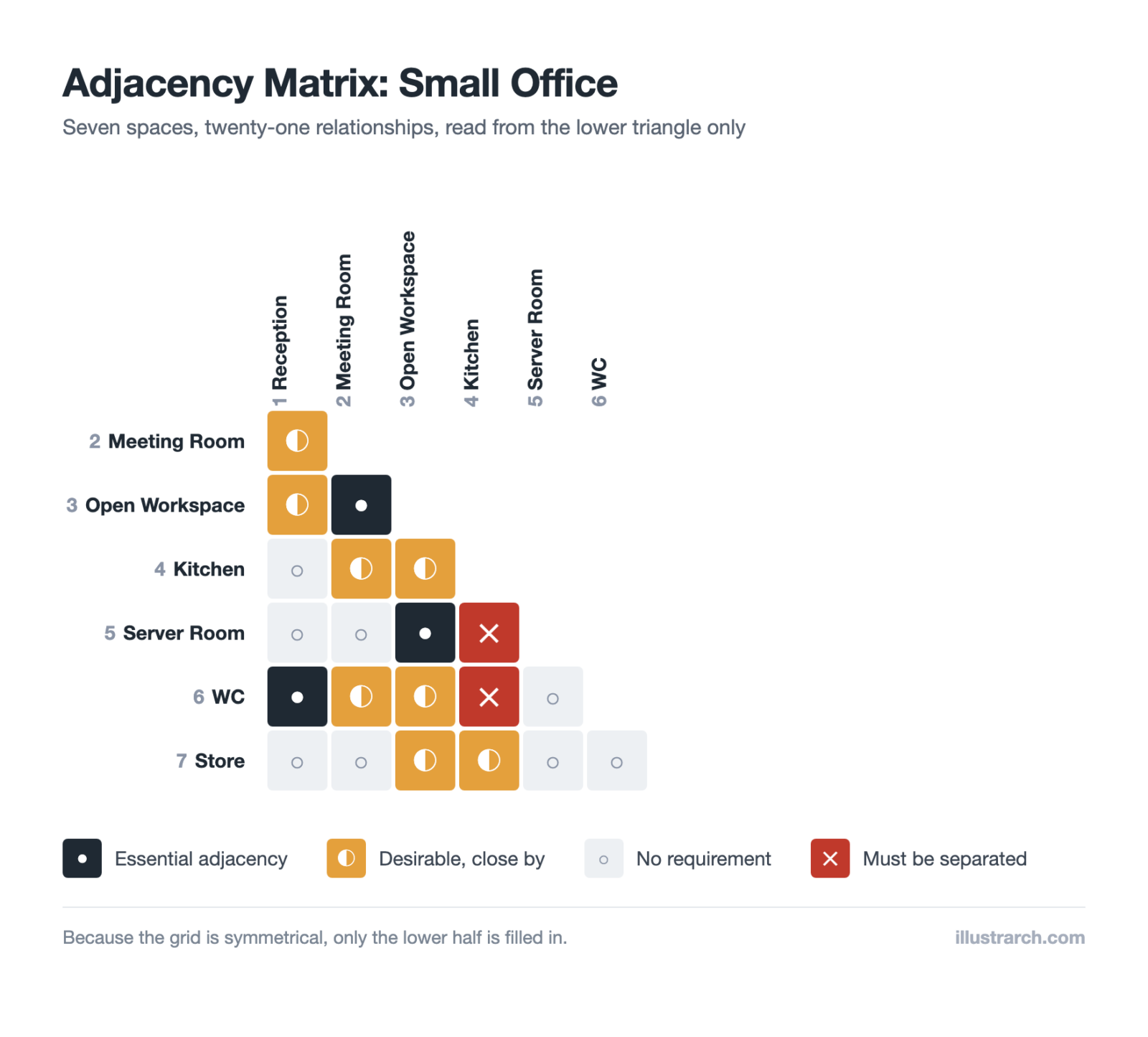
When starting a programmatic diagram, always begin with a written space list and adjacency matrix before drawing anything. Experienced architects find that spending 30 minutes organizing the program in a simple spreadsheet (listing each space, its required area, and its relationships to other spaces) saves hours of diagram revisions later.
Key Components of Programmatic Diagrams
The effectiveness of an architectural programmatic diagram stems from its ability to convey complex information succinctly. Key components of these diagrams include spatial organization, circulation patterns, and the relationship between different spaces. Spatial organization refers to how spaces are arranged and allocated within the building, illustrating the distribution of areas designated for specific functions. Circulation patterns depict the flow of movement throughout the building, highlighting how different areas are connected and how people will navigate the space. This aspect is crucial for creating efficient and intuitive layouts that enhance the occupant’s experience. Relationships between spaces are also a critical component, showing the proximity and accessibility between areas with different functions, ensuring that the building operates harmoniously. Through the strategic use of text, colors, and icons, programmatic diagrams articulate these components, offering an overview of the proposed design’s functional and aesthetic qualities. By focusing on these key elements, architects can effectively communicate their vision and ensure that the final building meets the intended goals and requirements.
The relationships behind a programmatic diagram are easiest to fix in a grid. Our free adjacency matrix maker records every pair at four levels, including must be separated.
Why Use a Diagram for Architecture Projects?
Every successful architecture project relies on clear communication and thoughtful spatial planning. Using a diagram for architecture projects allows architects and designers to visualize abstract design concepts before committing to detailed construction documents. These diagrams act as a shared reference point where the entire project team, from clients to engineers, can align on the building’s intended function, flow, and form.

In contemporary practice, a well-crafted diagram for architecture serves multiple purposes: it identifies spatial inefficiencies early, reveals opportunities for design innovation, and ensures regulatory and programmatic requirements are met. As the American Institute of Architects (AIA) emphasizes, diagramming is one of the most effective methods for aligning stakeholder expectations during the pre-design and schematic design phases. Whether you are exploring different types of architectural diagrams or refining a single programmatic layout, the diagram remains the architect’s most versatile communication tool.
📌 Did You Know?
The MacLeamy curve in the AIA’s Integrated Project Delivery guide shows that design changes are cheapest during programming and schematic design, and that their cost rises sharply once construction documents are complete. A strong programmatic diagram session at the start of a project can prevent expensive revisions later in the design process.
How Does a Programmatic Diagram Differ from a Bubble Diagram?
One of the most common questions architects and students ask is how a programmatic diagram differs from a bubble diagram. While they share similarities, each serves a distinct purpose in the design workflow.
A bubble diagram is typically the first spatial sketch an architect creates. It uses simple circles to represent spaces and lines to show adjacency relationships, without concern for scale, proportion, or detailed program information. A programmatic diagram builds on this foundation by adding layers of information: specific area allocations, circulation routes, functional zoning, user flow patterns, and even time-based activity mapping. While a bubble diagram answers “what goes where?”, a programmatic diagram answers “how do these spaces work together throughout the day?”
In practice, many architects move from bubble diagrams to programmatic diagrams as their understanding of the project deepens. The programmes and functions diagram approach bridges these two tools, adding functional analysis to the spatial logic already established in the bubble diagram stage.
Programmatic grouping turns into a zoning diagram as soon as you give each group measured area. Our free zoning diagram maker does exactly that, in metres.
The Various Types of Architectural Diagrams
Architectural diagrams serve as the foundation for translating complex design concepts into understandable visual representations. They are essential tools that articulate the relationships between space, function, and human interaction. Different types of architectural diagrams highlight various aspects of a building’s design, each serving a unique purpose in the architectural design process.
Comparative Overview of Diagram Types
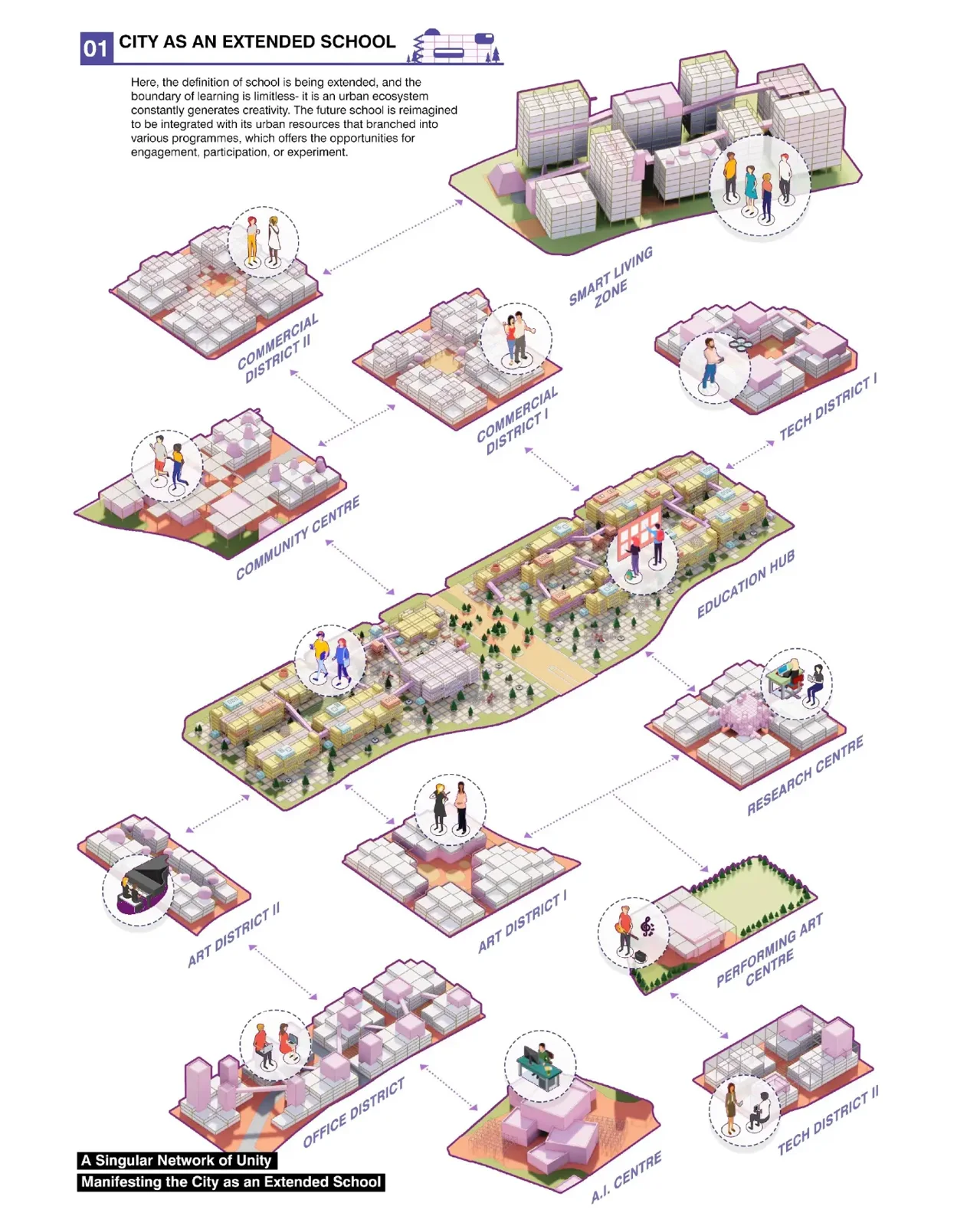
Architectural diagrams can be broadly categorized into several types, including programmatic, sectional, planimetric, axonometric, and volumetric diagrams, among others. The table below summarizes how each type differs in focus, view, and typical use case.
| Diagram Type | Primary Focus | View / Projection | Best Used For |
|---|---|---|---|
| Programmatic | Function, space allocation, user activity | 2D plan or section overlay | Early design, client presentations, program verification |
| Sectional | Vertical spatial relationships, daylighting | Vertical cut-through | Multi-level buildings, atria, topographic sites |
| Planimetric | Horizontal layout, site relationships | Top-down 2D | Site planning, floor plan analysis |
| Axonometric | 3D form, context, building envelope | 3D parallel projection | Design presentations, exploded views |
| Volumetric | Mass, proportion, void/solid relationships | 3D massing model | Urban context studies, massing options |
| Circulation | Movement patterns, user flow | Plan or section overlay | Wayfinding, code compliance, user experience |
| Bubble | Spatial adjacency, rough sizing | Abstract 2D | Earliest concept phase, brainstorming |
- Programmatic diagrams focus on the spatial function and the flow of movement within a building. These diagrams map out the relationships between different spaces based on their intended use and show how occupants interact with each space throughout the day.
- Sectional diagrams provide a vertical cut-through of a building, revealing the inner workings of spaces, including vertical circulation, ventilation, and daylighting strategies without adhering to a specific scale. They relate every component of the design back to human scale, offering insights into the volumetric and spatial hierarchy.
- Planimetric diagrams highlight the horizontal circulation of space through a top-down view. This type views the spatial composition and relationships from above, focusing on layout and the distribution of programs across the building’s footprint.
- Axonometric diagrams combine elements of both vertical and horizontal representation, offering a 3D view of the building or its components from an exterior vantage point. These diagrams excel at showing a building’s form and its interaction with the surrounding context.
- Volumetric diagrams visualize the three-dimensional mass, proportions, and spatial volumes of a design. Architects use volumetric diagram architecture representations to convey how form and void interact within a proposal, making them essential for understanding a building’s overall massing and scale.
- Circulation diagrams map the movement of people, vehicles, and goods through a building, showing entry points, corridors, vertical circulation elements, and the paths users take between key destinations.

Volumetric Diagram in Architecture: Understanding 3D Spatial Relationships
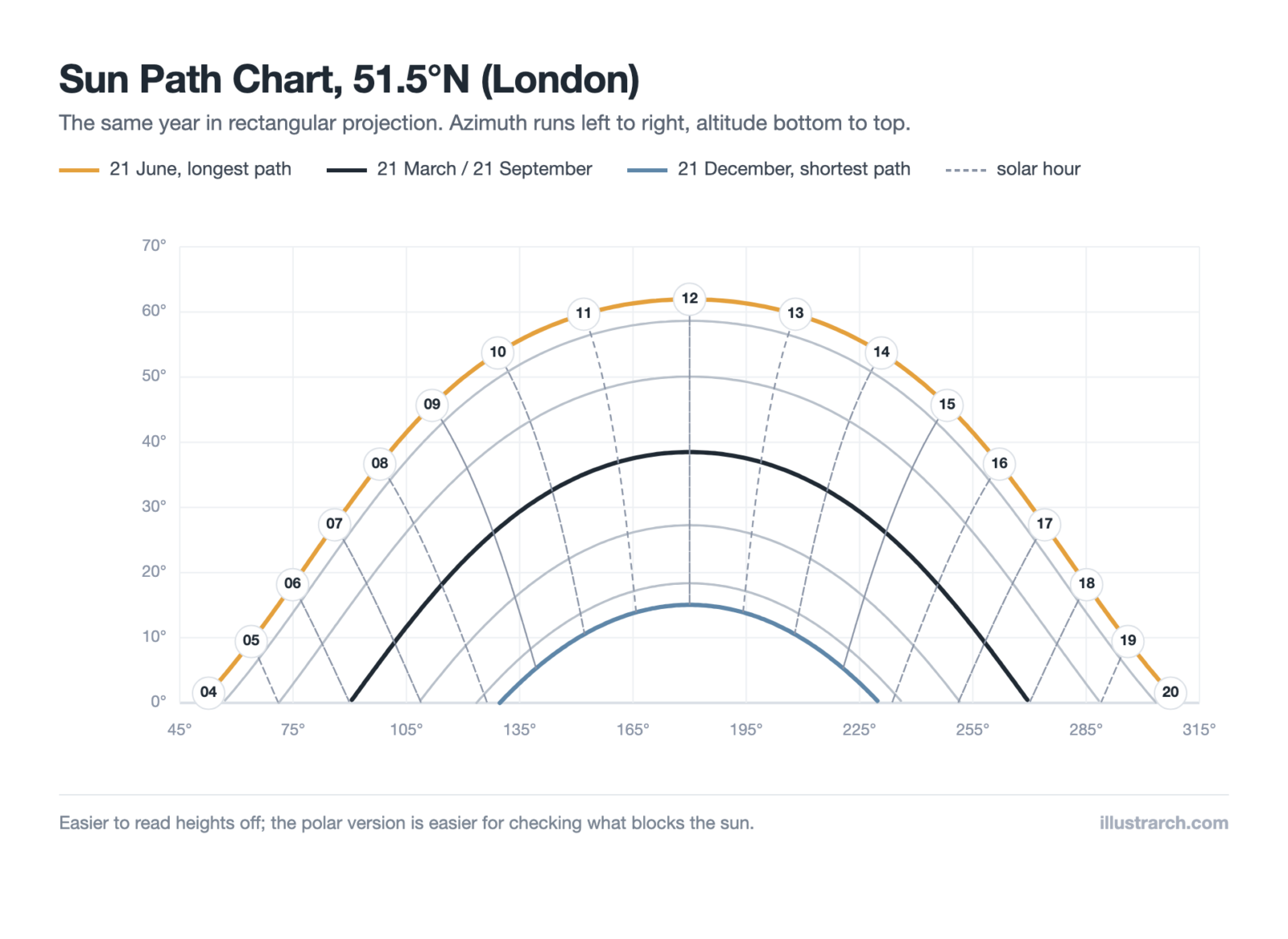
A volumetric diagram architecture representation is one of the most powerful tools available for visualizing how three-dimensional mass and void interact within a building design. Unlike programmatic diagrams that focus on function and flow, volumetric diagrams emphasize form, proportion, and the physical presence of a structure in its environment. Architects use these diagrams to study how a building’s massing relates to neighboring structures, how sunlight interacts with the form across different seasons, and how the overall volume contributes to the urban or rural context.
In 2026, the use of volumetric diagram techniques has grown substantially, especially with the integration of parametric design tools such as Rhinoceros 3D and Grasshopper. These tools enable architects to generate and iterate on volumetric studies rapidly, testing multiple massing options before committing to a final design. A strong volumetric diagram in architecture communicates the spatial hierarchy of a building, showing how public, semi-public, and private volumes are organized and how they contribute to the overall experience of the space.
Focus on Programmatic Diagrams in Design Development
Among the various types, programmatic diagrams play a crucial role in the initial stages of design, helping architects and stakeholders envision the functioning of a building. These diagrams go beyond spatial planning; they address the experiential and functional arrangements of spaces. By visualizing how different areas within a building relate to and complement each other, programmatic diagrams facilitate a deeper understanding of the project’s conceptual underpinnings.
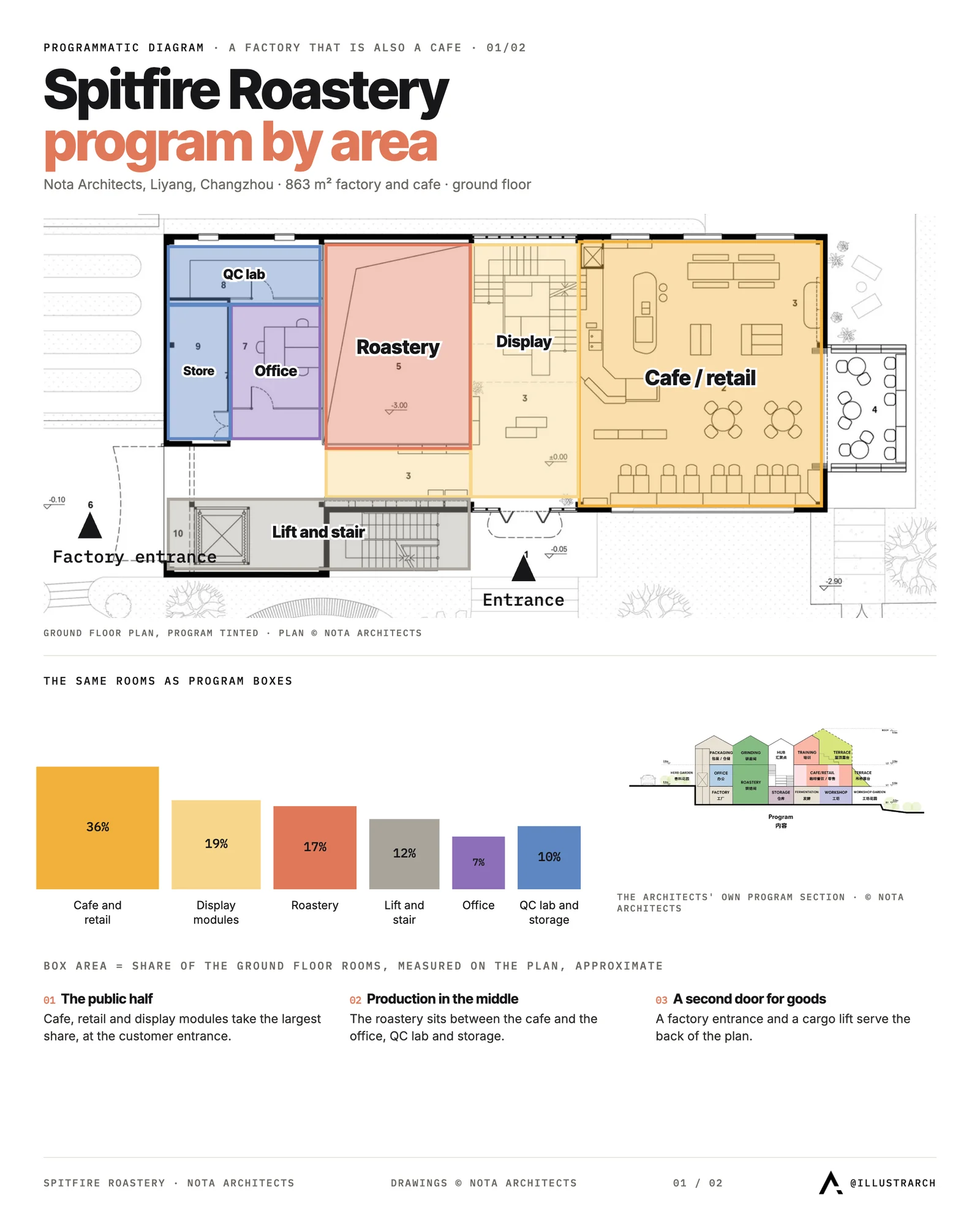
Focus on programmatic diagrams allows architects to explore and refine how space is allocated for different uses and how these uses interact. It is about mapping the journey of individuals through the building, ensuring that movement is intuitive and that spaces flow naturally into one another. These diagrams also highlight the relationship between interior and exterior spaces, how natural light influences the environment, and how the building adapts to seasonal changes.
Using programmatic diagrams during design development helps in identifying potential issues in space usage and circulation early in the process, allowing for a more responsive and adaptive design. As such, they are indispensable tools for architects aiming to create spaces that are not only visually appealing but also functional and in tune with the needs of their occupants.
⚠️ Common Mistake to Avoid
A frequent error in programmatic diagramming is jumping directly into software without first analyzing the written building program. Architects who skip the adjacency matrix step often produce diagrams that look polished but contain spatial logic errors, such as placing service areas far from the zones they support or creating circulation dead ends. Always validate your spatial relationships on paper before opening any design software.
Programmatic Architecture: Bridging Concept and Built Form
The concept of programmatic architecture extends beyond diagramming alone. It represents a design philosophy where the building’s program, or its intended use and activity patterns, drives every spatial decision. In programmatic architecture, the architect begins by deeply analyzing the activities, user needs, and functional relationships that a building must support, and then translates these into spatial configurations. This approach ensures that every room, corridor, and shared space serves a clearly defined purpose.
Programmatic architecture is especially relevant in complex building types such as hospitals, educational campuses, and mixed-use developments, where the interplay of multiple functions demands careful coordination. By grounding design decisions in programmatic analysis, architects can create buildings that respond intelligently to both current needs and future adaptability. Firms like those featured on ArchDaily regularly show how programmatic architecture translates user requirements into innovative spatial solutions, demonstrating the lasting value of this approach in contemporary practice.
🎓 Expert Insight
“Architecture is the thoughtful making of space.”
Louis Kahn, Architect
Kahn’s emphasis on spatial intention aligns directly with the principles of programmatic architecture. Every diagram begins with the question of what a space needs to do for the people who use it, and the program is the architect’s primary tool for answering that question with clarity and purpose.
How Architectural Programmatic Diagrams Aid in Project Visualization
Mapping Out Functions and Relations
Architectural programmatic diagrams play an indispensable role in the visualization of a project, allowing us to map out functions and relations within a space effectively. These diagrams are important in delineating the distribution of spaces and their intended uses across a building’s layout. By doing so, they not only specify areas designated for particular activities but also illustrate the intended interaction between these spaces. For instance, they can reveal how a public foyer might flow into private offices or how pedestrian traffic is directed through a plaza.
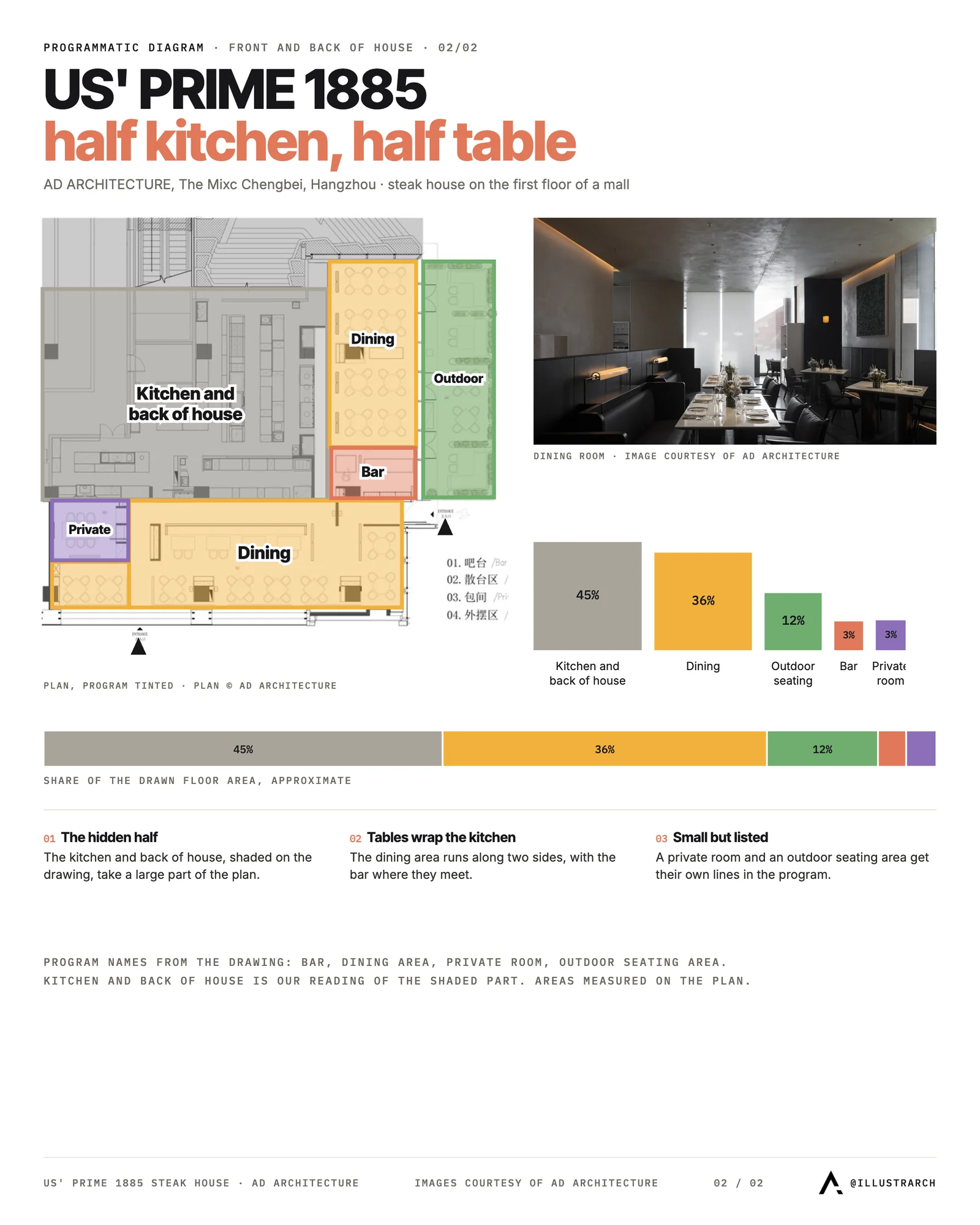
Through the use of programmatic diagrams, we can ensure that spatial relationships are not left to chance. They help in identifying synergies between spaces, such as the proximity of support spaces to primary functional areas, which is crucial in industries like healthcare, where time saved in movement can have significant impacts. This methodical mapping out of functions and relations is not only beneficial for architects but also for clients and end-users, as it provides a clear vision of how spaces are organized and interact with each other, aligning with the project’s goals and the occupants’ needs.
Enhancing Communication Among Stakeholders
One of the most significant advantages of architectural programmatic diagrams is their capacity to enhance communication among all project stakeholders. These diagrams serve as a common language, bridging the gap between technical architectural concepts and those without a background in architecture. By presenting complex relationships between spaces in an accessible and understandable format, stakeholders can easily grasp the design intent and functionalities of different areas within the project.
These diagrams facilitate productive discussions and feedback sessions by providing a visual reference that stakeholders can point to when expressing concerns or suggesting modifications. This clarity in communication ensures that everyone’s expectations are aligned and that any adjustments to the plan can be made efficiently, leading to a smoother development process. The use of programmatic diagrams in presentations or meetings helps to keep discussions focused on functional requirements and spatial efficiency, essential aspects in the successful realization of a project. Architectural programmatic diagrams are invaluable tools not only for visualizing space allocation and relationships but also for building understanding and collaboration among the people who will bring a project to life.
Steps in Creating an Architectural Programmatic Diagram
Architectural programmatic diagrams shape the outcome of architectural projects. These diagrams are instrumental in visualizing and planning the interactions and spatial dynamics within a building. Understanding the programmatic diagram architecture workflow is essential for producing clear and effective visual outputs. To create an effective programmatic diagram, follow a systematic approach. Below, we outline the essential steps to construct a clear and informative programmatic diagram.
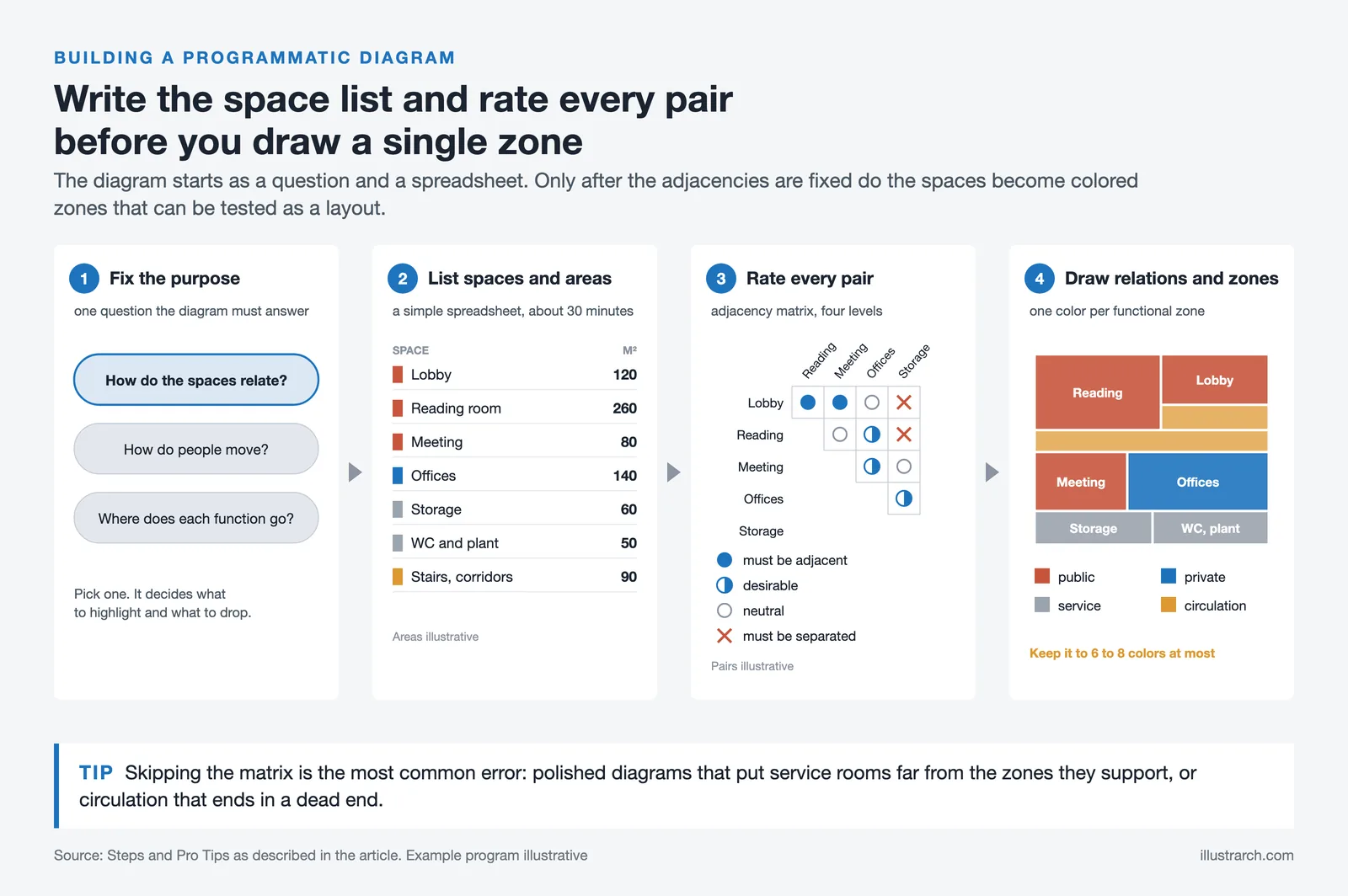
Establishing the Diagram’s Purpose
First, determine the primary objective of the architectural programmatic diagram. The purpose could vary from illustrating spatial relationships within a building, to showing the flow of movement, or simply conveying the allocation of spaces for different functions. Establishing this early on guides the entire process, ensuring the diagram is tailored to meet specific project needs and objectives. By pinpointing the diagram’s purpose, you can focus efforts on highlighting the information that matters most to stakeholders and team members.
Identifying Spatial and Functional Requirements
Next, gather and analyze the spatial and functional requirements of the project. This involves understanding the needs of the end-users, including the types of activities that will take place and the essential features required to support those activities. Consider various factors such as space sizes, connections between different areas, privacy considerations, and the need for flexible spaces that serve multiple purposes. Identifying these requirements is crucial for creating a diagram that accurately represents the envisioned usage of the space, ensuring that every element of the design is both purposeful and functional.
Drawing Relationships and Zoning
After establishing the purpose and understanding the requirements, proceed to delineate relationships between spaces and zoning. This step involves plotting out how different areas of the project relate to one another and organizing spaces in a way that optimizes flow and coherence. Consider how individuals will move through the spaces, how certain areas may need to be grouped together based on function, and how public and private spaces interact. Drawing these relationships clearly on the diagram helps to visualize and assess the effectiveness of the proposed spatial strategy. It also aids in identifying potential issues or inefficiencies early in the design process, allowing for adjustments before any physical work begins.
By following these steps, you ensure that your architectural programmatic diagrams are not just visually appealing, but also meaningful and beneficial for the project. These diagrams serve as foundational tools that aid in the visualization of complex spatial dynamics, enhancing communication, facilitating collaboration, and ultimately leading to the successful realization of architectural projects.
Real-World Applications of Programmatic Diagrams by Building Type
Programmatic diagrams are used across every building type and project scale. The way you apply them shifts depending on the complexity of the program and the number of user groups involved. Here are practical examples of how these diagrams function in specific contexts.
In healthcare design, architects use programmatic diagrams to separate sterile and non-sterile zones, organize patient flow from admission to discharge, and position support services like pharmacies and laboratories relative to treatment areas. A well-structured programmatic diagram can reduce the distance nurses walk daily, improving both staff efficiency and patient outcomes.
Educational buildings rely on programmatic diagrams to cluster classrooms around shared resources like libraries, maker spaces, and outdoor learning areas. The diagram helps administrators visualize how grade levels or departments share or separate spaces, and how after-hours community use can coexist with school operations.
In commercial office design, programmatic diagrams map collaboration zones, quiet work areas, meeting rooms, and amenity spaces. Open-plan offices, hybrid work environments, and co-working spaces all benefit from a clear diagram that balances density with comfort and functionality. Cultural institutions such as museums and performing arts centers use program diagrams to separate front-of-house public areas from back-of-house operations, coordinating complex circulation paths that guide visitors through exhibitions in a deliberate sequence.
🏗️ Real-World Example
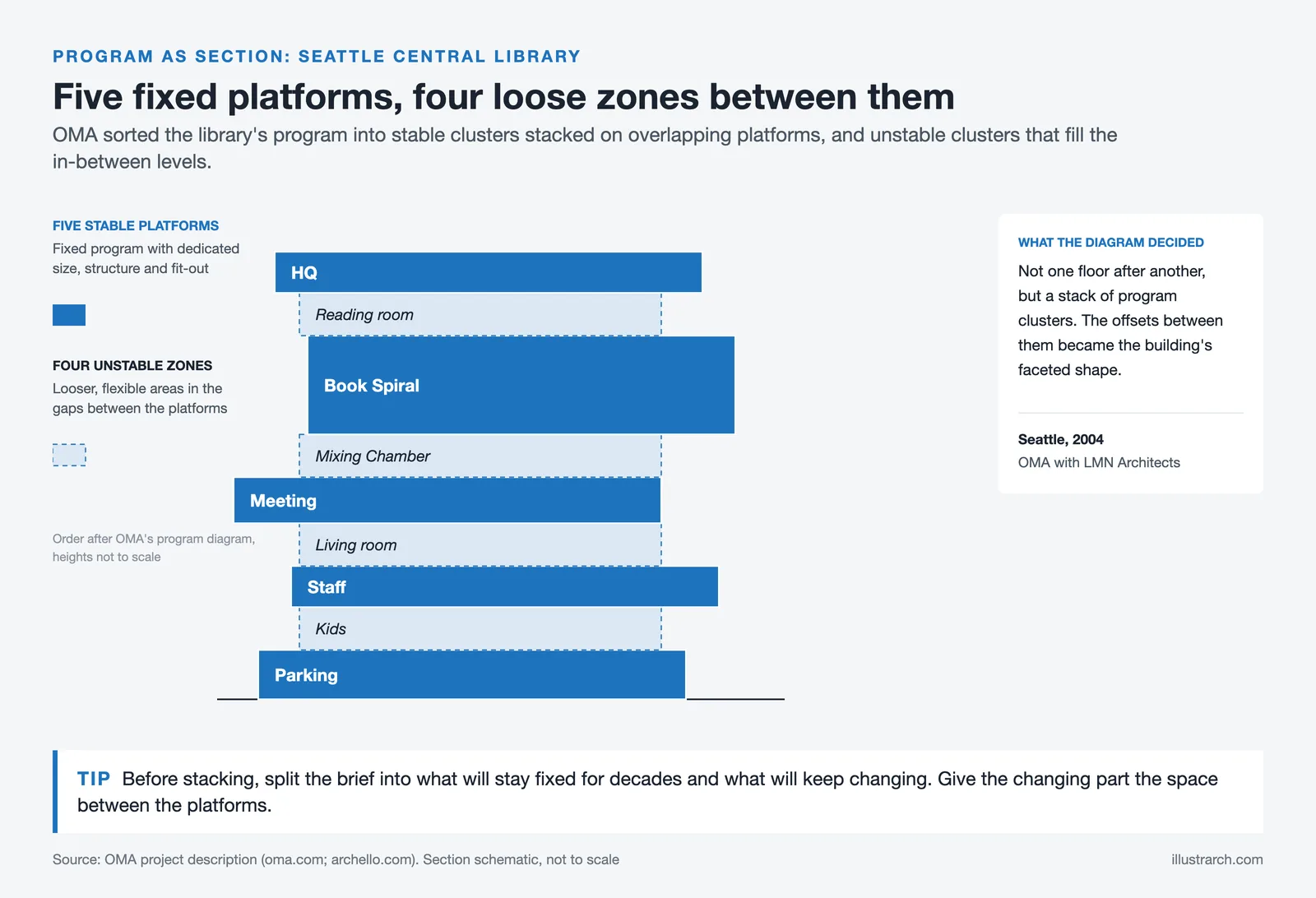
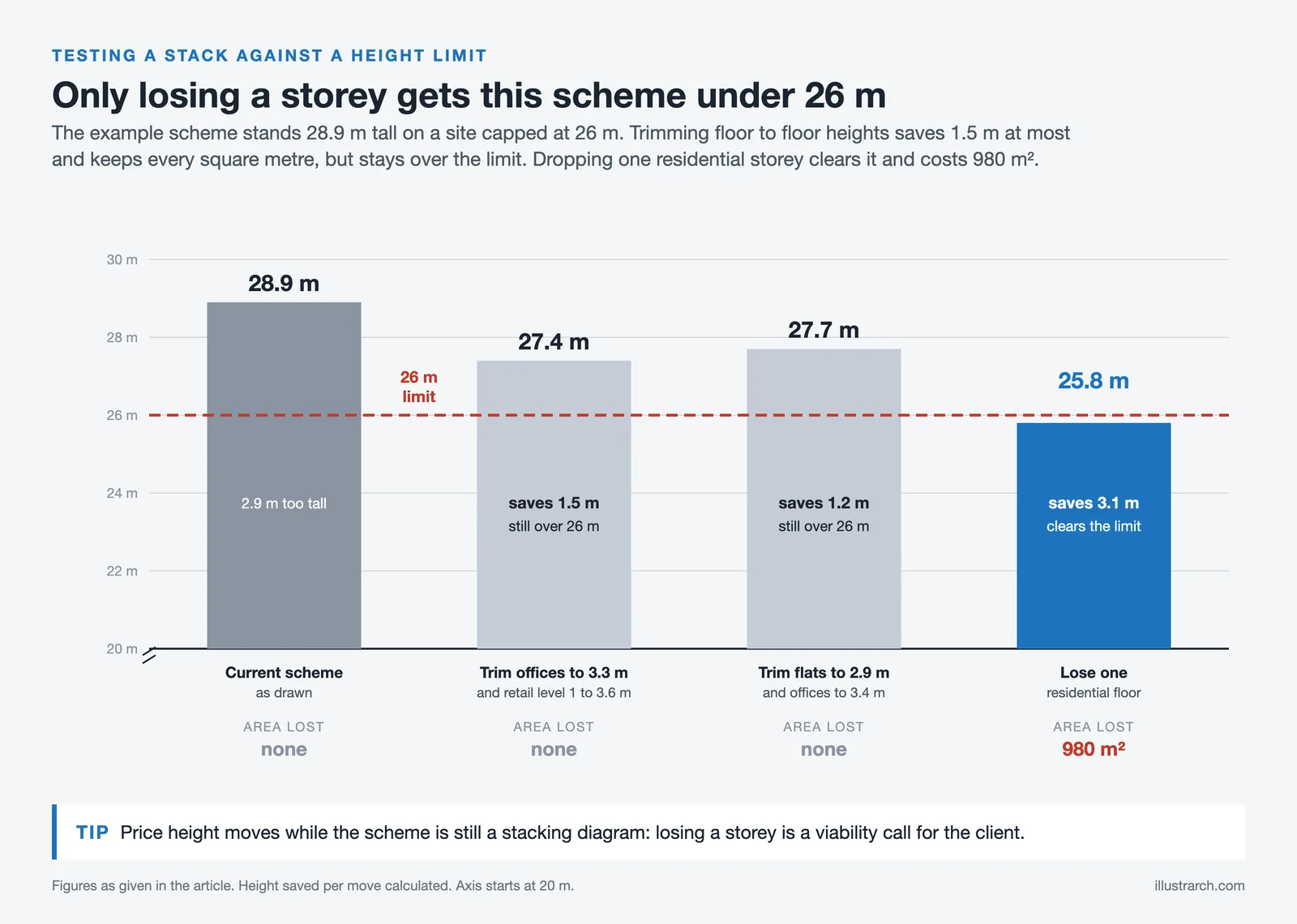
Seattle Central Library by OMA/LMN (Seattle, 2004): The design team used a sequence of programmatic diagrams to reorganize the library’s program into five distinct spatial “platforms” (parking, staff, meeting, books, headquarters) separated by flexible in-between zones. This diagrammatic approach allowed the architects to break away from traditional floor-by-floor library layouts, the same decision a stacking diagram is drawn to test and create a building where programmatic logic directly generated the architectural form.
Overcoming Challenges in Programmatic Diagramming
In the process of developing architectural programmatic diagrams, various challenges arise. Each challenge presents an opportunity to refine the approach, ensuring that the diagrams not only fulfill their functional purpose but also engage the viewer on a visual level. Below, we explore strategies for balancing aesthetics with information and highlight common pitfalls to avoid.
Balancing Aesthetics and Information
Achieving synergy between aesthetics and information is key in programmatic diagramming. The goal is to create diagrams that are both informative and visually clear. To do this, focus on selecting design elements that complement the data they represent. For instance, use color and iconography consistently to denote similar functions or areas, making the diagram intuitive at a glance.
Pay close attention to the layout, ensuring that it is structured in a way that guides the viewer’s eye through the information hierarchy. Clear labels and annotations should describe elements and relationships without overwhelming the viewer. This careful orchestration of design elements allows you to convey complex information in an accessible and aesthetically pleasing manner.
💡 Pro Tip
Limit your color palette to a maximum of 6 to 8 distinct colors per programmatic diagram. More than that makes the diagram difficult to read, especially when printed. Assign one color per functional zone (public, private, service, circulation) and stick to the same color scheme across all diagrams in a single project for consistency.
Common Pitfalls to Avoid
In the journey to produce effective programmatic diagrams, several common pitfalls can detract from the diagram’s effectiveness. One major pitfall is overcrowding the diagram with too much information or excessive design elements. This often leads to confusion rather than clarity. To avoid this, prioritize the most critical information and use design elements sparingly, ensuring each serves a purpose.
Another pitfall is inconsistency in the use of symbols, colors, or fonts, which can lead to misinterpretation of the information. To combat this, establish a clear and consistent visual language from the outset and adhere to it throughout the diagram.
Lastly, designing without considering the end user’s perspective can make the diagram difficult to understand for non-specialists. Address this by engaging in iterative reviews, incorporating feedback from diverse stakeholders to ensure the diagrams are universally understandable.
By carefully working through these challenges, you enhance your programmatic diagrams’ ability to effectively communicate spatial relationships and functions, thereby facilitating a smoother architectural planning and decision-making process.
What Tools Do Architects Use for Programmatic Diagrams in 2026?
The landscape of digital design tools continues to evolve, and architects in 2026 have access to a wide range of software for creating programmatic diagram architecture visualizations. Popular choices include Adobe Illustrator for graphic-quality 2D diagrams, Autodesk Revit for BIM-integrated programmatic layouts, and Rhinoceros 3D with Grasshopper for parametric volumetric studies. For quick conceptual diagramming, tools like Diagrams.net (formerly Draw.io) and Figma offer collaborative, cloud-based workflows that make it easy to share and iterate on diagrams with remote teams.
Selecting the right tool depends on the complexity of your project and the audience for your diagram. For early-stage exploration, simple hand-sketched bubble diagrams remain effective, while later stages benefit from the precision and presentation quality of digital tools. Regardless of the medium, the principles of clear spatial organization, consistent visual language, and effective communication remain the foundation of every successful diagram for architecture. For more guidance on the creation process, explore our guide to creating architecture diagrams.
AI-assisted design tools have also begun to influence programmatic diagramming workflows in 2026. Several platforms now offer features that can auto-generate spatial adjacency suggestions based on building type inputs, helping architects quickly test multiple program configurations. While these tools do not replace the architect’s spatial judgment, they accelerate the iteration process and help identify configurations that might not be immediately obvious through manual diagramming alone. The architectural diagram types guide provides additional context on choosing the right diagram format for each project phase.
✅ Key Takeaways
- A programmatic diagram maps spatial organization, functions, and circulation before detailed design begins.
- Programmatic diagrams differ from bubble diagrams by adding layers of functional detail, user flow, and zoning information.
- Key components include spatial allocation, circulation patterns, and relationships between public and private zones.
- Start every diagram with a written space list and adjacency matrix before drawing.
- Use a consistent color palette (6 to 8 colors maximum) and maintain the same visual language across all project diagrams.
- Tools like Adobe Illustrator, Revit, Rhino, Figma, and Diagrams.net serve different stages and audiences in the diagramming process.
Frequently Asked Questions
What is a programmatic diagram in architecture?
A programmatic diagram in architecture is a visual representation that maps out the spatial organization, functions, and circulation patterns within a building. It illustrates how different spaces relate to one another and how occupants interact with each area, serving as a critical tool in the early stages of architectural design. These diagrams use text, colors, and icons to clearly communicate the building’s intended program to all stakeholders.
What is the difference between a programmatic diagram and a volumetric diagram in architecture?
A programmatic diagram focuses on the functional relationships, space allocation, and circulation flow within a building, typically represented in 2D. A volumetric diagram architecture representation, on the other hand, visualizes the three-dimensional mass, proportions, and spatial volumes of a building, helping architects understand form and scale in relation to the surrounding context. Both types are complementary and often used together during the design process.
How do you create a programmatic diagram for an architecture project?
To create a programmatic diagram, start by defining the diagram’s purpose, then identify the spatial and functional requirements of the project. Next, draw the relationships between spaces and establish zoning using consistent colors, icons, and labels. Tools like Adobe Illustrator, Revit, and Rhino are commonly used for creating professional programmatic diagrams. For a detailed walkthrough, see our collection of architectural diagram examples.
Why are programmatic diagrams important in the design process?
Programmatic diagrams are essential because they help architects visualize and communicate functional requirements before detailed design begins. They identify potential issues in space usage and circulation early on, facilitate stakeholder communication, and ensure that buildings meet both aesthetic and functional needs of their occupants. Understanding the importance of architectural diagrams is fundamental for any architect or architecture student.
What is the difference between a programmatic diagram and a bubble diagram?
A bubble diagram uses simple circles to represent spaces and lines to show adjacency, focusing on rough spatial relationships without scale or detailed program data. A programmatic diagram builds on this by adding specific area allocations, circulation routes, functional zoning, and user activity patterns. Bubble diagrams answer “what goes where?” while programmatic diagrams answer “how do these spaces work together?” For a full guide on bubble diagrams, visit our bubble diagram in architecture article.
Frequently Asked Questions
A programmatic diagram organizes the functions a building must contain and shows how they connect. It translates the brief, a list of required spaces, into a visual structure of zones and relationships that guides the layout.
A program diagram organizes a building’s functions into a structured layout of blocks and zones, while a bubble diagram is a looser sketch of how individual spaces relate. Program diagrams sit a step closer to a real plan.
List the functions the building needs, group them into related zones, then represent each as a block sized by importance. Connect the blocks to show required links and circulation, and arrange them to test how the program could fit together.
Last updated:







Stacking Diagram: How to Allocate Uses Floor by Floor
A stacking diagram assigns each use in a brief to a level,...
 Sinan Ozen7 Mins read

Figure-Ground Diagram: How to Draw and Read Urban Fabric
A figure-ground diagram reduces a city to built mass against open space....
Sinan Ozen7 Mins read
Sun Path Diagram: How to Read One and Use It in Design
A sun path diagram shows where the sun sits all year for...
Sinan Ozen8 Mins read
Matrix Diagram in Architecture: How to Map Space Adjacencies
A matrix diagram, or adjacency matrix, maps how every space in a...
Sinan Ozen8 Mins read


Leave a comment