

5 Advantages of Revit Over ArchiCAD
Choosing the right BIM software can shape the efficiency and success of architectural projects. This article explores five key reasons why many professionals prefer Revit over Archicad, focusing on industry adoption, multidisciplinary integration, parametric control, construction compatibility, and global support. It offers insight into how Revit supports complex, large-scale, and collaborative design environments.
 Begum Gumusel15 January 20269 Mins read252

Table of Contents Show
Building Information Modeling (BIM) has become a foundational pillar of contemporary architectural and construction practice. The choice of BIM software directly affects design coordination, documentation accuracy, team collaboration, and long-term project efficiency. Among the most widely used BIM platforms, Autodesk Revit and Graphisoft Archicad stand out as industry leaders. While both tools offer robust modeling and documentation capabilities, Revit provides several strategic advantages that make it especially suitable for large-scale, multidisciplinary, and construction-driven projects. The following five points expand on why Revit is often favored in complex professional environments where coordination, precision, and scalability are critical.

Credit: www.autodesk.com
Revit vs. Archicad: Quick Overview
| Criteria | Autodesk Revit | Graphisoft Archicad |
|---|---|---|
| Developer | Autodesk (USA) | Graphisoft (Hungary, Nemetschek Group) |
| First Release | 2000 | 1987 |
| Primary Users | Architects, Structural & MEP Engineers, Contractors | Architects, Interior Designers, Smaller Firms |
| Platform | Windows only | Windows & macOS |
| BIM Approach | Parametric Families | Virtual Building concept |
| Disciplines | Architecture + Structure + MEP (all integrated) Advantage | Architecture-focused; MEP Designer add-on available |
| Collaboration | Worksharing & cloud via Autodesk Docs / BIM Collaborate Pro Advantage | BIMcloud for real-time teamwork |
| Interoperability Standard | IFC, RVT, DWG, 3DM, SKP, OBJ, STEP | Open BIM / strong IFC support Advantage |
| Learning Curve | Steeper; more complex interface | More intuitive; easier for beginners Advantage |
| Rendering | Basic built-in; integrates with Enscape, Lumion, Twinmotion, V-Ray | CineRender + Redshift built-in; Enscape, Lumion, Twinmotion plugins Advantage |
| Sustainability / Energy Analysis | Requires third-party integration | Built-in EcoDesigner tool Advantage |
| Annual Subscription (approx.) | ~$3,005 / year (as of October 2026) | ~$2,700-$2,900 / year (Archicad Collaborate) |
| Free Educational License | Yes | Yes |
| Global Market Share | Larger worldwide, especially Americas & Asia Advantage | Strong in Europe & Australia |
1. Stronger Industry Adoption and Collaboration
Revit’s strongest advantage lies in its widespread adoption across the global architecture, engineering, and construction (AEC) industry. It has effectively become a shared digital language among architects, structural engineers, MEP consultants, contractors, and project managers. This common platform significantly reduces interoperability issues that often arise when different disciplines use separate software. Central models, shared coordinates, and standardized documentation workflows enable teams to collaborate in real time with fewer translation errors. On large projects involving international consultants or complex approval processes, Revit’s dominance minimizes friction and allows smoother communication across all project stakeholders.
Beyond software compatibility, Revit’s industry adoption also influences hiring, outsourcing, and project scalability. Many global firms train their staff primarily in Revit, making it easier to expand teams or collaborate with external consultants. This widespread familiarity reduces onboarding time and ensures consistency across multiple offices or project phases.
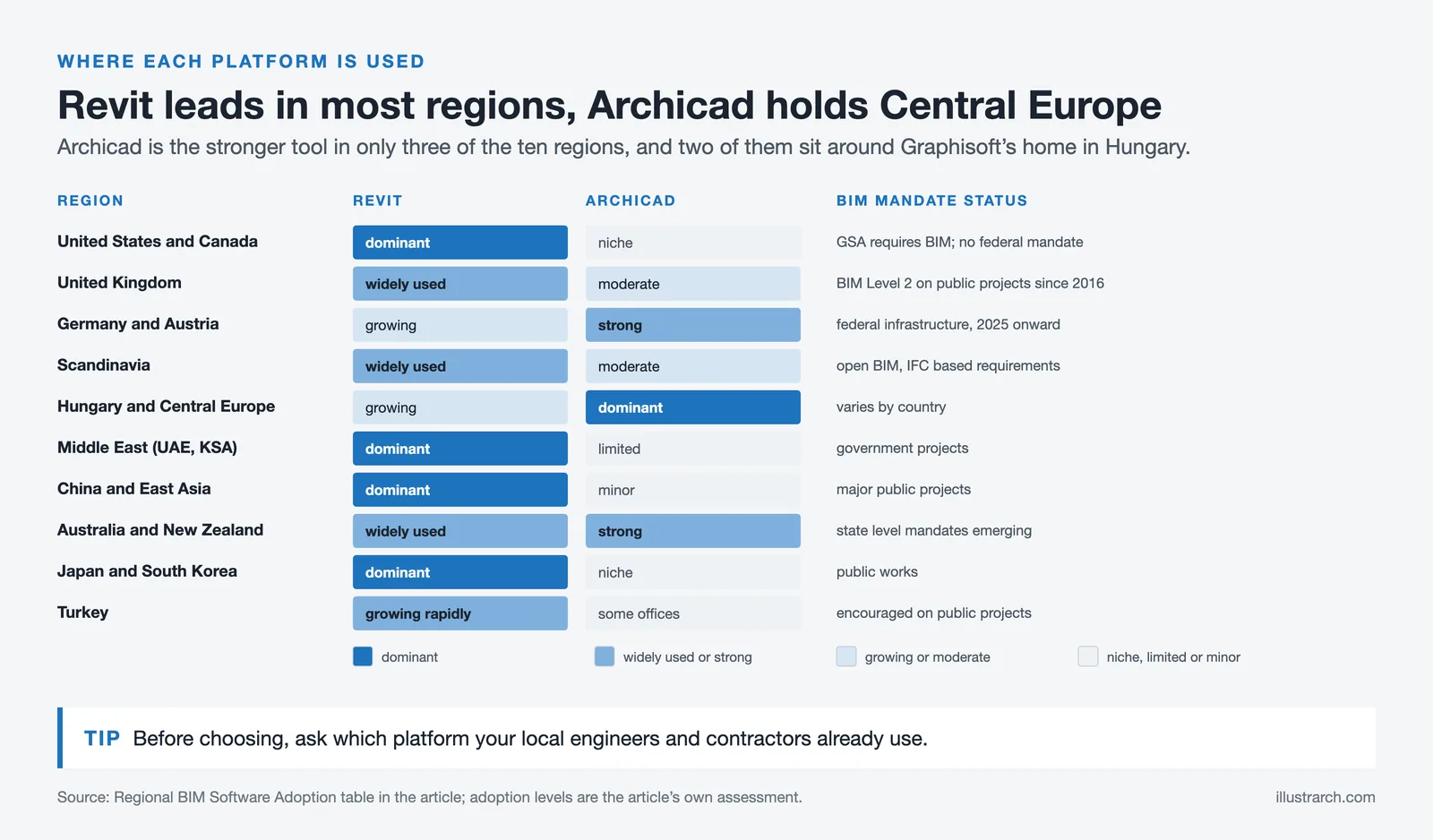
Regional BIM Software Adoption & Mandates
| Region / Country | Revit Adoption Level | Archicad Adoption Level | BIM Mandate Status |
|---|---|---|---|
| United States & Canada | 🟢 Dominant: industry standard across AEC Advantage | 🟡 Niche: used by some architecture studios | GSA requires BIM for public projects; no universal federal mandate |
| United Kingdom | 🟢 Widely used: strong in engineering & construction | 🟡 Moderate: popular in design-focused offices | BIM Level 2 mandatory for public projects since 2016 |
| Germany & Austria | 🟡 Growing: dominant in engineering firms | 🟢 Strong presence: preferred by many architecture firms Advantage | BIM mandatory for federal infrastructure projects (Germany, 2025+) |
| Scandinavia (NO, SE, FI, DK) | 🟢 Widely used: especially in multidisciplinary projects | 🟡 Moderate: used in architectural practices | Open BIM / IFC-based mandates; strong BIM culture |
| Hungary & Central Europe | 🟡 Growing presence | 🟢 Dominant: Graphisoft’s home region Advantage | Varies by country; EU pushing BIM adoption |
| Middle East (UAE, Saudi Arabia) | 🟢 Dominant: required by most large contractors Advantage | 🟡 Limited: some architectural firms | BIM mandated for government projects in UAE & KSA |
| China & East Asia | 🟢 Dominant: rapid growth in BIM adoption Advantage | 🟡 Minor presence | China mandating BIM for major public projects |
| Australia & New Zealand | 🟢 Widely used across AEC | 🟢 Strong: popular among architects Advantage | State-level BIM mandates emerging |
| Japan & South Korea | 🟢 Dominant in large-scale projects Advantage | 🟡 Niche use | Government BIM mandates for public works |
| Turkey | 🟢 Growing rapidly: preferred in infrastructure & large projects Advantage | 🟡 Used by some architectural offices | BIM increasingly encouraged for public projects |

Credit: www.graphisoft.com
2. Integrated Multidisciplinary BIM Environment
Revit was developed as a fully integrated BIM platform where architecture, structure, and MEP coexist within a single, coordinated environment. Instead of relying on loosely connected external references, all disciplines contribute to a unified model that updates dynamically. Structural changes, mechanical routes, or architectural modifications are instantly reflected throughout the project, allowing teams to identify conflicts early in the design process.
This integration is particularly valuable for complex buildings such as hospitals, airports, mixed-use developments, and high-rise structures, where coordination between systems is critical. Clash detection, spatial coordination, and system optimization become part of the design process rather than reactive problem-solving during construction. As a result, Revit supports a more holistic and efficient approach to BIM that aligns design intent with technical execution.
Multidisciplinary BIM Capabilities Comparison
| Capability | Revit | Archicad |
|---|---|---|
| Architectural Design | ✅ Full toolset | ✅ Full toolset |
| Structural Engineering | ✅ Dedicated structural tools & analytical models | ⚠️ Basic structural elements; limited analysis |
| MEP (Mechanical, Electrical, Plumbing) | ✅ Full MEP toolset integrated | ⚠️ MEP Designer add-on (included in Collaborate tier) |
| Clash Detection | ✅ Built-in interference checking | ⚠️ Requires Solibri or external tools for full clash detection |
| Unified Model Environment | ✅ All disciplines in one file/model | ⚠️ Architecture-centric; relies on IFC for multi-discipline coordination |
| Construction Scheduling (4D) | ✅ Supported via Navisworks / Autodesk ecosystem | ⚠️ Limited; relies on third-party tools |
| Cost Estimation (5D) | ✅ Model-driven quantity takeoffs & schedules | ✅ Quantity takeoffs available |
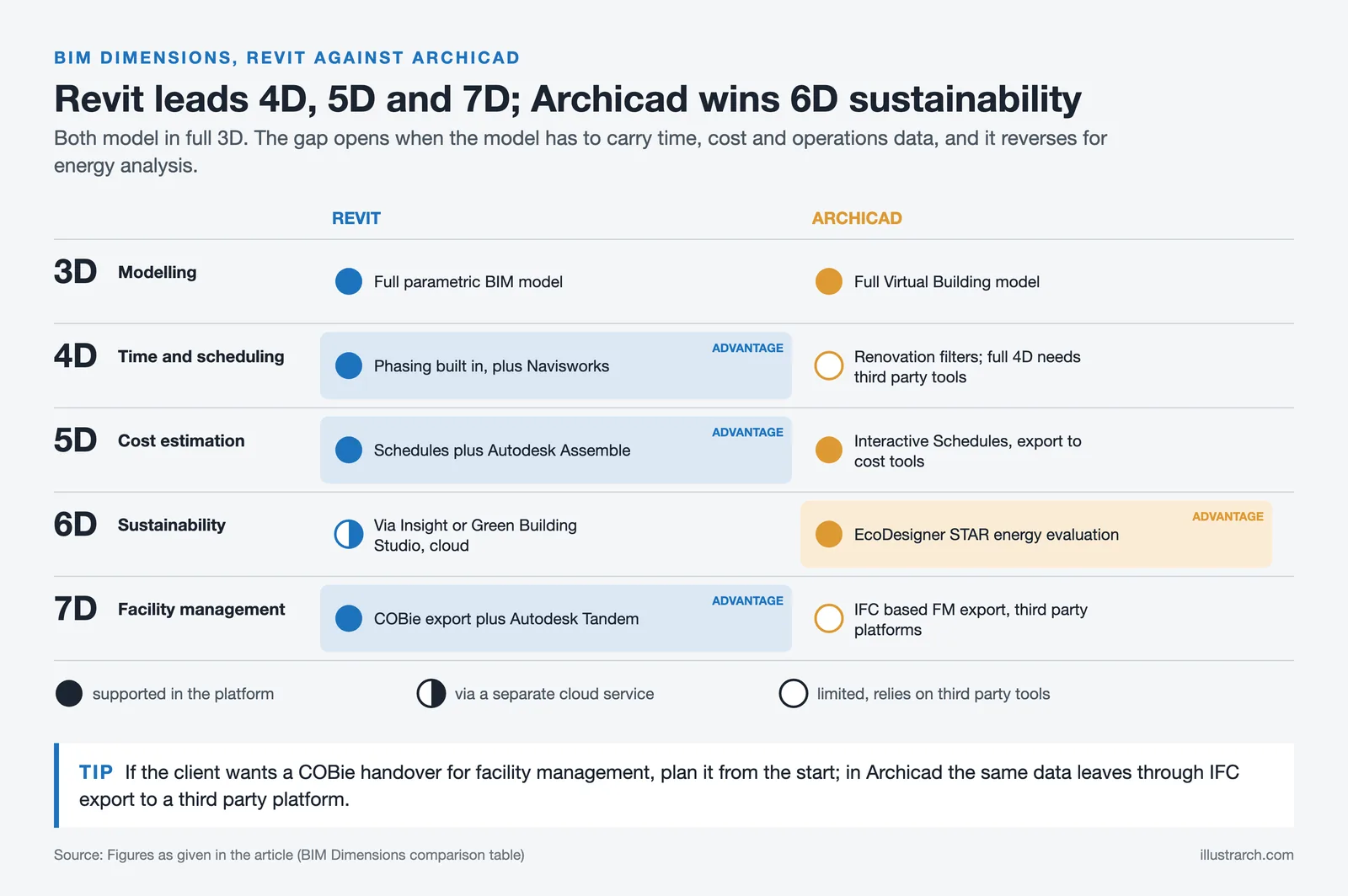
BIM Dimensions (3D → 7D) Support Comparison
| BIM Dimension | Description | Revit | Archicad |
|---|---|---|---|
| 3D: Modeling | Parametric 3D building model with embedded data | ✅ Full parametric BIM model | ✅ Full Virtual Building model |
| 4D: Time / Scheduling | Linking model elements to construction phases & timelines | ✅ Phasing built-in + Navisworks for detailed 4D simulation Advantage | ⚠️ Renovation filters available; full 4D requires third-party tools |
| 5D: Cost Estimation | Quantity takeoffs and cost data linked to model elements | ✅ Built-in schedules + Autodesk Assemble Advantage | ✅ Interactive Schedules + export to cost tools |
| 6D: Sustainability | Energy analysis, environmental impact, green building compliance | ⚠️ Via Insight / Green Building Studio (cloud-based) | ✅ Built-in EcoDesigner STAR for energy evaluation Advantage |
| 7D: Facility Management | As-built model with operational data for building lifecycle management | ✅ COBie export + Autodesk Tandem integration Advantage | ⚠️ IFC-based FM data export; relies on third-party FM platforms |

Credit: www.autodesk.com
3. Advanced Parametric Control
Revit’s parametric modeling system allows elements to be defined not just geometrically, but logically. Walls, floors, structural elements, and components are governed by relationships and constraints that maintain consistency throughout the model. When one parameter changes, such as floor height, grid spacing, or module size, related elements automatically adjust, preserving design intent without extensive manual updates.
This level of parametric control is especially advantageous in large or repetitive projects where changes are inevitable. Architects can test design alternatives, adapt layouts to regulatory requirements, or respond to client revisions without disrupting the entire model. Parametric families also allow firms to build custom libraries that reflect office standards, improving efficiency and consistency across projects. In this sense, Revit functions not only as a modeling tool, but as a system for managing design logic at scale.

Credit: www.autodesk.com
Parametric Modeling & Design Flexibility
| Feature | Revit | Archicad |
|---|---|---|
| Parametric System | Family Editor with parameters, constraints & formulas | GDL (Geometric Description Language) scripting |
| Custom Component Creation | Visual Family Editor (graphical) Advantage | GDL scripting (code-based, steeper learning) |
| Global Parameter Updates | ✅ Changes propagate throughout the model automatically | ✅ Changes propagate within the Virtual Building model |
| Visual Programming | Dynamo (built-in) Advantage | Grasshopper: Archicad Live Connection |
| Component Libraries | Vast online libraries + Autodesk App Store Advantage | Extensive built-in library + BIMcomponents.com |
| Freeform / Organic Geometry | Limited; often requires Rhino integration | More flexible out of the box Advantage |
| Scheduling & Data Extraction | Powerful parameter-driven schedules Advantage | Good scheduling with automated documentation |
Automation, API & Scripting Capabilities
| Capability | Revit | Archicad |
|---|---|---|
| Official API | Revit API (.NET: C# / VB.NET) Advantage | Archicad Add-On API (C++) |
| Python Scripting | ✅ pyRevit + Dynamo Python nodes: widely adopted Advantage | ✅ Archicad Python API (introduced in v26+) |
| Visual Programming | Dynamo: built-in, large community & node packages Advantage | Grasshopper: Archicad Live Connection (requires Rhino) |
| Macro / Script Automation | Revit Macros (SharpDevelop IDE built-in) | Limited: mainly through Add-On API or Python |
| Community Plugins & Scripts | Thousands: pyRevit, BIM One, DiRootsOne, etc. Advantage | Growing: smaller plugin ecosystem |
| AI & Machine Learning Integration | Autodesk AI tools (Forma, Insight); third-party AI plugins emerging | AI Visualizer (built-in rendering assist) Advantage |
| Batch Processing & Automation | ✅ Dynamo Player for repeatable scripts Advantage | ⚠️ Requires custom Add-On development |
4. Superior Compatibility with Construction Workflows
Revit is closely aligned with construction documentation and execution processes, making it highly effective beyond the design phase. Drawings, schedules, material takeoffs, and quantities are generated directly from the BIM model, ensuring accuracy and reducing discrepancies between drawings and specifications. This model-driven workflow supports more reliable cost estimation, procurement planning, and construction sequencing.
Contractors and consultants often prefer Revit models because they integrate seamlessly with other tools used for clash detection, coordination meetings, and project management within the Autodesk ecosystem. This compatibility strengthens collaboration during tendering and construction, where precise information and timely updates are essential. Revit’s strong presence in construction workflows makes it particularly valuable for design-build projects and large commercial developments.

Credit: www.graphisoft.com
Construction Workflow & Ecosystem Integration
| Aspect | Revit (Autodesk Ecosystem) | Archicad (Open BIM Ecosystem) |
|---|---|---|
| Construction Documentation | Model-driven drawings, schedules & takeoffs Advantage | Automated documentation from 3D model |
| Clash Detection / Coordination | Navisworks, BIM Collaborate Pro Advantage | Solibri, BIMcollab (third-party) |
| Project Management Integration | Autodesk Construction Cloud, BIM 360 | BIMcloud; third-party PM tools |
| Quantity Takeoffs | Built-in + Autodesk Assemble | Built-in Interactive Schedules |
| Fabrication Support | Direct fabrication models (Revit MEP → fabrication parts) Advantage | Export-based fabrication workflows |
| Ecosystem Breadth | AutoCAD, Civil 3D, Navisworks, InfraWorks, ACC Advantage | Solibri, dRofus, Bluebeam (Open BIM partners) |
| Export Formats | RVT, IFC, DWG, DXF, DGN, NWC, FBX, gbXML | IFC (strong), DWG, DXF, BCF, SKP, 3DM |
File Format & Interoperability Detail
| Format / Standard | Purpose | Revit Support | Archicad Support |
|---|---|---|---|
| IFC (Industry Foundation Classes) | Open BIM data exchange between different software | ✅ Import & Export (IFC 2×3, IFC4) | ✅ Certified IFC Import & Export, strong Open BIM focus Advantage |
| DWG / DXF | 2D drawing exchange (AutoCAD standard) | ✅ Native support (Autodesk format) Advantage | ✅ Import & Export |
| BCF (BIM Collaboration Format) | Issue tracking & coordination comments in BIM | ✅ Supported via plugins & BIM Collaborate | ✅ Native BCF Manager built-in Advantage |
| NWC / NWD (Navisworks) | Clash detection & 4D simulation | ✅ Direct export to Navisworks Advantage | ⚠️ Via IFC or third-party conversion |
| FBX / OBJ / 3DS | 3D geometry exchange for rendering & visualization | ✅ FBX export built-in | ✅ Multiple 3D export formats |
| gbXML | Energy analysis data exchange | ✅ Export supported | ✅ Export supported |
| SKP (SketchUp) | Importing SketchUp models | ✅ Import | ✅ Import & Export Advantage |
| 3DM (Rhino) | Complex geometry exchange with Rhino | ✅ Import (via Rhino.Inside.Revit also available) | ✅ Import & Export + Grasshopper Live Connection |
| 2D document sharing & printing | ✅ Export | ✅ Export | |
| COBie | Facility management data handover | ✅ Supported via IFC / plugins Advantage | ⚠️ Via IFC export |
5. Global Support, Resources, and Learning Ecosystem
As part of the Autodesk ecosystem, Revit benefits from an extensive global support and learning infrastructure. Users have access to official training programs, certifications, technical documentation, and a vast online community. Thousands of third-party plugins extend Revit’s capabilities, allowing firms to customize workflows for specific project types, regions, or regulatory requirements.
This ecosystem plays a crucial role in long-term adaptability. Firms can more easily train new staff, integrate emerging technologies, and respond to evolving industry standards. For offices operating across multiple countries or collaborating internationally, Revit’s global recognition ensures that knowledge, resources, and support are readily available. This makes Revit not just a software choice, but a strategic investment in future-ready practice.

Credit: www.graphisoft.com
Support, Pricing & Learning Resources
| Aspect | Revit | Archicad |
|---|---|---|
| Pricing Model | Subscription only (monthly / annual / 3-year) | Subscription only for new purchases since 2026; existing perpetual licenses remain valid |
| Approx. Annual Cost | ~$3,005 / year (as of October 2026) | ~$2,700-$2,900 / year |
| Pay-as-You-Go Option | Autodesk Flex (token-based) Advantage | Not available |
| Free Trial | 30-day free trial | 30-day free trial |
| Educational Access | Free for students & educators | Free for students & educators |
| Official Certifications | Autodesk Certified Professional (ACP) Advantage | Graphisoft certifications available |
| Third-Party Plugins | Thousands on Autodesk App Store Advantage | Growing library of add-ons |
| Community & Forums | Very large global community Advantage | Active but smaller community |
| Online Tutorials & Courses | Extensive (LinkedIn Learning, Udemy, YouTube, Autodesk U) Advantage | Good coverage; Graphisoft Learning |
| Technical Support | Web, email, chat, phone (tiered by plan) | Web & email support; local reseller support |
Minimum & Recommended System Requirements
| Specification | Revit (2025) | Archicad (28) |
|---|---|---|
| Operating System | Windows 10/11 (64-bit) only | Windows 10/11 (64-bit) & macOS 13+ Advantage |
| CPU (Minimum) | Multi-core Intel / AMD (single-core speed matters most) | 64-bit processor with SSE2, multi-core recommended |
| RAM (Minimum) | 8 GB (16 GB+ recommended for complex models) | 16 GB (32 GB+ recommended) |
| GPU | DirectX 11 compatible; 4 GB VRAM recommended | OpenGL 4.5+ / Metal (macOS); dedicated GPU recommended |
| Disk Space | ~30 GB for installation | ~5 GB for installation (lighter footprint) Advantage |
| Disk Type | SSD strongly recommended | SSD strongly recommended |
| Display Resolution | 1920 × 1080 minimum | 1920 × 1080 minimum |
| Large Model Performance | Handles very large models; can be resource-heavy Advantage | Efficient with medium models; struggles with very complex multi-discipline files |
Which Software Best Fits Your Profile?
| If You Are… | Choose Revit | Choose Archicad |
|---|---|---|
| Firm Size | Medium to large firms; multi-office operations | Solo practitioners; small to mid-sized studios |
| Project Type | Hospitals, airports, high-rises, mixed-use, infrastructure | Residential, boutique commercial, interiors, renovation |
| Team Composition | Multi-disciplinary (architects + engineers + contractors) | Architecture-focused teams |
| Workflow Priority | Coordination, documentation accuracy, construction delivery | Design exploration, visualization, creative flexibility |
| OS Requirement | Windows environment is acceptable | macOS support is essential |
| BIM Maturity Goal | Full BIM (3D → 7D); integrated project delivery | Architectural BIM with Open BIM collaboration |
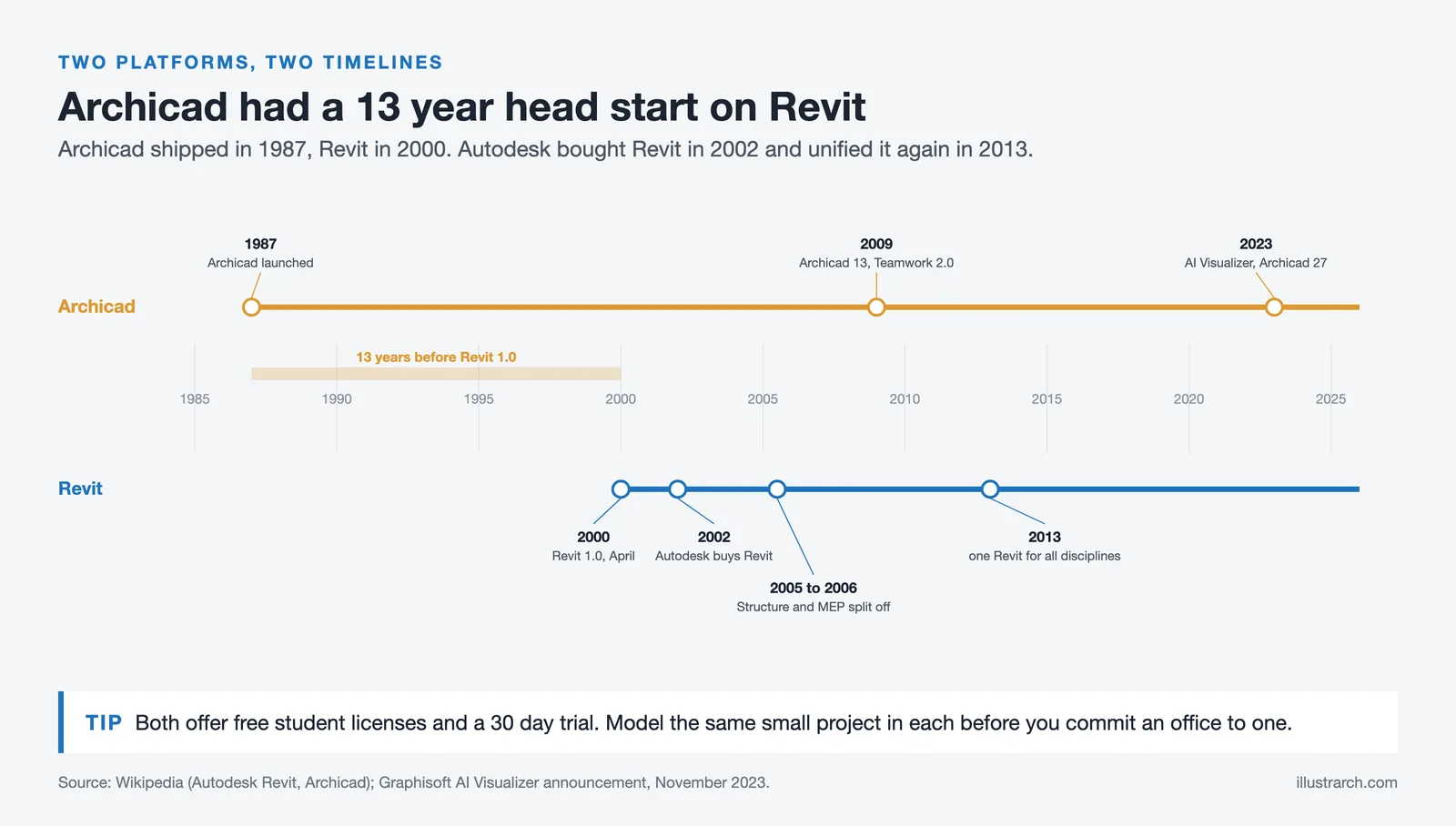
Key Version History & Milestones
| Year | Revit Milestones | Archicad Milestones |
|---|---|---|
| 1984-1987 | , | Archicad 1.0 released (1987), first BIM software for personal computers |
| 2000 | Revit 1.0 launched by Revit Technology Corporation | Archicad 6.5: established in European market |
| 2002 | Autodesk acquires Revit Technology Corp. | , |
| 2005-2006 | Split into Revit Architecture, Structure & MEP | Archicad 10 (Teamwork 2.0 followed with Archicad 13 in 2009) |
| 2013 | Revit re-unified as single platform (all disciplines) | Archicad 17: CineRender engine introduced |
| 2018-2020 | Cloud worksharing via BIM 360; Dynamo integration matured | Archicad 22-23, improved Rhino/Grasshopper connection |
| 2022-2024 | Revit 2024-2025: Toposolid, AI-assisted features, performance gains | Archicad 27-28: Predictive Design, AI Visualizer, enhanced MEP Designer |
| 2025+ | Revit inside Autodesk Forma platform; cloud-native direction | Nemetschek Group integration; strengthened Open BIM ecosystem |
Both Revit and Archicad are capable and sophisticated BIM platforms, each with its own strengths. However, Revit’s advantages become especially pronounced in complex, multidisciplinary, and construction-oriented projects. Its widespread industry adoption, fully integrated BIM environment, advanced parametric logic, strong alignment with construction workflows, and expansive global support network position it as a powerful tool for contemporary architectural practice. For firms seeking seamless collaboration, scalability, and long-term efficiency within a global construction context, Revit often emerges as the more robust and future-proof solution.


2 Comments




Notion Alternatives for Architects: 7 Tools That Fit Studio Work
Notion works until a studio needs fee tracking, phase budgets and timesheets....
 Furkan Sen7 Mins read

Why Every Practice Ends Up With Five Versions of the Same Revit Family
Let’s learn why Revit family libraries accumulate duplicates, break schedules and slow...
 illustrarch Editoral Team5 Mins read

Visualizing Renovation Projects From Photographs: A Workflow for Existing-Building Work
Photo-based visualization turns a photograph of a building that already exists into...
illustrarch Editoral Team7 Mins read

Best Free CAD Blocks and Resources for Architects
A working guide to free CAD blocks for architects, covering ARCAT, CAD-Blocks.net,...
Furkan Sen7 Mins read


Wow, so Revit is basically the Swiss Army knife of BIM software? Who knew that being a glorified digital translator could be such a big deal! It’s amazing how everyone just hops on the Revit train like it’s the only one leaving the station. And I love how it claims to solve all our collaboration issues—because, you know, software can totally fix human communication problems, right? Can’t wait to see how ‘dynamic updates’ work when my team can’t even agree on lunch!
So, basically Revit is like the popular kid in school who has all the right connections, while Archicad is still figuring out how to use its locker? I mean, who knew software could have social lives? But seriously, if Revit can help avoid those awkward clashes in design—like when your friend shows up in the same outfit as you—count me in!