

Autodesk Forma Review 2026: AI Urban Design Platform Analyzing Sun, Wind & Noise in Real-Time
Autodesk Forma (now Forma Site Design) uses AI to analyze sun exposure, wind comfort, noise levels, and embodied carbon during the earliest design stages. This 2026 review covers its core analysis tools, generative design features, Revit integration, pricing structure, free trial access, and how it compares against traditional site analysis workflows.
 Sinan Ozen5 March 20267 Mins read961

Table of Contents Show
Autodesk Forma, the subject of this review, is a cloud-based, AI-powered design platform built for architects and urban planners who need real-time environmental analysis during early-stage site planning. Originally launched as Spacemaker (acquired by Autodesk in 2020) and rebranded as Forma in 2023, the platform now operates under the name Forma Site Design and sits at the center of Autodesk’s broader Forma Industry Cloud. It runs entirely in the browser, requires no local installation, and delivers sun, wind, noise, and embodied carbon analysis within seconds of adjusting a massing model.

What Is Autodesk Forma?
Autodesk Forma is a cloud-native software platform designed for pre-design and schematic design phases of architectural and urban planning projects. Unlike traditional CAD or BIM tools that focus on detailed documentation, Forma targets the earliest project decisions: where to place buildings, how tall they should be, how they interact with sunlight and wind, and whether the resulting environment will be comfortable for people on the ground.

The platform pulls real-world contextual data (terrain, existing buildings, roads, vegetation) directly into the design environment. Architects can set up a geolocated project in minutes, start massing, and immediately run environmental analyses. According to a case study published by Autodesk, Baker Barrios Architects reported that work requiring 40 hours using traditional methods now takes four hours or less with Forma.
Forma integrates with Revit, Rhino, and Dynamo through dedicated plugins, allowing architects to move conceptual designs into detailed BIM models without starting from scratch. For teams already using Autodesk’s BIM software ecosystem, this connection is one of its strongest selling points.

Core Environmental Analysis Tools
The analysis suite is where Forma separates itself from conventional design tools. Each analysis runs directly on the cloud, meaning results appear in seconds or minutes rather than requiring overnight simulation runs. Sun hours analysis was the most popular Forma analysis in 2025, according to Autodesk’s own 2026 product update, reflecting how central passive solar design remains to architectural practice.
Sun Hours and Daylight Analysis
The sun hours tool measures how long each point on the ground and building surfaces receives direct sunlight on a given date. You can filter results by facade or roof to understand how different surfaces interact with natural light. This is critical for residential projects in northern climates where maximizing winter sun exposure directly affects livability, and equally important in hot climates where reducing solar gain lowers cooling loads.
The daylight potential analysis goes further, evaluating interior daylight levels based on building geometry and window placement. Architects working toward compliance with standards like EN 17037 or local planning requirements can use these results to justify design decisions early, before investing in detailed energy modeling.
Wind Comfort Analysis
Forma offers both rapid and detailed wind analysis. The rapid version uses AI to deliver near-instant feedback as you modify building shapes, making it practical to check wind conditions after every design iteration. The detailed analysis runs a more rigorous simulation and takes longer but produces higher-fidelity results suitable for planning submissions.
Wind analysis helps identify potential pedestrian discomfort zones, downdraft effects from tall buildings, and tunnel effects between structures. For urban planning projects where public space quality is a regulatory concern, this tool provides quantitative evidence that previously required hiring a specialized wind consultant.

Noise, Microclimate, and Carbon Analysis
The noise analysis evaluates road and rail traffic impact on the site, with filtering by time of day (a feature added in 2024). Microclimate analysis combines sun, wind, and localized weather data to map outdoor thermal comfort, now including rooftop analysis for green roof and rooftop garden design. The embodied carbon tool estimates lifecycle carbon production for proposed building masses, supporting early-stage decisions about structural systems and material choices. For architects pursuing sustainable design strategies, these integrated analyses remove the need for separate specialist software during concept development.
How Does Autodesk Forma Handle Generative Design?
Forma’s Site Automation feature (previously called “Explore”) automatically generates and evaluates multiple building layout options based on parameters you define: building heights, setbacks, density targets, and typology rules. The tool produces a range of options and pairs each with environmental performance data, letting you compare which configuration delivers the best sun access or lowest wind speeds at ground level.
At Autodesk University 2025, the company demonstrated Neural CAD capabilities within Forma. By setting building type (“residential multi-family”) and structural material (“wood”), the AI generated complete interior layouts with unit counts. Adjusting the building footprint and re-running the generation produced a different layout with 56 units instead of 36, all in seconds. This generative approach is trained on Autodesk’s own architectural data rather than general-purpose AI models, which helps produce layouts that follow real building conventions.
The 3D Sketch tools complement generative design by letting architects manually refine generated massing. You can create curved geometries, pitched roofs, tilted walls, and parametric building shells. Imported OBJ files (from SketchUp, for example) can be brought in and further edited with Forma’s modeling tools.
“The earlier you make smart decisions, the greater the impact on your project.”
Nicolas Mangon, VP of AEC Strategy, Autodesk (AU 2025 keynote)

Forma and Revit Integration
The connection between Forma and Revit has been a major development focus. Revit is now designated as the first “Forma Connected Client,” meaning it has deep, two-way integration with the Forma Industry Cloud. Changes made in Forma appear in Revit and vice versa, creating a shared data environment rather than a file-based export/import workflow.
Revit users can now run Forma-powered wind analysis directly inside the desktop application. Geolocation data from Forma carries into Revit projects, eliminating the tedious process of re-establishing project coordinates. Sustainability analyses from Forma (daylight, embodied carbon) are accessible within Revit as well, so design teams do not need to switch between applications to check performance metrics.
For firms that rely on Revit add-ins and established BIM workflows, this integration means Forma slots into the existing pipeline rather than disrupting it. The Forma plugin for Rhino and the Dynamo connection provide additional pathways for computational design teams.
Forma Building Design: A New Addition for 2026
Autodesk announced Forma Building Design at AU 2025, targeting Level of Development (LoD) 200 and 300 schematic design work. This new cloud-based tool focuses on detailed building modeling with automated design functions, facade design, interior layout exploration, and integrated carbon and daylight analysis. It entered closed beta in late 2025 and is expected to become generally available in 2026.
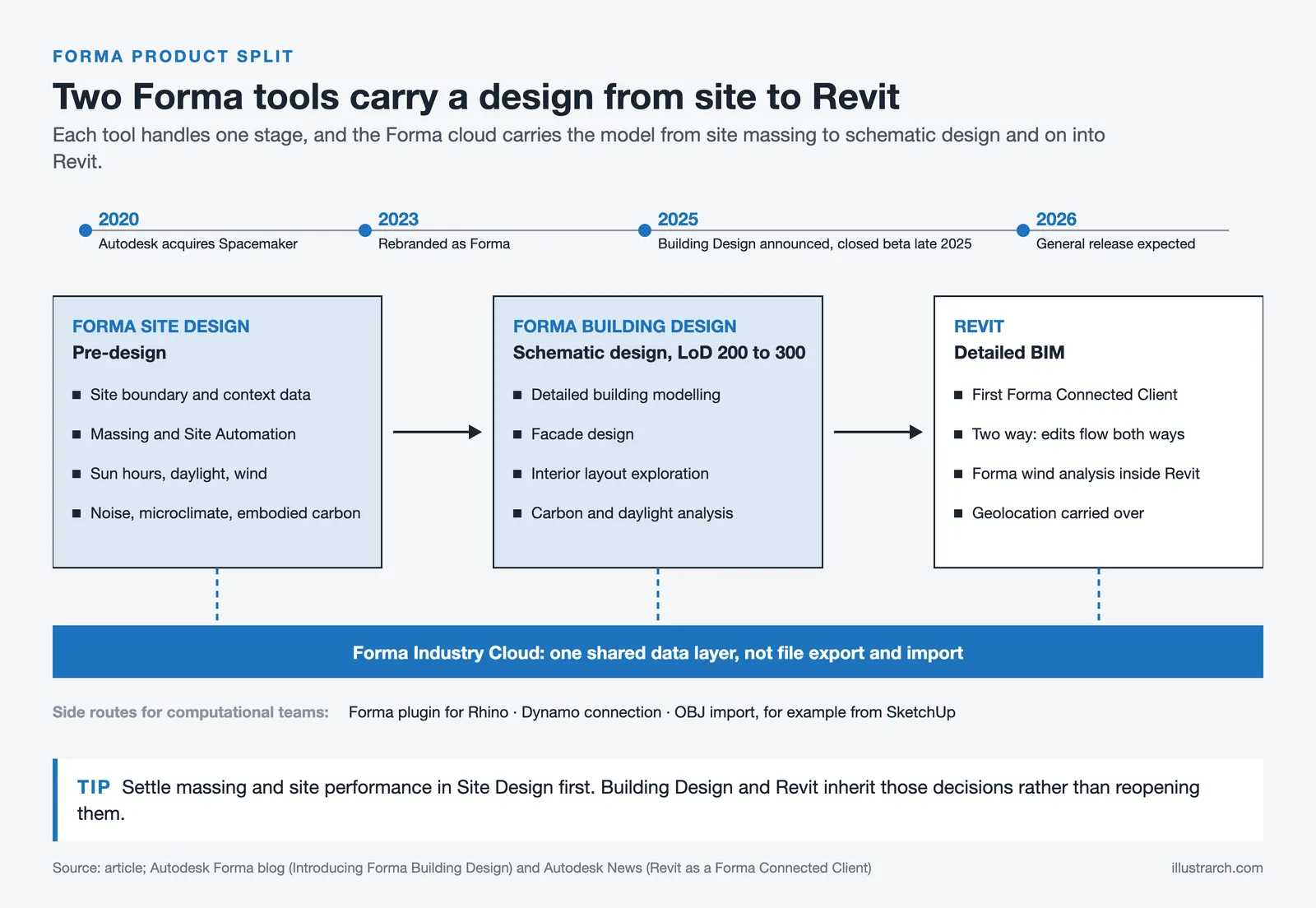
The thinking behind creating separate Forma products (Site Design for early-stage planning, Building Design for schematic development) rather than a single monolithic tool is intentional. Amy Bunszel, Autodesk’s EVP of AEC Solutions, explained that the goal is persona-based tools where each application handles a specific task well, while data flows between them through the Forma cloud layer. This approach directly challenges BIM 2.0 startups like Arcol, Snaptrude, and Motif that are building their own browser-based design platforms.

Is Autodesk Forma Free?
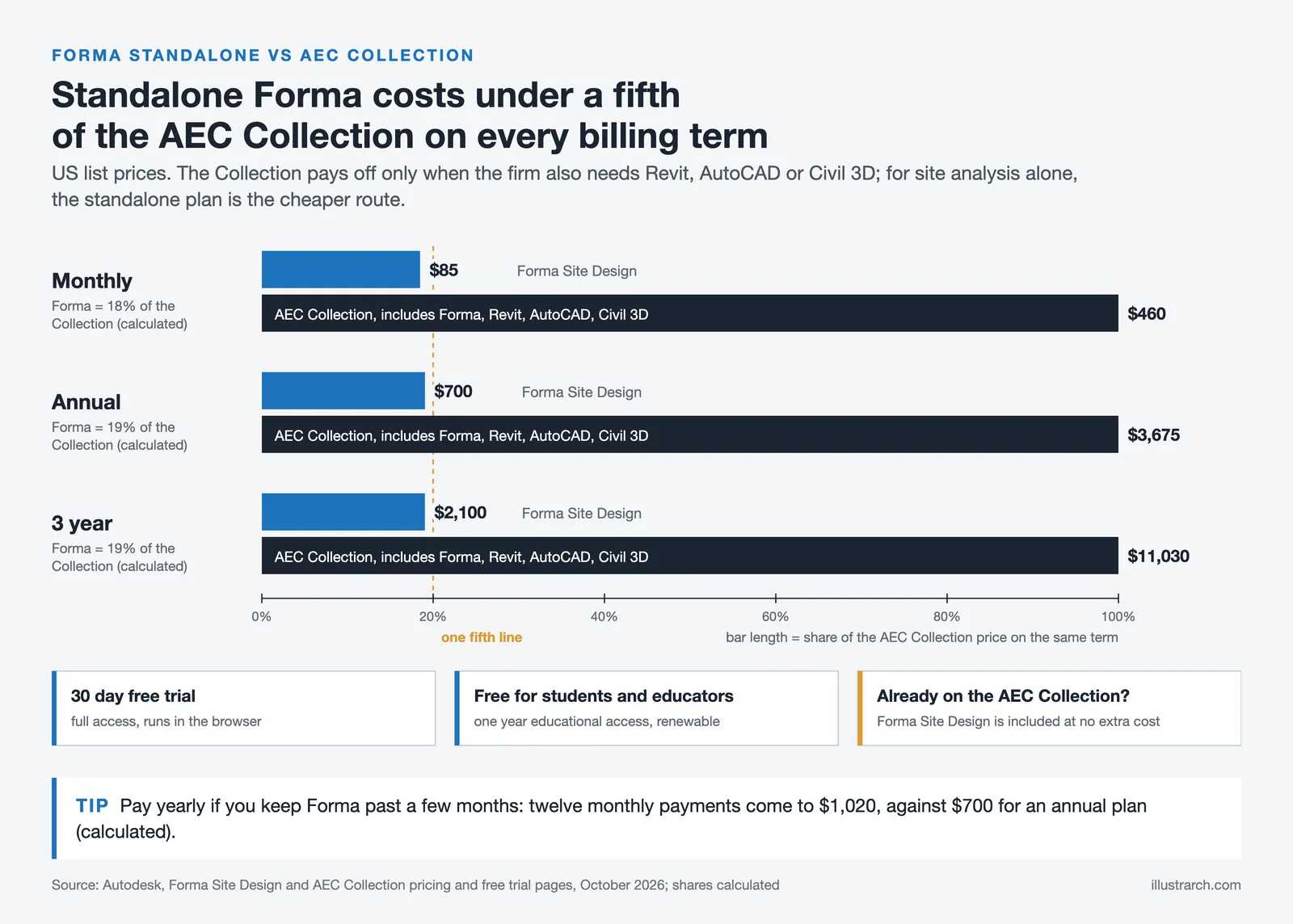
Autodesk Forma is not free for commercial use. It is available as a standalone subscription or as part of the Architecture, Engineering & Construction (AEC) Collection. If your firm already subscribes to the AEC Collection, you get Forma Site Design at no additional cost.
Autodesk Forma Pricing and Free Trial
Standalone pricing for Forma Site Design is $85/month, $700/year, or $2,100 for a three-year subscription as of October 2026. The AEC Collection, which includes Forma along with Revit, AutoCAD, Civil 3D, and other tools, costs $460/month or $3,675/year. Students and educators can access Forma for free through Autodesk’s educational licensing program.
An Autodesk Forma free trial is available as a 30-day period with full functionality. You can start it directly from Autodesk’s website with an Autodesk account. Since Forma runs entirely in the browser, there is nothing to download or install.
| Plan | Monthly | Annual | 3-Year |
|---|---|---|---|
| Forma Site Design (Standalone) | $85 | $700 | $2,100 |
| AEC Collection (includes Forma) | $460 | $3,675 | $11,030 |
| Free Trial | 30 days, full access, no payment required | ||
| Student/Educator | Free (1-year renewable license) | ||
Pricing reflects publicly listed Autodesk figures as of October 2026. Prices may vary by region and are subject to change. Always verify current pricing on the official Autodesk website.
Strengths and Limitations
Forma excels at speed. Setting up a geolocated project, ordering contextual data, and running your first analysis can happen within 15 minutes. The browser-based approach means any team member with an internet connection can access a project, which simplifies collaboration across offices and with external consultants. The analysis tools are approachable enough that architects without specialist simulation training can use them effectively.
The platform has clear limitations too. Modeling tools, while improved with 3D Sketch and curved road support, are less capable than dedicated tools like Rhino or SketchUp for complex freeform geometry. Wind and noise analyses are useful for early-stage comparative assessments but should not replace detailed CFD studies or acoustic consultant reports for final design validation. The subscription cost can feel steep for sole practitioners or very small firms that do not already subscribe to the AEC Collection. Some users also report that cloud-dependent workflows introduce friction when internet connections are unreliable.
Forma Site Design won the Architectural Record Best Architectural Products of the Year award in 2025, with the jury noting that the tool is reshaping early-stage design through cloud-based collaboration and integrated workflows. That recognition, combined with steady quarterly feature releases and the upcoming Forma Building Design launch, signals continued investment from Autodesk.

Who Should Use Autodesk Forma?
Forma fits best in medium to large architecture firms that handle urban-scale projects, multi-building developments, or any project where site-level environmental performance matters early. Real estate developers evaluating feasibility studies benefit from the fast massing and analysis cycle. Urban planners working on zoning studies or master plans can use generative layout tools to test density scenarios quantitatively.
Smaller firms and solo practitioners should evaluate the Autodesk Forma free trial before committing. If your projects rarely involve site-level environmental analysis, the subscription may not justify its cost. However, if you work on residential developments in areas with strict daylight or wind planning requirements, Forma can pay for itself by reducing consultant fees and revision cycles. For students exploring architectural design software, the free educational license makes it worth learning alongside other design tools.
Autodesk Forma has matured significantly since its 2023 launch. The combination of real-time environmental analysis, AI-powered generative design, and tight Revit integration makes it a practical tool for performance-driven early-stage design. It does not replace detailed BIM modeling or specialist simulation, but it fills a gap that previously required either expensive consultant time or rough manual estimates. For architects who believe design quality starts with smart site decisions, Forma offers a data-informed way to get there faster.



Notion Alternatives for Architects: 7 Tools That Fit Studio Work
Notion works until a studio needs fee tracking, phase budgets and timesheets....
 Furkan Sen7 Mins read

Why Every Practice Ends Up With Five Versions of the Same Revit Family
Let’s learn why Revit family libraries accumulate duplicates, break schedules and slow...
 illustrarch Editoral Team5 Mins read

Visualizing Renovation Projects From Photographs: A Workflow for Existing-Building Work
Photo-based visualization turns a photograph of a building that already exists into...
illustrarch Editoral Team7 Mins read

Best Free CAD Blocks and Resources for Architects
A working guide to free CAD blocks for architects, covering ARCAT, CAD-Blocks.net,...
Furkan Sen7 Mins read


Leave a comment