

Maket.ai Review 2026: Can AI Really Generate Zoning-Compliant Floor Plans in Seconds?
This Maket.ai review breaks down how the AI floor plan generator handles residential layouts, zoning compliance, 3D visualization, and design iteration. We cover pricing for the free and Pro plans, real user feedback from architects and builders, key limitations to watch for, and how it compares to traditional CAD workflows in 2026.
 Sinan Ozen8 March 20267 Mins read507

Table of Contents Show
Maket.ai is a generative AI platform that automates residential floor plan creation, style exploration, and zoning compliance for architects, builders, and homeowners. Built by a Montreal-based team with over 1 million registered users, it promises to replace weeks of schematic design with seconds of AI-generated layouts. This Maket.ai review asks whether the output actually holds up in a professional workflow.

What Is Maket.ai and Who Is It For?
Maket.ai positions itself as an AI-powered floor plan generator purpose-built for residential design. Unlike general-purpose AI image tools, it creates editable, dimensioned layouts based on room counts, square footage, adjacency rules, and lot constraints. The platform targets four main groups: architects looking to speed up early-stage schematic design, residential builders who need quick layout options for clients, real estate developers managing multiple projects, and homeowners exploring renovation or new construction ideas without CAD experience.
The company was founded in 2021 by CEO Patrick Murphy, COO Stephane Turbide, and CPO Simon Vallee. Vallee is a three-time founder who sold his previous startups to Groupon, Figma, and Slack, and later worked at Slack as a senior product manager. In October 2025, Maket secured $3.4 million CAD in seed funding led by Amiral Ventures to accelerate development ahead of its planned v2 release.

How Does Maket AI Generate Floor Plans?
The core workflow is straightforward. You specify your project parameters (room types, quantities, target square footage, lot shape) either through dropdown menus or natural language input, and the AI produces multiple floor plan variations within seconds. Each layout includes room labels and approximate dimensions, and you can iterate by adjusting constraints and regenerating.
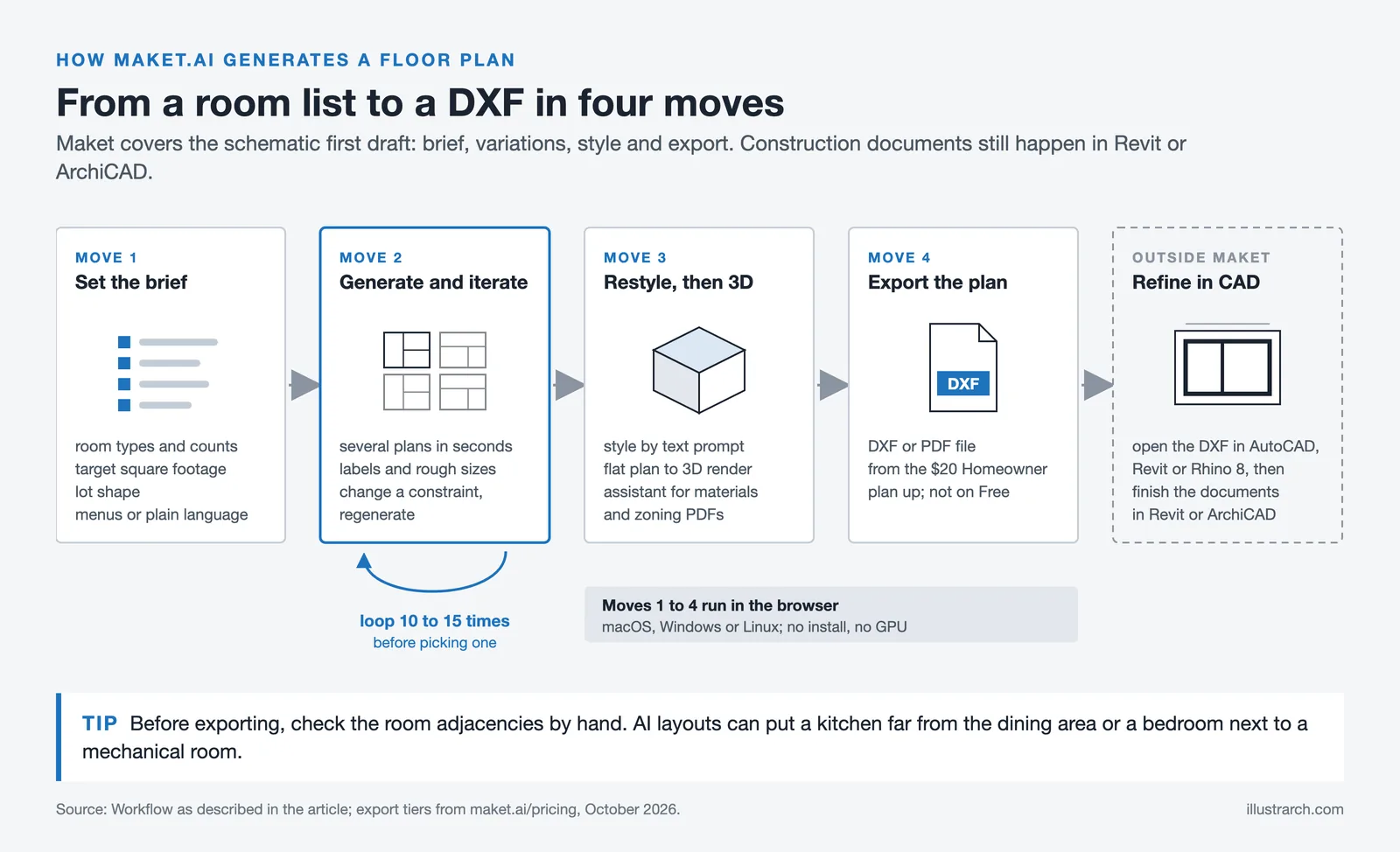
Beyond plan generation, Maket.ai offers several supporting features:
- A restyle tool that applies different interior and exterior design aesthetics using text prompts
- A virtual assistant for questions about materials, costs, and design alternatives
- A regulatory assistant that lets you upload zoning PDFs and ask plain-language compliance questions
- 3D visualization that converts flat plans into walkable renders
- Export to DXF format for importing into AutoCAD, Revit, or Rhino 8
The platform runs entirely in the browser on macOS, Windows, and Linux. No local installation or GPU is required.
Maket.ai Pricing: Free Plan vs. Pro Plan
Maket.ai offers a tiered pricing model that makes it accessible for testing before committing financially.

Pricing Comparison Table
The following table summarizes the key differences between available plans:
| Feature | Free Plan | Pro Plan ($100/mo as of October 2026) |
|---|---|---|
| Active Projects | 1 | Unlimited |
| Floor Plan Generation | 20 credits per floor (one floor on the 30 free credits) | 20 credits per floor (about 150 floors a month) |
| Image Generation Credits | 30 one-time credits | 3,000 credits per month |
| Export (DXF/PDF) | Not available (included from the $20 Homeowner plan) | Available |
| Advanced Editing | Basic tools only | Full editing suite |
| 3D Visualization | Limited | Full 2D-to-3D conversion |
| Multi-floor Generation | Not available (included from the $20 Homeowner plan) | Available |
At $100 per month as of October 2026 (17% less billed annually), the Pro plan is considerably cheaper than traditional architecture software subscriptions. For comparison, a single Revit license runs $3,005 per year as of October 2026. The value proposition is clear for early-stage ideation, though Maket.ai is not a replacement for full BIM software.
Does the Zoning Compliance Feature Actually Work?
One of the most interesting claims Maket.ai makes is its ability to assist with zoning code navigation. The Regulatory Assistant lets you upload municipal zoning PDFs and ask questions in plain English about setback requirements, lot coverage limits, height restrictions, and permitted uses. The AI parses the document and returns relevant answers.
This is helpful for quick reference during feasibility studies. However, the tool interprets uploaded documents rather than maintaining a live database of zoning codes across jurisdictions. If your local code has been recently amended, the AI will only know what you upload. It also lacks the ability to cross-reference multiple overlapping regulations (for example, historic district overlays combined with base zoning), which is where professional architects and zoning consultants still add irreplaceable value.
Zoning codes and building regulations vary by jurisdiction. Always verify AI-generated compliance suggestions with local authorities or a licensed professional before submitting permit applications.

Strengths and Limitations of Maket AI
After examining user feedback across review platforms and testing the platform’s claims against professional requirements, here is what stands out.
What Maket.ai Does Well
Speed is the platform’s strongest selling point. Generating 10 or more layout variations in under a minute is genuinely useful during client consultations and early feasibility reviews. The natural language input lowers the barrier for non-technical users, and the DXF export means plans can flow into standard CAD workflows without manual redrawing. The free tier is generous enough to evaluate whether the tool fits your workflow before spending anything.
Where Maket.ai Falls Short
The AI’s spatial reasoning draws consistent criticism. Several users report that generated layouts sometimes produce rooms with awkward proportions, impractical circulation paths, or hallways that waste square footage. The tool handles rectangular lots and standard room programs well, but struggles with L-shaped parcels, sloped sites, or multi-story configurations that require careful vertical coordination.
User reviews on Trustpilot reflect mixed experiences, with the platform holding a 2.3 out of 5 rating based on 7 reviews as of early 2026. Common complaints center on image generation quality and the gap between marketing promises and actual output fidelity. Professional users generally find more value than casual users, since architects can refine AI-generated layouts in their CAD software rather than expecting finished construction documents from the platform.
Maket 2.0: What Has Changed?
Earlier in 2026, Maket’s website showed a waitlist for v2. As of October 2026 that waitlist is gone, and the homepage describes a single canvas where you generate new layouts or upload an existing plan, describe changes in plain words, and render the design in a chosen style to explore in 3D. When the funding round was announced, BetaKit reported that the 2.0 release would add finer generation controls, better rendering, zoning code verification, HVAC planning and material takeoffs. Check Maket’s current feature list before you count on the compliance, HVAC or takeoff tools, since the homepage does not yet present them.
The broader market context supports this trajectory. According to The Business Research Company’s 2025 Global Market Report, the generative AI in architecture market was valued at approximately $1.48 billion in 2025 and is projected to reach $5.85 billion by 2029, growing at a CAGR of 41.1%. Tools that combine design generation with regulatory compliance and cost estimation are expected to capture a growing share of that market.

How Does Maket.ai Compare to Alternatives?
Maket.ai occupies a specific niche: AI-powered residential floor plan generation for the pre-design phase. It competes with a mix of AI startups and established software in different ways.

Maket.ai vs. Key Competitors
Here is how Maket.ai stacks up against other AI-driven architecture tools:
| Tool | Focus Area | Starting Price | Best For |
|---|---|---|---|
| Maket.ai | Residential floor plans + zoning | Free / $20 per month | Architects, builders, homeowners |
| Zenerate | Site feasibility + massing | Custom pricing | Real estate developers |
| Archistar | Site analysis + compliance | Custom pricing | Developers, urban planners |
| TestFit | Multifamily site planning | Custom pricing | Large-scale developers |
| ArkDesign AI | Multifamily floor plans + feasibility reports | Free (Lite) / $180 per month (Pro), as of October 2026 | Architects, firms |
Maket.ai’s advantage is accessibility. It has one of the lowest entry prices, the simplest interface, and requires zero CAD experience. Zenerate and TestFit target larger commercial projects and require enterprise-level commitments. Archistar focuses heavily on site-level feasibility rather than unit-level floor plans. For individual architects or small firms working primarily on residential projects, Maket.ai offers the most practical starting point.
“Maket is bringing a disruptive new approach to an industry that has been slow to change, empowering both professionals and everyday creators to design smarter, faster, and more beautifully than ever before.”
Frederic Bastien, Managing Partner at Amiral Ventures (via TechFundingNews, October 2025)
Maket Pricing: Credits, Not Seats
Maket prices by AI credit rather than by seat, which changes how you budget for it. Figures from Maket’s own pricing page at the time of writing.

| Plan | Price | Credits | What it adds |
|---|---|---|---|
| Free | $0 | 30 | Single-floor generation, floor plan editor, render generation |
| Homeowner | $20/month | 300 | Multi-floor generation, AI plan editing, one assisted upload, PDF/DXF/render export |
| Pro | $100/month | 3,000 | Up to five human-validated plan uploads a month, custom references and templates, priority support |
| Scale | Custom | Custom | Bulk portfolio import, custom generation models, API access |
The credit model is the thing to understand before subscribing. Iteration costs credits, and generative work is iteration by definition, so the useful question is not the monthly rate but how many attempts a real project takes. The free tier’s 30 credits exist to let you find that out.
Who Maket Is For, and Who It Is Not For
It suits homeowners and small residential practices testing layout options quickly, and developers who want a first pass at unit arrangements before an architect is engaged.
It does not suit anyone who needs the output to be construction-ready. Generated plans are a starting point, and the Pro tier’s human-validated uploads exist precisely because the automated output is not a drawing you build from.
Verdict: Is Maket.ai Worth It in 2026?
Maket.ai solves a real problem. Schematic design is one of the most time-consuming phases in residential architecture, and generating dozens of layout options in minutes has genuine practical value. For architects, builders, and developers who treat it as a brainstorming accelerator rather than a finished-document producer, the $100/month Pro plan pays for itself quickly.
The limitations are real, though. AI-generated spatial logic still requires human oversight, the zoning tools are document-dependent rather than database-driven, and the rendering quality trails behind dedicated 3D visualization tools. If the HVAC planning and material takeoff tools promised for v2 reach the product, Maket.ai could become a much more compelling end-to-end platform. For now, it is best understood as a powerful first step in the design process, not the entire journey.
The free plan makes it risk-free to test. If you work in residential design, sign up and run a real project through it. The output will tell you quickly whether it fits your workflow.
For the full picture, see our complete guide to the best AI architectural rendering tools.







Notion Alternatives for Architects: 7 Tools That Fit Studio Work
Notion works until a studio needs fee tracking, phase budgets and timesheets....
 Furkan Sen7 Mins read

Why Every Practice Ends Up With Five Versions of the Same Revit Family
Let’s learn why Revit family libraries accumulate duplicates, break schedules and slow...
 illustrarch Editoral Team5 Mins read

Visualizing Renovation Projects From Photographs: A Workflow for Existing-Building Work
Photo-based visualization turns a photograph of a building that already exists into...
illustrarch Editoral Team7 Mins read

Best Free CAD Blocks and Resources for Architects
A working guide to free CAD blocks for architects, covering ARCAT, CAD-Blocks.net,...
Furkan Sen7 Mins read


Leave a comment