

AI Tools for Architecture Students: 8 Best Picks 2026
A practical look at the best AI tools for architecture students in 2026, with a quick comparison table and tips on choosing the right one for your studio projects.
 Muhammad Abdullatef - Tifa Studio19 September 20245 Mins read875

Table of Contents Show
AI tools for architecture students help with concept sketches, floor plans, 3D massing, and environmental analysis, often in minutes. The strongest picks for 2026 include Midjourney, Adobe Firefly, Autodesk Forma, Maket.ai, and Finch, each handling a different part of the design process from early ideas to detailed layouts.
Studio deadlines move fast, and learning to draft, model, and render by hand takes years. AI tools let students test more design ideas in less time, which means more iterations before a review and fewer late nights redrawing a plan that did not work. The point is not to replace design skill. It is to clear away repetitive setup so you can spend energy on the decisions that actually matter, like massing, circulation, and how a building meets its site.
How AI Tools Help Architecture Students
Most coursework breaks into a few repeating tasks: generating concepts, drawing plans, building 3D models, and checking environmental performance. AI tools now cover each of these. Image generators turn a written prompt into a mood board in seconds. Generative plan tools produce dozens of layout options for a given footprint. Early-design platforms run sun, wind, and noise studies that used to require separate software and a lot of manual setup.
For students, the real value is speed during the messy early phase. You can present three or four directions at a desk crit instead of one, then refine the version that gets the best feedback. This also builds practical knowledge of the software firms already use, which gives you a head start in internships. If you are just getting started, our guide to essential tools for architecture students pairs well with the AI picks below.
💡 Pro Tip
Treat AI image outputs as references, not finished drawings. Save the exact prompt next to each render so you can reproduce a look or explain your process during a review. Tutors notice when a student can defend how an image was made, not just that it looks polished.
8 Best AI Tools for Architecture Students in 2026
The tools below cover the full studio workflow, from first concept image to detailed plan generation. Pricing changes often, so check each official site for current student offers before you commit. The table gives a quick view, and the list under it explains where each tool fits.
Quick Comparison of AI Tools for Students
| Tool | What It Does | Free / Paid |
|---|---|---|
| Midjourney | Concept images and renders from text prompts | Paid (subscription) |
| Adobe Firefly | Generative images and quick design graphics | Free tier + paid |
| Autodesk Forma | Early massing and sun, wind, noise studies | Free for students |
| Maket.ai | Generative floor plans and space planning | Freemium |
| Finch | Real-time layout optimization and feedback | Paid (free trial) |
| ARCHITEChTURES | Automated residential design generation | Paid (free trial) |
| RoomGPT | Interior redesign and room visualization | Freemium |
| Digital Blue Foam | Generative urban and sustainable site design | Paid (free trial) |
The Tools, and Where Each One Fits
- Midjourney: The fastest way to turn a written idea into a photorealistic image. Useful for mood boards, facade studies, and atmosphere shots when you need to communicate a concept before you have a model. Prompts take practice, so start simple and add material and lighting terms as you go.
- Adobe Firefly: Generates images and graphics inside the Adobe ecosystem, which helps if you already use Photoshop or InDesign for boards. Its generative fill is handy for cleaning up site photos or adding context to a render.
- Autodesk Forma: An early-design platform for massing models that runs sun, wind, and noise analysis as you work. Autodesk offers free education access, so it is one of the better-value options for students who want industry-standard output.
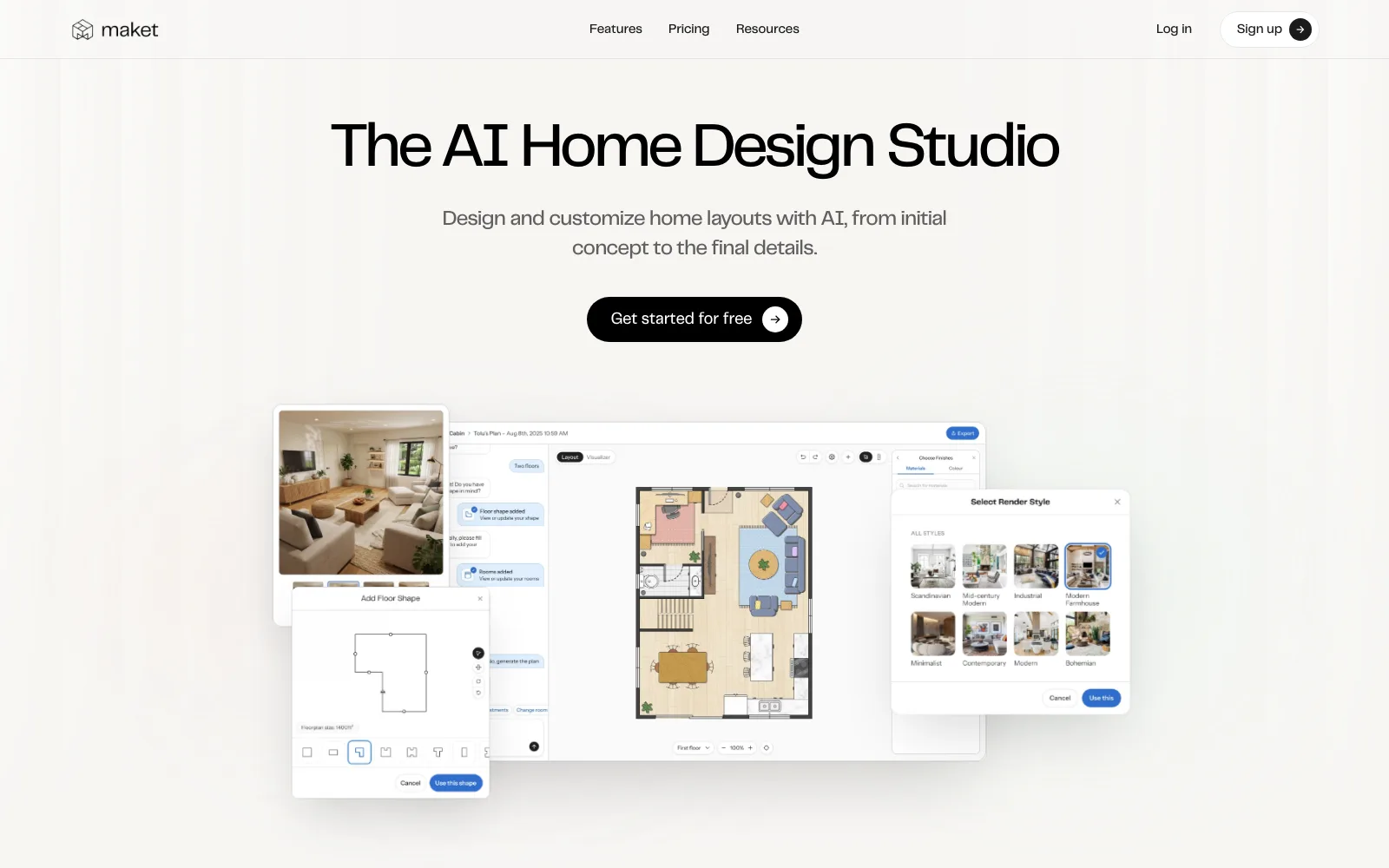
- Maket.ai: Produces many floor plan options from your constraints, like room counts and adjacencies. Good for the schematic phase when you want to compare layouts quickly instead of drawing each by hand.
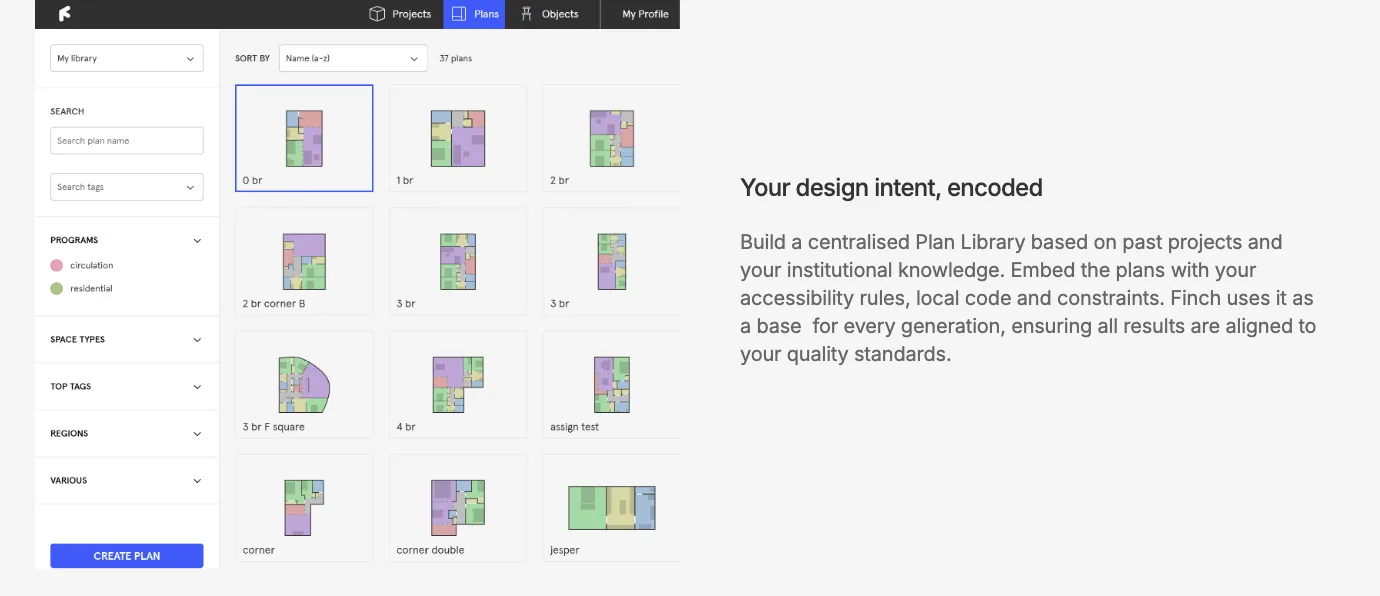
- Finch: Uses graph technology to optimize layouts in real time and flag issues as you adjust the design. The instant feedback loop makes it a strong teaching tool for understanding how one change ripples through a plan.
- ARCHITEChTURES: Automates residential design by generating plans that respond to site rules, unit mixes, and regulations. It shows how data-driven design works on real housing problems, which is useful for thesis or studio projects focused on density.
- RoomGPT: Redesigns interior spaces from a single photo, generating styled room options in seconds. A quick way to test material palettes and furniture arrangements for interior-focused briefs.
- Digital Blue Foam: Combines generative design with site and sustainability analytics, aimed at urban and early-stage planning. Helpful when a project needs to balance density, daylight, and environmental performance from the start.
These tools sit alongside the apps practicing offices rely on. If you want to see how professionals combine them, our roundup of the best AI apps for architects and designers covers the practice side in more depth.
📌 Did You Know?
Autodesk Forma grew out of Spacemaker, a Norwegian startup Autodesk acquired in 2020 for about 240 million dollars. The early-design analysis you can run for free as a student today started as software built for professional developers and city planners.
How Do You Choose the Right AI Tool as a Student?
Start with the task in front of you, not the tool with the most features. For a concept board, an image generator like Midjourney or Adobe Firefly is enough. For a studio project that needs plans and site analysis, a design platform like Autodesk Forma or Finch gives more useful output. Trying to learn five tools at once usually means you learn none of them well.
Budget matters too. Many of these tools run on monthly subscriptions that add up quickly on a student income. Look for free education licenses and free trials first, and confirm what happens to your files if you stop paying. Tools that export to common formats like DWG, IFC, or OBJ are safer choices because your work stays usable in Rhino, Revit, or SketchUp later. For more on building strong process skills, see how to approach site analysis as an architect, since good input data makes any AI tool more useful.
💡 Pro Tip
Before paying for any subscription, search the tool name plus “student” or “education” on its official site. Autodesk and several others give full free access with a valid school email. Set a calendar reminder for trial end dates so a free test does not quietly turn into a monthly charge.
Common Concerns About Using AI in Studio
A frequent worry is that relying on AI weakens core design skills. The honest answer is that it can, if you skip the thinking and accept whatever the software produces. The students who get the most out of these tools use them to test ideas faster, then apply judgment about which option actually works for the site, the brief, and the people who will use the building. The tool generates options. You still make the decisions.
Academic honesty is the other concern. Many schools now expect you to credit AI use in your process documentation, the same way you would cite a precedent or a software plugin. Keep notes on what you generated and how you edited it. Platforms like AI in architecture keep changing, and so do school policies, so check your studio brief each semester. Architecture media such as ArchDaily regularly publishes built projects that used these workflows, which is a good way to see responsible use in practice. You can also build on broader architectural education resources to ground your technical skills.

Where to Go From Here
Your Next Step: Pick one tool that matches your current project, claim its free student access or trial, and rebuild a layout or concept you already finished by hand. Comparing the two side by side teaches you faster than reading another feature list, and it shows you exactly where AI saves time and where your own judgment still wins.




A Courtyard Reading Corner Takes Shape with Nano Banana 3
A narrow courtyard can look finished on plan and still feel uninviting...
 illustrarch Editoral Team5 Mins read

Seedance 3.0 for Home and Garden Concepts: Making a Renovation Story Easier to Discuss
Seedance 3.0 can turn a renovation idea into a short concept video....
illustrarch Editoral Team5 Mins read

From SketchUp View to Client-Ready Render: A Hands-On Look at Vizbase
Vizbase co-founder Mikus Zarāns shows how the browser-based AI renderer turns SketchUp...
illustrarch Editoral Team4 Mins read

Best AI Interview Assistant for Architects: 9 Tools Compared
We compare nine AI interview assistants for architects on speed, drawing awareness,...
illustrarch Editoral Team12 Mins read


Leave a comment