

Revit Alternative Software for Architects
A practical comparison of eight Revit alternatives, covering ArchiCAD, Vectorworks, BricsCAD BIM, Allplan, Chief Architect, FreeCAD, BlenderBIM, and SketchUp Free. Includes pricing data, platform compatibility, IFC interoperability tips, and a side-by-side table to help architects choose the right BIM tool for their practice.
 Elif Ayse Sen28 February 20269 Mins read338

Table of Contents Show
Finding the right revit alternative can save your firm thousands of dollars per year while matching your actual design workflow. Autodesk Revit remains a powerful BIM platform, but its annual subscription cost of approximately $3,005 per seat, Windows-only limitation, and steep learning curve push many architects toward other solutions. Whether you run a small residential practice or a mid-size commercial studio, the BIM market now offers credible alternatives that handle modeling, documentation, and collaboration without locking you into the Autodesk ecosystem.
This guide compares eight revit alternatives across pricing, BIM depth, platform support, and real-world use cases so you can pick the tool that actually fits how your team works.

Why Architects Look for Alternatives to Revit
Revit has earned its place as the industry standard for multi-disciplinary BIM coordination. A change in the floor plan automatically updates sections, elevations, and schedules, and its MEP and structural modules make it the default for large commercial projects. However, several pain points drive architects to explore revit alternative software options.
Cost is the primary concern. According to Autodesk’s official pricing page, a single Revit subscription costs $3,005 per year (as of October 2026). For a five-person firm, that totals over $15,000 annually before accounting for hardware upgrades, training time, and the AEC Collection upsell. Small practices and freelancers rarely need Revit’s full multi-discipline toolkit, which makes that price difficult to justify.
Platform limitations also matter. Revit runs natively only on Windows. If your firm uses macOS, you need either a virtual machine or a completely separate workstation. Performance is another frequent complaint. Large models slow down noticeably, and Revit demands substantial RAM and GPU resources. The interface prioritizes database management over design intuition, which frustrates architects who want a tool that thinks like a designer rather than an engineer.
These frustrations became public when prominent architects and consultants signed an open letter to Autodesk’s CEO requesting meaningful improvements. While Autodesk has responded with incremental updates, many firms have already begun evaluating alternative digital tools that better match their practice size and design philosophy.

Best Paid Revit Alternatives for Architects
The strongest alternatives to Revit come from established BIM developers with years of architectural workflow refinement. Each targets a different practice profile, so matching the tool to your project type matters more than chasing feature lists.
ArchiCAD by Graphisoft
ArchiCAD is the closest direct competitor to Revit and the most popular autodesk revit alternative among architecture-focused firms. Launched in 1987, it was one of the first BIM tools ever created. Its design-centric interface uses floating palettes and customizable toolbars that feel natural for architects transitioning from SketchUp or traditional drafting. Many users describe ArchiCAD as software that thinks like a designer rather than a database manager.
ArchiCAD runs natively on both macOS and Windows, making it the default BIM choice for Apple-based studios. Its Teamwork feature, powered by BIMcloud, enables real-time collaboration on large models. ArchiCAD also champions Open BIM through strong IFC export capabilities, which means your structural and MEP consultants can work in their preferred software while you coordinate through industry-standard file formats. The Param-O tool for creating custom parametric objects is generally considered more approachable than Revit’s Dynamo scripting environment.
As of October 2026, US subscription pricing starts at approximately $201 per month (billed annually) for the Archicad Studio plan, with the Collaborate plan at roughly $237 per month (billed annually). Compared to Revit’s $3,005 annual cost, ArchiCAD offers meaningful savings, especially for smaller teams. Graphisoft also provides free educational licenses for students and educators. For a detailed side-by-side breakdown, see our Archicad vs Revit comparison.

Vectorworks Architect
Vectorworks Architect occupies a unique space in the BIM market by combining strong 2D drafting tools with capable 3D modeling in a single application. Part of the Nemetschek Group, Vectorworks has been serving designers since 1985, and over 685,000 users worldwide work with the platform across architecture, landscape, and entertainment design.
Where Vectorworks stands out is graphic quality. Architects who care about the visual appearance of their construction documents, presentations, and design sheets consistently praise its drawing output. Custom fonts, drop shadows, gradients, hatches, and line weights all render beautifully. The software handles the entire project lifecycle from early sketches to construction documents, and its hybrid CAD-plus-BIM approach lets firms transition from 2D to BIM at their own pace.
Vectorworks runs on both Mac and Windows. It supports IFC export for OpenBIM coordination and integrates with Rhino, SketchUp, Cinema4D, and Photoshop. The user community and support team are frequently praised for responsiveness. Annual subscription pricing varies by region through a global distributor network, but it is generally competitive with ArchiCAD.

BricsCAD BIM
For firms deeply invested in AutoCAD workflows who want BIM capabilities without a complete platform change, BricsCAD BIM offers a familiar DWG-native environment. It reads and writes DWG files natively, uses familiar commands, and includes machine-learning-powered features that automatically classify building elements and generate BIM data from 3D geometry.
BricsCAD BIM stands out as the best revit alternative for teams transitioning from AutoCAD. The learning curve is minimal for anyone already comfortable with DWG-based software. It also offers perpetual licensing alongside subscription options, with subscription pricing of about €1,060 per year for BricsCAD BIM (as of October 2026), making it one of the most affordable professional BIM tools on the market.
The trade-offs include a smaller plugin ecosystem compared to Revit and less community support. Rendering capabilities are basic, and for large-scale MEP coordination, you may still need supplementary tools.

Allplan
Allplan, also part of the Nemetschek Group, is a BIM solution built for large, multi-disciplinary projects. It handles architecture, structural engineering, and construction management within a single platform. European firms, particularly in Germany, Austria, and Switzerland, rely on Allplan for detailed engineering and complex building documentation.
The 2025 release introduced AI-powered visualization tools, an optimized Python API for custom workflows, and enhanced multilayer modeling. Allplan’s collaborative features support simultaneous work by multiple stakeholders. The learning curve is steeper than ArchiCAD or Vectorworks, but for campus, healthcare, or infrastructure projects that demand robust scheduling and discipline coordination, Allplan is a serious contender.

Chief Architect
Chief Architect is purpose-built for residential design. If your practice focuses on houses, renovations, and light commercial work, this revit alternative to the complexity of full BIM software delivers fast results. Automated roof generation, framing tools, and an extensive library of residential materials speed up documentation for home projects.
Users consistently praise Chief Architect for generating professional print-ready drawings directly from the design model. It runs on both Mac and Windows. The limitation is scope: Chief Architect lacks the collaboration features and multi-discipline integration that larger commercial projects require. For residential specialists, however, it can replace Revit entirely while cutting both cost and learning time. To understand more about choosing between residential-focused and full BIM tools, explore our Revit vs Archicad guide.

Free Revit Alternative Options Worth Considering
Budget constraints, student projects, or experimental workflows sometimes call for a free revit alternative. While none of these match the documentation depth of commercial BIM software, they fill important gaps in the design pipeline.
FreeCAD (with BIM Workbench)
FreeCAD is the most capable autodesk revit free alternative available today. It is fully open-source, runs on Windows, macOS, and Linux, and supports Python scripting for custom workflows. The BIM Workbench adds architectural modeling tools, IFC support, and basic documentation capabilities.
FreeCAD works well for smaller projects and for architects who want full control over their data without vendor lock-in. Its active development community continuously expands features relevant to architectural design. The main drawback is usability: the interface requires patience, and documentation generation is not as polished as commercial rivals. For students and budget-constrained practices, it remains the strongest free option. Our overview of free CAD tools for architecture covers additional options.

BlenderBIM
BlenderBIM (renamed Bonsai in 2024) is an add-on for Blender, the popular open-source 3D modeling application, that transforms it into a native IFC authoring tool. Unlike other BIM tools that export to IFC as a secondary format, BlenderBIM works directly on the IFC file. Every edit you make is a direct modification to the IFC data, which ensures accuracy and eliminates translation errors.
Combined with Blender’s powerful geometry nodes for parametric design, BlenderBIM gives technically-minded architects full BIM creation capability at zero cost. The trade-off is a steep learning curve. You need familiarity with both Blender’s interface and the technical structure of IFC data. Drawing generation is improving but remains behind commercial tools. For computational designers and architects who value open data standards, BlenderBIM represents the future of vendor-independent BIM.

SketchUp Free (Web Version)
SketchUp’s free web-based version is not a BIM tool, but it remains one of the fastest ways to explore architectural concepts in 3D. Its intuitive push-pull modeling approach makes it accessible even to non-technical team members and clients. The 3D Warehouse provides a massive library of pre-made components. SketchUp works well for massing studies, conceptual presentations, and interior layout explorations. For anything requiring construction documentation, scheduling, or BIM data, you will need to pair it with other software. To compare SketchUp with a full BIM platform, read our Archicad vs SketchUp breakdown.

Revit Alternatives Comparison Table
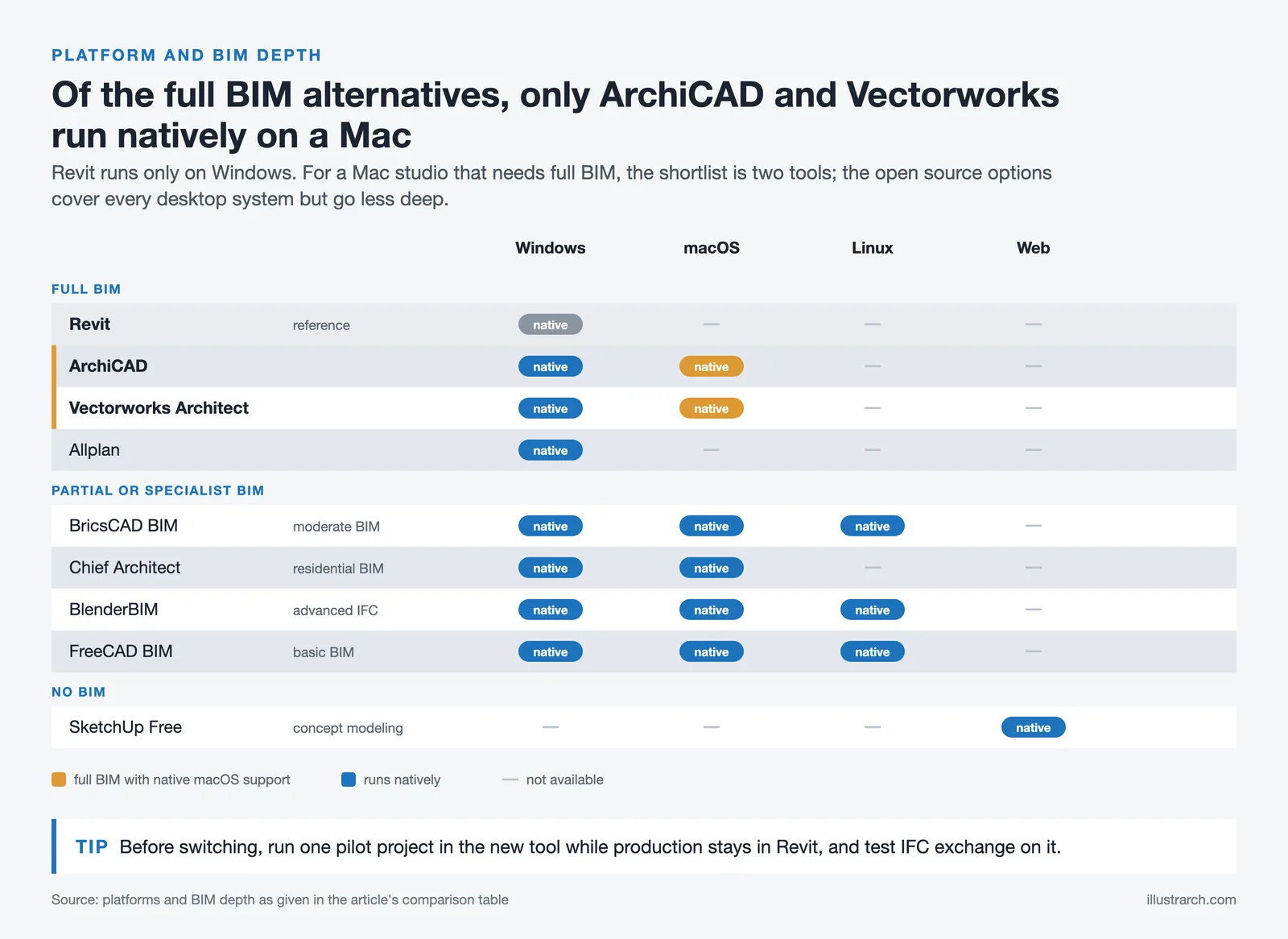
The following table compares the key specifications across all eight alternatives to help you narrow down your shortlist based on price, platform support, and project fit.
Side-by-Side Comparison of Revit Alternative Software
| Software | Annual Cost (approx.) | Platform | BIM Depth | Best For |
|---|---|---|---|---|
| ArchiCAD | From $2,414/yr | Mac, Windows | Full BIM | Architecture-focused firms, Mac users |
| Vectorworks Architect | ~$1,530/yr | Mac, Windows | Full BIM | Design-focused firms, strong 2D graphics |
| BricsCAD BIM | €1,060/yr | Windows, Mac, Linux | Moderate BIM | AutoCAD users transitioning to BIM |
| Allplan | $3,480/yr | Windows | Full BIM | Large projects, European firms |
| Chief Architect | ~$1,995/yr | Mac, Windows | Residential BIM | Residential architects, home builders |
| FreeCAD BIM | Free | Mac, Windows, Linux | Basic BIM | Students, budget-constrained practices |
| BlenderBIM | Free | Mac, Windows, Linux | Advanced IFC | Technical architects, open-data advocates |
| SketchUp Free | Free (web) | Web-based | No BIM | Concept modeling, quick presentations |
How to Choose the Right Revit Alternative for Your Practice
Picking the right revit alternative depends on four practical factors that go beyond feature comparison charts.

Start with your project type. If you work primarily on residential projects, Chief Architect or ArchiCAD will cover your needs at a lower cost and with less complexity. For large commercial or multi-discipline projects, ArchiCAD, Allplan, or Vectorworks provide the BIM depth you need. Concept-heavy studios that rely on freeform geometry should evaluate Rhino with Grasshopper as a modeling front-end paired with a BIM tool for documentation. Our parametric design tools guide covers these hybrid workflows.
Consider your operating system. If your firm runs macOS, ArchiCAD and Vectorworks are the only full BIM options with native Mac support. Allplan is Windows-only, while BricsCAD BIM also runs on macOS and Linux. SketchUp and the free tools run on multiple platforms.
Evaluate interoperability requirements. Most revit alternatives now support IFC export for OpenBIM coordination. If your consultants work in Revit, establish a clean IFC workflow using IFC4 Reference View and validate exports with an open viewer before sending files. BricsCAD has an edge here if your team relies heavily on DWG files.
Finally, calculate total cost of ownership. Software subscription is only part of the equation. Factor in training time for your team (ArchiCAD typically requires 1 to 2 weeks, Revit 2 to 4 weeks for AutoCAD users), hardware requirements (Revit demands higher-spec machines), and productivity during the transition period. For more on evaluating digital tools holistically, see our guide to must-have tools for architects.

IFC Interoperability: Working with Revit Users After Switching
One of the biggest concerns when choosing an alternative to Revit is maintaining smooth collaboration with consultants and contractors who still use Revit. The good news is that buildingSMART International’s IFC standard has matured to the point where cross-platform coordination works reliably for most architectural projects.

Use IFC4 or IFC4 Reference View for architectural model exchange. Map walls, slabs, doors, and windows to standard IFC classes so that schedules read correctly regardless of which BIM tool opens the file. Keep property sets minimal but consistent. Before sending any IFC file, validate it with an open viewer like BIMcollab or Solibri to catch missing GUIDs or unit mismatches.
For 2D drawing exchange, DWG remains the standard format. Export with a single unit system and frozen hatches that match your lineweight conventions. When you must hand over native RVT or RFA files, agree on the Revit version year with your consultants upfront and purge unused families to reduce file size. Firms interested in deepening their BIM knowledge can explore our resources on Revit add-ins and AutoCAD vs Revit workflows.
Software pricing referenced in this article reflects publicly available figures as of October 2026. Prices vary by region and licensing tier. Always verify current pricing on official vendor websites before making purchasing decisions.






Will Forma Replace Revit? Autodesk Finally Answers
Autodesk's own FAQ says Forma will replace Revit over time, as it...
 illustrarch Editoral Team3 Mins read

Notion Alternatives for Architects: 7 Tools That Fit Studio Work
Notion works until a studio needs fee tracking, phase budgets and timesheets....
 Furkan Sen7 Mins read

Why Every Practice Ends Up With Five Versions of the Same Revit Family
Let’s learn why Revit family libraries accumulate duplicates, break schedules and slow...
illustrarch Editoral Team5 Mins read

Visualizing Renovation Projects From Photographs: A Workflow for Existing-Building Work
Photo-based visualization turns a photograph of a building that already exists into...
illustrarch Editoral Team7 Mins read


Leave a comment