

Desk Selection for Architects: Top Tips for Comfort, Productivity, and Efficiency
Discover how to select the perfect desk for architects, balancing functionality, ergonomics, and design. Learn about key features like ample surface space, durable materials, adjustable heights, and built-in storage to optimize productivity and comfort. Explore top desk options and practical tips for creating an efficient workspace tailored to architectural tasks and unique professional needs.
 Furkan Sen15 January 20257 Mins read493

Table of Contents Show
Choosing the right desk is more than just picking a piece of furniture, it’s about creating a home workspace that fuels creativity and productivity. As architects, we spend countless hours sketching, drafting, and designing, so the desk we work at plays a crucial role in how efficiently we bring our visions to life.
From ergonomic designs to ample surface space for blueprints and models, the perfect desk needs to cater to both comfort and functionality. It’s not just about aesthetics; it’s about finding a setup that supports the demands of our craft while complementing our unique workflow. Let’s explore what makes a desk truly ideal for architects.
Importance Of Desk Selection For Architects
Desk selection directly influences an architect’s efficiency and work quality. Large surfaces are essential for spreading out blueprints, models, and digital tools. Compact desks fail to provide the necessary space, creating clutter that disrupts workflow.
Ergonomics play a crucial role in maintaining physical health during long hours of design work. Adjustable heights, supportive chairs, and well-positioned monitor platforms reduce strain. Poorly designed desks result in discomfort, affecting focus and productivity.
Material choice impacts durability and design harmony. Hardwood options support heavy models and equipment, while synthetic surfaces suit lighter setups. A mismatched desk clashes with office aesthetics, lowering visual cohesion.
Integrated storage optimizes organization. Drawers and shelves hold drafting supplies, reference materials, and equipment. Without storage, tools scatter, leading to inefficiency in project execution.

Key Features To Consider
Selecting the ideal desk for architects involves evaluating specific aspects that enhance functionality, comfort, and durability. Each feature directly impacts workflow efficiency and physical well-being.
Ergonomics
Ergonomic considerations ensure physical health during long hours of detailed design. A desk with adjustable height options supports different working postures, reducing back and neck strain. Features like rounded edges and appropriate legroom further contribute to comfort.
Size And Space
Adequate surface area is essential for architects to work efficiently. A desk accommodating blueprints, models, and digital tools prevents clutter, while ensuring enough space for desk accessories like lamps or organizers. For small spaces, L-shaped or modular desks optimize surface availability.
Material And Durability
Durable materials improve desk lifespan and aesthetic integration. Solid hardwood or high-quality engineered wood fits traditional designs, while steel or aluminum offers modern, minimalistic durability. Scratch-resistant surfaces preserve the desk’s appearance amidst heavy usage.
Storage Options
Built-in storage keeps tools and documents organized, supporting seamless workflow. Options like drawers, shelves, or hidden compartments reduce desktop clutter. Access to frequently used items, such as drafting scales or sketchbooks, is crucial for efficiency.
Adjustable Functionality
Features like adjustable tabletops or sections boost flexibility. An adjustable tilt accommodates drafting requirements, while integrated cable management systems support evolving tech use. Multi-functional elements improve adaptation across varied project demands.

The following table summarizes the key features architects should evaluate when selecting a desk:
| Feature | Why It Matters for Architects | What to Look For |
|---|---|---|
| Ergonomics | Reduces back/neck strain during long design sessions | Adjustable height (sit-stand), rounded edges, adequate legroom |
| Size & Space | Accommodates blueprints, models, and multiple monitors | Minimum 60″ x 30″ surface area; L-shaped or modular options for small rooms |
| Material & Durability | Supports heavy equipment and withstands daily wear | Solid hardwood, steel/aluminum frame, scratch-resistant laminate |
| Storage Options | Keeps drafting tools, scales, and documents organized | Built-in drawers, shelving units, hidden compartments |
| Adjustable Functionality | Adapts to drafting, digital work, and model-building tasks | Tilting tabletop, cable management, modular attachments |
Best Desk Types For Architects
Selecting the right desk type is critical for architects, as it directly impacts productivity and workflow organization. Here are some ideal desk options tailored to the unique needs of architects:
Standing Desks
Standing desks promote better posture and reduce strain during long design sessions. These desks, featuring adjustable height options, allow architects to alternate between sitting and standing, enhancing comfort and focus. For added utility, many models include integrated cable management systems, ensuring a clutter-free workspace. Popular options like electric height-adjustable desks support seamless transitions to accommodate various project stages.
Drafting Tables
Drafting tables, designed specifically for tasks requiring precision and detail, remain a staple for architects. Their adjustable, tilting tabletops provide optimal angles for sketching blueprints or detailed renderings. Many tables include integrated rulers and tool holders, which streamline workflows. Models constructed from sturdy materials like steel frames and tempered glass offer both durability and a modern aesthetic, combining form and function effectively.
Modular Desks
Modular desks are ideal for architects who value flexibility and a customizable setup. These desks, with interchangeable components like additional storage units and extended work surfaces, adapt to different project needs. They often feature built-in shelving units and organizers to keep essential tools within easy reach. High-quality modular systems, made from durable materials like engineered wood or metal, help create functional, personalized workstations that scale with workload demands.
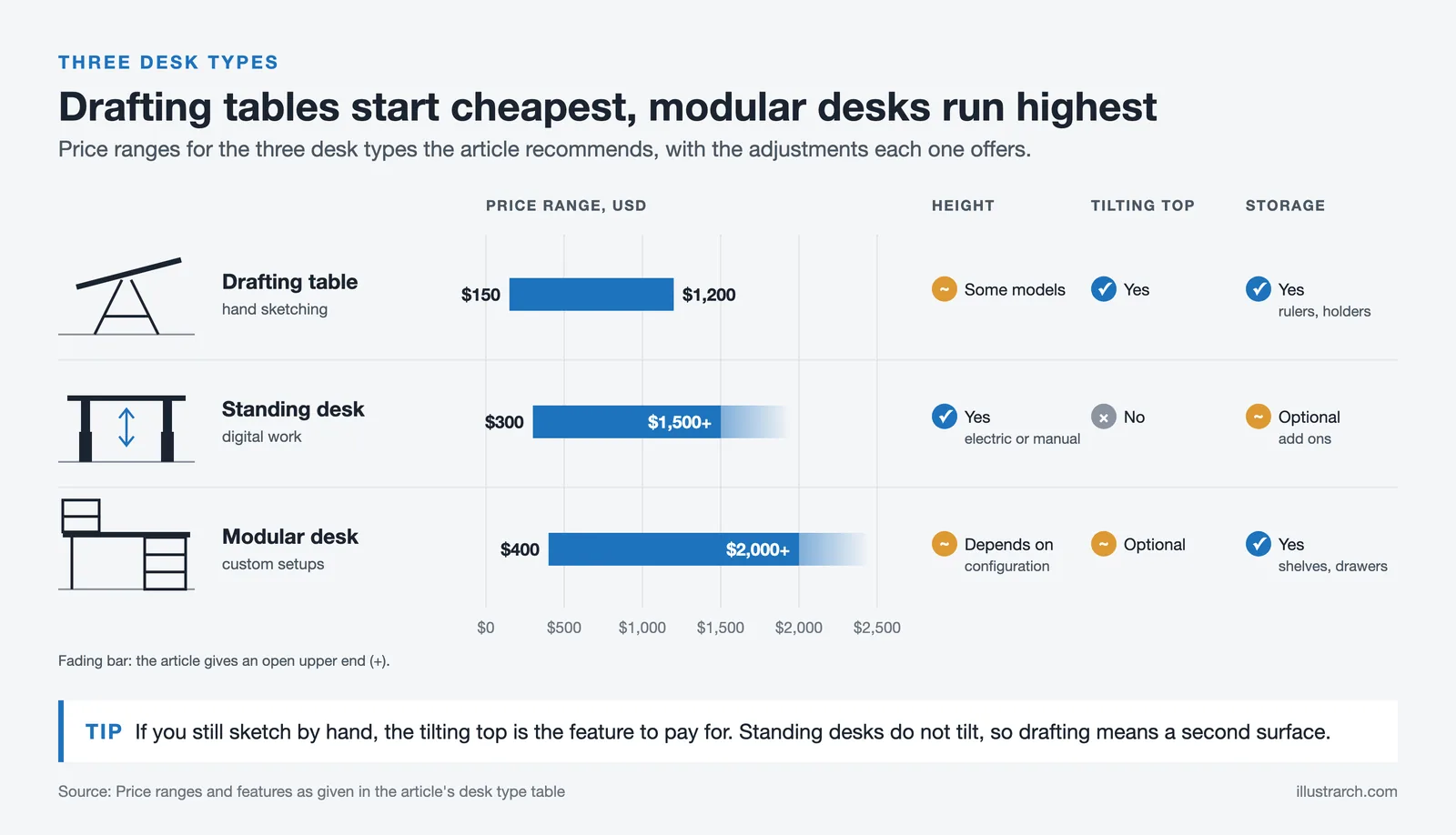
Here’s a quick comparison of the three main desk types suited for architects:
| Desk Type | Best For | Height Adjustable | Tilting Surface | Built-in Storage | Price Range |
|---|---|---|---|---|---|
| Standing Desk | Digital work, dual-monitor setups, long work sessions | Yes (electric/manual) | No | Optional (add-ons) | $300-$1,500+ |
| Drafting Table | Hand sketching, blueprint work, technical drawing | Some models | Yes | Yes (rulers, tool holders) | $150-$1,200 |
| Modular Desk | Multi-task workflows, customizable setups | Depends on configuration | Optional | Yes (shelves, drawers) | $400-$2,000+ |
Top Desk Brands For Architects
1. Herman Miller
Herman Miller produces ergonomic desks designed for comfort and durability. Their adjustable sit-stand desks, such as the Motia, feature spacious surfaces and promote better posture during long hours of work. The brand emphasizes sustainability with high-quality materials like FSC-certified wood.
2. Vari
Vari offers versatile sit-stand desks, prioritizing height adjustability and sturdy construction. The Vari Electric Standing Desk provides a large work surface and includes integrated cable management. Their desks suit architects requiring flexibility for various design tasks.
3. Steelcase
Steelcase delivers premium-quality desks known for durability and sophisticated designs. The Series 7 desks, now discontinued, accommodate dual monitors, large blueprints, and drafting tools while maintaining a sleek aesthetic. Their focus on ergonomics ensures optimal comfort.
4. UPLIFT Desk
UPLIFT Desk specializes in customizable office furniture, including height-adjustable desks tailored for architects. Options like V2 Desk offer extensive surface area, modular attachments, and smooth electric height adjustment for personalized use.
5. BD Studio
BD Studio designs drafting tables perfect for precision-driven tasks. Their desks feature tilting tabletops, built-in rulers, and compartments for tool storage. These desks cater to architects focusing on technical drawing and model design.
6. Fully
Fully creates ergonomic solutions supporting productivity and comfort. The Jarvis Standing Desk, with its bamboo surface and electric adjustability, offers durability and an eco-friendly design. It’s ideal for architects combining technology and hands-on work.

7. Sauder
Sauder’s desks provide a balance of affordability and functionality. Several models integrate ample storage, durable materials, and compact yet spacious layouts suitable for architects managing various tools and documents.
8. Vitra
Vitra is known for crafting contemporary desks that combine aesthetics with practicality. Their Workbays and Hack Desks feature minimalist yet functional designs, appealing to architects requiring a clutter-free, professional workspace.
9. ApexDesk
ApexDesk produces robust desks with electric height adjustments and wide workspaces. The Elite Series offers plenty of surface area to accommodate blueprints, models, and multiple screens, making it ideal for diverse architectural tasks.
10. IKEA
IKEA provides affordable yet functional desk options for architects. The Bekant series, no longer listed on IKEA US, includes desks with adjustable heights and integrated cable management, suitable for compact spaces without sacrificing utility.
The table below provides a detailed comparison of the top desk brands recommended for architects:
| Brand | Popular Model | Desk Type | Height Range | Weight Capacity | Starting Price (USD) | Warranty |
|---|---|---|---|---|---|---|
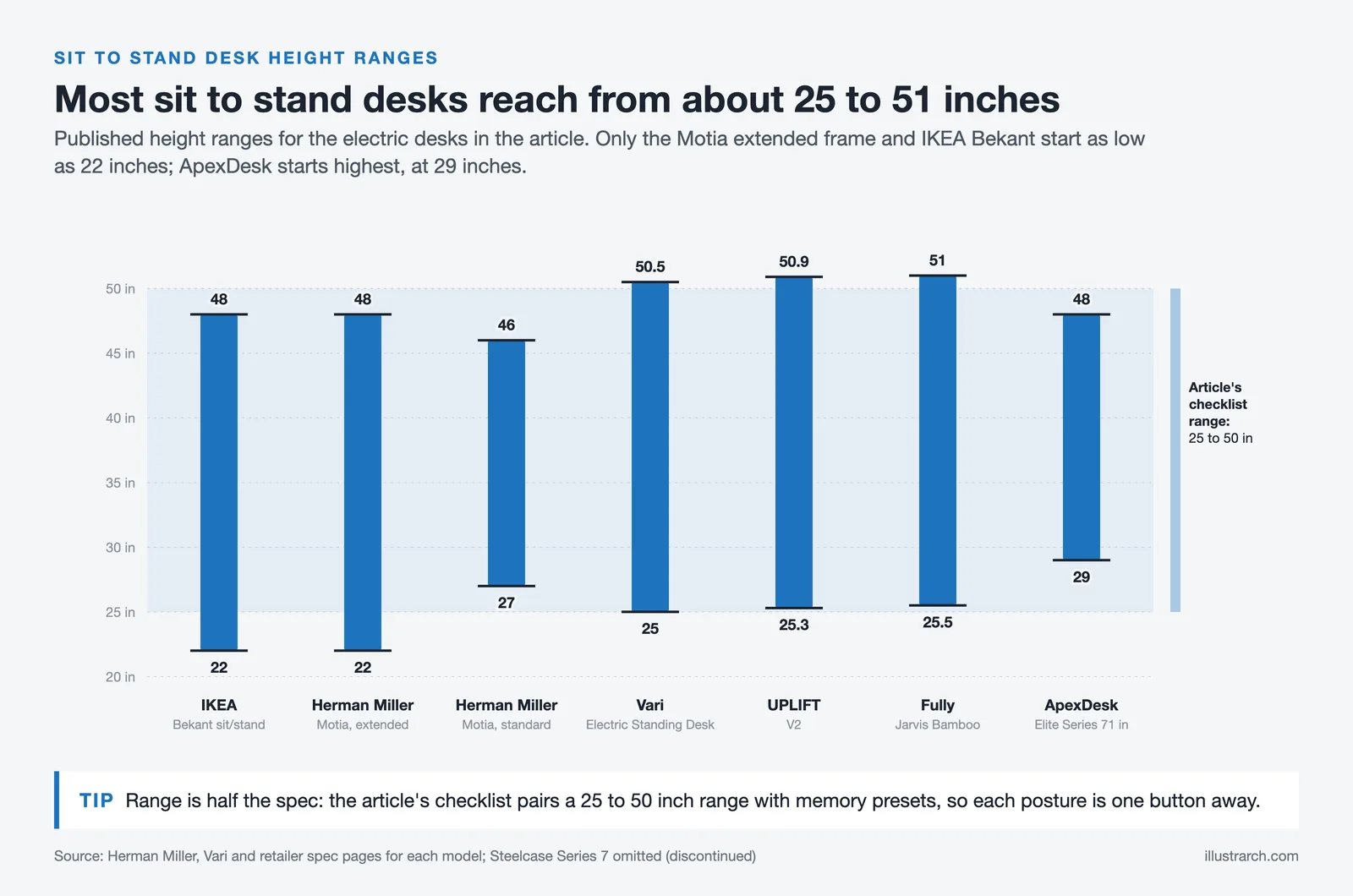
| Herman Miller | Motia Sit-to-Stand | Standing Desk | 27″, 46″ (standard) / 22″, 48″ (extended) | 250 lbs | ~$1,180 | Up to 12 years |
| Vari | Electric Standing Desk | Standing Desk | 25″: 50.5″ | 200 lbs | ~$650 | 5 years |
| Steelcase | Series 7 (discontinued) | Standing Desk | 22.6″: 48.7″ | 250 lbs | ~$1,500 | 12 years |
| UPLIFT Desk | V2 / V2 Commercial | Standing Desk | 25.3″: 50.9″ | 355 lbs | ~$599 | 15 years |
| BD Studio | Drafting Table | Drafting Table | Adjustable tilt | Varies | ~$300 | Varies |
| Fully | Jarvis Bamboo | Standing Desk | 25.5″ to 51″ (extended) | 350 lbs | ~$640 | 15 years (frame) / 5 years (top) |
| Sauder | Various Models | Traditional / L-Shaped | Fixed | Varies | ~$200 | 5 years |
| Vitra | Hack Desk | Standing / Modular | Adjustable | Varies | ~$1,800 | Varies |
| ApexDesk | Elite Series 71″ | Standing Desk | 29″: 48″ | 225 lbs | ~$600 | 2 years |
| IKEA | Bekant Sit/Stand (no longer listed on IKEA US) | Standing Desk | 22″: 48″ | 154 lbs | ~$549 | 10 years |
Tips For Making The Right Choice
- Assess Workspace Size
Measure the available space to ensure the desk fits without overcrowding. Compact desks work well for smaller areas, while larger workspaces can accommodate expansive surfaces for plans and models.
- Prioritize Surface Area
Choose desks with sufficient surface area to spread out blueprints, tools, and digital devices. For example, drafting tables often provide extra width and depth, accommodating diverse project demands.
- Focus on Ergonomics
Select desks with adjustable heights, rounded edges, or keyboard trays. Ergonomic features help reduce physical strain during long hours, promoting health and productivity.
- Consider Material Durability
Pick desks made of solid wood or metal for longevity and design consistency. Durable materials withstand daily wear and blend seamlessly with professional office aesthetics.
- Evaluate Built-In Storage Options
Opt for desks with drawers, shelving, or compartments to organize tools and supplies. Integrated storage minimizes clutter, enhancing workflow and accessibility.
- Check for Adjustable Features
Look for desks offering tilting tabletops or cable management systems. Flexible designs adapt to various project needs and create a cleaner, more efficient workspace.
- Align Desk Style with Workflow
Match desk types, like standing desks or modular layouts, to your work style. For example, standing desks improve posture, whereas modular options offer customizable setups for varying tasks.
Use the checklist table below to quickly evaluate any desk before purchasing:
| Checklist Item | Questions to Ask | Ideal Specification for Architects |
|---|---|---|
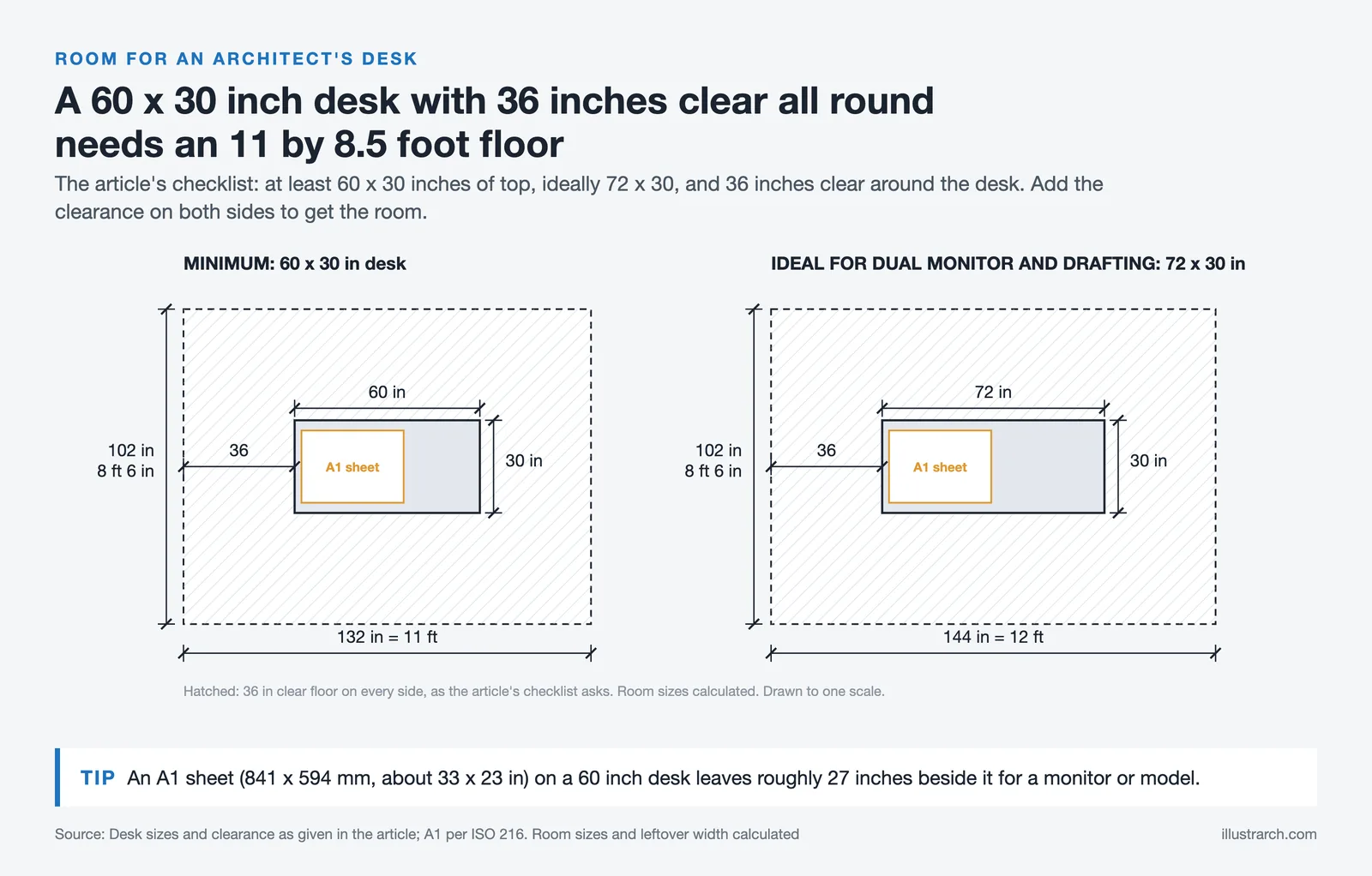
| Workspace Size | Does the desk fit your room without overcrowding? | Measure room dimensions; leave 36″ clearance around the desk |
| Surface Area | Can you spread out A1 blueprints comfortably? | Minimum 60″ x 30″; ideally 72″ x 30″ for dual-monitor + drafting |
| Ergonomics | Does it support sit-stand transitions? | Electric height adjustment with 25″: 50″ range and memory presets |
| Material | Can it handle heavy models and equipment? | Solid wood or steel frame; weight capacity of 200 lbs+ |
| Storage | Are drawers/shelves included or available as add-ons? | At least 1 drawer + shelving unit for supplies and documents |
| Adjustable Features | Does it have tilting surfaces or cable management? | Tilting tabletop (for drafting) + integrated cable tray |
| Budget | Does it offer good value for the features included? | $500-$1,200 for a quality sit-stand desk with accessories |
Conclusion
Choosing the right desk for architects integrates functionality, ergonomics, and design compatibility with professional needs. Dimensions, adjustability, and storage capacity ensure optimal workspace organization for architectural tasks. Durable materials and features like cable management systems add to the desk’s longevity and efficiency. Prioritizing these factors supports an architect’s workflow by minimizing disruptions and promoting physical well-being.
Incorporating ergonomic designs, such as sit-stand options and tilting surfaces, aligns the furniture with the needs of intensive design work. Selecting desks that facilitate project adaptability ensures tools, blueprints, and digital devices are accessible and organized. Architects who align desk features with their specific workflow and workspace requirements experience improved focus and productivity.






Futuro House Production Revived in Finland After Decades-Long Hiatus
A Facebook listing for abandoned moulds led to the first new Futuro...
 illustrarch Editoral Team3 Mins read

Building Your Dream Home in NSW: What You Should Know About Montgomery Homes
Montgomery Homes has been building across Sydney, Newcastle, the Hunter, Wollongong and...
illustrarch Editoral Team4 Mins read

Designing a Home Theater: Where Drapery Fits Into the Plan
In a media room the curtains are a performance layer, not decoration....
illustrarch Editoral Team3 Mins read

Oscar Niemeyer’s Cathedral of Brasília: The Hyperboloid Concrete Hymn
The Cathedral of Brasília reads as a single gesture, yet it stood...
Furkan Sen7 Mins read


Leave a comment