

Best Architecture Software for Small Firms
A practical comparison of the best architecture software for small firms in 2026. Covers BIM platforms like Revit and ArchiCAD, 3D modelers like SketchUp and Rhino, rendering tools, free alternatives, and AI-powered options, with pricing breakdowns and workflow guidance for studios with limited budgets and small teams.
 Elif Ayse Sen14 May 202613 Mins read361

Table of Contents Show
Architecture software for small firms needs to balance cost, ease of learning, and output quality across drafting, modeling, rendering, and documentation. The best options in 2026 include SketchUp for concept speed, Revit and ArchiCAD for BIM documentation, Rhino for complex geometry, and AI-powered rendering platforms like ArchFine that remove the need for dedicated visualization hardware.
Running a small architecture practice means every software subscription hits the bottom line harder than it would at a 200-person firm. The wrong tool wastes money. The wrong combination wastes time. And a stack that looked sensible two years ago may now cost more than alternatives that did not exist then. This guide breaks down 11 architecture software programs that genuinely fit the workflow, budget, and team size of firms with fewer than 15 people. Each tool is evaluated on what it actually does well, where it falls short, and what it costs per seat in 2026.
Why Small Firms Need a Different Software Strategy

About 75% of architecture firms in the United States have fewer than 10 employees, according to the AIA Firm Survey Report 2024. These firms handle everything from residential additions to small commercial tenant improvements, and they rarely have a dedicated IT person or BIM manager on staff. Software decisions fall on the principals, and the consequences of picking the wrong platform ripple through every project.
Large firms can absorb the $3,005 annual cost of a Revit seat across dozens of billable projects. A three-person studio running the same subscription feels that expense on every invoice. The calculation is not just about license fees, either. Training time, hardware requirements, and the hours lost to troubleshooting unfamiliar tools all add up. Small firms benefit most from software that is quick to learn, affordable per seat, and productive within the first week of use.
💡 Pro Tip
Before committing to any new software, audit your last five completed projects and identify where your current tools actually slowed you down. Most small firms discover the friction is concentrated in one or two areas (usually rendering or BIM coordination with consultants), not across the entire workflow. Solving those specific bottlenecks gives you a better return than overhauling your full stack.
Best Architecture Software Programs for Small Firms

The list below covers the full range of what a small practice needs: drafting, 3D modeling, BIM, rendering, and presentation. Some tools overlap in capability. Others fill a single gap. The right combination depends on your project types, your team’s existing skills, and how much you can realistically spend per month.
1. SketchUp Pro
SketchUp Pro remains the fastest way to go from a rough idea to a 3D model that clients can understand. Its push-pull modeling interface is intuitive enough that most architects can produce usable output within a day or two of starting. The 3D Warehouse provides access to millions of pre-built components, which saves hours on furnishing and populating scenes. SketchUp Pro costs $399 per year, and the Studio plan at $859 per year (as of October 2026) adds V-Ray rendering and Revit file import through Trimble Connect. For small firms doing residential work, early-stage design, or client presentations, SketchUp delivers strong value at a low price point. Its limitations appear when you need construction documentation, scheduling, or data-rich BIM models. For those tasks, you will need a second tool.
2. Revit
Revit is the dominant BIM platform in North American commercial architecture. Every change to the model automatically updates plans, sections, elevations, and schedules, which eliminates the coordination errors that plague CAD-based workflows. The Autodesk AEC Collection (bundling Revit with AutoCAD, Navisworks, Civil 3D, and Forma) runs at $3,675 per year per seat as of October 2026. That price is steep for a small office, but firms working on commercial projects where consultants require Revit coordination may find it unavoidable. Revit is Windows-only and has a steep learning curve that typically requires two to four weeks for someone coming from AutoCAD. For a deeper breakdown, see our guide to Revit alternatives for architects who want BIM without the Autodesk lock-in.
3. ArchiCAD

ArchiCAD by Graphisoft is the primary BIM alternative for firms that want to stay independent of the Autodesk ecosystem. It launched in 1987 as one of the earliest BIM tools and has a design-centric interface that architects transitioning from SketchUp or manual drafting find comfortable. ArchiCAD runs natively on both macOS and Windows, which makes it the default choice for Apple-based studios. Its Teamwork feature allows real-time multi-user collaboration on the same model, and its OpenBIM support through strong IFC export means your structural and MEP consultants can work in their preferred software while you coordinate through industry-standard file formats. Subscription pricing starts at approximately $200 per month, making it meaningfully cheaper than Revit for smaller teams. For a head-to-head comparison of these two platforms, read our detailed ArchiCAD vs Revit breakdown.
🎓 Expert Insight
“The software is the easy part. What matters is whether you can think in three dimensions and communicate space clearly. Free tools teach you that just as well as paid ones.”
Licensed architect with 20+ years of practice, AIA member
This perspective is especially relevant for small firms evaluating expensive subscriptions. The tool should serve the design process, not define it. Firms that master a lean stack of two or three well-chosen programs consistently outperform those juggling six platforms they barely know.
4. Rhino 3D

Rhino 3D handles complex, freeform geometry with a precision that few tools match. Its NURBS-based modeling engine is the standard for parametric design, and the Grasshopper plugin turns it into a full algorithmic design environment. At $995 for a perpetual license (no annual subscription), Rhino undercuts most BIM platforms on long-term cost. Small firms working on projects with curved facades, custom pavilions, or computational design workflows will find Rhino essential. It does not handle construction documentation or BIM data natively, so most practices pair it with Revit or ArchiCAD for the documentation phase. For more on this pairing, see our comparison of Rhino alternatives for architects.
5. AutoCAD
AutoCAD is the most established drafting tool in architecture. Its value for small firms lies in precision 2D drawing, layering, and the near-universal compatibility of DWG files. Many consultants, contractors, and permit offices still expect DWG submissions, which keeps AutoCAD relevant even as BIM adoption grows. A standalone AutoCAD subscription costs $2,095 per year as of October 2026. For firms that primarily need 2D documentation and do not require BIM coordination, AutoCAD remains a reliable workhorse. Its 3D modeling capabilities exist but lag far behind dedicated tools like SketchUp or Rhino for design work.
6. Vectorworks Architect
Vectorworks Architect sits between pure drafting tools and full BIM platforms. It offers hybrid 2D/3D workflows with strong visualization output and native macOS support. Vectorworks has a loyal following among design-led practices, particularly in Europe and Australia, where its user base is concentrated. Its drawing quality and presentation tools often exceed what Revit can produce visually. The trade-off is a smaller user community and potential coordination friction when working with Revit-based consultants. For a full comparison with other options, our Vectorworks alternatives guide covers how it stacks up against ArchiCAD, Revit, and SketchUp.
7. BricsCAD BIM

BricsCAD BIM is the best transition path for firms that have invested years in AutoCAD workflows and want to add BIM intelligence without learning an entirely new interface. It reads and writes DWG files natively, uses familiar commands, and includes machine-learning features that automatically classify building elements and generate BIM data from 3D geometry. BricsCAD is now sold as Octave BricsCAD, after its developer Bricsys moved from Hexagon to the new software company Octave in 2026, and BIM is offered as a toolset on top of the core program. Subscriptions for the BIM toolset start from €1,060 per year, and lifetime perpetual licenses are still available, which eliminates annual subscription pressure (as of October 2026). For budget-conscious small firms on Windows, macOS, or Linux, BricsCAD offers genuine BIM capability at a lower total cost of ownership than Revit.
⚠️ Common Mistake to Avoid
Many small firms switch to Revit because a single large client or consultant requested it, then discover the platform is poorly suited to their smaller residential or commercial work. Before committing, evaluate whether Revit’s multi-discipline coordination features actually match your typical project type and team size. A firm delivering ten residential projects a year has very different needs from one managing a single 50,000 sqm mixed-use development.
Best Architectural Rendering Software for Small Studios

Rendering used to require dedicated hardware and a full-time visualizer. That cost structure locked small firms out of high-quality presentations. AI-powered cloud rendering and real-time engines have changed the equation completely. A two-person office can now deliver client-ready visuals without a workstation upgrade.
8. Enscape
Enscape is a real-time rendering plugin that lives inside your modeling software. It connects directly to Revit, SketchUp, Rhino, ArchiCAD, and Vectorworks. You press a button and get a walkable 3D view of your model with realistic lighting, materials, and entourage. No file export, no separate application. For small firms, Enscape’s speed is the main draw. You can run a design review with a client, adjust materials in the model, and see the updated render in seconds. Annual pricing is $574.80 per seat for the Solo tier as of October 2026. The trade-off is output quality: Enscape produces very good images, but it does not reach the photorealism of offline renderers like V-Ray for hero shots that need to impress in a competition or publication.
9. Lumion
Lumion is the standalone real-time renderer most associated with polished final output. It ships with over 10,000 assets including high-quality vegetation, people, vehicles, and contextual elements, which makes it strong for landscape architecture and urban design. LiveSync plugins connect it to SketchUp, Revit, ArchiCAD, Rhino, and several others. Lumion Pro costs $1,149 per year as of October 2026. It requires a powerful GPU (NVIDIA RTX series recommended) and is Windows-only, so Mac-based studios will need a secondary Windows machine, since Boot Camp is not available on Apple Silicon Macs. For a deeper comparison of rendering engines, see our guide to 3D rendering software for architects.
10. ArchFine AI

ArchFine is an AI-powered architectural rendering platform built specifically for architects who need fast, client-ready visuals without heavy hardware. It accepts sketches, CAD exports, or basic massing models and returns detailed interior and exterior renders within seconds. Style presets, camera intelligence, and automated iteration suggestions let you produce multiple concept variations in a single client meeting. For small firms that previously could not justify a dedicated visualization workstation or a full-time rendering artist, ArchFine removes that bottleneck entirely. Cloud-based processing means your local machine specs do not limit output quality. The platform runs on a credit-based subscription model, so you pay for what you use rather than maintaining an expensive annual license.
💡 Pro Tip
When evaluating rendering software, test it on an actual project file before subscribing. Export your current SketchUp or Revit model, run it through the tool, and compare the output quality and time investment against your existing workflow. A 15-minute trial on a real file tells you more than a week of watching YouTube tutorials.
Best Free Architecture Software for Budget-Conscious Firms

Not every tool in a small firm’s stack needs a paid subscription. Several free options now offer professional-grade capabilities, particularly for concept design and visualization. For a full rundown of zero-cost tools, see our guide to free tools for architectural design and planning.
11. Blender with BlenderBIM
Blender is a professional-grade open-source 3D platform that has become increasingly relevant to architects, particularly through the BlenderBIM add-on (renamed Bonsai in 2024). BlenderBIM brings full IFC support, OpenBIM compliance, and a BIM authoring workflow into Blender’s modeling environment. The software is entirely free, runs on Windows, macOS, and Linux, and supports Apple Silicon natively. The learning curve is steeper than SketchUp, and the interface reflects its origins as a general 3D application rather than an architecture-specific tool. For studios willing to invest time in learning, Blender eliminates the cost barrier for both modeling and rendering while providing output quality that rivals paid alternatives.
📌 Did You Know?
SketchUp’s 3D Warehouse contains over 4.5 million models contributed by users worldwide, making it one of the largest free libraries of ready-to-use building components, furniture, and site elements available to architects. For small firms on a tight timeline, downloading a pre-built kitchen layout or furniture set from the Warehouse can save hours compared to modeling from scratch.
How to Choose the Right Architecture Software for Your Firm

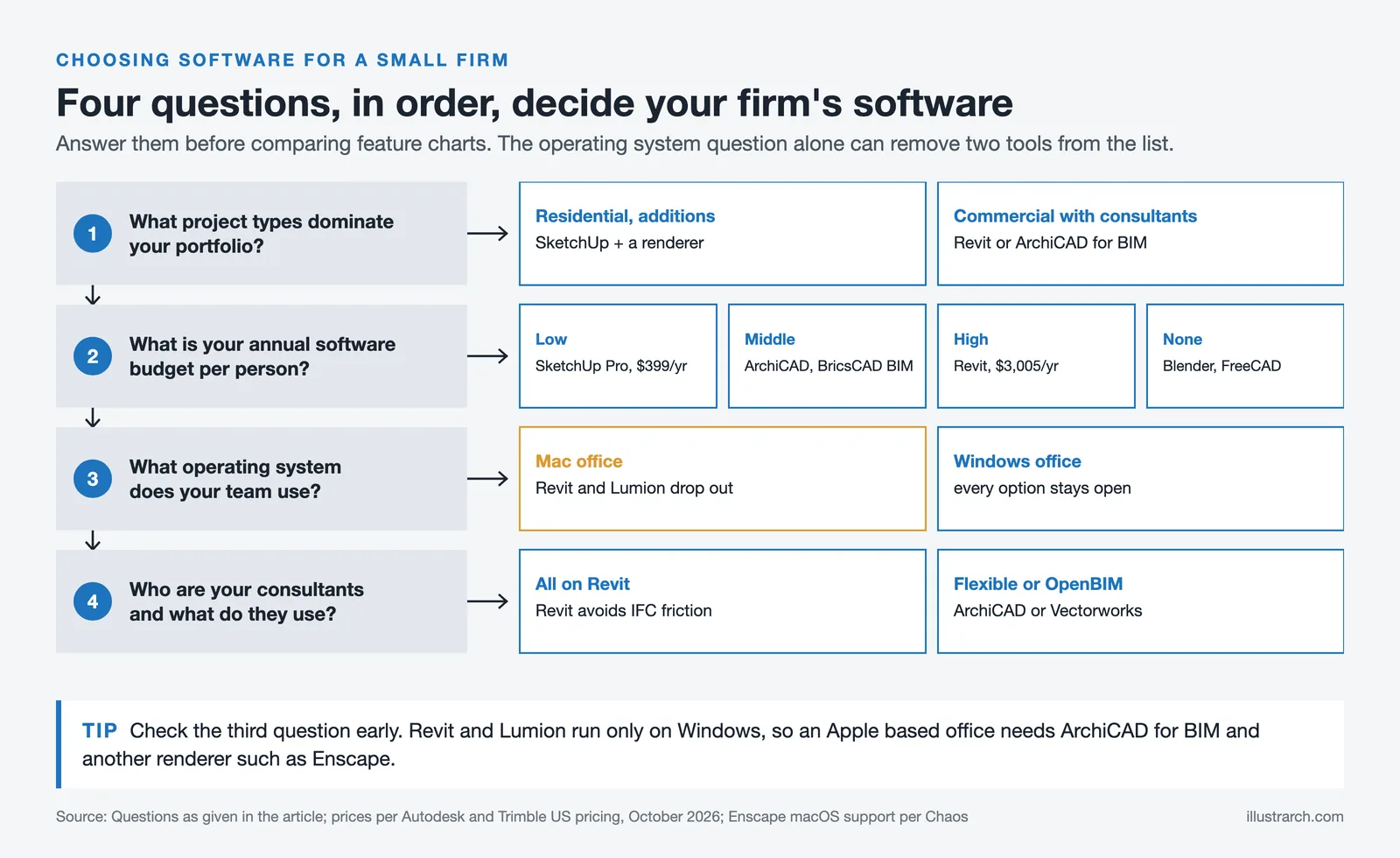
The best architectural design software for your practice depends on answers to four practical questions rather than feature comparison charts.
First, what project types dominate your portfolio? Residential firms doing additions and renovations have different needs from commercial studios coordinating with MEP engineers. SketchUp paired with a rendering tool covers most residential workflows. Commercial work with consultant coordination almost always requires Revit or ArchiCAD for BIM data exchange.
Second, what is your annual software budget per person? The cost gap between SketchUp Pro ($399/year) and Revit ($3,005/year) is significant. ArchiCAD and BricsCAD BIM fall in the middle. Blender and FreeCAD remove the cost barrier entirely, at the cost of learning time and community support.
Third, what operating system does your team use? Revit is Windows-only. ArchiCAD, SketchUp, Rhino, Vectorworks, and Blender all run on macOS. If your office is Apple-based, this single constraint eliminates several options immediately.
Fourth, who are your consultants and what do they use? If every structural engineer and MEP firm you work with uses Revit, the IFC coordination overhead of an ArchiCAD or Vectorworks workflow adds real friction. If your consultants are flexible about file formats or already use OpenBIM workflows, your platform choice becomes less constrained.
Architecture Software Comparison Table
The table below summarizes pricing, platform support, and best-fit scenarios for each tool covered in this guide.
| Software | Annual Cost (approx.) | Platform | Best For |
|---|---|---|---|
| SketchUp Pro | $399/yr | Win, Mac, Web | Concept modeling, client presentations |
| Revit | $3,005/yr | Windows only | Commercial BIM, multi-discipline coordination |
| ArchiCAD | $2,414/yr | Win, Mac | Design-led BIM, Mac-based studios |
| Rhino 3D | $995 perpetual | Win, Mac | Complex geometry, parametric design |
| AutoCAD | $2,095/yr | Win, Mac (limited) | 2D drafting, DWG compatibility |
| Vectorworks | ~$3,045/yr | Win, Mac | Hybrid CAD-BIM, presentation quality |
| BricsCAD BIM | From €1,060/year; perpetual available | Win, Mac, Linux | AutoCAD users transitioning to BIM |
| Enscape | $574.80/yr | Win, Mac | Real-time rendering inside BIM tools |
| Lumion | $1,149/yr | Windows only | Polished renders, large asset library |
| ArchFine AI | Credit-based | Cloud (any browser) | AI rendering, fast concept visuals |
| Blender + BlenderBIM | Free | Win, Mac, Linux | Budget studios, open-source BIM |
Pricing is approximate as of mid-2026 and varies by region, license type, and promotional offers. Always verify current rates on the vendor’s official website before purchasing.
🔢 Quick Numbers
- 75% of U.S. architecture firms have fewer than 10 employees (AIA Firm Survey Report, 2024)
- Only 27% of small architecture firms currently use AI in day-to-day work, compared to 61% of large firms (AIA Firm Survey Report, 2024)
- Cloud-based architectural software adoption among new practices grew from 8% to 30% between 2021 and 2024 (Industry Research Biz, 2026)
What Is the Best Software Stack for a Small Architecture Firm?

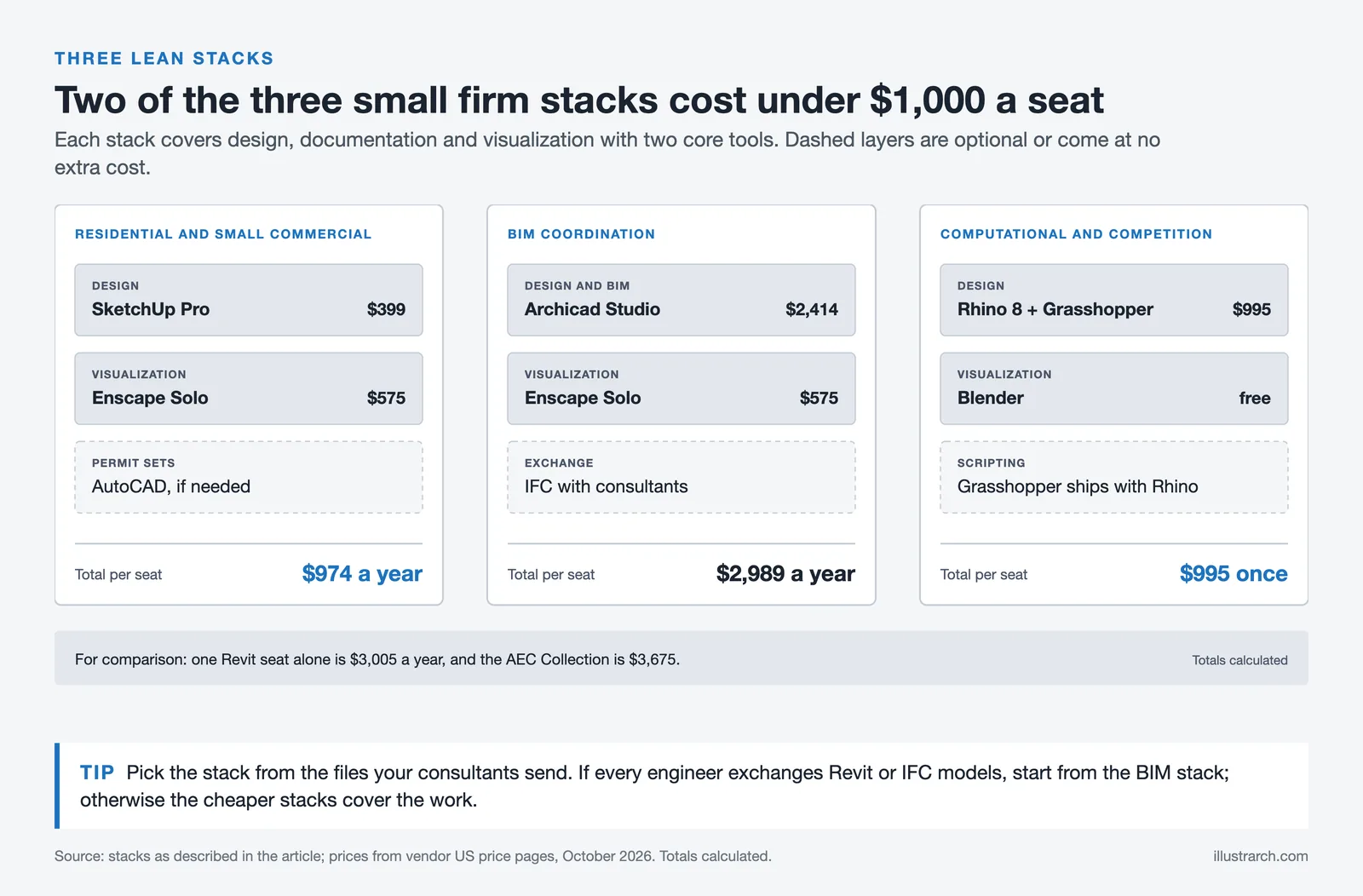
A practical software stack for a small firm does not require ten subscriptions. Most studios perform best with two to three core tools that cover their primary workflow stages: design, documentation, and visualization. The right combination depends on project type, but three common stacks work well for the majority of small practices.
For residential and small commercial work, SketchUp Pro plus Enscape or ArchFine covers concept design through client presentation at a total cost under $1,000 per year. Add AutoCAD or a lightweight drafting tool for permit sets, and you have a full production pipeline. This stack is fast to learn and inexpensive to run.
For firms that need BIM coordination with consultants, ArchiCAD plus a rendering tool (Enscape, Lumion, or ArchFine) provides the documentation depth of a BIM platform at a lower cost than Revit. ArchiCAD’s Mac support and OpenBIM compliance give smaller teams flexibility that the Autodesk ecosystem does not.
For studios doing computational or competition work, Rhino with Grasshopper plus Blender for rendering creates a powerful design-to-presentation pipeline at a one-time cost under $1,000 (Rhino perpetual license plus free Blender). This stack requires more technical skill but rewards it with output quality that rivals any subscription tool.
For a broader look at how firms are assembling cloud-based toolsets, our guide to the architect SaaS stack covers how subscription tools across BIM, rendering, and project management work together. And for studios exploring how AI tools can close the gap with larger practices, our breakdown of AI for architects covers the specific categories that matter most.
🏗️ Real-World Example
Three-person residential studio, U.S. Midwest (2025): This firm switched from a Revit-only workflow costing over $9,000 per year in licenses to a stack of SketchUp Studio ($859/seat) and ArchFine for AI rendering. Their annual software cost dropped to under $3,000 total, rendering turnaround went from four hours per image to under ten minutes, and they reported winning two additional projects in the first quarter after the switch because they could present concept renders during the initial client meeting instead of weeks later.
Video: Architecture Software Categories Explained
This video from Expose Academy breaks down the seven main categories of software used in architecture and interior design, covering popular options and their free or open-source alternatives. It is a useful overview for small firms evaluating which categories they actually need to cover.
How Much Does Architecture Software Cost for a Small Firm?
Total software cost for a small studio of three to five people typically falls between $400 and $900 per user per month across all tools combined, according to our analysis in The Architect SaaS Stack. BIM software represents the largest single line item. A firm running the Autodesk AEC Collection (Revit, AutoCAD, Navisworks, Forma) pays $3,675 per seat per year before adding rendering, project management, or cloud storage subscriptions.
The most cost-effective approach is layering: use a low-cost or free tool for concept design (SketchUp Free, Blender), a mid-range tool for documentation (ArchiCAD, BricsCAD BIM), and a pay-per-use service for rendering (ArchFine). This avoids paying annual subscriptions for capabilities you only use on a fraction of your projects. Free educational licenses from Autodesk Education cover Revit, AutoCAD, and 3ds Max for students and educators, which is one of the most underused resources in architecture education.
✅ Key Takeaways
- SketchUp Pro ($399/yr) is the fastest and cheapest entry point for concept modeling and client presentations at small firms.
- ArchiCAD offers full BIM capability on both Mac and Windows at a lower annual cost than Revit, making it the strongest BIM option for design-led small practices.
- Revit remains necessary for firms doing commercial work where multi-discipline consultant coordination in the Autodesk ecosystem is a project requirement.
- AI rendering tools like ArchFine eliminate the need for dedicated visualization hardware, letting two-person studios deliver client-ready renders in minutes instead of hours.
- A lean stack of two to three well-chosen tools outperforms a bloated collection of six or more subscriptions in both cost and daily productivity.

Final Thoughts
The best architecture software for a small firm is not necessarily the most expensive or the most feature-rich. It is the combination that fits your project types, your team’s skills, and your budget without forcing you to pay for capabilities you rarely use. Start by identifying where your current workflow loses the most time, solve that specific bottleneck with the right tool, and resist the urge to overhaul everything at once. Four tools used daily will always outperform twelve tools used occasionally. The competitive gap between small studios and large firms is no longer about tool access. In 2026, it is about tool fluency.






Notion Alternatives for Architects: 7 Tools That Fit Studio Work
Notion works until a studio needs fee tracking, phase budgets and timesheets....
 Furkan Sen7 Mins read

Why Every Practice Ends Up With Five Versions of the Same Revit Family
Let’s learn why Revit family libraries accumulate duplicates, break schedules and slow...
 illustrarch Editoral Team5 Mins read

Visualizing Renovation Projects From Photographs: A Workflow for Existing-Building Work
Photo-based visualization turns a photograph of a building that already exists into...
illustrarch Editoral Team7 Mins read

Best Free CAD Blocks and Resources for Architects
A working guide to free CAD blocks for architects, covering ARCAT, CAD-Blocks.net,...
Furkan Sen7 Mins read


Leave a comment