

Rhino Alternatives for Architects
Which Rhino alternative fits your architecture practice? Compare Revit, ArchiCAD, SketchUp, Blender and 3 more tools by BIM, pricing, and parametric capability.
 Elif Ayse Sen21 April 202610 Mins read223

Table of Contents Show
Rhino alternatives for architects range from full BIM platforms like Revit and ArchiCAD to freeform modelers like Blender and SketchUp. The right choice depends on your workflow, whether you prioritize parametric design freedom, BIM collaboration, or simply a lower price point. This guide breaks down the seven strongest options so you can make an informed decision based on how your practice actually operates.
Why Architects Look for Rhino Alternatives
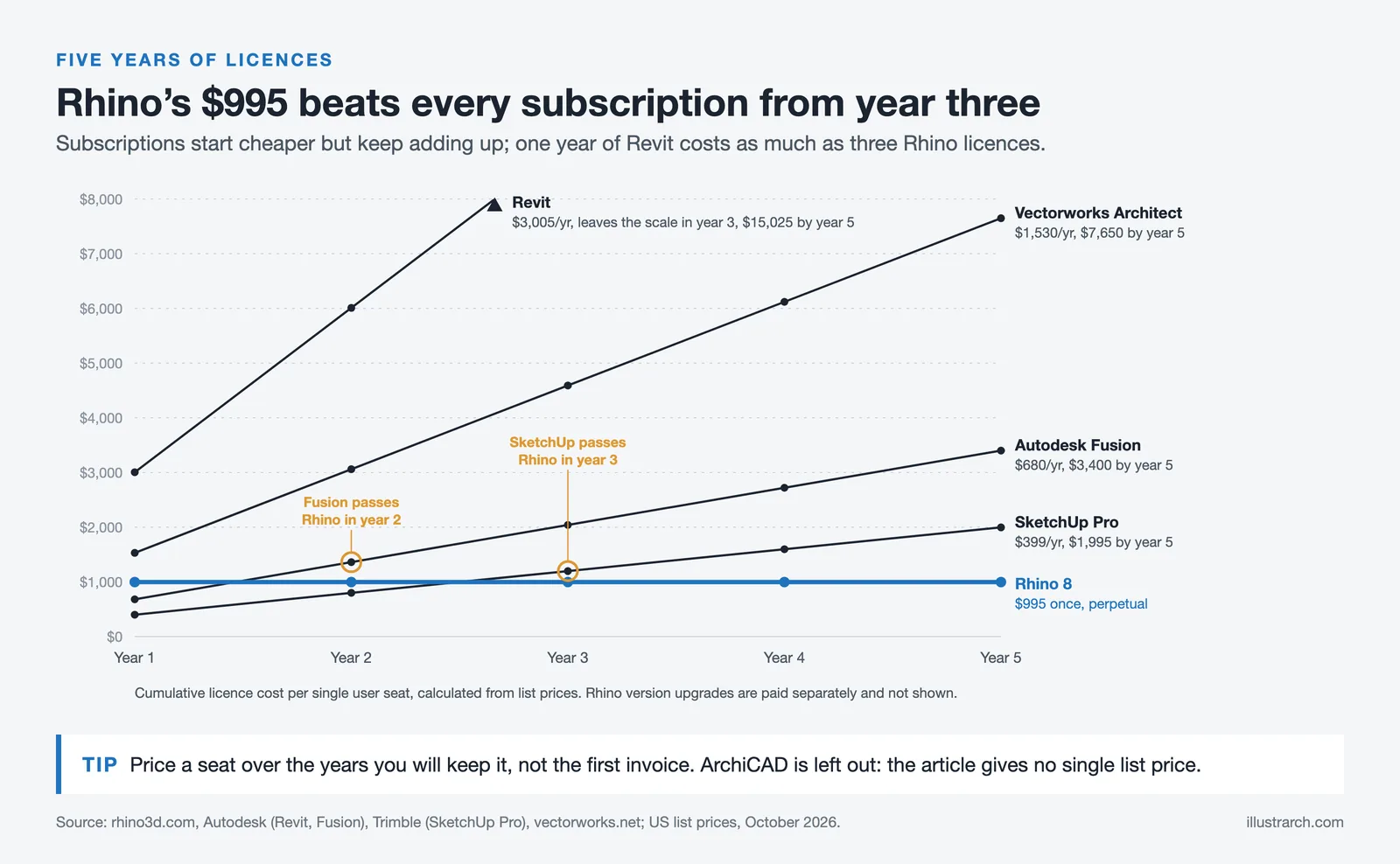
Rhinoceros 3D has earned a permanent spot in many architecture studios. Its NURBS-based modeling engine handles complex, freeform geometry with a precision that few tools match, and the Grasshopper integration turns it into a genuine parametric design environment. At $995 for a perpetual license, it also undercuts most subscription-based competitors on long-term cost.
That said, Rhino is not a perfect fit for every practice. Its learning curve is steep, particularly for architects who come from a BIM-first background. It has no native BIM capabilities, which means project documentation, coordination, and construction drawing production require either a secondary tool or significant plugin investment. For firms working on larger or more collaborative projects, this gap becomes a real workflow problem.
There is also the Grasshopper question. Rhino for architects is frequently inseparable from Grasshopper, but using both tools effectively requires a time investment that not every team can afford. If parametric scripting is not central to your work, you may be paying for capabilities you never fully use.
💡 Pro Tip
Before switching software, map out where Rhino actually fits in your project phases. Many architects use it only during concept and schematic design, then hand off to Revit for documentation. If that describes your workflow, you may not need a full replacement—just a better handoff process between tools.
What to Consider Before Choosing a Rhino Alternative
The software decision is not just about features. These factors will narrow your shortlist quickly:
BIM requirement: If your clients or collaborators require IFC-compliant models, shared BIM environments, or integrated construction documentation, you need a platform with native BIM support. Rhino does not offer this without the VisualARQ plugin.
Freeform modeling needs: For complex parametric or organic geometries—stadium canopies, twisting facades, doubly curved surfaces—NURBS-capable tools remain the most reliable. Not every Rhino alternative handles this type of geometry well.
Team size and collaboration: Solo practitioners have very different needs from firms with 20 or more architects working on shared models. Cloud-based collaboration and multi-user workflows vary significantly across platforms.
Budget structure: Rhino’s one-time license model is genuinely unusual in today’s market. If moving to a subscription bothers you, that alone rules out several options.
The 7 Best Rhino Alternatives for Architects

1. Autodesk Revit — Best for BIM-Driven Practices
Revit is the most common answer when architects ask whether to use Rhino or Revit for documentation-heavy work. It is a full BIM platform, meaning the model carries data—material properties, cost information, energy performance figures—rather than just geometry. Updating a wall type in one view updates it everywhere in the project, and the coordination tools for multi-discipline teams are industry-standard.
The tradeoff is design freedom. Revit’s parametric components are data-rich but geometrically constrained. It handles rectilinear and standard curved forms well, but complex freeform surfaces require workarounds or the use of a secondary modeling environment. Many firms run Revit and Rhino in parallel: Rhino for early concept modeling, Revit for construction documentation.
Revit runs on a subscription model through Autodesk, starting at $3,005 per year for a single-user license (Autodesk, as of October 2026). Educational licenses are available at no cost for students and educators.
📌 Did You Know?
Autodesk acquired Revit in 2002 for approximately $133 million. At that point, Revit had been in development for only a few years under the name “Charles River Software.” It was one of the first tools built from the ground up with BIM principles—rather than adapting existing CAD logic—and that foundational decision still shapes how the software behaves today.
2. SketchUp — Best for Quick Concept Modeling

SketchUp sits at the opposite end of the complexity spectrum from Rhino. Its push-pull interface is genuinely fast for early massing studies, building program exploration, and client presentations. The 3D Warehouse gives instant access to a massive library of furniture, fixtures, and contextual elements, which speeds up rendering-ready scenes considerably.
For landscape architects, SketchUp is particularly popular—it is one of the cleaner options for site modeling, topography work, and planting visualization. The extension ecosystem is wide, and tools like Profile Builder and 1001bit Tools add meaningful architectural functionality. SketchUp is a credible rhino alternative for landscape architects who do not need NURBS precision but want a faster, more intuitive modeling environment.
SketchUp Pro starts at $399 per year (Trimble, as of October 2026). A free web-based version exists but lacks many professional features. The platform’s main limitation is surface modeling—it struggles with anything truly organic or doubly curved.
3. ArchiCAD — Best BIM Option for Smaller Firms
ArchiCAD has been a BIM platform since the 1980s, predating Revit by more than a decade. It is particularly well-regarded for its handling of the entire project lifecycle within a single environment—from early concept through detailed documentation to construction phase coordination. Graphisoft’s OPEN BIM approach allows IFC-based collaboration with engineers and consultants who use other software.
For smaller practices that find Revit’s licensing costs difficult to absorb, ArchiCAD is worth serious consideration. In the US it is sold as an annual subscription (Archicad Studio at $2,414 per year as of October 2026), still below the cost of a Revit seat. The modeling tools handle complex curved forms more capably than Revit, making it a more natural transition for architects who rely on Rhino for expressive geometry.
🎓 Expert Insight
“The future of architectural design lies in integrated workflows where geometry, data, and collaboration happen in the same environment. BIM is not just documentation—it is the design itself.” — Patrick MacLeamy, CEO Emeritus, HOK
MacLeamy has long advocated for BIM-centered workflows as a fundamental shift in how architects approach design. His argument applies directly to the Rhino versus BIM platform debate: the question is not just about geometry tools, but about where data lives in the design process.
4. Blender — Best Free Alternative

Blender is the go-to answer when the budget constraint is absolute. It is free, open source, and its 3D capabilities have advanced rapidly over the past several years. For architects who need high-quality renders, animations, or detailed conceptual models without adding software cost, Blender is the most capable free tool available.
The caveat is significant: Blender is not a CAD application. It does not think in terms of construction documentation, IFC data, or precise dimensional control the way dedicated architectural tools do. Its NURBS support is limited compared to Rhino’s, and complex surface work often requires workarounds. It is best suited for visualization—taking a model developed elsewhere and producing compelling images and animations from it.
Blender is frequently used alongside Rhino or Revit rather than as a direct replacement. Architects export geometry from their primary tool, bring it into Blender for rendering and animation work, and produce client-facing visuals that would be expensive to generate with dedicated rendering software.
💡 Pro Tip
If you are using Blender for architectural visualization, install the BlenderBIM add-on (renamed Bonsai in 2024). It adds native IFC import and export and BIM data management directly inside Blender—turning it into a surprisingly capable BIM viewer and basic documentation environment at zero additional cost.
5. Vectorworks Architect — Best for Integrated Design-to-Documentation
Vectorworks Architect is a strong alternative that addresses one of Rhino’s core weaknesses: the transition from design model to construction document. It combines 3D modeling with 2D drafting and BIM data in a single environment, and its surface modeling capabilities are more flexible than Revit’s for curved and complex building forms.
The software is particularly popular in the UK, Australia, and parts of Europe, where it has a long-established user community. For firms working on cultural buildings, performing arts centers, or other projects with expressive geometry, Vectorworks offers a viable path that does not require maintaining separate tools for design and documentation phases.
Vectorworks Architect is priced at $1,530 per year for a single-user subscription, or available as a perpetual license in some markets (Vectorworks, as of October 2026). It integrates with popular rendering tools including Twinmotion, Lumion, and Enscape.
6. Autodesk Fusion — Best for Parametric Precision

Autodesk Fusion (formerly Fusion 360) is not a traditional architectural tool, but it deserves a place on this list for architects working on detailed fabrication, computational form-finding, or product and furniture design alongside building projects. Its parametric modeling engine is arguably more precise and more accessible than Rhino’s when it comes to history-based, constraint-driven geometry.
For rhino 3d for architects doing facade panel development, custom millwork design, or any project element that requires close coordination with manufacturing, Fusion’s integrated CAM environment is a genuine advantage. It bridges design and production in a way that Rhino can approximate through plugins but does not achieve natively.
Fusion offers a free tier for personal use and startup companies, with commercial licensing starting at approximately $680 per year (Autodesk, as of October 2026).
7. FreeCAD with BIM Workbench — Best Open-Source BIM Option
FreeCAD is the most capable open-source parametric modeler available, and its BIM Workbench makes it a legitimate—if demanding—alternative for architects who cannot or will not pay for commercial software. The modular architecture allows users to add specialized tools for architectural work, structural analysis, and IFC-compliant BIM modeling.
The honest assessment is that FreeCAD requires patience. The interface is less polished than commercial alternatives, documentation can be inconsistent, and complex models can become difficult to manage. It is best suited for architects with technical backgrounds who are comfortable problem-solving within the software’s constraints, or for practices in regions where commercial licensing costs are prohibitive.
Rhino Grasshopper Alternatives for Parametric Design

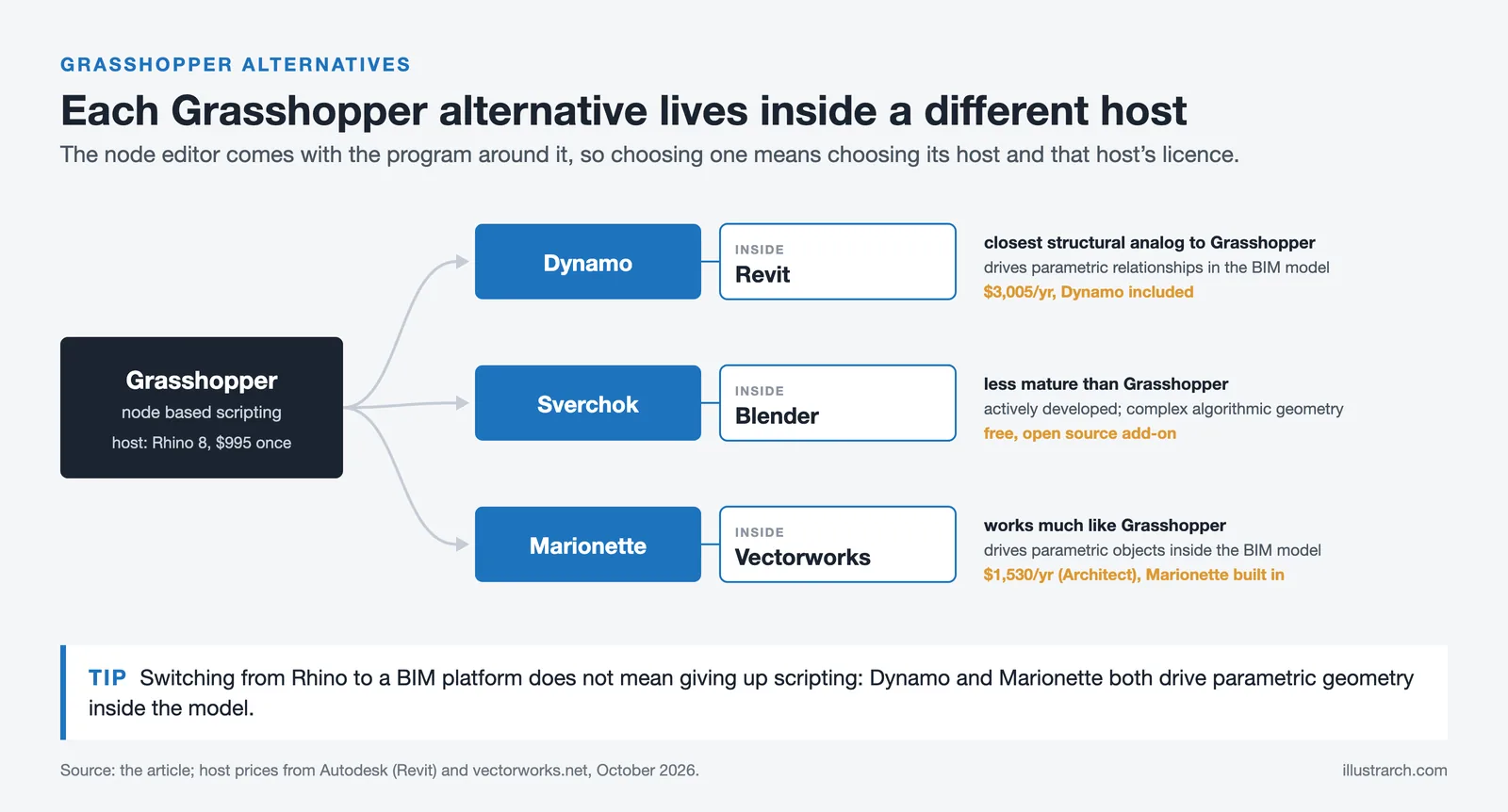
Grasshopper is often the specific reason architects stay with Rhino. Finding rhino grasshopper alternatives that offer the same visual programming environment for generative and parametric design is genuinely difficult. A few options exist:
Dynamo for Revit: Autodesk’s visual scripting environment for Revit is the closest structural analog to Grasshopper. It uses a node-based interface to drive parametric relationships in the BIM model, automate repetitive tasks, and generate complex geometry that Revit’s native tools cannot produce alone. The logic and workflow will feel familiar to Grasshopper users.
Sverchok for Blender: An open-source node-based parametric design tool built into Blender. It is less mature than Grasshopper but actively developed, and it is free. For architects comfortable with Blender, Sverchok can produce surprisingly complex algorithmic geometry.
Marionette in Vectorworks: Vectorworks’ visual scripting tool operates similarly to Grasshopper and drives parametric objects directly within the BIM environment. For practices that use Vectorworks, Marionette removes the need for a secondary parametric tool entirely.
⚠️ Common Mistake to Avoid
Architects often assume that switching from Rhino to a BIM platform means giving up parametric design capability. This is not accurate. Dynamo in Revit and Marionette in Vectorworks both offer node-based scripting environments capable of driving complex parametric geometry. The key difference is that these tools work within the constraints of a data-rich BIM model, which actually adds value for coordination and documentation even if it requires a slightly different approach to scripting.
Rhino vs Revit for Architects: How to Decide

The rhino or revit for architects question comes up constantly in practice, and the answer is rarely one or the other. They address different problems. Rhino excels at free-form 3D modeling, complex surface geometry, and experimental design exploration. Revit excels at data management, multi-discipline coordination, and construction documentation at scale.
Consider Rhino if your work is concept-heavy, involves non-standard building forms, or requires tight integration with fabrication and parametric scripting. Consider Revit if your firm works on larger projects with multiple consultants, produces significant documentation volume, or operates in a market where BIM compliance is contractually required.
Many firms use both. The more useful question is not which tool to choose but at what project stage each tool performs best—and how clean your handoff between them is. You can learn more about how professional practices approach this in our guide to Revit for architects.
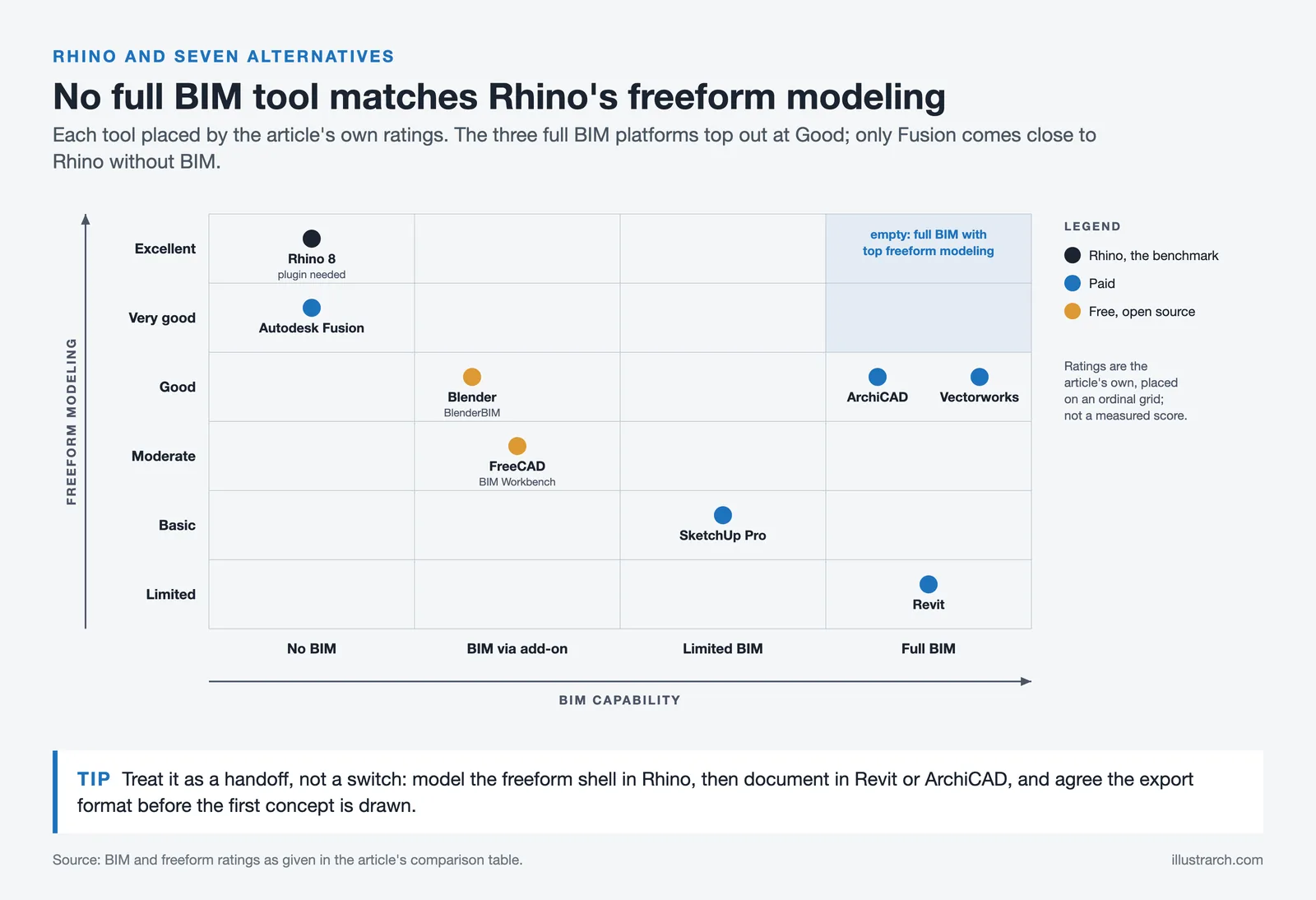
Comparison Table: Rhino vs Top Alternatives
The following table summarizes how the seven alternatives compare across the dimensions most relevant to architectural practice:
| Software | BIM | Freeform Modeling | Price (approx.) | Best For |
|---|---|---|---|---|
| Rhino 8 | No (plugin needed) | Excellent | $995 one-time | Complex geometry, parametric design |
| Revit | Full BIM | Limited | $3,005/yr | Large-scale documentation |
| SketchUp Pro | Limited | Basic | $399/yr | Concept modeling, landscape |
| ArchiCAD | Full BIM | Good | $2,414/yr (Studio) | Small-mid firms, OPEN BIM |
| Blender | Via BlenderBIM add-on | Good | Free | Rendering, visualization |
| Vectorworks Architect | Full BIM | Good | $1,530/yr | Design-to-documentation workflow |
| Autodesk Fusion | No | Very Good | ~$680/yr (free tier available) | Fabrication, parametric precision |
| FreeCAD (BIM) | Via BIM Workbench | Moderate | Free | Budget-constrained practices |
Rhino for Landscape Architects: What to Consider
Rhino for landscape architects is used primarily for terrain modeling, complex site geometries, and parametric landscape design through Grasshopper plugins like Lands Design and Elk. The software handles grading, contour generation, and surface manipulation with precision that site-focused CAD tools often can’t match. However, it doesn’t produce planting schedules, area takeoffs, or site documentation natively.
For landscape practices that need both design flexibility and project documentation, Vectorworks Landmark is a strong rhino alternative. It handles terrain modeling, planting design, irrigation layout, and construction documentation within a single environment. AutoCAD, which remains an industry standard for site plans and civil drawings, also integrates well into landscape architecture workflows where 2D precision and DWG compatibility are priorities.
Which Rhino Alternative is Right for Your Practice?
If your work is primarily BIM-driven and you need strong documentation output, Revit or ArchiCAD will serve you better than Rhino in the long run. If you work at a smaller scale and need something faster to learn and less expensive, SketchUp remains a reliable starting point for concept work, particularly for architects in landscape and residential practice.
For architects who specifically value Grasshopper and parametric scripting, the most honest answer is that no alternative fully replicates that environment. Dynamo for Revit is the closest structural equivalent, but it operates within a BIM context that requires a different mental model for scripting. If Grasshopper is central to your practice, staying with Rhino and supplementing it with a BIM tool for documentation is likely a better strategy than replacing it outright.
Blender and FreeCAD are worth serious consideration for anyone with budget constraints or a preference for open-source tools. Neither replaces Rhino precisely, but both offer genuine capability in specific workflows—Blender for visualization, FreeCAD for parametric precision on simpler geometry.
You can also explore how AI-based rendering tools are changing what architects need from their modeling software, since better rendering pipelines sometimes reduce the pressure on the modeling tool itself.
✅ Key Takeaways
- Rhino alternatives for architects vary significantly in purpose: BIM platforms (Revit, ArchiCAD, Vectorworks) replace Rhino’s documentation gap, while tools like SketchUp and Blender address speed and visualization needs.
- No current software fully replicates the Rhino plus Grasshopper combination for parametric design. Dynamo in Revit is the nearest equivalent but operates in a different workflow context.
- For landscape architects, SketchUp remains the most accessible and widely used rhino alternative, particularly for site modeling and client presentation work.
- The rhino or revit question is often a false choice—most practices benefit from running both, using Rhino for concept and Revit for documentation, with a clean model handoff between phases.
- Blender and FreeCAD are credible zero-cost alternatives but require more technical investment and work best as part of a multi-tool workflow rather than standalone replacements.
Software pricing listed above is approximate and subject to change. Always verify current pricing directly with the vendor before making a purchasing decision.






Notion Alternatives for Architects: 7 Tools That Fit Studio Work
Notion works until a studio needs fee tracking, phase budgets and timesheets....
 Furkan Sen7 Mins read

Why Every Practice Ends Up With Five Versions of the Same Revit Family
Let’s learn why Revit family libraries accumulate duplicates, break schedules and slow...
 illustrarch Editoral Team5 Mins read

Visualizing Renovation Projects From Photographs: A Workflow for Existing-Building Work
Photo-based visualization turns a photograph of a building that already exists into...
illustrarch Editoral Team7 Mins read

Best Free CAD Blocks and Resources for Architects
A working guide to free CAD blocks for architects, covering ARCAT, CAD-Blocks.net,...
Furkan Sen7 Mins read


Leave a comment