

Blender Alternatives for Architects: 7 Best Tools in 2026
Not every architect needs Blender's learning curve. This guide compares seven proven alternatives across rendering quality, BIM integration, ease of use, and pricing so you can find the right tool for your specific workflow stage and project type.
 Sinan Ozen13 April 20268 Mins read217

Table of Contents Show
Blender alternatives for architects range from dedicated real-time renderers like Lumion and Enscape to offline engines like V-Ray and animation suites like Cinema 4D. The right choice depends on where rendering and modeling sit in your workflow: whether you need photorealistic output, fast client presentations, construction documentation, or all three at different project stages.

Why Architects Look Beyond Blender
Blender is genuinely capable for architectural visualization. Its Cycles engine produces photorealistic results, and it runs entirely for free. But several real-world factors push architects toward alternatives. The learning curve is steep compared to tools built specifically for the profession. There is no native BIM support, so it cannot generate construction drawings or manage parametric building data. And its workflow does not connect directly to Revit, ArchiCAD, or other BIM platforms without manual export steps.
For architects who learned Blender for architectural rendering and now need faster iteration, deeper BIM integration, or simpler client-facing tools, the following seven options address those gaps directly. Each covers a different part of the workflow spectrum.
⚠️ Common Mistake to Avoid
Many architects search for a single Blender replacement that covers modeling, rendering, and documentation equally well. No such tool exists. Blender itself only covers part of the workflow (modeling and rendering, not BIM), so comparing alternatives should start with identifying which phase of your process needs improving, not which tool does everything.

How to Choose the Right Blender Alternative
Before evaluating specific software, it helps to map your workflow by phase. Early-stage massing and concept design favor fast, intuitive tools. Mid-stage design development often requires BIM data and parametric control. Visualization for client presentations calls for rendering quality and speed. Construction documentation demands a completely different toolset.

Most alternatives below specialize in one or two of these phases. Matching the tool to the phase produces better results than trying to find one application that replaces Blender across all stages. On illustrarch, the comparison of Lumion vs Enscape vs Twinmotion covers this workflow-first thinking in detail for real-time renderers specifically.
Comparison of Top Blender Alternatives for Architecture
The table below summarizes key differences across workflow fit, platform, and pricing to help narrow down the right option for your practice.
| Tool | Best For | BIM Support | Platform | Pricing |
|---|---|---|---|---|
| Lumion | Client visualization, large scenes | LiveSync import | Windows | Subscription |
| Enscape | In-workflow real-time rendering | Native plugin (Revit, SketchUp, Rhino) | Windows, Mac (select apps) | Subscription |
| Twinmotion | Walkthroughs, interactive presentations | LiveSync with Revit, SketchUp, Rhino | Windows, Mac | Free tier available |
| V-Ray | Photorealistic stills, competition boards | Plugin for SketchUp, Revit, Rhino, 3ds Max | Windows, Mac | Subscription |
| SketchUp + Renderer | Concept design, early-stage modeling | No native BIM | Windows, Mac | $399/year (Pro, as of October 2026) |
| D5 Render | Real-time ray tracing, animations | Direct sync with Revit, SketchUp, Rhino, ArchiCAD | Windows | Free + paid tiers |
| Cinema 4D | Motion graphics, complex animations | No native BIM | Windows, Mac | Subscription |
Lumion: The Fastest Path from Model to Presentation
Lumion is one of the most widely adopted blender alternatives for architects who prioritize speed and polish in client-facing work. You import your 3D model, add context from an extensive asset library (trees, people, vehicles, furniture), apply sky and weather effects, and produce high-quality stills or walkthroughs without any rendering setup. Lumion Pro 2025 introduced an AI-powered 8K upscaler, ray-traced water and volumetric lighting, and a Scene Inspector for managing complex scenes.
The tradeoff compared to Blender is a less flexible material system and no scripting access. Lumion works best as a downstream visualization tool: you build your model elsewhere (Revit, SketchUp, ArchiCAD) and bring it into Lumion for final rendering. Its LiveSync plugin keeps the Lumion scene updated as you make changes in your modeling software, which removes the need for repeated manual exports.
💡 Pro Tip
When switching from Blender to Lumion, import your model with materials already applied in your source software (Revit or SketchUp) rather than relying on Lumion’s material replacement. Lumion reads material names on import, and matching these to Lumion’s library entries saves significant scene setup time on larger projects.

Enscape: Real-Time Rendering Inside Your Existing Software
Enscape is a rendering plugin rather than a standalone application. It runs directly inside Revit, SketchUp, Rhino, ArchiCAD, and Vectorworks, which means you never leave your modeling environment to see a rendered view. Press one button and Enscape opens a live-synced 3D window. Change a wall in Revit and the Enscape window updates instantly.
For architects already working in BIM tools, this plugin-based approach is the key advantage over Blender and other standalone renderers. According to Enscape’s published figures, it is used by 85 of the top 100 architecture firms globally. After its 2022 merger with Chaos (makers of V-Ray), Enscape gained access to Veras, an AI visualization tool available on its Premium tier. Pricing starts at approximately $574.80 per year for a Solo named-user license.
📌 Did You Know?
Enscape was founded in 2013 in Karlsruhe, Germany, and was acquired by Chaos Group in 2022. The merger gave Enscape users access to Chaos’s V-Ray rendering technology and the Veras AI visualization engine, creating one of the most integrated rendering ecosystems in architectural software.
Twinmotion: Real-Time Visualization Built on Unreal Engine
Twinmotion, developed by Epic Games, sits between Lumion and Enscape in terms of workflow. It supports live sync with Revit, SketchUp, Rhino, and ArchiCAD, and it runs on both Windows and Mac, which is a meaningful advantage for studios using Apple hardware. Its integration with Quixel Megascans, the same texture library used in film and game production, gives it access to a high-quality asset base for materials and environments.
Twinmotion is particularly strong for animated walkthroughs and interactive presentations where clients can explore a design in real time. Its free educational license makes it a common first step for architecture students moving away from Blender for architecture. For students and freelancers comparing options, illustrarch’s guide to best architectural software for students covers Twinmotion alongside other accessible tools.

V-Ray: The Industry Standard for Photorealistic Stills
V-Ray has been the default choice for high-end architectural rendering for over two decades. Unlike Blender’s Cycles, which requires a standalone workflow, V-Ray operates as a plugin inside SketchUp, Revit, Rhino, 3ds Max, Cinema 4D, and other applications. This means photorealistic output without switching software or managing file exports separately.
The strength of V-Ray lies in its material system and lighting control. Architects producing competition boards, publication-quality imagery, or marketing renders for developers rely on V-Ray’s output quality. The tradeoff is setup complexity: achieving Cycles-level realism in V-Ray requires configuring materials, lighting, and render passes with a degree of technical knowledge. The Chaos Group (V-Ray’s developer) also produces Corona Renderer, which uses a similar approach but is more beginner-accessible.
💡 Pro Tip
V-Ray’s Denoiser significantly reduces render times while preserving image sharpness. For architectural stills where you’re iterating on material choices or lighting angles, enable the NVIDIA AI Denoiser during test renders, then switch to V-Ray Denoiser for final output. This can cut per-frame render time by 40 to 60 percent on GPU builds without sacrificing publication quality.
SketchUp with a Render Plugin: Best for Early-Stage Speed
SketchUp is not a direct replacement for Blender’s rendering capabilities, but paired with a render plugin (V-Ray, Enscape, or Twinmotion), it becomes a fast concept-to-visualization workflow. The push-pull modeling interface is faster for massing studies and early-stage design exploration than either Blender or any BIM platform.
For architectural design with blender as the baseline comparison: SketchUp wins on ease of entry and speed; Blender wins on render quality and scripting flexibility. The SketchUp alternatives guide on illustrarch covers the tradeoffs in detail, including how to decide when SketchUp’s limitations become a reason to switch rather than adapt. SketchUp Pro costs $399 per year as of October 2026, with a Studio plan at about $859 per year that adds Sefaira for energy analysis and Trimble’s Revit interoperability tools.

D5 Render: Real-Time Ray Tracing for Mid-Range Hardware
D5 Render has gained significant traction among visualization professionals as a real-time alternative to Blender’s offline Cycles rendering. It supports direct sync with eight major tools including SketchUp, Revit, Rhino, Blender itself, 3ds Max, Cinema 4D, ArchiCAD, and Vectorworks, preserving materials, cameras, and scene hierarchy across updates. On RTX 3060+ GPUs, D5 achieves approximately 30 frames per second in typical complex scenes with one-click 4K stills completing in under two minutes, according to 2024 to 2025 benchmark data published by D5’s team.
The free Community plan is limited to non-commercial use, so paid client work needs the Pro plan ($360 per year as of October 2026), which also unlocks cloud rendering and additional asset library access. For architects who found Blender’s real-time Eevee renderer insufficient for client work but do not need Lumion’s scene-building ecosystem, D5 is a practical middle ground. It particularly suits studios producing design-development visuals and animations on tight deadlines.
🎓 Expert Insight
The shift in rendering for architecture is not about which tool is technically superior. It is about which tool fits the pace of design decisions. Real-time feedback loops change how architects iterate.
This distinction shapes the move away from Blender’s offline rendering model for many firms. Real-time tools like D5, Enscape, and Twinmotion align visualization with the speed of design rather than treating it as a final-stage task.
Cinema 4D: Best Blender Alternative for Architecture Animation
Cinema 4D (C4D) covers a similar creative space to Blender, but with a cleaner interface and stronger motion graphics toolset. For architectural visualization that involves complex camera animations, product-level material work, or animated environmental effects, C4D’s MoGraph system outperforms Blender’s equivalent tools in production efficiency.
C4D integrates with Redshift (its included GPU renderer), V-Ray, and Arnold, giving architects access to multiple high-quality rendering pipelines. The software runs on both Windows and macOS, including Apple Silicon, which makes it practical for Mac-based studios. The main drawback compared to Blender is cost: C4D runs on a subscription model through Maxon, with pricing of $109 per month on monthly billing or $839 per year billed annually (as of October 2026). For firms where animation quality and timeline efficiency matter, this cost is generally justified. For firms primarily doing still renders, V-Ray on SketchUp or Lumion will serve better at a lower learning investment.
✅ Key Takeaways
- No single tool replaces Blender across all workflow phases. Match the alternative to the specific stage where Blender falls short for your practice.
- Enscape and Twinmotion are the strongest options for architects already working in BIM tools, offering live-sync visualization without leaving the modeling environment.
- Lumion leads for polished client presentations with large scene asset libraries and fast scene-building, particularly for landscape and exterior work.
- V-Ray remains the benchmark for photorealistic stills and competition boards where material accuracy and lighting control matter most.
- D5 Render offers real-time ray tracing on mid-range hardware with direct sync to most major modeling platforms, including Blender itself.
- Cinema 4D is the most capable Blender alternative for architecture animation, with stronger motion graphics tools and a cleaner interface for complex camera work.


Which Tool Is Right for Your Practice?
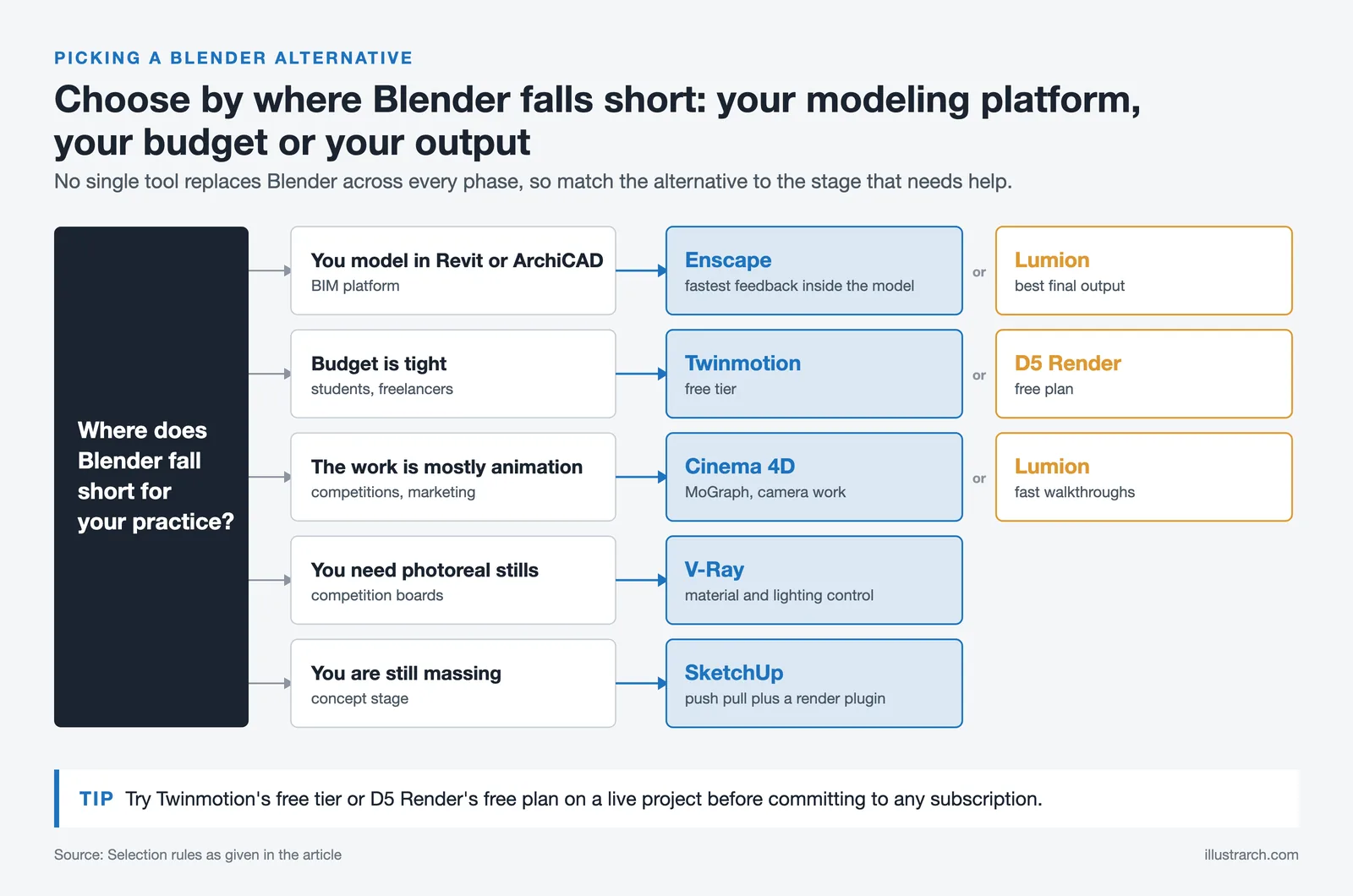
The answer depends on three factors: your current modeling platform, the type of output you need, and your hardware. Architects working in Revit or ArchiCAD will gain the most from Enscape (fastest feedback) or Lumion (best final output). Freelancers and students on tighter budgets should consider Twinmotion’s free tier or D5 Render’s free plan (non-commercial use only) before committing to a subscription. Those producing animation-heavy work for competitions or marketing will find Cinema 4D or Lumion more efficient than Blender, despite the steeper cost.
For a broader look at the rendering landscape, illustrarch’s guide to architectural rendering engines covers the full range of options across different project types. The digital tools guide for independent architects in 2026 also provides context on how visualization software fits into the broader software stack for smaller practices.
If you need AI-powered rendering as part of your workflow rather than traditional rendering pipelines, the 25 best AI architectural rendering tools for 2026 covers that segment separately, including tools that accept Blender exports and transform them using generative AI.
Further reading from authoritative external sources: ArchDaily regularly covers software workflow comparisons, and the RIBA has published research on how digital tools are changing architectural practice, including the role of AI-driven rendering in reducing hardware barriers for smaller firms.






Notion Alternatives for Architects: 7 Tools That Fit Studio Work
Notion works until a studio needs fee tracking, phase budgets and timesheets....
 Furkan Sen7 Mins read

Why Every Practice Ends Up With Five Versions of the Same Revit Family
Let’s learn why Revit family libraries accumulate duplicates, break schedules and slow...
 illustrarch Editoral Team5 Mins read

Visualizing Renovation Projects From Photographs: A Workflow for Existing-Building Work
Photo-based visualization turns a photograph of a building that already exists into...
illustrarch Editoral Team7 Mins read

Best Free CAD Blocks and Resources for Architects
A working guide to free CAD blocks for architects, covering ARCAT, CAD-Blocks.net,...
Furkan Sen7 Mins read


Leave a comment