

BricsCAD Alternatives for Architects
A practical guide to seven of the most capable BricsCAD alternatives for architects in 2026. Covers AutoCAD, ZWCAD, DraftSight, progeCAD, nanoCAD, Revit, and FreeCAD with DWG compatibility, pricing, platform support, and honest trade-offs so you can choose the right CAD tool for your practice.
 Sinan Ozen27 April 202611 Mins read349

Table of Contents Show
BricsCAD alternatives are DWG-compatible CAD and BIM tools that replace or complement the BricsCAD software family in architectural workflows. The most practical options in 2026 include AutoCAD, ZWCAD, DraftSight, progeCAD, nanoCAD, Revit, and FreeCAD. The right BricsCAD alternative depends on your platform, budget, and whether you need 2D drafting, full 3D modeling, or a BIM-native workflow.
For architects, choosing a CAD platform is rarely a one-variable decision. BricsCAD has earned a strong position by offering AutoCAD-like DWG workflows at a lower price, with optional BIM and mechanical modules. Yet there are legitimate reasons to look elsewhere. Some firms want perpetual licensing options that BricsCAD no longer emphasises. Others are on macOS or Linux and need specific feature parity. A studio moving toward full BIM may need Revit-level coordination; a solo practice may want a free tool that still handles DWG cleanly. For broader context on how CAD fits into the wider toolchain, our architectural design software overview covers how 2D, 3D, and BIM tools typically combine in a studio workflow.
This guide covers seven tested BricsCAD alternatives, each with pricing, platform notes, and the real trade-offs that architects hit during the switch.

Why Look for a BricsCAD Alternative?
BricsCAD is a capable, DWG-native CAD platform developed originally by Bricsys (now operating under the Octave brand). It runs on Windows, macOS, and Linux, and its Pro and BIM editions include parametric blocks, mechanical design tools, and AI-assisted BIM classification through BIMIFY. For many firms transitioning from AutoCAD, it has been the logical next step. The official Bricsys website lists the current edition tiers and licensing options.
Still, the decision to evaluate BricsCAD alternatives usually comes down to a few practical pressures. Pricing has climbed with the Octave transition, and some editions are now comparable in cost to competing tools with larger ecosystems. Architects working in multi-discipline teams may need deeper coordination than BricsCAD offers, especially around MEP and structural clash detection. Mac-based studios sometimes find that BricsCAD BIM modules are best supported on Windows, which creates a platform bottleneck. Studios focused on lightweight 2D drafting may find BricsCAD Pro or BIM overbuilt for what they actually do day to day.
💡 Pro Tip
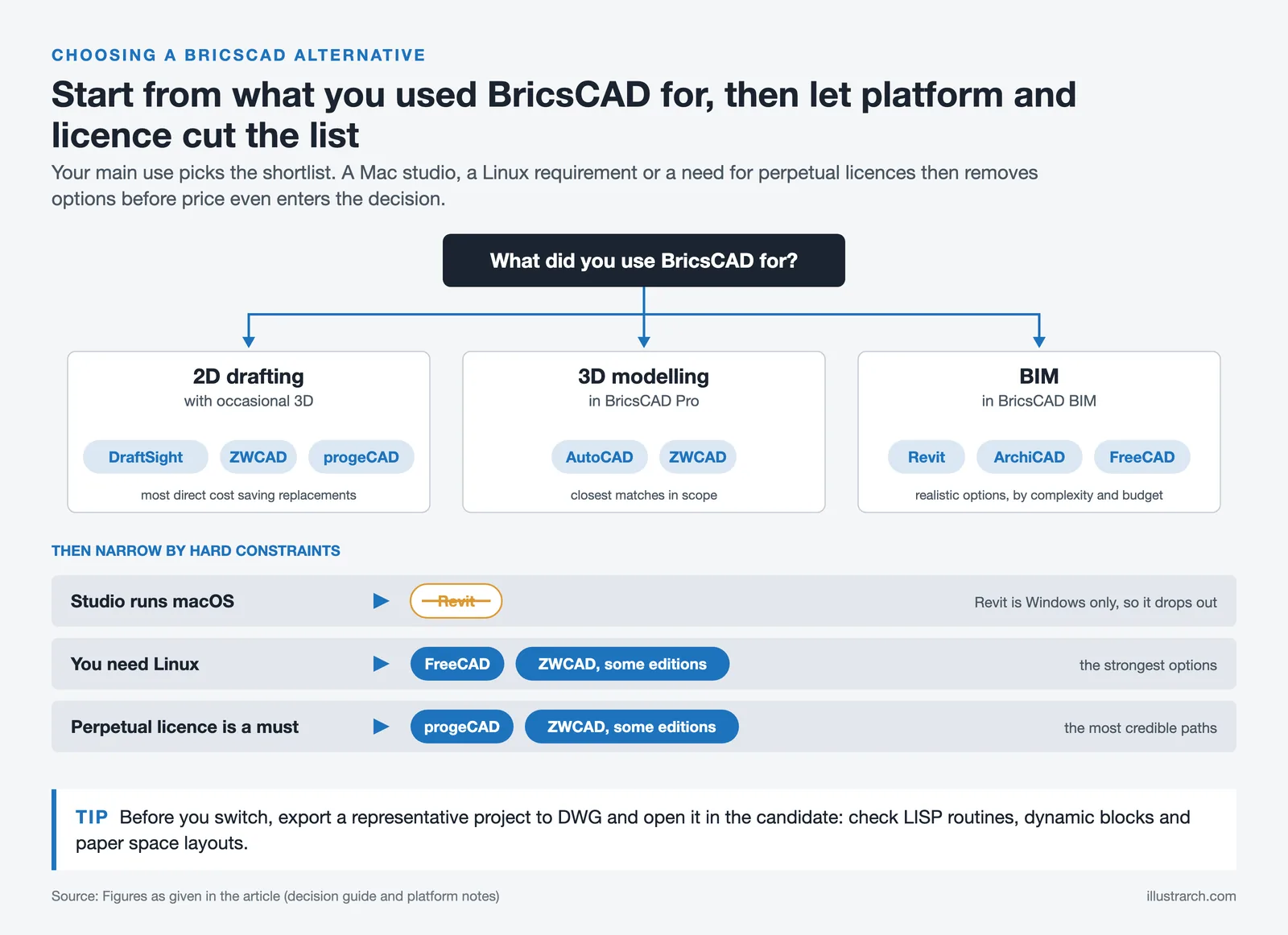
Before switching from BricsCAD, export a representative project to DWG and open it in your candidate tool. Check how custom LISP routines, dynamic blocks, and paper space layouts come across. Most platform frustrations show up in the first full test project, not in the demo file.

How to Choose the Right BricsCAD Alternative
Three practical constraints usually decide the shortlist. First, platform: AutoCAD, BricsCAD, and DraftSight support Windows and macOS, while Revit is Windows-only and FreeCAD runs across all three major operating systems including Linux. Second, DWG compatibility: if your team exchanges DWG files with consultants, native read and write support for the current DWG format is non-negotiable. Third, workflow depth: a 2D drafting tool, a full 3D modeller, and a BIM platform are genuinely different categories, and matching the tool to the workflow saves months of frustration. If your use of BricsCAD leans more toward 3D conceptual modelling than drafting, our coverage of SketchUp alternatives for architects is a useful parallel reference, since several of the same tools compete in both categories.
Budget is the fourth factor. BricsCAD alternatives range from free open-source tools like FreeCAD to enterprise BIM platforms like Revit at over $3,000 per seat per year. A clear view of what the practice actually needs for the next three years is the best way to avoid over-paying or under-equipping the team. If you are on the lower end of the budget spectrum, our guide to the best free CAD tools for architecture students lists several credible zero-cost options that overlap with the alternatives below.
Comparison of the 7 Best BricsCAD Alternatives
The table below summarises the seven BricsCAD alternatives covered in this guide, with approximate pricing, platform support, and best-use notes.
| Software | Approx. Price | Platform | Best For |
|---|---|---|---|
| AutoCAD | ~$2,095/year | Windows, macOS | Industry-standard DWG workflows |
| ZWCAD | ~$899 perpetual | Windows, macOS, Linux | Lower-cost AutoCAD-style drafting |
| DraftSight | ~$299/year | Windows, macOS | Affordable 2D drafting |
| progeCAD | ~$540 perpetual | Windows | Small firms wanting perpetual licensing |
| nanoCAD | Free tier / from ~$289/year | Windows | Students and budget-conscious drafters |
| Autodesk Revit | ~$3,005/year | Windows | Multi-discipline BIM coordination |
| FreeCAD | Free (open source) | Windows, macOS, Linux | Budget practices exploring BIM |
Pricing is current as of early 2026 and varies by region and reseller. Use the guide below to understand where each tool fits.
1. AutoCAD: The Industry-Standard BricsCAD Alternative
Autodesk AutoCAD is the most direct bricscad alternative in feature scope and DWG compatibility. It is the native format originator, and every detail of the DWG specification behaves predictably in AutoCAD. For practices working with consultants, contractors, or clients who exchange DWG files daily, this is the path of least friction.
In the autocad vs bricscad debate, AutoCAD generally wins on ecosystem depth. Third-party plugins, vertical toolsets (Architecture, Mechanical, MEP, Electrical), and the Autodesk cloud services around Forma and AutoCAD Web are all built around this platform. AutoCAD Mechanical and the AEC Collection extend the tool into specialised workflows that no bricscad alternative currently matches in breadth.
The cost is the main trade-off. An AutoCAD annual subscription runs approximately $2,095 per seat per year as a standalone licence, with multi-year commitments reducing the effective monthly cost. That is significantly more than the bricscad pro tier. AutoCAD is also subscription-only since 2016, so the perpetual licence option some firms valued in BricsCAD is not available from Autodesk. You can learn more about AutoCAD directly from Autodesk.
Best for: firms that need industry-standard DWG fidelity, a deep plugin ecosystem, and integration with the wider Autodesk AEC suite.

2. ZWCAD: A Familiar DWG Workflow at Lower Cost
ZWCAD is one of the closest functional equivalents to BricsCAD in terms of drafting logic, command structure, and DWG handling. Developed by ZWSOFT, it mirrors the AutoCAD interface closely enough that most users adapt within a day or two. For teams comparing bricscad vs autocad and finding both too expensive, ZWCAD sits in a middle position with both subscription and perpetual licensing options.
ZWCAD supports LISP, .NET, ZRX, and VBA, which matters for firms with custom tooling built around AutoCAD or BricsCAD. It also handles DWG read and write natively, with broad version support. The 3D capabilities are present but lighter than bricscad 3d or bricscad 3d modeling, which is a consideration for practices working with complex surfaces and solids.
Perpetual licence pricing for ZWCAD Standard sits around $899 for a single seat (Professional around $1,399, as of October 2026), which makes the long-term cost attractive compared to subscription-only tools. ZWSOFT runs active development, and ZWCAD is available in more than 15 languages, which helps international practices. You can review current editions on the ZWSOFT website.
Best for: practices that want a bricscad alternative with familiar drafting commands, DWG fidelity, and a lower total cost over three to five years.
📐 Technical Note
DWG is a proprietary file format owned by Autodesk. BricsCAD and most of the alternatives listed here read and write DWG through the Open Design Alliance’s Teigha libraries, which maintain compatibility with recent DWG versions. When exchanging files with AutoCAD-based teams, saving as DWG 2018 format offers the broadest compatibility across current commercial CAD platforms.
3. DraftSight: Affordable Professional 2D Drafting
Dassault Systèmes DraftSight started life as a free 2D CAD tool and has matured into a tiered professional product. For firms whose BricsCAD usage is primarily 2D drafting, annotation, and layout, DraftSight offers most of the core functionality at a fraction of the cost of bricscad pro or AutoCAD.
DraftSight reads and writes DWG natively, supports LISP and API automation, and includes the sheet set manager, dynamic blocks, and PDF import that architectural practices rely on. A 3D Modeling edition adds solid modelling capability, though not at the level of bricscad 3d modeling. Pricing for DraftSight Professional is around $299 per year as of October 2026, which is notably lower than BricsCAD Pro or AutoCAD.
The trade-off is that DraftSight is primarily a 2D-focused bricscad alternative. If you rely on BricsCAD for architectural concept modelling, BIMIFY classification, or bricscad bim workflows, DraftSight will not replace those capabilities. For firms that do 2D drafting and outsource or use a separate tool for 3D and BIM, it is one of the most cost-effective replacements available. More information is available on the DraftSight product page.
Best for: architects and technicians whose daily work is 2D construction documentation and who want to reduce software costs.

4. progeCAD: Perpetual Licensing for Small Practices
progeCAD is an IntelliCAD-based DWG editor that has built a following among small architectural practices precisely because it still sells perpetual licences. In an industry moving almost entirely to subscriptions, this pricing model appeals to sole practitioners and small firms that want to control long-term costs.
The interface is recognisable to any AutoCAD or BricsCAD user, and file compatibility with recent DWG formats is reliable for typical architectural work. progeCAD includes LISP support, block libraries, photorealistic rendering through a built-in engine, and a 3D modelling toolset that is adequate for massing studies but not for complex solid modelling. The licence covers two installations per user, which suits architects working from both office and home.
A single perpetual licence is approximately $540 as of October 2026, which over a five-year horizon is dramatically cheaper than any subscription-based alternative. The trade-off is that progeCAD is Windows-only, development is slower than Autodesk or Bricsys, and the plugin ecosystem is smaller. For a solo practice that does not need bleeding-edge features, the economics are hard to argue with.
Best for: sole practitioners and small studios that value ownership over subscriptions and primarily work in 2D with occasional 3D.
⚖️ Pros & Cons at a Glance
✔️ Pros: Lower cost than AutoCAD, DWG-native editing, perpetual licence options available across several alternatives
✖️ Cons: Smaller plugin ecosystems than Autodesk, 3D and BIM depth varies widely by product, support tiers differ
5. nanoCAD: A Free Starting Point for Students and Small Projects
nanoCAD is a free-tier DWG CAD tool from Nanosoft that has earned a place in many students’ toolkits and in small firms doing occasional drafting. The interface closely mirrors AutoCAD, which makes it a useful transitional bricscad alternative for anyone learning CAD on a budget.
The free version of nanoCAD covers core 2D drafting, including layers, blocks, dimensioning, hatching, and DWG read and write. A paid Plus edition adds direct modelling in 3D, multi-document support, and additional productivity features from around $289 per year as of October 2026, which is one of the most affordable paid CAD subscriptions on the market. For anyone exploring bricscad trial as a cost comparison, nanoCAD is a useful reference point on the low end of the scale.
Limitations are real. The free tier does not match bricscad pro or AutoCAD feature-for-feature, the plugin ecosystem is limited, and support is oriented toward the paid tiers. For students learning DWG workflows, or for small practices with light drafting needs, it is a credible free starting point. Students evaluating their full software stack may also want to read our notes on Revit for architecture students to understand how free educational licences stack up against free commercial tiers.
Best for: students and small practices needing a free or low-cost DWG drafting tool.

6. Autodesk Revit: The BIM Alternative to BricsCAD BIM
If the reason you are evaluating a bricscad alternative is that bricscad bim is not deep enough for your project load, Revit is the most direct replacement. It is the dominant BIM platform in North America and much of Europe, with multi-discipline toolsets for architecture, structure, and MEP coordination in a single environment.
Revit’s strength is parametric consistency. A change in a plan updates every section, elevation, and schedule instantly. For firms producing full construction document sets with multi-disciplinary consultants, that coordination depth is hard to match. Revit is Windows-only, costs approximately $3,005 per seat per year as of October 2026 as a standalone licence, and has a steeper learning curve than BricsCAD. A team transitioning from bricscad autocad workflows to Revit typically needs two to four weeks to reach basic productivity.
For firms already committed to Autodesk’s ecosystem or working with consultants on Revit-based projects, the coordination benefits often justify the cost. For practices exploring a full BIM move, our Revit alternatives guide covers eight platforms in detail with pricing and IFC interoperability notes. More information on pricing and features is available on the official Revit page.
Best for: mid-size and larger practices running full multi-discipline BIM projects.
⚠️ Common Mistake to Avoid
Assuming any bricscad alternative will handle both 2D drafting and BIM equally well is the most common planning error during a platform switch. Most alternatives are strong in one category and weaker in the other. Map your workflow stages (concept, documentation, coordination) and match a tool to each stage rather than searching for a single replacement. Some practices end up running two tools rather than forcing one to do everything.
7. FreeCAD: Open-Source BIM for Budget-Sensitive Practices
FreeCAD is a free, open-source parametric 3D modeller with a dedicated BIM workbench. For solo practitioners, educators, and small practices, it has become the most credible free alternative to bricscad bim in 2026. It runs on Windows, macOS, and Linux, handles IFC import and export, and has an active community maintaining architecture-specific workbenches.
The BIM Workbench supports walls, slabs, roofs, and standard building elements. IFC 4 export works cleanly, which means FreeCAD can participate in OpenBIM workflows alongside Revit, ArchiCAD, and other consultants’ tools. Parametric modelling is constraint-driven, so a change in wall thickness propagates through connected elements automatically.
The honest trade-off is that FreeCAD’s interface is less polished than commercial tools, the initial setup requires more technical investment, and documentation workflows are less mature than AutoCAD or Revit. For firms willing to invest the time, it is a legitimate bricscad alternative with zero licence cost. You can download it from the official FreeCAD website.
Best for: budget-sensitive practices, students, and technically inclined architects exploring open-source BIM.

Which BricsCAD Alternative Is Right for You?
The honest answer depends on what you were using BricsCAD for in the first place. If you were using bricscad for 2D drafting with occasional 3D, DraftSight, ZWCAD, or progeCAD are the most direct cost-saving replacements. If you were using bricscad pro for 3D modelling, AutoCAD or ZWCAD are the closest matches in scope. If you were relying on bricscad bim, your realistic options are Revit, ArchiCAD, or FreeCAD depending on project complexity and budget. Our broader ArchiCAD alternatives guide is a useful second reference when the BIM side of the decision dominates.
Platform constraints narrow the list quickly. If your firm runs macOS, Revit is immediately off the table. If you need Linux support, FreeCAD and some editions of ZWCAD are the strongest options. If perpetual licensing is a hard requirement, progeCAD and some ZWCAD editions are the most credible paths.
✅ Key Takeaways
- AutoCAD remains the most feature-complete BricsCAD alternative, at a significantly higher cost and subscription-only licensing.
- ZWCAD and progeCAD offer the closest cost-effective matches for 2D and light 3D drafting, with perpetual licence options still available.
- DraftSight and nanoCAD are strong choices for 2D-focused practices that want to reduce software costs without changing their documentation workflow.
- Revit is the right move if you need full multi-discipline BIM coordination, especially in Windows-based firms.
- FreeCAD is the most credible free BricsCAD alternative for practices willing to invest setup time into an open-source BIM workflow.
- Platform, DWG fidelity, and actual workflow depth should drive the decision more than the advertised feature list.
Final Thoughts on Choosing a BricsCAD Alternative
A platform change is never just a software decision. Templates, custom blocks, LISP routines, title-block libraries, and trained staff represent years of invested work that does not migrate automatically. Most practices underestimate the transition period, which typically costs 4 to 8 weeks of reduced billable productivity for a full platform switch. That is the real cost to factor in, alongside the licence price.
Take the time to run a full test project in your top one or two candidates before committing. Check DWG round-trip behaviour with your most difficult files, test how your consultants receive and return data, and validate that the commands and shortcuts your team relies on are either present or easy to replace. The bricscad alternative that looks best in marketing material is rarely the one that works best for your specific practice.
Software pricing and feature availability change frequently. The figures in this guide are accurate as of early 2026 and should be verified with each vendor before any purchasing decision.








Notion Alternatives for Architects: 7 Tools That Fit Studio Work
Notion works until a studio needs fee tracking, phase budgets and timesheets....
 Furkan Sen7 Mins read

Why Every Practice Ends Up With Five Versions of the Same Revit Family
Let’s learn why Revit family libraries accumulate duplicates, break schedules and slow...
 illustrarch Editoral Team5 Mins read

Visualizing Renovation Projects From Photographs: A Workflow for Existing-Building Work
Photo-based visualization turns a photograph of a building that already exists into...
illustrarch Editoral Team7 Mins read

Best Free CAD Blocks and Resources for Architects
A working guide to free CAD blocks for architects, covering ARCAT, CAD-Blocks.net,...
Furkan Sen7 Mins read


Leave a comment