

Best 3D Printers for Architectural Model Making
Looking for the best 3D printer for architectural models? This guide reviews five top printers for architects, from the high-detail Formlabs Form 3+ resin printer to budget-friendly options like Prusa MK4. Includes FDM vs resin comparison, specs, pricing, workflow tips, and material recommendations for professional model making.
 Elif Ayse Sen28 August 202515 Mins read470

Table of Contents Show
The best 3D printers for architectural models in 2026 combine high resolution, reliable build volume, and material flexibility to help architects produce presentation-quality scale models overnight. Top choices include the Formlabs Form 3+ for fine facade detail, the Ultimaker S5 for large prints, and the Prusa i3 MK4 for studios on a tight budget.
Finding the best 3D printer for architectural models can transform how you design, present, and communicate building concepts. 3D printed architectural models serve as a powerful representation method, bridging the gap between digital design and physical reality. With an architecture printer on your desk, you can quickly prototype buildings in professional presentations, test design variations, and refine concepts before construction begins.
Unlike handmade models crafted from foam board or basswood, a 3D printer for architects replicates complex geometries that would otherwise take days to build by hand. Architectural models 3D printing has become standard practice at firms like Renzo Piano Building Workshop and Laney LA, where overnight prints replace weeks of manual labor. A reliable 3D printer helps architects turn digital imagination into physical reality, and the right machine depends on your studio’s size, budget, and project type.
In this guide, we review the best 3D printers for architects in 2026, compare FDM and resin technologies, and share practical advice for choosing a 3D printer for architectural models that fits your workflow. For broader context on how this technology is reshaping the profession, see our overview of how 3D printing impacts architecture.
| Printer | Technology | Build Volume | Layer Resolution | Approx. Price (USD) | Best For |
|---|---|---|---|---|---|
| Formlabs Form 3+ | SLA (LFS Resin) | 145 × 145 × 185 mm | 25–300 µm | ~$3,499 | High-detail facade & interior models |
| Ultimaker S5 | FDM (FFF) | 330 × 240 × 300 mm | 20–600 µm | ~$5,995 | Large-scale models & multi-material |
| Prusa i3 MK4 | FDM | 250 × 210 × 220 mm | 50–350 µm | ~$799 | Budget-friendly quality for students & studios |
| Anycubic Photon Mono X 6K | MSLA (LCD Resin) | 197 × 122 × 245 mm | 10–200 µm (Z) / 34 µm (XY) | ~$300–$659 | Ultra-detailed ornamental models |
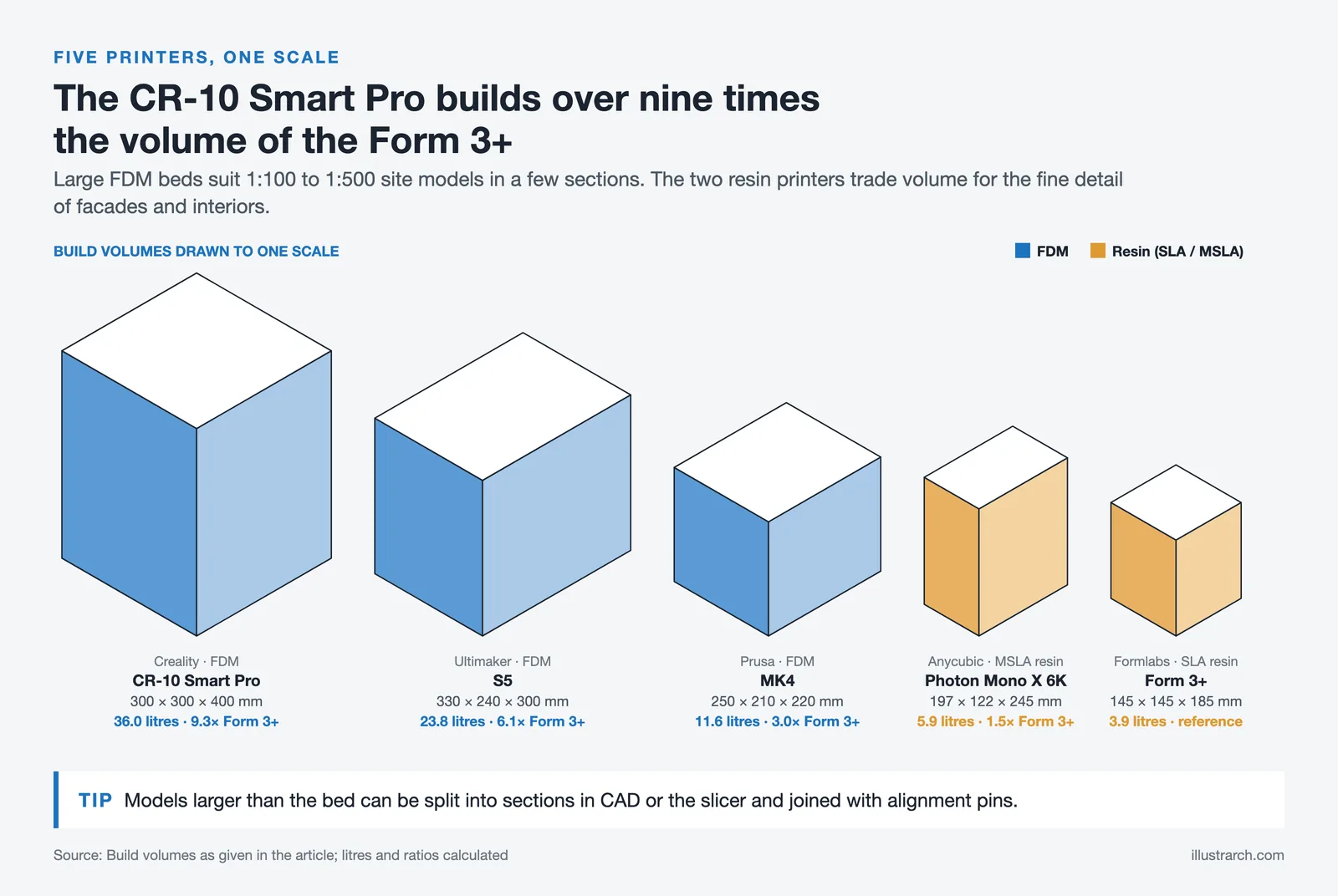
| Creality CR-10 Smart Pro | FDM | 300 × 300 × 400 mm | 100–400 µm | ~$799 | Large urban design & site models |
🔢 Quick Numbers
- Make Architects reduced model production costs by up to 90% after switching to Ultimaker FDM printers (UltiMaker case study, 2024)
- SLA prints achieve XY resolution as fine as 25-50 µm, compared to 100-200 µm typical for desktop FDM (Formlabs Architectural Models Guide, 2024)
- Renzo Piano Building Workshop uses Form 3 SLA printers to produce overnight scale models during rapid design iteration phases (Formlabs case study)
Top 5 Best 3D Printers for Architectural Models in 2026
Each printer below has been selected based on print quality, build volume, material options, and how well it serves typical architectural workflows. Whether you need a detailed facade study or a full site model, one of these machines will fit your needs.
Formlabs Form 3+
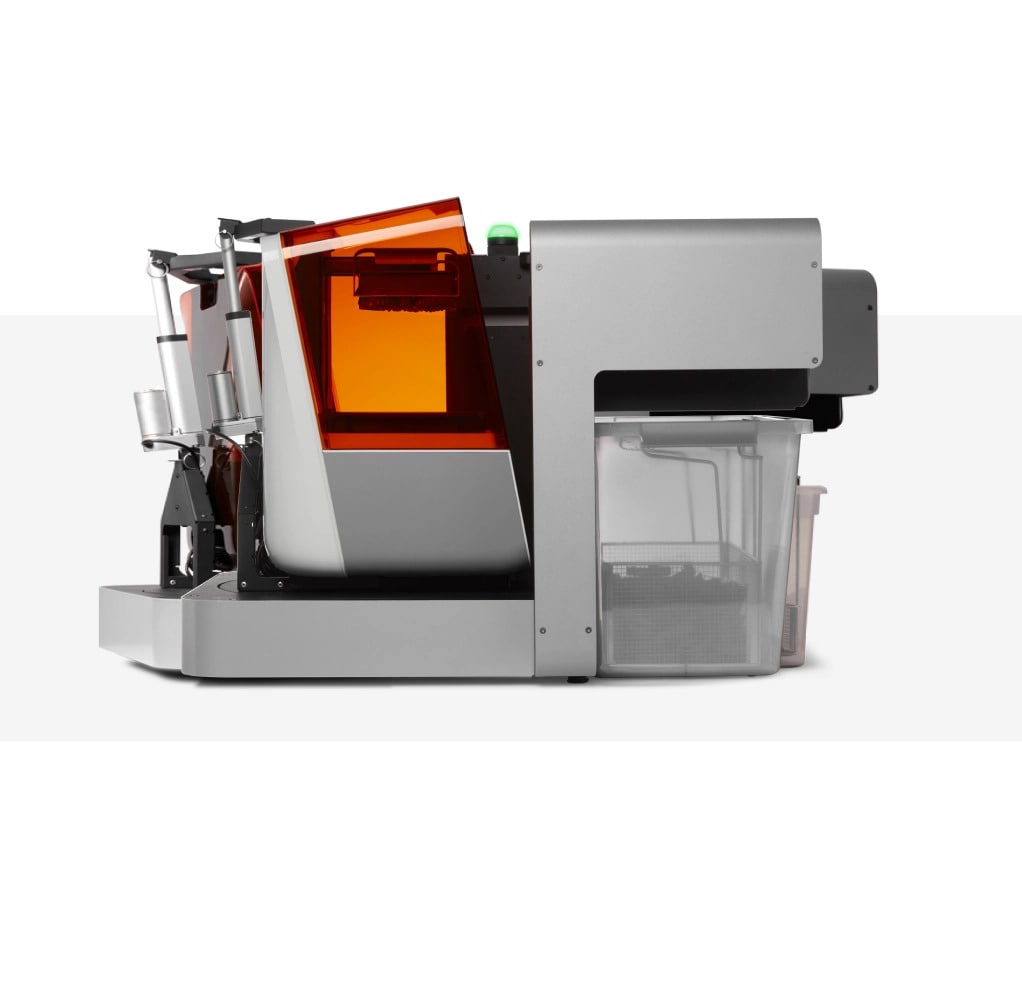
The Formlabs Form 3+ is one of the leading resin-based 3D printers for architects who value high-detail and smooth finishes. Its Low Force Stereolithography (LFS) technology ensures precision down to the smallest architectural details, making it perfect for facade elements, miniature interiors, and intricate structural parts. Resin models produced on the Form 3+ have a professional, polished look with minimal post-processing needed.
The printer also offers a wide range of resin materials, including standard, durable, flexible, and even transparent options for different project needs. Firms like Renzo Piano Building Workshop (RPBW) use Formlabs SLA printers to produce models overnight when design changes happen rapidly. With an intuitive interface and consistent reliability, the Formlabs Form 3+ stands out as a professional-grade architecture printer ideal for offices that prioritize presentation-quality output. For a deeper look at when SLA fits architecture workflows, Formlabs publishes a detailed guide to 3D printing architectural models.
💡 Pro Tip
When printing facade studies on the Form 3+, use Clear Resin at 50 µm layer height to simulate glass and translucent panels. After curing, a light coat of matte spray paint on opaque sections creates a convincing material contrast that impresses clients during presentations.
| Technology | LFS (Low Force Stereolithography) |
| Build Volume | 145 × 145 × 185 mm (5.7 × 5.7 × 7.3 in) |
| Layer Thickness | 25–300 µm |
| XY Resolution | 85 µm laser spot size |
| Laser | 250 mW, 405 nm |
| Materials | 30+ resins (Standard, Durable, Flexible, Transparent, etc.) |
| Connectivity | Wi-Fi, Ethernet, USB |
| Software | PreForm (free) |
| Price | Starting at ~$3,499 |
Ultimaker S5
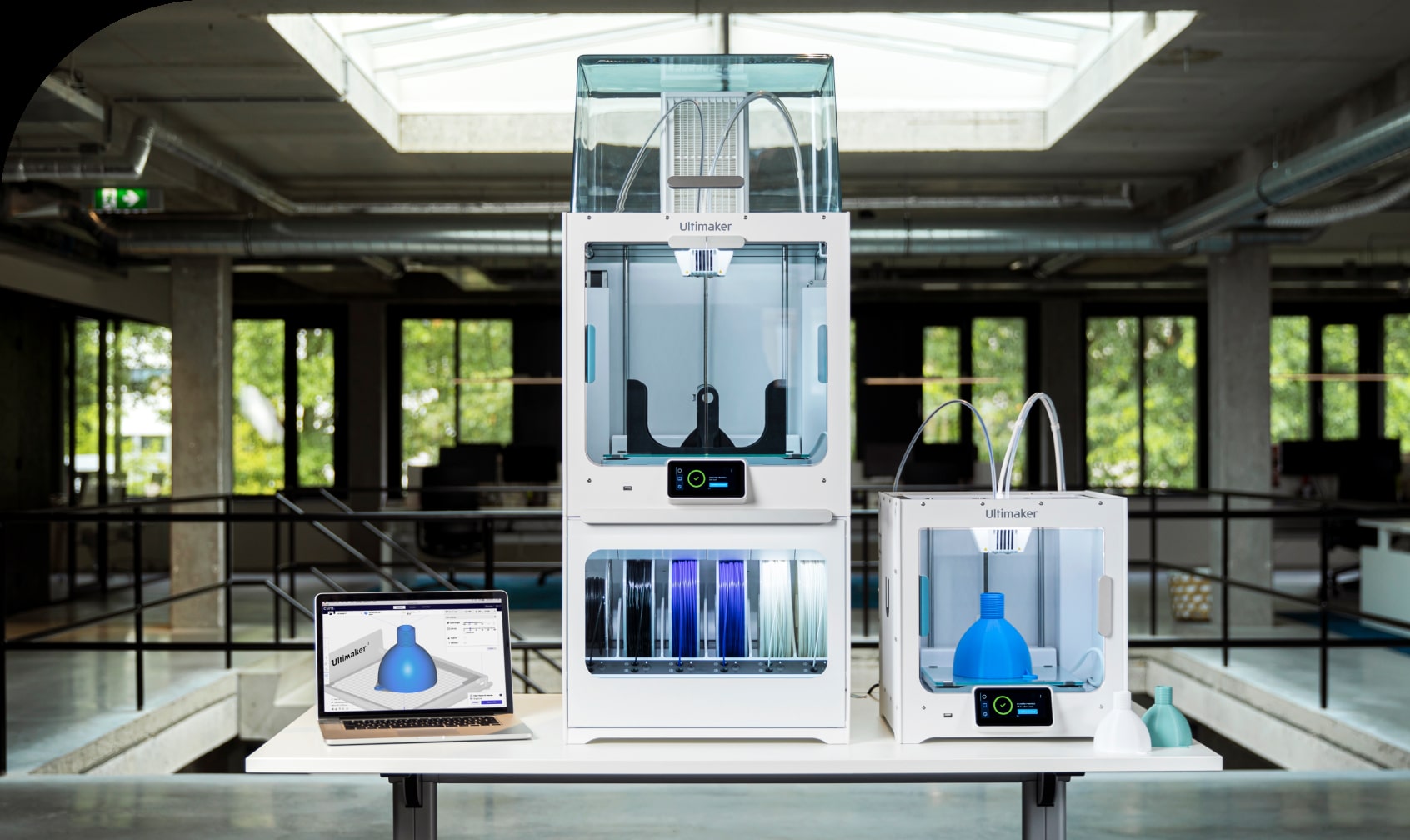
The Ultimaker S5 is one of the most popular FDM (Fused Deposition Modeling) printers for professionals. Known for its large build volume (330 x 240 x 300 mm), it enables architects to 3D print bigger models or multiple parts in one session. This makes it highly efficient for offices working on large-scale projects or urban design layouts.
The S5 also supports dual extrusion, meaning you can print with two materials simultaneously. For example, combining structural PLA with dissolvable PVA support material allows you to achieve complex geometries without manual cleanup. Its open filament system provides flexibility with a wide range of third-party materials. According to a case study published by UltiMaker, the London-based firm Make Architects reduced model production costs by up to 90% after switching to Ultimaker printers. With reliable software integration through UltiMaker Cura, this best 3D printer for prototyping has become a go-to choice for architectural firms worldwide.
🏗️ Real-World Example
Make Architects Model Workshop (London, ongoing): After integrating Ultimaker S-series FDM printers into their model workshop, Make Architects cut both the production time and cost of physical massing models by approximately 90% compared to traditional handmade timber models, freeing model makers to focus on design exploration rather than manual fabrication.
| Technology | FFF (Fused Filament Fabrication) |
| Build Volume | 330 × 240 × 300 mm (13 × 9.4 × 11.8 in) |
| Layer Resolution | 20–600 µm |
| Nozzle Sizes | 0.25 / 0.4 / 0.6 / 0.8 mm (swappable print cores) |
| Extruders | Dual extrusion |
| Max Nozzle Temp | 280 °C |
| Materials | 200+ (PLA, ABS, Nylon, CPE, PC, TPU, PVA, composites) |
| Connectivity | Wi-Fi, Ethernet, USB |
| Software | UltiMaker Cura (free) |
| Price | Starting at ~$5,995 |
Prusa i3 MK4

The Prusa i3 MK4 is a highly affordable yet professional 3D printer, making it popular among architects, students, and small studios. Known for its reliability, it provides excellent print quality for its price point and is user-friendly with automatic bed leveling, filament sensors, and fast setup.
It supports a wide variety of filaments, including PLA, PETG, and ABS, making it versatile for creating models of different textures and strength levels. The open-source PrusaSlicer software gives you full control over print parameters, and an active online community shares profiles optimized for architectural printing. If you are a student or run a small practice looking for the best 3D printer for architectural models on a budget, the Prusa MK4 offers an ideal balance of quality, versatility, and cost.
| Technology | FDM (Fused Deposition Modeling) |
| Build Volume | 250 × 210 × 220 mm (9.8 × 8.3 × 8.7 in) |
| Layer Resolution | 50–350 µm |
| Nozzle Diameter | 0.4 mm (interchangeable) |
| Extruder | Nextruder (direct drive, load cell sensor) |
| Materials | PLA, PETG, ABS, ASA, Flex, Nylon, Composites |
| Connectivity | USB-C, Ethernet, Wi-Fi (optional) |
| Software | PrusaSlicer (free, open-source) |
| Price | Starting at ~$799 |
Anycubic Photon Mono X 6K
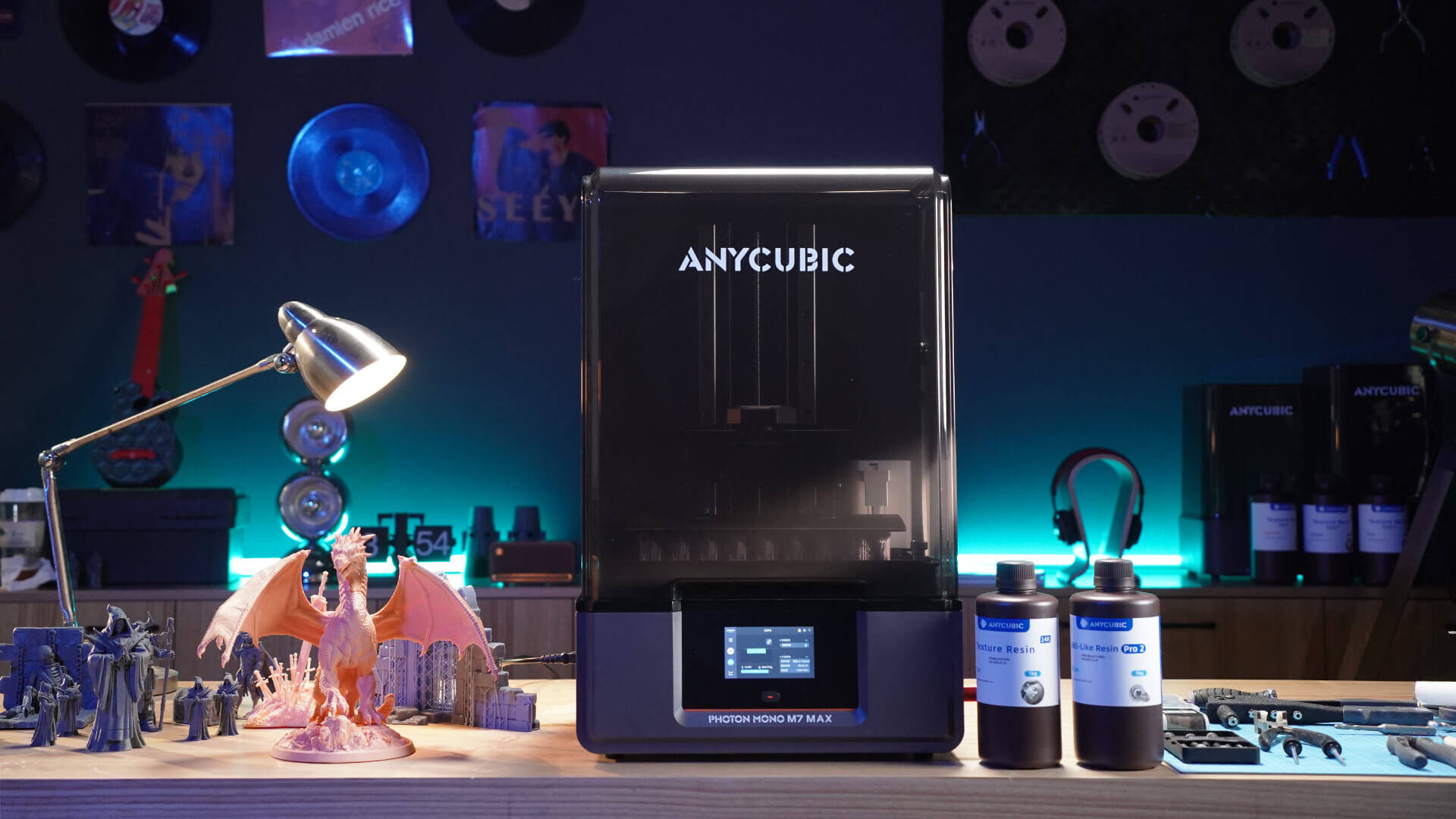
The Anycubic Photon Mono X 6K is a resin printer designed for high-resolution 3D printing architecture models. With its 6K monochrome screen delivering 34 µm XY resolution, it produces extremely detailed architectural models ideal for facade ornamentation, furniture prototypes, and intricate scale designs.
Its printing speed is significantly faster compared to older resin printers, making it a good fit for rapid prototyping needs. At a price range of $300 to $659, this 3D printer architecture tool offers remarkable value. Combined with reliable results and an affordable entry point, the Photon Mono X 6K has become a strong competitor in the resin printing market and an excellent choice for studios producing 3D printed architectural model pieces that demand fine detail.
| Technology | MSLA (LCD-based UV Resin) |
| Build Volume | 197 × 122 × 245 mm (7.8 × 4.8 × 9.6 in) |
| Screen | 9.25″ 6K Mono LCD (5760 × 3600 px) |
| XY Resolution | 34 µm |
| Z Layer Thickness | 10–200 µm |
| Light Source | Matrix UV LED (405 nm), 30–100% adjustable |
| Contrast Ratio | 350:1 |
| Materials | 405 nm UV resins (standard & specialty) |
| Connectivity | USB |
| Price | Starting at ~$300–$659 |
Creality CR-10 Smart Pro

The Creality CR-10 Smart Pro is a large-format FDM printer designed for bigger and more detailed prints. Its 300 x 300 x 400 mm build volume is suitable for large-scale architectural models or urban design layouts. With features like Wi-Fi connectivity, touch-screen controls, and smart auto-leveling, it is both powerful and user-friendly.
Its compatibility with different filament types allows architects to experiment with different textures and finishes, from wood-fill PLA for realistic massing models to carbon fiber composites for structural prototypes. As a budget-friendly but capable option, the CR-10 Smart Pro makes large-scale prototyping more accessible for studios that regularly produce site models or neighborhood-scale presentations.
| Technology | FDM (Fused Deposition Modeling) |
| Build Volume | 300 × 300 × 400 mm (11.8 × 11.8 × 15.7 in) |
| Layer Resolution | 100–400 µm |
| Nozzle Diameter | 0.4 mm, 1.75 mm filament |
| Extruder | All-metal direct drive (Sprite) |
| Max Nozzle Temp | 300 °C |
| Materials | PLA, ABS, PETG, TPU, PA, Carbon Fiber, Wood |
| Connectivity | Wi-Fi, Bluetooth, Ethernet, SD Card |
| Special Features | Built-in HD camera, LED light bar, 4.3″ touchscreen |
| Price | Starting at ~$799 |
FDM vs. Resin: Which 3D Printing Technology Is Best for Your Architectural Models?
Choosing between FDM and resin technology is one of the first decisions you will face when selecting a 3D printer for architectural models. Each technology excels in different scenarios, and many professional studios keep one of each type to cover the full range of model-making needs. The table below breaks down how these technologies compare across the factors that matter most to architects.
| Feature | FDM (Ultimaker S5, Prusa MK4, Creality CR-10) | Resin / SLA (Formlabs Form 3+, Anycubic Mono X 6K) |
|---|---|---|
| Surface Detail | Visible layer lines (good for massing models) | Ultra-smooth surfaces (ideal for presentation models) |
| Build Volume | Generally larger (up to 300 × 300 × 400 mm) | Generally smaller (up to ~200 × 200 × 250 mm) |
| Material Cost | Lower (~$20–$50/kg filament) | Higher (~$35–$150/liter resin) |
| Post-Processing | Minimal (remove supports, optional sanding) | Required (washing + UV curing) |
| Best For | Massing models, site layouts, large-scale prototypes | Facade details, furniture, intricate ornamental elements |
| Safety | Low concern (use ventilation for ABS) | Requires gloves & ventilation (liquid resin is toxic) |
In practice, FDM printers work best for early-stage concept models and large site plans where speed and size matter more than surface finish. Resin printers shine when you need to present intricate details to clients, such as ornamental facades, custom furniture, or interior layouts at 1:50 scale or smaller. Many studios start with an affordable FDM machine like the Prusa MK4 and later add a resin printer like the Anycubic Photon Mono X 6K for presentation work.
📌 Did You Know?
Stereolithography (SLA), the technology behind today’s leading resin printers like the Formlabs Form 3+, was the world’s first 3D printing process, invented in the 1980s by Chuck Hull. More than four decades later, it remains the gold standard for the smoothest surface finish and highest accuracy of all plastic 3D printing technologies for architectural presentation models.
How to Choose the Right 3D Printer for Architects
Selecting the best 3D printer for architects depends on several practical factors. Before purchasing, consider the following criteria to match your studio’s real-world needs. For an independent point of comparison across the wider market, the All3DP team maintains an updated round-up of the best 3D printers for architects.
Build Volume and Model Scale
Think about the typical scale you work at. If you regularly produce 1:100 or 1:200 site models, a large-format FDM printer like the Creality CR-10 Smart Pro (300 x 300 x 400 mm) lets you print substantial sections in one piece. For detail-focused 1:50 interior models, a smaller resin printer with high resolution may be the better investment. Keep in mind that most 3D printed architectural models larger than the print bed can be divided into sections and assembled after printing.
⚠️ Common Mistake to Avoid
Many architects buy the largest printer they can afford, assuming bigger build volume always means more flexibility. In practice, large FDM beds usually print at lower resolution and slower speeds for fine details. A smarter setup is often a mid-size FDM printer for site models plus a small resin printer for facade and interior detail, rather than one oversized machine that compromises on quality.
Resolution and Surface Quality
Resolution determines how fine your architectural details will appear. For presentation models where clients will examine window mullions, balustrades, and surface textures up close, aim for 25 to 50 µm layer height (achievable with SLA/MSLA printers). For study models where overall massing and spatial relationships matter more, 100 to 200 µm on an FDM machine works well. As a reference, a printer with 25 µm resolution can render individual window panes clearly at 1:100 scale.
Material Compatibility
Different projects call for different materials. PLA is the most common filament for architectural models because it is easy to print, affordable, and produces clean white surfaces that photograph well. PETG and ABS offer greater strength for models that need to survive transport. Resin printers expand your options further with transparent, flexible, and castable materials. If you plan to experiment with wood-fill, stone-fill, or carbon fiber filaments, choose an FDM printer with an all-metal hotend and a maximum nozzle temperature above 260 °C. For a broader look at traditional materials for architectural models, including how 3D-printed parts integrate with foam board, basswood, and acrylic, see our companion guide.
Software and CAD Workflow
Your 3D printer needs to integrate with your existing design software workflow. Most architectural CAD programs (Rhino, Revit, ArchiCAD, SketchUp) can export STL or OBJ files suitable for 3D printing. Slicer software like UltiMaker Cura (for FDM) or Formlabs PreForm (for SLA) then prepares these files for printing. Choose a printer whose slicer supports automatic support generation and offers profiles optimized for architectural work.
💡 Pro Tip
Experienced architects recommend exporting your Rhino or Revit model as a single watertight mesh before importing into slicer software. Running a mesh repair tool (such as Meshmixer or the built-in repair in PrusaSlicer) catches non-manifold edges and holes that cause failed prints, saving hours of wasted print time.
From CAD to Physical Model: The 3D Print Arch Workflow
Understanding the 3D print arch workflow helps you get better results from your architecture printer. Here is a step-by-step overview of the process most studios follow when producing 3D printing architecture models.
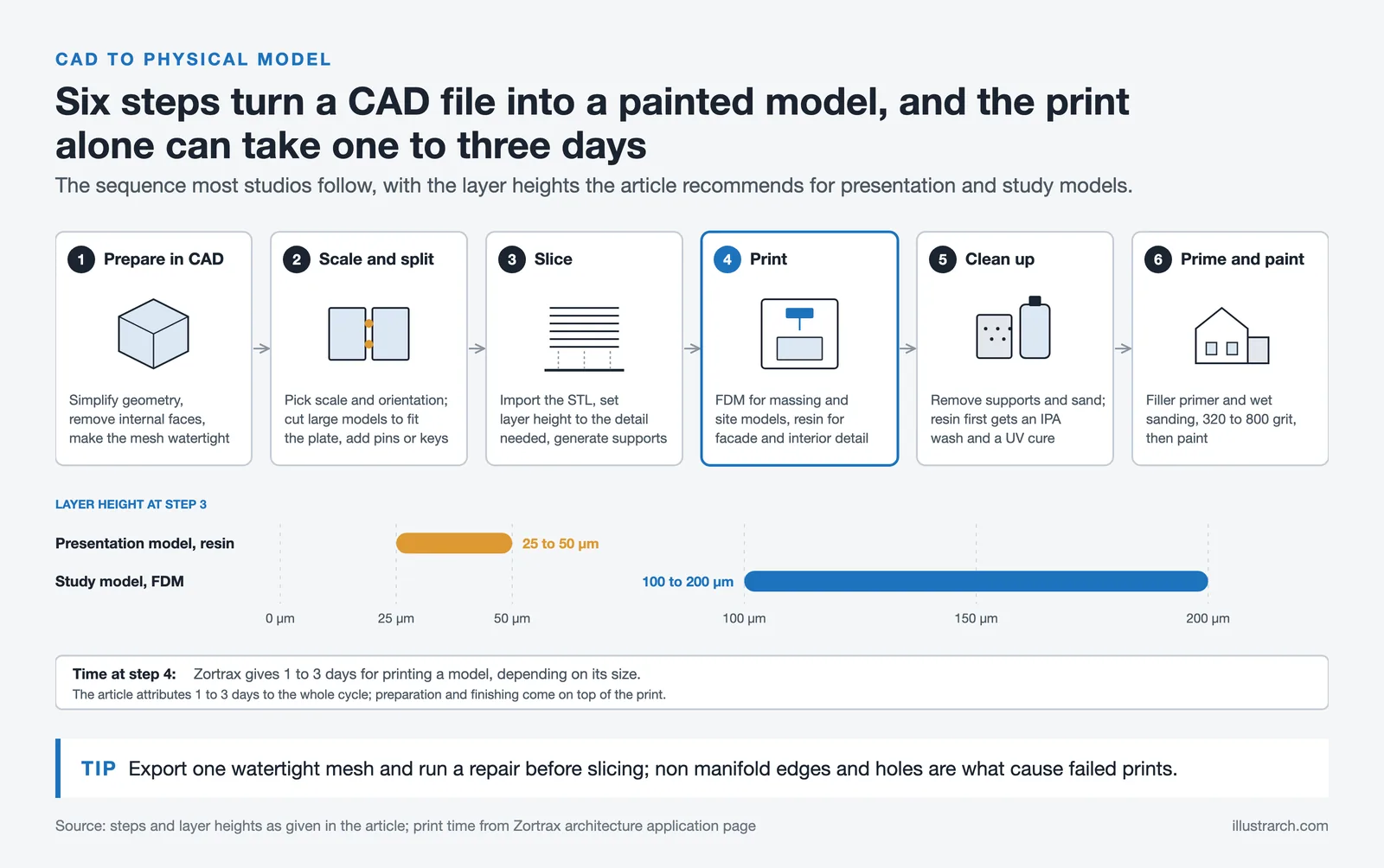
Start by preparing your 3D model in your preferred CAD software. Simplify the geometry where possible, remove internal faces, and ensure the mesh is watertight. Next, decide on scale and orientation. A common approach is to split large models into sections that fit the build plate, using alignment pins or keyed joints for assembly. Import the STL file into your slicer, set layer height based on the required detail level, and generate supports where needed. After printing, remove supports carefully, sand visible surfaces, and apply primer and paint as desired. Post-processing techniques like filler primer spray and wet sanding with 320 to 800 grit paper can dramatically improve the final appearance of FDM prints.
For resin prints, the post-processing sequence includes washing in isopropyl alcohol, UV curing under a dedicated lamp, and then sanding and painting. The printing step itself typically takes 1 to 3 days depending on size and complexity, according to Zortrax’s architecture application guide. If you are new to model-making in general, our overview of physical models in architecture covers how 3D-printed parts fit alongside traditional handmade techniques.
Best Materials for 3D Printed Architectural Models
Choosing the right material affects both the look and durability of your finished model. Here is a summary of the most commonly used materials for 3D printing architectural models.
FDM Filaments for Architecture
PLA remains the default choice for most architectural prints. It produces a matte white finish, requires no heated enclosure, and costs roughly $20 to $30 per kilogram. PETG is a good alternative when you need slightly higher impact resistance, for instance for models that will be transported to client meetings. Wood-fill and stone-fill PLA composites can simulate natural material textures, which adds realism to model making presentations. For structural elements or parts that need to survive repeated handling, consider ABS or ASA printed in an enclosed chamber.
Resin Materials for Architecture
Standard grey or white resin is the starting point for most resin prints. Transparent resin works well for glazing elements, allowing you to show interior spaces through exterior walls. Durable and tough resins from Formlabs offer ABS-like strength for functional prototypes. Keep in mind that all resin materials require proper ventilation and personal protective equipment (gloves and safety glasses) during handling.
3D Printing Tips for Architects: Getting Professional Results
Getting clean, professional results from any 3D printer for architects requires attention to a few practical details that go beyond default slicer settings.
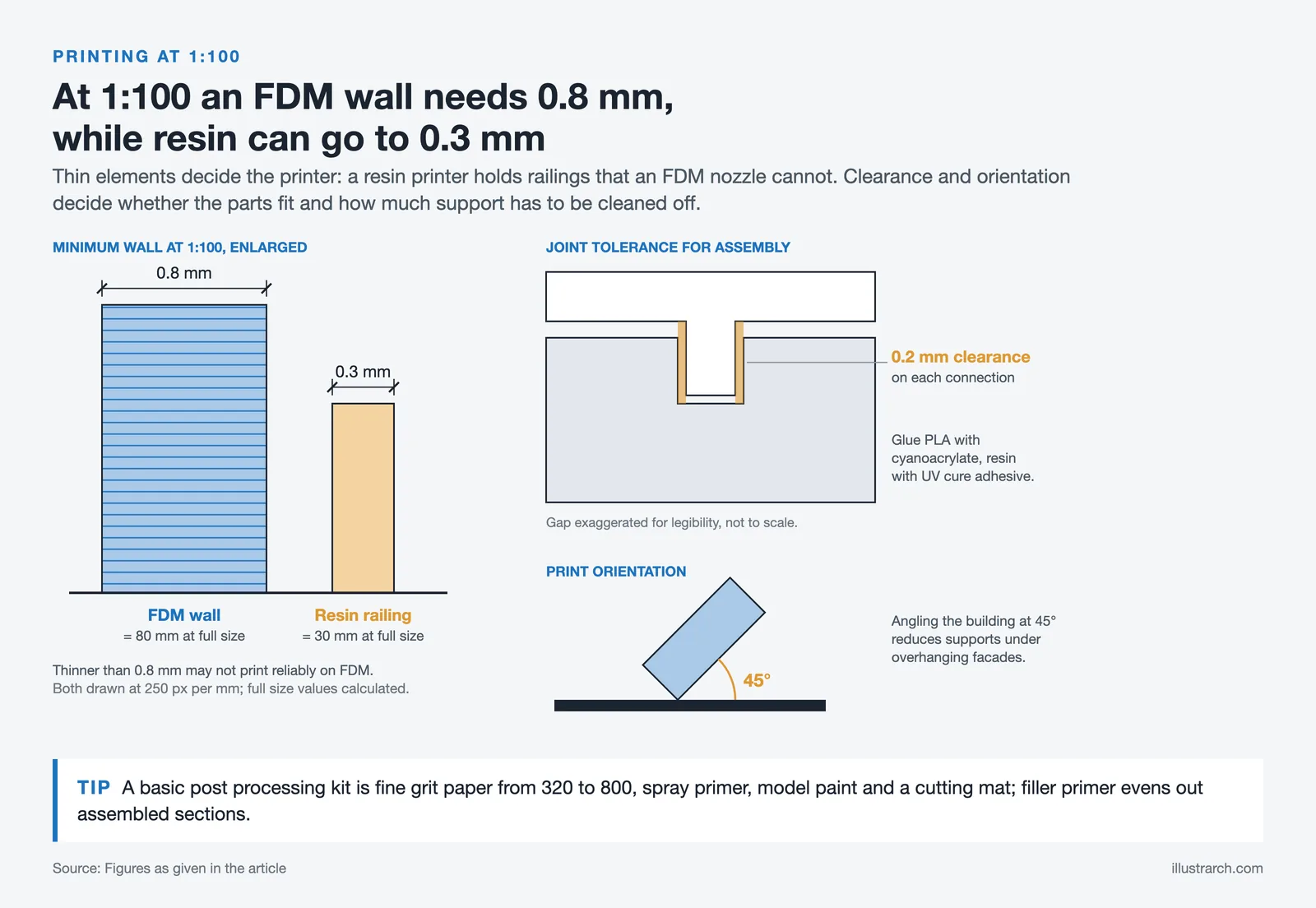
Scale your model carefully. For 1:100 models, wall thicknesses below 0.8 mm may not print reliably on FDM machines. On resin printers, you can go as thin as 0.3 mm for delicate elements like railings. Print orientation matters too: angling a building at 45 degrees on the build plate can reduce the need for support structures on overhanging facades.
When printing multi-part models for assembly, add 0.2 mm tolerance to connection points to account for dimensional variations. Use cyanoacrylate (super glue) for bonding PLA parts, and UV-cure adhesive for resin pieces. For a uniform finish across assembled sections, apply a coat of filler primer before painting.
Consider investing in a basic post-processing kit: fine-grit sandpaper (320 to 800 grit), spray primer, model paint, and a cutting mat. These simple tools turn a rough 3D print into a presentation-ready 3D printed architectural model that communicates your design intent clearly.
Why Every Architecture Studio Needs a 3D Printer
For architects, a 3D printer is more than just a piece of equipment. It enhances creativity, speeds up workflow, and improves communication of design ideas. Complex geometries that are difficult to visualize in drawings can be brought to life with precise detail and scale accuracy.
The ability to print models overnight means design iterations that once took weeks can now happen in a single day. According to the UltiMaker case study on Make Architects, switching from traditional timber models to 3D printing reduced both production time and cost by approximately 90%. This frees up budget for more iterations and allows teams to explore bolder design concepts without worrying about model-making labor costs.
3D-printed models also allow clients and stakeholders to engage with designs in a more tangible and interactive way. You can remove roof sections to reveal interior layouts, print at multiple scales, or create modular pieces that snap together. This hands-on interaction builds stronger client confidence and leads to more informed decision-making.
With the growing demand for sustainable architecture, many 3D printers now support eco-friendly materials like biodegradable PLA and recycled filaments that reduce waste. This makes it possible for architects to prototype responsibly while still exploring bold and innovative concepts. Technologies like VR in architecture complement 3D printed models by offering immersive digital walkthroughs alongside physical representations, giving clients the full picture of a proposed design.
Investing in the right 3D printer means investing in the future of architectural creativity. Whether you choose a high-detail resin printer like the Formlabs Form 3+ or a versatile FDM model like the Ultimaker S5 and budget-friendly Prusa i3 MK4, there are options for every studio size and need. When selecting a 3D printer, consider build volume, material compatibility, resolution, and ease of use to find the machine that best supports your practice.
✅ Key Takeaways
- The best 3D printer for architectural models depends on scale and purpose: FDM for large massing and site models, resin for high-detail presentation pieces.
- The Formlabs Form 3+ leads on detail, the Ultimaker S5 on size and reliability, and the Prusa i3 MK4 on price-to-quality ratio for students and small studios.
- Aim for 25-50 µm layer heights on resin printers for client-facing presentation models, and 100-200 µm on FDM for early-stage massing studies.
- PLA is the default filament for architecture; add PETG for transport durability and resin for fine ornamental detail.
- Post-processing (sanding, priming, painting) is what separates a rough print from a presentation-ready architectural model.
- Many studios end up with both an FDM and a resin printer, using each for the model type it handles best.
Frequently Asked Questions About 3D Printers for Architectural Models
What is the best 3D printer for architectural models?
For most professional studios, the Formlabs Form 3+ is the best 3D printer for architectural models when presentation quality is the priority, thanks to its 25 µm layer resolution and smooth resin finish. For large site models, the Ultimaker S5 leads with a 330 x 240 x 300 mm build volume, while the Prusa i3 MK4 is the best budget option for students and small practices.
How much does a 3D printer for architects cost?
Entry-level FDM printers suitable for architectural models start around $300 to $800 (Prusa MK4, Creality CR-10 Smart Pro). Mid-range resin printers cost $300 to $700 (Anycubic Photon Mono X 6K). Professional-grade machines like the Formlabs Form 3+ or Ultimaker S5 typically range from $3,500 to $6,000, plus ongoing costs for filament, resin, and replacement parts.
Is FDM or resin better for architectural models?
FDM is better for large-scale site models, massing studies, and early-stage prototypes where speed, build volume, and low material cost matter most. Resin is better for client-facing presentation models, facade details, and small-scale interior layouts where surface smoothness and fine detail are critical. Many architecture studios use both technologies for different parts of the same project.
Can I print large-scale site models on a desktop 3D printer?
Yes. Large site models that exceed the build volume of a desktop 3D printer can be split into sections in your CAD or slicer software, printed separately, and assembled with alignment pins or glue. The Creality CR-10 Smart Pro (300 x 300 x 400 mm) and Ultimaker S5 (330 x 240 x 300 mm) handle most 1:200 to 1:500 urban models with two to four sections.
What software do I need for 3D printing architecture models?
Most architects export STL or OBJ files from CAD software like Rhino, Revit, ArchiCAD, or SketchUp, then prepare them in slicer software. Free options include UltiMaker Cura (for most FDM printers), PrusaSlicer (for Prusa and many other FDM machines), and Formlabs PreForm (for Formlabs SLA printers). A mesh repair tool like Meshmixer is also useful for fixing non-manifold geometry before printing.
Prices mentioned in this article are approximate and may vary by region, retailer, and current promotions. Always verify specifications with the manufacturer before purchasing.
- 3d printed architectural model
- 3d printer for architectural models
- 3D printers for architecture
- 3d printing architecture models
- architectural model 3D printing
- architectural models 3d printing
- FDM 3D printers for architects
- high-resolution 3D printers for architects
- professional 3D printers for architects
- Prusa i3 MK4 for architectural models


1 Comment




ARki Review: AR Room Planner and 3D Visualization on Mobile
ARki has been a fixture in architectural augmented reality since before AI...
 Sinan Ozen5 Mins read
Architectural Visualization with Blender: Free Assets and PBR Materials Guide
This guide breaks down how free asset packs, PBR material libraries, and...
Elif Ayse Sen13 Mins read
26 Best AI Architectural Rendering Tools in 2026
AI is revolutionizing architectural visualization in 2026, enabling faster iterations, richer creativity,...
 Bahattin Duran14 Mins read
Top 3D Visualization Outsourcing Picks for 2025
Looking to scale your 3D production without expanding headcount or software spend?...
 Begum Gumusel4 Mins read


So, let me get this straight: 3D printing is like magic for architects? I mean, one minute you’re doodling on a napkin, and the next you have a mini Eiffel Tower that doesn’t look like it’s been through a blender! I just hope my coffee cup doesn’t turn into a 3D model by accident. Also, what’s up with the price tags? Who knew turning ideas into reality could cost more than my car?