

Finch3D Review 2026: How Generative AI Is Changing Early-Stage Architectural Design
This Finch3D review covers how the Swedish-built generative design platform helps architects produce optimized floor plans during early-stage design. It examines graph rules, Revit integration, real-time performance feedback, pricing tiers, and how Finch3D compares against alternatives like Autodesk Forma and Maket.ai.
 Sinan Ozen16 April 20268 Mins read555
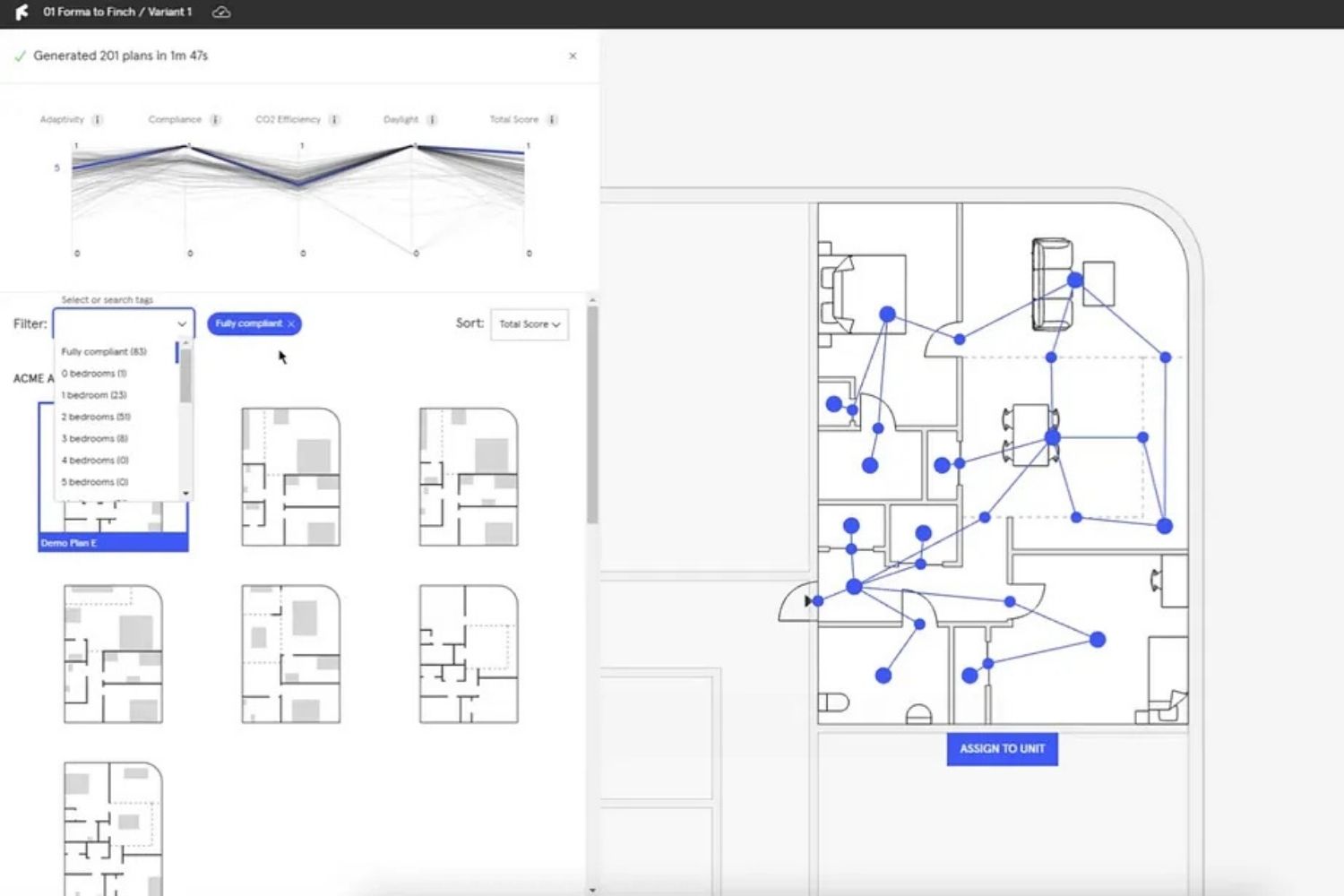
Table of Contents Show
Finch3D is a generative AI design platform built specifically for architectural early-stage work. Founded in Malmö, Sweden by architects Pamela Nunez Wallgren, Jesper Wallgren, and Martin Kretz, it uses graph technology and AI algorithms to generate and optimize floor plans from a building massing in seconds. Rather than replacing the architect, it functions as a co-pilot that compresses schematic iteration from days to minutes.

What Is Finch3D and Who Builds It?
Finch3D started as an internal tool at architecture studio Wallgren Arkitekter. A floor plan generator plug-in for Rhino gained traction after appearing in the Financial Times, and the team eventually spun it out into a standalone cloud platform. Today it is no longer just a Rhino plugin. It operates as an independent application with two-way native integrations into Rhino, Grasshopper, and Revit, making it compatible with the most common professional workflows in architecture.
The platform is aimed squarely at the early design phase, from first sketch through schematic design. Its core job is to take a massing volume and populate it with floor plans, test unit mixes, check compliance, and return performance data in real time. Firms working on multifamily residential, mixed-use, and medium-to-large commercial projects are the primary users.
💡 Pro Tip
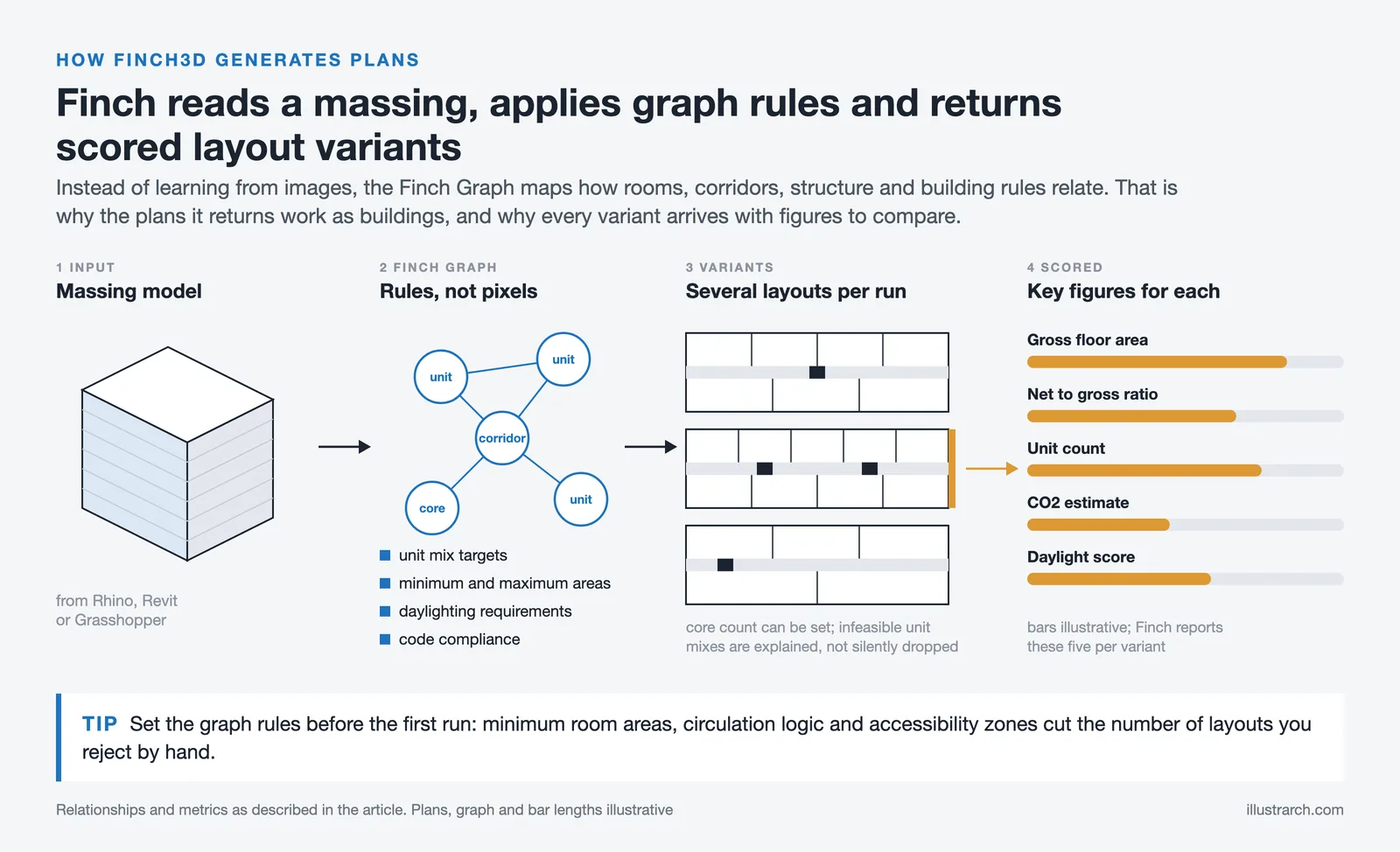
When first setting up a Finch3D project, spend time defining your graph rules before running any generation. Rules that specify minimum room areas, circulation path logic, and accessibility zones will drastically reduce how many outputs you need to manually reject. Architects who skip this step early often spend more time filtering unusable layouts than they save through automation.

How Does Finch3D Generative Design Actually Work?
The central technology behind finch3d generative design architecture is what the company calls the “Finch Graph.” Instead of generating floor plans from pixel-level image training (like many image-based AI tools), Finch uses a proprietary graph system that maps spatial relationships between rooms, corridors, structural elements, and building rules. This is why its outputs are architecturally coherent rather than visually plausible but functionally broken.
When an architect imports a massing model from Rhino, Revit, or Grasshopper, Finch reads the geometry and begins populating stories with unit types and circulation paths. The algorithm considers unit mix targets, minimum and maximum area constraints, daylighting requirements, and code compliance rules simultaneously. Each generation run produces multiple layout variants, each accompanied by a dashboard of key figures: gross floor area, net-to-gross ratio, unit count, CO2 estimate, and daylight simulation scores.
The Generate Floor Plate 2.0 update, released in late 2024, added more transparency to this process. Architects can now specify how many circulation cores the algorithm should try, and the system explains why certain unit mixes are infeasible for a given footprint rather than silently failing. This addresses one of the most common complaints about black-box generative tools: that you get an output without understanding what constrained it.
📌 Did You Know?
Finch3D originated from a Rhino plugin developed internally at Wallgren Arkitekter. After the tool went viral following coverage in the Financial Times, the founding team formally incorporated it as a standalone company in Malmö, Sweden in 2019. It has since attracted tens of thousands of architects to its waitlist through word-of-mouth within the AEC community.
Finch3D Revit Integration: How Deep Does It Go?
The finch3d revit integration is one of the platform’s strongest arguments for firms already in the Autodesk ecosystem. Rather than treating Revit as a one-way export destination, Finch maintains a two-way live connection. Changes made in Revit update the massing data inside Finch, and optimized layouts generated in Finch can be exported back as full BIM models complete with walls, doors, area tags, and space labels.
For architects working within project delivery pipelines that require Revit-native documentation, this matters more than it might initially seem. Most generative design tools at this price point output DXF or image files that require manual recreation inside BIM software. Finch’s direct Revit export means the schematic layout generated by AI can become the actual starting point for design development documentation, rather than a reference image someone traces over.
The plugin is available through the Autodesk App Store and installs directly into Revit. As of October 2026, support covers Revit 2023 to 2027. Enterprise plan users get access to BIM model generation that produces a complete building model from a Finch layout in seconds.
🎓 Expert Insight
“Finch3D is for early-stage design, from first sketch through design development until schematic design. What we do is explore volume and populate that volume with plans.”
Pamela Nunez Wallgren, Co-founder, Finch3D
This framing is important for practitioners evaluating the tool. Finch3D is not competing with Revit or ArchiCAD for documentation work. Its value sits upstream, in the phase where design options are being generated and compared before any detailed drawings begin.

What Does Finch3D Cost? Pricing Tiers Explained
Finch3D uses a three-tier pricing model. The Free Plan costs nothing and gives a single user access to all manual editing tools and real-time performance metrics. It does not include the AI generation engine. This tier is practical for getting familiar with the interface and testing whether the workflow fits your process.
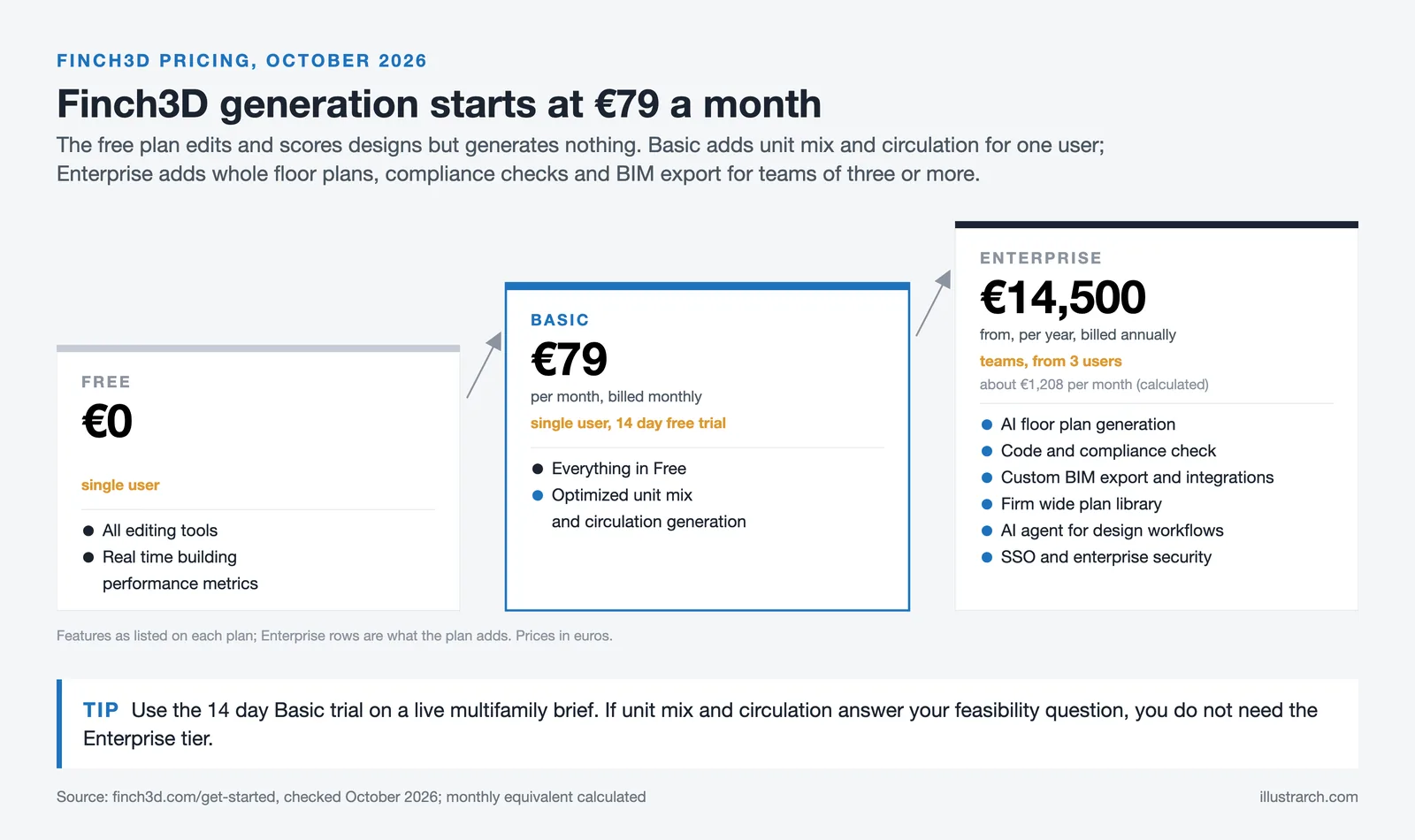
The Basic Plan runs at €79 per month, billed monthly, for a single architect (as of October 2026). It unlocks the core generative tools for multifamily residential projects, including unit mix generation and circulation path creation. A 14-day free trial is available before committing. This is the tier most individual architects and small firms will start with.
The Enterprise Plan starts at €14,500 per year, billed annually for three seats (about €1,208 per month, as of October 2026). It adds full floor plan generation in seconds, complete BIM model output, and custom graph rules that let organizations encode their own design standards into the AI’s behavior. The custom graph rules feature is particularly relevant for firms working on large residential developments where consistency across hundreds of unit types matters.
Pricing is subject to change. Always verify current rates on finch3d.com before making a purchasing decision.
Finch3D Pricing Comparison
The table below summarizes what each plan includes as of early 2026.
| Feature | Free | Basic (€79/mo) | Enterprise (from €14,500/yr) |
|---|---|---|---|
| Manual editing tools | Yes | Yes | Yes |
| Plan library | Personal | Personal | Team |
| AI generative floor plans | No | Multifamily residential | All project types |
| BIM model export | No | No | Yes |
| Custom graph rules | No | No | Yes |
| Rhino / Revit / Grasshopper integration | Yes | Yes | Yes |
Is Finch3D Free to Use?
Yes, finch3d free access exists in the form of the permanent Free Plan. It gives architects full access to the manual editing environment, the plan library, and the Rhino/Revit/Grasshopper integrations. What it does not include is the generative AI engine itself. Think of the free tier as a digital drafting board with compliance checking built in, which is genuinely useful on its own, but the automation that saves hours per project sits behind the paid plans.
The 14-day free trial on the Basic Plan is the better starting point for anyone who wants to test the AI generation workflow specifically. It requires no credit card upfront according to the Finch3D documentation, making the barrier to entry quite low for a professional tool at this level of capability.

Finch3D Alternatives: How Does It Compare?
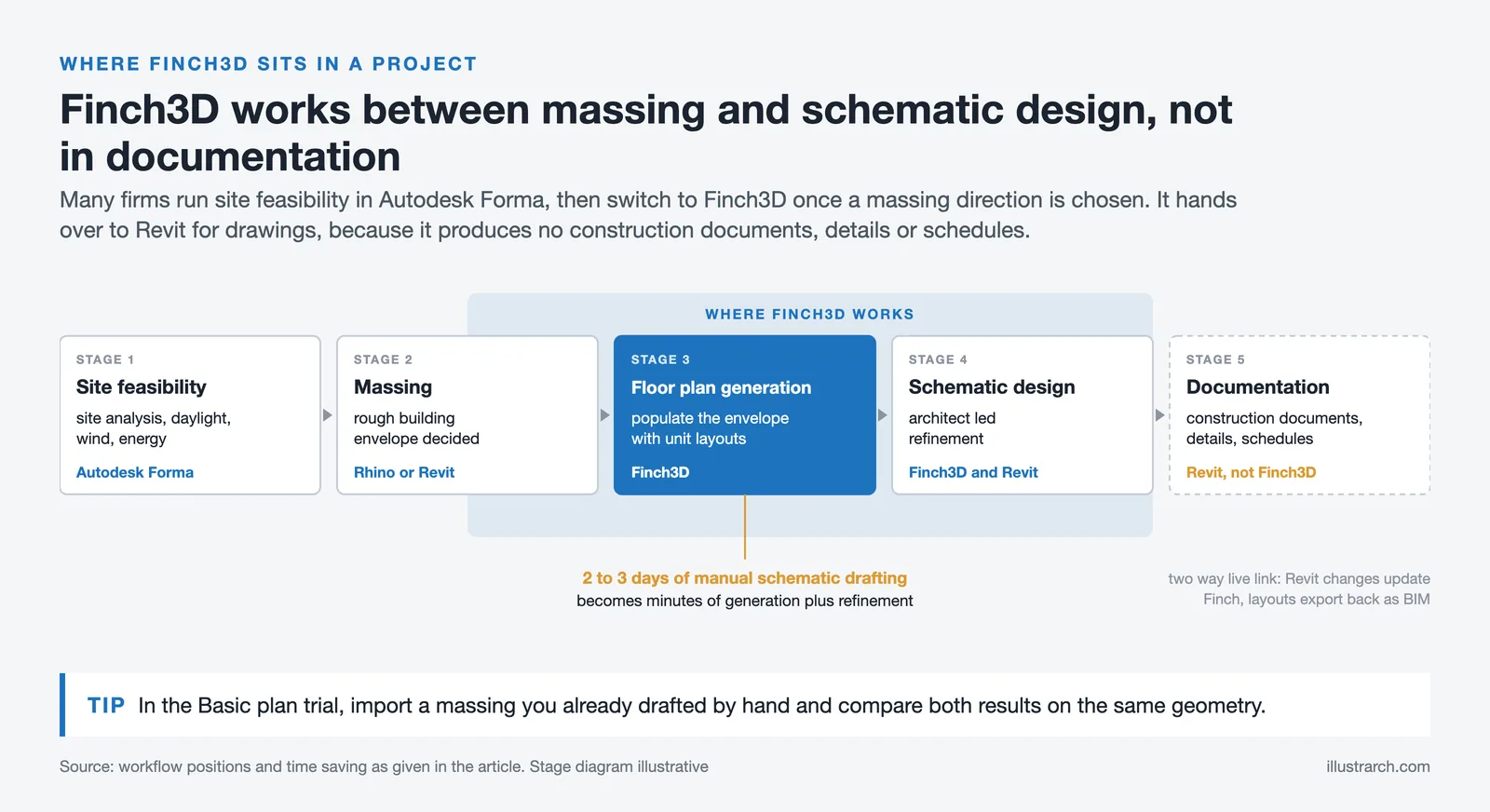
The closest finch3d alternative in terms of early-stage generative design is Autodesk Forma (formerly Spacemaker), which focuses on massing and site-level analysis rather than floor plan layout. Forma integrates natively with Revit and is included in the AEC Collection subscription, giving it a cost advantage for firms already paying for the Autodesk bundle. Its daylight, wind, and energy analysis runs earlier in the process than Finch’s floor plan generation, so the two tools are not strictly competing. Many firms use Forma for site feasibility, then Finch3D once a massing direction is chosen.
Maket.ai takes a broader approach, targeting residential floor plan generation for architects, developers, and homeowners with a simpler interface and lower starting price. It lacks the compliance depth and BIM export quality of Finch3D but works across a wider range of project types from the outset. ARCHITEChTURES, a Spanish platform, covers a similar niche with particularly strong code compliance rules for European projects.
For architects specifically looking at the illustrarch review of AI floor plan generators, Finch3D scores highest among tools aimed at multifamily residential with Revit integration as a priority. TestFit edges it out for developer-facing feasibility work, while ARCHITEChTURES is stronger for European regulatory compliance scenarios.
⚖️ Pros & Cons at a Glance
✔️ Pros: Deep Revit/Rhino/Grasshopper integration, graph-based compliance checking, real-time CO2 and daylight feedback, BIM export on Enterprise, free tier available
✖️ Cons: AI generation limited to multifamily residential on Basic plan, Enterprise pricing is steep for smaller firms, learning curve on graph rules setup, limited project type scope compared to broader generative tools
Where Does Finch3D Fit in a Real Architectural Workflow?
The practical answer is: between massing and schematic design. Once a site has been analysed and a rough building envelope is decided, Finch3D takes over to populate that envelope with a floor plan that meets the program requirements. According to the illustrarch overview of AI architecture design in 2026, this phase is where generative tools are currently delivering the clearest time savings, compressing two to three days of manual schematic drafting into minutes of AI generation followed by architect-led refinement.
The finch3d ai architecture approach fits best into firms working on volume residential projects where the same constraints (unit mix, fire egress distances, accessibility standards, floor-to-floor heights) apply repeatedly across multiple buildings or phases. In that context, investing time in custom graph rules at the Enterprise tier pays back quickly because the rules get reused across every project.
For one-off bespoke residential or cultural projects with irregular geometry and highly specific programmatic requirements, the return is lower. Finch3D’s generation algorithms work best when given repeatable parameters. Non-standard typologies require more manual intervention, which reduces the speed advantage the tool is built to deliver.
💡 Pro Tip
If you are evaluating Finch3D against other tools for a specific project, import a massing model you have already completed in Rhino or Revit and run the Basic plan trial against it. This gives you a direct comparison between what you would have drafted manually and what the AI produces in the same time, using real project geometry rather than tutorial examples.

What Finch3D Does Not Do
Understanding the tool’s limits matters as much as knowing its strengths. Finch3D does not produce construction documents. It has no detailing capability, no door schedule generation, and no connection to specification or cost-estimation workflows. It is explicitly a schematic and early design development tool. For teams expecting to generate permit-ready drawings from AI, this is not the right platform.
It also does not currently handle structural or MEP coordination. The spatial layouts it generates optimise for architectural logic (room adjacencies, circulation, area targets) but do not integrate structural grid constraints or mechanical shaft routing. A layout that scores well in Finch3D may still require adjustments once engineering input is overlaid in Revit.
For a broader picture of how AI tools at different design stages connect to each other, the illustrarch breakdown of best AI apps for architects covers tools that fill the gaps Finch3D leaves open, including visualization, documentation, and site analysis platforms.
⚠️ Common Mistake to Avoid
A frequent misunderstanding with finch3d generative design floor plan tools is treating the first generated output as a near-final layout. The generation is a starting point, not a finished design. Architects who get the most value from Finch3D treat each AI output as one option in a comparative study, running several variations with different unit mixes or circulation configurations before selecting a direction to develop. Accepting the first result limits the tool’s actual benefit.
✅ Key Takeaways
- Finch3D is a generative AI platform for early-stage architectural design, built around graph technology rather than image generation, which produces architecturally coherent floor plans rather than visually plausible but impractical ones.
- Its Revit integration supports two-way data exchange, meaning AI-generated layouts can flow directly into BIM documentation without manual redrawing.
- A permanent free tier exists, but the AI generation engine requires the Basic plan (€79/month) or Enterprise (from €14,500/year for teams).
- The tool performs best on multifamily residential typologies with repeatable constraints. Bespoke or structurally complex projects return less time savings.
- Finch3D sits upstream of construction documents. It is not a replacement for Revit, ArchiCAD, or any detailing environment; it is a schematic co-pilot that feeds into them.






From SketchUp View to Client-Ready Render: A Hands-On Look at Vizbase
Vizbase co-founder Mikus Zarāns shows how the browser-based AI renderer turns SketchUp...
 illustrarch Editoral Team4 Mins read

Futuro House Production Revived in Finland After Decades-Long Hiatus
A Facebook listing for abandoned moulds led to the first new Futuro...
illustrarch Editoral Team3 Mins read

Building Your Dream Home in NSW: What You Should Know About Montgomery Homes
Montgomery Homes has been building across Sydney, Newcastle, the Hunter, Wollongong and...
illustrarch Editoral Team4 Mins read

Designing a Home Theater: Where Drapery Fits Into the Plan
In a media room the curtains are a performance layer, not decoration....
illustrarch Editoral Team3 Mins read


Leave a comment