

AI Floor Plan Generator: Top 8 Tools for Architects & Designers
This guide compares the top AI floor plan generators available in 2026, covering what each tool does best, which project types they suit, how they handle zoning and code compliance, and where human review remains essential for professional use.
 Furkan Sen30 March 202612 Mins read536
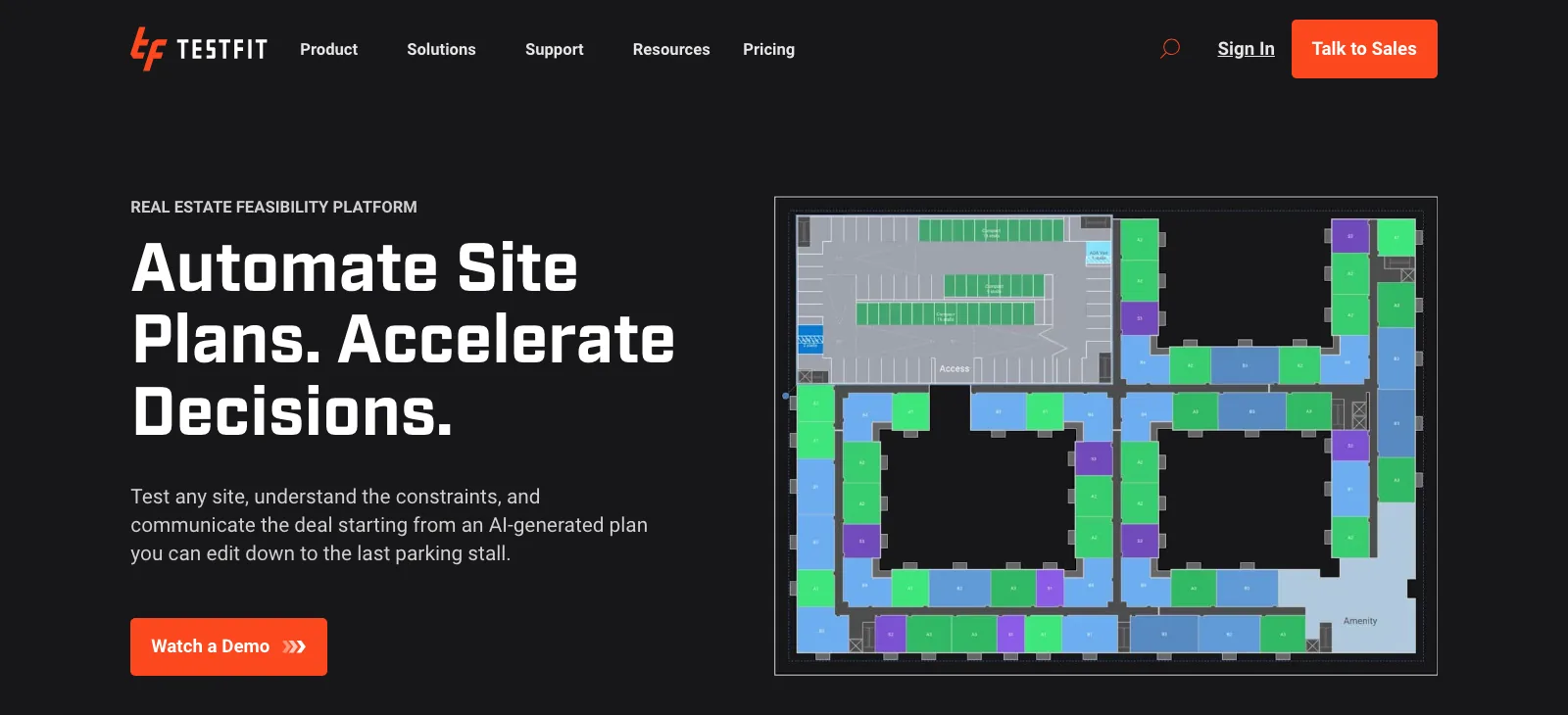
Table of Contents Show
An AI floor plan generator is software that uses machine learning and generative algorithms to produce building layouts from user-defined inputs such as room counts, square footage, site dimensions, and zoning constraints. These tools cut early-phase schematic work from days to minutes, giving architects and designers more time for refinement, client iteration, and creative problem-solving.
Why Architects Are Turning to AI for Floor Plans

The shift toward AI-generated floor plans is not about replacing architectural judgment. It is about compressing the time it takes to reach a workable starting point. A traditional schematic layout for a mid-size residential project can absorb two to three days of drafting. With an AI floor plan generator, that same phase takes minutes, and the architect can evaluate ten layout variations in the time it would have taken to draw one by hand.
According to a 2024/2025 survey of 1,227 architecture professionals conducted by Architizer and Chaos, 46% of respondents already use AI tools in their projects, with another 24% planning to start soon. The adoption is concentrated in early design phases, where speed and volume of options matter most. A 2025 systematic review in Automation in Construction, covering 161 journal papers, found that 68.94% of AI usage in architecture occurs during early design phases.
🔢 Quick Numbers
- 46% of 1,227 architecture professionals already use AI tools in active projects (Architizer & Chaos, 2024/2025)
- 68.94% of AI usage in architecture occurs during early design phases (Automation in Construction, 2025)
- Autodesk reports one architecture firm achieved a 50% increase in early-phase productivity using Autodesk Forma (Autodesk, 2024)
What has changed in 2026 is the quality of outputs. Earlier tools produced rough massing diagrams. Current platforms generate dimensioned, room-labeled layouts that include adjacency logic, parking ratios, and in some cases, code compliance checks. The gap between AI output and a first schematic drawing has narrowed considerably.
What to Look for in an AI Floor Plan Generator
Before comparing specific tools, it helps to define what separates a useful AI floor plan tool from one that creates more work than it saves. The most important factors for professional use come down to five areas.
Input flexibility determines how naturally you can describe a project. Some tools use dropdown menus; others accept natural language prompts. For complex programs, natural language input tends to produce more accurate results because you can specify unusual adjacency requirements that menus do not anticipate.
Output editability is critical. An AI-generated floor plan that exports only as a flat image is nearly useless professionally. Look for tools that export to DXF, DWG, or IFC formats so the layout can move directly into Revit, ArchiCAD, or AutoCAD for refinement.
Code compliance handling varies widely. Some platforms, like TestFit and ArkDesign, embed zoning rules and building code parameters into the generation engine. Others produce layouts with no compliance awareness, leaving that review entirely to the architect. Know which category a tool falls into before relying on it for client-facing work.
Integration with your existing software stack matters more at production scale. A tool that works as a standalone web app is fine for feasibility studies. For firms generating dozens of layouts per week, API access or direct plugin integration with BIM platforms reduces friction significantly.
Finally, pricing structure and output volume should match your use case. Free tiers are genuinely useful for student exploration and occasional residential work. Production-volume use cases call for subscription plans with higher generation limits.
💡 Pro Tip
When using any AI floor plan generator, always verify room-to-room adjacency logic manually before sharing with clients. AI tools frequently place kitchens far from dining areas or position bedrooms adjacent to mechanical rooms. A focused 10-minute review against your project’s programming requirements catches most spatial errors before they propagate into later design phases.
Best AI Floor Plan Generators: Tool-by-Tool Breakdown

The following tools represent the most widely adopted and professionally relevant options available in 2026. They are grouped loosely by primary use case, since no single tool performs equally across all project types.
Comparison Table: Top AI Floor Plan Generators at a Glance
The table below summarizes key differences across the eight tools covered in this guide.
| Tool | Best For | Code Compliance | Export Formats | Free Tier |
|---|---|---|---|---|
| Maket.ai | Residential schematic design | Zoning checks (v2) | JPEG, DXF | Yes (trial) |
| TestFit | Multi-family feasibility | Yes (site + zoning) | DWG, CSV, Revit | No |
| ArkDesign.ai | Multi-family, mixed-use | Yes (built-in) | DWG, IFC | Yes (limited) |
| Autodesk Forma | Site massing + analysis | Partial | Revit, DWG | Yes |
| Finch3D | CO2-optimized layouts | Partial | Revit, DWG | Yes (limited) |
| Hypar | Design automation, firms | Custom (template-based) | IFC, DWG, Revit | Yes |
| GetFloorPlan AI | 2D/3D from sketches | No | JPEG, PDF, DWG | Yes (limited) |
| ARCHITEChTURES | Residential optimization | Yes (regulatory) | DWG, IFC, PDF | Yes (trial) |
1. Maket.ai

Maket.ai is the most widely recognized AI floor plan generator for residential work, with over one million registered users as of early 2026. The platform, built by a Montreal-based team, lets architects, builders, and homeowners specify room types, quantities, target square footage, and lot shape. The AI produces multiple layout variations within seconds, each with room labels and approximate dimensions.
The core workflow is conversational. You describe your project in natural language or through dropdown parameters, and the tool generates options. Beyond plan generation, Maket.ai includes a restyle tool that applies different aesthetic directions and a virtual assistant for questions about materials and costs. Outputs export in JPEG and DXF formats. Maket v2, targeted for release in 2026, is expected to add more granular zoning code verification and HVAC planning capabilities, moving the platform closer to a complete pre-construction tool. For more detail on this specific platform, the Maket.ai review on illustrarch covers pricing, limitations, and real user feedback.
2. TestFit
TestFit targets multi-family and commercial feasibility at a scale where unit count, parking ratios, and zoning constraints drive the design problem. You input site dimensions, zoning rules, setbacks, and unit mix requirements, and TestFit produces building configurations with estimated unit counts and parking ratios in real time. The standout capability is live feedback as you adjust parameters: the model updates the layout, yield numbers, and density metrics simultaneously.
The platform integrates directly with Revit and AutoCAD, which matters for firms that need feasibility outputs to flow into production workflows without manual re-entry. TestFit is purpose-built for real estate developers and large residential practices. It is not appropriate for single-family residential work. Pricing is subscription-based with no public free tier. Visit the TestFit website for current plan information.
3. ArkDesign.ai

ArkDesign.ai automates schematic design for multi-family and mixed-use projects, with code compliance built directly into its generation engine. You configure constraints (setbacks, unit mix, building height limits, parking requirements) and the platform produces optimized layouts that have already been filtered for regulatory viability. This distinguishes it from tools that generate layouts and leave compliance review entirely to the architect.
ArkDesign is particularly useful for developers managing multiple projects across different zoning jurisdictions, since the compliance parameters can be updated per project without starting from scratch. Export formats include DWG and IFC, making it compatible with most BIM workflows. The platform offers a limited free tier for initial exploration.
🏗️ Real-World Example
Autodesk Forma, North American Architecture Firm (2024): According to Autodesk’s own reporting, one architecture firm using Forma recorded a 50% increase in early-phase development productivity. The firm used the tool’s site analysis and massing generation capabilities to evaluate daylight access and building density for a multi-unit residential project, compressing a feasibility study that previously required two weeks of manual analysis into a two-day iterative process.
4. Autodesk Forma
Autodesk Forma, formerly known as Spacemaker before its 2020 acquisition by Autodesk, operates at the intersection of site analysis and massing generation rather than detailed floor plan layout. The platform uses AI to run daylight, wind, and energy analyses directly within the design environment, making it most useful during the earliest site feasibility phase when building orientation, massing envelope, and programmatic density are being determined.
Forma integrates natively with Revit, which means analysis outputs can inform downstream BIM development without file conversion overhead. A free tier is available, making it accessible for academic use and smaller firms testing the workflow. The Autodesk Forma product page details current features and subscription options.
5. Finch3D

Finch3D was established by architecture studio Wallgren Arkitekter and BOX Bygg in Sweden and takes a sustainability-oriented approach to AI floor plan generation. The platform generates and edits floor plans optimized for CO2 efficiency, energy performance, and daylight access alongside spatial efficiency metrics. This makes it particularly relevant for projects where environmental certification or green building targets are part of the brief.
Finch3D’s Revit integration is one of its strongest features for firms already embedded in the Autodesk ecosystem. The tool allows architects to generate optimized layout options and then refine the selected option directly in Revit, maintaining a clean handoff between the AI generation phase and detailed design documentation.
💡 Pro Tip
AI floor plan generators work best during feasibility and pre-design phases. Experienced architects use tools like TestFit or Maket.ai to explore ten to fifteen layout variations in the time it takes to sketch one by hand, then carry the strongest option into Revit or ArchiCAD for construction documentation. Treating AI output as a first draft, not a finished proposal, is the professional standard.
6. Hypar
Hypar takes a different approach to AI-generated floor plans by allowing firms to encode their own design standards and constraints into reusable templates. Rather than providing a single generation algorithm, Hypar gives architecture firms a platform to build custom parametric workflows that reflect their own design rules, typological preferences, and performance targets. This makes it especially useful for practices working in modular construction, housing typologies, or any context where repeated project types benefit from standardized starting points.
The platform supports IFC, DWG, and Revit exports and is compatible with the broader BIM ecosystem. Hypar has a free tier for individual use, with team and enterprise plans for larger practices. More information is available on the Hypar website.
7. GetFloorPlan AI

GetFloorPlan AI serves a different entry point: it converts existing sketches, rough hand drawings, or low-quality reference photos into clean 2D and 3D floor plans. Where most tools on this list start from a blank project, GetFloorPlan AI starts from something that already exists, making it particularly useful for renovation projects, existing building documentation, and real estate visualization where a physical space needs a digital representation quickly.
Outputs are available in JPEG, PDF, and DWG formats. The platform also generates 360-degree virtual tours from the produced floor plans, which is useful for real estate marketing applications. The turnaround time from uploaded sketch to finished plan is typically under 30 minutes. Visit GetFloorPlan for current pricing and plan options.
8. ARCHITEChTURES
ARCHITEChTURES focuses on automated residential planning with a strong emphasis on regulatory compliance and spatial optimization. The platform analyzes site conditions and client requirements to generate multiple design options, then ranks those options by criteria such as daylight access, energy efficiency, and buildable area. It is one of the more comprehensive tools on this list for pure residential design automation, covering everything from unit mix optimization to compliance with municipal planning regulations.
Architects working on multi-unit residential projects at scale will find ARCHITEChTURES particularly relevant. The platform integrates with standard BIM workflows through DWG and IFC exports. More technical documentation is available on the ARCHITEChTURES website.
⚠️ Common Mistake to Avoid
Many architects and students present AI-generated floor plans as finished designs without running a compliance and circulation review. Tools like Maket.ai and ArkDesign.ai are excellent for generating layout options quickly, but the outputs require professional review for egress compliance, accessibility requirements, and program logic before they can be used in a client-facing or regulatory context. AI generates a starting point; the architect’s judgment determines whether it is a viable one.
How AI Floor Plan Generators Fit Into a Professional Workflow
The clearest value proposition for AI-generated floor plans sits in the pre-schematic and early schematic phases. This is where the speed of iteration and the volume of options explored matter most, and where the cost of exploring alternative directions is lowest.
A practical professional workflow looks like this: use an AI floor plan generator to produce eight to fifteen layout variations based on your project parameters. Review those variations against your program, circulation requirements, and site constraints. Identify the two or three strongest candidates. Take the most promising into your BIM environment for detailed development. From that point, the AI tool’s role in the project ends, and conventional documentation work takes over.
What AI tools do not replace, at least in 2026, is construction document production, coordination between architectural and structural drawings, and the accessibility and code compliance review that determines whether a building can be built and permitted. Those stages still require professional production and human review. For a broader look at how AI is fitting into architectural practice, see the guide to AI architecture design in 2026 on illustrarch, which covers the full workflow from massing to post-occupancy.
The illustrarch guide on creating architecture plans with AI also provides a useful overview of how these tools fit into traditional design processes, particularly for architects new to AI-assisted workflows.
What Does an AI Floor Plan Generator Cost?

Pricing across these tools varies considerably depending on intended user type and output volume. Free tiers are available for Maket.ai, Autodesk Forma, Finch3D, Hypar, and ARCHITEChTURES, making initial exploration genuinely accessible without a financial commitment. These free tiers typically limit generation volume, output resolution, or export format options.
Mid-range subscription plans for tools like ArkDesign.ai and Maket.ai typically run in the range of $30 to $150 per month for individual architects, based on available pricing information as of early 2026. Enterprise and firm-level pricing for TestFit and Hypar is available on request and scales with team size and usage volume.
Note: Pricing for AI tools in this category changes frequently as products update. Always verify current pricing directly on each tool’s website before making a purchasing decision.
For context on how AI tools are shaping the broader rendering and visualization market alongside floor plan generation, the 25 best AI architectural rendering tools guide on illustrarch covers complementary tools that pair well with floor plan generators in a full design workflow. Additional context on how AI fits into architectural practice can be found in the complete guide to AI in architecture on illustrarch.
📌 Did You Know?
A systematic review published in Automation in Construction (2025) found that the gap between AI theory and real architectural application has shrunk from 62 years to just 2.5 years, a 96% reduction. This means AI capabilities developed in research are reaching professional architectural tools faster than in almost any previous period in the field’s history.
✅ Key Takeaways
- AI floor plan generators are most valuable in pre-schematic and early schematic phases, where iteration speed matters more than drawing precision.
- For residential design, Maket.ai and ARCHITEChTURES offer the strongest combination of usability and output quality. For multi-family feasibility and urban-scale work, TestFit and ArkDesign.ai are better matches.
- Code compliance handling varies significantly across tools. Always confirm whether a platform embeds zoning rules or leaves compliance review entirely to the architect.
- Export format compatibility (DXF, DWG, IFC) determines how smoothly AI outputs move into Revit, ArchiCAD, or AutoCAD for detailed development.
- AI-generated floor plans require professional review for egress, circulation logic, and accessibility before use in client or regulatory contexts. Treat every output as a first draft.
Frequently Asked Questions
What is the best AI floor plan generator for architects?
The best choice depends on project type. For residential schematic design, Maket.ai and ARCHITEChTURES are strong options with solid free tiers. For multi-family feasibility and projects where zoning compliance matters from day one, TestFit and ArkDesign.ai are more appropriate. Autodesk Forma is the leading choice when site analysis and massing optimization are the primary need.
Can AI floor plan generators produce construction-ready drawings?
Not currently. AI floor plan generators produce schematic layouts that require significant professional development before they can be used for building permits or construction. The outputs serve as starting points for detailed design, not finished documents. Code compliance, structural coordination, and accessibility review must all happen after the AI generation phase.
How does an AI floor plan generator work?
Most tools accept inputs such as room count, square footage, lot dimensions, and adjacency preferences. A generative algorithm, often trained on large datasets of existing floor plans and building codes, produces one or more layout options that satisfy the specified constraints. The architect then reviews, selects, and refines the output using conventional design tools.
Are AI-generated floor plans accurate?
AI floor plan generators produce dimensionally plausible layouts, but spatial logic errors are common. Kitchens placed far from dining areas, bedrooms adjacent to mechanical rooms, and circulation paths that require walking through private spaces are typical issues. Manual review against your project’s programming requirements is essential before any AI-generated layout is shared with clients or used in downstream design work.
Which AI floor plan tools are free?
Maket.ai, Autodesk Forma, Finch3D, Hypar, and ARCHITEChTURES all offer free tiers as of 2026. Free tiers typically limit generation volume or export options. GetFloorPlan AI offers a limited free trial. TestFit does not have a public free tier and is priced for professional and enterprise use.






Floorplanner Review: Easy 2D to 3D Floor Plan Creation for Non-Designers
Floorplanner turns a 2D layout into a 3D render in the browser...
 Elif Ayse Sen9 Mins read
Open Plan vs Closed Plan: Which Layout Works Better for Modern Living?
Open plan and closed plan layouts each bring distinct advantages to modern...
 Sinan Ozen6 Mins read
Architecture Floor Plan Guide: Types, Elements & How to Read
An architectural floor plan is a scaled, top-down drawing that shows the...
Furkan Sen10 Mins read

Architecture Plan: Tips for Creating & Presenting Plans
Learn how to create and present professional architectural plans with this comprehensive...
Elif Ayse Sen13 Mins read


Leave a comment