

Parametric Architecture Design with Grasshopper for Rhino: 2026 Review
A focused 2026 review of Grasshopper for Rhino for parametric architecture design, with a breakdown of how the visual programming canvas works, where it fits in real architectural workflows, the most useful plugins, pricing, and where it stands against alternatives like Dynamo and Houdini.
 Furkan Sen6 May 20268 Mins read551
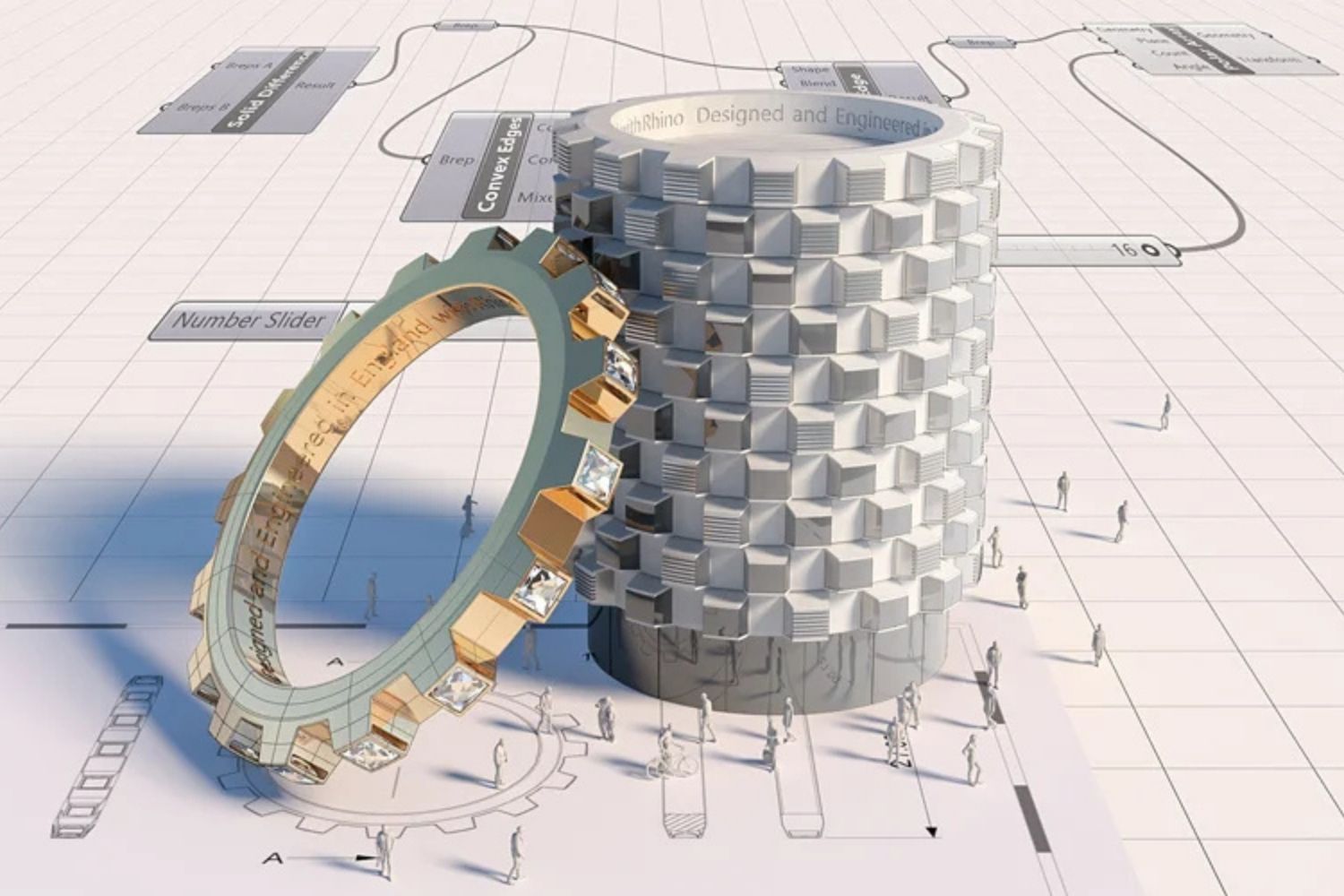
Table of Contents Show
Parametric architecture design with Grasshopper for Rhino has become the default workflow for architects working on complex facades, generative form-finding, and performance-driven geometry. Grasshopper is a visual programming environment built into Rhinoceros 3D that lets designers define geometry through rules and components rather than manual modeling, with full access to plugins for analysis, fabrication, and BIM integration.
What Is Grasshopper for Rhino?
Grasshopper for Rhino is a visual programming canvas where you build algorithms by dragging components onto a workspace and connecting their inputs and outputs with wires. Each component performs a specific operation: dividing a surface into panels, mapping a curve along a wall, calculating sun angles, generating a structural truss. The output of one component feeds into the next, and the final result appears as live geometry inside the Rhino viewport.
The tool was created by David Rutten at Robert McNeel & Associates, with the first version released in 2007 under the name “Explicit History.” Since Rhino 6, Grasshopper has shipped natively with every Rhino license, which means you do not need to install or pay for it separately.
The reason it dominates parametric architecture design is simple: it gives architects the power of programming without requiring code. The node-and-wire interface is visible, traceable, and editable. If a parameter changes, every downstream component recalculates instantly. For a broader view of how this fits into the larger movement, see what parametric architecture is and how it emerged.
💡 Pro Tip
When you start a new Grasshopper definition, group related components inside named clusters from the beginning. Studios that skip this end up with sprawling canvases that nobody else on the team can read, and the script becomes effectively unmaintainable when the original author leaves the project.
How Does Grasshopper Work?
Grasshopper treats every architectural element as the output of a chain of operations. Instead of drawing a wall, you describe how the wall should be generated: take this curve, offset it by a slider value, extrude it to a height controlled by a number, and divide it into panels whose width responds to a sun-angle calculation. The wall now exists not as fixed geometry but as a recipe.
This shift from object to relationship is what makes parametric workflows possible. A single definition can generate hundreds of design variations by adjusting a few sliders. Architects can run optimization plugins like Galapagos or Wallacei to evolve geometry toward a defined goal, such as minimum solar gain or maximum view quality.
Data Trees and Lists
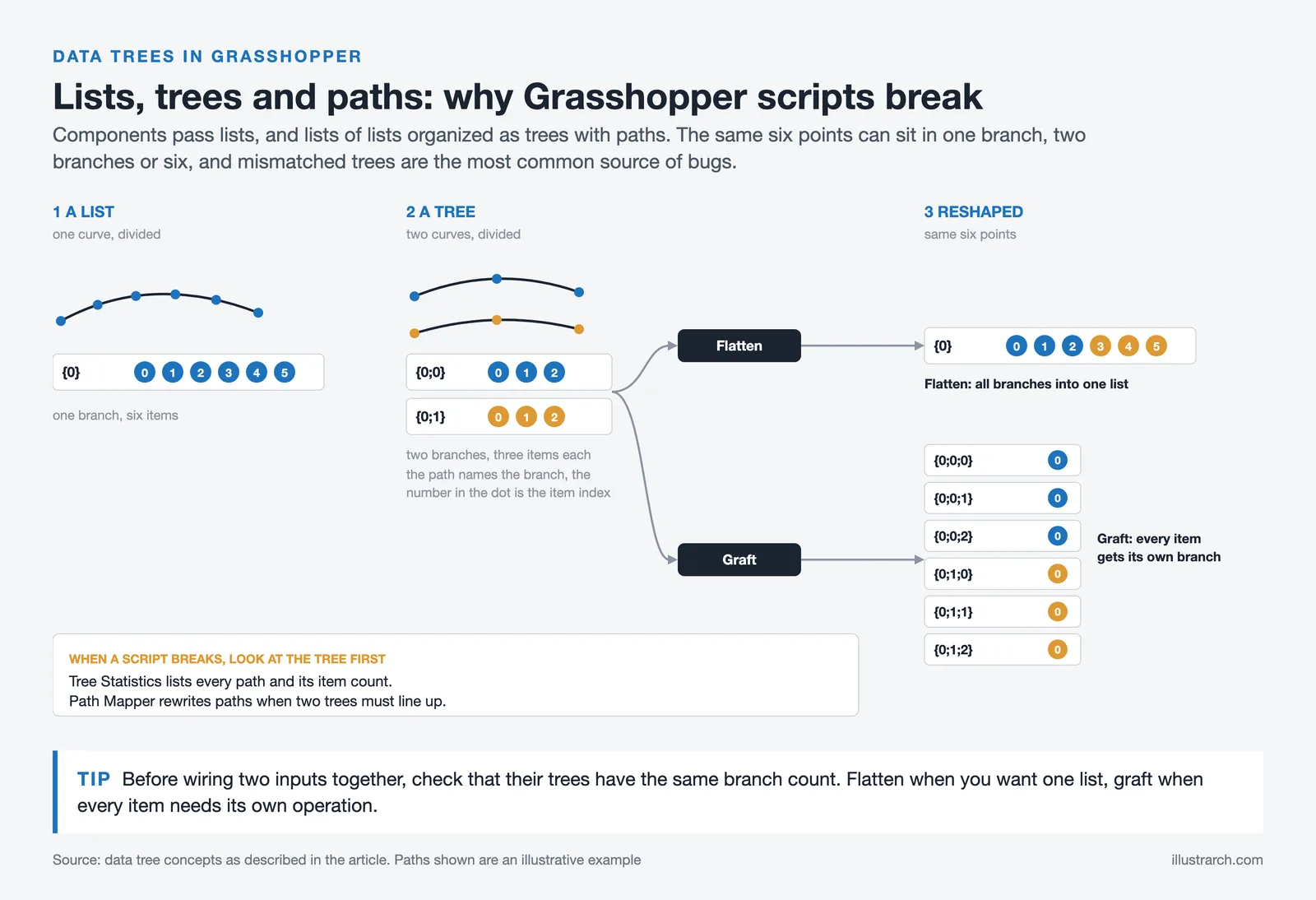
The single concept that takes the longest to grasp is data structure. Grasshopper does not pass single values between components, it passes lists, and lists of lists, organized in tree structures with paths. Mismatched data trees are the most common source of bugs in any complex script. Production definitions spend significant logic just on flattening, grafting, and aligning data.
🎓 Expert Insight
“Grasshopper for Rhino is one of the best platforms for computational design. It’s easy to use for beginners, and the depth of possibilities make it an incredibly customizable framework for advanced users.”, Jose Luis García del Castillo y López, ParametricCamp, quoted on the Rhino website
This sums up why the tool keeps its position despite newer alternatives. The entry barrier is low enough for students, but the same canvas scales up to drive complete fabrication pipelines for landmark projects.
Best Uses for Grasshopper Rhino in Architectural Practice
The best uses for Grasshopper Rhino fall into a small number of categories that show up repeatedly in real practice. Understanding which problems the tool actually solves well helps you avoid forcing it onto tasks where simpler approaches would be faster.
Facade Panelization and Pattern Generation
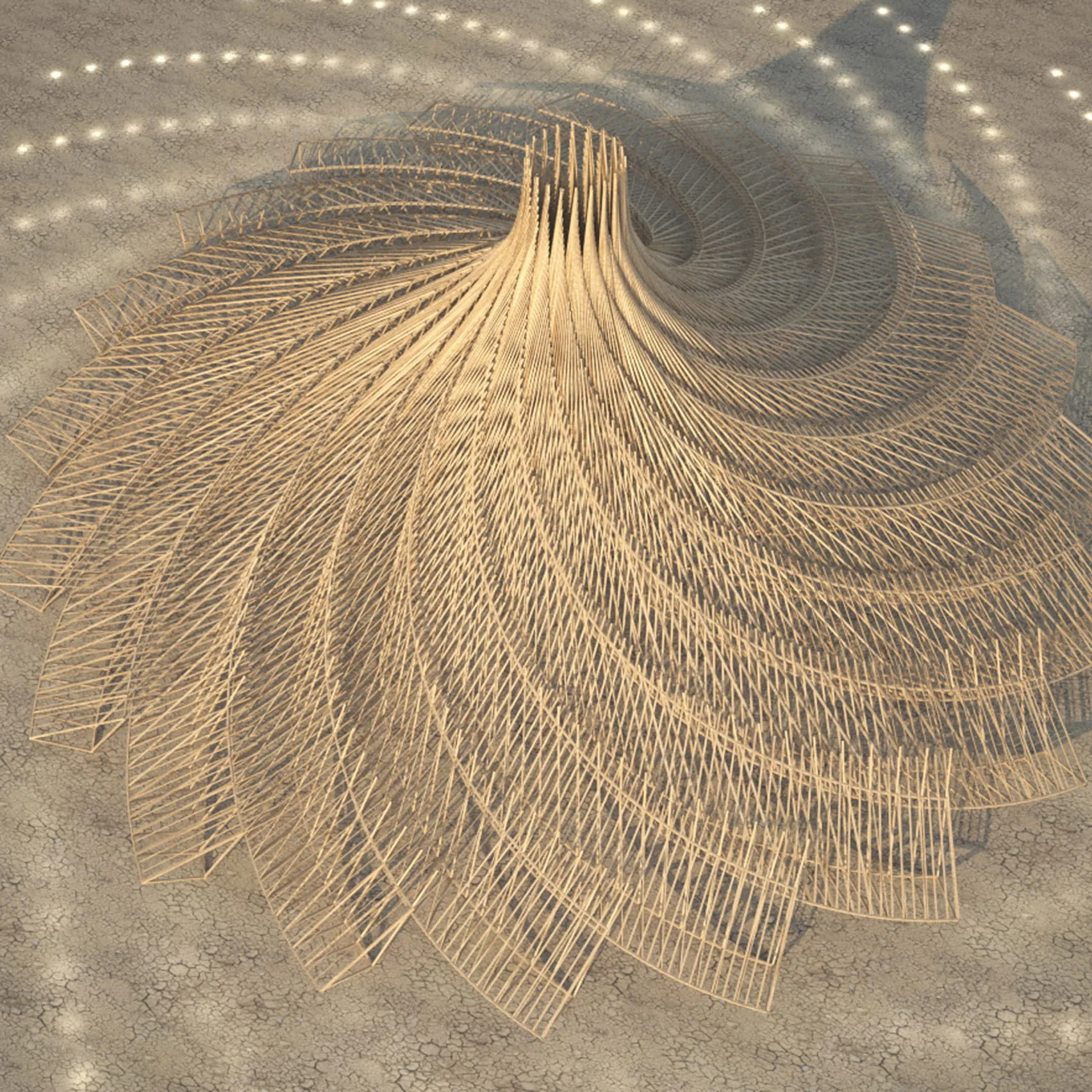
Facade design is the single most common use of grasshopper for rhino architecture. Take a curved surface, divide it into a grid, and apply a transformation to each cell so that panel size, rotation, or aperture varies with position, sun exposure, or any other input. Every panel can be unique while still following one underlying logic, which is exactly the situation traditional CAD handles badly.
Massing Studies and Structural Form-Finding
For early-stage massing, Grasshopper connects site constraints (zoning envelopes, setbacks, daylight angles) directly to the building geometry. With plugins like Karamba3D and Kangaroo, the same canvas handles physics-based form-finding for tension nets, compression shells, and minimal surfaces. This is the workflow behind much of the work coming out of teams like the University of Stuttgart’s research pavilions.
Environmental Analysis and Digital Fabrication
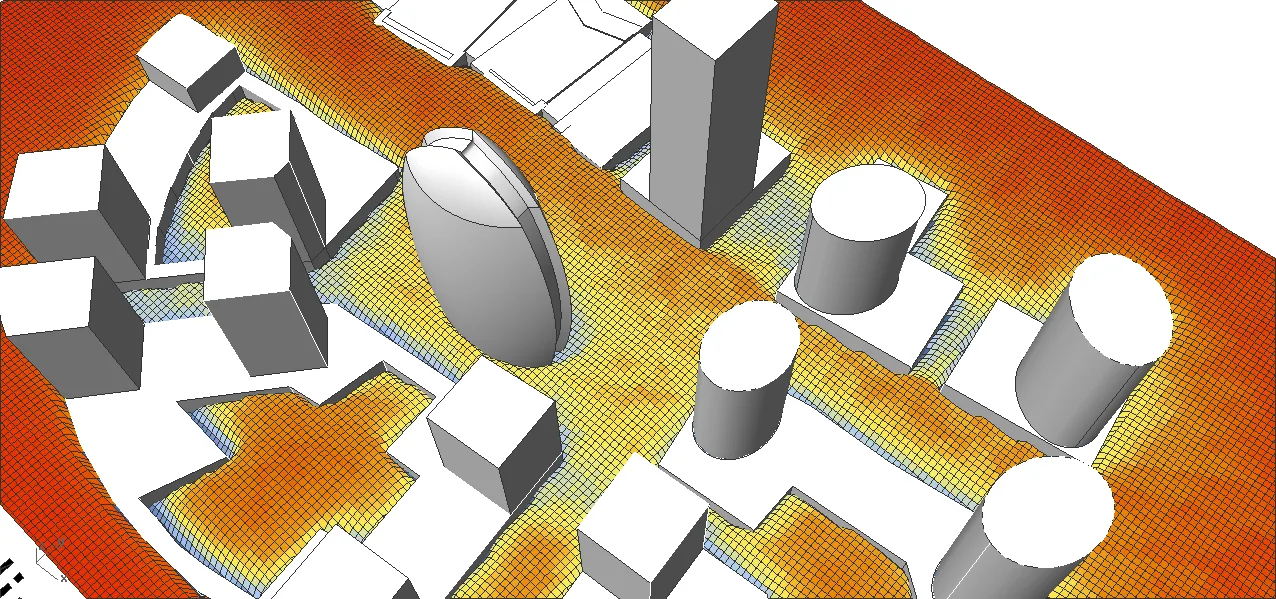
Plugins like Ladybug and Honeybee bring solar, daylight, and energy analysis into the canvas. The geometry being analyzed is the same geometry being designed, with no export step in between. Output also runs cleanly to CNC routers, laser cutters, robotic arms, and 3D printers. Our complete guide to Grasshopper 3D goes deeper into specific plugin workflows. For furniture-scale work, see our piece on laser engraving in parametric wooden furniture.
📌 Did You Know?
According to AEC Magazine, McNeel’s Rhino modeling tool is “endemic in the architectural design world,” and Grasshopper is the main reason. Its first version, originally called Explicit History, shipped in September 2007, and the long-developed Grasshopper 2 is now downloadable as a WIP release through the Rhino 8 package manager (Wikipedia, 2026).
Grasshopper for Rhino vs Other Parametric Tools
Grasshopper is not always the best choice. Different tools fit different practice setups, and understanding the trade-offs prevents teams from buying licenses they will not actually use.
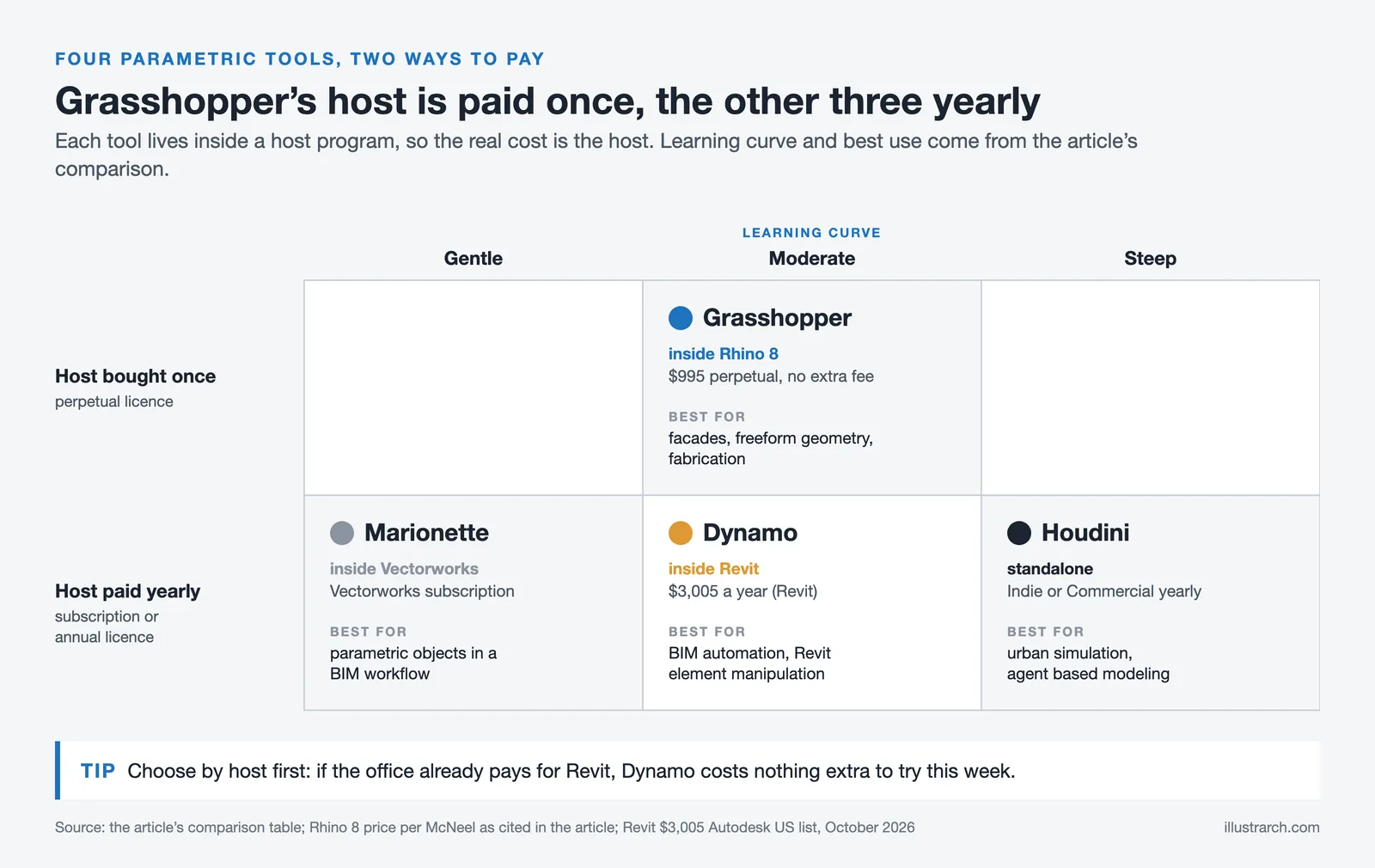
The table below summarizes the key differences between the four parametric platforms used in serious architectural practice in 2026:
| Feature | Grasshopper (Rhino) | Dynamo (Revit) | Houdini | Marionette (Vectorworks) |
|---|---|---|---|---|
| Best For | Facades, freeform geometry, fabrication | BIM automation, Revit element manipulation | Urban simulation, agent-based modeling | Parametric objects in BIM workflow |
| Geometry Engine | NURBS (Rhino kernel) | Lightweight, BIM-tied | Procedural, mesh-based | Vectorworks native |
| Plugin Ecosystem | Largest (Food4Rhino) | Moderate, Revit-focused | Strong but VFX-leaning | Smaller, Vectorworks-only |
| Learning Curve | Moderate | Moderate | Steep | Gentle |
| Cost (Host App) | $995 perpetual (Rhino 8) | Revit subscription | Indie $269/yr, Commercial $4,495/yr | Vectorworks subscription |
If your practice runs on Revit and your bottleneck is documentation, Dynamo is the more practical entry into parametric work. If your work pushes into procedural urbanism or VFX-grade simulation, Houdini does things Grasshopper cannot. For most architects working on freeform geometry, facades, and fabrication, Grasshopper remains the strongest fit. We compared the broader ecosystem in our review of the best parametric design tools for architects.
The plugin ecosystem is half the reason Grasshopper holds its position. The most-used additions are Ladybug Tools for environmental analysis, Karamba3D for structural simulation, Kangaroo for physics-based form-finding, Pufferfish for advanced surface manipulation, and Speckle for live data exchange with Revit, Blender, and other platforms. Most are available through Food4Rhino, McNeel’s official plugin marketplace.
Grasshopper for Rhino Tutorial: How to Get Started

The fastest path into Grasshopper is project-driven. Trying to learn the entire component library upfront is a slow way in. Pick one specific problem, build a definition that solves it, and let the gaps in your knowledge pull you toward the components you actually need.
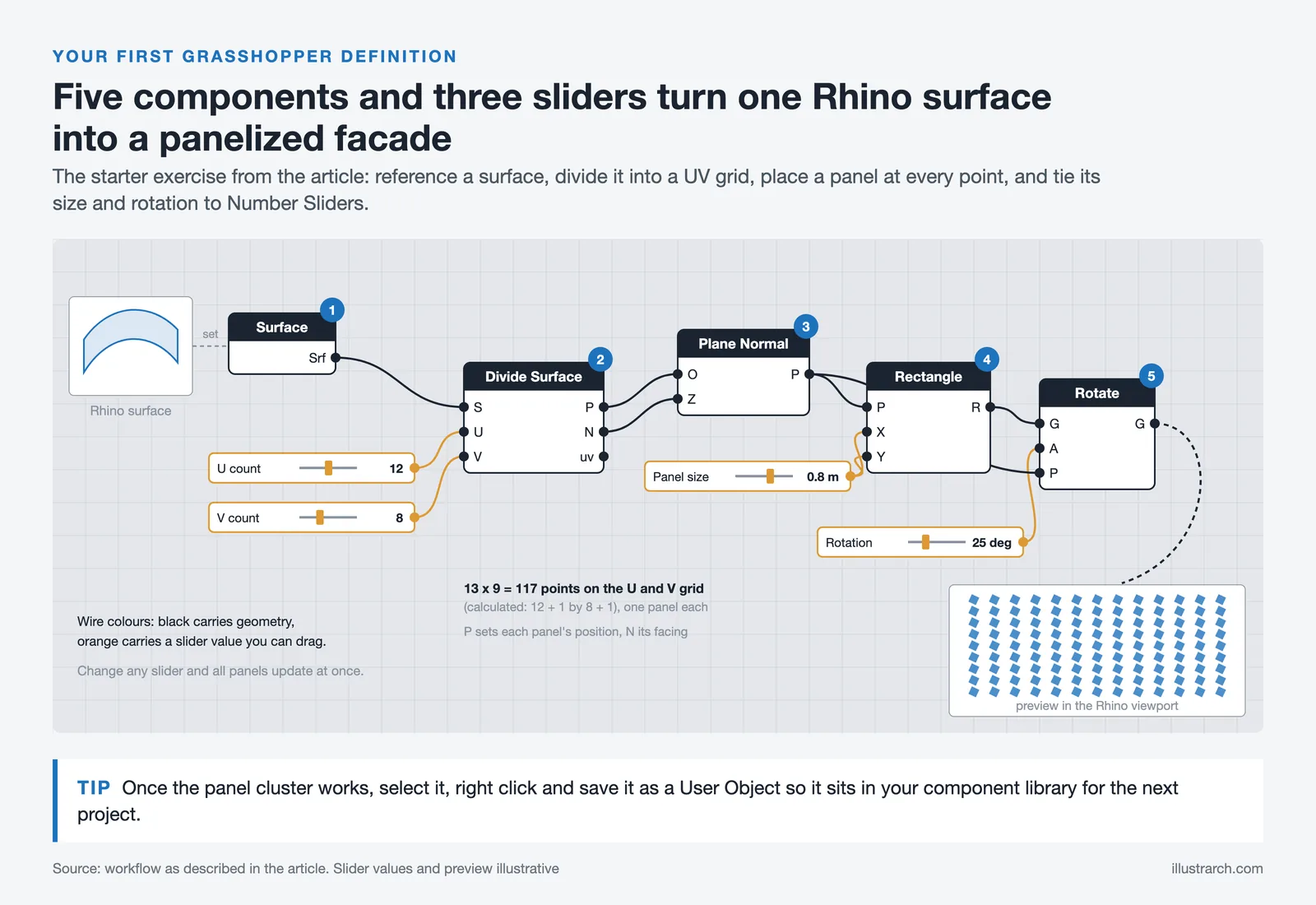
Open Rhino, type Grasshopper in the command line, and the canvas opens in a separate window. A useful starter exercise is a panelized facade: reference a surface from Rhino into Grasshopper, connect it to a Divide Surface component to break it into a UV grid, then use the resulting points to drive a series of panels with their size or rotation tied to a Number Slider. Within an hour you have a working parametric facade with live editable inputs.
The unavoidable hurdle is data trees. Spend time with Tree Statistics, Flatten Tree, Graft Tree, and Path Mapper components until you genuinely understand how Grasshopper organizes data. Skipping this step is the reason most beginners hit a wall around their third or fourth definition. The McNeel forum and the Grasshopper3D community archive thousands of working definitions, and reverse-engineering a script someone else built is the fastest way to learn idiomatic patterns. Official tutorials are available through McNeel’s Rhino learning portal.
💡 Pro Tip
Save your most-used component patterns as user objects. If you find yourself rebuilding the same facade-panel cluster in every project, drag it onto the canvas, right-click, and save it as a User Object. It now appears in your component library and saves the rebuild time on every future job.
🏗️ Real-World Example
Heydar Aliyev Center (Baku, 2012): Designed by Zaha Hadid Architects, this 57,519 square meter cultural complex was generated through advanced parametric modeling to form a continuous envelope without visible joints. The flowing surface geometry could not have been built without computational tools, and the project remains one of the clearest demonstrations of what the technology enables at full building scale. For more on Hadid’s approach, see our 10 noteworthy works of Zaha Hadid.
How Much Does Grasshopper for Rhino Cost?
Grasshopper itself is free. It comes bundled with every Rhino license at no extra cost, and there is no separate Grasshopper purchase, subscription, or maintenance fee. What you pay for is Rhino.
According to McNeel’s official pricing, Rhino 8 in North America costs $995 for a single commercial perpetual license, $9,950 for ten concurrent users, and $49,750 for fifty concurrent users. Educational licenses for students, faculty, and schools are available at a substantial discount. All licenses are permanent and do not expire, with no recurring fees, which is unusual in 2026’s subscription-dominated software market.
Pricing figures are based on McNeel’s published 2026 pricing for North America and may vary by region and reseller. Always confirm current pricing through an authorized distributor before purchase.
Strengths and Weaknesses
⚖️ Pros & Cons at a Glance
✔️ Pros: Free with Rhino, largest plugin ecosystem in computational design, NURBS precision, perpetual license, massive learning community
✖️ Cons: Steep data-tree learning curve, weak BIM integration without Speckle or Rhino.Inside, no native version control, performance drops on very large definitions
The weak BIM integration deserves attention. Grasshopper does not produce IFC-compliant data on its own. For practices where BIM coordination is the central activity, Rhino.Inside.Revit is now the standard bridge, and it works well, but it adds a setup cost and another dependency. Our guide to Rhino alternatives for architects covers this trade-off in more detail.
⚠️ Common Mistake to Avoid
A frequent mistake is treating Grasshopper as a way to make any project parametric by default. The tool only adds value when there is genuine variation, repetition, or optimization in the problem. Using a 200-component definition to model what could have been a single Rhino solid wastes time and produces a script no one else on the team can edit. Choose the parametric route only when the problem has parametric structure.
✅ Key Takeaways
- Grasshopper for Rhino is the most widely used platform of its kind, with the deepest plugin ecosystem in computational design.
- It comes bundled free with every Rhino license, so the only cost is the $995 Rhino 8 perpetual license itself.
- The tool fits best for facade panelization, massing studies, structural form-finding, environmental analysis, and digital fabrication.
- Mastering data trees is the single most important step for moving from beginner to productive user.
- For BIM-first practices, Dynamo with Revit is often a better starting point depending on workflow priorities.
Final Thoughts
Grasshopper for Rhino in 2026 holds the position it has held for a decade. It is the tool most architects reach for when geometry needs to respond to logic, data, or fabrication constraints. The interface has aged well, the ecosystem keeps growing, and the perpetual licensing model continues to look attractive next to subscription-only competitors. The honest weakness is BIM integration, which has improved through Rhino.Inside but still requires a deliberate setup. For studios doing freeform work, competition design, parametric facades, or anything that touches digital fabrication, this remains the most direct route from idea to built form.







Futuro House Production Revived in Finland After Decades-Long Hiatus
A Facebook listing for abandoned moulds led to the first new Futuro...
 illustrarch Editoral Team3 Mins read

Building Your Dream Home in NSW: What You Should Know About Montgomery Homes
Montgomery Homes has been building across Sydney, Newcastle, the Hunter, Wollongong and...
illustrarch Editoral Team4 Mins read

Designing a Home Theater: Where Drapery Fits Into the Plan
In a media room the curtains are a performance layer, not decoration....
illustrarch Editoral Team3 Mins read

Oscar Niemeyer’s Cathedral of Brasília: The Hyperboloid Concrete Hymn
The Cathedral of Brasília reads as a single gesture, yet it stood...
Furkan Sen7 Mins read


Leave a comment