

Best Laptops for Architects: 15 Expert-Reviewed Picks
Laptops for architects feature powerful processors, dedicated graphics, ample RAM, and high-quality displays, essential for handling demanding design software and workflows.
 Elif Ayse Sen1 February 202228 Mins read508

Table of Contents Show
The best laptops for architects combine powerful multi-core processors, dedicated NVIDIA RTX graphics, at least 16 GB of RAM, and color-accurate displays to handle BIM modeling, 3D rendering, and CAD drafting without slowdowns. Whether you need a portable 2-in-1 for site visits or a desktop-replacement workstation for Revit and Lumion, this guide covers 15+ top picks for every budget and workflow.
A powerful laptop is one of the biggest needs for architects. It should deliver enough processing power for demanding design software while staying portable enough for office, studio, and on-site use. In this article, we share the best laptops for architects, including brand-specific recommendations from Dell, ASUS, HP, and Apple, budget picks for students, and practical buying advice. We also answer common questions like whether gaming laptops work for architecture and which 2-in-1 laptops suit architects who sketch on screen.
Best High-Performance Laptops for Architects
The best high-performance laptops for architects include the MSI GS66 Stealth for GPU-heavy rendering, the Apple MacBook Pro 16 (M4 Max) for Rhino and SketchUp workflows, and the Lenovo Legion Pro 7i for value-driven workstation power. Each delivers desktop-class performance for Lumion, V-Ray, and complex BIM projects.
These laptops deliver desktop-class performance for heavy 3D rendering, complex BIM projects, and architectural visualization workflows.
MSI GS66 Stealth

The MSI GS66 Stealth remains one of the best laptops for architects who need serious GPU power in a sleek form factor. Among MSI models, the Stealth stands out with its low-profile design that fits naturally into a professional office environment. It packs an Intel Core i9 processor, 32 GB of RAM, 1 TB of SSD storage, and NVIDIA GeForce RTX 3080 graphics. This configuration handles Revit, 3ds Max, V-Ray rendering, and Lumion scenes with ease. The 15.6 inch 300Hz display provides smooth viewport navigation during complex modeling sessions. For architects who need raw power without the bulky gaming aesthetic, the Stealth is a strong choice.
| MSI GS66 Stealth Key Specs | |
|---|---|
| CPU | Intel Core i9-11900H (8-core, up to 4.9 GHz) |
| GPU | NVIDIA GeForce RTX 3080 (8 GB GDDR6) |
| RAM | Up to 32 GB DDR4 |
| Storage | Up to 1 TB NVMe SSD |
| Display | 15.6″ FHD 300Hz IPS |
| Weight | 2.1 kg (4.63 lbs) |
| Battery | 99.9 Whr (up to 10 hours) |
| Amazon Rating | 4.2 / 5 ⭐ |
| Best For | Heavy 3D rendering, BIM workflows, Lumion, V-Ray |
Apple MacBook Pro 16 (M4 Max)

The best Apple laptop for architects is the MacBook Pro 16 inch with the M4 Max chip. Its unified memory architecture (up to 128 GB) eliminates the traditional CPU-GPU bottleneck, delivering exceptional performance in Rhino, SketchUp, and Adobe Creative Suite. The 16.2 inch Liquid Retina XDR display covers the full DCI-P3 color gamut with 1,600 nits peak brightness, making it outstanding for material visualization and client presentations. Battery life reaches up to 22 hours for light tasks, which is unmatched in this performance class. Keep in mind that Revit does not run natively on macOS. Architects who rely heavily on Revit should consider Windows alternatives or use Parallels for virtualization, which now performs reasonably well on Apple Silicon according to Parallels.
| Apple MacBook Pro 16 (M4 Max) Key Specs | |
|---|---|
| Chip | Apple M4 Max (16-core CPU, up to 40-core GPU) |
| Unified Memory | Up to 128 GB |
| Storage | Up to 8 TB SSD |
| Display | 16.2″ Liquid Retina XDR (3456 x 2234, P3, 1600 nits) |
| Weight | 2.14 kg (4.7 lbs) |
| Battery | Up to 22 hours |
| Ports | 3x Thunderbolt 5, HDMI 2.1, SD card, MagSafe |
| Amazon Rating | 4.9 / 5 ⭐ |
| Best For | Rhino, SketchUp, ArchiCAD, Adobe CC, visualization |
Lenovo Legion Pro 7i

The Lenovo Legion Pro 7i offers workstation-level performance in a gaming chassis at a competitive price point. Equipped with an Intel Core i9-14900HX and an NVIDIA RTX 4070 (or RTX 4080 in higher configurations), this laptop handles 3D modeling, BIM coordination, and rendering with confidence. The 16 inch WQXGA OLED display delivers sharp contrast and full sRGB coverage, which benefits architectural drawing reviews and visualization work. Lenovo’s Coldfront 5.0 cooling system maintains consistent performance during extended rendering sessions. At around 5.6 lbs, it is heavier than ultrabooks but still manageable for transport between office and home.
| Lenovo Legion Pro 7i Key Specs | |
|---|---|
| CPU | Intel Core i9-14900HX (24-core, up to 5.8 GHz) |
| GPU | NVIDIA RTX 4070 / 4080 (8-12 GB GDDR6) |
| RAM | Up to 32 GB DDR5 (upgradeable to 64 GB) |
| Storage | Up to 2 TB NVMe Gen4 SSD |
| Display | 16″ WQXGA OLED (2560 x 1600, 100% DCI-P3) |
| Weight | 2.54 kg (5.6 lbs) |
| Cooling | Coldfront 5.0 with AI tuning |
| Starting Price | ~$1,600 |
| Amazon Rating | 4.5 / 5 ⭐ |
| Best For | Mid-range BIM, rendering, value performance |
Acer Predator Helios 16

The Acer Predator Helios 16 is a strong gaming laptop for architects who want top-tier GPU performance at a competitive price. It features Intel Core i9-14900HX processing and NVIDIA RTX 4070 or RTX 4080 graphics with up to 12 GB VRAM, which handles Lumion walkthroughs, V-Ray batch rendering, and large Revit models without bottlenecks. The 16 inch WQXGA IPS display (2560 x 1600, 240 Hz) provides fluid viewport navigation and covers 100% DCI-P3 for color-sensitive work. Acer’s 5th Gen AeroBlade 3D fan technology keeps thermals under control during extended rendering sessions. The chassis weighs about 2.4 kg and includes a full suite of ports: Thunderbolt 4, HDMI 2.1, USB-A, and an Ethernet jack. Starting around $1,500, this offers one of the best price-to-GPU-power ratios available for architects.
| Acer Predator Helios 16 Key Specs | |
|---|---|
| CPU | Intel Core i9-14900HX (24-core, up to 5.8 GHz) |
| GPU | NVIDIA RTX 4070 / 4080 (8-12 GB GDDR6) |
| RAM | Up to 32 GB DDR5 (upgradeable) |
| Storage | Up to 2 TB NVMe Gen4 SSD |
| Display | 16″ WQXGA IPS (2560 x 1600, 240Hz, DCI-P3) |
| Weight | 2.4 kg (5.29 lbs) |
| Starting Price | ~$1,500 |
| Amazon Rating | 4.3 / 5 ⭐ |
| Best For | Budget powerhouse, Lumion, V-Ray, value pick |
Lenovo ThinkPad P16s Gen 3

For architects in corporate environments or firms that issue standard workstations, the Lenovo ThinkPad P16s Gen 3 is a reliable ISV-certified mobile workstation in a lighter package. It features Intel Core Ultra 7 processors paired with NVIDIA RTX A500 professional graphics, which carry ISV certification from Autodesk, Siemens, and Dassault Systemes. The 16 inch WUXGA IPS display (1920 x 1200, 100% sRGB) works well for 2D drafting, BIM coordination, and document review. At just 1.73 kg, it is one of the lightest workstation-class laptops available. The ThinkPad keyboard is widely considered the best in the business for extended typing sessions. Starting around $1,200, this suits architects who prioritize reliability, IT manageability, and all-day battery life over raw GPU power.
| Lenovo ThinkPad P16s Gen 3 Key Specs | |
|---|---|
| CPU | Intel Core Ultra 7 (up to 4.8 GHz) |
| GPU | NVIDIA RTX A500 (ISV-certified) |
| RAM | Up to 48 GB LPDDR5x |
| Storage | Up to 2 TB NVMe Gen4 SSD |
| Display | 16″ WUXGA IPS (1920 x 1200, 100% sRGB) |
| Weight | 1.73 kg (3.81 lbs) |
| Starting Price | ~$1,200 |
| Amazon Rating | 4.4 / 5 ⭐ |
| Best For | Corporate environments, 2D CAD, BIM coordination, ISV compliance |
Best 2-in-1 Laptops for Architects
The best 2-in-1 laptops for architects are the ASUS ROG Flow Z13 for the most GPU power in a convertible, the Microsoft Surface Book 3 for a detachable tablet workflow, and the Samsung Notebook 9 Pro for ultra-lightweight portability. Each offers pen input for sketching and annotations during site visits.
A 2-in-1 laptop for architects offers the flexibility to sketch concepts directly on screen, annotate drawings during site visits, and present designs to clients in tablet mode. The best 2-in-1 laptops for architects balance pen input accuracy with enough processing power for CAD and light 3D modeling.
Samsung Notebook 9 Pro

The Samsung Notebook 9 Pro is a notebook and tablet hybrid with a rotatable touchscreen and included S Pen for drawing and annotation. Architects who use Samsung devices will appreciate its seamless ecosystem integration. At just 1.14 kg, this is one of the lightest options available, making it ideal for site visits and client meetings. It features an Intel Core i7 processor, Intel UHD Graphics 620, and up to 512 GB SSD storage. While the integrated graphics limit heavy rendering, it handles 2D drafting, presentations, and lightweight SketchUp work well.
| Samsung Notebook 9 Pro Key Specs | |
|---|---|
| CPU | Intel Core i7-8565U (4-core, up to 4.6 GHz) |
| GPU | Intel UHD Graphics 620 (integrated) |
| RAM | Up to 16 GB LPDDR3 |
| Storage | Up to 512 GB SSD |
| Display | 13.3″ FHD Touchscreen (360° hinge) |
| Weight | 1.14 kg (2.51 lbs) |
| Battery | 55 Whr (up to 14.7 hours) |
| Special Feature | S Pen included, 360° hinge, Samsung ecosystem |
| Best For | Sketching, presentations, lightweight drafting, site visits |
Dell Inspiron 13 7000

This Dell laptop for architects features a flippable touchscreen that combines an attractive design with solid specifications. The 360-degree hinge makes it easy to switch between laptop, tent, and tablet modes during presentations or collaborative design sessions. Multiple programs run smoothly with the Intel Core i7 processor, and customizable storage up to 2 TB ensures project files are never an issue. The Inspiron 13 7000, with its 13.3 inch display (available in FHD or 4K UHD), is suitable for architects who prefer a compact, portable laptop over larger 15 and 17 inch workstations.
| Dell Inspiron 13 7000 Key Specs | |
|---|---|
| CPU | Intel Core i7-10510U (4-core, up to 4.9 GHz) |
| GPU | Intel UHD Graphics 620 (integrated) |
| RAM | Up to 32 GB DDR4 |
| Storage | Up to 2 TB SSD + 1 TB HDD |
| Display | 13.3″ FHD / 4K UHD Touchscreen (360° hinge) |
| Weight | 1.4 kg (3.09 lbs) |
| Battery | Up to 10 hours |
| Key Ports | USB-C (Thunderbolt 3), USB-A, HDMI |
| Best For | Portable design work, client presentations, 2D drafting |
Microsoft Surface Book 3

The Surface laptop series from Microsoft is known for combining powerful hardware with premium build quality. The Surface Book 3 delivers 32 GB of RAM and 2 TB of SSD storage, letting architects handle intensive tasks and large video files without lag. Its unique detachable hinge transforms the display into a standalone tablet, giving architects flexibility for sketching with the Surface Pen, presenting to clients, or collaborating with contractors on site. The 3:2 aspect ratio on the 15 inch PixelSense display provides more vertical space than standard widescreen laptops, which benefits architectural drawing layouts.
| Microsoft Surface Book 3 Key Specs | |
|---|---|
| CPU | Intel Core i7-1065G7 (4-core, up to 3.9 GHz) |
| GPU | NVIDIA GTX 1660 Ti Max-Q (6 GB GDDR6) |
| RAM | Up to 32 GB LPDDR4x |
| Storage | Up to 2 TB SSD |
| Display | 15″ PixelSense (3240 x 2160, 3:2 aspect ratio) |
| Weight | 1.9 kg (4.2 lbs) |
| Battery | Up to 17.5 hours |
| Key Ports | USB-C, 2x USB-A, SD card slot |
| Special Feature | Detachable tablet, Surface Pen support, 3:2 display |
| Best For | Versatile office/site work, digital sketching, moderate 3D modeling |
ASUS ROG Flow Z13

For architects who want the ultimate in portability with real GPU power, the ASUS ROG Flow Z13 is the best 2-in-1 laptop for architects in its size class. This compact device functions as both a laptop and tablet with pen and touch support, making it excellent for on-the-go markup, concept sketching, and client presentations. Despite its small 13.4 inch form factor, it packs an AMD Ryzen AI MAX+ processor and up to 128 GB of RAM, with integrated Radeon 8060S graphics that handle CAD/BIM work and moderate 3D rendering. Pair it with an external monitor and keyboard at your desk for a complete workstation setup.
| ASUS ROG Flow Z13 Key Specs | |
|---|---|
| CPU | AMD Ryzen AI MAX+ (up to 16-core) |
| GPU | AMD Radeon integrated (discrete-class performance) |
| RAM | Up to 128 GB unified memory |
| Storage | Up to 1 TB NVMe SSD |
| Display | 13.4″ QHD+ Touchscreen (165Hz, pen support) |
| Weight | ~1.2 kg (2.65 lbs) |
| Special Feature | Detachable keyboard, pen + touch, tablet mode |
| Best For | Ultra-portable CAD/BIM, concept sketching, client presentations |
Best Dell Laptops for Architects
The best Dell laptops for architects are the Dell XPS 16 for portable premium design work and the Dell Precision 5690 for ISV-certified BIM workflows in larger firms. The XPS 16 starts around $1,850 with RTX 4050 graphics, while the Precision 5690 offers certified NVIDIA RTX Ada professional GPUs starting around $2,400.
Dell laptops for architects span from sleek ultrabooks to certified mobile workstations. The brand is a reliable choice for firms that value enterprise support, ISV-certified drivers, and consistent build quality across product lines.
Dell XPS 16

The Dell XPS 16 is one of the best Dell laptops for architects who prioritize portability and premium design. Its 16.3 inch display fits inside a compact chassis that measures just 14.6 mm thin, making it one of the slimmest 16 inch laptops available. You can configure it with an Intel Core Ultra 7 or Ultra 9 processor, up to 64 GB of LPDDR5x RAM, and NVIDIA GeForce RTX 4050, 4060, or 4070 graphics. The 4K+ OLED touchscreen option (3840 x 2400, 100% DCI-P3) is excellent for reviewing materials, renders, and color-sensitive presentations. Triple Thunderbolt 4 ports allow you to connect dual external monitors and peripherals through a single dock. The XPS 16 works best for architects who handle AutoCAD, Revit, and moderate SketchUp projects. For GPU-intensive rendering in Lumion or V-Ray, consider the RTX 4070 configuration.
| Dell XPS 16 Key Specs | |
|---|---|
| CPU | Intel Core Ultra 7/9 (up to 5.0 GHz) |
| GPU | NVIDIA RTX 4050 / 4060 / 4070 |
| RAM | Up to 64 GB LPDDR5x |
| Storage | Up to 4 TB NVMe SSD |
| Display | 16.3″ FHD+ or 4K+ OLED Touch (100% DCI-P3) |
| Weight | 1.65 kg (3.65 lbs) |
| Key Ports | 3x Thunderbolt 4, HDMI 2.1 |
| Starting Price | ~$1,850 |
| Amazon Rating | 4.1 / 5 ⭐ |
| Best For | Portable design, AutoCAD, moderate 3D |
Dell Precision 5690

For architects working in larger firms or government projects where ISV certification matters, the Dell Precision 5690 is a professional-grade mobile workstation. It ships with NVIDIA RTX 2000 Ada or RTX 3000 Ada professional graphics, which are tested and certified by Autodesk, Dassault, and other vendors for driver stability. The 16 inch display supports up to 4K+ resolution with 100% AdobeRGB coverage. With Intel Core Ultra 9 processors, up to 64 GB DDR5 RAM, and dual NVMe SSD slots, the Precision 5690 handles large Revit central models, complex Grasshopper definitions, and multi-discipline BIM coordination without compromise. It also passes MIL-STD 810H durability testing, which benefits architects who travel to construction sites frequently.
| Dell Precision 5690 Key Specs | |
|---|---|
| CPU | Intel Core Ultra 9 (vPro) |
| GPU | NVIDIA RTX 2000 / 3000 Ada (ISV-certified) |
| RAM | Up to 64 GB DDR5 |
| Storage | Up to 4 TB (dual NVMe SSD slots) |
| Display | 16″ 4K+ (100% AdobeRGB) |
| Weight | 1.88 kg (4.14 lbs) |
| Key Ports | 2x Thunderbolt 4, HDMI 2.1, SD card |
| Starting Price | ~$2,400 |
| Amazon Rating | 4.3 / 5 ⭐ |
| Best For | BIM workflows, certified environments, large firms |
Dell Laptops for Architects: Specs at a Glance
| Feature | Dell XPS 16 | Dell Precision 5690 |
|---|---|---|
| CPU | Intel Core Ultra 7/9 (up to 5.0 GHz) | Intel Core Ultra 9 (vPro) |
| GPU | NVIDIA RTX 4050 / 4060 / 4070 | NVIDIA RTX 2000 / 3000 Ada (ISV-certified) |
| RAM | Up to 64 GB LPDDR5x | Up to 64 GB DDR5 |
| Display | 16.3″ FHD+ or 4K+ OLED Touch | 16″ 4K+ (100% AdobeRGB) |
| Storage | Up to 4 TB NVMe SSD | Up to 4 TB (dual SSD slots) |
| Weight | 1.65 kg (3.65 lbs) | 1.88 kg (4.14 lbs) |
| Key Ports | 3x Thunderbolt 4, HDMI 2.1 | 2x Thunderbolt 4, HDMI 2.1, SD card |
| Best For | Portable design, AutoCAD, moderate 3D | BIM workflows, certified environments, large firms |
| Amazon Rating | 4.1 / 5 ⭐ | 4.3 / 5 ⭐ |
| Starting Price | ~$1,850 | ~$2,400 |
Best ASUS Laptop for Architects
The best ASUS laptop for architects is the ProArt Studiobook 16 OLED, which offers a PANTONE-validated 3.2K OLED display, ASUS Dial creative control, and RTX 4070 graphics starting around $2,000. For budget buyers, the ASUS TUF Gaming F16 provides a dedicated RTX 4050 GPU from around $900. The ROG Strix G16 covers high-end rendering needs.
ASUS covers the full spectrum from budget-friendly student laptops to professional-grade creator workstations. Their ProArt line is specifically designed for color-critical creative work, while the ROG and TUF gaming series offer powerful hardware at competitive prices.
ASUS ProArt Studiobook 16 OLED

The ASUS ProArt Studiobook 16 OLED is purpose-built for professionals who demand color accuracy and creative control. Its 16 inch 3.2K OLED touchscreen (3200 x 2000, 120 Hz) covers 100% DCI-P3 and is PANTONE Validated with Delta E less than 1, making it one of the most accurate laptop displays available for architectural visualization and material review. The ASUS Dial, a physical rotary control below the keyboard, integrates directly with Adobe Creative Suite and other creative applications, letting you adjust brush size, zoom, and other parameters with your fingertip. Under the hood, an Intel Core i9-13980HX processor (24 cores, up to 5.6 GHz) pairs with an NVIDIA GeForce RTX 4070 GPU and up to 64 GB DDR5 RAM. Liquid metal thermal technology and dual 102-blade fans handle the 160W combined CPU/GPU power delivery. Two Thunderbolt 4 ports, HDMI 2.1, RJ45 Ethernet, and an SD Express 7.0 card reader cover connectivity needs. At around 5.29 lbs, it is heavier than ultrabooks, but the build quality meets MIL-STD 810H standards.
| ASUS ProArt Studiobook 16 OLED Key Specs | |
|---|---|
| CPU | Intel Core i9-13980HX (24-core, up to 5.6 GHz) |
| GPU | NVIDIA RTX 4070 (8 GB GDDR6) |
| RAM | Up to 64 GB DDR5 |
| Storage | Up to 2 TB NVMe (dual SSD slots) |
| Display | 16″ 3.2K OLED Touch (3200 x 2000, 120Hz, 100% DCI-P3, PANTONE Validated) |
| Weight | 2.4 kg (5.29 lbs) |
| Special Feature | ASUS Dial, PANTONE Validated, stylus support, MIL-STD 810H |
| Starting Price | ~$2,000 |
| Amazon Rating | 4.4 / 5 ⭐ |
| Best For | Color-critical visualization, creative workflows |
ASUS TUF Gaming F16

For architecture students and early-career professionals working within a tighter budget, the ASUS TUF Gaming F16 delivers reliable performance for everyday design work. Its Intel Core 5 210H processor and NVIDIA RTX 4050 GPU handle AutoCAD drafting, Revit BIM coordination, and moderate 3D modeling in SketchUp and Rhino without issues. The 16 inch FHD+ display uses a 16:10 aspect ratio, giving you extra vertical workspace for schedules, drawings, and documentation. The TUF series is built for durability with a reinforced chassis and efficient cooling. Starting around $900, this is one of the most affordable good laptops for architects that includes a dedicated RTX GPU.
| ASUS TUF Gaming F16 Key Specs | |
|---|---|
| CPU | Intel Core 5 210H |
| GPU | NVIDIA RTX 4050 (6 GB GDDR6) |
| RAM | Up to 32 GB DDR5 |
| Storage | 512 GB / 1 TB NVMe SSD |
| Display | 16″ FHD+ IPS (16:10 aspect ratio) |
| Weight | 2.2 kg (4.85 lbs) |
| Special Feature | MIL-STD durability, budget-friendly |
| Starting Price | ~$900 |
| Amazon Rating | 4.3 / 5 ⭐ |
| Best For | Students, 2D CAD, budget BIM |
ASUS ROG Strix G16

At the high-performance end, the ASUS ROG Strix G16 packs an Intel Core Ultra 9 275HX and NVIDIA RTX 5070 Ti, making it a powerhouse for demanding visualization workflows. This asus laptop for architects handles real-time rendering in Enscape, Twinmotion, D5 Render, and Unreal Engine with fluid navigation even in complex scenes. The 16 inch QHD+ 240 Hz display and robust cooling system support extended work sessions. Priced around $2,000 to $2,500 depending on configuration, it offers exceptional performance per dollar compared to mobile workstations.
| ASUS ROG Strix G16 Key Specs | |
|---|---|
| CPU | Intel Core Ultra 9 275HX |
| GPU | NVIDIA RTX 5070 Ti |
| RAM | Up to 64 GB DDR5 |
| Storage | Up to 2 TB NVMe SSD |
| Display | 16″ QHD+ 240Hz |
| Weight | 2.3 kg (5.07 lbs) |
| Special Feature | Advanced cooling, high refresh rate |
| Starting Price | ~$2,000 |
| Amazon Rating | 4.5 / 5 ⭐ |
| Best For | Heavy rendering, real-time visualization |
ASUS Laptops for Architects: Specs at a Glance
| Feature | ProArt Studiobook 16 OLED | TUF Gaming F16 | ROG Strix G16 |
|---|---|---|---|
| CPU | Intel Core i9-13980HX (24-core) | Intel Core 5 210H | Intel Core Ultra 9 275HX |
| GPU | NVIDIA RTX 4070 (8 GB) | NVIDIA RTX 4050 (6 GB) | NVIDIA RTX 5070 Ti |
| RAM | Up to 64 GB DDR5 | Up to 32 GB DDR5 | Up to 64 GB DDR5 |
| Display | 16″ 3.2K OLED Touch (120Hz, DCI-P3) | 16″ FHD+ IPS (16:10) | 16″ QHD+ 240Hz |
| Storage | Up to 2 TB NVMe (dual SSD) | 512 GB / 1 TB NVMe SSD | Up to 2 TB NVMe SSD |
| Weight | 2.4 kg (5.29 lbs) | 2.2 kg (4.85 lbs) | 2.3 kg (5.07 lbs) |
| Special Feature | ASUS Dial, PANTONE Validated, stylus support | MIL-STD durability, budget-friendly | Advanced cooling, high refresh rate |
| Best For | Color-critical viz, creative workflows | Students, 2D CAD, budget BIM | Heavy rendering, real-time viz |
| Amazon Rating | 4.4 / 5 ⭐ | 4.3 / 5 ⭐ | 4.5 / 5 ⭐ |
| Starting Price | ~$2,000 | ~$900 | ~$2,000 |
Best HP Laptop for Architects
The best HP laptop for architects is the HP ZBook Studio G10, an ISV-certified workstation with DreamColor display and RTX 4070/4080 graphics starting around $2,700. For mid-range users, the HP Envy 16 offers an RTX 4060 and 2.5K display from $1,300. The HP Victus 16 covers student budgets starting at $800.
HP serves architects through two main product lines: the ZBook professional workstation series and the consumer-oriented Envy and Victus families. The ZBook line stands out for ISV-certified professional graphics, while HP’s consumer options provide strong value for students.
HP ZBook Studio G10

The HP ZBook Studio G10 is a premium HP laptop for architects who need workstation-class reliability in a portable package. It features Intel Core i9-13900H processors paired with NVIDIA RTX 4070 or RTX 4080 professional-grade graphics. The 16 inch DreamColor display (3840 x 2400, 120 Hz) supports 100% DCI-P3 and is factory-calibrated for Delta E less than 1, which is critical for accurate material and lighting evaluation. ISV certification from Autodesk, Dassault, and other vendors ensures stable driver performance with Revit, AutoCAD, and 3ds Max. The aluminum chassis is slim at 17.4 mm and weighs around 1.73 kg, making it surprisingly portable for a workstation. Z Turbo Drive storage with dual NVMe SSDs provides fast access to large project files. This laptop suits senior architects, project leads, and firm owners who present to clients regularly and need guaranteed software compatibility.
| HP ZBook Studio G10 Key Specs | |
|---|---|
| CPU | Intel Core i9-13900H |
| GPU | NVIDIA RTX 4070 / 4080 (ISV-certified) |
| RAM | Up to 64 GB DDR5 |
| Storage | Up to 4 TB (dual NVMe, Z Turbo Drive) |
| Display | 16″ 4K DreamColor (3840 x 2400, 120Hz, 100% DCI-P3) |
| Weight | 1.73 kg (3.81 lbs) |
| Starting Price | ~$2,700 |
| Amazon Rating | 4.2 / 5 ⭐ |
| Best For | Professional firms, ISV workflows, presentations |
HP Envy 16

The HP Envy 16 bridges the gap between consumer laptops and professional workstations at a more accessible price point. It comes with an Intel Core i7-13700H processor, NVIDIA RTX 4060 graphics (8 GB VRAM), up to 32 GB DDR5 RAM, and a bright 16 inch 2.5K IPS display with 100% sRGB coverage. The display reaches 400 nits brightness, which helps when working near windows or in well-lit studios. Connectivity includes Thunderbolt 4, USB-A, HDMI 2.1, and an SD card reader. Priced around $1,300 to $1,600, the Envy 16 handles Revit, SketchUp, Rhino, and Adobe Creative Suite comfortably. It is a solid mid-range choice for architecture students and early-career professionals who need capable hardware without the premium workstation price.
| HP Envy 16 Key Specs | |
|---|---|
| CPU | Intel Core i7-13700H |
| GPU | NVIDIA RTX 4060 (8 GB GDDR6) |
| RAM | Up to 32 GB DDR5 |
| Storage | Up to 2 TB NVMe SSD |
| Display | 16″ 2.5K IPS (100% sRGB, 400 nits) |
| Weight | 2.17 kg (4.78 lbs) |
| Key Ports | Thunderbolt 4, USB-A, HDMI 2.1, SD card |
| Starting Price | ~$1,300 |
| Amazon Rating | 4.3 / 5 ⭐ |
| Best For | Mid-range professionals, Revit/SketchUp users |
HP Victus 16

For the most budget-conscious architects and students, the HP Victus 16 delivers a dedicated NVIDIA RTX 4050 GPU at prices starting around $800. While it lacks the build quality and display accuracy of HP’s higher-end lines, it runs AutoCAD, SketchUp, and basic Revit projects reliably. The 16.1 inch FHD display and decent cooling system make it functional for daily design work. Consider this a stepping-stone laptop for students who plan to upgrade once they enter professional practice.
| HP Victus 16 Key Specs | |
|---|---|
| CPU | Intel Core i5 / i7 or AMD Ryzen 5 |
| GPU | NVIDIA RTX 4050 (6 GB GDDR6) |
| RAM | Up to 32 GB DDR5 |
| Storage | 512 GB / 1 TB NVMe SSD |
| Display | 16.1″ FHD IPS (144Hz) |
| Weight | 2.30 kg (5.07 lbs) |
| Starting Price | ~$800 |
| Amazon Rating | 4.2 / 5 ⭐ |
| Best For | Students, budget CAD work |
HP Laptops for Architects: Specs at a Glance
| Feature | HP ZBook Studio G10 | HP Envy 16 | HP Victus 16 |
|---|---|---|---|
| CPU | Intel Core i9-13900H | Intel Core i7-13700H | Intel Core i5 / i7 or AMD Ryzen 5 |
| GPU | NVIDIA RTX 4070 / 4080 (ISV-certified) | NVIDIA RTX 4060 (8 GB) | NVIDIA RTX 4050 (6 GB) |
| RAM | Up to 64 GB DDR5 | Up to 32 GB DDR5 | Up to 32 GB DDR5 |
| Display | 16″ 4K DreamColor (120Hz, DCI-P3) | 16″ 2.5K IPS (100% sRGB, 400 nits) | 16.1″ FHD IPS (144Hz) |
| Storage | Up to 4 TB (dual NVMe) | Up to 2 TB NVMe SSD | 512 GB / 1 TB NVMe SSD |
| Weight | 1.73 kg (3.81 lbs) | 2.17 kg (4.78 lbs) | 2.30 kg (5.07 lbs) |
| Best For | Professional firms, ISV workflows, presentations | Mid-range professionals, Revit/SketchUp users | Students, budget CAD work |
| Amazon Rating | 4.2 / 5 ⭐ | 4.3 / 5 ⭐ | 4.2 / 5 ⭐ |
| Starting Price | ~$2,700 | ~$1,300 | ~$800 |
Best Apple Laptop for Architects
The best Apple laptop for architects is the MacBook Pro 16 with M4 Max for high-end visualization work, or the MacBook Pro 14 with M4 Pro for portable everyday design. Both run Rhino, SketchUp, ArchiCAD, and Adobe Creative Suite natively. Revit does not run on macOS and requires Parallels virtualization.
The Apple MacBook Pro lineup remains the best Apple laptop for architects who work primarily in Rhino, SketchUp, Adobe Creative Suite, or ArchiCAD. macOS integrates well with iPad for sketching via Sidecar, and the overall ecosystem offers seamless file sharing, long battery life, and consistently quiet operation under load. The primary limitation remains software compatibility: Revit, 3ds Max, and many Autodesk plugins do not run natively on macOS. Architects in BIM-heavy workflows using Revit should carefully evaluate whether Parallels virtualization meets their needs before committing to a Mac.
MacBook Pro 16 (M4 Max)
The MacBook Pro 16 with M4 Max is Apple’s most powerful laptop and the top best apple laptop for architects doing visualization, animation, or multi-application workflows. The M4 Max chip features a 16-core CPU and up to a 40-core GPU with up to 128 GB of unified memory, which eliminates the traditional bottleneck between system RAM and GPU VRAM. The 16.2 inch Liquid Retina XDR display delivers 1,600 nits peak brightness with full P3 wide color coverage, making it outstanding for reviewing renders, materials, and lighting studies. Battery life reaches up to 22 hours on light tasks, which is unmatched in this performance class. This configuration excels at Rhino with Grasshopper, SketchUp with heavy plugins, Cinema 4D, Blender, and the full Adobe Creative Suite. Architects who run ArchiCAD (which supports macOS natively) will find this machine exceptional.
MacBook Pro 14 (M4 Pro)

For architects who want Apple Silicon performance in a more portable package, the MacBook Pro 14 with M4 Pro offers a compelling balance. Its 14-core CPU and 20-core GPU handle Rhino, SketchUp, Vectorworks, and Adobe apps smoothly. With up to 48 GB of unified memory, it manages complex models and multi-app workflows well. The 14.2 inch Liquid Retina XDR display shares the same color accuracy and brightness as the 16 inch model. At 1.55 kg (3.4 lbs), it is significantly lighter and easier to carry between meetings, studios, and site visits. Battery life reaches around 17 hours. This is the sweet spot for most architects on macOS who do not need the absolute maximum GPU cores of the M4 Max.
| MacBook Pro 14 (M4 Pro) Key Specs | |
|---|---|
| Chip | Apple M4 Pro (14-core CPU, 20-core GPU) |
| Unified Memory | Up to 48 GB |
| Storage | Up to 4 TB SSD |
| Display | 14.2″ Liquid Retina XDR (3024 x 1964, P3, 1600 nits) |
| Weight | 1.55 kg (3.4 lbs) |
| Battery | Up to 17 hours |
| Ports | 3x Thunderbolt 5, HDMI 2.1, SD card, MagSafe |
| Revit Compatibility | Via Parallels only (not native) |
| Starting Price | ~$1,999 |
| Amazon Rating | 4.8 / 5 ⭐ |
| Best For | Portable macOS design, Rhino, SketchUp, ArchiCAD, Adobe CC |
Apple MacBook Pro: Specs at a Glance
| Feature | MacBook Pro 16 (M4 Max) | MacBook Pro 14 (M4 Pro) |
|---|---|---|
| Chip | Apple M4 Max (16-core CPU, 40-core GPU) | Apple M4 Pro (14-core CPU, 20-core GPU) |
| Unified Memory | Up to 128 GB | Up to 48 GB |
| Display | 16.2″ Liquid Retina XDR (3456 x 2234) | 14.2″ Liquid Retina XDR (3024 x 1964) |
| Storage | Up to 8 TB SSD | Up to 4 TB SSD |
| Battery Life | Up to 22 hours | Up to 17 hours |
| Weight | 2.14 kg (4.7 lbs) | 1.55 kg (3.4 lbs) |
| Ports | 3x Thunderbolt 5, HDMI 2.1, SD card, MagSafe | 3x Thunderbolt 5, HDMI 2.1, SD card, MagSafe |
| macOS Software | Rhino, SketchUp, ArchiCAD, Adobe CC, Vectorworks | Rhino, SketchUp, ArchiCAD, Adobe CC, Vectorworks |
| Revit Compatibility | Via Parallels only (not native) | Via Parallels only (not native) |
| Amazon Rating | 4.9 / 5 ⭐ | 4.8 / 5 ⭐ |
| Starting Price | ~$3,499 | ~$1,999 |
What Specs Should Architects Look for in a Laptop?
Architects need a laptop with at least an Intel Core i7 or AMD Ryzen 7 processor, a dedicated NVIDIA RTX GPU with 6+ GB VRAM, 16 to 32 GB of RAM, a 512 GB NVMe SSD, and a color-accurate display covering 100% sRGB. These specs ensure smooth performance in AutoCAD, Revit, Rhino, SketchUp, and real-time rendering tools like Enscape and Lumion.
Before choosing a specific model, understanding the hardware requirements for architectural software helps you avoid costly mistakes. Programs like AutoCAD, Revit, Rhino, SketchUp, and rendering engines like Lumion, Enscape, and V-Ray each stress different components. Choosing the right balance of CPU, GPU, RAM, and display quality ensures your laptop keeps up with your workflow for years.
What Each Component Does for Architects
| Component | Role in Architecture Work | Software Impact |
|---|---|---|
| CPU (Processor) | Handles calculations, file exports, BIM regeneration | Revit model processing, Grasshopper definitions, AutoCAD commands |
| GPU (Graphics Card) | Accelerates 3D viewport, real-time rendering, visualization | Enscape, Lumion, Twinmotion, V-Ray GPU mode, SketchUp viewport |
| RAM (Memory) | Keeps multiple apps and large files open simultaneously | Revit + Photoshop multitasking, large BIM files, point clouds |
| Storage (SSD) | Loads project files, textures, and software quickly | BIM file load times, render library access, OS responsiveness |
| Display | Shows accurate colors and fine detail for design review | Material evaluation, client presentations, drawing clarity |
Processor (CPU)
The CPU handles parametric calculations, BIM regeneration, and file exports. Look for Intel Core i7 or i9 (13th Gen or newer) or AMD Ryzen 7 or 9 processors. Multi-core performance matters for Revit’s model processing and Grasshopper definitions, while high single-thread speeds help with SketchUp and general responsiveness. According to Autodesk’s system requirements for Revit, a multi-core processor with single-thread speeds above 3.0 GHz is the minimum recommendation.
Graphics Card (GPU)
A dedicated GPU accelerates 3D viewport navigation, real-time rendering, and visualization tasks. For architects running Enscape, Twinmotion, or Lumion, an NVIDIA RTX 4060 or higher with at least 6 GB VRAM provides smooth performance. Integrated graphics (like Intel UHD or Iris Xe) can handle basic 2D CAD work but will struggle with anything beyond simple SketchUp models.
RAM and Storage
Architects should aim for 16 GB RAM as a minimum, though 32 GB is increasingly important for running Revit alongside Photoshop, a web browser, and a rendering plugin simultaneously. For storage, a 512 GB NVMe SSD is the baseline. If you work with large BIM files, point clouds, or render libraries, 1 TB or more keeps your workflow smooth. NVMe SSDs are significantly faster than SATA drives for loading project assets.
Display Quality and Size
Accurate color reproduction matters when reviewing materials, lighting studies, and client presentations. Look for at least 100% sRGB coverage. A 15 to 16 inch display with a 16:10 aspect ratio provides extra vertical space for drawings and schedules. Architects who do detailed visualization work benefit from 4K or OLED panels, which offer sharper text and richer contrast. Consider pairing your laptop with an external monitor for architects when working at a desk.
Are Gaming Laptops Good for Architects?
Yes, gaming laptops are good for architects. They share the same core hardware requirements as architectural workstations, including powerful multi-core CPUs, dedicated NVIDIA RTX GPUs, fast SSD storage, and high-refresh displays. Gaming laptops typically cost $500 to $1,000 less than mobile workstations with equivalent specs. The main trade-offs are louder fans, shorter battery life, and lack of ISV driver certification.

Gaming laptops share many of the same hardware requirements as architectural workstations: powerful multi-core CPUs, dedicated NVIDIA RTX GPUs with high VRAM, fast SSD storage, and high-refresh displays. The main advantage is cost. A gaming laptop with an RTX 4070 often costs $500 to $1,000 less than a mobile workstation with equivalent or lower specs.
There are some trade-offs to consider. Gaming laptops may lack ISV driver certification, which means Autodesk and other vendors have not officially tested their drivers for stability with specific applications. In practice, most architects report no issues using standard NVIDIA Game Ready drivers, but firms with strict IT policies may prefer certified workstation models. Gaming laptops also tend to have louder fans under load and shorter battery life compared to business-class machines.
“If my kids are fighting me for my system (they are gamers), then I know I am golden!”
— Marsha McDonald, Principal Designer and CEO of Seacrest Designs (via Architizer)
Popular gaming laptops that work well for architecture include the Lenovo Legion series, ASUS ROG Strix, MSI Katana, and Acer Predator Helios. These models offer excellent price-to-performance ratios for students and professionals who need reliable rendering and 3D modeling capabilities.
MSI Katana 16
The MSI Katana 16 is a budget-friendly gaming laptop that performs well for architecture students. It features Intel Core i7-13620H processing, an NVIDIA RTX 4060 GPU with 8 GB VRAM, and 16 GB DDR5 RAM in its base configuration. The 16 inch FHD+ display (1920 x 1200, 144 Hz) provides smooth drafting and modeling visuals. While the display color accuracy is not professional-grade, it handles AutoCAD, Revit, SketchUp, and moderate Rhino projects reliably. Starting around $1,000, the Katana 16 is one of the most affordable laptops for architects that includes a capable dedicated GPU. RAM is user-upgradeable to 64 GB, which adds future-proofing for growing project complexity.
| MSI Katana 16 Key Specs | |
|---|---|
| CPU | Intel Core i7-13620H (10-core, up to 4.9 GHz) |
| GPU | NVIDIA RTX 4060 (8 GB GDDR6) |
| RAM | 16 GB DDR5 (upgradeable to 64 GB) |
| Storage | 1 TB NVMe SSD |
| Display | 16″ FHD+ IPS (1920 x 1200, 144Hz) |
| Weight | 2.3 kg (5.07 lbs) |
| Starting Price | ~$1,000 |
| Amazon Rating | 4.1 / 5 ⭐ |
| Best For | Students, budget CAD/BIM, SketchUp, Rhino |
How to Choose the Best Laptop for Architects
To choose the best laptop for architecture, match your primary software to the right hardware tier. AutoCAD users need a mid-range machine, Revit professionals need 32 GB RAM and a dedicated GPU, and architects running Lumion or V-Ray need top-tier RTX graphics with 8+ GB VRAM. Weight, battery life, and ISV certification also matter depending on your work environment.
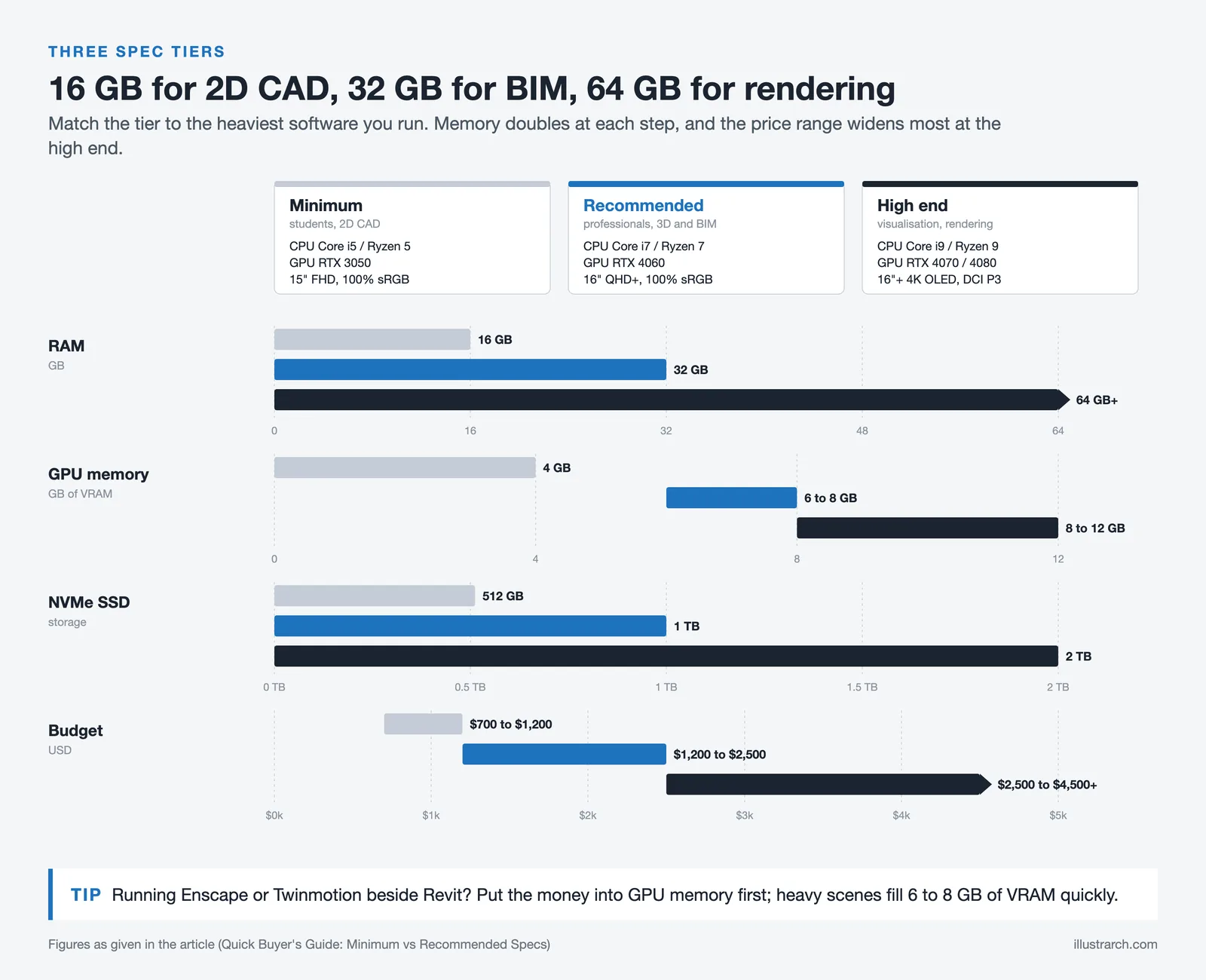
Your ideal laptop depends on your primary software, work environment, and budget. Architects focused on 2D drafting in AutoCAD can get by with a mid-range machine, while those running Lumion, V-Ray, or Unreal Engine need top-tier GPU power. Students should prioritize value and upgradeability, while senior architects and firm principals may want ISV-certified workstations for long-term reliability. If you frequently move between studio, home, and construction sites, weight and battery life matter as much as raw performance.
Quick Buyer’s Guide: Minimum vs Recommended Specs
| Component | Minimum (Students / 2D CAD) | Recommended (Professionals / 3D + BIM) | High-End (Visualization / Rendering) |
|---|---|---|---|
| CPU | Intel Core i5 / Ryzen 5 | Intel Core i7 / Ryzen 7 | Intel Core i9 / Ryzen 9 |
| GPU | RTX 3050 (4 GB VRAM) | RTX 4060 (6-8 GB VRAM) | RTX 4070 / 4080 (8-12 GB VRAM) |
| RAM | 16 GB | 32 GB | 64 GB+ |
| Storage | 512 GB NVMe SSD | 1 TB NVMe SSD | 2 TB NVMe SSD |
| Display | 15″ FHD, 100% sRGB | 16″ QHD+, 100% sRGB | 16″+ 4K OLED, DCI-P3 |
| Budget Range | $700 – $1,200 | $1,200 – $2,500 | $2,500 – $4,500+ |
Laptop Specifications Comparison Table
The following table compares the specifications of the laptops featured in this guide to help you evaluate them side by side.
| Specification | MSI GS66 Stealth | Samsung Notebook 9 Pro | Dell Inspiron 13 7000 | Microsoft Surface Book 3 |
|---|---|---|---|---|
| Processor | Intel Core i9-11900H | Intel Core i7-8565U | Intel Core i7-10510U | Intel Core i7-1065G7 |
| RAM | Up to 32GB DDR4 | Up to 16GB LPDDR3 | Up to 32GB DDR4 | Up to 32GB LPDDR4x |
| Graphics | NVIDIA GeForce RTX 3080 | Intel UHD Graphics 620 | Intel UHD Graphics 620 | NVIDIA GTX 1660 Ti Max-Q |
| Storage | Up to 1TB NVMe SSD | Up to 512GB SSD | Up to 2TB SSD + 1TB HDD | Up to 2TB SSD |
| Display | 15.6″ FHD 300Hz | 13.3″ FHD Touchscreen | 13.3″ FHD / 4K UHD Touch | 15″ 3240×2160 PixelSense |
| Weight | 2.1 kg (4.63 lbs) | 1.14 kg (2.51 lbs) | 1.4 kg (3.09 lbs) | 1.9 kg (4.2 lbs) |
| Battery Life | Up to 10 hours (99.9Whr) | Up to 14.7 hours (55Whr) | Up to 10 hours | Up to 17.5 hours |
| 2-in-1 / Touchscreen | No | Yes (360 hinge + S Pen) | Yes (360 hinge + Active Pen) | Yes (Detachable + Surface Pen) |
| Key Ports | USB-C, USB-A, HDMI, Thunderbolt 4 | 2x Thunderbolt 3 (USB-C only) | USB-C (Thunderbolt 3), USB-A, HDMI | USB-C, 2x USB-A, SD Card Slot |
Architecture Software Compatibility: All Laptops Compared
This table shows how well each laptop in this guide runs popular architecture design software. Ratings range from ⭐ (barely usable) to ⭐⭐⭐⭐⭐ (excellent performance). “N/A” indicates the software does not run natively on that platform.
| Laptop | AutoCAD | Revit | SketchUp | Rhino | 3ds Max / V-Ray | Lumion | Enscape | Adobe CC | ArchiCAD |
|---|---|---|---|---|---|---|---|---|---|
| High-Performance Laptops | |||||||||
| MSI GS66 Stealth | ⭐⭐⭐⭐⭐ | ⭐⭐⭐⭐⭐ | ⭐⭐⭐⭐⭐ | ⭐⭐⭐⭐⭐ | ⭐⭐⭐⭐⭐ | ⭐⭐⭐⭐⭐ | ⭐⭐⭐⭐⭐ | ⭐⭐⭐⭐⭐ | ⭐⭐⭐⭐⭐ |
| MacBook Pro 16 (M4 Max) | Yes (AutoCAD for Mac) | N/A | ⭐⭐⭐⭐⭐ | ⭐⭐⭐⭐⭐ | N/A | N/A | Yes (Enscape for Mac) | ⭐⭐⭐⭐⭐ | ⭐⭐⭐⭐⭐ |
| Lenovo Legion Pro 7i | ⭐⭐⭐⭐⭐ | ⭐⭐⭐⭐⭐ | ⭐⭐⭐⭐⭐ | ⭐⭐⭐⭐⭐ | ⭐⭐⭐⭐ | ⭐⭐⭐⭐ | ⭐⭐⭐⭐ | ⭐⭐⭐⭐⭐ | ⭐⭐⭐⭐⭐ |
| Acer Predator Helios 16 | ⭐⭐⭐⭐⭐ | ⭐⭐⭐⭐⭐ | ⭐⭐⭐⭐⭐ | ⭐⭐⭐⭐⭐ | ⭐⭐⭐⭐ | ⭐⭐⭐⭐ | ⭐⭐⭐⭐ | ⭐⭐⭐⭐⭐ | ⭐⭐⭐⭐⭐ |
| Lenovo ThinkPad P16s Gen 3 | ⭐⭐⭐⭐⭐ | ⭐⭐⭐⭐ | ⭐⭐⭐⭐ | ⭐⭐⭐⭐ | ⭐⭐⭐ | ⭐⭐⭐ | ⭐⭐⭐ | ⭐⭐⭐⭐ | ⭐⭐⭐⭐ |
| 2-in-1 / Convertible Laptops | |||||||||
| Samsung Notebook 9 Pro | ⭐⭐⭐ | ⭐⭐ | ⭐⭐⭐ | ⭐⭐ | ⭐ | ❌ | ❌ | ⭐⭐⭐ | ⭐⭐⭐ |
| Dell Inspiron 13 7000 | ⭐⭐⭐ | ⭐⭐ | ⭐⭐⭐ | ⭐⭐ | ⭐ | ❌ | ❌ | ⭐⭐⭐ | ⭐⭐⭐ |
| Microsoft Surface Book 3 | ⭐⭐⭐⭐ | ⭐⭐⭐⭐ | ⭐⭐⭐⭐ | ⭐⭐⭐⭐ | ⭐⭐⭐ | ⭐⭐⭐ | ⭐⭐⭐ | ⭐⭐⭐⭐ | ⭐⭐⭐⭐ |
| ASUS ROG Flow Z13 | ⭐⭐⭐⭐ | ⭐⭐⭐⭐ | ⭐⭐⭐⭐ | ⭐⭐⭐⭐ | ⭐⭐⭐ | ⭐⭐⭐ | ⭐⭐⭐ | ⭐⭐⭐⭐ | ⭐⭐⭐⭐ |
| Dell Laptops | |||||||||
| Dell XPS 16 | ⭐⭐⭐⭐⭐ | ⭐⭐⭐⭐ | ⭐⭐⭐⭐⭐ | ⭐⭐⭐⭐ | ⭐⭐⭐⭐ | ⭐⭐⭐⭐ | ⭐⭐⭐⭐ | ⭐⭐⭐⭐⭐ | ⭐⭐⭐⭐⭐ |
| Dell Precision 5690 | ⭐⭐⭐⭐⭐ | ⭐⭐⭐⭐⭐ | ⭐⭐⭐⭐⭐ | ⭐⭐⭐⭐⭐ | ⭐⭐⭐⭐⭐ | ⭐⭐⭐⭐⭐ | ⭐⭐⭐⭐⭐ | ⭐⭐⭐⭐⭐ | ⭐⭐⭐⭐⭐ |
| ASUS Laptops | |||||||||
| ASUS ProArt Studiobook 16 | ⭐⭐⭐⭐⭐ | ⭐⭐⭐⭐⭐ | ⭐⭐⭐⭐⭐ | ⭐⭐⭐⭐⭐ | ⭐⭐⭐⭐⭐ | ⭐⭐⭐⭐⭐ | ⭐⭐⭐⭐⭐ | ⭐⭐⭐⭐⭐ | ⭐⭐⭐⭐⭐ |
| ASUS TUF Gaming F16 | ⭐⭐⭐⭐ | ⭐⭐⭐⭐ | ⭐⭐⭐⭐ | ⭐⭐⭐⭐ | ⭐⭐⭐ | ⭐⭐⭐ | ⭐⭐⭐ | ⭐⭐⭐⭐ | ⭐⭐⭐⭐ |
| ASUS ROG Strix G16 | ⭐⭐⭐⭐⭐ | ⭐⭐⭐⭐⭐ | ⭐⭐⭐⭐⭐ | ⭐⭐⭐⭐⭐ | ⭐⭐⭐⭐⭐ | ⭐⭐⭐⭐⭐ | ⭐⭐⭐⭐⭐ | ⭐⭐⭐⭐⭐ | ⭐⭐⭐⭐⭐ |
| HP Laptops | |||||||||
| HP ZBook Studio G10 | ⭐⭐⭐⭐⭐ | ⭐⭐⭐⭐⭐ | ⭐⭐⭐⭐⭐ | ⭐⭐⭐⭐⭐ | ⭐⭐⭐⭐⭐ | ⭐⭐⭐⭐⭐ | ⭐⭐⭐⭐⭐ | ⭐⭐⭐⭐⭐ | ⭐⭐⭐⭐⭐ |
| HP Envy 16 | ⭐⭐⭐⭐⭐ | ⭐⭐⭐⭐ | ⭐⭐⭐⭐⭐ | ⭐⭐⭐⭐ | ⭐⭐⭐⭐ | ⭐⭐⭐⭐ | ⭐⭐⭐⭐ | ⭐⭐⭐⭐⭐ | ⭐⭐⭐⭐⭐ |
| HP Victus 16 | ⭐⭐⭐⭐ | ⭐⭐⭐ | ⭐⭐⭐⭐ | ⭐⭐⭐ | ⭐⭐⭐ | ⭐⭐⭐ | ⭐⭐⭐ | ⭐⭐⭐⭐ | ⭐⭐⭐⭐ |
| Apple Laptops (macOS: Revit, 3ds Max, Lumion, Enscape not natively supported) | |||||||||
| MacBook Pro 14 (M4 Pro) | N/A | N/A | ⭐⭐⭐⭐⭐ | ⭐⭐⭐⭐⭐ | N/A | N/A | N/A | ⭐⭐⭐⭐⭐ | ⭐⭐⭐⭐⭐ |
| Gaming Laptops (for Architecture) | |||||||||
| MSI Katana 16 | ⭐⭐⭐⭐ | ⭐⭐⭐⭐ | ⭐⭐⭐⭐ | ⭐⭐⭐⭐ | ⭐⭐⭐⭐ | ⭐⭐⭐⭐ | ⭐⭐⭐⭐ | ⭐⭐⭐⭐ | ⭐⭐⭐⭐ |
⭐⭐⭐⭐⭐ = Excellent | ⭐⭐⭐⭐ = Good | ⭐⭐⭐ = Adequate | ⭐⭐ = Basic / Slow | ⭐ = Barely Usable | ❌ = Not Suitable | N/A = Not available on this OS
Best Use Cases for Architects
Each laptop serves different architectural workflows. The table below summarizes which tasks each model handles best, along with key advantages and limitations.
| Laptop | Best For | Pros | Cons |
|---|---|---|---|
| MSI GS66 Stealth | Heavy 3D rendering, BIM workflows, architectural visualization | Most powerful GPU/CPU combo; runs Lumion, V-Ray, Enscape smoothly; 300Hz display for fluid modeling | Heavier than others; fan noise under load; no touchscreen or pen support |
| Samsung Notebook 9 Pro | Sketching, presentations, lightweight drafting, site visits | Ultra-lightweight (1.14 kg); S Pen included; 360 hinge; excellent battery life (14.7 hrs) | Integrated graphics only; limited to 16GB RAM; not suitable for heavy rendering |
| Dell Inspiron 13 7000 | Portable design work, client presentations, 2D drafting | Compact 13.3″ form factor; 4K UHD option; pen support; lightweight (1.4 kg) | Integrated graphics; small screen for detailed work; limited GPU performance |
| Microsoft Surface Book 3 | Versatile office/site work, digital sketching, moderate 3D modeling | Detachable tablet; dedicated GPU (GTX 1660 Ti); 3:2 aspect ratio ideal for design; Surface Pen support; up to 17.5 hrs battery | Expensive; 15W CPU limits heavy workloads; heavy tablet portion for standalone use |
Frequently Asked Questions About Laptops for Architects
What is the best laptop for an architect?
The best laptop for an architect depends on your primary software and budget. For Revit and BIM-heavy workflows, the Dell Precision 5690 or HP ZBook Studio G10 with ISV-certified graphics are top choices. For Rhino, SketchUp, and Adobe Creative Suite on macOS, the MacBook Pro 16 with M4 Max delivers outstanding performance. For the best all-around value with Windows, the Lenovo Legion Pro 7i or ASUS ProArt Studiobook 16 OLED cover most architectural needs.
Which laptop is best for architects on a budget?
For architects on a budget, the ASUS TUF Gaming F16 (starting around $900) and the MSI Katana 16 (starting around $1,000) offer dedicated NVIDIA RTX GPUs that handle AutoCAD, Revit, and SketchUp reliably. The HP Victus 16 is another option starting around $800. All three include upgradeable RAM, which lets you expand memory as your projects grow without buying a new machine.
Can architects use a gaming laptop for work?
Yes, architects can use gaming laptops for work. Gaming laptops and architectural workstations share the same core requirements: powerful processors, dedicated NVIDIA RTX graphics, fast SSD storage, and ample RAM. The main trade-off is that gaming laptops lack ISV driver certification, which means software vendors like Autodesk have not officially tested them. Most architects report no stability issues with standard NVIDIA Game Ready drivers, though firms with strict IT policies may prefer certified workstation models.
How much RAM does an architect need in a laptop?
Architects should have at least 16 GB of RAM for basic 2D CAD work in AutoCAD. For Revit, BIM coordination, and multitasking with Photoshop or a web browser, 32 GB is the recommended standard. Architects working with large point clouds, complex Grasshopper definitions, or running real-time rendering alongside their BIM software should consider 64 GB for a comfortable workflow.
Do architects need a dedicated GPU?
Yes, a dedicated GPU is strongly recommended for architects. Integrated graphics (Intel UHD, Intel Iris Xe) can handle basic 2D AutoCAD drafting, but they struggle with 3D viewports in Revit, SketchUp, and Rhino. For real-time rendering tools like Enscape, Twinmotion, and Lumion, a dedicated NVIDIA RTX GPU with at least 6 GB VRAM is essential. An RTX 4060 covers most professional needs, while an RTX 4070 or higher gives headroom for larger projects.
Is MacBook good for architecture?
MacBooks are excellent for architecture if you use Rhino, SketchUp, ArchiCAD, Vectorworks, or Adobe Creative Suite, all of which run natively on macOS with Apple Silicon. The MacBook Pro with M4 Pro or M4 Max chips delivers strong performance and industry-leading battery life. However, Autodesk Revit does not run natively on macOS. Architects who rely on Revit need to use Parallels virtualization or choose a Windows laptop instead.
What screen size is best for architects?
A 15 to 16 inch display is the most popular screen size for architects, offering a good balance between workspace and portability. A 16:10 aspect ratio provides more vertical space for drawings, schedules, and documentation compared to standard 16:9 screens. For detailed visualization work, a 4K or OLED panel improves text clarity and color accuracy. Most architects pair their laptop with an external monitor at their desk for maximum productivity.
Which laptop brand is most popular among architects?
Dell, ASUS, HP, Apple, and Lenovo are the most popular laptop brands among architects. Dell’s Precision series and HP’s ZBook line dominate in firms that require ISV-certified workstations. Apple’s MacBook Pro is widely used among architects working in Rhino, ArchiCAD, and design-focused studios. ASUS and Lenovo offer strong price-to-performance ratios through their gaming and creator laptop lines, making them popular among students and solo practitioners.
Prices, specifications, and availability of laptops for architects vary by region and retailer. Always verify current pricing and configuration options on the manufacturer’s website before purchasing.
Last updated:


1 Comment





Futuro House Production Revived in Finland After Decades-Long Hiatus
A Facebook listing for abandoned moulds led to the first new Futuro...
 illustrarch Editoral Team3 Mins read

Building Your Dream Home in NSW: What You Should Know About Montgomery Homes
Montgomery Homes has been building across Sydney, Newcastle, the Hunter, Wollongong and...
illustrarch Editoral Team4 Mins read

Designing a Home Theater: Where Drapery Fits Into the Plan
In a media room the curtains are a performance layer, not decoration....
illustrarch Editoral Team3 Mins read

Oscar Niemeyer’s Cathedral of Brasília: The Hyperboloid Concrete Hymn
The Cathedral of Brasília reads as a single gesture, yet it stood...
 Furkan Sen7 Mins read


I found the section about the MSI GS66 Stealth really interesting. It’s impressive how it can handle heavy 3D rendering and BIM workflows. Does anyone know if it really lives up to its claims during intense tasks? I’m curious about the fan noise mentioned.