

Rayon Design Software: Revolutionizing Creativity and Collaboration in AEC Industry
Discover how Rayon design software is revolutionizing the AEC industry with its advanced features like parametric tools, AI-powered automation, and sustainable design solutions. From enhancing creativity to streamlining workflows, Rayon empowers designers, architects, and engineers to innovate, collaborate, and build smarter, greener projects with ease.
 Muhammad Abdullatef - Tifa Studio9 January 202511 Mins read797
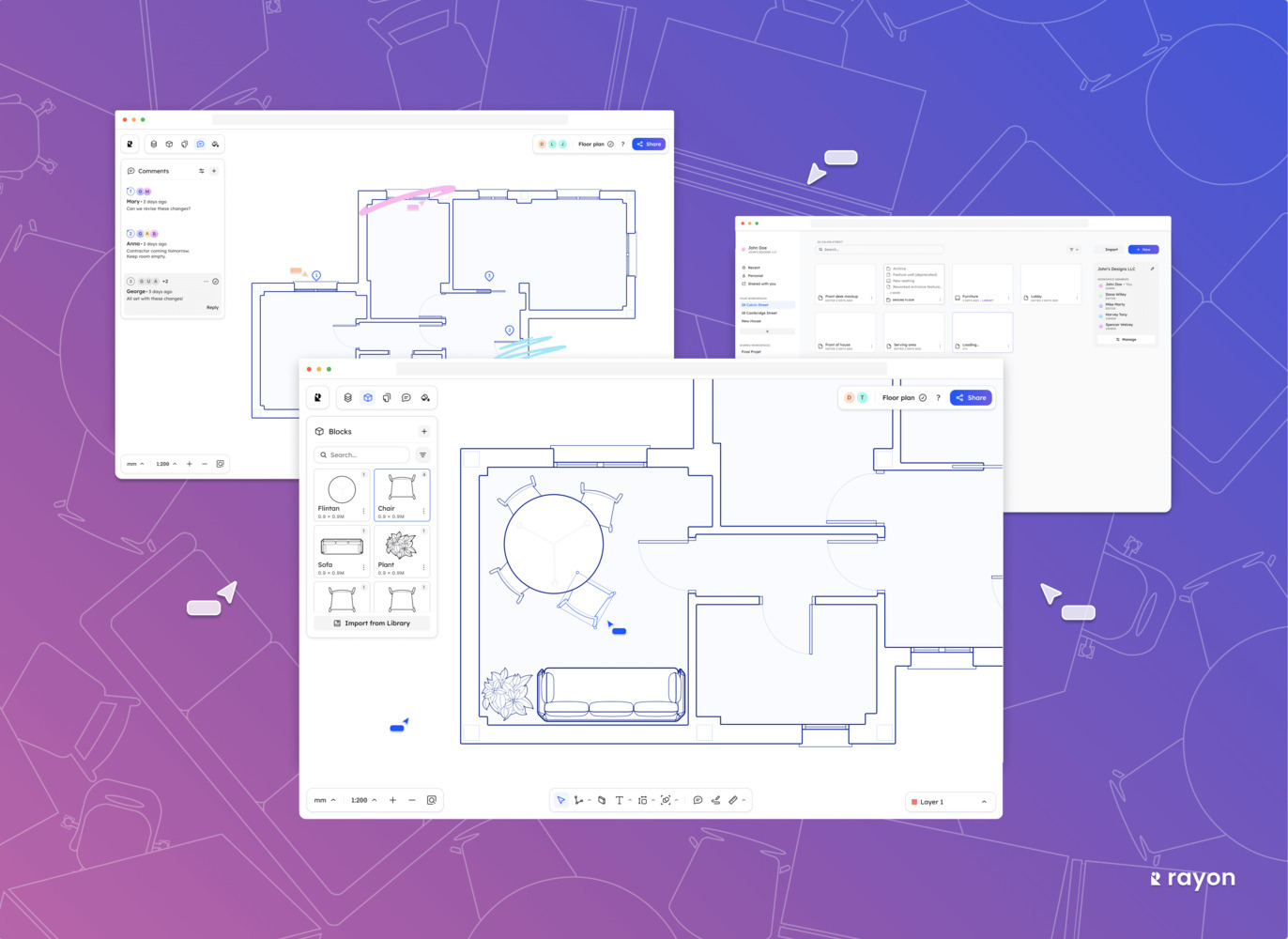
Table of Contents Show
Rayon design software is a browser-based, AI-powered CAD platform built for architects, interior designers, and AEC professionals. It combines 2D drafting, real-time collaboration, and cloud storage in a single tool, positioning itself as a lighter, more accessible alternative to desktop-based solutions like AutoCAD, Revit, and SketchUp.
What Is Rayon Design Software?
Founded in 2021 by Bastien Dolla and Stanislas Chaillou, Rayon is a web-based collaborative design tool that blends CAD and BIM features into what the co-founders describe as a “light-BIM” solution. The platform runs entirely in the browser, requires no installation, and supports real-time multiplayer editing. Rayon is built for professionals who produce floor plans, sections, elevations, mood boards, and presentation documents on a daily basis. It imports and exports DWG, DXF, PDF, and image files, making it compatible with workflows that already rely on established tools like AutoCAD or Revit.
The software raised €4 million in seed funding co-led by Northzone and Foundamental, with architect Norman Foster among the angel investors. This backing gave the team resources to expand its feature set, culminating in the V3 release in late 2025, which added parametric blocks, a redesigned scheduling panel, AI-powered search, and deeper DWG compatibility.
What Makes Rayon Unique in the AEC Sector?
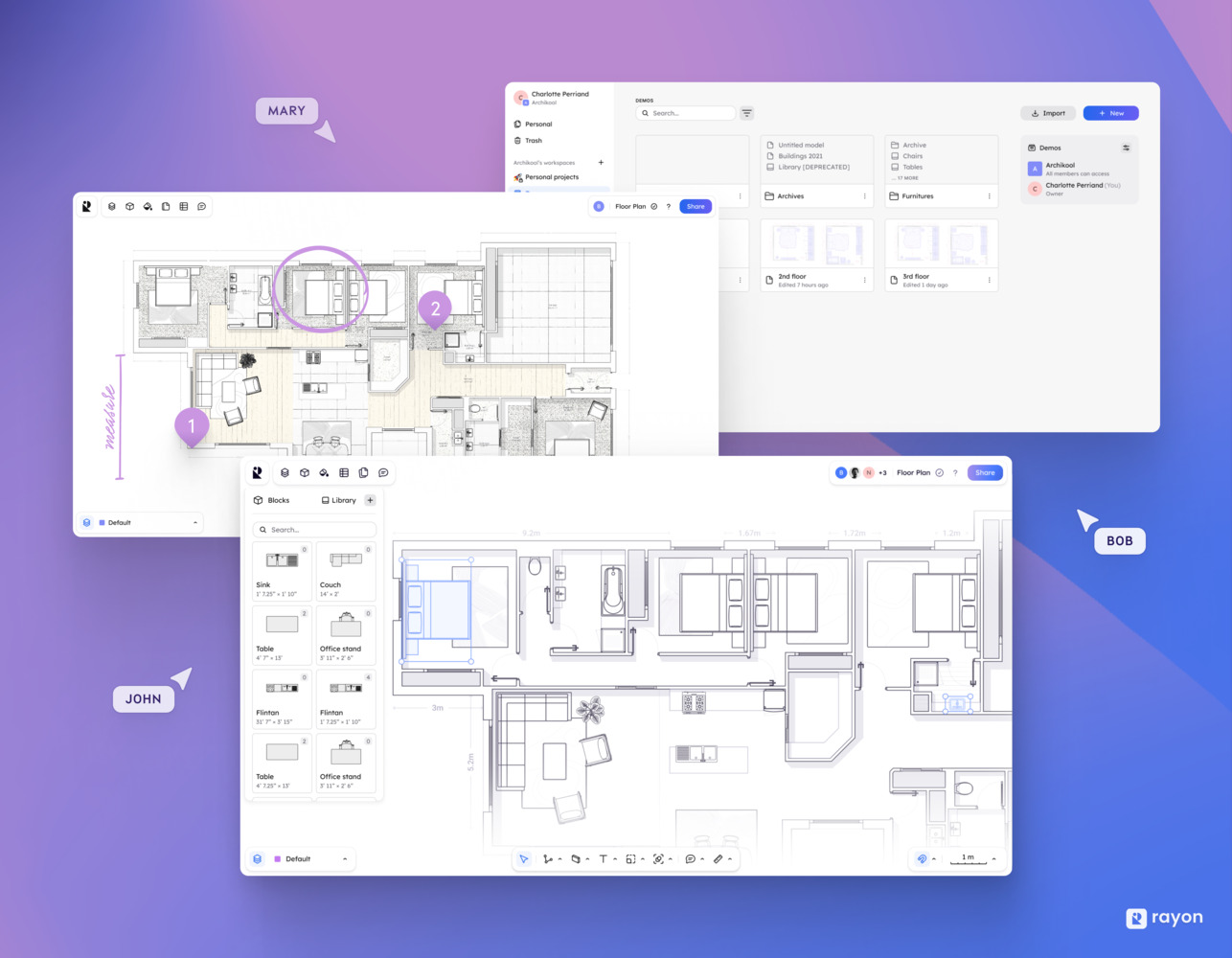
Rayon stands out in the AEC sector due to its intuitive interface and browser-first approach. Unlike desktop-heavy tools such as AutoCAD or Revit, Rayon requires no downloads, no system checks, and no manual updates. This makes it accessible from any device with an internet connection, a significant advantage for distributed teams. The software simplifies complex design processes, allowing architects and engineers to focus on design quality rather than technical setup.
Key Features
- Parametric Tools: Users can create adaptable designs by modifying parameters like dimensions or materials, ensuring flexibility across various projects. The V3 update introduced parametric blocks that support AutoCAD-style dynamic block behavior.
- Real-Time Collaboration: Rayon’s multi-user environment allows teams to draw, comment, and annotate on the same model simultaneously. This is similar to how tools like Figma work for UI design, but applied to architectural drawings.
- Cloud Integration: All project files are stored in the cloud, accessible from anywhere. Users can share designs through a simple public link, eliminating the file-compatibility headaches common when exchanging DWG files between different versions of AutoCAD.
- AI-Powered Tools: Rayon includes an AI panel that helps users search block libraries, generate architectural visuals, trace images into vector wireframes, and get instant answers to CAD-related questions.
Benefits for AEC Professionals
- Time Savings: Automated processes minimize manual drafting. The built-in library of over 4,000 blocks (furniture, fixtures, architectural symbols) reduces the need to model elements from scratch, a task that can take hours in traditional CAD tools like ArchiCAD or Vectorworks.
- Accuracy: Rayon provides snapping, dimensioning, and layer management features that reduce human error in 2D documentation.
- Scalability: The platform handles both small-scale residential renovations and multi-location commercial projects. Its scheduling and data tables (introduced in V3) let users attach properties like cost, materials, and formulas directly to drawn elements.
- Sustainable Design: Clear, shareable 2D layouts make it easier to discuss energy-efficient planning early, aligning with green building standards promoted by organizations like the U.S. Green Building Council (USGBC).
- Urban Planning: Site analysis and layout visualization tools help planners test different configurations quickly, without switching between multiple programs.
- Interior Architecture: Rayon’s mood boarding and presentation features let interior designers collage materials, furniture inspiration, and technical drawings in one workspace, replacing the need to jump between tools like Adobe InDesign and AutoCAD.
💡 Pro Tip
If you are transitioning from AutoCAD to Rayon, import your existing DWG files directly into the platform. Rayon converts them into editable objects, so you can continue working on legacy projects without redrawing anything from scratch. Experienced designers report cutting their onboarding time to under a day using this approach.
Rayon transforms AEC workflows by combining drafting, styling, and presenting in a single browser tab, reducing the multi-tool friction that slows down many design teams.

How Does Rayon Compare to AutoCAD, Revit, and SketchUp?
Choosing between Rayon design software and its established competitors depends on your project type, team size, and budget. Below is a practical comparison based on real feature differences rather than marketing claims.

Rayon vs AutoCAD
AutoCAD by Autodesk has been the industry standard for 2D drafting since 1982. It offers unmatched precision for construction documents, sections, and elevations. AutoCAD’s command-line interface gives experienced users speed that is hard to replicate in browser-based tools. The software costs approximately $2,095 per year (as of October 2026), requires desktop installation, and runs best on higher-end hardware. For firms producing detailed construction documentation sets, AutoCAD remains the safer choice. Rayon offers a lighter alternative for teams focused on floor plan creation, space planning, and collaborative review. Its lower learning curve makes it practical for smaller firms and early-career designers who find AutoCAD’s complexity unnecessary for their project scope.
Rayon vs Revit
Revit is Autodesk’s BIM platform, priced at approximately $3,005 per year per seat (as of October 2026). It supports parametric 3D modeling, construction scheduling, and multi-discipline coordination. For large-scale commercial projects involving structural engineers, MEP consultants, and architects working on a shared model, Revit is difficult to replace. Rayon does not compete directly with Revit on BIM depth. Instead, it targets the 2D drafting and early design phase where Revit’s overhead (heavy downloads, steep learning curve, Windows-only limitation) feels excessive. For interior architecture projects and space planning tasks, Rayon provides a faster, more focused workflow. Teams that need both can start designs in Rayon and export DWG files for further development in Revit or its alternatives.
Rayon vs SketchUp
SketchUp by Trimble is a 3D modeling tool known for its push-pull interface and the 3D Warehouse library. SketchUp Pro costs $399 per year, and Studio runs $859 annually (as of October 2026). Its strength lies in quick conceptual 3D models and client-facing visualizations. Where SketchUp excels in 3D, Rayon focuses on 2D architectural documentation. Rayon offers stronger real-time collaboration (SketchUp’s multiplayer features are limited), built-in mood boarding (SketchUp requires separate tools for this), and direct scheduling/data tables. Designers who work primarily in 2D with occasional presentation needs may find Rayon more efficient than toggling between SketchUp and supplementary tools like LayOut.
Rayon vs ArchiCAD
ArchiCAD by Graphisoft is a full BIM platform with a design-centric interface and native macOS support. It costs approximately $2,414 per year for Studio licensing. ArchiCAD’s Teamwork feature (powered by BIMcloud) enables real-time collaboration on shared BIM models, and its Open BIM support through IFC export makes it a strong choice for multi-discipline coordination. Rayon occupies a different tier. It is not a BIM tool and does not generate 3D models or construction documents at the level ArchiCAD handles. For firms that need full project lifecycle management (from schematic design through construction administration), ArchiCAD or similar platforms are more appropriate. Rayon serves as a faster entry point for 2D layout work, client presentations, and collaborative space planning where full BIM capabilities are not required.
| Feature | Rayon | AutoCAD | Revit | SketchUp Pro | ArchiCAD |
|---|---|---|---|---|---|
| Primary Focus | 2D CAD + Collaboration | 2D/3D Drafting | BIM Modeling | 3D Modeling | BIM Modeling |
| Platform | Browser (any OS) | Desktop (Win/Mac) | Desktop (Windows only) | Desktop + Web | Desktop (Win/Mac) |
| Real-Time Collaboration | Yes (multiplayer) | Limited (cloud saves) | Via Revit Cloud | Limited | Via BIMcloud |
| Approx. Annual Cost | Free plan; Pro $21/month billed yearly | ~$2,095/year | ~$3,005/year | $399/year (Pro) | ~$2,414/year |
| Learning Curve | Low | Moderate to High | High | Low to Moderate | Moderate |
| 3D Modeling | No (2D only) | Yes | Yes (parametric) | Yes | Yes (parametric) |
| AI Features | Yes (search, tracing, visuals) | Limited | Limited | Yes (Diffusion plugin) | Limited |
| Offline Access | No | Yes | Yes | Yes (desktop) | Yes |
🎓 Expert Insight
“Space Design is fundamentally collaborative, but the current CAD software offering is not: these tools are not only expensive, heavy and too complex, but they also represent a barrier to teamwork in this industry.”
Stanislas Chaillou, Co-founder of Rayon
This perspective explains why Rayon prioritizes browser access and multiplayer editing over feature depth. For teams where collaboration speed matters more than BIM complexity, this trade-off makes practical sense.
Tackling the “Culture of the Ordinary” in Urban Design
Urban design often falls into patterns of predictable and uninspired layouts, reflecting what Rayon’s founders call a “culture of the ordinary.” These are the buildings that make up roughly 90% of any city’s built fabric: housing blocks, retail spaces, small offices. They may not win architecture awards, but they collectively shape how people experience cities. Rayon design software addresses this segment directly by offering design tools that are fast, affordable, and collaborative enough for the firms and professionals who produce these everyday buildings.
Traditional tools like AutoCAD and Revit were built for large practices and complex projects. Their licensing costs, system requirements, and steep learning curves create barriers for smaller firms working on “ordinary” buildings. Rayon lowers that barrier with a free tier, browser-based access, and an interface designed to feel immediate rather than intimidating. For context, the American Institute of Architects (AIA) reports that solo practitioners and firms with fewer than 10 employees make up the majority of architecture practices in the United States. Tools like Rayon speak directly to this underserved market.
Rayon’s parametric tools allow designers to explore unconventional forms, breaking free from the limitations of conventional templates.
Collaboration features further reduce design monotony. The multi-user environment lets architects, urban planners, and engineers contribute to the same project simultaneously. This diversity of input, working in one shared drawing, pushes projects beyond what a single designer using standalone drafting software might produce alone.
Rayon’s visualization tools add clarity when presenting bold urban concepts. Users can test different design options, evaluate visual impact, and refine ideas before presenting them to clients or planning authorities. These features encourage more ambitious projects by reducing the risk of committing to a design direction too early.

📌 Did You Know?
Architect Norman Foster (Foster + Partners) is among Rayon’s angel investors. His participation in the €4 million seed round alongside venture firms like Northzone and Seedcamp signals institutional confidence in browser-based design tools as a viable category within AEC technology.
How Rayon Embraces Emerging Technology Trends
Rayon integrates AI algorithms into its core drafting workflow rather than treating them as add-ons. The platform’s AI panel assists with block search, image-to-vector tracing, and visualization generation. This built-in approach differs from how competitors handle AI: SketchUp offers AI rendering through its Diffusion plugin, while Revit users typically rely on third-party plugins like Veras or WiseBIM for AI-powered functionality. Rayon bundles these features directly into the platform, removing the plugin management overhead.
Advanced parametric modeling in Rayon adapts to changing project requirements. Dynamic designs evolve with real-time data, and the V3 release introduced parametric blocks that adjust dimensions based on user-defined rules. This feature brings Rayon closer to the parametric capabilities found in tools like Grasshopper (the visual programming plugin for Rhino 3D), though at a more basic level suited to 2D layout work rather than complex 3D geometry.
Cloud-based collaboration is central to Rayon’s architecture. Every file saves automatically, version history is built in, and sharing requires only a link. This mirrors the workflow model pioneered by SaaS productivity tools and contrasts with the file-exchange friction common in desktop CAD workflows where teams email DWG files back and forth between different AutoCAD and Revit versions.
Green building compliance is a growing demand, but Rayon does not include energy simulation, so energy performance is best checked in a dedicated analysis tool during early design stages, when decisions have the greatest impact on a building’s lifetime energy consumption. For firms pursuing LEED certification, this early-stage analysis can reduce costly redesigns later.
Rayon’s 3D visualization capabilities focus on generating architectural visuals from 2D plans using AI. While these are not photorealistic renderings at the level of dedicated tools like Lumion, D5 Render, or Enscape, they serve a specific purpose: giving designers quick visual feedback during the concept phase without switching to a separate rendering application.
These technology integrations position Rayon as a tool for architects who value speed and accessibility over the deep feature sets offered by platforms like ArchiCAD or Vectorworks. The trade-off is clear: Rayon sacrifices 3D modeling depth and construction documentation power in exchange for a faster, lighter, and more collaborative design experience.

💡 Pro Tip
When evaluating Rayon against competitors like AutoCAD or SketchUp, test with a real project rather than a demo model. Import an existing DWG floor plan, invite a colleague to edit simultaneously, and try exporting a presentation PDF. This 30-minute exercise reveals practical workflow differences that feature lists cannot communicate.
Pros and Cons of Rayon Design Software
Every design tool involves trade-offs. Rayon’s strengths in accessibility and collaboration come with limitations that matter depending on your project needs. Here is a balanced overview based on user reviews and feature analysis.
⚖️ Pros & Cons at a Glance
✔️ Pros: Browser-based (no installation), real-time multiplayer editing, low learning curve, free tier available, AI-powered block search and image tracing, DWG/PDF import/export
✖️ Cons: No 3D modeling, requires internet connection, not suited for full construction document sets, limited rendering compared to Lumion or D5 Render, still evolving (some features less mature than AutoCAD)
For teams that produce primarily 2D floor plans, space layouts, and client presentations, Rayon’s advantages outweigh its limitations. For firms that need BIM coordination, detailed construction documentation, or photorealistic rendering, established tools like Revit, ArchiCAD, or Rhino with Grasshopper remain better suited.
Looking Ahead: Challenges and Opportunities
Rayon design software faces challenges as it grows within a competitive AEC software market. Rapid advancements in AI across the industry, with Autodesk, Trimble, and Graphisoft all investing heavily in AI-powered features for AutoCAD, SketchUp, and ArchiCAD respectively, mean that Rayon’s current AI advantage may narrow over time. Staying competitive will require continuous development and a clear focus on what browser-based design does best.
Adoption barriers remain for smaller firms. While Rayon’s free tier lowers the financial barrier, teams with years of AutoCAD or SketchUp muscle memory may resist switching. Offering migration guides, DWG conversion tools, and demonstrating measurable time savings on real projects can help address this hesitation.
Interoperability with other design tools is critical but complex. Ensuring smooth file exchange with AutoCAD, Revit, and ArchiCAD requires robust DWG/DXF support and ongoing development. The V3 release improved DWG compatibility and added XREF support, which are steps in the right direction. For Rayon to become a standard part of multi-tool workflows, it needs to be the kind of platform that firms add to their stack rather than replace their stack with.
Opportunities lie in sectors that value speed over feature depth. Industries like modular construction, prefabrication, and commercial real estate space planning benefit from Rayon’s quick layout tools and collaborative editing. Expanding partnerships with furniture manufacturers and fit-out contractors could open new use cases for the platform.
Global urbanization trends increase demand for accessible design tools. According to UN-Habitat, roughly 68% of the world’s population is expected to live in urban areas by 2050. The architects and planners serving this growth, many of them in small practices or emerging markets, need affordable, cloud-based tools. Rayon’s browser-first model positions it well for this expanding market.
As distributed work continues to grow across the AEC sector, demand for real-time cloud collaboration will increase. Rayon is already ahead of legacy desktop tools in this area. By improving its data management features, strengthening version control, and building deeper integrations with BIM platforms, Rayon can secure a lasting position as the collaboration layer that connects design teams working across different tools and locations.
⚠️ Common Mistake to Avoid
Do not evaluate Rayon as a full replacement for AutoCAD or Revit. It is designed for a different layer of the design process: early-stage layouts, collaborative review, and client-facing presentations. Firms that try to force Rayon into a construction documentation role will be disappointed. Treat it as a complementary tool that fills the speed and collaboration gaps left by heavier desktop software.
Final Thoughts
✅ Key Takeaways
- Rayon design software is a browser-based, AI-powered CAD tool focused on 2D floor plans, collaboration, and presentations for AEC professionals.
- It offers a significantly lower learning curve and cost compared to AutoCAD ($2,095/year), Revit ($3,005/year), and ArchiCAD ($2,414/year).
- Real-time multiplayer editing is Rayon’s strongest differentiator, setting it apart from desktop-based competitors.
- Rayon does not support 3D modeling or full BIM workflows, so it works best as a complement to, not a replacement for, tools like Revit or ArchiCAD.
- The V3 release (late 2025) added parametric blocks, AI search, XREF support, and improved DWG compatibility.
Rayon design software fills a real gap in the AEC tool landscape: it provides the collaboration-first, browser-based experience that legacy desktop CAD tools have not delivered. For architects and interior designers whose work centers on 2D layouts, space planning, and team coordination, Rayon offers a practical, affordable workflow that reduces the friction of traditional design software. For projects requiring full BIM depth, 3D parametric modeling, or photorealistic rendering, established platforms like AutoCAD, Revit, SketchUp, ArchiCAD, and Rhino continue to lead. The most productive approach for many firms will be using Rayon alongside these tools, taking advantage of its strengths in speed and collaboration while relying on specialized software for tasks that require deeper capability.
Software pricing referenced in this article reflects publicly available figures as of early 2026. Prices vary by region and licensing tier. Always verify current pricing on official vendor websites before making purchasing decisions.








Notion Alternatives for Architects: 7 Tools That Fit Studio Work
Notion works until a studio needs fee tracking, phase budgets and timesheets....
 Furkan Sen7 Mins read

Why Every Practice Ends Up With Five Versions of the Same Revit Family
Let’s learn why Revit family libraries accumulate duplicates, break schedules and slow...
 illustrarch Editoral Team5 Mins read

Visualizing Renovation Projects From Photographs: A Workflow for Existing-Building Work
Photo-based visualization turns a photograph of a building that already exists into...
illustrarch Editoral Team7 Mins read

Best Free CAD Blocks and Resources for Architects
A working guide to free CAD blocks for architects, covering ARCAT, CAD-Blocks.net,...
Furkan Sen7 Mins read


Leave a comment