

Must-Have Architect Tools for Drafting & Design in 2025
Every architect needs the right tools to deliver precise, creative work. This guide covers the must-have architect tools for 2025, including digital drafting software like AutoCAD, Revit, and SketchUp, physical tools such as laser measurers and professional pencil sets, plus workspace optimization essentials like ergonomic furniture and task lighting.
 Muhammad Abdullatef - Tifa Studio19 October 202515 Mins read859

Table of Contents Show
An architect tool is any software, device, or instrument that helps architects design, draft, measure, or manage building projects. The most essential architect tools in 2025 include CAD and BIM platforms like AutoCAD and Revit, portable devices such as the iPad Pro and laser measurers, traditional drafting supplies, and ergonomic workspace equipment that supports long hours of focused design work.
Every architect knows that having the right architect tool can make or break a project. From sketching initial designs to finalizing blueprints, the architectural tools for drafting we use shape our creativity and efficiency. Whether you are a seasoned professional or just starting out, equipping yourself with essential tools is crucial for delivering accurate, inspiring work.
Trying to draft a complex structure without a reliable compass or trace paper would make precision nearly impossible. Tools like standing desks and all-in-one screwdrivers not only streamline workflow but also boost productivity. The landscape of architectural tools has evolved dramatically over the past decade. Today’s architect must master both physical instruments and powerful software to stay competitive. Below you will find the must-have tools that every architect should keep within arm’s reach, organized by category with pricing, comparisons, and practical recommendations for practices of every size. For a look at how these tools fit into broader industry shifts, see our coverage of essential architecture tools in 2026.
Essential Digital Tools for Architects
Digital drafting has fundamentally changed how architects design and deliver projects. Modern architectural tools for drafting range from industry-standard CAD platforms to advanced BIM systems, each serving a distinct purpose in the design pipeline. According to the American Institute of Architects (AIA), proficiency in digital tools is now considered a core competency for licensed professionals. If you are exploring options beyond premium subscriptions, our guide to free tools for architectural design covers zero-cost alternatives worth considering. Below are the most impactful software platforms architects rely on in 2025.
🔢 Quick Numbers
- About 75% of U.S. architecture firms have fewer than 10 employees (AIA Firm Survey Report, 2024)
- Global BIM adoption among architecture firms reached 73% in 2023 (NBS National BIM Report, 2023)
- AutoCAD holds an estimated 30% share of the global CAD software market (Grand View Research, 2024)
AutoCAD (2025)
AutoCAD has long been the backbone of architectural drafting and continues to dominate as one of the most reliable and versatile tools in the industry. The 2025 version refines the user experience by offering faster 2D drafting, improved 3D capabilities, and deeper integration with BIM platforms. Architects depend on AutoCAD for creating precise technical drawings, construction documents, and detailed plans that contractors can easily interpret. Its expansive library of plugins and customization options make it adaptable for every firm, from small studios to international practices. AutoCAD’s cloud-based storage and collaboration features also enable effective teamwork across locations, ensuring architects can keep their designs accurate, standardized, and accessible anywhere.

Revit (2025)
Revit is the cornerstone of Building Information Modeling (BIM), and its 2025 release improves collaborative workflows for multi-disciplinary projects. Unlike traditional CAD software, Revit embeds information into the model, meaning every wall, door, and beam carries data that can be used for scheduling, cost estimation, and facility management. Architects rely on Revit to coordinate with structural engineers, mechanical consultants, and contractors, minimizing conflicts during construction. The 2025 improvements focus on cloud collaboration, sustainability analysis, and generative design tools that help architects explore environmentally responsible options quickly. For firms working on large-scale housing developments, hospitals, or infrastructure, Revit is almost indispensable.

💡 Pro Tip
When choosing between AutoCAD and Revit, consider your project pipeline rather than just pricing. Firms that handle renovation or as-built documentation often get more daily value from AutoCAD, while practices focused on new construction with multi-consultant teams benefit from Revit’s coordinated BIM environment. Many mid-size offices run both side by side.
Part3
Part3 is construction administration software built specifically for architects. It provides a dedicated digital platform for managing submittals, RFIs, drawings, and field reports in one place.
The platform integrates with Procore, allowing architects to stay connected with contractors and project partners already working in that ecosystem. Designed for both office and on-site use, Part3 makes it simple to issue reports, review submittals, and track changes without the burden of manual processes.
By automating CA tasks, Part3 helps firms protect profits, save time, and ensure design intent is carried through during construction.

ArchiCAD 27
ArchiCAD is especially popular among architects who prioritize user-friendliness and visualization capabilities without sacrificing power. The 27th edition expands on its strengths by offering enhanced teamwork functions, real-time rendering options, and energy evaluation tools. Its clean interface makes it approachable for students and small practices, while its BIM capabilities ensure it can compete with heavyweights like Revit. ArchiCAD is also known for its fast rendering engine, which enables architects to quickly create client presentations without the need for third-party software. Many architects choose ArchiCAD when they want flexibility between technical precision and visually compelling design communication. For a more detailed comparison of which platform fits smaller teams, see our article on the best architecture software for small firms.

SketchUp Pro 2025
SketchUp remains the most approachable 3D modeling software for architects who need to quickly conceptualize and iterate design ideas. The 2025 version provides better material libraries, improved rendering plugins, and more convenient cloud integrations for file sharing. Architects use SketchUp to sketch entire urban blocks, test facade designs, or communicate conceptual massing to clients who may not understand complex CAD drawings. Its real strength lies in simplicity and speed: architects can go from a blank screen to a clear 3D form in minutes, making it the perfect brainstorming tool. Combined with rendering engines like V-Ray or Enscape, SketchUp models can be elevated into realistic presentations with ease.

Rhino 8
Rhino is the tool of choice for architects pushing the limits of geometry and form. The newly released Rhino 8 comes with better meshing tools, improved Grasshopper integration, and enhanced performance for handling extremely complex designs. Architects turn to Rhino when working on fluid, organic, or parametric designs that standard CAD software struggles with. When combined with Grasshopper, Rhino becomes a powerful computational design engine, enabling architects to script algorithms that generate facades, structures, and even full building layouts. Its open platform and compatibility with other tools make it a favorite in innovative firms that value experimentation. Rhino is particularly popular in high-end cultural projects, pavilions, and parametric facades.

Autodesk 3ds Max 2025
3ds Max is an essential tool for architects who need to transform their CAD or BIM models into photorealistic renderings and animations. The 2025 update focuses on AI-assisted rendering, significantly reducing production time for high-quality visuals. With advanced lighting, material libraries, and animation tools, 3ds Max allows architects to present designs in a way that resonates emotionally with clients and stakeholders. This tool is especially important in competitions or marketing contexts, where presentation quality can determine the success of a proposal. Many firms integrate Revit models directly into 3ds Max, ensuring that technical precision is maintained while visual appeal is maximized.

Architecture Software Comparison Table
| Software | Primary Use | Pricing (Annual) | License Type | BIM Support | Platform | Learning Curve | Best For |
|---|---|---|---|---|---|---|---|
| AutoCAD 2025 | 2D/3D CAD Drafting | ~$2,095/year | Subscription | Limited (via plugins) | Windows, Mac | Moderate | Technical drawings, construction documents |
| Revit 2025 | BIM Modeling | ~$3,005/year | Subscription | Full BIM | Windows only | Steep | Large-scale projects, multi-disciplinary coordination |
| Part3 | Construction Administration | Contact vendor | Subscription | Integrates with BIM via Procore | Web-based | Easy | Submittal management, field reports, CA workflows |
| ArchiCAD 27 | BIM Modeling & Visualization | From $2,414/year (US) | Subscription / Perpetual | Full BIM | Windows, Mac | Moderate | Small-to-mid firms, residential projects |
| SketchUp Pro 2025 | 3D Conceptual Modeling | ~$399/year | Subscription | No (3D only) | Windows, Mac, Web | Easy | Concept design, client presentations, massing studies |
| Rhino 8 | Advanced 3D / Parametric Design | $995 (one-time) | Perpetual | No (via Grasshopper-Archicad link) | Windows, Mac | Moderate to Steep | Parametric design, complex geometry, computational workflows |
| 3ds Max 2025 | 3D Rendering & Animation | ~$2,010/year | Subscription | Imports BIM models | Windows only | Steep | Photorealistic rendering, competition visuals, animations |
Key Physical Tools for Everyday Use
While software dominates modern practice, physical tools remain indispensable for architects who value tactile feedback and portable creativity. From tablets that double as flexible workstations to precision styluses, these devices bridge the gap between hand-drawn concepts and digital production.
iPad Pro (M4, 2024)
The 2024 iPad Pro, powered by Apple‘s M4 chip and equipped with an OLED Ultra Retina XDR display, is redefining digital sketching and portable workflows for architects. With desktop-level performance, architects can run professional-grade software, sketch detailed concepts, or annotate drawings on-site without carrying a laptop. The LiDAR scanner is particularly valuable, enabling quick AR-based measurements of physical spaces. Architects increasingly rely on the iPad Pro for presentations, replacing bulky boards with sleek digital portfolios that can be carried into meetings. Its blend of performance, portability, and ecosystem integration makes it the single most versatile device an architect can carry.

Apple Pencil Pro
The Apple Pencil Pro is a natural companion to the iPad Pro, offering precise sketching capabilities that rival traditional drawing tools. With pressure and tilt sensitivity, architects can shade, hatch, and draft in ways that feel intuitive and tactile. The Pro version introduces advanced haptic feedback and customizable shortcuts, further streamlining workflows. Many architects now sketch initial concepts digitally, instantly exporting them into CAD software for refinement. This tool bridges the gap between traditional hand sketching and digital workflows, preserving the creative spontaneity of drawing while improving efficiency.

Adonit Note Pro
For architects who prefer non-Apple tablets or need a cost-effective stylus option, the Adonit Note Pro delivers excellent performance. It supports palm rejection, tilt recognition, and high precision, making it suitable for digital sketching and note-taking. This tool is particularly valuable for architecture students or small practices that do not rely on Apple devices. Paired with drawing apps such as Concepts, Morpholio Trace, or Autodesk SketchBook, the Adonit Note Pro enables architects to replicate traditional sketching workflows in a digital environment at a lower price point.

Digital Sketching Devices Comparison Table
| Device / Stylus | Type | Approx. Price | Key Features | Pressure Sensitivity | Compatibility | Best For |
|---|---|---|---|---|---|---|
| iPad Pro (M4, 2024) | Tablet | From $999 | M4 chip, OLED XDR display, LiDAR scanner, desktop-level performance | Via Apple Pencil | iPadOS apps (Procreate, Morpholio, AutoCAD Mobile) | On-site sketching, presentations, AR measurements |
| Apple Pencil Pro | Stylus | ~$129 | Haptic feedback, squeeze gesture, barrel roll, tilt & pressure sensitivity | Yes (advanced) | iPad Pro (M4), iPad Air (M2+) | Professional digital sketching, precision drafting |
| Adonit Note Pro | Stylus | ~$60 | Palm rejection, tilt recognition, high precision, rechargeable | Yes (tilt-based) | iPad (various models) | Budget-friendly digital sketching, students |
What Measuring Tools Do Architects Use on Site?
Precision is paramount in architecture. Specialized measuring and imaging equipment ensure accuracy in every project phase. Laser measurers, for example, provide exact dimensions over long distances, reducing errors and speeding up the measurement process. These devices are essential when surveying sites or verifying dimensions on complex projects. As ArchDaily frequently highlights, accurate site data forms the foundation of successful design outcomes.
Scale rulers remain a staple, allowing for easy conversion of measurements from plans to real-world dimensions. A scale ruler with multiple sides, each marked with different scales, can facilitate quick and accurate translations, especially useful when working with diverse project scales.
⚠️ Common Mistake to Avoid
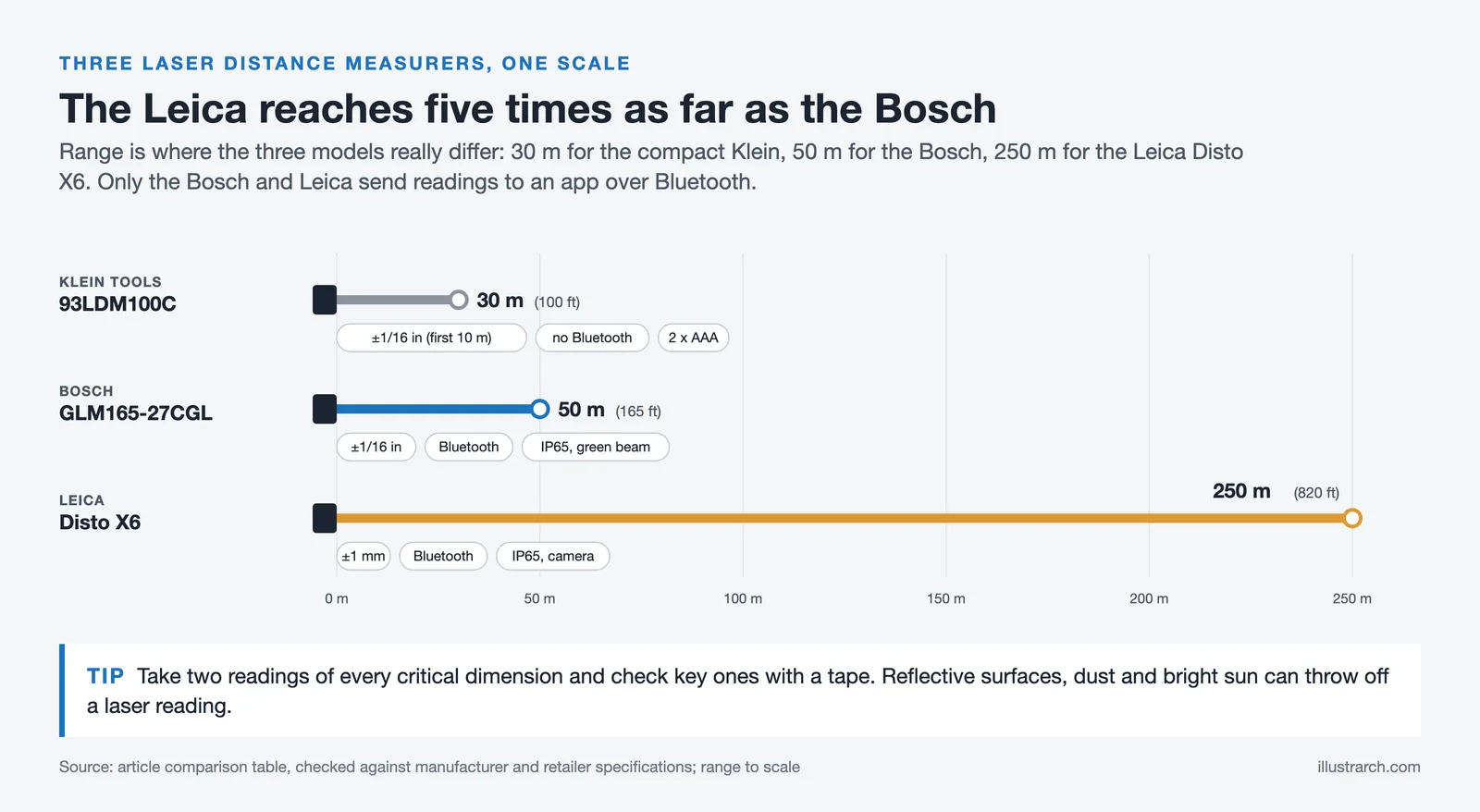
Relying solely on a laser distance measurer without cross-checking critical dimensions manually is a frequent error during site surveys. Laser readings can be skewed by reflective surfaces, dust, or bright sunlight. Always take at least two readings per measurement and confirm key dimensions with a tape measure on high-stakes projects.
Bosch GLM165-27CGL Laser Distance Measurer
The Bosch GLM165-27CGL is one of the most versatile and accurate laser distance measurers available. With a range of 165 feet and an accuracy of ±1/16″, it provides reliable measurements in both indoor and outdoor conditions. Its green laser beam is easier to see in bright environments, while Bluetooth integration allows measurements to be synced directly with architectural apps. Rugged enough for construction sites, this tool saves architects hours of manual measuring, ensuring precision and efficiency during site surveys or client visits.

Leica Disto X6
The Leica Disto X6 is a professional-grade measuring device, highly regarded for its superior accuracy and durability. Capable of measuring over long distances and integrating with 3D software, it allows architects to quickly create digital floor plans and verify as-built conditions. It is especially useful for outdoor applications, where bright sunlight can make standard laser measurers less effective. Leica has long been a leader in measurement technology, and the Disto X6 maintains this reputation by providing reliability for demanding architectural projects.

Klein Tools 93LDM100C
A simple, affordable, and highly effective laser measurer, the Klein Tools 93LDM100C is best suited for quick indoor projects. It offers dependable accuracy at a lower cost, making it ideal for smaller firms or students. While it may not have the advanced features of Leica or Bosch devices, its straightforward design makes it extremely practical for day-to-day use.

Laser Distance Measurer Comparison Table
| Laser Measurer | Range | Accuracy | Laser Type | Bluetooth | IP Rating | Battery | Approx. Price | Best For |
|---|---|---|---|---|---|---|---|---|
| Bosch GLM165-27CGL | 165 ft (50 m) | ±1/16 in | Green beam | Yes | IP65 | Rechargeable Li-ion | ~$167 (as of October 2026) | All-around professional use, indoor & outdoor |
| Leica Disto X6 | 820 ft (250 m) | ±1 mm | Red beam (with camera) | Yes | IP65 | Rechargeable Li-ion | ~$700-$900 | Long-range outdoor surveys, high-precision projects |
| Klein Tools 93LDM100C | 100 ft (30 m) | ±1/16 in to 33 ft, ±1/8 in to 100 ft | Red beam | No | N/A | 2x AAA batteries | ~$30-$40 | Budget-friendly indoor measurements, students |
Traditional Drafting and Sketching Supplies
Despite the digital revolution, traditional architectural tools for drafting by hand remain vital. Many firms still begin the design process with pencil-on-paper ideation, as it encourages rapid exploration without the constraints of software interfaces. Organizations such as the Royal Institute of British Architects (RIBA) continue to emphasize the importance of freehand skills in architectural education.
📌 Did You Know?
Renowned architect Renzo Piano still begins every project with freehand pencil sketches before moving to digital tools. This habit reinforces that traditional drafting skills remain central to high-level design even in a software-driven profession.
Staedtler Mars Lumograph Pencil Set
For architects who continue to value the tactile process of sketching, the Staedtler Mars Lumograph Pencil set remains an irreplaceable tool. With a wide range from H to 6B, this set allows architects to switch between crisp, technical lines and expressive, shaded sketches. The pencils produce consistent graphite quality, making them a favorite for both concept sketching and detailed shading. Even in the digital age, many architects rely on Staedtler pencils during brainstorming, enjoying the creative flow of hand drawing before translating ideas into digital form.

Moleskine Sketchbook
A Moleskine Sketchbook is more than just paper; it is a portable archive of ideas. With its durable binding and thick, bleed-resistant pages, it is trusted by architects for daily sketching, conceptual development, and capturing sudden design inspiration. The premium paper handles pencils, inks, and markers well, making it versatile for any medium. Many architects keep years of Moleskines as personal design diaries, reflecting the evolution of their ideas and style over time.

Sakura Pigma Micron Pens
Sakura Pigma Micron pens are a staple in every architect’s toolkit. Known for their archival-quality ink and a variety of tip sizes, they allow precise line work that does not smudge or fade. These pens are ideal for producing clean ink drawings, diagrams, and annotations. Many architects use Microns when finalizing presentation sketches or creating portfolio illustrations, as they produce sharp and professional results.

Traditional Drafting Supplies Comparison Table
| Product | Type | Approx. Price | Key Features | Media Compatibility | Best For |
|---|---|---|---|---|---|
| Staedtler Mars Lumograph Set | Graphite Pencil Set | ~$15-$30 (set) | H to 6B range, consistent graphite, break-resistant leads | Paper, tracing paper, vellum | Concept sketching, technical drafting, shading studies |
| Moleskine Sketchbook | Sketchbook | ~$20-$35 | Thick bleed-resistant paper, durable binding, portable format | Pencils, inks, markers, light watercolors | Daily sketching, idea archiving, on-site notes |
| Sakura Pigma Micron Pens | Archival Ink Pens | ~$12-$25 (set) | Archival-quality pigment ink, multiple tip sizes (005 to 08), no smudge/fade | Paper, sketchbooks, vellum | Ink drawings, annotations, presentation sketches, portfolio work |
How to Optimize Your Architecture Workspace
A well-designed workspace directly influences the quality of architectural output. Investing in ergonomic furniture and proper lighting is not a luxury; it is a professional necessity that protects long-term health and sustains creative focus. Whether you work from a dedicated studio or a flexible home office, optimizing your environment pays dividends in every project. For a deeper look at desk configuration, our guide on architect desk setup tools covers monitor placement, cable management, and accessory choices.
Ergonomic Furniture
Ergonomic furniture is crucial for architects who want to maintain productivity and health over long careers. Adjustable chairs with lumbar support provide comfort during long hours of drafting and designing. Standing desks offer flexibility, allowing architects to alternate between sitting and standing, which can reduce the risk of chronic pain and improve overall well-being. Ergonomic keyboards and mouse setups also help reduce strain on wrists and hands, ensuring efficient work without discomfort.
Effective Lighting Solutions
Effective lighting solutions significantly impact a workspace. Natural light is ideal, but when it is not feasible, specialized LED desk lamps with adjustable brightness and color settings can mimic daylight. Task lighting is essential for focusing light on specific areas like a drafting table or computer screen, reducing eye strain and improving precision. Ambient lighting also helps create a well-lit environment that improves mood and productivity, making it easier to focus on complex design tasks.
💡 Pro Tip
Position your desk lamp so that it illuminates your drawing surface from the opposite side of your dominant hand. This prevents your hand from casting shadows on the area you are actively drafting. If you are right-handed, place the lamp to your left. A color rendering index (CRI) above 90 is recommended for any lamp used for reviewing material samples or printed drawings.
BenQ e-Reading Desk Lamp
Lighting directly affects concentration and eye comfort, and the BenQ e-Reading Desk Lamp is specifically designed for professionals who spend hours working with screens and drawings. Its wide beam evenly illuminates the entire desk, reducing glare and shadows. With adjustable brightness and color temperature, architects can create optimal lighting conditions for sketching, drafting, or digital modeling. By protecting eyesight and reducing fatigue, this lamp indirectly improves design quality and efficiency.

Ergonomic Chair with Lumbar Support
An ergonomic chair with proper lumbar support is critical for architects, whose long design sessions can take a toll on posture. Adjustable armrests, reclining options, and breathable materials all contribute to comfort during extended hours of CAD or BIM modeling. By investing in quality seating, architects protect their health and ensure long-term productivity. A good chair is as important to a designer’s toolkit as any software or device.

Ergonomic Standing Desk
Standing desks are increasingly being adopted in architectural studios for their health and productivity benefits. Architects often spend long hours at computers, and alternating between sitting and standing reduces back pain, improves posture, and improves focus. Many modern desks include programmable height settings, allowing users to customize positions easily. For creative work that demands long sessions of concentration, ergonomic standing desks provide both physical relief and renewed energy.

Workspace Optimization Tools Comparison Table
| Product | Category | Approx. Price Range | Key Features | Ergonomic Benefit | Best For |
|---|---|---|---|---|---|
| BenQ e-Reading Desk Lamp | Task Lighting | ~$200-$300 | Wide beam, adjustable brightness & color temperature, auto-dimming sensor | Reduces eye strain and glare on screens & drawings | Long drafting sessions, screen-intensive work |
| Ergonomic Chair (with Lumbar Support) | Seating | ~$250-$1,500+ | Adjustable lumbar, armrests, recline, breathable mesh, height adjustment | Prevents back pain, improves posture during extended sessions | CAD/BIM workstations, all-day desk work |
| Ergonomic Standing Desk | Desk | ~$300-$1,200+ | Electric height adjustment, programmable presets, cable management, spacious surface | Reduces back pain, promotes active posture, improves focus | Architecture studios, home offices, collaborative workspaces |
How to Choose the Right Architect Tool for Your Practice
With so many options available, selecting the right architect tool depends on your project type, budget, and workflow preferences. Sole practitioners and small studios may find that a streamlined setup (SketchUp for modeling, a quality pencil set for ideation, and a laser measurer for site work) covers most needs. Larger firms handling multi-disciplinary BIM projects will benefit from investing in Revit or ArchiCAD alongside collaboration platforms like Part3.
Evaluate tools based on interoperability: how well does your drafting software export to rendering engines? Can your laser measurer sync with your modeling app? The best architectural tools for drafting integrate smoothly into an end-to-end workflow, from initial survey through construction documentation. Resources like Dezeen and Wikipedia’s overview of architectural drawing offer additional context on how these tools fit into broader design practice.
🎓 Expert Insight
“The computer is just a tool, like a pencil. You have to know what you want to draw before you pick up the pencil.”
Frank Gehry, Founding Partner, Gehry Partners
Gehry’s remark underlines a principle that applies directly to tool selection: software and devices only amplify design thinking that already exists. Choosing tools that match your workflow, rather than chasing the newest release, consistently produces better results.
Recommended Architect Tool Kits by Practice Size
| Practice Type | Software | Physical / Digital Tools | Workspace Essentials | Estimated Annual Budget |
|---|---|---|---|---|
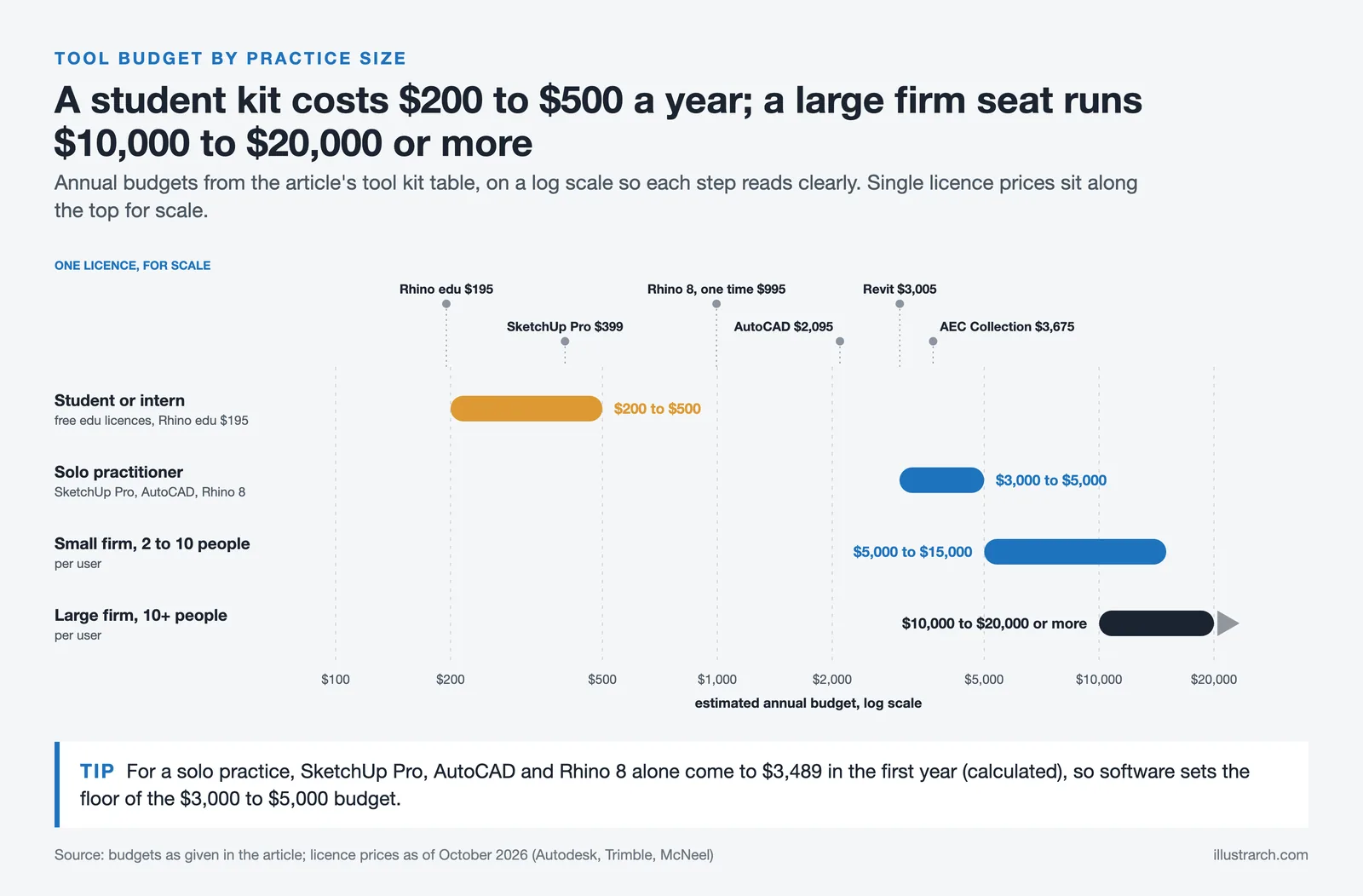
| Student / Intern | SketchUp (Free/Go), AutoCAD (Edu License, Free), Rhino (Edu, $195) | Staedtler pencils, Moleskine, Klein Tools laser, Adonit stylus | Basic desk lamp, budget ergonomic chair | ~$200-$500 |
| Solo Practitioner | SketchUp Pro ($399), AutoCAD ($2,095/year), Rhino 8 ($995 one-time) | iPad Pro + Apple Pencil Pro, Bosch GLM165-27CGL, Sakura Micron pens | Standing desk, ergonomic chair, BenQ lamp | ~$3,000-$5,000 |
| Small Firm (2 to 10 people) | Revit or ArchiCAD, SketchUp Pro, 3ds Max or Enscape | iPad Pro, Bosch or Leica laser measurer, drafting supplies | Ergonomic chairs, standing desks, quality task lighting | ~$5,000-$15,000 per user |
| Large Firm (10+ people) | Autodesk AEC Collection (~$3,675/user per year as of October 2026), ArchiCAD, Rhino + Grasshopper, Part3 | Leica Disto X6, iPad Pro fleet, full drafting kits | Full studio ergonomic setup, ambient + task lighting | ~$10,000-$20,000+ per user |
✅ Key Takeaways
- AutoCAD and Revit remain the dominant CAD and BIM platforms; choose based on whether your practice focuses on documentation or multi-consultant coordination.
- SketchUp and Rhino serve different roles: SketchUp excels at speed and client communication, while Rhino handles complex parametric geometry.
- An iPad Pro with Apple Pencil Pro is the most versatile physical device for architects, combining sketching, annotation, presentations, and LiDAR scanning in a single tool.
- Laser measurers range from $30 (Klein Tools) to $900 (Leica Disto X6); match range and Bluetooth needs to your typical project scope.
- Traditional drafting supplies (pencils, sketchbooks, archival pens) still play a central role in ideation and client-facing sketches.
- Workspace ergonomics (chair, desk, lighting) protect long-term health and directly affect output quality during extended design sessions.
Conclusion
Incorporating essential tools, both traditional and modern, transforms how architects approach their work. Physical tools like drafting equipment remain vital for precision. Digital tools such as AutoCAD streamline sophisticated design processes and increase productivity.
Workspace optimization cannot be overlooked. Ergonomic furniture fosters comfort and reduces health risks that come with long hours of drafting and designing. Effective lighting solutions, from adjustable desk lamps to ambient lighting setups, directly affect productivity and well-being.
Selecting high-quality digital tools is equally important. Tablets and styluses have become indispensable for architects today. The Apple Pencil Pro stands out for its responsiveness and functionality, offering pixel-perfect precision and minimal lag. It integrates tightly with iPad Pro, improving the digital drafting experience considerably.
Understanding the cost efficiency of quality tools is necessary. Opting for affordable yet high-quality options, like the Klein Tools laser measurer or the Adonit Note Pro stylus, saves significant costs without compromising design accuracy or functionality.
A well-equipped workspace, coupled with the latest tech tools, supports accuracy, efficiency, and collaboration in architectural practice. As you invest in these essential architect tools, you strengthen your ability to create innovative and precise designs, regardless of your firm size or specialization.
Prices mentioned in this article are approximate, based on publicly available data as of mid-2025, and may vary by region, retailer, or promotional period. Always verify current pricing directly with the vendor before purchasing.



1 Comment




Procreate for Architects: A Practical Review Beyond Illustration
A practical look at Procreate for architects, covering concept sketching, perspective guides,...
 Furkan Sen5 Mins read
Best Stylus and Pen for Architectural Sketching: Top Picks for 2026
A tested breakdown of the top stylus pens and traditional pens for...
 Elif Ayse Sen11 Mins read

Digital Art Basics: Beginner’s Guide to Tools & Techniques
Digital art basics cover everything beginners need to know, from essential hardware...
 illustrarch Editoral Team16 Mins read

Introduction to Digital Architectural Sketching: Tools, Techniques, and Benefits Explained
Discover how digital architectural sketching revolutionizes design by blending traditional techniques with...
 Bahattin Duran5 Mins read


So apparently, we need to shell out big bucks for things like AutoCAD 2025 just to make a pretty blueprint? I mean, who knew precision was so pricey? And can someone explain why my standing desk is supposed to magically fix my back problems? Just seems like another gadget in a long line of overpriced ‘must-haves’ for architects. I’ll stick to my trusty sketchbook and some pencils for now.