

TestFit Review: The AI Site Planning Tool That Turns Weeks of Feasibility Studies Into Minutes
This TestFit review breaks down how the platform automates site feasibility studies for architects, developers, and urban planners. Covers core tools including Site Solver and Urban Planner, real-world time savings, pricing tiers, workflow integrations, and honest limitations based on user feedback.
 Sinan Ozen30 March 202610 Mins read589
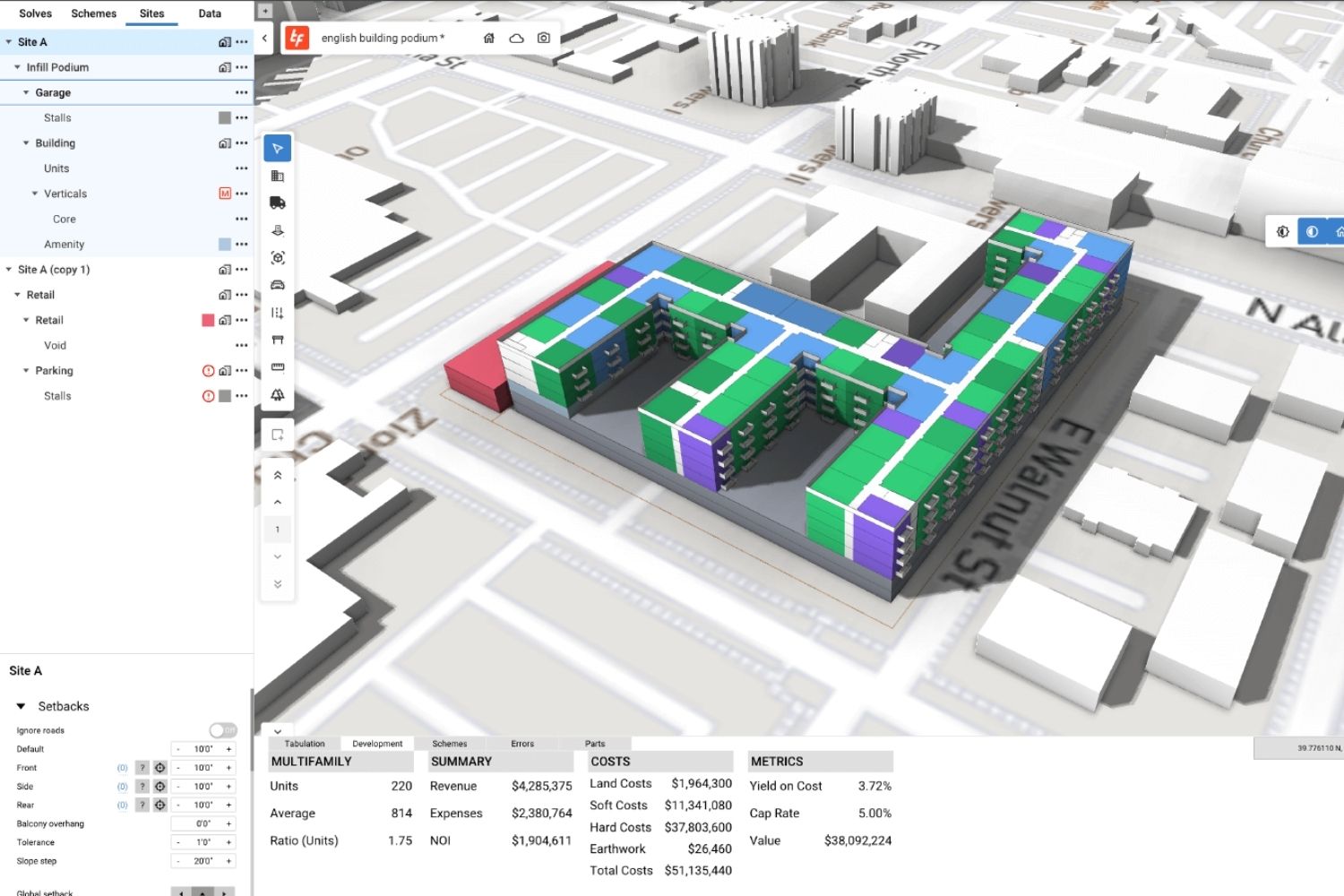
Table of Contents Show
TestFit is an AI-powered real estate feasibility platform that automates site planning, parking layout, unit mix optimization, and cost estimation for architects, developers, and urban planners. Founded in Dallas in 2016, the software generates thousands of buildable design options in seconds by combining parametric configurators with generative design, cutting first-pass feasibility studies that used to take weeks down to minutes. This TestFit review covers its core tools, pricing, user feedback and limitations.

What Is TestFit and How Does It Work?
TestFit started as a tool to solve a specific, painful problem: manually laying out apartment units and parking lots took experienced architects entire nights, and developers were paying thousands of dollars for studies that often led nowhere. Co-founders Clifton Harness, a licensed architect, and Ryan Griege built the software to put that automation directly into practitioners’ hands. It sits alongside a growing category of AI tools for architects that are reshaping early-stage design and decision-making.
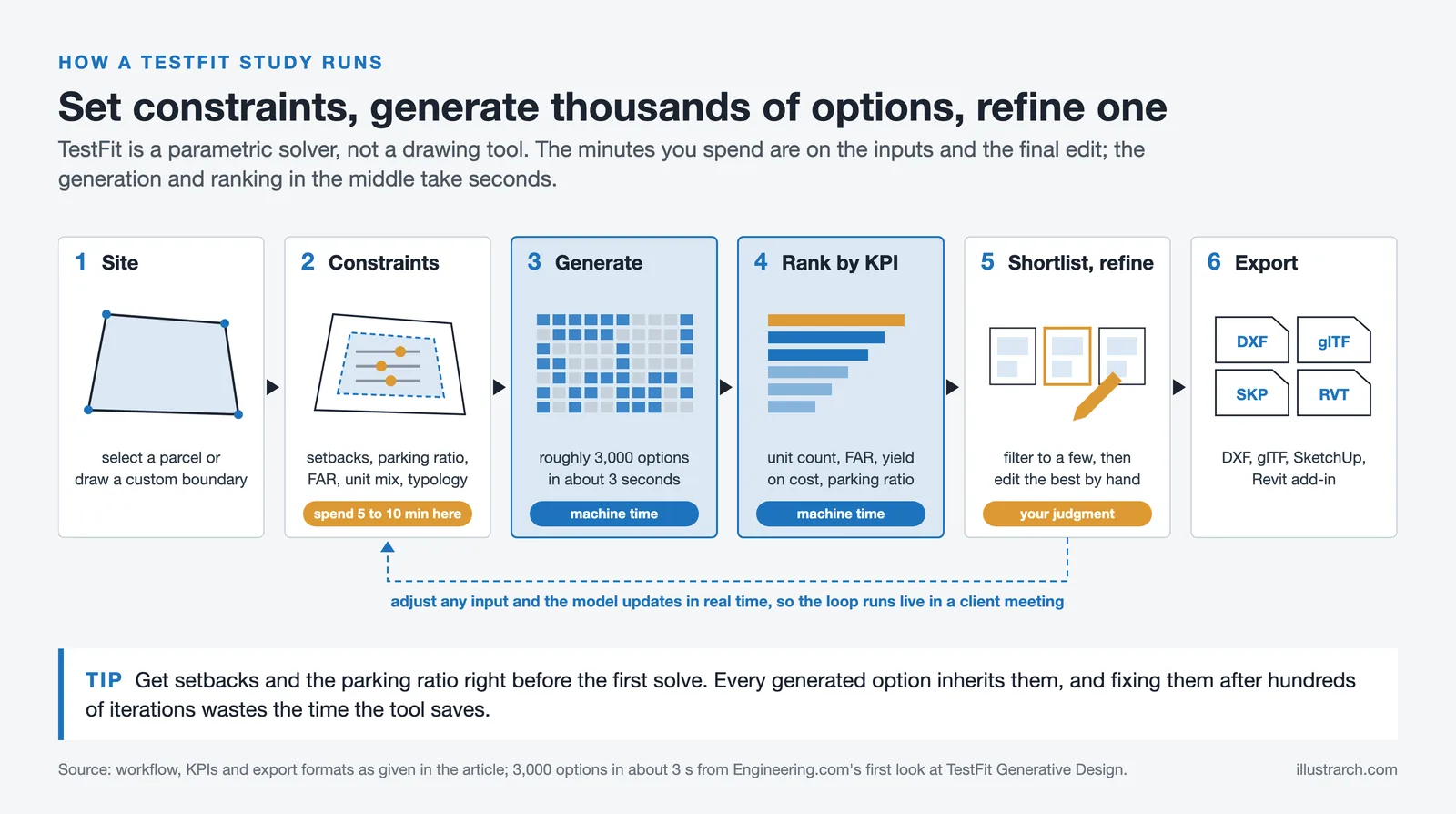
At its core, TestFit uses a proprietary parametric algorithm rather than pure machine learning. You define the site boundary by selecting a parcel or drawing a custom shape, then set parameters like zoning setbacks, parking ratios, FAR targets, unit mix, and building typology. The engine instantly generates a fully resolved site plan, complete with unit counts, parking layouts, circulation, and basic financial data. Adjust any input and the model updates in real time.
That real-time feedback loop is what separates TestFit from traditional feasibility workflows. Instead of waiting for a redline or a revised SketchUp model, you can sit with a client or an elected official and explore options live. As one urban planner described it, what used to take a full day in SketchUp now takes 15 minutes in a public meeting. For context on where tools like this fit within the broader site analysis and urban planning software landscape, the range of options has expanded considerably in recent years.
💡 Pro Tip
When you first open a new site in TestFit, resist the urge to immediately run the AI solve. Spend 5-10 minutes setting accurate zoning setbacks and a realistic parking ratio first. The quality of the generated layout depends almost entirely on the quality of those initial constraints, and fixing them after hundreds of iterations have been generated wastes the time you came here to save.

Core Products Inside the TestFit Platform
TestFit has grown from a single apartment-focused tool into a multi-product platform. Understanding which product you actually need is important before evaluating pricing.
Site Solver
Site Solver is TestFit’s flagship product and the one most architects and developers encounter first. It handles multifamily housing, podium buildings, garden-style apartments, townhomes, mixed-use developments, and increasingly, industrial and data center typologies. The generative design feature, introduced in 2024, generates roughly 3,000 design variations in about three seconds on standard hardware, then ranks them by user-defined KPIs such as unit count, FAR, yield on cost, or parking ratio. You filter down to a shortlist, then manually refine the preferred option.
Site Solver also handles cut and fill calculations, earthwork cost estimation, and automatic quantity takeoffs covering square footage, unit count, and parking stall counts. These outputs feed directly into a pro forma, so teams can validate whether a deal makes financial sense before any detailed design work begins. The platform also integrates with BIM tools like Revit, AutoCAD, and SketchUp via export formats including DXF, glTF, and native add-ins.

Urban Planner
Urban Planner, launched in 2024, targets large-scale massing studies and master planning rather than individual building feasibility. It includes automated massing tools, customizable road networks, zoning setback automation, and 3D topography data. It is priced significantly lower than Site Solver and is aimed at city planners, urban designers, and early-stage developers who need to evaluate land at the neighborhood or district scale before committing to a specific program. A deeper look at how these massing tools integrate into broader urban planning and mapping workflows is useful context for understanding where Urban Planner fits in a typical team’s toolkit.
Data Maps
Data Maps overlays contextual intelligence directly onto the site model. Layers include FEMA flood zones, wetlands data, ESRI satellite imagery, zoning color maps, soil data, utility locations, and power plant proximity (useful for data center feasibility). Rather than pulling this information from multiple external sources and manually reconciling it, teams can assess site risk and opportunity from a single workspace.
🔢 Quick Numbers
- 7,700+ users evaluate over 3,200 deals in TestFit every week (TestFit, 2024)
- Customers report producing 2-3x more design iterations within the same budget (TestFit ROI Report, 2024)
- 96% of customers agreed TestFit improved their internal and external stakeholder communication (TestFit ROI Report, 2024)
- Site planning that previously took a week can reach a 10-15% margin of error result in 30-60 minutes (TestFit user testimonials, 2024)

TestFit Review: What Users Actually Say
Across Capterra, Software Advice, and direct user accounts, TestFit earns consistent praise for the same things: speed during early-stage feasibility, the ability to run studies live with clients, and the time savings compared to manual SketchUp or spreadsheet workflows. One architecture firm reported winning over $750,000 in project fees by marketing TestFit as a competitive advantage. Another documented saving over $200,000 in labor hours across their portfolio.
For AI-assisted concept design at the pre-design stage, the platform has few direct competitors at the same level of specificity. Where tools like Autodesk Forma focus on environmental analysis (sun, wind, noise), TestFit focuses on financial and yield optimization. They serve different purposes and, in practice, are often used together in the same workflow.
The criticisms cluster around a few consistent areas. Manual mode is genuinely difficult to use, particularly when trying to input precise measurements for building footprints. The software can struggle with small, irregularly shaped urban lots. There have historically been occasional crashes and bugs, though users note these have become less frequent with recent updates. And because TestFit optimizes for yield and financial performance, it does not make aesthetic judgments. The design output is a starting point, not a finished scheme.
⚠️ Common Mistake to Avoid
Many first-time TestFit users treat the AI-generated output as a near-final site plan and present it to clients without editing. The generated layout is optimized for yield and code compliance, not for design quality or buildability nuance. The correct workflow is to use the generated solve as a quantified starting point, then manually refine it using your professional judgment before any client presentation. The real value is in the numbers it produces, not the geometry itself.
TestFit Pricing: How Much Does It Cost?
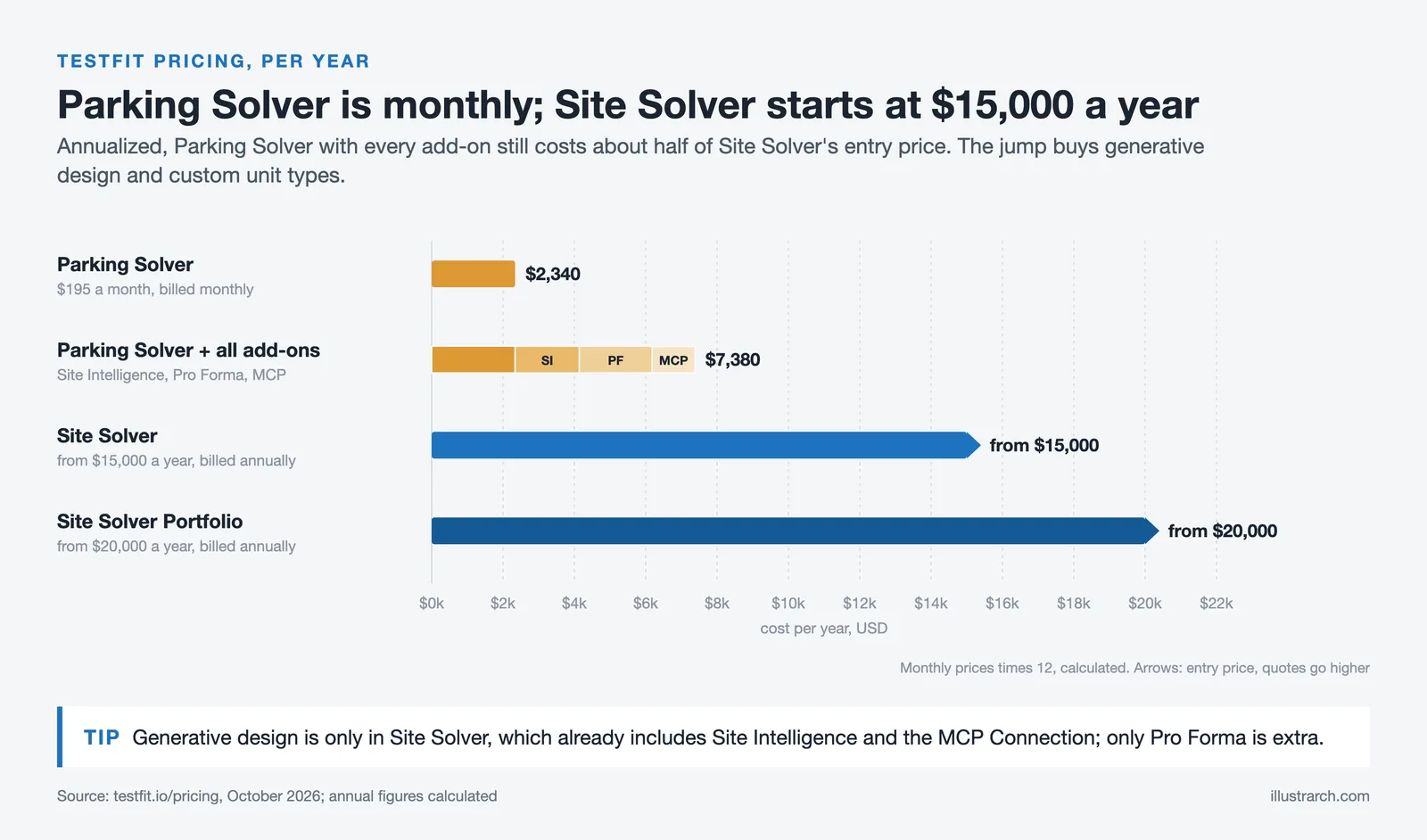
TestFit uses a tiered subscription model with products priced separately. As of October 2026, TestFit’s pricing page lists Parking Solver at $195 per month billed monthly, Site Solver from $15,000 per year billed annually and Site Solver Portfolio from $20,000 per year, with add-ons such as Site Intelligence (+$150/month), Pro Forma (+$170/month) and MCP Connection (+$100/month).
| Plan | Price | What it covers |
|---|---|---|
| Parking Solver | $195/month, billed monthly | Parking automation, 2D and 3D massing, custom stalls and drive aisles, Yield Estimator, unlimited users |
| Site Solver | From $15,000/year, billed annually | Everything in Parking Solver plus high-detail building presets, generative design, custom unit types, dedicated onboarding, with Site Intelligence and MCP Connection included |
| Site Solver Portfolio | From $20,000/year, billed annually | Everything in Site Solver plus volume pricing, enterprise SSO, quarterly business reviews |
| Add-ons | Site Intelligence +$150/mo · Pro Forma +$170/mo · MCP Connection +$100/mo | Priced separately on applicable plans |
The structure tells you who the product is for. Parking Solver is a monthly tool an individual can justify; Site Solver is an annual contract aimed at developers and firms running feasibility repeatedly. TestFit is not a tool you buy to test one site.
For architects and students, Parking Solver, billed monthly, is now the far cheaper entry point compared with Site Solver. The company notes that educational access is sometimes available through professors. For those just getting started with the platform, building a focused learning path before diving in helps considerably. The cost model is built around the assumption that for developers and larger architecture firms, the time saved on a single feasibility study more than justifies the annual subscription. A 65-acre mixed-use site plan completed in 3-4 hours instead of a week of revisions is the economic argument TestFit makes repeatedly in its own case studies, and the numbers hold up for teams doing high volumes of pre-design work.
⚖️ Pros & Cons at a Glance
✔️ Pros: Real-time generative design with thousands of options in seconds, strong financial and yield modeling, integrates with Revit/SketchUp/AutoCAD, active product development with regular updates, works live in client meetings
✖️ Cons: Site Solver pricing is high for smaller firms and solo practitioners, manual mode is difficult for precise control, struggles with small irregular urban lots, no open API (AI assistant access comes through the MCP Connection add-on), aesthetic output requires significant human refinement

Who Should Use TestFit?
TestFit is most clearly suited to real estate developers doing high volumes of site acquisition and feasibility work, architecture firms that regularly handle pre-design studies for developer clients, and contractors who need early cost intelligence before committing to a bid. The software also has a genuine use case for urban planners working on zoning studies or master plans who need to visualize density scenarios quantitatively during public stakeholder processes.
It is less suited to individual architecture students, small boutique firms that do only a few feasibility studies per year, and practices focused on bespoke or small-scale projects where lot irregularity is common. For those situations, the cost-benefit ratio of the Site Solver tier is difficult to justify, and tools like Autodesk Forma or manual SketchUp workflows remain practical alternatives.
It is also worth noting that TestFit and Forma are not really competitors in the traditional sense. Forma excels at environmental performance analysis. TestFit excels at financial and yield optimization. Firms doing serious pre-design work often use both, with TestFit generating the program and Forma validating the environmental performance of the preferred scheme. The two tools frequently appear together in recommended stacks for architecture practices that work regularly on developer-led projects.
🎓 Expert Insight
“TestFit is on the leading edge of utilizing AI to test out site options so we can get to the right solution faster. Being able to have that generative design process to eliminate labor hours and leveraging software to help get us to the best solution for our clients faster is amazing.” Senior Project Manager quoted in TestFit customer case study
This reflects a pattern seen across user reviews: the tool’s value is primarily measured in labor hours recovered and deals evaluated that otherwise would have been passed over entirely due to the cost of studying them manually.

How TestFit Fits Into the Broader Architecture Software Ecosystem
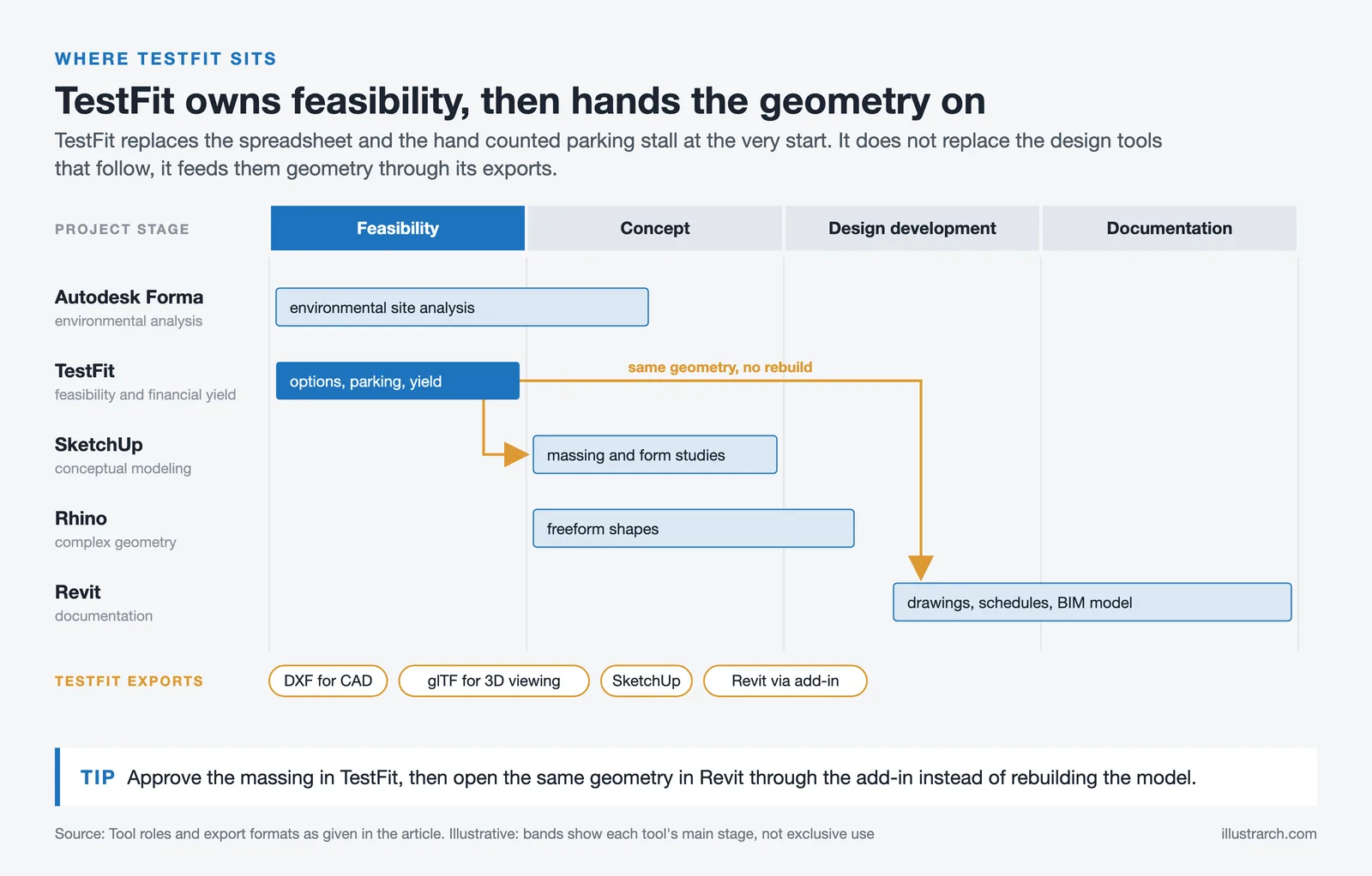
TestFit sits at the pre-design and feasibility end of the project lifecycle. It is not a design tool in the traditional sense. It does not replace Revit for documentation, SketchUp for conceptual modeling, or Rhino for complex geometry. What it replaces is the spreadsheet, the hand-counted parking stall, and the one-or-two-option feasibility package that used to require days of an architect’s time. For teams unfamiliar with how the main architecture software tools fit together, understanding that positioning helps set realistic expectations.
The platform exports to DXF for CAD, glTF for 3D viewing, SketchUp, and Revit via a dedicated add-in. This means the geometry generated in TestFit can flow directly into the next phase of design rather than requiring a rebuild. That continuity matters in practice: teams can approve a massing concept in TestFit, then open the same geometry in Revit to begin documentation without starting the model from scratch.
The broader context here is that the market for computational feasibility tools has grown substantially since 2020. As AEC Magazine has noted, TestFit’s desktop-based real-time engine and its decade of iteration with developer clients give it a depth that newer entrants are still working to match. Startups like Maket.ai and Arcol approach the problem from different angles, and Autodesk’s Forma covers adjacent environmental analysis territory. But TestFit’s focus on financial performance data remains its clearest differentiator in a crowded field.
💡 Pro Tip
If you work at an architecture firm that handles developer clients, schedule a TestFit demo focused specifically on a real site from your recent portfolio rather than using the platform’s sample sites. The time difference between your current process and the TestFit workflow becomes immediately visible and makes the business case for the subscription far easier to communicate internally to firm leadership.
✅ Key Takeaways
- TestFit is a parametric site planning platform, not a pure AI system. It uses constraint-based generative design to produce thousands of feasibility options in seconds, which practitioners then filter and refine manually.
- The platform has three main products: Site Solver (detailed building feasibility), Urban Planner (large-scale massing), and Data Maps (site context and risk data). Each is priced and sold separately.
- Real user data consistently shows 2-4x faster feasibility timelines and significant cost savings in labor hours, making it financially viable for firms doing regular pre-design work for developers.
- The primary limitations are the high Site Solver price for smaller firms, difficulty in manual precision mode, and weak performance on small irregular urban lots.
- TestFit works best as part of a larger software stack alongside tools like Revit, SketchUp, and Autodesk Forma rather than as a standalone replacement for any of them.
TestFit is worth trialing through the monthly Parking Solver plan or requesting a demo for Site Solver before committing to an annual subscription. The learning curve is relatively gentle for the generative workflow; the bigger adjustment is conceptual, shifting from designing a single option to evaluating hundreds of options simultaneously and then narrowing down. That shift in approach is where most of the time savings actually come from.
Pricing details and a free demo are available at testfit.io.
Pricing figures referenced in this article are based on publicly available information and are subject to change. Contact TestFit directly for current enterprise and multi-seat pricing.
TestFit Alternatives
| Tool | Entry price | Best for | Trade-off |
|---|---|---|---|
| Snaptrude | Free tier, then $60/month | Concept BIM with Revit export | Not a feasibility solver. Different problem. |
| Autodesk Forma | Included in the AEC Collection | Environmental analysis at massing stage | Analysis rather than yield optimisation. |
| Hypar | Free tier available | Rule-based generative building systems | Requires more setup; less turnkey. |
| Rhino + Grasshopper | Perpetual licence | Building your own yield logic | No presets. You write the rules yourself. |
The honest comparison: nothing on this list does what TestFit does at the same speed. The alternatives are cheaper because they solve adjacent problems, not the same one.






Notion Alternatives for Architects: 7 Tools That Fit Studio Work
Notion works until a studio needs fee tracking, phase budgets and timesheets....
 Furkan Sen7 Mins read

Why Every Practice Ends Up With Five Versions of the Same Revit Family
Let’s learn why Revit family libraries accumulate duplicates, break schedules and slow...
 illustrarch Editoral Team5 Mins read

Visualizing Renovation Projects From Photographs: A Workflow for Existing-Building Work
Photo-based visualization turns a photograph of a building that already exists into...
illustrarch Editoral Team7 Mins read

Best Free CAD Blocks and Resources for Architects
A working guide to free CAD blocks for architects, covering ARCAT, CAD-Blocks.net,...
Furkan Sen7 Mins read


Leave a comment