

ArchiCAD Alternatives: 7 Best Software Tools for Architects in 2026
Looking for an ArchiCAD alternative that fits your budget, operating system, and project type? This guide compares seven of the most practical options available in 2026, covering BIM platforms, hybrid CAD tools, and free open-source solutions with pricing and workflow notes for each.
 Sinan Ozen25 March 202610 Mins read300

Table of Contents Show
ArchiCAD alternatives range from full BIM platforms like Revit and Vectorworks Architect to free open-source tools like FreeCAD and BlenderBIM. The best option depends on your project type, team size, operating system, and budget. This guide covers seven tested alternatives with pricing, workflow notes, and honest trade-offs to help you make the switch confidently.

Why Architects Look for an ArchiCAD Alternative
ArchiCAD is a mature, well-regarded BIM platform developed by Graphisoft. It launched in 1987, making it one of the earliest commercial BIM solutions ever built, and it has earned a loyal following particularly among smaller European and Australian practices. Its design-centric interface, native macOS support, and OpenBIM approach give it real advantages over competing platforms.
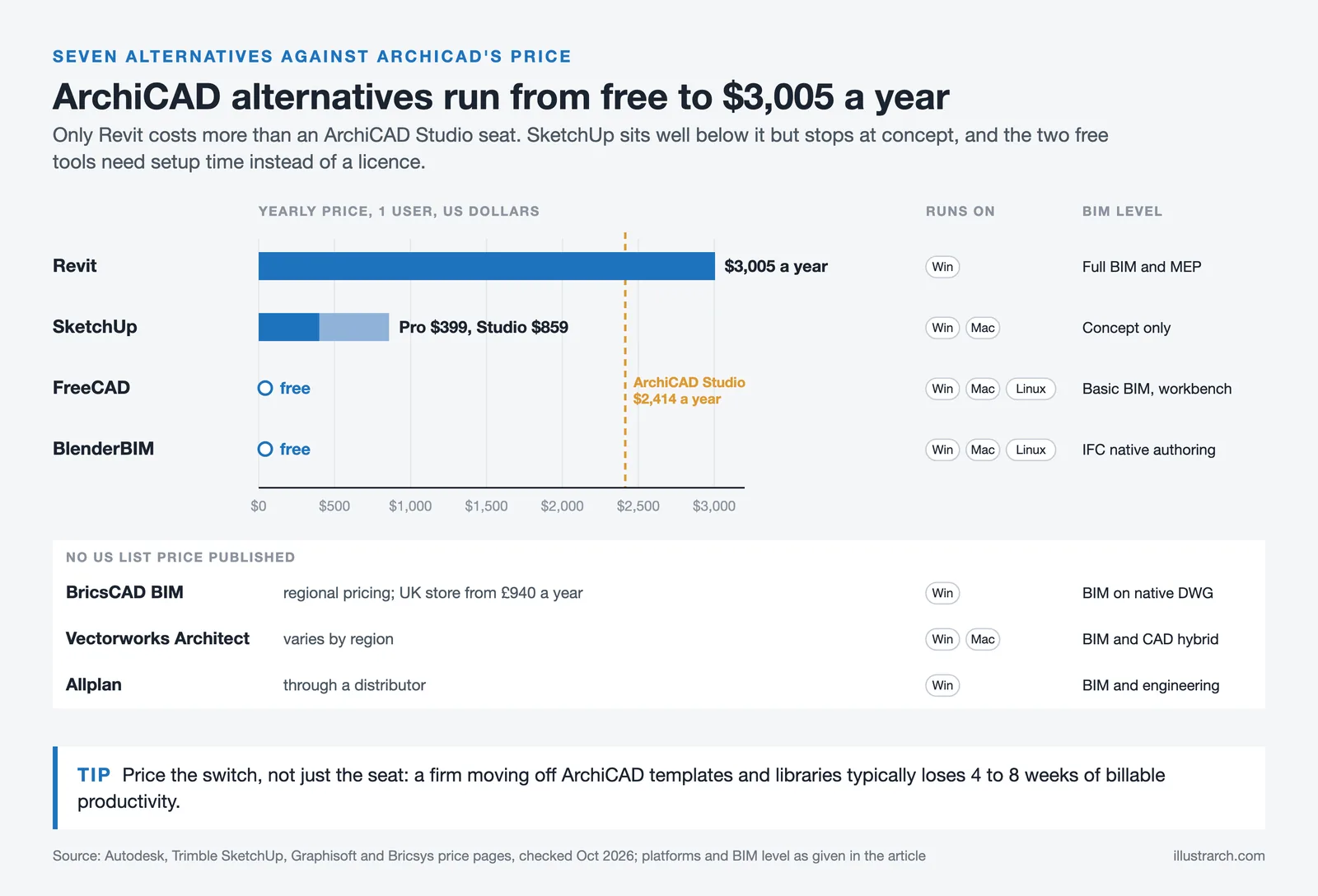
That said, there are legitimate reasons architects look for a free ArchiCAD alternative or a paid substitute. Subscription pricing has increased significantly in recent years, with ArchiCAD Studio listed at $2,414 per year (as of October 2026). Firms heavily embedded in the Autodesk ecosystem often find integration with Revit-based consultants to be a friction point. Others simply outgrow what the platform offers for large multi-discipline projects, or find that their specific workflow demands a different kind of tool.
💡 Pro Tip
Before switching away from ArchiCAD, identify exactly which part of your workflow is causing friction. Many practices switch platforms for documentation speed, then realize the bottleneck was actually template and library setup, not the software itself. Spending one week auditing your current workflow will save months of costly migration later.
The ArchiCAD alternatives market has never been stronger. Nemetschek Group (which owns Graphisoft) has competitors at every price tier. Autodesk dominates large commercial projects with Revit, while Vectorworks and BricsCAD compete on design flexibility and pricing. At the free end, BlenderBIM and FreeCAD now offer credible open-source routes into IFC-native authoring.

How to Choose the Right ArchiCAD Alternative
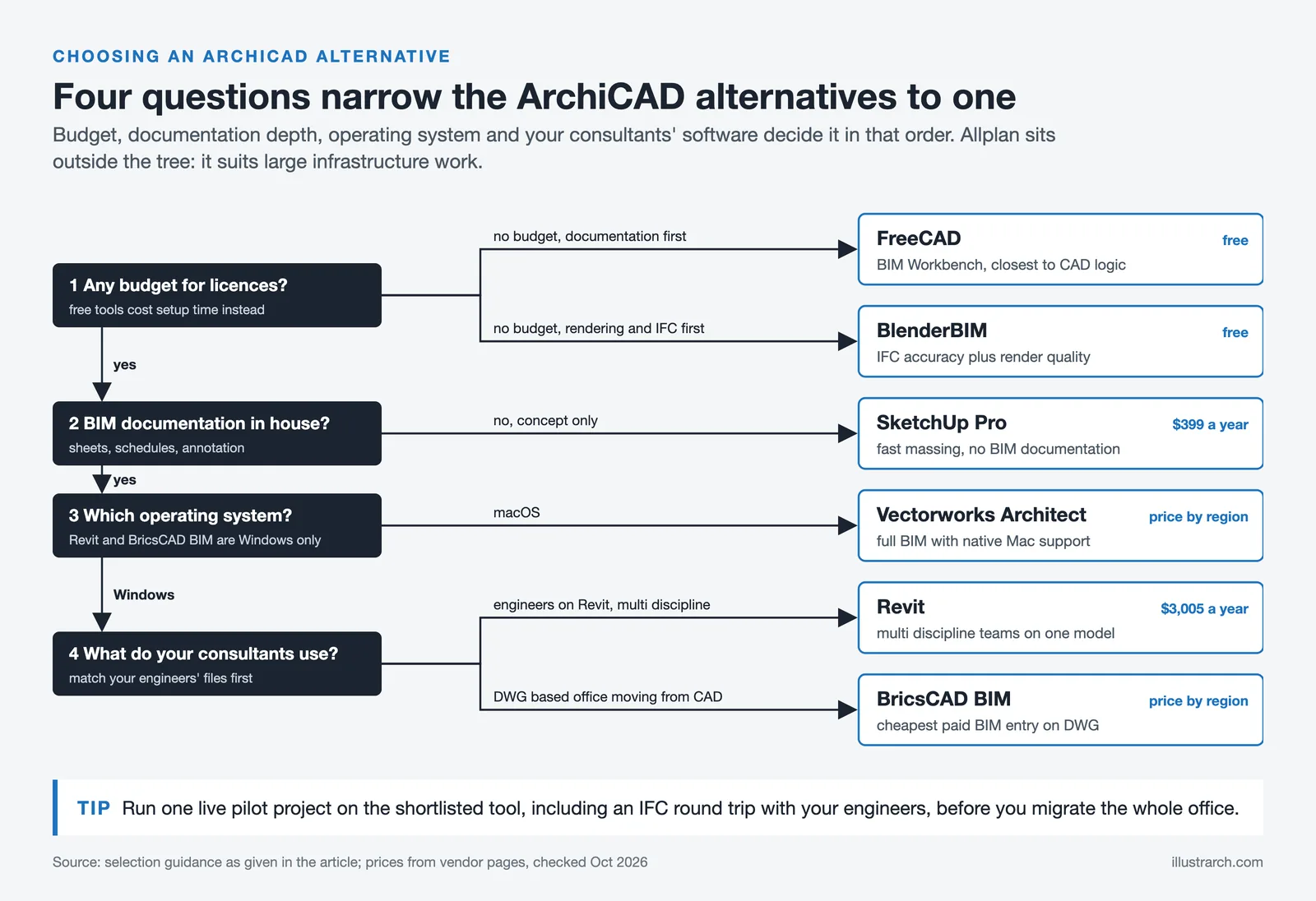
Before comparing specific tools, it helps to clarify three practical constraints. First, your operating system: Revit is Windows-only, which immediately rules it out for Mac-based studios. Vectorworks and ArchiCAD both run natively on macOS, and Blender and FreeCAD support Apple Silicon. Second, your documentation depth: if you produce full construction document sets in-house, you need a tool with robust sheet, schedule, and annotation capabilities. Third, your consultants’ software: if your engineers work in Revit, establishing a clean IFC export workflow matters more than any other single factor when selecting an alternative.
⚠️ Common Mistake to Avoid
Many architects evaluate alternatives based only on features, then discover the real cost is the transition period. A firm running on ArchiCAD templates, libraries, and trained staff will typically lose 4 to 8 weeks of billable productivity during any full platform switch. Factor that cost into your comparison, not just the annual subscription figure.
7 Best ArchiCAD Alternatives for Architects
1. Autodesk Revit
Revit is the most direct alternative to ArchiCAD in terms of BIM capability and market positioning. Developed by Autodesk and first released in 2000, it has become the dominant platform for multi-discipline projects in North America and much of Europe. For detailed context on how the two platforms compare, see our ArchiCAD vs Revit 2026 comparison.
Revit’s strength lies in its coordination tools. It includes dedicated toolsets for architecture, structural engineering, and MEP (mechanical, electrical, plumbing), and its parametric modeling ensures that changes in a floor plan update automatically across all sections, elevations, and schedules. For large commercial studios or firms handling full multi-discipline projects in-house, that depth of integration is hard to match.
The trade-offs are real. Revit is Windows-only, expensive (approximately $3,005 per year for a standalone subscription as of October 2026), and carries a steeper learning curve than ArchiCAD. For architects transitioning from ArchiCAD’s design-centric workspace, Revit’s engineering-forward interface can feel constraining during early design phases. Small to mid-size architecture-only practices often find ArchiCAD or Vectorworks a better fit.
Pricing: approximately $3,005/year (as of October 2026). Platform: Windows only. Best for: large firms, multi-discipline projects, North American market.

2. Vectorworks Architect
Vectorworks Architect is one of the strongest archicad alternatives for design-led practices, particularly those on Mac. Part of the Nemetschek Group (the same parent company as Graphisoft), it has served architects since 1985 and now counts over 685,000 users globally across architecture, landscape, and entertainment design.
Where Vectorworks consistently outperforms competitors is drawing quality. Architects who care about the visual appearance of construction documents praise its graphic control. Custom fonts, drop shadows, gradients, and line weights all render beautifully, producing sheet output that feels more like a crafted architectural drawing than a technical printout. For firms that present directly to clients or publish their work, this matters.
Vectorworks also runs natively on both Mac and Windows, supports IFC export for OpenBIM coordination, and integrates with Rhino, SketchUp, Cinema4D, and Photoshop. Its hybrid CAD-plus-BIM approach lets firms transition from 2D to BIM at their own pace without abandoning existing drafting workflows. For students, free educational licenses are available through the official Vectorworks site.
Our Vectorworks overview for design students covers the key reasons it works as an entry-level and professional platform simultaneously.
Pricing: subscription and perpetual license options, varies by region. Platform: Mac and Windows. Best for: design-led studios, landscape architects, Mac users.
🎓 Expert Insight
“Having used both Revit and ArchiCAD (and Architrion) ‘in anger’ for many years I chose Vectorworks for my own practice as it includes many of the ‘modules’ missing from Revit and is more cost effective than both and works on the Apple OS, the most important aspect.”
John Kellett, reader comment on First In Architecture’s Revit vs Archicad article, September 2023
This reflects a pattern common among smaller independent practices: once freed from the project constraints that demand Revit compatibility, many architects find Vectorworks handles the full lifecycle from concept to construction documents without the overhead of the larger platforms.
3. BricsCAD BIM
BricsCAD BIM is a strong archicad alternative for firms with deep roots in AutoCAD workflows. It works natively in DWG format, meaning existing libraries, details, and templates carry over without conversion friction. Its AI-powered tools, including BIMIFY for automatic element classification, automate a significant portion of the model-setup work that slows teams down in other platforms.
For practices transitioning from 2D CAD to BIM, BricsCAD offers the gentlest on-ramp in the market. You keep the drafting logic and keyboard shortcuts you already know while adding walls, slabs, and intelligent BIM data progressively. IFC support is solid, and pricing varies by region (the UK store lists it from £940 per year), making it the most affordable full-capability BIM platform on this list.
The main limitation is platform: BIM modules are Windows-only, which blocks Mac-based studios from using it as a full replacement. The user community is also smaller than Revit or ArchiCAD, which affects the availability of training resources and third-party content.
Pricing: varies by region (UK store from £940/year). Platform: Windows (BIM module). Best for: DWG-centric offices shifting to BIM, budget-conscious practices.

4. Allplan
Allplan is a BIM solution built for large, multi-disciplinary infrastructure and commercial projects. Part of the Nemetschek Group alongside ArchiCAD and Vectorworks, it is particularly strong in German, Austrian, and Swiss markets, where detailed engineering documentation and structural coordination are central to project delivery.
Its 2025 release introduced AI-powered visualization tools, an improved Python API for custom workflows, and enhanced multilayer modeling for complex facades and structural systems. For campus, healthcare, or infrastructure projects that demand robust scheduling and discipline coordination, Allplan is a credible option that ArchiCAD users can evaluate without leaving the Nemetschek ecosystem.
The learning curve is steeper than ArchiCAD or Vectorworks, and the interface is less polished for pure architectural design work. Pricing is available through Nemetschek’s distributor network; direct contact is required for current quotes.
Platform: Windows (BIM modules). Best for: large infrastructure projects, engineering-heavy work, European market practices.
5. SketchUp Pro
SketchUp is not a BIM tool, but it remains one of the most widely used archicad alternative options for conceptual and early-stage design work. Its push-pull modeling interface makes 3D exploration faster than almost any other platform, and the 3D Warehouse provides a massive library of pre-built components for rapid massing and layout studies.
SketchUp Pro at $399/year (Studio at $859/year, as of October 2026) gives access to LayOut for 2D documentation, Sefaira for energy analysis, and Trimble’s Revit interoperability. For smaller residential projects or firms that pair SketchUp with a dedicated BIM tool for documentation, this combination covers the full design workflow at a competitive price point.
The honest limitation: for anything requiring construction documentation, scheduling, or BIM data exchange with consultants, SketchUp needs to be paired with other software. It works well as the front end of a two-tool workflow but not as a standalone ArchiCAD replacement for complete projects. Our ArchiCAD vs SketchUp comparison covers these trade-offs in detail.
Pricing: $399/year (Pro), $859/year (Studio), as of October 2026. Platform: Mac and Windows. Best for: concept design, small firms, residential projects.

6. FreeCAD (with BIM Workbench)
FreeCAD is the strongest free ArchiCAD alternative for budget-constrained practices and students who need parametric modeling without a subscription. Its BIM Workbench (formerly Arch Workbench) provides wall, floor, roof, door, window, and stair objects that carry IFC data, enabling basic OpenBIM coordination with other platforms.
FreeCAD runs on Windows, macOS, and Linux, and its Python API gives technically comfortable users extensive customization options. The active open-source community continues to expand features relevant to architectural design, and the software has no vendor lock-in or ongoing licensing cost.
The limitations are real: the interface requires patience to learn, documentation generation is not as polished as commercial rivals, and the software does not match the production speed of ArchiCAD for full construction document sets. For students and early-career architects building skills without a firm budget behind them, it provides a credible entry point. For full professional production, most practices will hit its ceiling. The FreeCAD project site documents the current feature set and development roadmap.
Pricing: free and open source. Platform: Windows, macOS, Linux. Best for: students, budget-constrained practices, open-source advocates.
7. BlenderBIM (Bonsai BIM Add-on)
BlenderBIM (now officially the Bonsai add-on) transforms Blender, the powerful open-source 3D creation suite, into a native IFC authoring environment. Unlike most BIM tools that export to IFC as a secondary format, BlenderBIM works directly on the IFC file. Every edit is a direct modification to the IFC data, which eliminates translation errors and ensures the model you author is the model consultants receive.
Blender itself has world-class rendering engines (Cycles and EEVEE), Geometry Nodes for parametric modeling, and an enormous community producing free assets and tutorials. For visualization-heavy practices or tech-savvy studios doing research-led work, combining BlenderBIM with Blender’s rendering capabilities creates a genuinely powerful pipeline at zero software cost.
The honest constraint: this combination requires significant technical investment to set up productively. Blender’s interface is designed for 3D generalists, not architects, and adapting it to a construction-documentation workflow demands custom templates, training, and likely a dedicated technical resource in the firm. It is not a plug-and-play ArchiCAD replacement, but for the right practice it offers capabilities no commercial platform can match at any price.
Pricing: free and open source. Platform: Windows, macOS, Linux. Best for: tech-savvy studios, visualization specialists, IFC-native workflows.
💡 Pro Tip
When evaluating any archicad alternative, run a pilot project before committing to a full migration. Choose a completed project you know well, rebuild it in the candidate software, and time every phase from template setup to sheet output. Real production time tells you far more than any feature comparison chart.

ArchiCAD Alternatives Comparison Table
The following table summarizes key specs across all seven alternatives to help you narrow down your shortlist based on price, platform, and project fit.
Side-by-Side Comparison: ArchiCAD Alternatives
| Software | Approx. Price | Platform | BIM Capable | Best For |
|---|---|---|---|---|
| Revit | ~$3,005/yr | Windows only | Full BIM + MEP | Large multi-discipline firms |
| Vectorworks Architect | Varies by region | Mac + Windows | BIM + CAD hybrid | Design-led studios, Mac users |
| BricsCAD BIM | Varies by region | Windows (BIM) | BIM + DWG native | CAD-to-BIM transitions |
| SketchUp Pro | $399 to $859/yr | Mac + Windows | Concept only | Small firms, residential |
| Allplan | Contact distributor | Windows (BIM) | Full BIM + engineering | Large infrastructure projects |
| FreeCAD | Free | Win / Mac / Linux | Basic BIM via workbench | Students, open-source users |
| BlenderBIM | Free | Win / Mac / Linux | IFC-native authoring | Tech-savvy studios, visualization |
📌 Did You Know?
Two of the seven tools on this list (Vectorworks and Allplan) are owned by the Nemetschek Group, which also owns ArchiCAD developer Graphisoft. It is a German AEC software conglomerate founded in 1963. Together, these brands account for a significant portion of the global BIM market outside the Autodesk ecosystem, and their shared ownership means interoperability between them is generally better than with Autodesk products.
What Is the Best Free ArchiCAD Alternative?
If budget is the primary constraint, FreeCAD and BlenderBIM are the two most credible free archicad alternatives in 2026. FreeCAD is the better choice for practices that need to produce standard architectural documentation: its BIM Workbench handles walls, roofs, and IFC export in a workflow that is closer to conventional CAD logic. BlenderBIM is the better choice for practices where rendering quality and IFC accuracy are both priorities, and where the team has the technical appetite to invest in setup and customization.
SketchUp’s free web-based version is worth mentioning for concept work, but it has no BIM capabilities and very limited documentation features, so it does not function as a production-ready ArchiCAD alternative freeware replacement for professional practice.
For software decisions at the student and early-career level, our guide to architectural design software and features covers how to build your toolkit progressively from free tools to professional platforms.

Which ArchiCAD Alternative Should You Choose?
The right answer depends on three questions: What is your operating system? What does your documentation workflow require? And who are your consultants using?
If you are on macOS and need full BIM, the practical choice is Vectorworks Architect. It is the only platform on this list that matches ArchiCAD’s Mac support with comparable BIM depth and significantly stronger drawing output. If you are on Windows in a multi-discipline environment, Revit is the natural destination despite its cost and learning curve. If your firm is DWG-based and wants the most affordable BIM entry point, BricsCAD BIM offers a logical transition path.
For practices exploring Revit as the primary alternative, our Revit alternatives guide covers eight platforms in detail with pricing, IFC interoperability notes, and a side-by-side comparison table. For SketchUp users considering a move to more capable tools, our SketchUp alternatives guide explains how each option compares across workflow stages.
✅ Key Takeaways
- The best ArchiCAD alternative depends on your OS, project type, and budget. There is no single right answer for all practices.
- Revit is the most capable direct replacement for large multi-discipline firms, but it is Windows-only and carries a steep learning curve.
- Vectorworks Architect is the strongest Mac-compatible alternative with comparable BIM depth and superior drawing quality.
- BricsCAD BIM offers the most affordable paid BIM entry point for DWG-centric offices transitioning from CAD.
- FreeCAD and BlenderBIM are credible free archicad alternatives, but both require significant setup investment before they match commercial platform productivity.
- Always run a pilot project on any candidate tool before committing to a full firm-wide migration.
For further reading on how these platforms compare in specific contexts, the Revit vs ArchiCAD comparison and the ArchiCAD vs SketchUp breakdown on illustrarch.com cover the two most common decision points architects face when evaluating their options.
Software pricing is approximate and subject to change. Always verify current pricing on official vendor websites before making purchasing decisions.






Notion Alternatives for Architects: 7 Tools That Fit Studio Work
Notion works until a studio needs fee tracking, phase budgets and timesheets....
 Furkan Sen7 Mins read

Why Every Practice Ends Up With Five Versions of the Same Revit Family
Let’s learn why Revit family libraries accumulate duplicates, break schedules and slow...
 illustrarch Editoral Team5 Mins read

Visualizing Renovation Projects From Photographs: A Workflow for Existing-Building Work
Photo-based visualization turns a photograph of a building that already exists into...
illustrarch Editoral Team7 Mins read

Best Free CAD Blocks and Resources for Architects
A working guide to free CAD blocks for architects, covering ARCAT, CAD-Blocks.net,...
Furkan Sen7 Mins read


Leave a comment