

Revit for Architecture Students: Free Download, Best Tutorials & Practical Tips
Revit for architecture students comes with a free Autodesk Education license, giving you access to the full professional version during your studies. This guide covers how to download it, the best free tutorial resources, key BIM concepts to master early, and practical workflow tips that carry directly into professional practice.
 Sinan Ozen3 April 202610 Mins read614

Table of Contents Show
Revit for architecture students is available completely free through Autodesk’s Education Community, giving you access to the full professional version for one year at a time, renewable while you remain eligible. This guide walks you through exactly how to get it, which tutorial resources are worth your time, and the practical BIM habits that will make you genuinely job-ready by the time you graduate. If you are still deciding which tools to prioritize alongside Revit, our overview of the best architectural software for students covers the full toolkit.

Is Revit Free for Architecture Students?
Yes, Autodesk Revit is free for students through the Autodesk Education Community. You get access to the same full-featured version used by professional firms, not a stripped-down student edition. The license is valid for one year and renewable as long as you remain enrolled.
To access autodesk revit free for students, you need:
- A valid educational email address (.edu or institutional equivalent)
- Proof of enrollment (most universities qualify automatically)
- An Autodesk account, which you create during registration
Once registered, you can download Revit from the Education portal alongside other Autodesk tools including AutoCAD, 3ds Max, and Fusion 360. The download includes the full Revit installer; there are no feature restrictions or watermarks on your output files.
⚠️ Common Mistake to Avoid
Many students download Revit LT, thinking it is the standard version. Revit LT is a scaled-back product with no collaboration tools, no MEP or structural worksets, and limited family editing. Always download the full Revit product from the Education portal, not Revit LT, to get everything your coursework and internships will require.

How to Download Autodesk Revit for Students: Step by Step
Getting revit software for students set up takes about 30 to 45 minutes once you have your credentials ready. Here is the process:
- Go to autodesk.com/education and click “Get started.”
- Create an Autodesk account using your institutional email address.
- Verify your student status (automated for most accredited universities).
- Search for “Revit” in the product catalog and select the current version.
- Download the installer and follow the standard installation steps.
- Activate with your Autodesk account login when prompted.
System requirements matter here. Revit is resource-intensive. For comfortable use, you want at minimum a modern multi-core processor (Intel Core i7 or equivalent), 16 GB RAM, and a dedicated GPU with at least 4 GB VRAM. Running it on 8 GB RAM is possible for small projects but you will hit slowdowns on anything complex. Once installed, pairing Revit with add-ins can extend what you can do significantly; see our list of the best Revit add-ins for architects for tools worth adding early.
💡 Pro Tip
When setting up Revit for the first time, change your save reminder interval to every 10 minutes under Options > General. Revit does not auto-save by default the way Word does, and it is possible to lose hours of work in a crash. Setting this early saves a lot of pain during deadline crunches.
Why Architecture Students Should Learn Revit Early
Revit architecture for students is not just about learning one more software tool. It is about learning to think in BIM terms, which changes how you approach the entire design process. When you model in Revit, walls carry material properties, structural logic, and cost data. Floors connect to levels that update automatically across all views. Every change you make in one drawing propagates across plans, sections, and elevations simultaneously. For a deeper look at what BIM fluency actually means in practice, our article on becoming a BIM expert covers the professional side of these skills.
This relational way of working is the standard in professional practice. According to the American Institute of Architects, BIM adoption among architecture firms has grown steadily, with Revit remaining the dominant platform for project documentation and collaboration. Students who arrive at a firm already comfortable in Revit skip weeks of onboarding time and can contribute to live projects much sooner.
🔢 Quick Numbers
- Revit is the most widely used BIM software globally, with dominant market share in North America, the UK, and parts of Asia (NBS Digital Construction Report, 2024)
- Architecture students who enter firms with Revit proficiency report an average onboarding advantage of 2 to 4 weeks compared to those who learn it on the job (Autodesk Education Survey, 2023)
- Over 685,000 professionals across architecture, engineering, and construction use Autodesk’s BIM tools on active projects (Autodesk, 2024)
Beyond employability, learning revit for architecture early in your studies lets you produce construction-ready documentation, coordination models, and parametric designs that simply are not possible in SketchUp or AutoCAD alone.

Best Free Revit Tutorials for Architecture Students
The quality of free Revit learning resources has improved dramatically in recent years. You do not need to pay for a course to build solid foundational skills. For a full list of channels that go beyond the beginner stage, our guide to the best YouTube channels for learning Revit covers intermediate and advanced resources as well. The following are the most effective starting points for revit for students at any level.
Balkan Architect (YouTube)
This is the most thorough free Revit tutorial channel available. The instructor, Milos Rankovic, is a practicing BIM manager who teaches both the mechanics of the software and the reasoning behind professional workflows. His beginner course on YouTube covers levels, grids, walls, roofs, stairs, and documentation within a real project context. With over 572,000 subscribers and nearly 1,000 tutorial videos, the channel has become the standard recommendation in architecture schools worldwide. You can find the channel at youtube.com/@balkanarchitect.
Autodesk’s Official Learning Paths
Autodesk provides structured learning paths through Autodesk Learn. The Revit Quick Start Guide is particularly useful for students because it introduces BIM concepts alongside the software interface, so you understand why you are doing each step, not just what to click. This matters more in Revit than in most software because the logic of families, levels, and views shapes everything else.
Lynda / LinkedIn Learning
If your university has a LinkedIn Learning subscription (many do), their Revit courses are well-produced and structured for sequential learning. The platform is especially good for students who prefer clear chapter organization over searching through individual YouTube videos.
🎓 Expert Insight
“Revit proficiency is no longer a benefit but a necessity in the industry today. What I love about Revit is that it makes you think in building element terms, which makes you a better architect.”
Milos Rankovic, BIM Manager and educator, Balkan Architect
This distinction matters for students. Learning Revit as a modeling tool misses half the point. The real skill is learning to think parametrically, where every object carries data and every design decision has downstream consequences across the entire model.

Key Revit Concepts Every Architecture Student Should Know
Before you spend hours on tutorials, it helps to understand the structural logic of Revit for architecture. These core concepts shape every workflow in the software.
Families
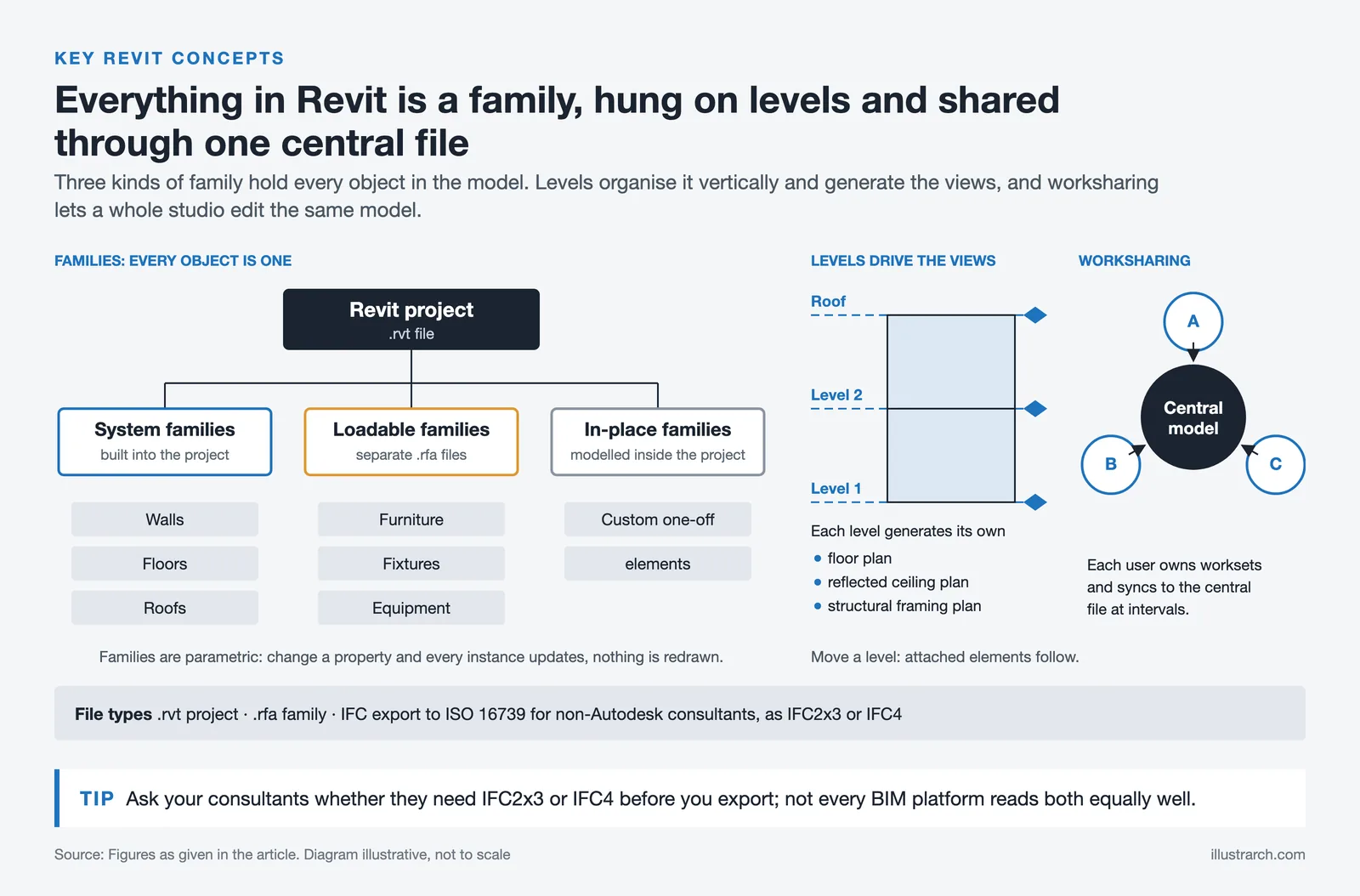
Everything in a Revit model, from a wall type to a door handle to a title block, is a family. Families are parametric objects with defined properties that you can modify without redrawing them. Understanding the difference between system families (walls, floors, roofs), loadable families (furniture, fixtures, equipment), and in-place families (custom one-off elements) is fundamental to working efficiently.
Levels and Views
Levels control the vertical organization of a building model. Floor plans, reflected ceiling plans, and structural framing plans are all derived from level-based views. When you change a level elevation, every element attached to that level updates automatically. This is the parametric logic that makes BIM different from standard 3D modeling.
Worksharing
On any project with more than one person, Revit’s worksharing system lets multiple users work on the same central model simultaneously. Each user owns specific elements or worksets and syncs changes to the central file at intervals. Students who understand this workflow are immediately useful on collaborative studio projects and internship work.
📐 Technical Note
Revit files use the .rvt format for project files and .rfa for family files. For collaboration with consultants using non-Autodesk software, Revit exports IFC (Industry Foundation Classes) files conforming to the ISO 16739 standard. When sharing models with structural or MEP engineers, always confirm which IFC version your consultants require (IFC2x3 or IFC4) before exporting, as not all BIM platforms handle both versions equally well.

Practical Tips for Learning Revit for Architecture Faster
The biggest time-wasters for students learning revit architecture are the same across the board: starting with an overly complex project, ignoring keyboard shortcuts, and not understanding why something works before trying to do it. The same efficiency principles apply across all architecture software; our article on how to learn architecture software faster covers strategies that apply directly to Revit and beyond.
Here are the habits that separate students who become genuinely fluent from those who spend a year struggling with basics:
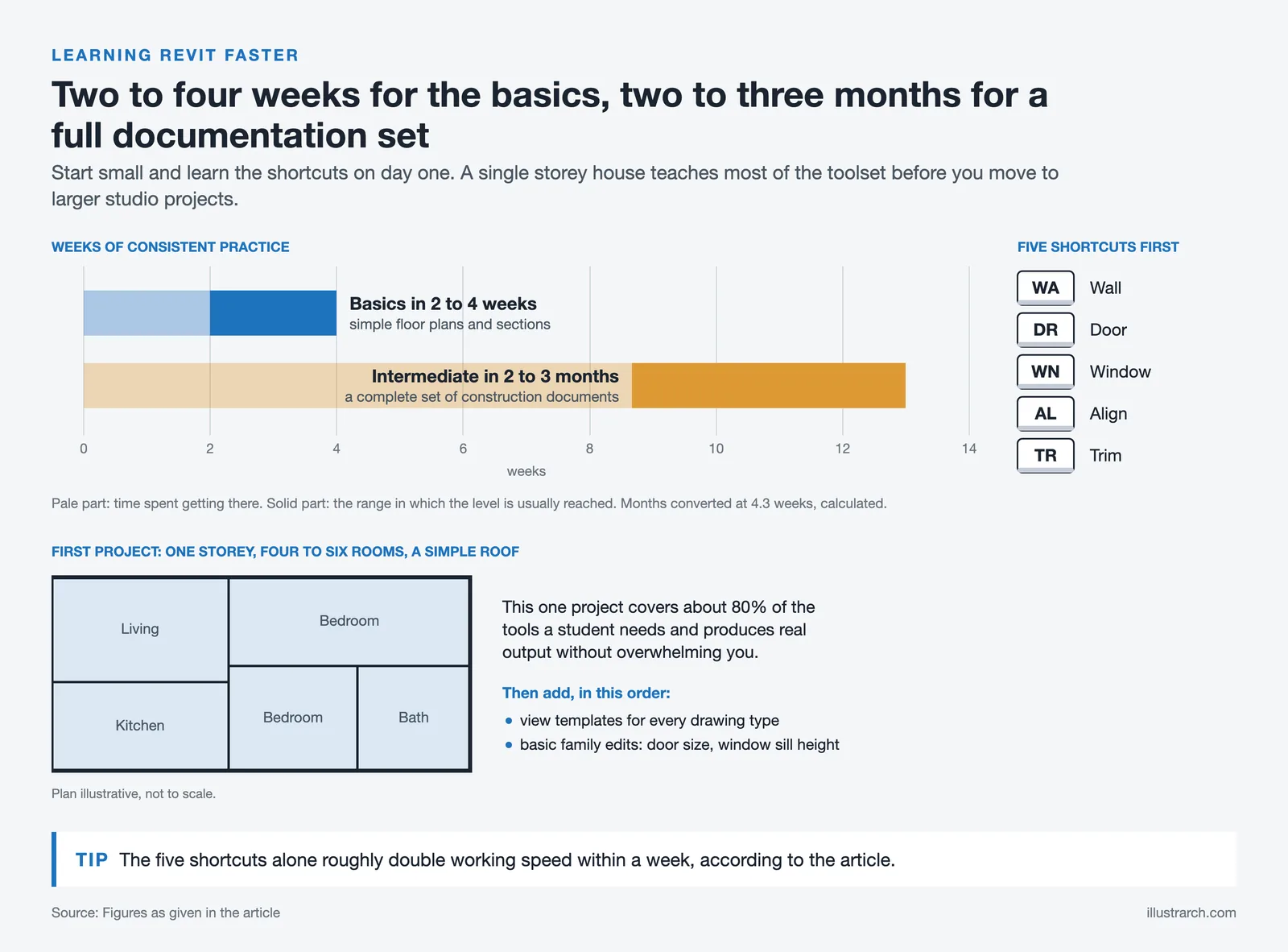
- Start with a single-story house. One floor, four to six rooms, a simple roof. This project covers 80% of the tools you need and produces real output without overwhelming you.
- Learn the most-used keyboard shortcuts immediately. “WA” for wall, “DR” for door, “WN” for window, “AL” for align, “TR” for trim. These five alone will double your working speed within a week.
- Set up view templates from the beginning. View templates control visibility, scale, and annotation settings for each drawing type. Starting without them leads to hours of manual adjustment later.
- Practice creating and editing families early. Most students avoid this and hit a wall later. Even basic family editing, like modifying a door size or a window sill height, saves significant time on real projects.
💡 Pro Tip
When you hit a problem in Revit, search the Autodesk Knowledge Network first before going to YouTube. For specific error messages, the Knowledge Network has direct answers, while YouTube tutorials are better for learning workflows. Combining both sources cuts troubleshooting time significantly on complex family and documentation issues.
How Revit Fits Into the Broader Architecture Student Toolkit
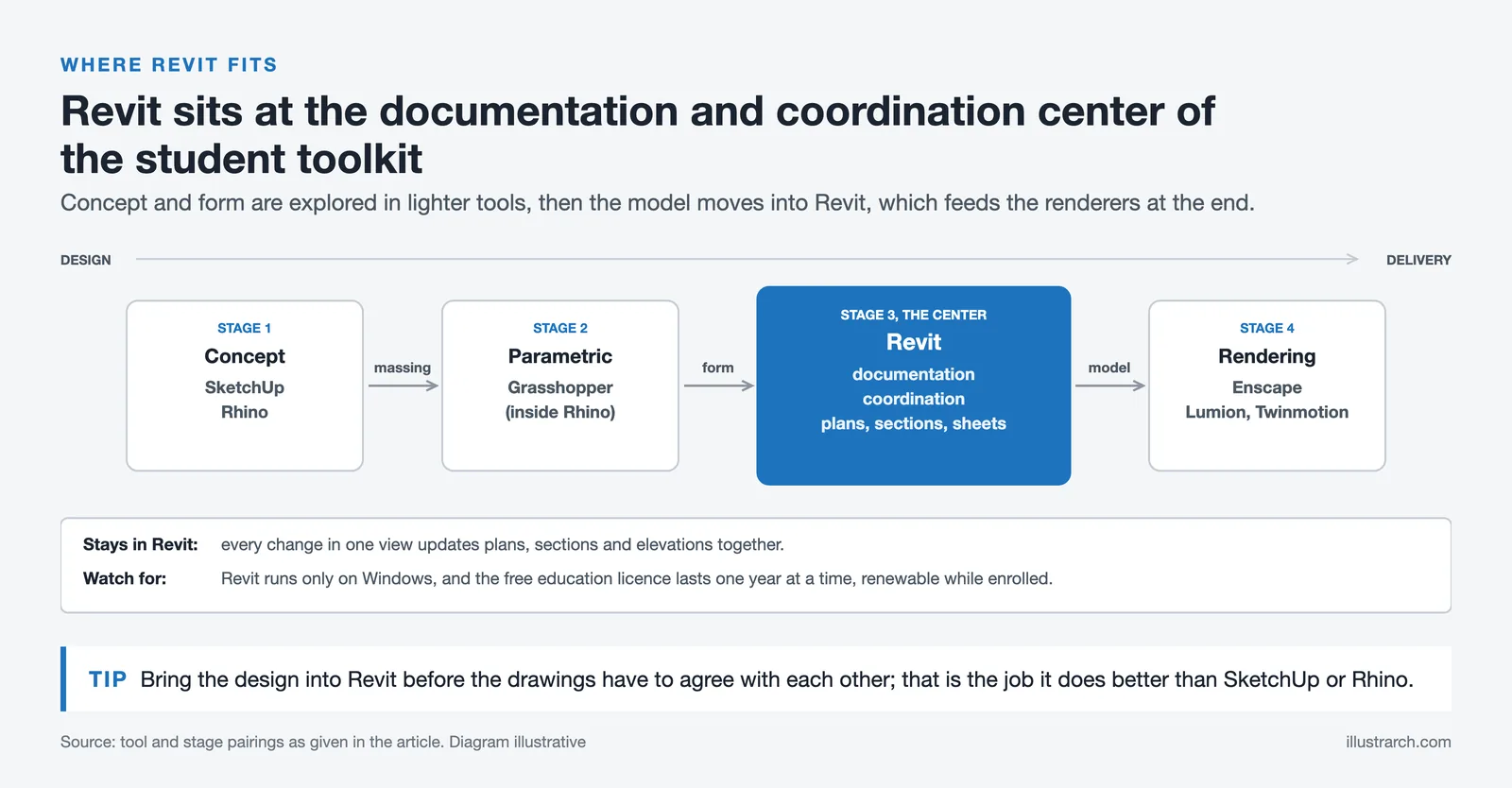
Revit does not replace every other tool. Architecture students typically work across multiple programs depending on the stage of the project. Conceptual design often happens in SketchUp or Rhino, parametric exploration in Grasshopper, and rendering in Enscape, Lumion, or Twinmotion. Revit sits at the documentation and coordination center of this ecosystem. For the detailed breakdown of how Revit compares to ArchiCAD on interface, pricing, and workflow, our Revit vs ArchiCAD comparison is worth reading before committing to either platform.
If your school has a limited budget or you want to practice outside of your student license window, our Revit alternatives guide covers FreeCAD, BricsCAD BIM, and other options with honest assessments of where they fall short.
✅ Key Takeaways
- Autodesk Revit is completely free for students through the Autodesk Education Community using a valid institutional email.
- Always download the full Revit product, not Revit LT, to get worksharing, MEP tools, and full family editing capability.
- Learning Revit early in your studies creates a significant advantage when entering professional practice, where BIM proficiency is expected rather than a bonus.
- The most effective free tutorial resource is the Balkan Architect YouTube channel, which covers both beginner and advanced workflows in a project-based format.
- Mastering core concepts like families, levels, and worksharing early gives you a framework that makes every subsequent tutorial faster to absorb.
Frequently Asked Questions About Revit for Architecture Students
Is Revit free for architecture students?
Yes. Autodesk provides free access to Revit and other professional software through the Autodesk Education Community. Students with a valid institutional email can download the full version at no cost for one year at a time, renewable annually while enrolled.
How long does it take to learn Revit as a student?
Basic proficiency for producing simple floor plans and sections typically takes two to four weeks of consistent practice. Reaching intermediate level, where you can produce a complete set of construction documents, usually takes two to three months. Advanced skills like custom family creation and parametric modeling take longer but develop naturally through project work.
What is the best way to start learning Revit with no experience?
Start with the Balkan Architect beginner course on YouTube and model a simple single-story house. Following a project from setup to documentation teaches you far more than watching isolated technique videos. Once you can complete that first project independently, the logic of the software starts to feel intuitive.
Does learning Revit help with getting architecture internships?
Significantly. Most architecture firms in North America and the UK use Revit as their primary documentation platform. Students who list Revit proficiency on their resume and can demonstrate it with work samples from their portfolio have a measurable advantage in internship applications compared to those who list only SketchUp or hand drafting experience.
Can I use Revit on a Mac?
Revit does not have a native macOS version. It runs only on Windows. Mac users have three main options: running Windows through Boot Camp on Intel Macs, using a Windows virtual machine via Parallels, or accessing Revit through Autodesk’s cloud-based tools. Performance through virtualization is acceptable for light work but noticeably slower on large models.




Notion Alternatives for Architects: 7 Tools That Fit Studio Work
Notion works until a studio needs fee tracking, phase budgets and timesheets....
 Furkan Sen7 Mins read

Why Every Practice Ends Up With Five Versions of the Same Revit Family
Let’s learn why Revit family libraries accumulate duplicates, break schedules and slow...
 illustrarch Editoral Team5 Mins read

Visualizing Renovation Projects From Photographs: A Workflow for Existing-Building Work
Photo-based visualization turns a photograph of a building that already exists into...
illustrarch Editoral Team7 Mins read

Best Free CAD Blocks and Resources for Architects
A working guide to free CAD blocks for architects, covering ARCAT, CAD-Blocks.net,...
Furkan Sen7 Mins read


Leave a comment