

Onboarding to New Software in Just One Week? Easier Than You Think!
King + King Architects successfully trains summer interns to use Vectorworks in just one week through a structured boot camp focused on practical skills and mentor support.
 Bahattin Duran4 October 20235 Mins read463
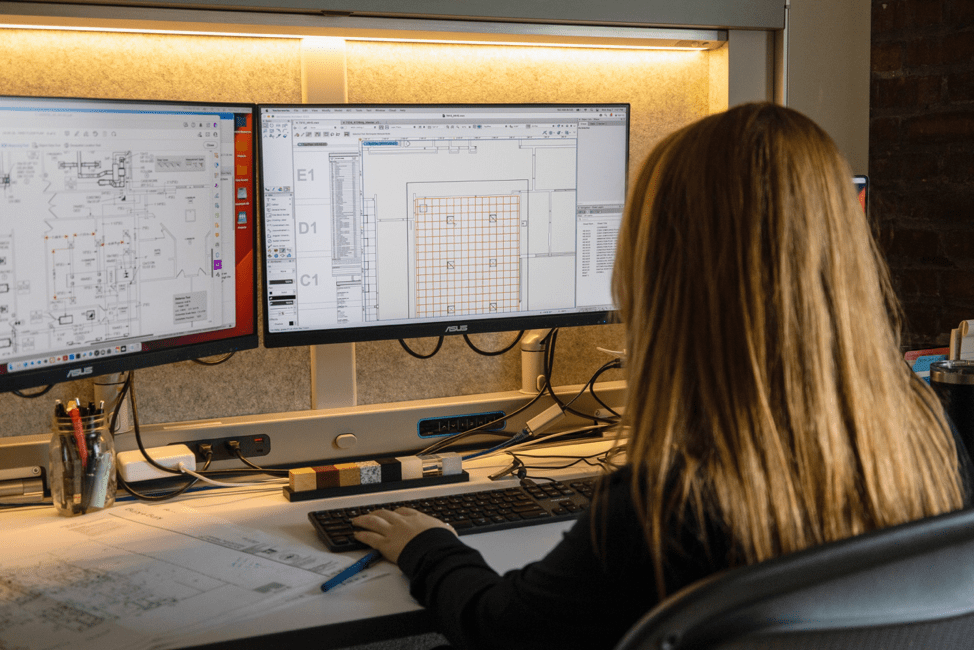
Table of Contents Show
Onboarding to new software does not have to drag on for months. King + King Architects trains its summer interns to design and draw confidently in Vectorworks within a single week, using a structured boot camp built around Vectorworks University. The formula is simple: a focused learning path, hands-on practice on real tasks, and steady mentor support.
Moving an entire office, or a fresh group of interns, onto a new design platform raises plenty of fair questions. How long will productivity dip? How much retraining will it take? The case of King + King shows that a tight, well-planned program can shrink that learning curve dramatically. The skills people bring from other tools transfer over, so nobody starts from zero.
How King + King Architects Onboards Interns in One Week
King + King Architects places real value on growing talent in-house. With dozens of Vectorworks design software licenses across the practice, the firm makes sure new interns can pull their weight quickly rather than spending a summer just watching.
To do that, the firm runs a one-week training boot camp every summer. Over five working days, interns build their understanding of Vectorworks alongside the wider habits of the architectural profession. The goal is practical fluency, not theory: by the end of the week, interns can model, draw, and contribute.
🏗️ Real-World Example
King + King Architects Summer Boot Camp: The Syracuse-based firm compresses core Vectorworks onboarding into one intensive week, then moves interns straight onto live project teams. Early on, Vectorworks staff helped deliver the sessions; today the program runs entirely in-house.

As Vectorworks training resources grew, King + King brought the whole program in-house. Michael Groves of the Vectorworks Customer Success team set up a dedicated learning path through Vectorworks University, which King + King now administers itself. That path starts with the fundamentals needed to be productive, then moves into more advanced areas like team collaboration and the basics of working with BIM.
🎓 Expert Insight
“The Vectorworks team has been, and continues to be, a valuable partner with training and development initiatives for our staff and accepting feedback for the positive evolution of their software tool,” said Kirk Narburgh, CEO and managing partner of King + King.
That partnership matters: an onboarding program works best when the software vendor and the firm treat training as an ongoing relationship rather than a one-time setup.
What Makes a One-Week Software Onboarding Work
A week sounds short for learning a full design platform, yet the structure is what makes it possible. King + King leans on a guided learning path inside Vectorworks University instead of leaving interns to find their own way through scattered tutorials. Sequencing lessons from basic drawing to modeling to collaboration keeps momentum and avoids overwhelm.
Three things tend to separate fast onboarding from slow, frustrating onboarding:
- A defined learning path so people always know the next step
- Real tasks early, so skills stick through practice rather than passive watching
- Named mentors who answer questions before small blockers turn into bad habits
💡 Pro Tip
When you plan a software switch, map your learning path to the actual deliverables your team produces, not to a generic feature tour. Interns and staff retain far more when their first exercises mirror the floor plans, sections, and models they will build the following week.
What a Focused Onboarding Week Can Cover
A productive first week usually front-loads the essentials, then layers in depth. Early sessions handle navigation, drawing setup, and core 2D drafting so interns can produce something usable fast. Mid-week shifts toward 3D modeling and document layout, the parts of the workflow that turn a sketch into a coordinated set. By the final day, the focus moves to collaboration and file sharing, since most real work happens across a team rather than on one machine.
Spacing the harder topics this way keeps people from stalling on day one. It also gives the firm a clear checkpoint at each stage to confirm an intern is ready before adding more. That rhythm, rather than raw hours at the screen, is what makes a single week realistic for onboarding to new software.
Building on Skills You Already Have
One reason the week works is that drafting and modeling skills carry across programs. If someone already understands layers, viewports, or 3D modeling in another tool, much of that knowledge maps onto Vectorworks with new menus and shortcuts to learn. The same logic applies whether you came from AutoCAD, SketchUp, or Revit. If your team is weighing options before a switch, our look at Houdini alternatives for architects and the round-up of FormIt alternatives for conceptual design can help frame what to prioritize during training.
What Happens After the Boot Camp
Training does not stop when the week ends. After boot camp, interns join teams and start contributing to actual King + King projects. The fact that they can do this after only one week speaks to how well the program is structured and run.
To keep that progress steady, the firm holds daily and weekly check-ins throughout the summer. Each intern has an assigned mentor, and project teams stay close enough to catch questions early. These touchpoints give interns a safe place to raise concerns and get unstuck instead of guessing.

The payoff is a real head start on a design career. Many of these internships go on to become full-time roles, which makes the upfront investment in fast, structured onboarding worthwhile for both the firm and the new hires.
Putting Your Own Onboarding Plan Together
You can borrow the same model whether you run a large practice or a small studio. Start with a written learning path, lean on the vendor’s official training, pair each learner with a mentor, and schedule short regular check-ins for the first few weeks. Keeping the first projects low-risk lets people learn on the job without putting deadlines at stake.
Budget and timing matter too. A short, structured week costs less in lost productivity than a slow rollout where people pick things up at random over a month or two. Tracking a few simple signals helps you know it is working: how soon learners complete their first real task without help, how many questions repeat across the group, and whether mentors feel the pace is sustainable. If the same question keeps coming up, that is a sign your learning path has a gap worth fixing before the next cohort.
Software choice still drives part of the experience, so it helps to keep an eye on what your team actually uses day to day. If tablets are part of your workflow, our review of SketchUp for iPad and our guide to the best AI tools for architects show how new tools keep reshaping the way studios work, and how training has to keep pace.
If you want to formalize the effort, Vectorworks University also offers certifications that turn study time into something you can point to on a resume. You can read more about getting started with Vectorworks Architect and the firm behind this case study at King + King Architects.
Where to Go From Here
Your Next Step: Before your next software rollout, write a one-week learning path tied to a single real deliverable, then assign one mentor per learner. That small amount of structure is what turns a daunting switch into a manageable week.
*Images courtesy of King + King Architects.
Architecture Students Hub
This guide is part of Software, Rendering and Gear, stage 4 of our student roadmap from the first diagram to the first internship. Next stage: Portfolio, CV and Internships, or browse every free tool and guide in the Architecture Students Hub.







Notion Alternatives for Architects: 7 Tools That Fit Studio Work
Notion works until a studio needs fee tracking, phase budgets and timesheets....
 Furkan Sen7 Mins read

Why Every Practice Ends Up With Five Versions of the Same Revit Family
Let’s learn why Revit family libraries accumulate duplicates, break schedules and slow...
 illustrarch Editoral Team5 Mins read

Visualizing Renovation Projects From Photographs: A Workflow for Existing-Building Work
Photo-based visualization turns a photograph of a building that already exists into...
illustrarch Editoral Team7 Mins read

Best Free CAD Blocks and Resources for Architects
A working guide to free CAD blocks for architects, covering ARCAT, CAD-Blocks.net,...
Furkan Sen7 Mins read


Leave a comment