

Canva Alternatives for Architects: 9 Best Design Tools in 2026
Canva is widely used in architecture studios and schools, but it has real limitations for professional design work. This guide covers nine Canva alternatives that handle architectural layouts, presentation boards, and portfolio design with greater precision, better typography, and stronger export quality than Canva offers on its own.
 Furkan Sen7 July 202610 Mins read141

Table of Contents Show
Canva alternatives give architects access to design tools with stronger typography controls, precise grid systems, high-resolution export options, and the ability to handle technical drawings that Canva was never built to support. While Canva works well for quick social media graphics and simple layouts, architectural work demands more control over scale, print quality, and visual hierarchy.
Canva has grown into one of the most popular online design platforms in the world, with over 265 million monthly active users as of late 2025 (TechCrunch, 2026). Its drag-and-drop interface, huge template library, and free tier make it a go-to tool for students and small firms that need fast visual output without a steep learning curve. But architecture professionals frequently hit its limitations: no support for .dwg imports, weak typographic precision, limited control over bleed and margins for print, and a template-driven aesthetic that can make every presentation look identical.
This guide covers nine alternatives to Canva that serve different parts of the architectural workflow, from portfolio layout and presentation board design to collaborative diagramming and data-driven visuals. Each tool fills a specific gap that Canva leaves open.
Why Architects Look for Canva Alternatives
The reasons architects move beyond Canva tend to cluster around three issues. First, print quality and export control. Architectural portfolios and competition boards need 300 DPI output with accurate color profiles. Canva’s export options are limited compared to professional layout software, and fine-tuning bleed, trim marks, or spot colors is not possible within the platform.
Second, layout precision. Architecture demands exact spacing, consistent grid systems, and the ability to position elements down to the millimeter. Canva’s snap-to-grid system is helpful for basic alignment, but it does not offer the paragraph-level control or baseline grid locking that programs like Adobe InDesign or Figma provide.
Third, creative repetition. Because millions of users pull from the same Canva template library, presentations and portfolios risk looking generic. For architects who need to communicate a distinct design language, starting from a shared template can work against them.
💡 Pro Tip
Before switching away from Canva entirely, consider a hybrid workflow. Many architecture studios use Canva for quick social media content and internal memos, while relying on InDesign or Figma for client-facing portfolios and competition boards. Splitting tools by purpose often produces better results than searching for a single platform that does everything.
Adobe InDesign: The Industry Standard for Architecture Portfolios

Adobe InDesign has been the default layout tool in architecture firms and schools for over two decades. It handles multi-page documents, master page templates, precise typography, and high-resolution PDF export with CMYK color management. For printed portfolios, competition booklets, and formal presentations, InDesign remains the most capable option available.
InDesign’s paragraph and character style system gives architects granular control over every text element across hundreds of pages. Changes to a style definition cascade through the entire document instantly. Its grid and guide tools allow exact placement in millimeters or points, which matters when preparing A1 presentation boards or A3 portfolio spreads. The software also supports linked files, meaning renders, plans, and diagrams update in the layout automatically when the source file changes.
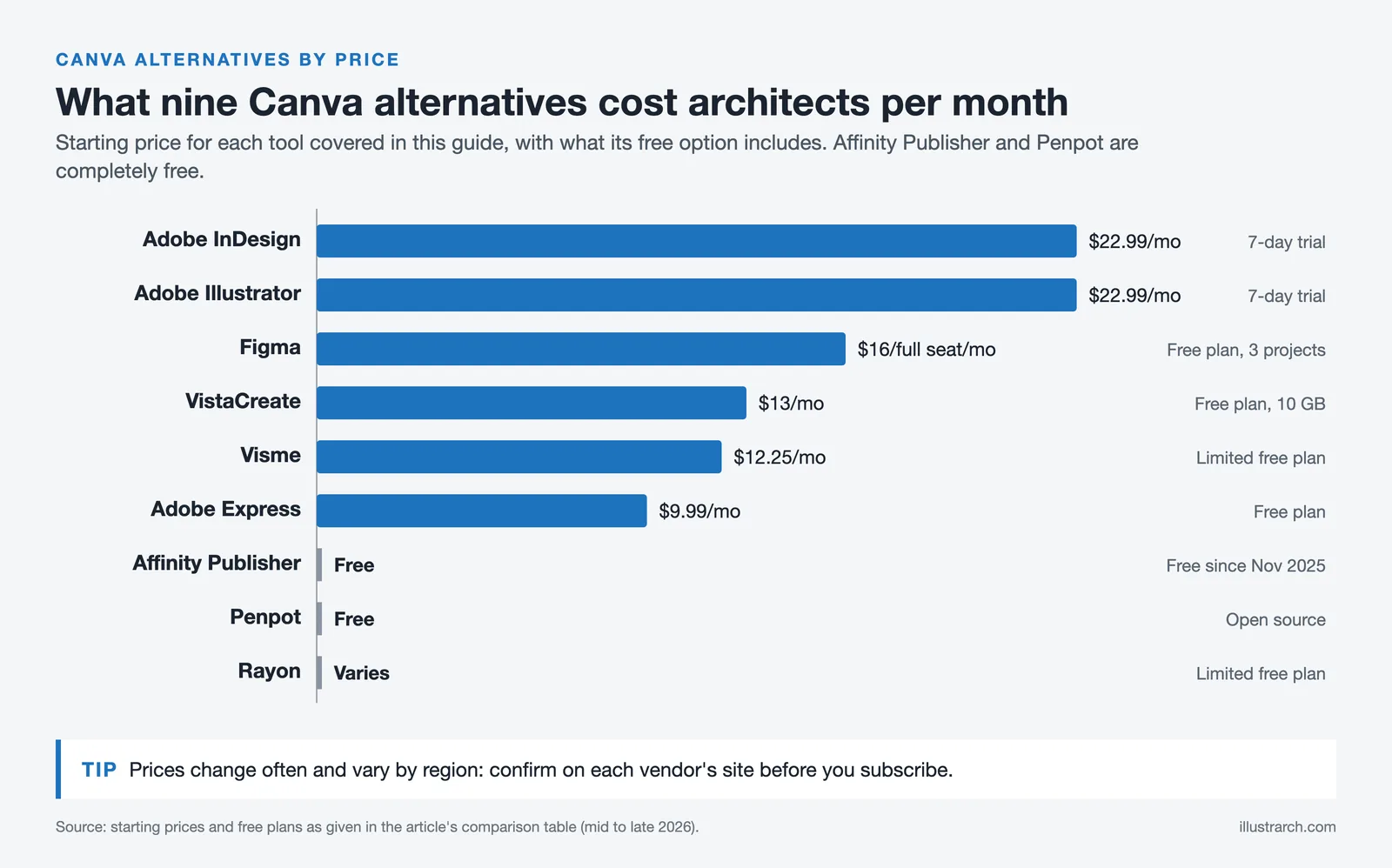
The main drawback is cost and learning curve. InDesign requires an Adobe Creative Cloud subscription (starting around $22.99/month for the single app plan), and it takes time to learn properly. However, for anyone serious about portfolio quality, the investment pays off quickly. InDesign integrates directly with Photoshop and Illustrator, creating a pipeline where renders can be post-processed, diagrams can be drawn as vectors, and everything comes together in a unified layout. For a deeper comparison of portfolio software options, see our guide to architecture portfolio software.
Figma: Real-Time Collaboration for Design Teams

Figma started as a UI/UX design tool, but architecture studios have adopted it for presentation layouts, diagram creation, and collaborative design work. Its browser-based interface means no installation is needed, and multiple team members can edit the same file simultaneously with changes visible in real time.
For architects, Figma’s strengths lie in its vector editing tools, component system, and auto-layout features. You can create reusable components for elements like scale bars, north arrows, or title blocks, then update them globally across all frames. The free tier is generous enough for individual use, and the Professional plan ($16 per full seat per month as of October 2026) adds version history, shared libraries, and advanced prototyping.
Figma does not handle multi-page print documents as well as InDesign. It was designed for screen-based output, so print-specific features like bleed, CMYK color, and facing page spreads are absent. But for digital portfolios, website mockups, and collaborative presentation boards, it is one of the strongest Canva alternatives available. Many studios now use Figma alongside InDesign, with Figma handling early-stage board layouts and InDesign producing the final print-ready files.
🎓 Expert Insight
The tools used to represent architecture matter as much as the design itself. Representation is not an afterthought; it is an extension of the design process.
This idea directly applies to choosing the right layout and presentation software. The tool you select shapes how others perceive your design thinking, spatial logic, and attention to detail.
Adobe Express: A Stronger Free Alternative from Adobe
Adobe Express occupies the middle ground between Canva’s simplicity and the full Adobe Creative Cloud. It offers a template-based, drag-and-drop editor with access to Adobe Fonts, Adobe Stock images, and AI-powered features like background removal and text-to-image generation through Adobe Firefly.
What sets Adobe Express apart from Canva for architects is its integration with the broader Adobe ecosystem. If your team uses Photoshop for render post-production or Illustrator for diagrams, you can pull assets directly into Express without downloading and re-uploading files. Brand kits help maintain consistent colors, fonts, and logos across all outputs.
The free tier covers most basic needs, and the Premium plan (approximately $9.99/month) adds full access to Adobe Fonts, premium templates, and expanded AI tools. Express is not a replacement for InDesign or Figma for complex architectural layouts, but it outperforms Canva when you need quick, polished graphics that stay consistent with your firm’s visual identity. You can learn more about how design tools work together for architecture in our guide to free tools for architectural design.
Adobe Illustrator: Vector Precision for Diagrams and Graphics
Adobe Illustrator is not a direct alternative to Canva in the template-and-drag-drop sense, but it is the standard tool for creating the vector-based architectural graphics that populate portfolios and presentation boards. Site plans, concept diagrams, exploded axonometrics, and custom infographics are all more precisely controlled in Illustrator than in any template-based platform.
Illustrator’s pen tool, pathfinder operations, and artboard system let architects produce publication-quality diagrams at any scale without losing resolution. Files can be exported as SVG, EPS, or high-resolution PDF for use in InDesign layouts, web portfolios, or print submissions. The software also handles complex typography well, making it useful for creating architectural diagrams that require both graphic clarity and labeled information.
The learning curve is steep compared to Canva, and the subscription cost (part of Adobe Creative Cloud) adds up. But for architects who produce original graphics rather than assembling templates, Illustrator is difficult to replace.
Affinity Designer and Affinity Publisher: One-Time Purchase Alternatives
The Affinity suite from Serif offers a professional-grade alternative to Adobe’s Creative Cloud without the subscription model. Affinity Designer competes with Illustrator for vector work, while Affinity Publisher competes with InDesign for multi-page layout. Both are now part of the Affinity app, which Canva has offered free of charge since November 2025 (as of October 2026), making them attractive for students and small firms that want to avoid monthly fees.
Affinity Publisher handles master pages, linked images, CMYK output, and professional typography controls. It can open and export PDF files, making it compatible with most print workflows. Affinity Designer supports both vector and raster editing in a single workspace, which is useful when combining hand-drawn sketches with precise linework.
The main limitation is ecosystem size. Adobe’s template marketplace, plugin library, and third-party integrations are much larger. File compatibility can also be an issue when collaborating with firms that work exclusively in Adobe formats. However, for independent architects and studios that control their own workflow, the Affinity suite delivers professional output at a fraction of the cost.
⚠️ Common Mistake to Avoid
Choosing a design tool based only on price or popularity without considering your actual output requirements is a common error. A free tool that cannot export at 300 DPI or handle CMYK color will cost you more in reprinting and reworking than a paid tool with proper print support. Always test export quality with your specific use case before committing to a platform for a major project.
VistaCreate: The Closest Free Alternative to Canva
VistaCreate (formerly Crello) mirrors much of Canva’s interface and workflow, making it one of the easiest platforms to switch to. It offers a large template library, drag-and-drop editing, animated design support, and a generous free plan that includes 10 GB of cloud storage (compared to Canva’s 5 GB on the free tier).
For architects who use Canva primarily for social media graphics, Instagram posts, or quick visual summaries, VistaCreate provides a similar experience with access to Depositphotos’ stock library (over 100 million assets). The platform supports video and animation templates, which can be useful for creating short project walkthroughs or animated site analysis clips for Instagram Reels or TikTok.
VistaCreate does not solve the fundamental limitations that make architects leave Canva in the first place, meaning print precision, typographic control, and scalable vector output remain weak. But as a free alternative for visual content production, it holds its own.
Visme: Data Visualization and Infographic Design
Visme fills a specific niche that Canva and most layout tools handle poorly: data-driven visual content. Architects who produce feasibility studies, sustainability reports, or client-facing project summaries with charts, graphs, and interactive elements will find Visme more capable than Canva in this area.
The platform includes over 40 chart and graph types, customizable flowcharts, 2D and 3D data widgets, and animated infographic elements. It supports interactive features like hover effects, popups, and clickable links within presentations, which can enhance digital project proposals. Visme also integrates with Google Sheets and other data sources, allowing charts to update automatically when underlying data changes.
The free plan is limited in exports and storage, but the Starter plan (from $12.25/month) opens up full download options and brand kit features. Visme is not a layout tool for portfolios or presentation boards, but for the data communication side of architectural practice, it fills a gap that few other tools address well.
Penpot: The Open-Source Option
Penpot is a free, open-source design and prototyping platform that runs entirely in the browser. It offers vector editing, real-time collaboration, component systems, and a layout engine that supports CSS-based flexbox and grid concepts. For architects comfortable with digital tools who want a capable design platform without any subscription cost, Penpot is worth evaluating.
The platform supports SVG natively, which means all designs maintain clean vector quality and can be exported or embedded without quality loss. Components and design systems work similarly to Figma, allowing reusable elements that update globally. Being open-source also means the tool can be self-hosted for firms with strict data privacy requirements.
Penpot’s template library is much smaller than Canva’s or Figma’s, and the community is still growing. But the feature set is maturing quickly, and for studios that prioritize ownership and privacy, it offers something no subscription-based platform can.
💡 Pro Tip
If you are a student choosing between free alternatives, test both Figma and Penpot before committing. Figma has a larger community and more learning resources, but Penpot’s open-source model means your work is never locked behind a platform that might change its pricing or terms. Starting with both gives you flexibility as your career develops.
Rayon: A Browser-Based CAD and Presentation Hybrid
Rayon is a newer platform specifically designed for the built environment. It combines basic CAD drafting capabilities with presentation layout tools in a single browser-based workspace. You can draw walls, place furniture from smart libraries, and create floor plans that maintain correct scale, then export the results as presentation-quality graphics.
This approach addresses one of the biggest gaps in Canva’s architecture workflow: the inability to work with scaled drawings. In Canva, you are placing images of plans, not interacting with architectural data. Rayon lets you draft spaces at correct dimensions and then arrange them into polished visual layouts without switching between a CAD program and a design tool.
Rayon is still a relatively young product, and its feature set does not match standalone CAD tools like AutoCAD or Revit for documentation. But for early-stage design presentations, client-facing concept boards, and quick space planning visuals, it represents a category of tool that did not exist a few years ago.
Comparison of Canva Alternatives for Architects
The following table summarizes the key differences between each platform to help you identify which tools fit your specific needs:
| Tool | Best For | Free Plan | Starting Price | Print Quality |
|---|---|---|---|---|
| Adobe InDesign | Print portfolios, competition booklets | 7-day trial | $22.99/mo | Professional CMYK |
| Figma | Collaborative layouts, digital portfolios | Yes (3 projects) | $16/full seat/mo | Screen-focused (RGB) |
| Adobe Express | Quick branded graphics, social media | Yes | $9.99/mo | Good (RGB) |
| Adobe Illustrator | Diagrams, vector graphics, site plans | 7-day trial | $22.99/mo | Professional CMYK |
| Affinity Publisher | Portfolio layout (no subscription) | Yes (free) | Free (as of October 2026) | Professional CMYK |
| VistaCreate | Social media, quick visual content | Yes (10 GB storage) | $13/mo | Basic (RGB) |
| Visme | Data visualization, reports, infographics | Yes (limited) | $12.25/mo | Good (RGB) |
| Penpot | Open-source vector design, prototyping | Yes (fully free) | Free | SVG-based (RGB) |
| Rayon | Scaled floor plans with presentation layout | Yes (limited) | Varies | Good (RGB) |
How to Choose the Right Canva Alternative for Your Workflow
The best alternative to Canva depends on what you actually produce. If your primary output is printed portfolios and competition booklets, InDesign or Affinity Publisher will give you the strongest results. If you work in a team that needs real-time collaboration on layouts, Figma is the clear choice. For studios that need quick branded content for social media or client updates, Adobe Express or VistaCreate are faster and more practical than opening a full layout application.
Many architects end up using two or three tools together. A common combination for students is Figma for layout, Illustrator for diagrams, and Canva for social media. Professionals often pair InDesign with Photoshop and Illustrator through Creative Cloud, adding Figma for collaborative review. The key is to match the tool to the task rather than forcing one platform to handle everything.
Consider your budget, your team size, and whether your work is primarily digital or print-focused. Test the free tiers before committing to paid plans, and pay attention to export quality. A tool that looks great on screen but exports poorly for print will cost you time and money when it matters most. For additional guidance on choosing the right tools for your architectural presentations, review our detailed breakdown of software options and workflow strategies.
📌 Did You Know?
Canva users created over 30 billion total designs between 2013 and 2025, with approximately 38.5 million designs produced per day (Backlinko, 2026). Despite this enormous volume, architecture-specific templates remain a small fraction of Canva’s library, which is one reason design professionals in the field often look for specialized alternatives.

✅ Key Takeaways
- Canva works well for quick graphics, but architects need tools with better print quality, typography control, and layout precision for professional deliverables.
- Adobe InDesign remains the strongest option for printed portfolios and competition submissions, while Figma leads for collaborative digital layouts.
- Adobe Express and VistaCreate are the closest direct Canva alternatives for quick visual content, with Express offering Adobe ecosystem integration as a bonus.
- Affinity Publisher and Penpot provide professional results free of charge, making them practical for students and independent practitioners.
- Most architects benefit from combining two or three tools rather than relying on a single platform for all design tasks.
Final Thoughts
Canva earned its popularity by making design accessible to everyone, and it still does that job well. But architects and design professionals operate in a space where visual precision, print quality, and originality carry real weight. The nine alternatives covered here each solve specific problems that Canva cannot, from InDesign’s publication-grade output to Penpot’s open-source freedom. The right choice depends on your workflow, your budget, and the kind of work you produce. Start with the free options, test your actual output requirements, and build a toolkit that serves your work rather than constraining it.
Pricing information and feature availability reflect data available as of mid-2026 and may vary by region and subscription tier. Always verify current pricing on each platform’s official website.







Notion Alternatives for Architects: 7 Tools That Fit Studio Work
Notion works until a studio needs fee tracking, phase budgets and timesheets....
Furkan Sen7 Mins read

Why Every Practice Ends Up With Five Versions of the Same Revit Family
Let’s learn why Revit family libraries accumulate duplicates, break schedules and slow...
 illustrarch Editoral Team5 Mins read

Visualizing Renovation Projects From Photographs: A Workflow for Existing-Building Work
Photo-based visualization turns a photograph of a building that already exists into...
illustrarch Editoral Team7 Mins read

Best Free CAD Blocks and Resources for Architects
A working guide to free CAD blocks for architects, covering ARCAT, CAD-Blocks.net,...
Furkan Sen7 Mins read


Leave a comment