

Figma Alternatives for Architects: 7 Tools Worth Switching To
Choosing a design tool beyond Figma matters for architects who build diagrams, portfolio boards, and concept layouts. This guide compares seven options across price, platform, and best use, covering free open source picks and paid suites.
 Furkan Sen13 July 20266 Mins read1
Table of Contents Show
Figma alternatives give architects browser-based design, vector tools, and presentation features without locking into one workflow. The strongest options include Penpot, Sketch, Adobe Illustrator, Affinity, Canva, Inkscape, and Framer, ranging from free open source apps to paid professional suites built for diagrams, portfolio boards, and interactive concept work.
Plenty of architects reach for Figma because it runs in the browser and supports live collaboration. The trouble starts when a studio outgrows the free tier, needs offline access, or wants print-ready output for a competition board. That is where a different tool earns its place in your kit. Below is a practical look at seven options, with a comparison table so you can match a tool to the kind of work you actually do.
Why Architects Look for Figma Alternatives
Figma was built for product and interface teams, not for studios producing site plans, axonometric diagrams, or portfolio layouts. Its vector engine handles clean line work well, yet it struggles with CMYK print preparation, high-resolution image placement, and long multi-page documents. Pricing is the second pressure point. Once you move past the free tier, per-editor seats add up quickly for a small practice.
Architects usually want one of three things from an alternative: a free or open source figma alternative for students and small teams, a vector tool strong enough for presentation diagrams, or a layout app that exports clean PDFs for portfolios. The seven tools here cover all three needs. If your day-to-day leans toward raster post-production instead, our guide to Photoshop alternatives for architects pairs well with this list.
📌 Did You Know?
Penpot is the first design and prototyping platform to be fully open source under the Mozilla Public License, and according to Penpot, it surpassed one million registered users in 2024 after Figma announced pricing changes. The spike in sign-ups came largely from teams wanting self-hosted control over their design files.
The Best Figma Alternatives for Architects Compared
Each tool below fits a different budget and platform. Use the table to scan price model and best use at a glance, then read the sections that match how you work.
Comparison of Seven Figma Alternatives
| Tool | Best for | Platform | Price model |
|---|---|---|---|
| Penpot | Open source UI and diagram collaboration | Web, self-host | Free, open source |
| Sketch | Tidy vector diagrams and artboards | macOS, web viewer | Subscription or one-time |
| Adobe Illustrator | Print-ready boards and detailed diagrams | Windows, macOS | Subscription |
| Affinity | Vector plus layout on a tight budget | Windows, macOS, iPad | Free core app |
| Canva | Fast boards and portfolio templates | Web, mobile | Freemium |
| Inkscape | SVG editing and node-level diagrams | Windows, macOS, Linux | Free, open source |
| Framer | Interactive prototypes and portfolio sites | Web | Freemium |
Free Figma Alternatives Worth Trying
If cost is the main reason you want out of Figma, three tools stand out. Each one is genuinely free for the core feature set, and none of them caps the number of files or editors the way a freemium seat model does.
Penpot
Penpot is the closest open source figma alternative on the market. It runs in any modern browser, supports real-time multiplayer editing, and uses open web standards like SVG and CSS under the hood, so your files are not trapped in a proprietary format. Architects use it for schematic diagrams, wireframes for interactive presentations, and shared concept boards. You can run it on Penpot’s hosted cloud or self-host it on your own server for full data control.
The official Penpot platform also added flexible layout tools that mirror Figma’s auto-layout, which makes moving an existing team across far less painful than it used to be.
💡 Pro Tip
When you self-host Penpot for a studio, set up a nightly backup of the PostgreSQL database and the assets volume. Teams that skip this step often lose months of board iterations after a server migration, since design history lives in those two places and nowhere else.
Inkscape
Inkscape is a free, open source vector editor that runs on Windows, macOS, and Linux. Built around the SVG format, it handles node-level path editing, boolean operations, and precise diagram work that holds up at any scale. For architects who produce flow diagrams, sun-path studies, or vector site plans, it covers most of what Illustrator does without a subscription. The interface feels dated next to Figma, and there is no live collaboration, but the export quality is excellent.
Canva
Canva is the quickest path from blank page to finished board. Its template library and drag-and-drop editor suit students assembling a portfolio or a small studio that needs a clean competition entry under deadline. It will not replace a true vector tool for detailed line drawings, yet for layout, typography, and image-heavy spreads it moves fast. For a wider look at portfolio-focused options, see our guide to presentation tools for architecture portfolios.
Paid and Professional Figma Alternatives
When output quality, print fidelity, or interactivity matter more than price, the paid tier changes the calculation. These four options give architects capabilities that free apps cannot match, and most offer a trial so you can test before committing.
Sketch
Sketch is a macOS vector tool that, like Figma, grew out of interface design. Architects use it for clean schematic diagrams and presentation graphics where its artboard system keeps multi-frame layouts organized. The Sketch app now offers both a subscription and a one-time license with optional updates, which appeals to anyone tired of mandatory recurring fees. The catch is platform: there is no native Windows version, only a web viewer for handoff.
Adobe Illustrator
Illustrator remains the standard for print-ready diagrams and competition boards. Its CMYK support, advanced typography, and precise vector control outpace anything in the free tier, and it pairs naturally with InDesign for long portfolio documents. The cost is a recurring Creative Cloud subscription, which is the very thing many people want to escape. As a figma adobe alternative for raw drawing power, though, it is hard to beat. Our breakdown of Illustrator alternatives for architects is worth a read if the price is a sticking point.
Affinity
Affinity changed the math for budget-conscious studios in late 2025. After Canva acquired the software, the old Designer, Photo, and Publisher apps merged into a single program, and the core app became free. That gives architects vector drawing, raster editing, and page layout in one place, with no subscription. It is a strong fit for portfolio spreads and presentation diagrams that need both clean line work and placed renders.
Framer
Framer moves beyond static design into working prototypes and published websites. For an architect building an interactive concept presentation or a personal portfolio site, it turns design frames into a live, responsive page without hand-coding. It is less suited to print boards, but for digital storytelling and client-facing web portfolios it fills a gap the others leave open.
💡 Pro Tip
Keep your master diagrams in a tool-agnostic format like SVG, not a proprietary file. When you draw a site plan as SVG in Inkscape or Penpot, you can drop it into Illustrator, Affinity, or a web page later without redrawing a single line. This habit saves hours every time a client switches deliverable formats.
How to Choose the Right Figma Alternative
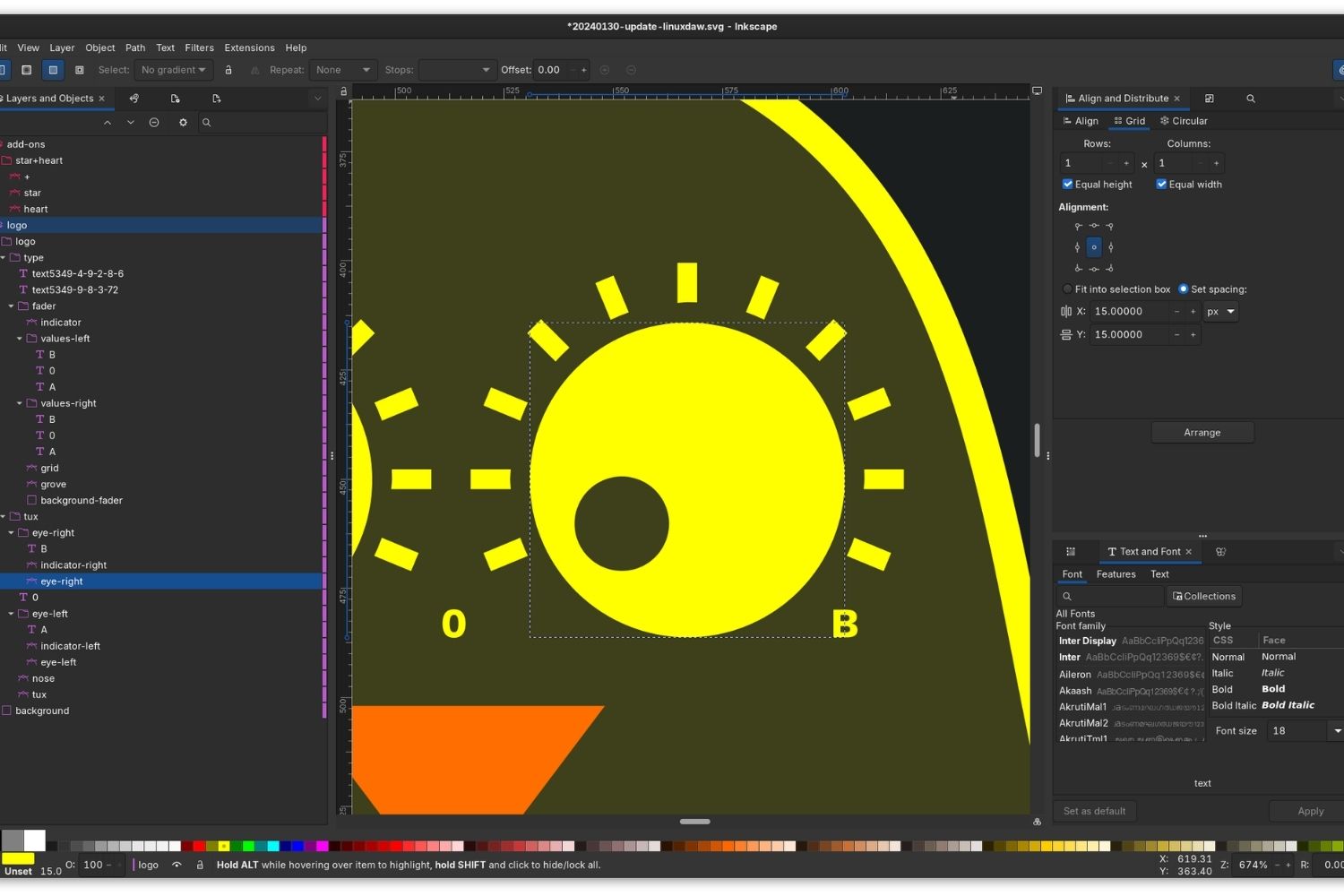
The best alternatives to figma depend less on feature checklists and more on your output. Ask what leaves your desk most often. If it is print boards, start with Illustrator or Affinity. If it is collaborative diagrams, Penpot is the natural swap. If it is a portfolio website or an interactive pitch, Framer earns the seat.
Platform matters too. Sketch locks you to macOS, while Inkscape and Penpot run almost anywhere. Budget is the last filter. The free alternatives to figma listed here, Penpot, Inkscape, Canva, and the core Affinity app, cover most student and small-studio needs without a single recurring charge. If you also work with browser-based modeling, the collaborative tool Rayon brings Figma-style real-time editing to architectural CAD, which is a useful companion to a 2D design app.
For studios already mixing in machine learning, our roundup of AI tools architects use for concept design shows how these design apps fit alongside generative workflows. Architecture publications such as ArchDaily regularly feature studios that combine these lighter design tools with heavyweight modeling software rather than relying on one platform for everything.
Where to Go From Here
You do not need to commit to a single tool today. Most architects end up running two: a free vector app for everyday diagrams and one paid program for polished deliverables. For background on the platform you are moving away from, the Figma overview on Wikipedia outlines its history and recent ownership changes.
Your Next Step: Pick one free option from the table, rebuild a recent diagram in it this week, and compare the export against your current Figma file before deciding whether to switch fully.





Linea Link Review: Fast Sketching From iPad to Mac Without the Clutter
A practical Linea Link review for architects and designers, looking at how...
 Sinan Ozen8 Mins read
Concepts App Review: The Infinite Canvas Architects Actually Use
A practical Concepts App review for architects, looking at the infinite canvas,...
Sinan Ozen7 Mins read
Keynote vs PowerPoint on iPad for Architecture Presentations
A practical comparison of Keynote and PowerPoint on iPad for architecture presentations,...
Furkan Sen6 Mins read
GoodNotes vs Notability: Which Is Better for Architecture Students?
Choosing between GoodNotes and Notability as an architecture student depends on your...
Sinan Ozen8 Mins read


Leave a comment