

Should Architects Use iPad for Designing?
The iPad has become a powerful design companion for architects. From sketching concepts on-site to running full CAD apps like Shapr3D and AutoCAD, this guide covers the best iPad for architects, top architecture apps for iPad, and practical workflow tips for professionals and students alike.
 Elif Ayse Sen28 October 202518 Mins read621
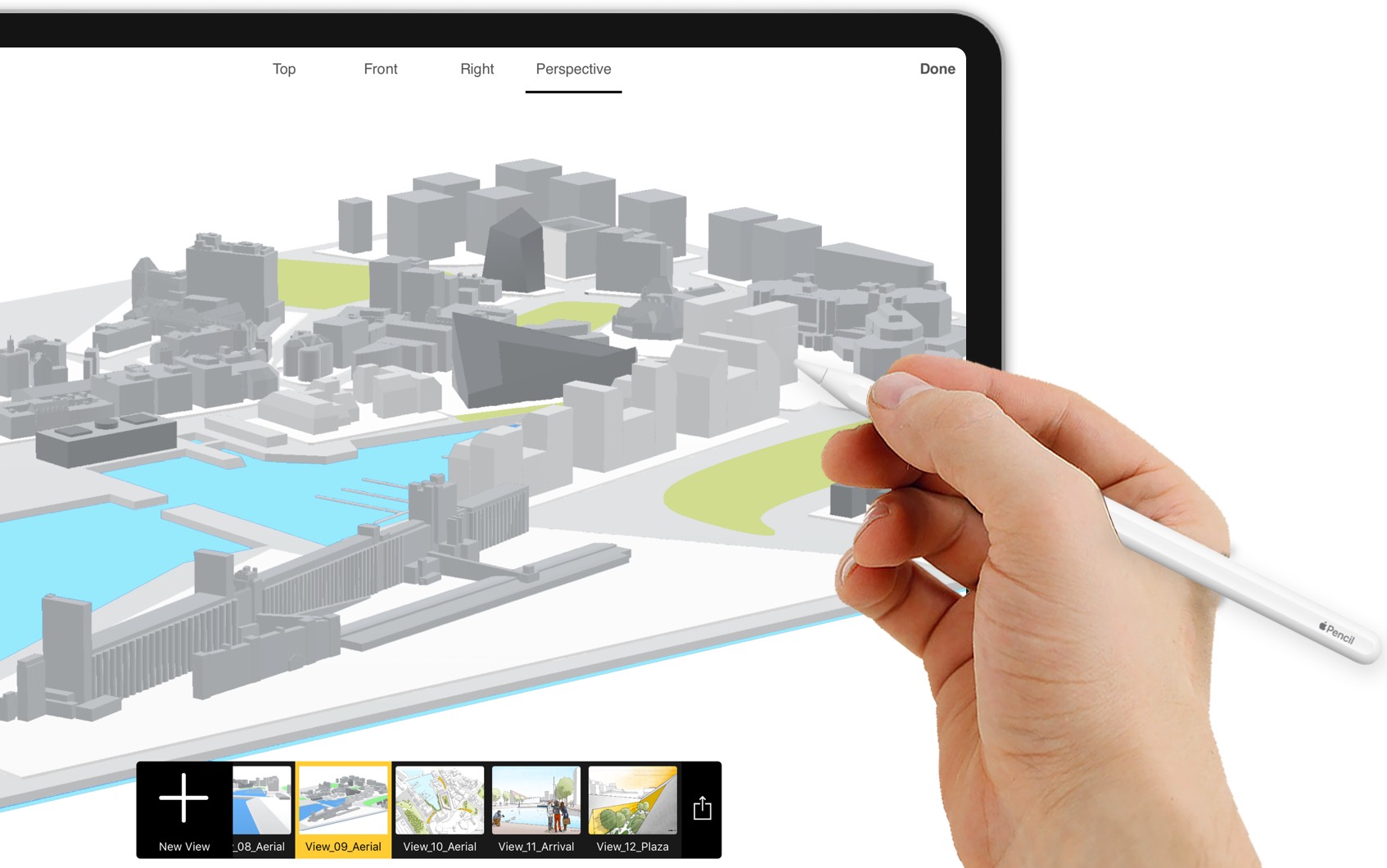
Table of Contents Show
The iPad for architects is a portable design tool that handles sketching, CAD editing, BIM viewing, LiDAR room scanning, and on-site documentation in a single device. With Apple Pencil Pro precision and M5 chip performance, it replaces several pieces of traditional equipment and fits into every project phase, from concept sketches to construction administration.
Architects have always been at the forefront of technological advancements in the design industry, constantly seeking new tools to improve their work and streamline the design process. In recent years, the iPad for architects has evolved from a novelty into an essential design companion, offering a range of features and benefits that make it an indispensable part of the modern architectural workflow. Whether you are a seasoned professional or a student just starting out, understanding how to use iPad architecture tools can significantly boost your productivity and creativity.
In this guide, we will look at why architects should use an iPad for designing, review the best architecture apps for iPad, compare iPad models suited for architectural work, and share practical tips to optimize your iPad architecture workflow in 2026. If you are still weighing tablet platforms more broadly, our updated drawing tablets for architects guide compares iPad against Wacom, Surface, and other options.

Why Should Architects Use an iPad in 2026?
Architects should use an iPad in 2026 because it combines portability, Apple Pencil Pro precision, LiDAR scanning, and powerful M-series chips in a single device that handles sketching, CAD editing, BIM viewing, and on-site documentation without needing a laptop. This makes it ideal for fieldwork, client meetings, and design exploration in any setting.
One of the main benefits of using an iPad for design is its portability. Unlike a traditional desktop computer or laptop, the iPad is small and lightweight, making it easy to take with you on-site or to client meetings. This allows architects to access their designs and make changes in real-time, without having to return to the office or wait until they have access to their computer. This can help to speed up the design process, reduce delays and improve overall efficiency.
The iPad also supports Apple Pencil, which transforms the device into a precise digital drafting tool. Combined with LiDAR scanning capabilities on iPad Pro models, architects can now scan rooms, generate 3D models of existing spaces, and overlay design concepts directly on-site, which were unimaginable just a few years ago.
📌 Did You Know?
According to Apple’s official iPad Pro specifications, the LiDAR Scanner on iPad Pro can be paired with Trimble SketchUp for iPad to turn a quick room scan directly into an editable 3D CAD project, all from one device. This workflow eliminates the need for separate measuring tools or laser distance meters during early site visits.
Another benefit of using an iPad for design is the range of applications available. The App Store has a large collection of design and architecture-related applications, many of which have been specifically designed for the iPad. These applications provide architects with access to a range of tools and features that can help to streamline their workflow and improve the quality of their designs. For example, some applications allow architects to create 3D models, annotate and sketch their designs, and collaborate with team members in real-time. For those interested in architectural sketching techniques, the iPad provides a natural bridge between traditional hand drawing and digital workflows.

Apple Pencil and the Touch-Screen Advantage
The iPad’s touch-screen interface is also a significant advantage for architects. It provides a more intuitive and natural way to interact with designs, allowing architects to manipulate and explore their designs in a way that is not possible with a mouse and keyboard. With Apple Pencil Pro’s pressure sensitivity and tilt detection, sketching on iPad feels remarkably close to pen on paper, yet with the power of undo, layers, and scalable precision. This can help to improve the accuracy and precision of designs, and can also make the design process more enjoyable and engaging.
The latest Apple Pencil Pro adds three features that matter for architectural work: haptic feedback that provides a small physical confirmation when you tap or switch tools, a barrel roll sensor that lets you rotate brushes and shapes by twisting the pencil, and a squeeze gesture for quickly switching between tools without leaving the canvas. For sketching layered overlays in Morpholio Trace or making precise selections in PDF markup, these reduce the friction of constantly switching tools.
Finally, the iPad’s battery life is another factor that makes it an attractive option for architects. The device’s long battery life means that architects can work on designs for hours without having to worry about running out of power, making it an ideal tool for use on-site or in meetings.
💡 Pro Tip
If you are running a full day of fieldwork on iPad Pro M5, go to Settings → Apple Intelligence & Siri and toggle off Apple Intelligence when you do not need it. The continuous background AI processing introduced in 2026 can shorten screen-on time by up to 1.5 to 2 hours per charge, which makes a real difference during long site visits or all-day client presentations.
The iPad is an excellent tool for architects and offers a range of benefits that can help to improve their workflow and overall efficiency. Its portability, range of applications, touch-screen interface, and long battery life make it an attractive option for architects who are looking to streamline their design process and improve the quality of their work.
Best Architecture Apps for iPad
Choosing the right iPad architecture apps is crucial for getting the most out of your device. For a wider list of options grouped by use case, our complete architecture apps for iPad guide covers more than 10 tools across sketching, CAD, BIM, and rendering. Below are the apps most architects rely on in 2026:
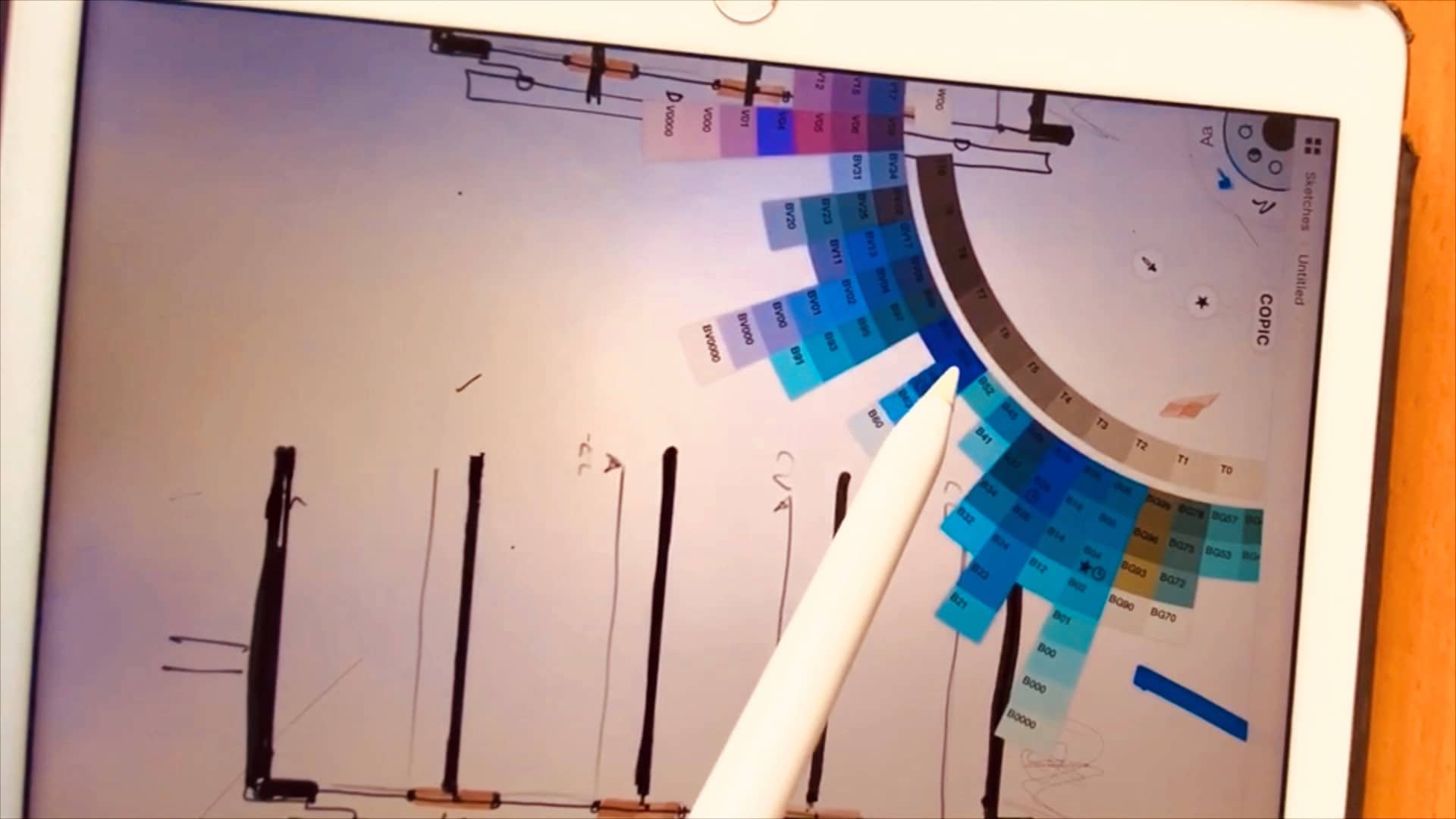
Morpholio Trace. Widely regarded as one of the best architecture apps for iPad, Morpholio Trace combines the fluidity of freehand sketching with intelligent CAD features. Architects can draw scaled plans, mark up PDFs, trace over images, and export to DXF for direct CAD integration. Its RoomPlan feature uses LiDAR scanning to create instant 3D room models you can sketch over.
Shapr3D. A professional CAD tool built specifically for iPad and Apple Pencil. Shapr3D enables architects to create precise 3D models using intuitive touch and pencil gestures. It exports to major CAD formats and works with Rhino, AutoCAD, and Revit workflows.
AutoCAD Mobile. Autodesk’s mobile version brings core drafting capabilities to the iPad. With AutoCAD Mobile, architects can view, create, and edit DWG files on the go, making it ideal for on-site revisions and quick annotations during collaborative site visits.
Concepts. A vector-based sketching app with an infinite canvas, perfect for early-stage design exploration. It supports scale grids, layers, and exports to PDF, SVG, and DXF formats. Check out our guide on free architecture apps for iPad for more options.
Procreate. While primarily an illustration app, Procreate is widely used by architects for presentation renderings, conceptual perspectives, and hand-drawn visualizations. Its 2026 update includes perspective guides and vector-precision export.
SketchUp Viewer and BIMx. For viewing and presenting 3D models and BIM data on-site or in client meetings, these apps turn the iPad into a powerful presentation tool with AR visualization capabilities.
| App | Primary Use | Pricing | Export Formats | Apple Pencil Support | LiDAR / AR | Best For |
|---|---|---|---|---|---|---|
| Morpholio Trace | Sketching & PDF Markup | Free (Basic) / Pro from $7.99/mo (as of October 2026) | PDF, DXF, Image | Full (Pencil Pro) | ✅ RoomPlan LiDAR | Conceptual design, site markups |
| Shapr3D | 3D CAD Modeling | Free (Basic) / Pro $249.99/yr (as of October 2026) | STEP, IGES, DWG, DXF, STL, OBJ | Full (Pencil Pro) | ✅ AR Preview | 3D modeling, design development |
| AutoCAD Mobile | 2D Drafting & DWG Editing | Free (View) / Premium $59.99/yr | DWG, DXF, PDF | Full | ❌ | On-site DWG editing, annotations |
| Concepts | Vector Sketching | Free / Everything $4.99/mo or $29.99/yr (as of October 2026) | PDF, SVG, DXF, PSD | Full (Pencil Pro) | ❌ | Early-stage exploration, diagrams |
| Procreate | Illustration & Rendering | $12.99 (one-time) | PSD, PDF, PNG, TIFF, JPEG | Full (Pencil Pro) | ❌ | Presentation renderings, visuals |
| SketchUp Viewer | 3D Model Viewing | Free (with SketchUp subscription) | SKP (view only) | Basic Navigation | ✅ AR Visualization | Client presentations, model review |
| BIMx | BIM Model Viewer | Free (with Archicad) | BIMx Hyper-model | Basic Navigation | ✅ AR Walkthrough | BIM presentations, site walkthroughs |
For architects exploring AI-assisted visualization, our roundup of the best AI architectural rendering tools in 2026 covers companion platforms that work alongside iPad apps for fast concept renders. You can also explore digital architectural sketching tools that pair well with iPad-based design workflows.
How to Choose the Right iPad App for Your Architecture Workflow
Picking the right app depends on what you actually do day to day. An architect who spends most of the time on concept sketches and client presentations needs a different toolkit from someone who edits DWG files on construction sites every week.
If your workflow centers on freehand design exploration, start with Morpholio Trace or Concepts. Both apps support Apple Pencil Pro and export to CAD-compatible formats, so your sketches can move into Revit or AutoCAD later without redrawing. For architects who need to build and edit precise 3D geometry on the iPad itself, Shapr3D is the clear choice; it handles STEP, IGES, and DWG exports and receives files from desktop CAD platforms for further refinement.
Site-focused architects who spend significant time outside the office will benefit most from AutoCAD Mobile paired with a markup app like Bluebeam. The combination lets you open DWG files, annotate construction documents, and photograph field conditions, all on one device.
🎓 Expert Insight
The most effective iPad architecture setups treat the tablet as a companion to desktop tools rather than a substitute. The real productivity gain comes from faster iteration loops between site, studio, and client meeting.

For a broader view of mobile apps that architects use beyond iPad, including project management and collaboration tools, our dedicated guide covers the full ecosystem.
Best iPad for Architects: Which Model to Choose
Selecting the best iPad for architects depends on your workflow needs and budget. Here is a quick comparison of the most relevant models in 2026:
iPad Pro 13-inch (M5 chip). The top choice for professional architects. According to the Apple Newsroom announcement from October 2025, the M5 chip features a 10-core GPU with hardware-accelerated ray tracing and 153GB/s memory bandwidth, with up to 16GB RAM on 1TB and 2TB configurations. The Tandem OLED Ultra Retina XDR display offers exceptional color accuracy for design review and client presentations. The LiDAR scanner enables room scanning with apps like Morpholio Trace, and Apple Pencil Pro support adds haptic feedback and barrel roll for advanced drawing control. This is the best iPad for architects who need maximum performance.
📐 Technical Note
The iPad Pro M5 supports external display output up to 6K at 60Hz or 4K at 120Hz over Thunderbolt / USB 4, which is useful for architects who want to dock the iPad to a studio monitor for detailed CAD work or client presentations. Wi-Fi 7 with the new Apple N1 chip and Bluetooth 6 are also included. (Source: Apple Support, iPad Pro 13-inch M5 Tech Specs.)
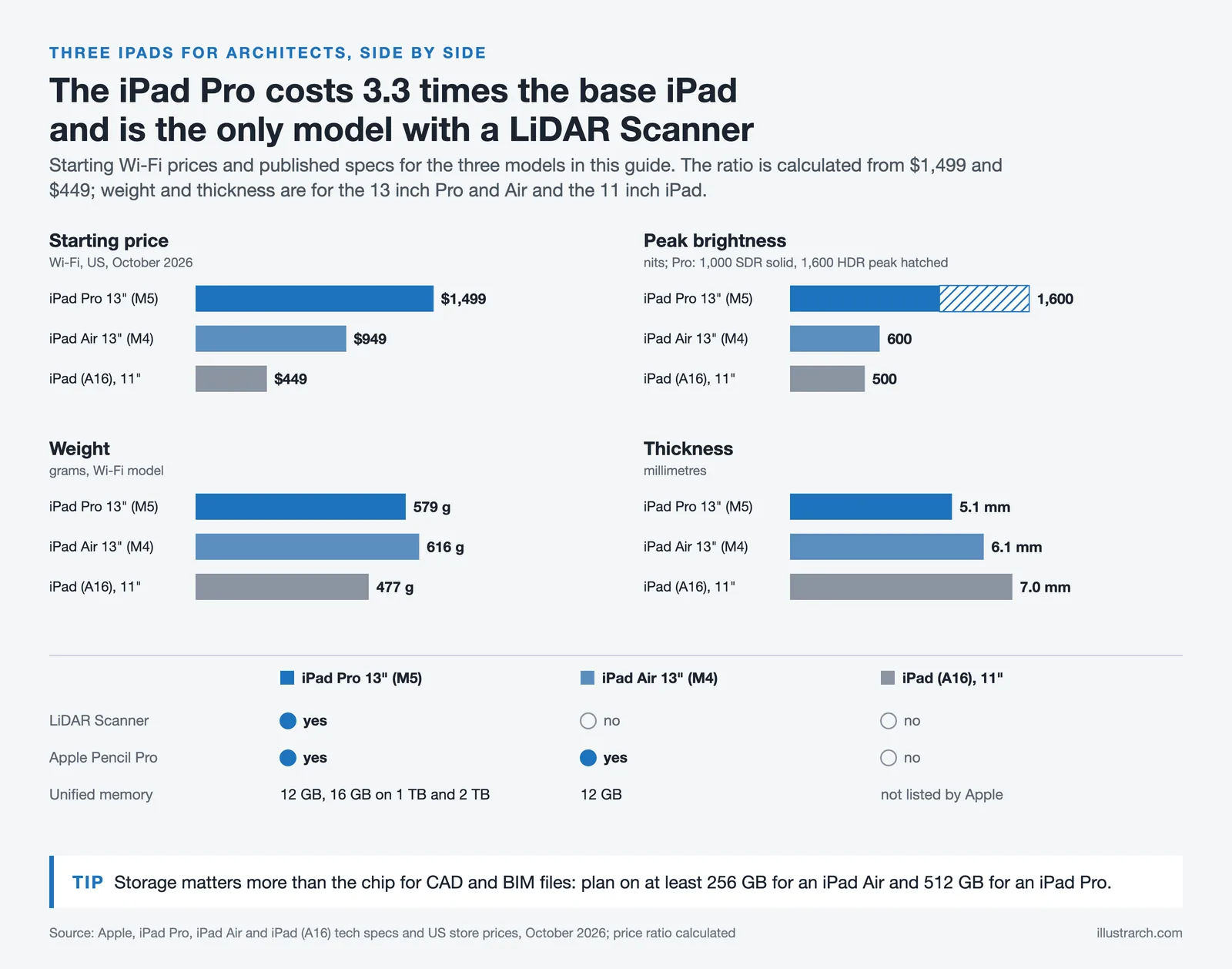
iPad Air 13-inch (M4 chip). An excellent mid-range option that delivers strong performance for most architecture apps for iPad. The M4 chip handles CAD, sketching, and multitasking smoothly. At a lower price than the Pro, the iPad Air is ideal for architects and architecture students who want a capable device without the premium cost.
iPad (11th generation, A16 chip). The budget-friendly entry point for students exploring iPad architecture workflows. It handles basic sketching, PDF markup, and note-taking well, though it lacks LiDAR and the Pro display technologies. A solid starter device for those new to digital design. Students can find additional guidance in our iPad Pro for architecture students article.
| Feature | iPad Pro 13″ (M5) | iPad Air 13″ (M4) | iPad 11th Gen (A16) |
|---|---|---|---|
| Starting Price (Wi-Fi, as of October 2026) | $1,499 | $949 | $449 |
| Display | 13″ Ultra Retina XDR (Tandem OLED) | 13″ Liquid Retina (IPS LCD) | 11″ Liquid Retina (IPS LCD) |
| Display Technology | OLED, ProMotion 120Hz, 2752×2064 | IPS, 60Hz, 2732×2048 | IPS, 60Hz, 2360×1640 |
| Peak Brightness | 1,600 nits (HDR) | 600 nits | 500 nits |
| Chip | Apple M5 (10-core CPU, 10-core GPU) | Apple M4 (8-core CPU, 9-core GPU) | Apple A16 Bionic (5-core CPU, 4-core GPU) |
| RAM | 12 GB (16 GB on 1TB/2TB) | 12 GB | 6 GB |
| Storage Options | 256 GB / 512 GB / 1 TB / 2 TB | 128 GB / 256 GB / 512 GB / 1 TB | 128 GB / 256 GB / 512 GB |
| Apple Pencil Support | Apple Pencil Pro, USB-C | Apple Pencil Pro, USB-C | Apple Pencil (USB-C), 1st Gen |
| LiDAR Scanner | ✅ Yes | ❌ No | ❌ No |
| Biometric | Face ID | Touch ID (top button) | Touch ID (top button) |
| Wi-Fi | Wi-Fi 7 | Wi-Fi 6E | Wi-Fi 6 |
| USB Port | Thunderbolt / USB 4 | USB-C (USB 3, 10Gb/s) | USB-C (USB 2.0) |
| Battery Life | Up to 10 hours | Up to 10 hours | Up to 10 hours |
| Weight | 579 g (Wi-Fi) | 616 g (Wi-Fi) | 477 g (Wi-Fi) |
| Thickness | 5.1 mm | 6.1 mm | 7.0 mm |
| External Display | Up to 6K @ 60Hz | Up to 6K @ 60Hz | Mirroring only |
| Apple Intelligence | ✅ Yes | ✅ Yes | ❌ No |
| Stage Manager | ✅ Yes | ✅ Yes | ❌ No |
| Best For | Professional architects, heavy 3D modeling, LiDAR scanning | Mid-career architects, students, everyday CAD & sketching | Architecture students, PDF markup, note-taking |
When choosing a model, prioritize at least 256 GB of storage, Apple Pencil compatibility, and an M-series chip for future-proofing. Cloud storage services like iCloud or Google Drive help manage large architectural files across devices. For a more detailed device-by-device breakdown including Android and Windows alternatives, see our best tablets for architects 2025/2026 guide.
⚠️ Common Mistake to Avoid
Many architects buy the cheapest 128 GB iPad to save money, then run out of storage within months once they install Shapr3D, Procreate, Morpholio Trace, and start saving DWG and BIM files locally. A single complex SketchUp or Revit-exported model can be several gigabytes, and offline-cached site documentation adds up fast. Aim for 256 GB minimum on iPad Air and 512 GB on iPad Pro if you do regular CAD or BIM work on the device.
Can an iPad Replace a Laptop for Architecture Work?
This is one of the most common questions architects ask before investing in an iPad. The short answer: for many daily tasks, yes; for the full scope of professional work, not yet.
The iPad handles sketching, design review, client presentations, site documentation, PDF markup, and 3D modeling with apps like Shapr3D very well. iPadOS 26 added a more flexible windowing system that brings it closer to a desktop multitasking experience. Stage Manager lets you arrange multiple app windows side by side, which helps when you need to reference site photos while editing a CAD file.
However, heavy BIM workflows in Autodesk Revit or ArchiCAD, complex rendering pipelines, and large-scale coordination models still require desktop or laptop processing power. iPadOS cannot run full desktop versions of these programs, and the file sizes involved in multi-discipline BIM projects exceed what most iPad storage configurations handle comfortably.
Most architects who get the best results treat the iPad as a powerful companion device. They sketch and annotate on iPad during the day, then sync files to their desktop workstation for heavier production work. This hybrid approach captures the portability benefits without sacrificing the raw power needed for documentation and rendering.
🔢 Quick Numbers
- According to the 2024 AIA Firm Survey Report by the American Institute of Architects, one-third of firms now use AI tools in day-to-day operations, with 61% of large firms reporting regular AI usage.
- Apple reports the M5 chip delivers up to 3.5x faster AI performance compared to the M4 and up to 5.6x faster than the M1, based on on-device diffusion workloads (Source: Apple Newsroom, October 2025).
- The iPad Pro M5’s 10-core GPU with hardware-accelerated ray tracing provides up to 1.5x faster 3D rendering than the M4 generation (Source: Apple Newsroom, October 2025).
iPad Architecture Workflow: From Sketch to Presentation
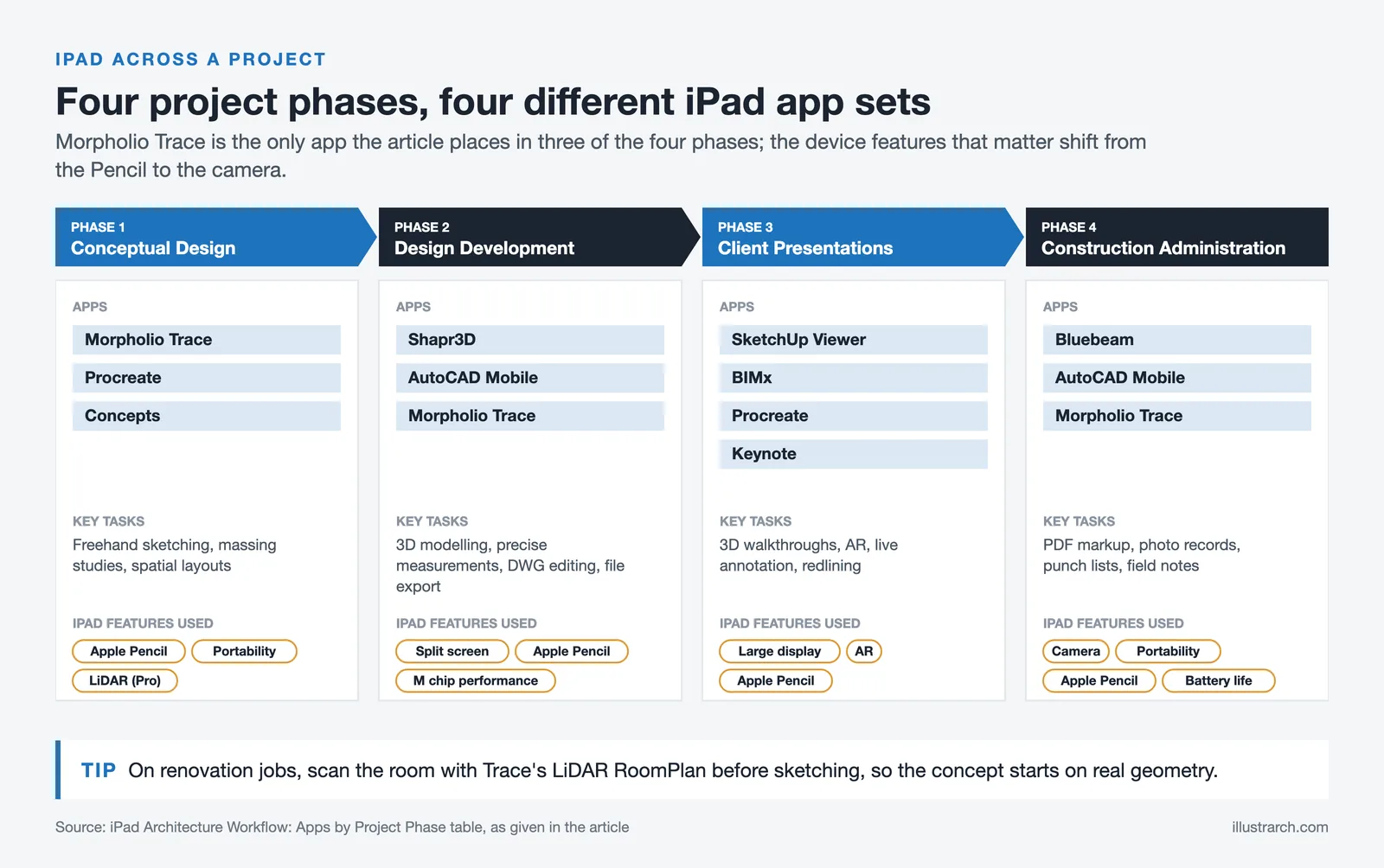
The real power of iPad for architects lies in integrating it into a complete design workflow. Here is how many professionals use iPad architecture tools across project phases:
During the conceptual design phase, architects use Morpholio Trace or Procreate to sketch initial ideas, explore massing concepts, and develop spatial layouts. The iPad’s portability means these sessions can happen anywhere, in a café, on a train, or during a site visit.
In design development, apps like Shapr3D and AutoCAD Mobile allow architects to refine 3D models, work with precise measurements, and export files to desktop software for further development. The split-screen feature on iPad enables referencing site photos or building codes while modeling at the same time.
For client presentations and reviews, the iPad becomes a dynamic presentation tool. Walk clients through 3D models using SketchUp Viewer or BIMx, annotate live during meetings, and share feedback instantly. The Apple Pencil makes real-time redlining and sketching over renderings effortless.
During construction administration, architects carry the iPad to job sites for PDF markup of construction documents, photo documentation, and field issue tracking using apps like Bluebeam or project management tools recommended by AIA. For dimensioned floor plan capture during walkthroughs, our Magicplan review looks at how phone and iPad scanning apps perform against traditional tape-measure surveys.
🏗️ Real-World Example
Foster + Partners, London (ongoing): The studio has publicly described using iPad Pro with Apple Pencil as part of its design process, with architects sketching directly on top of digital site photos and 3D model snapshots during early design conversations. This kind of iPad-first workflow shortens the loop between an idea sketched in a meeting and a refined drawing brought into the office BIM environment.
| Project Phase | Recommended iPad Apps | Key Tasks | iPad Features Used |
|---|---|---|---|
| Conceptual Design | Morpholio Trace, Procreate, Concepts | Freehand sketching, massing studies, spatial layout exploration | Apple Pencil, portability, LiDAR (Pro) |
| Design Development | Shapr3D, AutoCAD Mobile, Morpholio Trace | 3D modeling, precise measurements, DWG editing, file export | Split screen, Apple Pencil, M-chip performance |
| Client Presentations | SketchUp Viewer, BIMx, Procreate, Keynote | 3D walkthroughs, AR visualization, live annotation, redlining | Large display, AR capabilities, Apple Pencil |
| Construction Administration | Bluebeam, AutoCAD Mobile, Morpholio Trace | PDF markup, photo documentation, punch lists, field notes | Camera, portability, Apple Pencil, long battery life |
💡 Pro Tip
For renovation and as-built projects, scan the room with Morpholio Trace’s LiDAR-powered RoomPlan before you start sketching. The resulting 3D model gives you an accurate base layer, and you can immediately overlay design intent on top of real geometry. This saves a typical site survey trip per project and cuts dimensional errors in early design proposals.
iPad for Landscape Architects
Landscape architects and garden designers have found the iPad particularly well suited to outdoor fieldwork. The portability of the device, combined with GPS, camera, and LiDAR capabilities, means you can document site conditions, photograph planting, and sketch spatial ideas without carrying separate tools.
Apps like Procreate work well for hand-drawn landscape section drawings and planting overlays on site photographs. Morpholio Trace supports large-scale site plans with scaled grids. For a dedicated breakdown of iPad tools for outdoor design, our guide to iPad apps for landscape architecture and garden design covers seven apps tested in real project conditions.
Tips for Architecture Students Who Use iPad
By following these tips, architecture students can make the most of their iPad and effectively use it as a tool in their design process.
- Invest in a stylus: The Apple Pencil can provide a more precise and natural experience when using design applications on the iPad, allowing for greater accuracy and control. The Apple Pencil Pro adds haptic feedback and squeeze gestures that speed up tool switching.
- Get the right apps: There are a variety of architecture and design-related apps available for the iPad, but not all of them are created equal. Make sure to research and choose the best architecture apps for iPad that suit your needs and work well for your workflow. Start with Morpholio Trace for sketching and Shapr3D for 3D modeling.
- Store your work in the cloud: The iPad’s limited storage can be an issue for architecture students with large design files. Consider storing your work in a cloud-based storage service like Google Drive or Dropbox to access your files from anywhere.

- Use a keyboard case: A keyboard case like the Magic Keyboard can greatly enhance the iPad’s functionality and make typing and inputting data much easier, especially when writing project reports or emails.
- Use the split screen feature: The split screen feature on the iPad allows you to run two apps side by side, making it easier to work on designs while referencing other resources such as building codes, material libraries, or site photos.
- Take advantage of collaboration tools: Some design apps offer collaboration tools that allow multiple users to work on the same design simultaneously, making it easier to work with classmates and instructors.
- Make use of markup and annotation tools: Many design apps on the iPad offer markup and annotation tools, allowing you to easily make notes and mark up your designs during studio critiques and reviews.
- Regularly backup your work: Regularly backing up your work is important to avoid losing important files and designs. Consider using a cloud-based storage service or an external hard drive for backup. Enable automatic iCloud backup for peace of mind.
- Add a matte screen protector: A paper-like screen protector adds friction to the iPad glass, making Apple Pencil sketching feel more natural and reducing hand fatigue during long drawing sessions.
- Explore free apps first: Before committing to paid subscriptions, test free architecture apps for iPad to understand which tools fit your studio workflow. Many apps offer fully functional free tiers that are sufficient for coursework.
| Accessory | Price (Approx.) | Compatible With | Key Benefit for Architects |
|---|---|---|---|
| Apple Pencil Pro | $129 | iPad Pro (M5), iPad Air (M4) | Haptic feedback, barrel roll, squeeze gestures for precise sketching |
| Apple Pencil (USB-C) | $79 | All current iPad models | Budget-friendly stylus for basic sketching and markup |
| Magic Keyboard (Pro) | $299 – $349 | iPad Pro (M5) | Backlit keys, trackpad, laptop-like typing for reports & emails |
| Magic Keyboard (Air) | $269 – $319 | iPad Air (M4) | Function row, trackpad, lighter design for portable use |
| Magic Keyboard Folio | $249 | iPad 11th Gen (A16) | Two-piece detachable design, click-anywhere trackpad |
| Matte Screen Protector | $15 – $40 | All iPad models | Paper-like feel, reduced glare, less hand fatigue when drawing |
| Portable iPad Stand | $20 – $60 | All iPad models | Ergonomic viewing angle for presentations and on-site reviews |

✅ Key Takeaways
- The iPad Pro 13-inch with M5 chip is the strongest option for professional architects in 2026 thanks to its Tandem OLED display, LiDAR scanner, and Apple Pencil Pro support.
- Mid-career architects and students get the best value from the iPad Air 13-inch (M4), which handles most CAD and sketching workflows at a more accessible price.
- Core architecture apps for iPad include Morpholio Trace, Shapr3D, AutoCAD Mobile, Concepts, Procreate, SketchUp Viewer, and BIMx, covering sketching, CAD, and BIM viewing.
- Plan for at least 256 GB of storage, an Apple Pencil Pro, a keyboard case, and a matte screen protector to get a complete iPad architecture setup.
- The iPad fits across the full project lifecycle: concept sketching, design development, client presentations, and on-site construction administration.
- The iPad works best as a companion device alongside a desktop workstation, since heavy BIM and rendering workflows still require full desktop software.
Frequently Asked Questions
What is the best iPad for architects in 2026?
The iPad Pro 13-inch with M5 chip is widely considered the best iPad for architects. It offers the largest display, most powerful processor, LiDAR scanner for room scanning, and full Apple Pencil Pro support. For those on a tighter budget, the iPad Air with M4 chip provides excellent performance at a more accessible price point.
What are the best architecture apps for iPad?
The top iPad architecture apps include Morpholio Trace for sketching and PDF markup, Shapr3D for 3D CAD modeling, AutoCAD Mobile for DWG editing, Concepts for vector-based drawing, Procreate for hand-drawn presentations, and SketchUp Viewer for 3D model visualization. The right combination depends on your specific workflow needs.
Can an iPad replace a laptop for architecture work?
For many tasks like sketching, design review, client presentations, site documentation, and 3D modeling, the iPad performs exceptionally well. However, heavy BIM workflows in Revit or ArchiCAD and complex rendering tasks still require desktop or laptop power. Most architects use the iPad as a powerful companion device alongside their main workstation.
Is the Apple Pencil worth it for architects?
The Apple Pencil is considered essential for any architect using an iPad. It provides pressure sensitivity, tilt detection, and pixel-perfect precision that make digital sketching and PDF markup feel natural. The Apple Pencil Pro adds features like haptic feedback and barrel roll that further enhance the architectural drawing experience.
How much storage do I need on an iPad for architecture?
For serious architecture work, 256 GB is the practical minimum, and 512 GB is more comfortable if you regularly install CAD apps, save DWG and BIM exports locally, and cache site documentation. The base 128 GB iPad fills up quickly once you add Shapr3D, Procreate, Morpholio Trace, and a few project files. Pair internal storage with cloud services like iCloud, Google Drive, or Dropbox.
What accessories do architects need for iPad?
Key accessories include the Apple Pencil (Pro or USB-C), a keyboard case such as the Magic Keyboard for typing and data entry, a matte screen protector for a paper-like drawing feel, a cloud storage subscription for managing large files, and a portable stand for presentations and on-site reviews.
How does the iPad Pro M5 compare to the M4 for architecture use?
The iPad Pro M5 brings up to 3.5x faster AI performance, a faster 10-core GPU with hardware-accelerated ray tracing, Wi-Fi 7 with the Apple N1 chip, and Bluetooth 6 support. For architects, the practical benefits include smoother 3D rendering in Shapr3D, faster file processing, and improved wireless transfer speeds when syncing large project files. The display, LiDAR scanner, and Apple Pencil Pro support remain the same as the M4 generation.
Last updated:


1 Comment





Foster + Partners to Test Robot Swarms Building Timber from the Top Down
Foster + Partners wins €4m EU grant to build robot and drone...
 illustrarch Editoral Team2 Mins read
PLNAR Review: Does AR Measurement Hold Up on a Real Site Visit?
PLNAR began as a consumer AR tape measure and now runs as...
 Sinan Ozen5 Mins read
ArchiSnapper Review: Is This Field Report App Worth It for Architects?
A hands-on look at Deltek ArchiSnapper, the mobile app built for field...
Sinan Ozen5 Mins read

Gross Internal Area and Net Internal Area: What’s the Difference?
The difference between Gross Internal Area and Net Internal Area shapes how...
Sinan Ozen5 Mins read


I really don’t see how an iPad could replace a proper laptop for architects. The article talks about portability, but that doesn’t make up for the lack of power and software compatibility. It feels like they are pushing the iPad as a must-have when it’s just not practical for serious design work.