

Best Tablets for Architects and Students in 2026: Performance, Drawing & CAD
In 2026, tablets have become essential tools for architects and architecture students, supporting workflows that range from hand sketching and digital drawing to advanced CAD and BIM tasks. This guide reviews the best tablets for architectural use, comparing performance, stylus quality, software compatibility, portability, and price to help professionals and students choose the right device for their design needs.
 Elif Ayse Sen27 December 202537 Mins read869
Table of Contents Show
The best tablets for architects and students in 2026 combine a precise stylus, a color-accurate display, strong CAD and BIM software compatibility, and enough processing power for sketching, rendering, and on-site review. Top picks include the Apple iPad Pro 13″ (M5) for sketching, the Microsoft Surface Pro 11 for full desktop CAD, and the Wacom MobileStudio Pro 16 for professional-grade pen precision.
In 2026, tablets have become essential tools for architects and architecture students, bridging the gap between hand sketching, digital drawing, and professional CAD workflows. No longer limited to note-taking or casual use, today’s tablets can handle complex design tasks, large drawings, and even full desktop software, making them valuable companions in studios, classrooms, and on site. Choosing the right tablet now depends on more than brand loyalty; performance, stylus quality, software compatibility, portability, and price all play a critical role in how effectively a device supports architectural work.

This guide explores the best tablets for architects and students in 2026, focusing on real-world needs such as sketching accuracy, multitasking, CAD compatibility, and long-term usability. From powerful flagship devices to budget-friendly student options and professional pen-centric workstations, the following tablets represent the strongest choices for different design workflows and experience levels.
💡 Pro Tip
When testing a tablet for architectural use, always sketch a long, slow diagonal line at low pressure on the demo unit. Cheap or poorly tuned styluses produce wavy or stepped lines under these conditions, even when fast strokes look smooth. This single test reveals more about real drawing quality than any spec sheet, and it takes about ten seconds in any store.
What Is the Best Tablet for Architects in 2026?
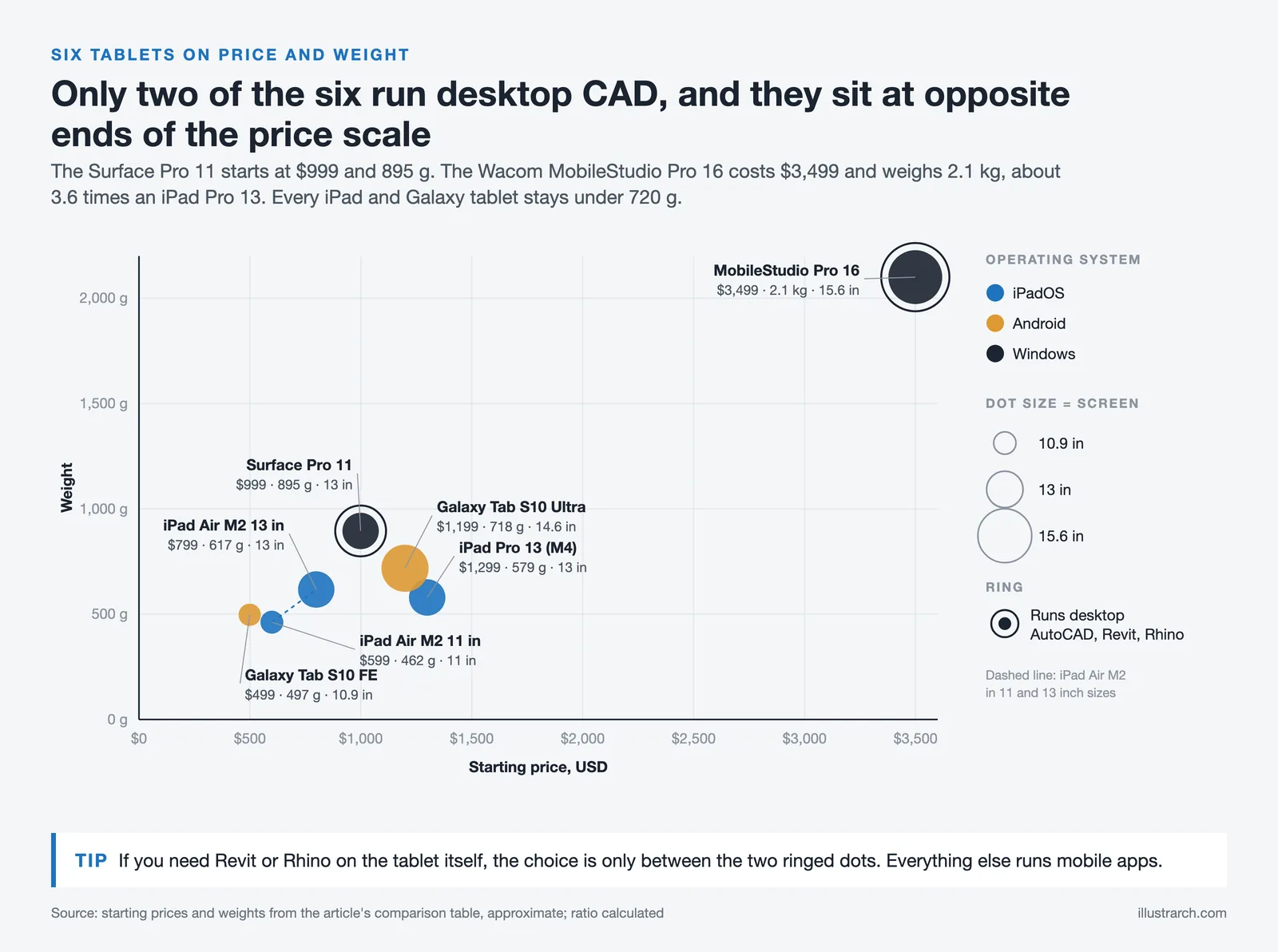
The best tablet for architects in 2026 depends on workflow rather than brand. For pure sketching, presentations, and PDF markup on site, the Apple iPad Pro 13″ (M5) leads on display quality and app ecosystem. For architects who need to run full desktop AutoCAD, Revit, or Rhino, only the Microsoft Surface Pro 11 and the Wacom MobileStudio Pro 16 can do that natively. Students looking for the strongest balance of price and performance are best served by the Apple iPad Air (M2) or the Samsung Galaxy Tab S10 FE.
Quick Comparison Table
| Tablet | Display | Processor | RAM | Storage | Stylus | OS | Weight | Starting Price (USD) |
|---|---|---|---|---|---|---|---|---|
| Apple iPad Pro 13″ (M5) | 13″ Ultra Retina XDR OLED, 2752×2064, 120Hz | Apple M5 | 12 GB / 16 GB | 256 GB: 2 TB | Apple Pencil Pro (sold separately) | iPadOS | 579 g (1.28 lbs) | ~$1,299 |
| Samsung Galaxy Tab S10 Ultra | 14.6″ Dynamic AMOLED 2X, 2960×1848, 120Hz | MediaTek Dimensity 9300+ | 12 GB / 16 GB | 256 GB: 1 TB (+ microSD) | S Pen (included) | Android 14 | 718 g (1.58 lbs) | ~$1,199 |
| Microsoft Surface Pro 11 | 13″ LCD or OLED, 2880×1920, 120Hz | Snapdragon X Plus / X Elite | 16 GB / 32 GB | 256 GB: 1 TB | Surface Slim Pen (sold separately) | Windows 11 | 895 g (1.97 lbs) | ~$999 |
| Apple iPad Air 6th Gen (M2) | 11″ or 13″ Liquid Retina, up to 2732×2048, 60Hz | Apple M2 | 8 GB | 128 GB: 1 TB | Apple Pencil Pro (sold separately) | iPadOS | 462 g: 617 g | ~$599 (11″) / ~$799 (13″) |
| Samsung Galaxy Tab S10 FE | 10.9″ LCD, 90Hz | Samsung Exynos 1580 | 8 GB / 12 GB | 128 GB: 256 GB (+ microSD) | S Pen (included) | Android 15 | 497 g (1.09 lbs) | ~$499 |
| Wacom MobileStudio Pro 16 | 15.6″ IPS 4K UHD, 3840×2160 | Intel Core i7-8559U | 16 GB | 512 GB SSD | Wacom Pro Pen 2 (included, 8192 levels) | Windows 10 | 2.1 kg (4.6 lbs) | ~$3,499 |
🔢 Quick Numbers
- One-third of architecture firms reported using AI in day-to-day work, with 61% adoption among large firms (AIA Firm Survey Report, 2024).
- About 80% of architecture firms use at least one type of design software, and around 70% of architectural visualization is done using 3D rendering tools (industry data, 2023-2024).
- Approximately 75% of U.S. architecture firms have fewer than 10 employees, where a single tablet often replaces multiple legacy drawing tools (AIA, 2024).
Apple iPad Pro 13 (M5)
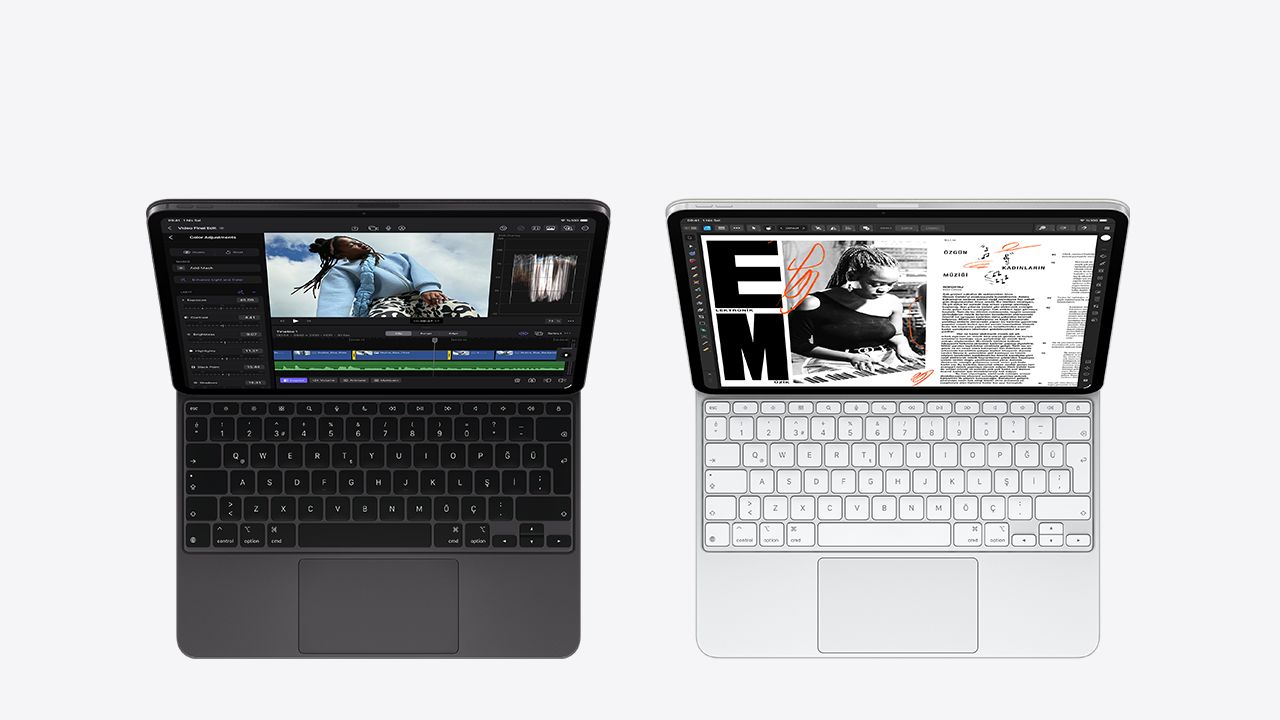
The Apple 13-inch iPad Pro is one of the most powerful tablets available in 2026, offering an excellent balance of performance, display quality, and creative capability for architects and advanced students. Its Ultra Retina XDR display with ProMotion provides smooth visuals, accurate color reproduction, and high brightness, making it well suited for detailed sketching, plan review, and presentations. Powered by Apple’s latest M-series processors and compatible with the Apple Pencil Pro, it delivers responsive, desktop-class performance for demanding design workflows. On iPadOS it runs graphics-heavy apps such as Shapr3D, Procreate, and Morpholio Trace smoothly, and students weighing it for studio work can read our dedicated guide to the iPad Pro for architecture students.
This level of performance comes at a premium cost, particularly when accessories such as the Apple Pencil Pro and Magic Keyboard are included. While iPadOS supports a strong range of design and CAD applications, it may not fully replace desktop software for all professional needs. As a result, the 13-inch iPad Pro is best suited for architects and serious design students seeking a top-tier tablet for high-quality drawing, visualization, and multitasking.
📌 Did You Know?
The Apple Pencil Pro can detect when it is hovering up to 12 mm above the iPad Pro display, letting architects preview a brush stroke or measurement before committing to a line. Combined with the squeeze gesture and barrel roll, it brings interaction patterns much closer to traditional pen-on-paper drafting than earlier stylus generations.
Samsung Galaxy Tab S10 Ultra
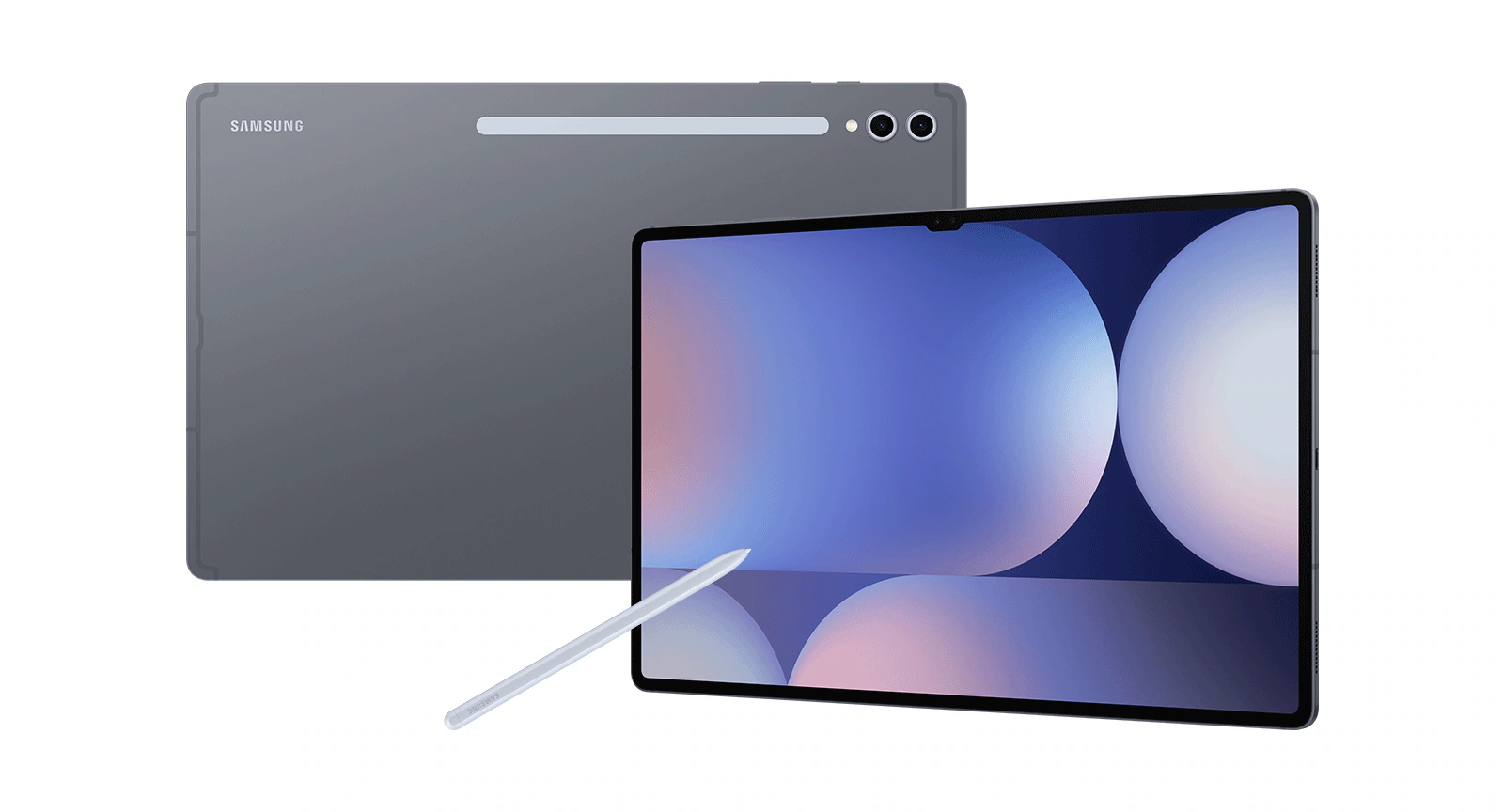
The Samsung Galaxy Tab S10 Ultra is one of the most powerful Android tablets available in 2026, featuring a massive 14.6″ Dynamic AMOLED 2X display with vibrant colors and smooth 120 Hz refresh rate, perfect for sketching, reviewing drawings, and multitasking with architecture apps. It packs high-end hardware like up to 16 GB RAM, 1 TB storage (expandable via microSD), and a fast processor, making it excellent for handling large design files, multitasking, and creative work with the included S Pen stylus. The S Pen enhances precision and responsiveness for drawing, concepting, and annotating plans, while the long software support ensures it stays relevant for years.
Its large size and premium price might not suit everyone, since it’s heavier and less portable than smaller tablets, and battery life may lag during intense work sessions. While the Android ecosystem supports many creative apps, it still trails iPadOS in terms of optimized professional design software. This tablet is ideal for architects, designers, and students who want a feature-rich Android alternative with a huge canvas for drawing, presentation, and productivity tasks, especially those who value screen real estate and stylus precision.
Microsoft Surface Pro 11
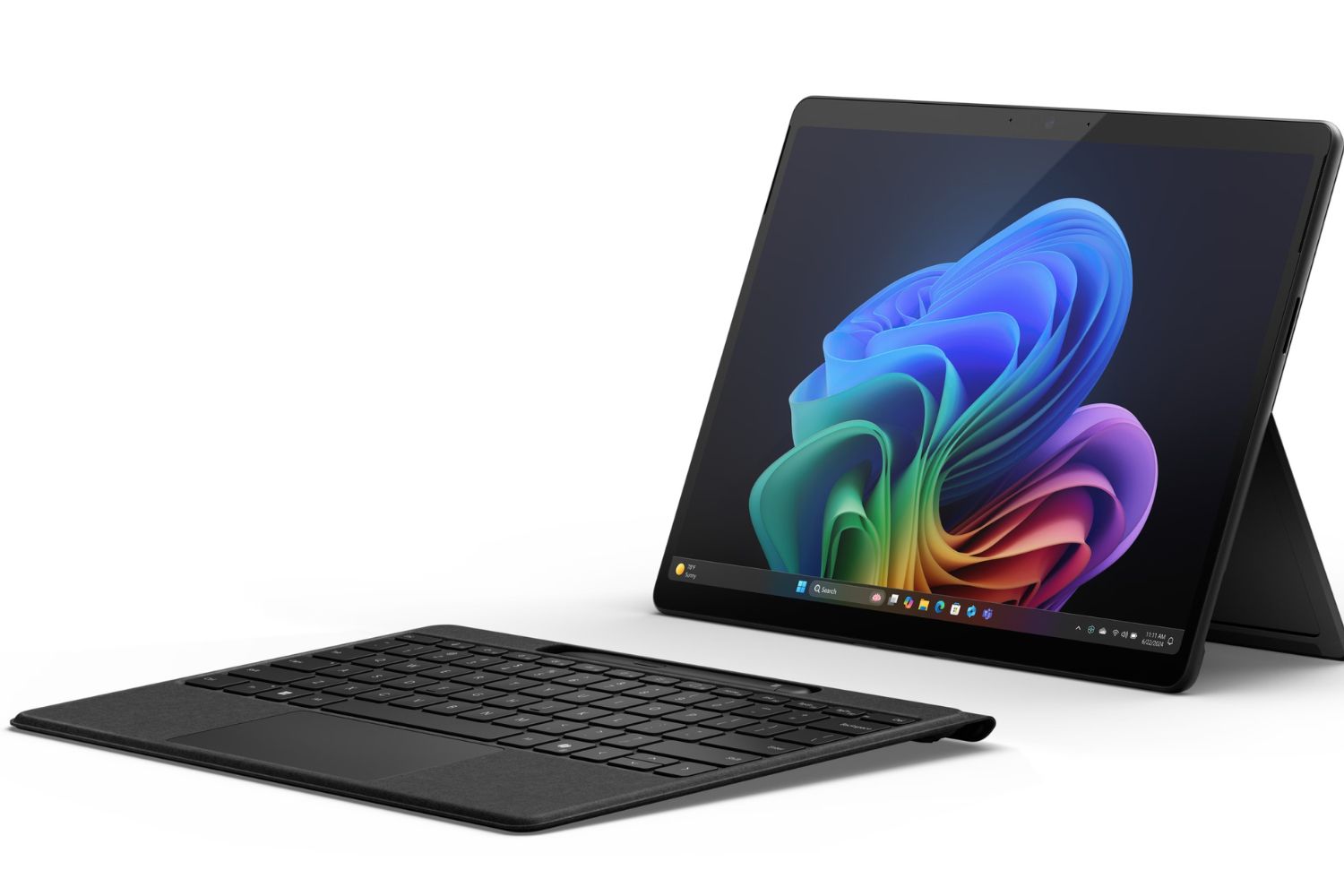
The Microsoft Surface Pro 11 is a versatile Windows-based 2-in-1 tablet/laptop that excels for architects and advanced students who need full desktop software on the go. It features a high-resolution 13″ OLED or LCD touchscreen with a 3:2 aspect ratio, excellent color accuracy, and smooth responsiveness, making it ideal for sketching, design review, and detailed plan work. Powered by Qualcomm’s Snapdragon X Plus or Snapdragon X Elite chip, it offers strong performance for multitasking, office workflows, and creative tools, while Windows 11 provides the flexibility to run industry-standard programs such as full CAD software or BIM tools that iPadOS and Android can’t.
However, this versatility comes with trade-offs: the base price doesn’t include the keyboard or stylus, which are sold separately and can significantly increase the total cost, and app compatibility issues may still arise with some legacy x86 software when running on ARM-based configurations. The Surface Pro 11 also typically costs more than traditional tablets, which might be overkill for students who mainly need casual sketching or note-taking apps. This makes it ideal for architecture students and professionals who want the power of a laptop and the portability of a tablet in one device, especially those running full desktop design software regularly. For students starting out with Revit and other BIM tools, the Surface Pro 11 is one of the few tablets that supports the full desktop versions natively. One caveat matters here: Autodesk does not support Revit or AutoCAD on Windows on ARM, so if Autodesk software is central to your work, choose an Intel Core Ultra (business) configuration of the Microsoft Surface Pro 11 rather than a Snapdragon model, and check the current options on Microsoft’s Surface site before ordering.
⚠️ Common Mistake to Avoid
Many architecture students choose a tablet based on raw processor benchmarks alone and end up with a device that struggles with their actual workflow. The bottleneck for most architects is not CPU speed; it is stylus latency, palm rejection, color accuracy on the display, and software compatibility. A mid-range tablet with excellent pen calibration will outperform a flagship device with a sub-par stylus for daily sketching and PDF markup.
Apple iPad Air 6th Generation
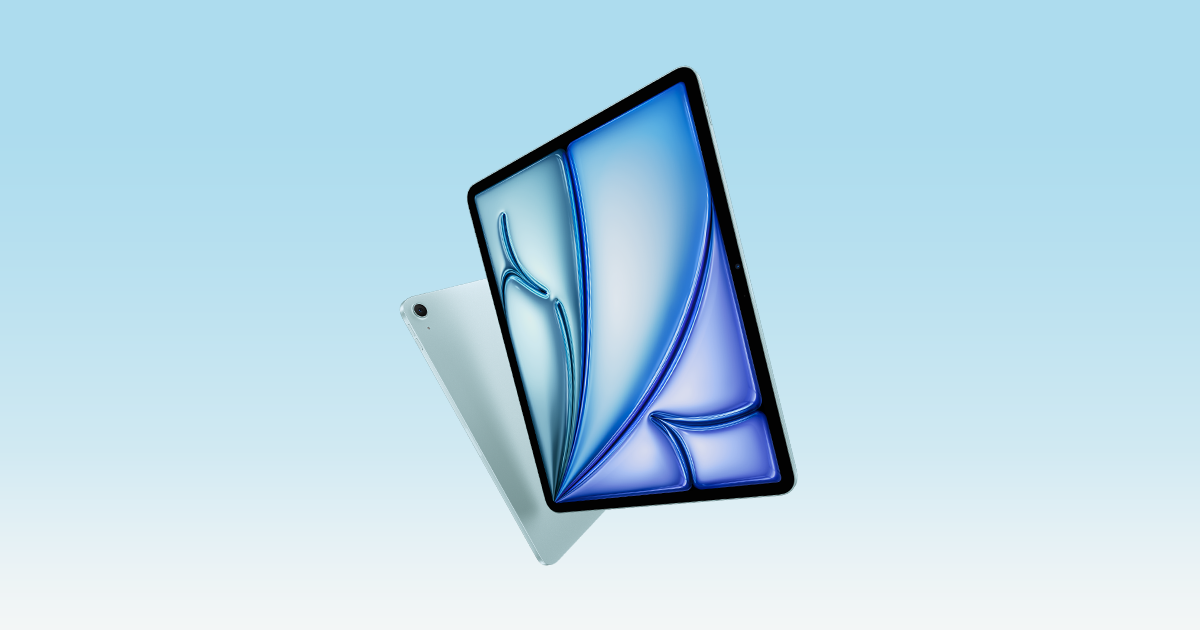
The Apple iPad Air 6th Generation hits the sweet spot between performance and price, offering powerful processing, a bright Liquid Retina display, and compatibility with the Apple Pencil Pro. It’s a perfect choice for architecture students who want smooth sketching, note-taking, and multitasking without paying flagship prices. The long-term iPadOS support and sleek design also give it strong future-proofing. However, it doesn’t reach the sheer power or XDR display brightness of the top-tier iPad Pro models, which might matter for heavy 3D modeling or complex multitasking. This makes the iPad Air ideal for students or budget-conscious creatives who want a balanced, high-performing tablet that handles most creative apps with ease.
On the downside, the iPad Air lacks some of the advanced display features found on higher-end iPad Pro models and can be pricier once you add accessories like the Pencil and Magic Keyboard. It also doesn’t offer as much raw horsepower as an iPad Pro for very heavy 3D modeling or multitasking with multiple pro-grade apps. This makes it ideal for students and mid-level creatives who want a powerful, versatile tablet for design tasks, digital sketching, and productivity without the highest flagship cost.
Samsung Galaxy Tab S10 FE
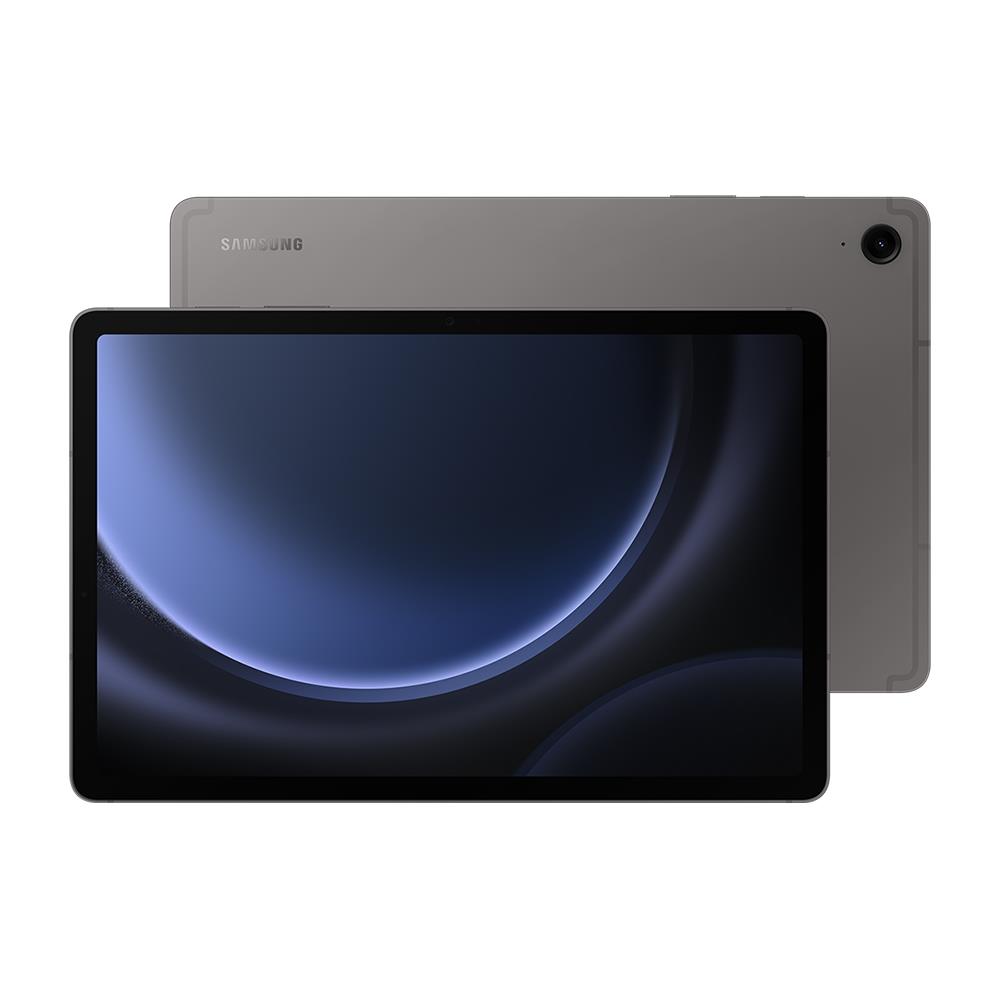
The Samsung Galaxy Tab S10 FE is a solid budget-friendly Android tablet that punches above its price point with a 10.9″ high-resolution display, expandable storage, and an S Pen included in the box, great for sketching, note-taking, and basic design tasks straight out of the gate. Its large 8,000 mAh battery and responsive performance make it ideal for long class sessions, multimedia use, and everyday productivity, while the vibrant screen and stylus support help with conceptual sketches and annotation.
Despite being less powerful than flagship tablets, the S10 FE holds its own for students and casual creative users who don’t need top-tier processing for heavy 3D work. Its use of a midrange chipset means it’s best suited for light CAD/notes and ideation, rather than professional-grade architectural modeling. If you’re seeking a value-packed tablet with stylus support for study, presentations, and sketch workflows without spending a premium, this tablet fits perfectly. Pairing it with free CAD tools for architecture students can keep total costs down while still covering most coursework needs. On Android, install Concepts before relying on AutoCAD Mobile: it is built around the way architects sketch on paper, with an infinite canvas and proper layer control.
Wacom MobileStudio
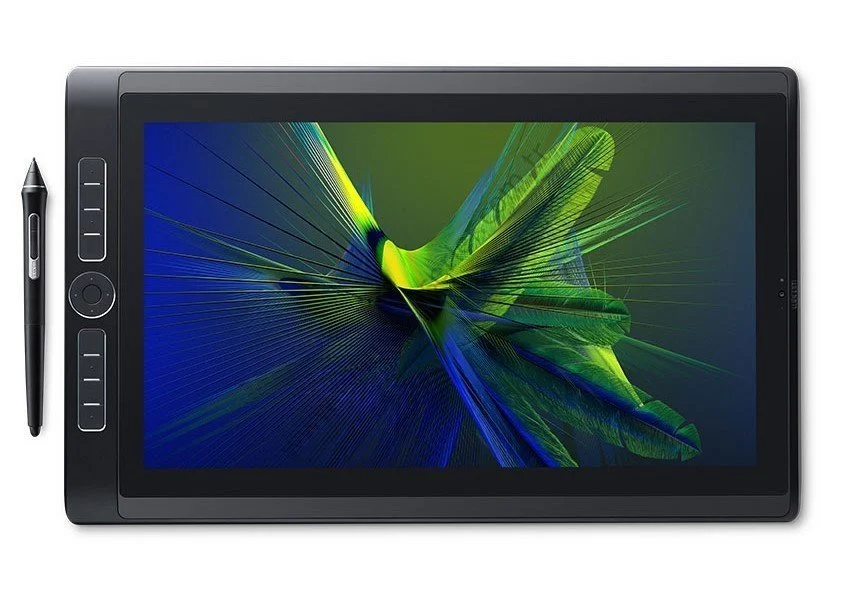
The Wacom MobileStudio Pro series is one of the most powerful pen-centric creative workstations available, combining a full Windows computer with industry-leading stylus performance and dedicated creative tools. Available in models like the 13″ and 16″ versions, these tablets feature high-resolution screens (QHD to 4K), powerful Intel processors, plenty of RAM, and spacious storage options, making them capable of running full desktop programs such as Photoshop, Illustrator, and CAD tools without needing a separate PC. The included Wacom Pro Pen 2 delivers exceptional pen precision with thousands of pressure sensitivity levels and tilt support, offering a natural and lag-free drawing experience that’s particularly valuable for architectural sketching, rendering, and concept work.
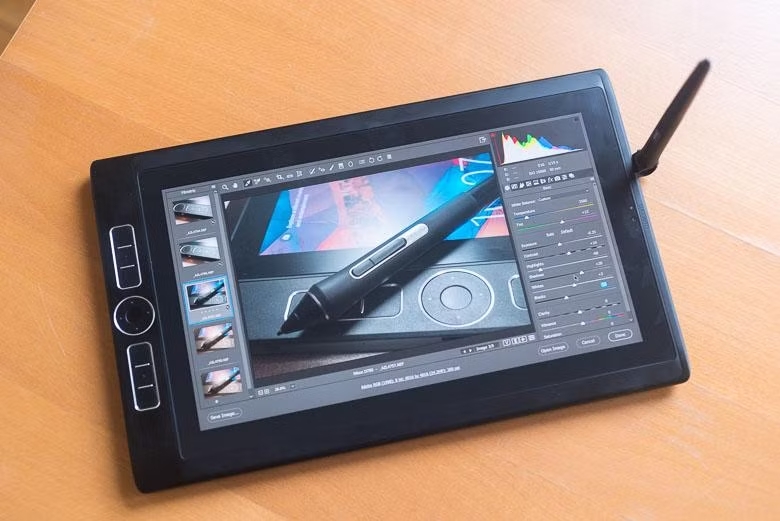
At the same time, this level of performance and toolset comes at a premium price, and compared with lighter tablets it’s heavier and less portable, with battery life that’s shorter than many consumer tablets. These devices are optimized for creative professionals and power users rather than casual note-taking or basic student tasks, and they’re best suited for those who need a desktop-class drawing and design platform on the go. If you require maximum stylus precision and full desktop software compatibility for architectural design, 3D modeling, or professional digital art, the MobileStudio Pro is a top choice, though it may be overkill for lighter workloads or budget-focused users. Wacom’s MobileStudio Pro getting started guide is the place to begin once the device arrives.

💡 Pro Tip
For any tablet you plan to use as a primary architectural sketching device, choose at least 256 GB of internal storage. Project files, reference photos, scanned drawings, and offline copies of large PDFs add up faster than students expect, and tablets without expandable storage become a real bottleneck by second year if you start with 128 GB.
Stylus & Pen Comparison
| Tablet | Stylus | Included in Box? | Pressure Levels | Tilt Support | Key Features |
|---|---|---|---|---|---|
| iPad Pro 13″ (M5) | Apple Pencil Pro | No (~$129) | N/A (Apple proprietary) | Yes | Squeeze gesture, barrel roll, haptic feedback, hover detection, Find My |
| Galaxy Tab S10 Ultra | S Pen | Yes | 4,096 | Yes | Bluetooth, Air Actions, low latency, magnetic attachment |
| Surface Pro 11 | Surface Slim Pen 2 | No (~$130) | 4,096 | Yes | Zero Force Inking, haptic feedback, ultra-precise shading, Flex Keyboard storage |
| iPad Air 6th Gen (M2) | Apple Pencil Pro | No (~$129) | N/A (Apple proprietary) | Yes | Squeeze gesture, barrel roll, haptic feedback, hover detection, Find My |
| Galaxy Tab S10 FE | S Pen | Yes | 4,096 | Yes | Magnetic attachment, no Bluetooth (unlike flagship S Pen) |
| Wacom MobileStudio Pro 16 | Wacom Pro Pen 2 | Yes | 8,192 | Yes (60°) | Battery-free, virtually lag-free, eraser end, industry-leading precision |
Architecture Software Compatibility
| Software / Feature | iPad Pro 13″ | Galaxy Tab S10 Ultra | Surface Pro 11 | iPad Air 6th Gen | Galaxy Tab S10 FE | Wacom MobileStudio Pro |
|---|---|---|---|---|---|---|
| Full Desktop AutoCAD | ✗ | ✗ | ✔ | ✗ | ✗ | ✔ |
| AutoCAD Mobile / Web | ✔ | ✔ | ✔ | ✔ | ✔ | ✔ |
| Revit (BIM) | ✗ | ✗ | ✔* | ✗ | ✗ | ✔ |
| SketchUp | ✔ (iPad app) | ✔ (Web) | ✔ (Desktop) | ✔ (iPad app) | ✔ (Web) | ✔ (Desktop) |
| Adobe Photoshop (Full) | ✔ (iPad) | ✗ | ✔ | ✔ (iPad) | ✗ | ✔ |
| Procreate | ✔ | ✗ | ✗ | ✔ | ✗ | ✗ |
| Rhino / Grasshopper | ✗ | ✗ | ✔* | ✗ | ✗ | ✔ |
| Morpholio Trace | ✔ | ✗ | ✗ | ✔ | ✗ | ✗ |
| Concepts App | ✔ | ✔ | ✔ | ✔ | ✔ | ✔ |
| Bluebeam Revu | ✔ (iPad) | ✗ | ✔ (Desktop) | ✔ (iPad) | ✗ | ✔ (Desktop) |
*ARM compatibility via emulation (Prism), some x86 apps may have performance or compatibility limitations on the Surface Pro 11.
Pros & Cons at a Glance
| Tablet | Pros | Cons | Best For |
|---|---|---|---|
| iPad Pro 13″ (M5) | Stunning OLED display; M5 performance; excellent app ecosystem (Procreate, SketchUp, Morpholio); thin & light | Expensive (especially with accessories); no full desktop CAD; iPadOS limitations | Architects & advanced students seeking top-tier drawing, visualization & multitasking |
| Galaxy Tab S10 Ultra | Largest display (14.6″); S Pen included; expandable storage; strong multitasking; IP68 | Heavy; fewer optimized pro design apps than iPadOS; premium price | Android-preferring designers who value screen real estate & stylus precision |
| Surface Pro 11 | Full Windows 11, runs desktop CAD/BIM software; OLED option; great battery life; 2-in-1 versatility | Keyboard & pen sold separately; ARM app compatibility issues; heavier than pure tablets | Professionals & students who need full desktop software in a portable form factor |
| iPad Air 6th Gen (M2) | Great price-to-performance; M2 chip; Apple Pencil Pro support; two size options; long software support | 60Hz display (no ProMotion); no XDR brightness; accessories add to cost | Students & mid-level creatives wanting a capable tablet without flagship pricing |
| Galaxy Tab S10 FE | Most affordable option; S Pen included; IP68; large battery (8,000 mAh); expandable storage | LCD display; midrange chipset; not suited for heavy 3D / CAD work | Budget-conscious students for note-taking, sketching & light design tasks |
| Wacom MobileStudio Pro 16 | Best-in-class pen precision (8,192 levels); 4K display; full Windows; runs all desktop creative & CAD software | Very expensive; heavy (2.1 kg); short battery life (~5 hrs); aging hardware | Professional architects & digital artists who demand maximum pen accuracy & desktop-class power |
Best Pick by Use Case
| Use Case | Recommended Tablet | Why? |
|---|---|---|
| Architectural Sketching & Concept Design | Apple iPad Pro 13″ (M5) | Best display quality, Apple Pencil Pro precision, and rich creative app ecosystem (Procreate, Morpholio Trace) |
| Running Full Desktop CAD & BIM Software | Microsoft Surface Pro 11 | Only mainstream tablet running full Windows 11, supports AutoCAD, Revit, Rhino, and other x86 applications |
| Maximum Pen Precision & Professional Digital Art | Wacom MobileStudio Pro 16 | Industry-leading 8,192 pressure levels, 4K display, full Windows for desktop software, built for creative professionals |
| Best Value for Architecture Students | Apple iPad Air 6th Gen (M2) | Strong M2 performance at a lower price, Apple Pencil Pro support, excellent app availability, long-term iPadOS updates |
| Budget Student Tablet with Stylus | Samsung Galaxy Tab S10 FE | S Pen included, IP68 durability, expandable storage, large battery, all under $500 |
| Largest Drawing Canvas & Multitasking | Samsung Galaxy Tab S10 Ultra | Massive 14.6″ AMOLED screen with 120Hz, S Pen included, up to 16 GB RAM for heavy multitasking |
| On-Site Plan Review & Annotations | Apple iPad Pro 13″ (M5) or Surface Pro 11 | Bright outdoor-visible displays, responsive stylus input, and support for PDF markup / Bluebeam |
| Presentations & Client Meetings | Apple iPad Pro 13″ (M5) | Stunning OLED visuals, lightweight for carrying, AirPlay mirroring, polished presentation apps |
How to Choose the Right Tablet for Architecture Work
Picking the best tablet for architects starts with how you actually work, not with a spec sheet. If your daily tasks revolve around sketching, presentations, and PDF markup on site, an iPad-class device with a precise stylus is usually the right choice. If you regularly run full desktop AutoCAD, Revit, or Rhino, only a Windows tablet such as the Surface Pro 11 or a Wacom MobileStudio Pro will fit. For students whose budget is the main constraint, mid-range Android tablets with an included S Pen offer the best entry point.
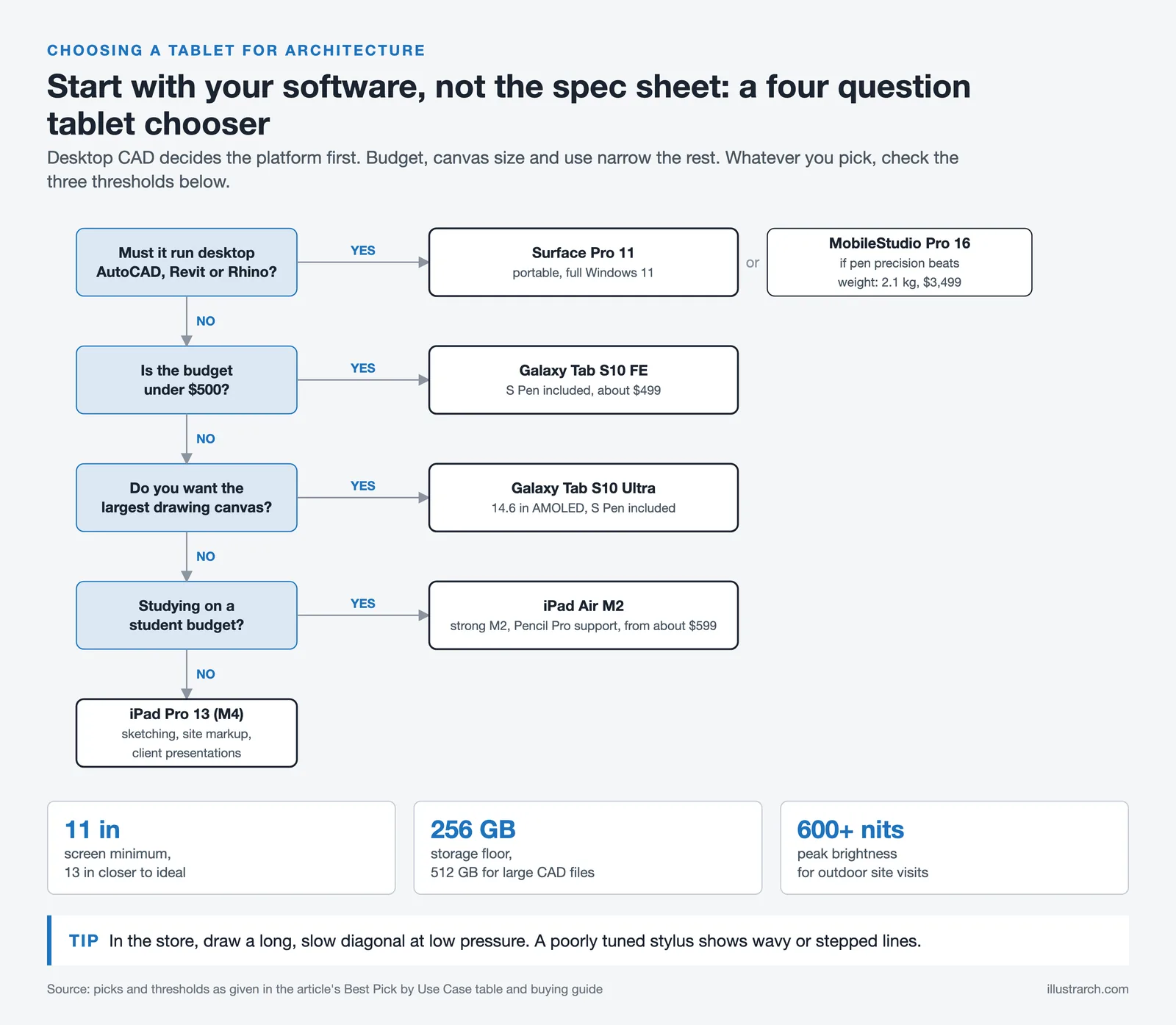
Display size and quality matter more than they appear in marketing materials. An 11-inch screen is the practical minimum for reviewing plans and elevations comfortably, and 13 inches is closer to ideal. OLED, Tandem OLED, or AMOLED panels improve color accuracy for materials studies and renderings, while peak brightness above 600 nits keeps the screen readable on outdoor site visits. Storage of 256 GB should be considered the floor for any architecture-focused tablet, with 512 GB recommended if you frequently handle large CAD files.
Stylus quality often separates a tablet that “feels right” from one that frustrates daily use. The Apple Pencil Pro and Samsung S Pen offer the strongest balance of low latency, tilt support, and palm rejection on their respective platforms, while the Wacom Pro Pen 2 remains the precision benchmark for professional digital art and detailed rendering. Software compatibility is the other decisive factor: confirm that the apps you rely on (whether AutoCAD, Revit, Morpholio Trace, Shapr3D, or a specific BIM platform) actually run well on the operating system you choose.
The operating system shapes the rest of the experience. iPadOS is where most new architecture apps launch first, Android offers broader hardware choice and microSD storage, and Windows is the only platform that runs desktop programs like Revit and AutoCAD with all their plugins. It also helps to match the tablet to your phone and other devices; pairing an iPad with an iPhone, for example, saves time when moving files between them. If digital drawing is new to you, our introduction to digital architectural sketching and our wider look at the world of digital architectural sketching explain how a stylus fits into a design workflow.
Finally, treat the tablet as part of a wider toolkit rather than a laptop replacement. An iPad will not run desktop Revit, and a Surface Pro will not match the iPad app ecosystem for sketching. If you are still building your software skill set, our guide on how to learn architecture software faster can help you decide which tools to prioritize before you commit to a platform.
What Tablet Trends Are Shaping Architectural Workflows in 2026?
As of 2026, tablets are core tools in architectural education and early design phases. New releases emphasize ultra-low stylus latency, enhanced color accuracy, and stronger support for cloud-based BIM review tools, improving collaboration across studios and courses. Architects and students are increasingly adopting AI-assisted design workflows on tablets. Integrated features like smart suggestions, generative sketch options, and real-time annotation syncing are redefining how preliminary concepts are developed and shared.
Apple’s M5 chip, Samsung’s Dimensity 9300+ platform, and Microsoft’s latest Surface hardware all reflect a broader push toward on-device AI processing. For architects, this means faster rendering previews, smarter layer management in drawing apps, and better voice-to-note features during site visits. The tablet market in 2026 also rewards portability: thinner form factors, longer battery life, and improved wireless connectivity (Wi-Fi 7, Bluetooth 6) make it easier than ever to carry your digital studio wherever the project takes you.
In the field of architecture, technology continues to play a central role in shaping how professionals conceptualize, design, and communicate their ideas. Tablets, with their strong portability, high-performance capabilities, and advanced features, have become indispensable tools for architects. They allow precise sketching, 3D modeling, blueprint review, and client presentations within a single device. The market is filled with tablets that match the specific needs of architects, offering precise stylus support, strong processing power, and vibrant displays. This article covers the top tablets of 2025 and 2026 that are reshaping the architectural workflow, helping professionals bring their visions to life with efficiency and precision.
💡 Pro Tip
When testing a tablet for architectural use, always sketch a long, slow diagonal line at low pressure. Cheap styluses produce wavy or stepped lines under these conditions, even when fast strokes look fine. This single test reveals more about real drawing quality than any spec sheet, and it takes about ten seconds in any store demo unit.
Top 5 Best Tablets for Architects and Designers in 2025/2026
1. Apple iPad Pro (13-inch, M5 / 2025 Model)
The iPad Pro continues to lead the professional tablet market. The 2025 model, powered by Apple’s M5 chip, raises the bar for architects and designers. Its 13-inch Ultra Retina XDR Tandem OLED display offers strong color accuracy and a 2,000,000:1 contrast ratio, suitable for viewing architectural blueprints, high-resolution renderings, and immersive presentations. The ultra-thin bezels and edge-to-edge display provide a large workspace while keeping portability for site visits and client meetings.
Apple’s M5 chip delivers up to 3.5x faster AI performance over the M4, with a 10-core GPU featuring Neural Accelerators in every core. This iPad Pro is optimized for demanding workflows, including running apps like AutoCAD, BIMx, and SketchUp Viewer. Its advanced neural engine supports real-time rendering and detailed manipulation of complex 3D models without lag. The base configuration now starts at 12 GB of RAM (up from 8 GB on the M4), and storage options go up to 2 TB, which gives plenty of room for storing CAD files, presentations, and reference material. If it will be your main sketching and presentation device, budget for an Apple keyboard alongside the Pencil, and compare storage tiers on Apple’s iPad Pro configuration page before ordering, since the 1 TB and 2 TB models step up from 12 GB to 16 GB of RAM.
The Apple Pencil Pro is another standout feature, offering industry-leading precision with low latency. With features like hover detection and pressure sensitivity, it feels natural to sketch floor plans, annotate drawings, or create concept art directly on the screen. The vast ecosystem of apps on iPadOS, paired with tight integration with Apple’s other devices, supports an efficient and collaborative workflow. New connectivity features include Wi-Fi 7 and Bluetooth 6, along with Apple’s custom C1X cellular modem for faster 5G speeds on cellular models.
Why it stands out: The iPad Pro combines power, portability, and precision in a sleek package. Its advanced display and processing capabilities make it a strong tool for architects who need to visualize their ideas, create detailed sketches, and present their work to clients in the best possible light, often with a sleek iPad Pro stand for optimal viewing and security.
2. Microsoft Surface Pro 11
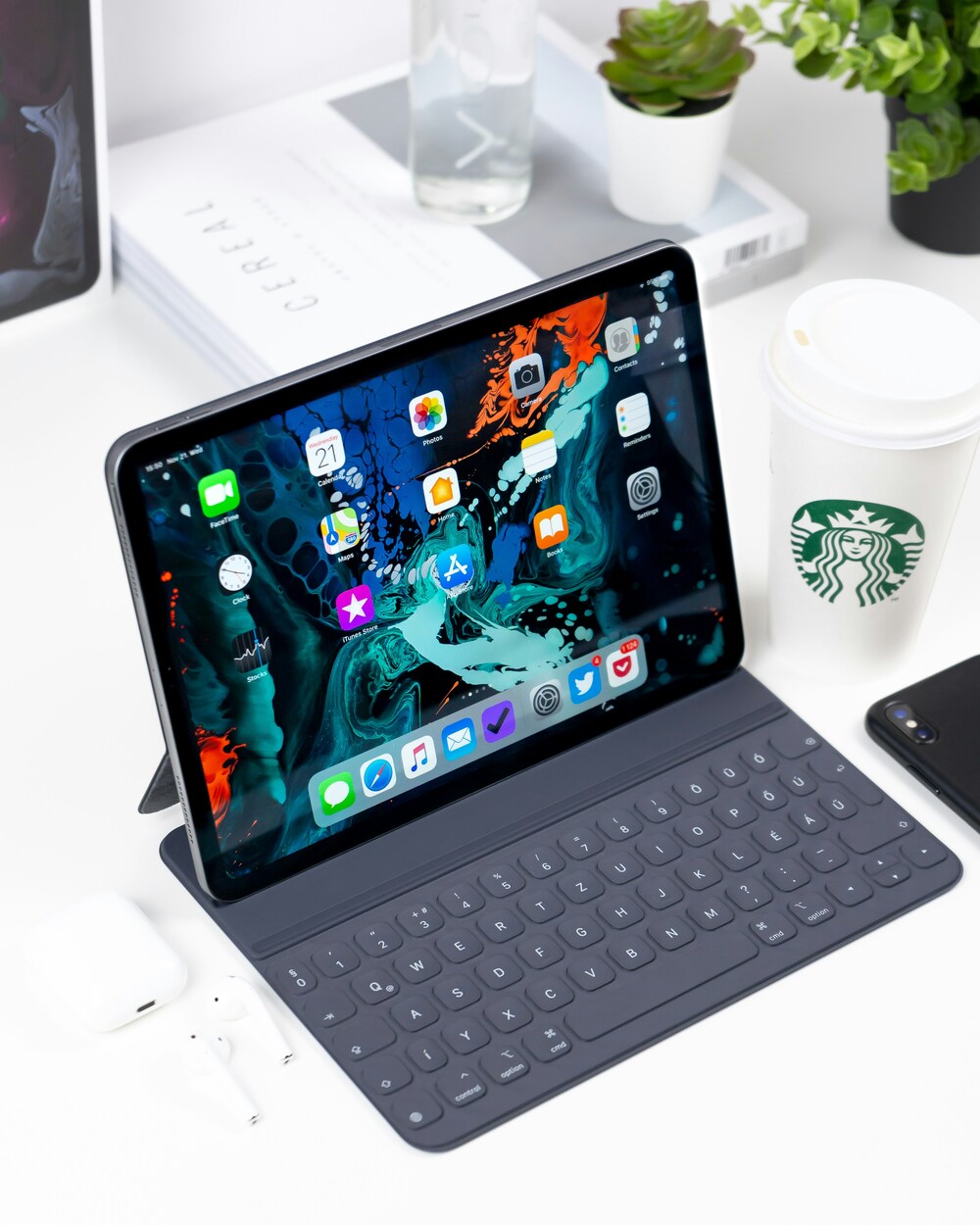
The Microsoft Surface Pro 11 offers architects a hybrid solution that bridges the gap between a laptop and a tablet. Its versatility is one of its biggest strengths: the detachable keyboard and kickstand let users switch between drawing mode and full laptop functionality, which is useful for multitasking. For architects who need to run full desktop CAD or BIM software on a tablet, the Surface Pro 11 remains the top choice.
The 13-inch PixelSense OLED display is sharp and responsive, with a 120Hz refresh rate that supports fluid interactions when sketching or zooming into blueprints. Available with Intel Core Ultra or Snapdragon X Elite processors, architects can run full desktop versions of applications like AutoCAD, Revit, and Rhino, providing a level of capability not typically found in traditional tablets. For architects deeply invested in BIM workflows, the Surface Pro 11 is the most flexible portable choice in 2026.
The Surface Slim Pen 2 adds an element of realism with its haptic feedback feature, which mimics the sensation of drawing on paper. Its fine-tip precision makes it a reliable drawing tablet for architects who create technical sketches or annotate PDFs on the go. With up to 1TB of storage and support for cloud syncing through Microsoft OneDrive, architects can securely access their projects anywhere.
Why it stands out: The Surface Pro 11 is ideal for architects who value flexibility and power in their devices. Whether you are drafting designs on-site, making adjustments during client consultations, or preparing detailed models in the office, this device provides everything you need in one package. It is widely considered the best tablet PC for architects who depend on Windows-based design software.

3. Samsung Galaxy Tab S10 Ultra
For architects who want a large canvas for their creative work, the Samsung Galaxy Tab S10 Ultra is an exceptional choice and the best Samsung tablet for architects. Its expansive 14.6-inch Dynamic AMOLED 2X display offers a resolution of 2960 x 1848 pixels, delivering vibrant and accurate colors with deep blacks and high contrast. This makes it well suited for reviewing detailed architectural renderings, showcasing immersive walkthroughs, or sketching concept designs. The display also features anti-reflection technology and 120Hz refresh rate for smooth stylus input.
Under the hood, the tablet is powered by the MediaTek Dimensity 9300+ processor, supporting smooth performance for graphics-intensive tasks and multitasking. With up to 1TB of storage (expandable via microSD), 16GB of RAM, and IP68 water and dust resistance, it provides the speed, capacity, and durability needed to handle architectural software such as Morpholio Trace, Concepts, or ArchiCAD viewer. Samsung’s Galaxy AI features add smart tools for note-taking and sketch-to-image generation.
The included S Pen is a standout tool for architects. It features good pressure sensitivity and near-zero latency, which is helpful for precision sketching, diagramming, and annotation. Plus, the tablet’s ability to run multiple apps in split-screen mode boosts productivity, allowing architects to sketch while referencing floor plans or specifications side by side. As the best android tablet for architects, the Tab S10 Ultra also benefits from Samsung’s commitment to seven years of OS and security updates.
Why it stands out: The Galaxy Tab S10 Ultra is a strong fit for those who want a large, vibrant display and a lightweight yet powerful device. Its expansive screen real estate and excellent stylus make it a great choice for drafting, collaborating, and presenting ideas.

4. Wacom MobileStudio Pro 16
The Wacom MobileStudio Pro 16 is the go-to device for architects who need professional-grade tools for design and visualization. Known for its strong precision and responsiveness, this graphic tablet for architects is tailored specifically for creative professionals who demand the highest pen accuracy available.
Its 16-inch 4K Ultra HD display is calibrated to cover 100% Adobe RGB color space, which means every detail of your design is rendered with high accuracy. Whether you are working on 3D models, rendering photorealistic visualizations, or editing complex floor plans, the display’s clarity and color fidelity will exceed expectations.
The Intel Core i7 processor paired with NVIDIA Quadro graphics handles even the most demanding architectural tasks, such as 3D rendering and virtual walkthroughs. It is also compatible with industry-standard software like Rhino, SketchUp, and Maya.
The included Wacom Pro Pen 2 is one of the most advanced styluses available, offering 8192 levels of pressure sensitivity and tilt support. This makes it a powerful tool for detailed drawing, shading, and annotations, rivaling the experience of working with pen and paper. Wacom’s driver ecosystem also supports extensive customization of pen buttons, touch gestures, and shortcut keys across different applications.
Why it stands out: For those who demand the highest level of precision and performance, the MobileStudio Pro 16 is unmatched. It is the best drawing tablet for architects who create detailed designs and handle complex architectural workflows.

5. Apple iPad Air 13-inch (M4)
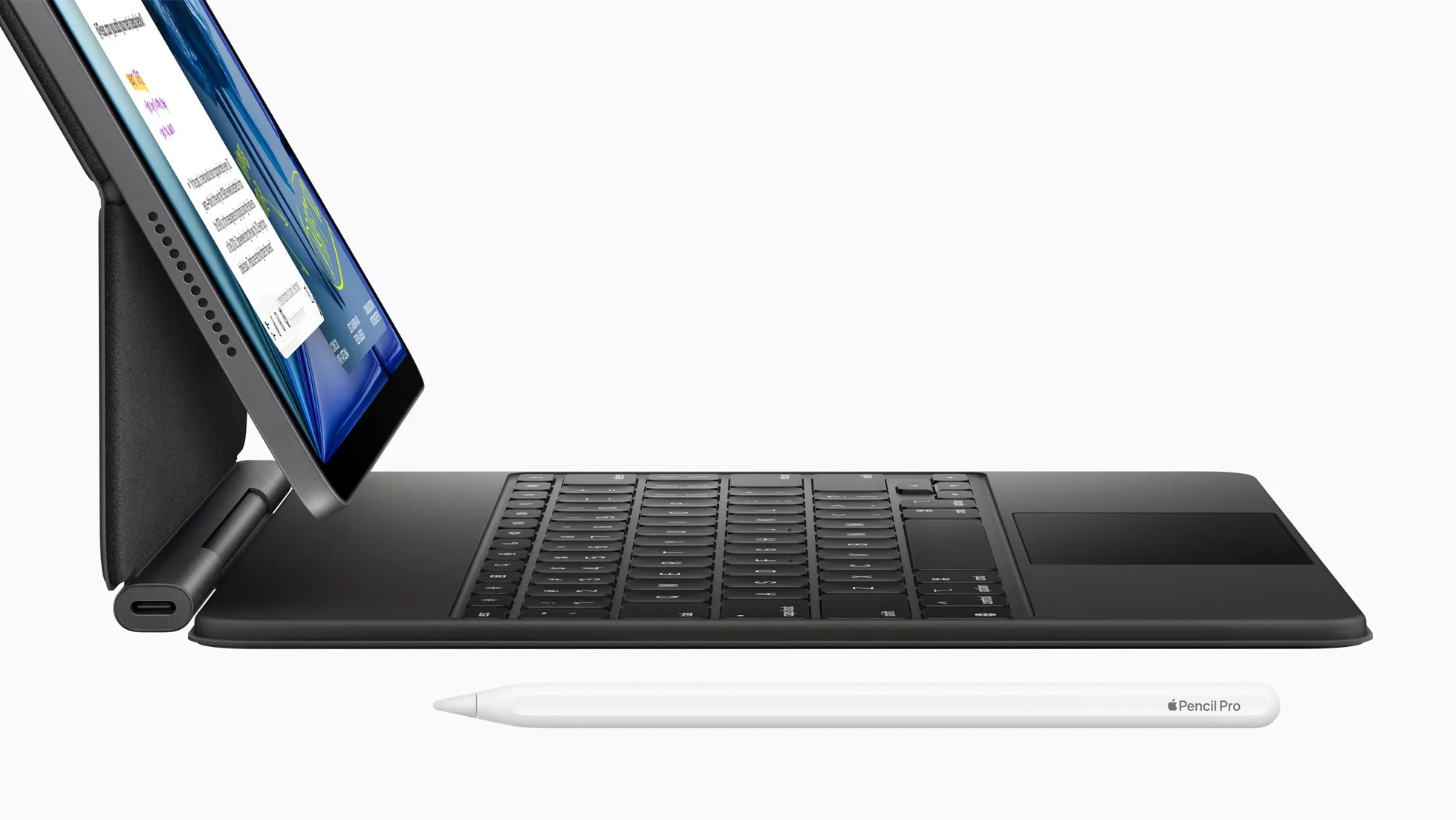
The 13-inch iPad Air is the value pick for architects and students who want a large drawing surface without paying iPad Pro prices. Apple updated it in March 2026 with the M4 chip and 12 GB of unified memory, and its 13-inch Liquid Retina display (2732 x 2048 pixels, 600 nits) gives accurate P3 color for reviewing drawings and renderings.
It supports the Apple Pencil Pro with hover, so sketching, markup and presentation workflows match the iPad Pro closely. Storage runs from 128 GB to 1 TB, enough to keep large CAD files and presentation sets on the device. The trade-offs are an LCD panel instead of the iPad Pro’s tandem OLED and a slightly heavier body at 616 g.
Why it stands out: at a starting price of $799 for the 13-inch model (as of October 2026), it is the most affordable large-screen tablet here for architects and students who mainly sketch, annotate and present, and do not need desktop CAD on the tablet itself.
📌 Did You Know?
Tablets are now common tools during client presentations and on-site design reviews, especially in small firms, where a single tablet often replaces several pieces of traditional drawing equipment.
Are Graphic Tablets Good for Architects?
Yes, graphic tablets are excellent tools for architects. A dedicated graphic tablet (also called a pen tablet or drawing tablet) connects to your computer and provides a pressure-sensitive surface for sketching, tracing, and editing designs. Unlike standalone tablets such as the iPad Pro or Surface Pro, screenless graphic tablets like the Wacom Intuos Pro or XP-Pen Deco Pro are more affordable and pair directly with your desktop workstation.
Graphic tablets are especially useful for architects who already have a powerful desktop or laptop but want a more natural input method for digital drawing. They work with software like AutoCAD, Rhino, SketchUp, and Adobe Creative Suite. The pen pressure and tilt recognition let you create expressive line work, shade conceptual diagrams, and annotate plans with far more control than a mouse. For architects who spend long hours on detail work, a graphic tablet reduces wrist strain and speeds up repetitive tasks.
What Are the Best Budget Tablets for Architecture Students?
Architecture students do not always need to invest in flagship devices. Several mid-range tablets deliver strong value for coursework, sketching, and studio presentations. The Apple iPad Air (13-inch, M3) offers much of the iPad Pro’s creative capability at a lower price point, with Apple Pencil Pro support and solid multitasking performance. On the Android side, the Samsung Galaxy Tab S10 FE comes with an S Pen included and a vibrant 10.9-inch display, a practical choice for students who need a drawing and annotation tool without spending a premium.
For students who prefer Windows and need to run full desktop architecture apps, the Microsoft Surface Go series offers a compact and affordable entry into the Surface ecosystem, though it trades some processing power for portability. Budget-conscious students can also consider screenless drawing tablets from brands like Huion or XP-Pen, which pair with a laptop to create a low-cost digital sketching setup. Older models are worth a look too: the Samsung Galaxy Tab S6 launched at around $649 with the S Pen in the box and Samsung DeX for a desktop-like layout on an external monitor, and a refurbished Tab S6 or Surface Pro often delivers the best value for students on a tight budget. For a fuller picture of what students should pair their tablet with, our tech gadgets for architects guide outlines the supporting equipment that pays back the most in studio time.
Budget Tablet Options for Architecture Students
The following table compares budget-friendly and mid-range tablet options suited for architecture students who need reliable performance without the flagship price tag.
| Tablet | Display | Processor | RAM / Storage | Stylus | Starting Price |
|---|---|---|---|---|---|
| Apple iPad Air 13″ (M3) | 13″ Liquid Retina, 2732×2048 | Apple M3 | 8 GB / 128 GB: 1 TB | Apple Pencil Pro (sold separately) | $799 |
| Samsung Galaxy Tab S10 FE | 10.9″ TFT LCD, 2304×1440 | Samsung Exynos 1580 | 8 GB / 128 GB: 256 GB + microSD | S Pen (included) | $499 |
| Samsung Galaxy Tab S10 FE+ | 13.1″ TFT LCD, 2880×1800 | Samsung Exynos 1580 | 8 GB / 128 GB: 256 GB + microSD | S Pen (included) | $649 |
| Microsoft Surface Go 4 | 10.5″ PixelSense, 1920×1280 | Intel N200 | 8 GB / 64 GB: 256 GB | Surface Pen (sold separately) | $579 |
| Apple iPad 10th Gen (A14) | 10.9″ Liquid Retina, 2360×1640 | Apple A14 Bionic | 4 GB / 64 GB: 256 GB | Apple Pencil USB-C (sold separately) | $349 |
💡 Pro Tip
For architecture students on a tight budget, an iPad Air paired with Morpholio Trace and a refurbished laptop running Revit will outperform a single mid-range Surface Go for the same money. The split lets you sketch and annotate where tablets shine, while keeping a real Windows machine for CAD and BIM coursework.
Which Software and Apps Work Best on a Tablet for Architecture?
A tablet’s hardware is only as useful as the software it runs. Here are the categories of apps that architects rely on most:
- CAD and BIM viewers: AutoCAD Mobile, BIMx, SketchUp Viewer, and Revit Cloud Worksharing allow plan review and lightweight editing on the go.
- Sketching and drawing: Morpholio Trace, Concepts, Procreate, and SketchBook provide flexible tools for concept sketches, diagrams, and freehand illustration. Our comparison of Procreate vs Photoshop for architects explains where each one fits.
- PDF annotation: Bluebeam Revu (iPad), PDF Expert, and GoodNotes simplify markup of construction documents and drawing sets.
- Presentation: Keynote, PowerPoint, and Prezi let you build and deliver polished client presentations directly from your tablet.
- Cloud collaboration: Platforms like Autodesk BIM Collaborate, Miro, and Figma support real-time teamwork across studios and remote offices.
iPadOS offers the widest selection of optimized architecture apps, followed by Windows (which can run full desktop software) and Android. Before purchasing any tablet, confirm that the apps you depend on are available and well-supported on that platform. A simple test helps: list the three programs you use every week. If full desktop AutoCAD or Revit is on that list, an iPad or Android tablet cannot replace your workflow, because AutoCAD Mobile and AutoCAD Web cover only a fraction of the desktop feature set: fine for markup and review, not for drafting construction documents. Our overview of architectural design software helps you map which programs you really need. You can explore a full list of iPad apps for architects for further guidance.
Architecture Software Compatibility by Tablet Platform
The following table shows key architecture and design applications and their availability across the three major tablet operating systems. This helps architects and students confirm whether their essential tools are supported before purchasing a device.
| Application | iPadOS | Windows | Android |
|---|---|---|---|
| AutoCAD (Full Desktop) | ❌ | ✅ | ❌ |
| AutoCAD Mobile / Web | ✅ | ✅ | ✅ |
| Revit (Full Desktop) | ❌ | ✅ | ❌ |
| BIMx (Graphisoft) | ✅ | ✅ | ✅ |
| SketchUp (Full Desktop) | ❌ | ✅ | ❌ |
| SketchUp Viewer | ✅ | ✅ | ✅ |
| Rhino 3D (Full Desktop) | ❌ | ✅ | ❌ |
| Morpholio Trace | ✅ | ❌ | ❌ |
| Concepts App | ✅ | ✅ | ✅ |
| Procreate | ✅ | ❌ | ❌ |
| Bluebeam Revu | ✅ | ✅ | ❌ |
| Figma | ✅ (Web/App) | ✅ | ✅ (Web) |
| Adobe Photoshop (Full) | ✅ | ✅ | ❌ |
| Autodesk BIM Collaborate | ✅ (Web) | ✅ | ✅ (Web) |
Video: 5 Drawing Tips for Architects in Morpholio Trace
In this official tutorial from Morpholio Apps, you can see five practical drawing tips that help architects get the most out of their tablet workflow. From scaled plan sketches to quick perspective overlays, the video shows how a tablet and stylus can replace traditional trace paper in everyday practice.
How Much Should You Spend on a Tablet for Architecture?
Tablet budgets for architects in 2026 typically fall into three tiers. Entry-level options between $350 and $600 cover students who mainly need sketching, PDF markup, and presentation playback, with the iPad 10th Gen and Galaxy Tab S10 FE being the most reliable picks. Mid-range tablets between $700 and $1,200, such as the iPad Air 13″ or Galaxy Tab S10, suit architecture students and junior architects who want longer software support and stylus performance close to flagship models.
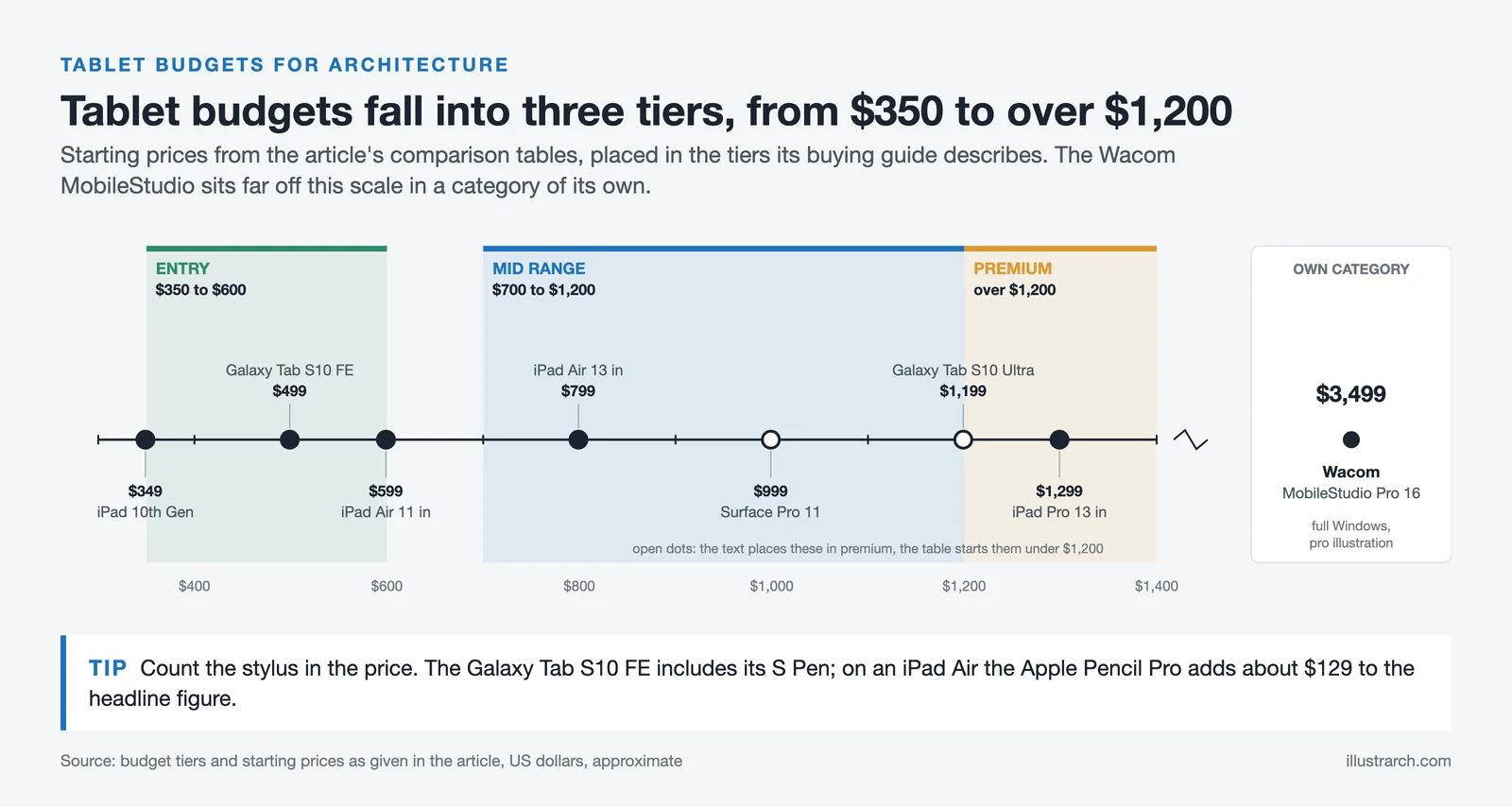
Premium tablets, including the iPad Pro 13″ (M5) above $1,200 and the Surface Pro 11 and Galaxy Tab S10 Ultra that start just under it, are aimed at working architects whose workflow truly benefits from larger displays, more RAM, and stronger processors. The Wacom MobileStudio Pro 16 sits in its own price category, justified only when high-end illustration, color-accurate rendering, and full Windows portability are part of daily work.
Frequently Asked Questions
What is the best tablet for architecture students in 2026?
For most architecture students in 2026, the Apple iPad Air (M2) offers the strongest balance of performance, display quality, and price. It supports the Apple Pencil Pro, runs all the major sketching and CAD apps available on iPadOS, and benefits from long software support. Students who need full desktop Revit or AutoCAD should look at the Microsoft Surface Pro 11 instead, while those on a tight budget will find the Samsung Galaxy Tab S10 FE includes an S Pen at a much lower price.
Can you use an iPad Pro for AutoCAD and Revit?
The iPad Pro runs the AutoCAD mobile and web apps very well, supports Bluebeam Revu for PDF markup, and handles SketchUp’s iPad version. However, it cannot run full desktop AutoCAD or Revit because Autodesk does not release native iPadOS versions. For full BIM modeling on a tablet, the Microsoft Surface Pro 11 or Wacom MobileStudio Pro 16 are the only mainstream options.
Is the Surface Pro 11 better than the iPad Pro for architects?
It depends on workflow. The Surface Pro 11 is better if you need to run full desktop CAD and BIM software on a portable device. The iPad Pro is better if your work centers on sketching, presentations, on-site PDF markup, and apps like Procreate, Morpholio Trace, and Shapr3D. Many architects end up using both: a Surface or laptop for production work and an iPad for ideation and client meetings.
How much should architects spend on a tablet?
Realistic budgets in 2026 range from around $500 for the Samsung Galaxy Tab S10 FE to over $3,500 for a fully equipped Wacom MobileStudio Pro 16. A capable mid-range tablet for an architecture student typically costs $700 to $1,000 once a stylus and case are included, while a flagship sketching and presentation device with accessories sits in the $1,300 to $1,800 range.
Do architects really need a stylus tablet?
For sketching, on-site annotation, and design review, a stylus-capable tablet has become close to essential. According to industry surveys, architecture firms have steadily expanded their use of tablets for client presentations and on-site reviews over the past decade, particularly in smaller practices where a single tablet can replace several traditional drawing tools. A pressure-sensitive stylus also speeds up tasks such as PDF markup, redlining drawings, and overlaying sketches on existing plans.
What size tablet is best for architectural work?
A 12-inch or 13-inch tablet is the sweet spot for architectural work. Smaller screens make reviewing full-size construction drawings uncomfortable, while larger ones, like the 14.6-inch Galaxy Tab S10 Ultra or the 15.6-inch Wacom MobileStudio Pro, give more canvas but reduce portability for site visits. For students and casual sketching, an 11-inch tablet can still work.
What are the best apps for architects on a tablet?
The most useful apps for architects on a tablet include Morpholio Trace for sketching over plans, Shapr3D for 3D modeling, Procreate for concept sketching and rendering, Concepts for vector-based design, AutoCAD mobile for .dwg work, and SketchUp for iPad for basic 3D models. For a deeper guide, see our roundup of the best digital architectural sketching tools.
Do architecture students need a tablet or a laptop?
Most architecture students benefit from owning both, but if you can only afford one device, a laptop is the safer choice because it runs full desktop CAD and rendering software. A tablet works best as a secondary device for sketching, note-taking, and presentations, and students who already have a capable workstation at home or in the studio get excellent value from a mid-range tablet such as an iPad Air or the Galaxy Tab S10 FE paired with a stylus.
Which Tablet Is Best for Interior Designers?
Interior design work leans on colour accuracy and material presentation far more than most architectural work does, and much less on running desktop CAD. That changes the ranking, so the shortlist above is not the shortlist an interior designer should use.
Colour-critical work, finishes, fabric and material boards, render review, puts display quality first. The Wacom MobileStudio Pro 16 covers 100% Adobe RGB, which matters when a client signs off a colour from your screen. The iPad Pro’s P3 wide-colour display is the practical alternative and is far more portable for site visits and showroom trips.
Client-facing presentation favours the iPad Pro or iPad Air. Mood boards, room walkthroughs and finish schedules read well on an OLED panel, and handing a light tablet to a client across a table is a different experience from turning a laptop around.
Running full desktop software, 3ds Max, AutoCAD, Revit or SketchUp Pro, still means the Surface Pro 11, because it runs Windows rather than a mobile OS. If your practice does technical drawings alongside styling work, this is the only device on the list that does both without a second machine.
On a tight budget, the Galaxy Tab S10 FE includes the S Pen in the box, which removes the stylus surcharge that pushes an iPad past its headline price.
| Interior design priority | Best choice | Why |
|---|---|---|
| Colour-accurate material and finish work | Wacom MobileStudio Pro 16 | 100% Adobe RGB coverage and 8,192 pressure levels |
| Client presentations and mood boards | iPad Pro 13″ | P3 wide colour, light enough to hand across a table |
| 3ds Max, AutoCAD or SketchUp Pro on the device | Surface Pro 11 | Full Windows, so desktop software runs natively |
| Lowest cost with a stylus included | Galaxy Tab S10 FE | S Pen in the box, no separate stylus purchase |
Which Tablet Should You Choose? Quick Decision Guide
Use the table below to match a tablet to your specific workflow and priorities.
| Your Priority | Best Choice | Why |
|---|---|---|
| Best overall for sketching & presentations | iPad Pro 13″ | Best app ecosystem, OLED display, lightest weight, longest software support |
| Running full desktop CAD/BIM (Revit, Rhino, AutoCAD) | Surface Pro 11 | Full Windows 11 runs any desktop architecture application natively |
| Largest screen for design reviews & split-screen work | Galaxy Tab S10 Ultra | 14.6″ display with included S Pen, multi-window multitasking, expandable storage |
| Professional-grade illustration & 3D rendering | Wacom MobileStudio Pro 16 | 8,192 pressure levels, 4K display with 100% Adobe RGB, dedicated GPU |
| Best value for architecture students | iPad Air 13″ or Galaxy Tab S10 FE | Strong performance at a lower price; Galaxy Tab includes the S Pen |
| Best battery life for all-day fieldwork | Surface Pro 11 | Up to 14 hours with Snapdragon X Elite, plus full Windows functionality |
| Tightest budget (under $500) | Samsung Galaxy Tab S10 FE | S Pen included, solid display, long update commitment, expandable storage |
Tablet vs Laptop for Architects: Which is Better?
Many architects ask whether a tablet can replace a laptop for daily work. The honest answer is that it depends on the type of work you do. Tablets are now strong enough to handle sketching, BIM model review, PDF markup, and client presentations, but they still fall short for heavy rendering, complex Revit modeling, and full BIM coordination on large projects. The table below summarizes when each option makes sense. For a deeper look at workstation laptops, see our best laptops for architects guide.
| Task | Tablet | Laptop |
|---|---|---|
| Concept Sketching | ✅ Better (natural pen input) | ⚠️ Possible but less intuitive |
| On-Site Markup | ✅ Best option (portable, instant) | ❌ Cumbersome on site |
| Heavy Revit / BIM Modeling | ⚠️ Surface Pro 11 only | ✅ Required for large projects |
| 3D Rendering (Lumion, V-Ray) | ❌ Not recommended | ✅ Required (dedicated GPU) |
| Client Presentations | ✅ Faster setup, more interactive | ⚠️ Good but less flexible |
| Construction Documents | ⚠️ Surface Pro 11 only | ✅ Better for full sheet sets |
| Travel and Site Visits | ✅ Lighter, faster boot | ⚠️ Heavier and slower |
Operating System Comparison for Architectural Work
The choice of operating system determines which professional applications you can run and how well the tablet integrates into your existing workflow. Below is a comparison of the three major operating systems available in the tablets reviewed above.
| Criteria | iPadOS (Apple iPad Pro) | Windows 11 (Surface Pro / ThinkPad / Wacom) | Android (Samsung Galaxy Tab S) |
|---|---|---|---|
| Full Desktop CAD Support | ❌ Limited (iPad versions of AutoCAD, no Revit) | ✅ Full support (AutoCAD, Revit, SketchUp, Rhino, ArchiCAD) | ❌ Limited (mobile/web versions only) |
| 3D Modeling Apps | ✅ Shapr3D, uMake, Nomad Sculpt | ✅ Rhino, 3ds Max, Blender, SketchUp | ⚠️ Limited options (Nomad Sculpt, SketchUp Viewer) |
| Sketching and Design Apps | ✅ Procreate, Concepts, Morpholio Trace | ✅ Photoshop, Illustrator, SketchBook | ✅ Concepts, SketchBook, Infinite Painter |
| BIM Compatibility | ⚠️ BIM 360 viewer only | ✅ Full Revit, ArchiCAD, Navisworks support | ⚠️ BIM 360 viewer only |
| File Format Support | ⚠️ Limited .dwg/.rvt handling | ✅ Native support for all CAD file formats | ⚠️ Requires third-party apps |
| Multi-Monitor Support | ⚠️ Stage Manager (limited) | ✅ Full external display support | ⚠️ Samsung DeX (limited) |
| Plugin and Add-on Ecosystem | ⚠️ Limited | ✅ Full plugin support for all major software | ❌ Very limited |
| Software Update Longevity | ✅ 5 to 6+ years of updates | ✅ Long-term Windows support | ✅ 4 OS updates + 5 years security (Samsung) |
⚠️ Common Mistake to Avoid
Many architecture students buy a pen display monitor like the Huion Kamvas or XP-Pen Artist Pro thinking it is a standalone tablet, only to discover it requires a separate computer to function. These devices are displays with pen input, not full tablets. If you need a self-contained device you can carry without a laptop, look at the iPad Pro, Surface Pro, or Wacom MobileStudio Pro instead.
Stylus Comparison for Architectural Precision
The quality of the stylus is essential for architects who sketch, annotate, and design directly on their tablets. The table below compares the pen technologies available for each tablet, with a focus on the features that matter most for precise architectural drawing.
| Stylus Feature | Apple Pencil Pro | Surface Slim Pen 2 | Samsung S Pen | Wacom Pro Pen 2 | ThinkPad Pen Pro |
|---|---|---|---|---|---|
| Pressure Levels | Force sensing (undisclosed) | 4,096 | 4,096 | 8,192 | 4,096 |
| Tilt Support | Yes | Yes | Yes | Yes (±60°) | Yes |
| Palm Rejection | Yes | Yes | Yes | Yes | Yes |
| Haptic Feedback | Yes (squeeze gesture) | Yes | No | No | No |
| Battery | Rechargeable (USB-C / magnetic) | Rechargeable | Battery-free (EMR) | Battery-free (EMR) | Rechargeable / AAAA |
| Included with Tablet | No (~$129) | No (~$130) | Yes | Yes | Varies by config |
| Best For | Creative sketching and conceptual design | Desktop software annotation and CAD | Quick sketches and on-site notes | Professional illustration and detailed drafting | Business annotation and CAD markup |
Best Tablet for Architecture Students vs Professionals
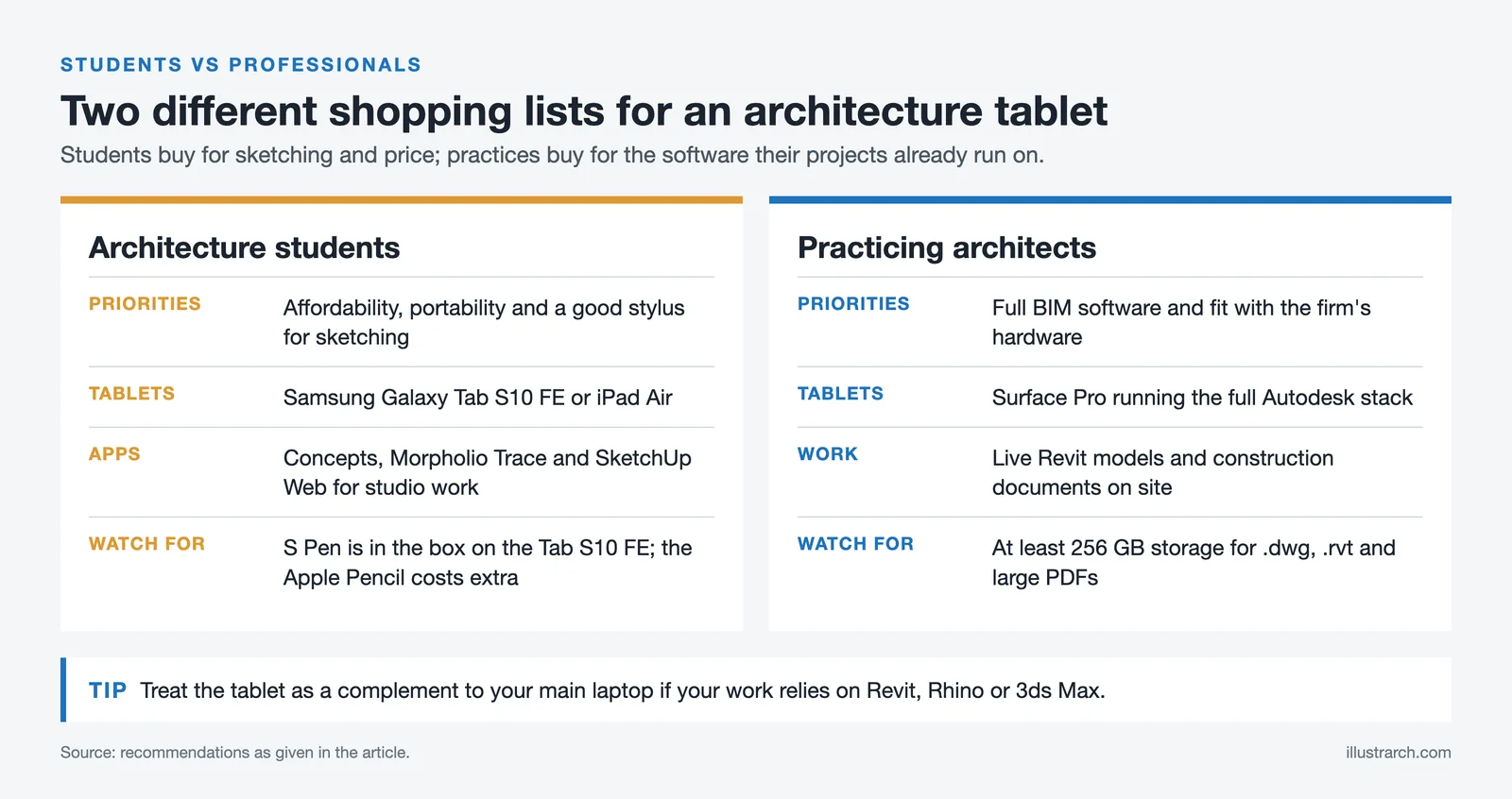
Architecture students and practicing architects have different needs, and the best tablet for one may not be the best for the other. Students typically prioritize affordability, portability, and a good stylus for sketching, while professionals lean toward devices that run full BIM software and integrate with the firm’s hardware ecosystem.
Students often do well with the Samsung Galaxy Tab S10 FE or an iPad Air, both of which support Concepts, Morpholio Trace, and SketchUp Web for studio assignments. The Galaxy Tab S10 FE includes the S Pen in the box, which removes the stylus surcharge that pushes an iPad past its headline price. Practicing architects who handle live Revit models and construction documents on site usually need a Surface Pro running the full Autodesk stack from Autodesk’s official software lineup.
For a broader 2026 comparison that includes flagship tablets like the Samsung Galaxy Tab S10 Ultra and the Wacom MobileStudio Pro, see our guides to the best Android tablets for architects and the best drawing tablets for architects and students. Insights from the American Institute of Architects on technology adoption in firms can also help students understand which tools they will likely use after graduation.
✅ Key Takeaways
- The Microsoft Surface Pro is the strongest pick for architects who need to run full desktop Revit, AutoCAD, or Rhino on a tablet.
- The Apple iPad Pro with the M5 chip is the best choice for sketching, presentations, and Apple ecosystem users.
- The Samsung Galaxy Tab S10 FE offers excellent value for Android users and architecture students with its included S Pen.
- Always confirm software compatibility before buying, especially for BIM workflows that depend on Windows-only tools.
Essential Tablet Accessories for Architects
A tablet alone does not make a complete mobile workstation. The right accessories can extend battery life, protect your investment on construction sites, and improve comfort during long drawing sessions. Here are the accessories that matter most for architects.
Screen Protectors and Cases for Site Work
A matte screen protector (often called a “paper-feel” protector) adds friction to the glass surface, which improves line control and reduces hand fatigue during extended sketching. Brands like Paperlike for iPad and Bellemond for Samsung tablets are popular among architects. For site work, a rugged case with raised edges protects the screen from drops and dust. If you carry your tablet on construction sites regularly, a case rated for shock absorption (such as OtterBox Defender or UAG) is a worthwhile addition.
Keyboards, Stands and Docking Solutions
A detachable keyboard turns a tablet into a laptop substitute for email, specifications writing, and project documentation. The Apple Magic Keyboard, Microsoft Type Cover, and Samsung Book Cover Keyboard all integrate magnetically with their respective tablets. For desk use, a tablet stand that holds the screen at eye level reduces neck strain during long plan review sessions. Architects who use their tablet as a secondary screen alongside a desktop workstation may also benefit from a USB-C docking station, which connects to an external monitor, keyboard, and mouse in one cable. For a broader look at workspace gear, see our architect desk setup tools guide.
How to Set Up a Tablet-Based Architecture Workflow
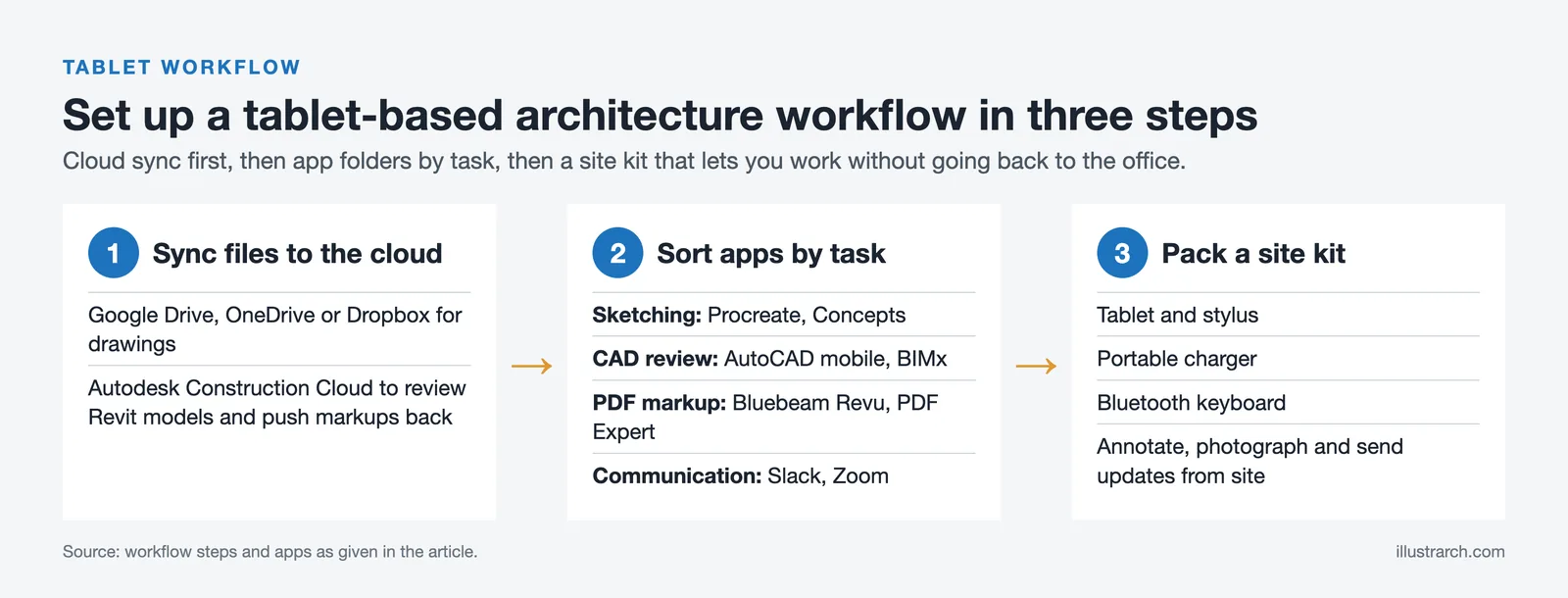
Owning the best tablet for architects is only half the equation. Setting up an efficient workflow around the device ensures you get the most out of your investment. Start by syncing your project files to a cloud platform such as Google Drive, OneDrive, or Dropbox so you can access drawings on both your tablet and your office workstation. For BIM-heavy workflows, Autodesk BIM 360 (now Autodesk Construction Cloud) allows you to review Revit models on an iPad or Android tablet, mark up issues, and push comments back to the desktop team in real time. On a Windows tablet that opens Revit models directly, work with Worksets and detach from the central file before opening it on the device; loading a 500 MB or larger central file over Wi-Fi often causes slowdowns and sync errors.
Organize your tablet apps into folders by task type: sketching (Procreate, Concepts), CAD review (AutoCAD mobile, BIMx), PDF markup (Bluebeam Revu, PDF Expert), and communication (Slack, Zoom). This simple step saves time when switching between tasks on site. If you travel between studio and site frequently, keep a dedicated “site kit” in your bag: tablet, stylus, portable charger, and a Bluetooth keyboard. This setup lets you annotate drawings, photograph progress, and send updates without returning to the office. For broader context on how technology fits into modern practice, read our article on the role of technology in architecture.
🔢 Quick Numbers
- 62% of architecture firms use cloud-based collaboration tools for project coordination (WifiTalents / OpenAsset, 2024)
- 75% of US architecture firms have fewer than 10 employees (AIA Small Firm Exchange, 2024 Annual Report), making portable devices especially valuable for small practices
Common Mistakes When Choosing a Tablet for Architectural Design
One of the most common mistakes architects make when selecting a tablet is focusing only on hardware specs while overlooking software compatibility and workflow integration. A high-resolution display or powerful processor may look impressive on paper, but if the tablet does not smoothly support your architectural apps, file formats, or multi-device workflows, its real value drops fast.
Another frequent issue is underestimating long-term usability. Choosing a tablet without considering stylus precision, external display support, or update longevity often leads to limitations as project complexity grows. The best tablet for architects balances performance, ecosystem support, and real-world architectural use rather than raw specs alone. Before purchasing, consider how the tablet will integrate with your existing architectural design software ecosystem and which apps you actually use day to day. A third mistake, especially among students, is buying a tablet with too little storage. Architecture files, especially .dwg, .rvt, and high-resolution PDFs, consume space quickly. Aim for at least 256GB, and choose a device with cloud sync or expandable storage if your budget allows.
Long-Term Reliability
Over the long term, the Apple iPad Pro receives strong marks for its consistent performance and software updates. Users report minimal slowdowns and commend the device’s longevity, with many models still receiving full iPadOS updates five or more years after release. ArchDaily’s coverage of the iPad Pro reinforces this point for architects evaluating it as a long-term investment.
The Microsoft Surface Pro is praised for maintaining strong performance levels over time, with user feedback highlighting its sturdy build and durable hardware. Regular firmware updates from Microsoft help to keep the device running smoothly and patched against security issues, which matters for firms handling sensitive client data.
The Samsung Galaxy Tab S series also earns positive feedback for durability, with architects noting that it withstands the rigors of daily use. Samsung now commits to four major Android OS updates and five years of security patches on flagship models, which addresses one of the historical weak points of Android tablets.

Final Thoughts
There is no single tablet that can be considered universally optimal for all architects or architecture students; each device offers distinct strengths depending on the nature of its intended use and working context. High-end tablets such as the iPad Pro and the Galaxy Tab S10 Ultra provide exceptional display quality and processing performance, making them well suited for intensive creative tasks and advanced visual work. Hybrid devices like the Surface Pro 11 stand out for their versatility, particularly for users who depend on full desktop CAD and BIM software. Meanwhile, more balanced options such as the iPad Air and the Galaxy Tab S10 FE offer capable design performance at a more accessible price point, making them attractive choices for students. Specialized solutions like the Wacom MobileStudio Pro remain unrivaled for professionals who prioritize advanced pen accuracy and desktop-class creative control.
✅ Key Takeaways
- The best tablet for architects in 2026 is workflow-dependent: iPad Pro for sketching and presentations, Surface Pro 11 for full desktop CAD, Wacom MobileStudio Pro for maximum pen precision.
- For most architecture students, the iPad Air (M2) offers the strongest price-to-performance balance, with the Galaxy Tab S10 FE as the leading budget option.
- Stylus quality, display brightness, and software compatibility matter more than raw processor benchmarks for typical architectural use.
- Aim for at least 256 GB of storage and an 11-inch or larger display to keep up with project files and detailed drawings.
- Treat the tablet as a complement to a primary laptop, not a full replacement, especially if your degree relies on Revit, Rhino, or 3ds Max.








Foster + Partners to Test Robot Swarms Building Timber from the Top Down
Foster + Partners wins €4m EU grant to build robot and drone...
 illustrarch Editoral Team2 Mins read
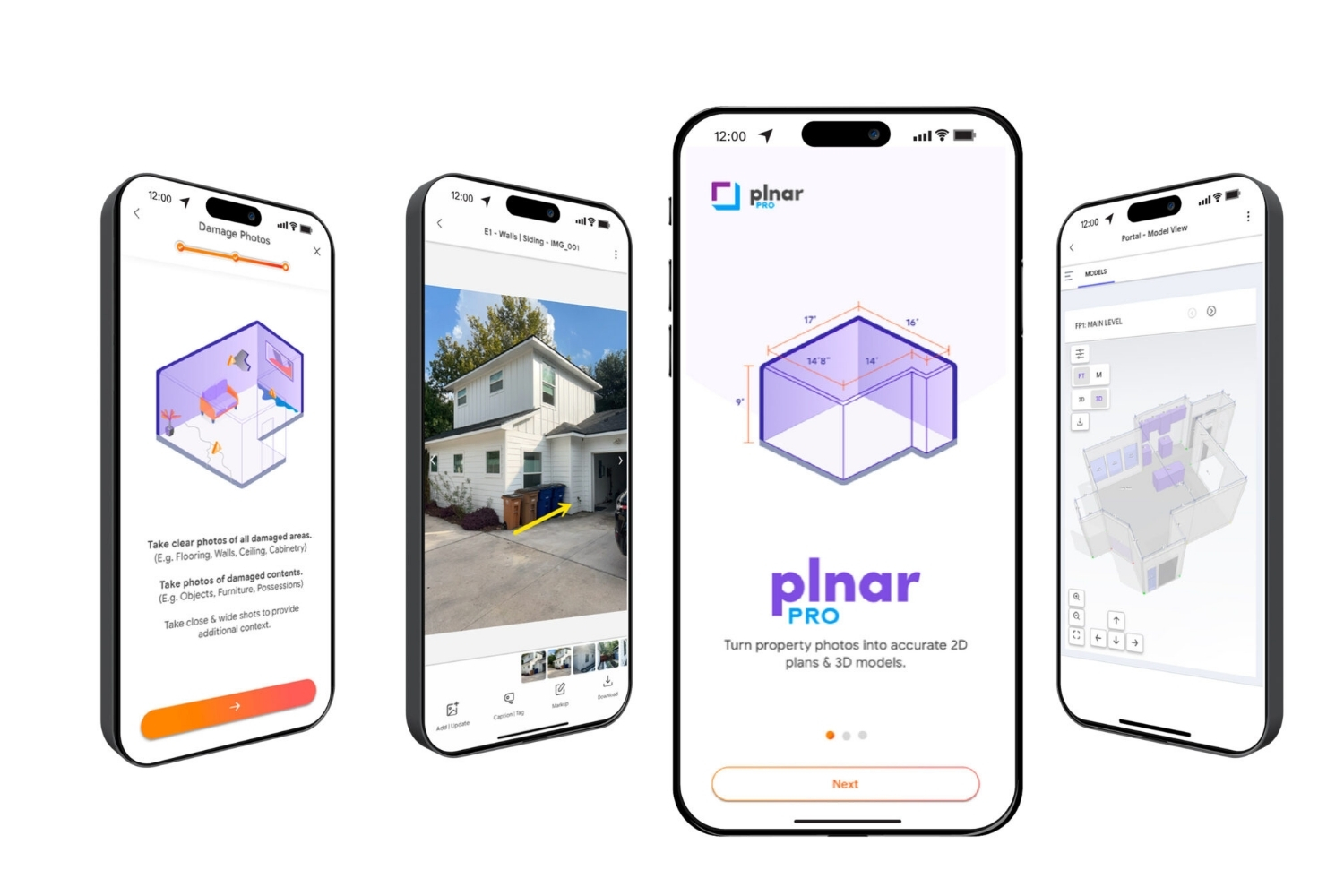
PLNAR Review: Does AR Measurement Hold Up on a Real Site Visit?
PLNAR began as a consumer AR tape measure and now runs as...
 Sinan Ozen5 Mins read
ArchiSnapper Review: Is This Field Report App Worth It for Architects?
A hands-on look at Deltek ArchiSnapper, the mobile app built for field...
Sinan Ozen5 Mins read

Gross Internal Area and Net Internal Area: What’s the Difference?
The difference between Gross Internal Area and Net Internal Area shapes how...
Sinan Ozen5 Mins read


Leave a comment