

Free Tools for Architectural Design and Planning
A practical guide to the best free tools for architectural design and planning in 2026. Covers 3D modeling, CAD drafting, AI-powered platforms, and online tools, with clear comparisons to help architects and students choose the right software for their workflow and budget.
 Elif Ayse Sen31 March 202610 Mins read379

Table of Contents Show
The best free tools for architectural design cover everything from 2D CAD drafting and 3D modeling to AI-powered concept generation and online planning platforms. Whether you are a student working with a tight budget or a professional looking to expand your toolkit without adding subscription costs, a growing number of capable platforms now offer full workflows at zero cost.
Why Free Tools for Architecture Design Are Worth Taking Seriously

A few years ago, the gap between free and paid architectural software was significant enough to matter on real projects. That gap has narrowed considerably. Open-source communities have matured, browser-based platforms have improved, and several major vendors now offer genuinely functional free tiers rather than feature-stripped demos.
For students, free tools eliminate the financial barrier to building technical skills early. For independent practitioners and small studios, they reduce overhead without compromising output quality on appropriate project types. The key is understanding which tool suits which task, because no single free platform handles every phase of an architectural project equally well.
💡 Pro Tip
Rather than trying to replace your entire paid workflow at once, identify the one phase where cost is most painful (often early-stage massing or concept visualization) and substitute a free tool there first. This approach lets you test reliability on low-stakes work before committing to a full workflow change.
One practical reality worth acknowledging: free tools for architecture design sometimes carry a steeper learning curve or less polished interface than their commercial counterparts. That is a fair trade-off for many users, but it is worth factoring in when estimating how long it will take to reach a productive level of use.
What Are the Best Free Tools for Architectural Design?
The tools listed below are grouped by primary use case. Some overlap across categories, and several work best in combination with each other. All have been selected based on current availability, active development, and confirmed usefulness for architectural workflows in 2026.
SketchUp Free (Web-Based 3D Modeling)

SketchUp Free runs entirely in the browser and remains one of the most widely used tools for architectural design at the concept and massing stage. Its push-pull modeling interface makes it faster for spatial exploration than almost any other platform, and the 3D Warehouse gives you access to a large library of pre-built components for furniture, fixtures, and site elements.
The limitations are real: no custom plugin support, cloud-only file storage, and no BIM capabilities. It works well as a front end for early-stage design but needs to be paired with other software for documentation. If you are comparing it to the paid Pro version, the free tier covers everything you need for schematic design exploration but stops short of professional documentation. You can access SketchUp Free directly at sketchup.com.
📌 Did You Know?
SketchUp’s 3D Warehouse contains over 4.5 million models contributed by users worldwide. For architects, this means standard building components such as doors, windows, furniture, and structural elements are almost always available to download at no cost, which can save hours on schematic-stage models.
FreeCAD (Open-Source BIM and Parametric Modeling)
FreeCAD is the strongest genuinely free CAD tool for architects who need more than sketch-level output. Its BIM Workbench handles walls, floors, roofs, doors, windows, and stairs, and supports IFC export for coordination with other BIM platforms. It runs on Windows, macOS, and Linux, and its Python API allows technically comfortable users to script custom workflows.
The learning curve is steeper than SketchUp, and the interface reflects its origins as engineering software rather than an architecture-specific platform. The active open-source community produces a steady stream of tutorials, templates, and BIM library content. For students and budget-constrained practices, FreeCAD offers the broadest feature set of any free architectural tool available today. More on how it compares to commercial alternatives is covered in our ArchiCAD alternatives guide. Download and documentation are available at freecad.org.
Blender with BlenderBIM (3D Modeling, Rendering, and IFC)

Blender is a professional-grade open-source 3D platform that has become increasingly relevant to architects, particularly through the BlenderBIM add-on. BlenderBIM brings full IFC support, OpenBIM compliance, and a BIM authoring workflow into Blender’s modeling environment, making it an unusually capable free architecture design tool for practices comfortable with a technically demanding setup.
Even without BlenderBIM, Blender’s Cycles and EEVEE render engines produce results competitive with paid visualization tools. Architects use it for concept renders, animation walkthroughs, and photorealistic presentation images. The main friction point is the non-intuitive default interface, which requires real investment to learn. With consistent practice, most architecture students reach a functional level within four to six weeks. Blender is free to download at blender.org.
⚠️ Common Mistake to Avoid
Many architects dismiss Blender as a VFX or animation tool and overlook it for architectural work. With the BlenderBIM add-on, Blender supports full IFC workflows and is used in professional BIM practice by studios across Europe and Asia. If your primary reason for avoiding Blender is that it looks like “not an architecture tool,” that assumption no longer holds in 2026.
AutoCAD Web and Autodesk Educational Licenses (Free for Students)
Autodesk provides free educational licenses for students and educators that cover Revit, AutoCAD, 3ds Max, and the rest of their suite. These are full versions, not student-restricted builds, and they remain free for the duration of your education. For students specifically, this is one of the most underused resources in architecture education. A valid educational email address is all that is required to register at Autodesk Education.
AutoCAD Web also offers a browser-based free tier that handles 2D drafting with DWG compatibility, useful for quick edits, file review, or light drafting work without a full desktop install. It is more limited than the desktop version but genuinely functional for many common tasks.
🎓 Expert Insight
“The software is the easy part. What matters is whether you can think in three dimensions and communicate space clearly. Free tools teach you that just as well as paid ones.”
Licensed architect with 20+ years of practice, AIA member
This reflects a widely shared view in architectural education: the platform matters far less than the quality of spatial thinking behind it. Students who develop strong design reasoning on free tools transition to professional software without significant difficulty.
Is There a Free AI Tool for Architecture Design?

Yes, several legitimate free and freemium AI tools now exist specifically for architectural design work. The landscape has changed significantly since 2023, and architects at every career stage are using AI-powered platforms for concept generation, rendering, and site analysis. The most useful options fall into two categories: generative design platforms and AI-assisted rendering tools.
Autodesk Forma (Free Tier for Massing and Site Analysis)
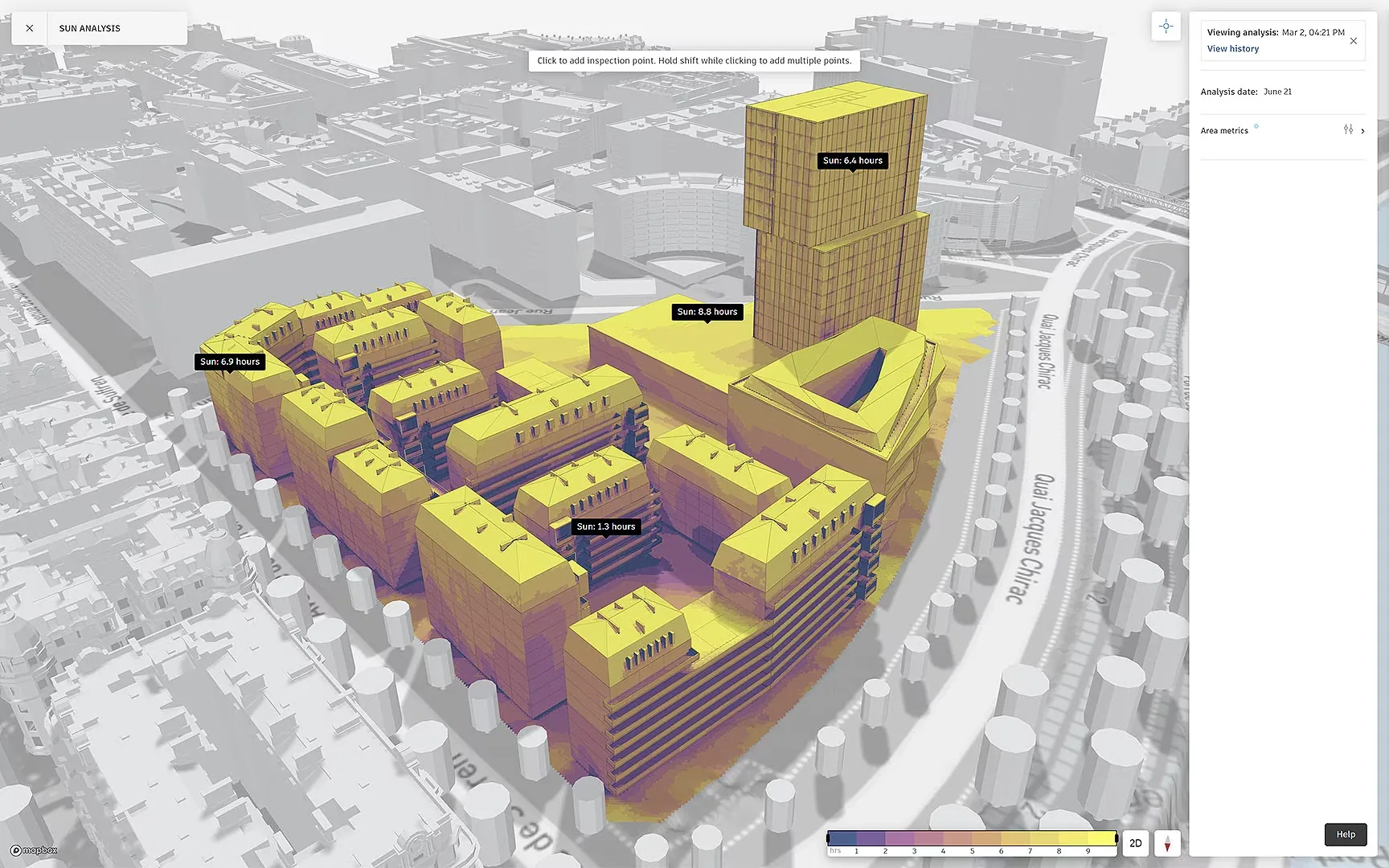
Autodesk Forma offers a free tier that covers early-stage massing, sun path analysis, wind simulation, and noise analysis. It is one of the most capable free AI tools for architecture design at the site feasibility stage, letting architects test layout options against environmental performance data before committing to a design direction. The platform is cloud-based and connects with Revit for teams already working in the Autodesk ecosystem. More context on how it handles concept-stage workflows is in our guide to AI tools for concept design. Access it at autodesk.com/forma.
Midjourney and Adobe Firefly (Concept Visualization)

Midjourney operates on a subscription model but offers a limited free trial that gives new users enough credits to test its architectural visualization capabilities. Adobe Firefly integrates directly into Photoshop and Adobe Express, with free usage available through the Adobe free tier. Both tools are useful for generating mood images, material palette explorations, and early atmospheric renders from text prompts.
Neither is suitable for plan-accurate or technically precise output, but both are genuinely useful for the mood-board and client communication stages of a project. Our overview of AI apps for architects and designers covers these and additional platforms in more detail. For a broader look at how the technology is being integrated into practice, the AI building design trends article is worth reading alongside this guide.
💡 Pro Tip
When using any AI image tool for architecture, include specific spatial references in your prompts: lighting direction, material type, scale cues (like human figures), and camera angle. Vague prompts produce generic-looking results. The more architectural your language, the more useful the output becomes for actual design communication.
Online Tools for Architecture Design: Browser-Based Options

Several capable online tools for architecture design run entirely in the browser with no installation required. These are particularly useful for students, for teams collaborating across devices, and for architects who need a quick platform without setting up a full software environment.
Illustrarch Bubble Diagram Maker

The Illustrarch Bubble Diagram Maker is a free, architecture-focused web tool designed specifically for early-stage spatial planning. It allows architects to map program relationships, test circulation logic, and organize spatial adjacencies before formal design begins, using an intuitive browser interface. For students and early-career architects working through the pre-design phase, it offers a focused alternative to general-purpose diagramming platforms that were not built with architectural thinking in mind.
Draw.io for Circulation and Program Diagrams
Draw.io, also known as diagrams.net, is a fully free open-source diagramming tool with a drag-and-drop interface. Architects use it for circulation diagrams, program organization charts, and site analysis overlays. It integrates with Google Drive, Microsoft OneDrive, and Atlassian tools, and supports export in multiple formats. The shape library includes floor plan elements and ArchiMate shapes, giving it more architectural coverage than most free diagramming platforms.
Canva (Presentation and Portfolio Layouts)
Canva’s free tier is genuinely useful for architecture students and independent architects who need presentation boards, portfolio layouts, or client-facing design summaries. Its drag-and-drop interface, architecture-themed templates, and high-resolution PDF export make it an accessible option for visual communication work. More detail on how it compares to InDesign and other portfolio tools is in our architecture portfolio software guide.
How to Choose the Right Free Tool for Architecture Design

Choosing among the available free tools for architectural design comes down to three questions: What does your current project require? What is your operating system? And how much time are you willing to invest in learning a new platform?
Comparison of Free Architecture Design Tools
The following table summarizes the key differences between the most widely used free platforms for architectural design work:
| Tool | Primary Use | BIM Support | Best For | Platform |
|---|---|---|---|---|
| SketchUp Free | 3D massing, concept design | No | Students, early-stage design | Browser |
| FreeCAD | Parametric modeling, BIM | Yes (IFC) | Budget-constrained practices | Desktop (Win/Mac/Linux) |
| Blender + BlenderBIM | Rendering, BIM authoring | Yes (IFC via add-on) | Visualization-focused practices | Desktop (Win/Mac/Linux) |
| Autodesk Forma | Site analysis, massing AI | Partial | Early feasibility analysis | Browser (cloud) |
| AutoCAD Web | 2D drafting, DWG review | No | Quick 2D edits, file review | Browser |
| Draw.io | Diagrams, program charts | No | Schematic diagrams, collaboration | Browser / Desktop |
| Canva (free tier) | Presentation boards, portfolio | No | Students, visual communication | Browser |
| Midjourney / Firefly | AI concept visualization | No | Mood boards, early client renders | Browser |
Students entering their first year of architectural education will generally benefit most from SketchUp Free or Tinkercad for 3D spatial thinking, paired with Canva for presentation work. More advanced students should invest time in FreeCAD or Blender, as these transfer directly to professional workflows. For a detailed walkthrough of how to build a full free toolkit progression, the guide to learning architecture software faster is a useful companion to this overview.
🔢 Quick Numbers
- Autodesk educational licenses are used by students at over 3,400 institutions globally, making them one of the most widely distributed free software resources in architecture education (Autodesk Education, 2024)
- MyArchitectAI reports more than 7,500,000 renders generated to date, by architects and interior designers in 90+ countries (MyArchitectAI, as of October 2026)
Free Architecture Apps for iPad and Mobile

For architects who work on site or prefer sketching on a tablet, a strong range of free architecture apps now covers core tasks including 3D modeling, floor plan drafting, and markup annotation. Our guide to free architecture apps for iPad covers the six best tested options in detail, including Shapr3D (free tier with two active projects) and Concepts for vector sketching.
Shapr3D’s free tier deserves particular mention because it runs the full modeling toolset on iPad, Mac, Windows and Vision Pro for up to two projects. The trade-off is export: the free plan saves only basic-quality STL and 3MF files, while DWG, DXF, STEP and other CAD formats need a paid plan (as of October 2026). For architects who use an iPad as a primary sketching device, it is still one of the most practical free tools for testing form at the concept stage.
✅ Key Takeaways
- Free tools for architectural design have matured significantly: SketchUp Free, FreeCAD, Blender, and Autodesk’s educational licenses now cover every phase from massing to documentation.
- Free AI tools for architecture design are now a real category: Autodesk Forma’s free tier handles site analysis and massing, while Midjourney and Adobe Firefly support concept visualization work.
- For students, Autodesk’s free educational licenses for Revit and AutoCAD represent one of the most underused resources in architecture education.
- Browser-based tools including SketchUp Free, Draw.io, Autodesk Forma, and Canva eliminate the need for high-spec hardware and allow collaborative access from any device.
- No single free tool covers the complete architectural workflow. A combination of two or three platforms produces a capable zero-cost pipeline for most project types.
Building a Free Architecture Design Toolkit: Practical Recommendations
For most architects and students, a combination of tools produces the best results. Below are three practical toolkit combinations based on different use cases, all using free platforms.
For students on a tight budget working through academic projects, a practical combination is SketchUp Free for 3D massing, FreeCAD for floor plan development and documentation, Blender for renders, and Canva for layout and presentation boards. This covers the full output expected in a typical studio project at zero cost. This combination is explored in detail in our article on affordable tools and resources for architecture students.
For independent practitioners handling small residential or commercial projects, AutoCAD Web handles quick DWG reviews without a subscription, Autodesk Forma covers site feasibility analysis, and Blender handles client visualization. Adding the Illustrarch Bubble Diagram Maker for the pre-design phase rounds out a surprisingly capable free workflow for early project stages.
For practices exploring open-source as a long-term strategy, FreeCAD with the BIM Workbench and Blender with the BlenderBIM add-on provide a fully IFC-compliant workflow at no cost. For more on the strengths and tradeoffs of this approach, the open-source architecture software guide covers the practical decision points in detail.
The free tools landscape for architecture continues to improve each year. For studios already evaluating which digital tools belong in an independent practice, the digital tools guide for independent architects provides a broader evaluation framework that includes both free and paid platforms across all practice phases.
- ai tool for architecture design free
- best free ai tool for architecture design
- free ai tool for architecture design
- free ai tools for architecture design
- is there a free ai tool for architecture design
- online tool for architecture design
- tool for architecture design
- tools for architectural design
- tools for architecture design





Notion Alternatives for Architects: 7 Tools That Fit Studio Work
Notion works until a studio needs fee tracking, phase budgets and timesheets....
 Furkan Sen7 Mins read

Why Every Practice Ends Up With Five Versions of the Same Revit Family
Let’s learn why Revit family libraries accumulate duplicates, break schedules and slow...
 illustrarch Editoral Team5 Mins read

Visualizing Renovation Projects From Photographs: A Workflow for Existing-Building Work
Photo-based visualization turns a photograph of a building that already exists into...
illustrarch Editoral Team7 Mins read

Best Free CAD Blocks and Resources for Architects
A working guide to free CAD blocks for architects, covering ARCAT, CAD-Blocks.net,...
Furkan Sen7 Mins read


Leave a comment