

Magicplan Review: Can Your Phone Really Replace a Tape Measure?
Magicplan lets contractors, realtors, and architects create dimensioned floor plans by scanning rooms with their smartphone camera. This review covers AR accuracy, LiDAR support, pricing tiers, export options, and how it compares to alternatives like RoomScan Pro and CubiCasa.
 Sinan Ozen22 March 20267 Mins read456

Table of Contents Show
Magicplan is a mobile floor plan app that uses augmented reality (AR) and LiDAR scanning to turn your smartphone camera into a measuring tool. Instead of manually measuring rooms with a tape, you point your phone at corners and walls, and the app calculates dimensions and builds a scaled floor plan in real time. This review covers how well it actually works, who benefits most from it, and whether the subscription model is worth the cost.

What Is Magicplan and How Does It Work?
Magicplan, developed by Sensopia Inc., has been on the market since 2011 and has evolved significantly with each hardware generation of iPhone and iPad. At its core, the app lets you create floor plans through three input methods: scanning with your phone’s camera via AR, connecting a Bluetooth laser distance meter for precise manual measurements, or drawing room layouts manually on-screen.
The AR scan mode works by detecting floor-to-wall transitions as you pan your camera around a room. The app identifies corners, suggests wall lengths, and constructs the room footprint automatically. On devices with a LiDAR sensor (iPhone 12 Pro and later, iPad Pro), the scan is noticeably faster and more reliable, as the depth sensor adds a physical measurement layer on top of the camera feed. On standard devices without LiDAR, the AR mode is still functional but benefits from good lighting and unobstructed wall bases.
💡 Pro Tip
For the most accurate AR scans, clear furniture away from baseboards before scanning. The app detects the floor-to-wall junction, so anything blocking that line forces it to estimate rather than measure. Even moving a single couch back 15 cm can meaningfully improve the resulting room dimensions.

Once a room is scanned, you can add doors, windows, appliances, and furniture from the built-in object library. Rooms are stitched together to form a full multi-room floor plan. The generated plan can then be used to produce cost estimates, material takeoffs, PDF reports, or exported in formats including DXF, JPG, and PNG for use in external CAD software.

Who Uses Magicplan?
Magicplan positions itself squarely at field-based professionals rather than hobbyists or design students. Its primary user base includes residential contractors, insurance adjusters handling property claims, realtors creating listing floor plans, and restoration companies documenting damage on-site. The app integrates directly with Xactimate, the industry-standard estimating platform widely used in the insurance restoration sector, which makes it particularly relevant for remediation and contents claims work.
Interior designers and architects also use the magicplan app for rapid as-built documentation during site visits, where pulling out a tape measure and drawing by hand would be slower and less accurate. The cloud sync feature means sketches made on-site are immediately accessible to the office team.
For context on how AR fits into the broader landscape of architectural tools, illustrarch has covered augmented reality apps for architecture in depth, as well as the best apps for architectural plan drawing across different user categories.
Key Features of the Magicplan App
The feature set in Magicplan goes well beyond basic floor plan creation. Here is what the current version of the platform offers:
- Real-time floor plan creation via AR scan or manual drawing
- LiDAR scanning on compatible iOS Pro devices for enhanced accuracy
- Bluetooth laser meter integration (Bosch, Leica, Hilti, Stabila, DeWalt, Würth)
- 360° panoramic photo capture and room annotation
- Built-in estimating with customizable price lists and quantity takeoffs
- Scope of Work (SoW) builder with Xactimate ESX export
- Professional PDF reports with photos, notes, and sketches
- DXF export for import into AutoCAD and other CAD platforms
- 3D model generation directly from the floor plan
- Team collaboration with unlimited users and real-time sync
- Offline mode for fieldwork in areas without connectivity
📌 Did You Know?
Magicplan has been downloaded over 13 million times globally and is actively used by thousands of teams daily across restoration, insurance, real estate, and contracting sectors. The platform’s direct Xactimate integration (offered alongside ESX file export) is one of the only mobile-first tools to offer this, making it a go-to choice in the property claims industry.

How Accurate Is the Magicplan Floor Plan App?
Accuracy is where the magicplan floor plan app earns its reputation. In furnished rooms with clear wall-floor junctions, the AR scan produces dimensions with minor deviations that typically require only small manual corrections. Window and door detection is automatic and surprisingly reliable. A field review by construction software researchers at Capterra and Software Advice consistently notes that scanning accuracy is solid, with most users needing only minor adjustments after scanning.
On devices with LiDAR, the depth sensor adds a physical measurement layer that reduces guesswork considerably. When combined with a Bluetooth laser distance meter, Magicplan’s accuracy approaches that of traditional manual measurement in a fraction of the time. Field tests published by Mavric Research found that combining LiDAR-assisted scanning with a disto bluetooth laser delivered accuracy suitable for professional-grade as-built drawings.
The main limitation is rooms with heavy furnishing. When sofas, cabinets, or stored materials block the baseboard, the AR mode struggles to find the floor-wall junction. In those cases, users typically need to move obstructions or fall back to manual dimension input. Android users also face a constraint: Magicplan removed the AR scan feature from Android in late 2024, citing hardware inconsistencies, and currently recommends using a Bluetooth laser on non-iOS devices.
⚠️ Common Mistake to Avoid
Many users try to scan complex multi-room properties in a single session without saving room-by-room drafts. If the app crashes mid-project or the scan is lost, all progress goes with it. Save and sync each completed room to the cloud before moving to the next space. This is especially important on older devices or properties with poor Wi-Fi coverage.
Magicplan Pricing: Plans and Costs
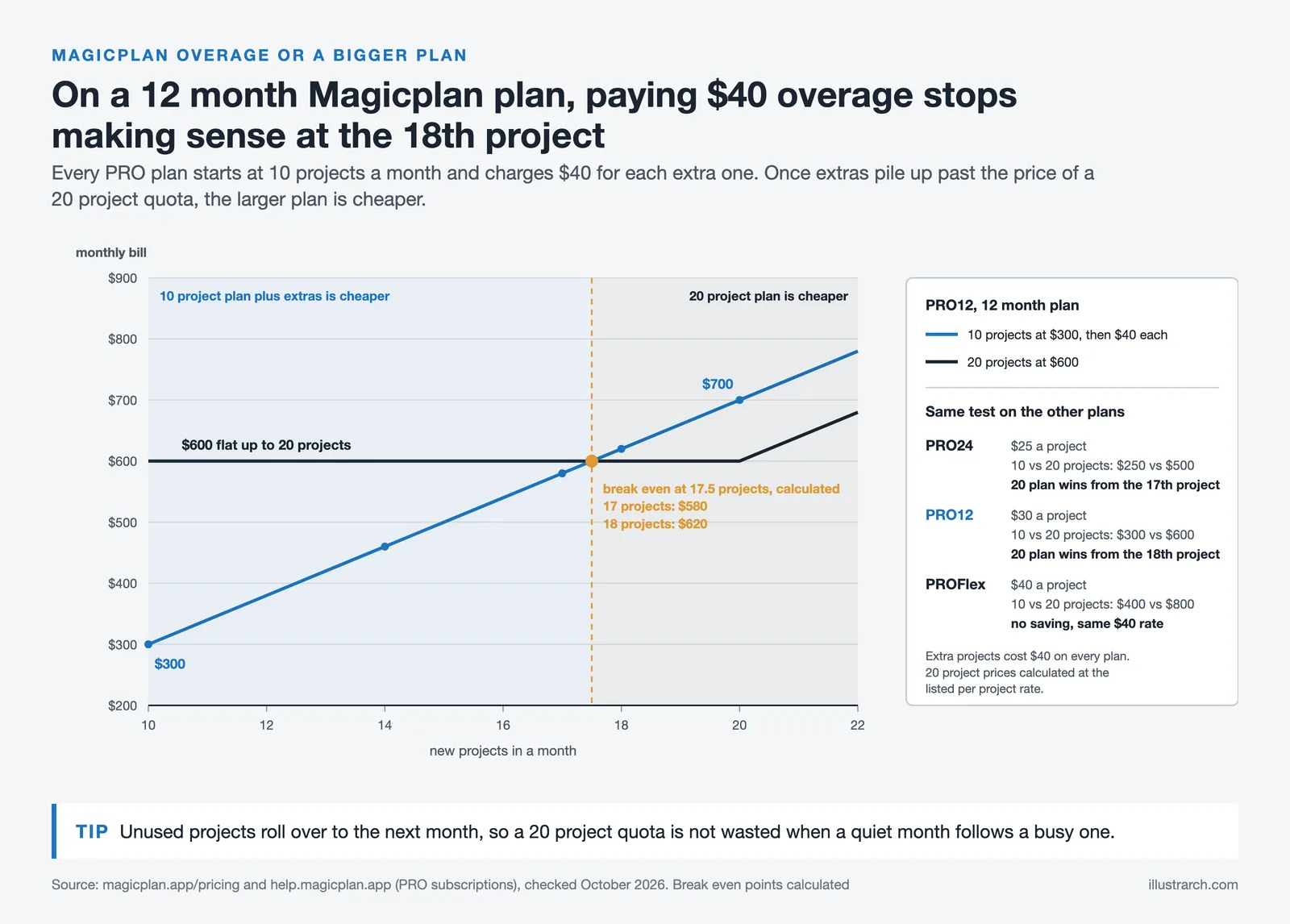
Magicplan no longer offers a free unlimited plan. The current model gives two free projects to new users, which serves as a trial period. Beyond that, paid plans are structured around the number of new projects per month. Plans start at 10 projects per month, and unused project credits roll over to the following billing cycle. All paid plans include unlimited users, meaning team size is never an added cost.
For teams that exceed their monthly project cap, additional projects are available at $40 per project. The pricing page notes that all features are included in every plan, there are no add-ons required to unlock LiDAR scanning, reporting, or the Xactimate integration. This all-inclusive model is a meaningful differentiator from competitors that charge extra for export formats or premium features.
Note: As of October 2026, the Magicplan pricing page lists three plans for 10 projects per month: PRO24 at $25 per project ($250 per month), PRO12 at $30 per project ($300 per month) and PROFlex at $40 per project ($400 per month). The $40 per additional project rate is publicly stated for overage charges.
💡 Pro Tip
Every plan includes at least 10 projects per month with rollover, so occasional users pay $250 to $400 a month however few properties they scan; compare that with your real volume before subscribing. For high-volume restoration or claims teams doing 30+ jobs monthly, a higher project allocation plan pays for itself quickly compared to per-project charges stacking up.

Magicplan vs. Alternatives: How Does It Compare?
There are several competing apps in the AR floor plan space. Here is how the main magicplan alternatives stack up across the factors that matter most to field professionals.

Comparison of Magicplan vs. Top Alternatives
The table below summarizes how Magicplan compares to RoomScan Pro and CubiCasa across key features and use cases:
| Feature | Magicplan | RoomScan Pro | CubiCasa |
|---|---|---|---|
| Scan Method | AR camera + LiDAR (iOS), manual (Android) | Touch walls, camera, or manual | Walk-through video scan |
| Built-in Estimating | Yes | No | No |
| Xactimate Integration | Yes (direct) | Yes | No |
| Door/Window Autodetect | Yes | No | Yes (processed) |
| DXF / CAD Export | Yes | Yes | Yes |
| Android AR Support | Removed (late 2024) | Limited | Yes |
| Free Tier | 2 projects | Limited free | 1 free scan |
| Primary Use Case | Contractors, adjusters, restoration | Surveyors, real estate | Real estate listings |
RoomScan Pro has a notable advantage for scanning cluttered sites, its wall-face mapping method works even when floor corners are blocked by materials or equipment, something that gives Magicplan trouble. However, Magicplan is generally easier to edit after the scan and includes built-in cost estimating that RoomScan Pro lacks entirely. CubiCasa targets real estate professionals who want a hands-off approach: you walk through a property holding your phone, and the service processes the scan for you within 24 hours, but it offers no on-site estimation capability.
For architects and designers looking at the broader software ecosystem, illustrarch’s coverage of best architectural mobile apps and iPad apps for architects provides additional context on how these tools fit into a professional workflow.
What the Magicplan AI Feature Actually Does
Magicplan references AI in the context of its automatic room detection and object recognition during scans. The app uses computer vision to identify wall edges, detect door and window openings, and suggest room type classifications during setup. This is distinct from generative AI; it is more accurately described as machine-learning-assisted spatial recognition running locally on the device. The magicplan AI layer improves with each hardware generation as newer iPhones provide more precise depth data for the model to work with.
There is no AI-assisted design suggestion or layout generation inside the app currently. The intelligence is entirely focused on the capture and measurement phase, not the design phase.
⚖️ Pros & Cons at a Glance
✔️ Pros: Fast AR room scanning on LiDAR devices, built-in estimating, direct Xactimate integration, unlimited team users, offline mode, comprehensive export formats
✖️ Cons: AR scan removed from Android, struggles with furnished rooms, subscription-only with limited free tier, steep learning curve for new users, no redo button in editing

Verdict: Is Magicplan Worth It?
For field professionals who need to document spaces quickly and produce reports, estimates, or claims documentation on-site, the magicplan app is one of the strongest tools in its category. The combination of AR scanning, built-in estimating, and Xactimate integration is difficult to match in a single mobile application. The learning curve is real but manageable within a few projects.
For casual users or homeowners who want to measure a single room, the two-project free tier may be enough. But committing to a subscription without a clear workflow need is harder to justify, especially given that Android users have lost the AR scanning feature entirely and are now dependent on Bluetooth laser meters for accurate results.
Architecture students and designers exploring mobile survey tools will find illustrarch’s guide to creating architectural plans a useful companion to understand where a tool like Magicplan fits within the professional documentation process.
✅ Key Takeaways
- Magicplan uses AR and LiDAR scanning to generate dimensioned floor plans from your phone camera, with accuracy that is genuinely useful for professional field documentation.
- LiDAR-equipped iOS devices (iPhone 12 Pro and later) deliver the best scan results; Android users lost the AR scan feature in late 2024 and now rely on Bluetooth laser meters.
- Built-in estimating and direct Xactimate integration make Magicplan particularly strong for contractors, insurance adjusters, and restoration professionals.
- The subscription model includes unlimited users and unlimited storage, but the free tier is limited to two projects, enough to evaluate the app, not enough for regular professional use.
- Furnished or cluttered rooms remain a genuine scanning limitation; clearing wall bases before scanning meaningfully improves dimension accuracy.






Foster + Partners to Test Robot Swarms Building Timber from the Top Down
Foster + Partners wins €4m EU grant to build robot and drone...
 illustrarch Editoral Team2 Mins read
PLNAR Review: Does AR Measurement Hold Up on a Real Site Visit?
PLNAR began as a consumer AR tape measure and now runs as...
Sinan Ozen5 Mins read
ArchiSnapper Review: Is This Field Report App Worth It for Architects?
A hands-on look at Deltek ArchiSnapper, the mobile app built for field...
Sinan Ozen5 Mins read

Gross Internal Area and Net Internal Area: What’s the Difference?
The difference between Gross Internal Area and Net Internal Area shapes how...
Sinan Ozen5 Mins read


Leave a comment