

Notion Alternatives for Architects: 7 Tools That Fit Studio Work
Notion works until a studio needs fee tracking, phase budgets and timesheets. This breakdown covers seven alternatives, from free local-first note tools to architecture specific practice software, with current pricing and where each one falls short.
 Furkan Sen1 September 20267 Mins read183

Table of Contents Show
Notion alternatives worth testing in an architecture studio include Obsidian, Coda, ClickUp, Asana, Milanote, Monograph and BQE Core. The right pick depends on which job you are actually replacing: a studio knowledge base, a task board for a small team, or fee and time tracking tied to project phases.
Most practices land on Notion for the same reason. It is cheap, flexible, and one workspace can hold meeting notes, a drawing register, a reading list and a rough project tracker. Friction starts when the studio passes three or four people and that tracker has to answer a harder question: how many hours went into schematic design, and did the fee cover them?
Why Architects Start Looking at Notion Competitors

Cost is the first thing people check. Notion charges per member, and its official pricing page lists a free plan that runs indefinitely for personal use, Plus at $10 per member per month billed annually, and Business at $20. A six person studio on Business pays $1,440 a year before anyone logs a single billable hour.
The bigger issue is structural. Notion has no native concept of a fee, a phase budget or a timesheet, so studios end up rebuilding all three out of relation properties and rollups. That works until the person who built it leaves. Add the fact that consultants and clients usually only need to read, yet still consume guest slots or seats, and the per member model starts to look expensive for what it delivers. Firms assembling a wider toolset often hit the same wall across categories, which the breakdown of the architect SaaS stack covers in more detail.
⚖️ Pros & Cons at a Glance
✔️ Staying on Notion: one workspace for notes, wikis and light tracking, a genuinely usable free tier for solo practice, fast to restructure when a project brief changes, easy for new staff to read.
✖️ Staying on Notion: no native time tracking or invoicing, per seat billing even for read only collaborators, databases slow down as they grow, and every custom system depends on whoever built it.
How to Judge a Notion Alternative for Studio Work
Before comparing feature lists, separate the three jobs Notion is doing in your office. The first is the knowledge base: standards, details, contacts, precedent research. The second is task management for teams, the weekly who-is-doing-what. The third is practice operations, meaning hours, fees, phase budgets and invoices. Very few tools do all three well, and paying for one that pretends to usually costs more than running two that do not.
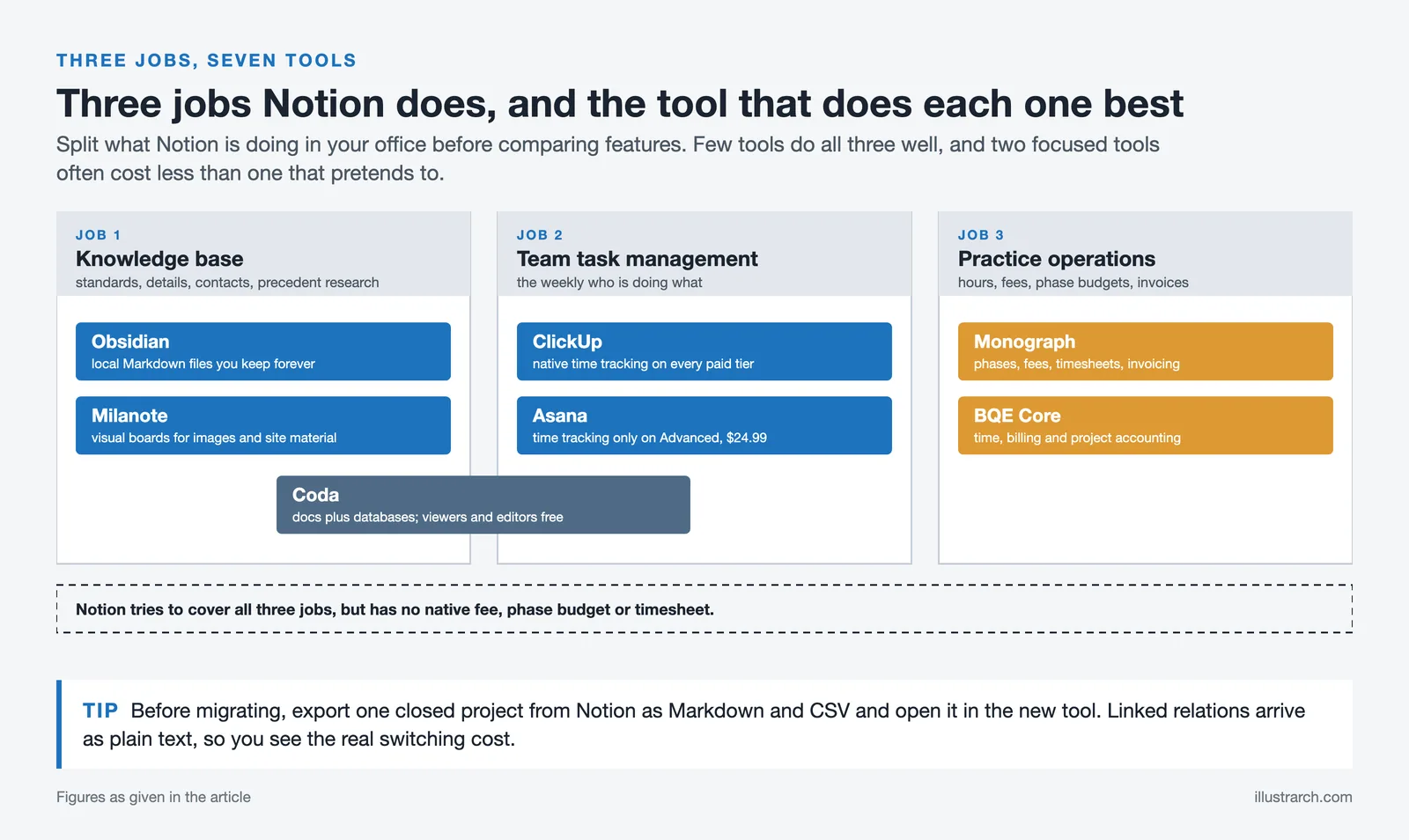
Two other criteria matter for project management for architects specifically. Check how the tool bills read only users, since a typical project involves engineers, contractors and clients who never create anything. And check the export path before you commit, because a workspace holding five years of project history is only as safe as the format it comes out in.
The Best Notion Alternatives for Architects

1. Obsidian
Obsidian stores notes as plain Markdown files in a folder on your own machine, which makes the obsidian vs notion decision less about features than about ownership. Nothing lives on a vendor server unless you pay for sync, and the folder stays readable in any text editor decades from now. For a practice archiving design rationale, code research and detail libraries, that permanence is the whole argument, and it is why many architects treat it as the best note taking app rather than a project tool.
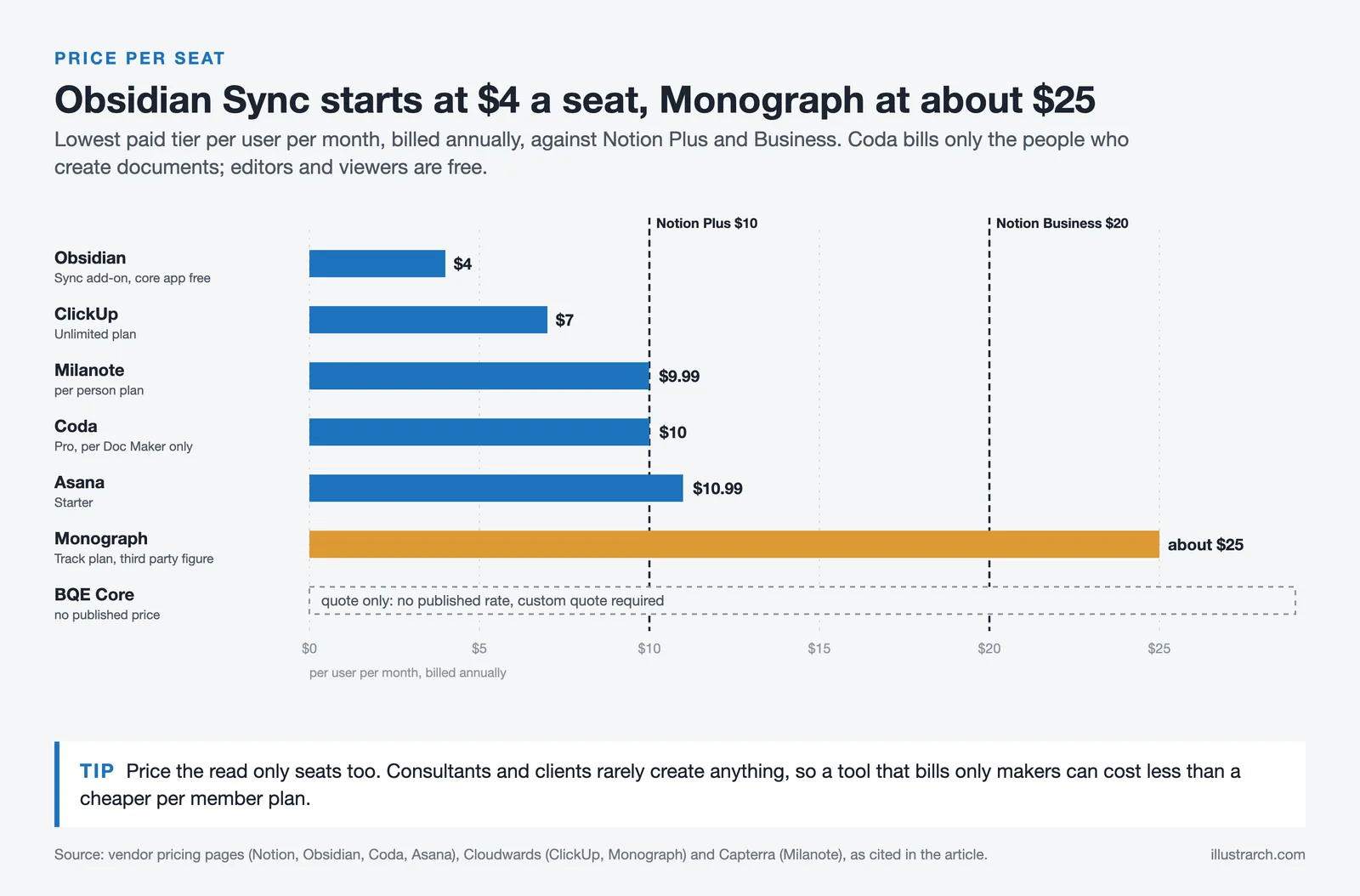
The core app is free. Optional Sync runs $4 per user per month billed annually and Publish $8, per Obsidian’s pricing page. What you give up in the notion vs obsidian trade is real time collaboration: two people cannot edit the same note at once the way they can in a Notion page.
📌 Did You Know?
Obsidian’s commercial licence used to be mandatory for any business with two or more employees. Since February 2025 it is voluntary, so a studio of any size can now use the full app at work for free. The $50 per user per year licence still exists purely as a way to support development.
2. Coda
Coda is the closest structural match to Notion, so notion vs coda usually comes down to the billing model. Coda charges only for Doc Makers, the people who create and own documents, while editors and viewers are free on every plan. Pro is $10 per Doc Maker per month billed annually and Team is $30, with a free tier for small workloads.
For an architecture office that shape fits well. Two or three people build the drawing register, the submittal log and the consultant tracker, and everyone else, including outside consultants, reads and comments at no cost. Coda’s formula language is also stronger than Notion’s for anything resembling a schedule or a quantity calculation.
3. ClickUp
ClickUp is the pick when the actual need is a task management app for teams rather than a wiki. It ships with native time tracking on every paid tier, which is exactly the piece Notion lacks. According to Cloudwards’ ClickUp and Asana comparison, the Unlimited plan is $7 per user per month billed annually and Business is $12, with a free tier that supports unlimited users.
The trade is complexity. ClickUp’s hierarchy of spaces, folders, lists and subtasks rewards a studio willing to set it up properly and punishes one that does not. Give it a deliberate structure in week one or it turns into a second inbox.
4. Asana
Asana is the calmer option and often the best project management app for practices that want people using it by Friday. Setup is quick, the interface stays out of the way, and timelines map cleanly onto design phases. The free plan covers up to 2 users for accounts opened after November 12, 2025 (older accounts keep the 10 user limit), Starter is $10.99 per user per month and Advanced is $24.99.
Watch the time tracking gate. Asana’s native time tracking sits on the Advanced tier, so a studio that needs hours against phases either pays $24.99 per seat or bolts on a separate tracker.
5. Milanote
Milanote replaces the part of Notion architects use least well: the visual one. Boards are free form canvases for site photographs, material samples, precedent images and sketches, nested inside each other to follow a project structure. Per Capterra’s listing, the free plan caps at 100 cards and 10 file uploads, the per person plan is $9.99 per month billed annually, and a team plan runs $49 per month.
It is not a project tracker and does not pretend to be. Pair it with something else, the same way most studios pair rendering and documentation tools rather than hunting for one platform, a pattern the review of architecture software for small firms traces across categories.
6. Monograph
Monograph is built only for architecture and engineering practices, and it is the first tool on this list that treats a project the way an architect does: as phases with fees, budgets and hours attached. Timesheets, phase level budget alerts, forecasting and QuickBooks Online invoicing all come standard.
Pricing is the catch. Monograph does not publish rates on its pricing page, which shows a revenue calculator instead, and figures only appear after a demo. Cloudwards’ July 2026 review places the Track plan at $30 per member per month monthly or $25 billed annually, and Grow at $55 monthly or $45 annually.
7. BQE Core
BQE Core covers similar ground with a heavier accounting core, which suits multidisciplinary offices that bill on several contract types at once. Time and expense capture, invoicing, and project accounting sit in one system rather than syncing between three.
Like Monograph, it is quote only. TechRepublic’s roundup of project management software for architects notes that BQE does not advertise pricing at all and requires a custom quote. That opacity is a real reason small studios stay on general purpose tools longer than they should.
Notion Alternatives Compared
The table puts the seven side by side on the details that usually decide it.
| Tool | Type | Free tier | Paid from (annual) | Best for |
|---|---|---|---|---|
| Obsidian | Local Markdown notes | Yes, full app | $4 per user (Sync add-on) | Studio knowledge base you keep forever |
| Coda | Docs plus databases | Yes, limited docs | $10 per Doc Maker | Trackers where most people only read |
| ClickUp | Task and project management | Yes, unlimited users | $7 per user | Task boards with built in time tracking |
| Asana | Task management | Yes, 2 users (10 on older accounts) | $10.99 per user | Fast adoption with minimal setup |
| Milanote | Visual boards | Yes, 100 cards | $9.99 per user | Concept boards, references, site material |
| Monograph | AE practice operations | No | About $25 per user (third party figure) | Phase budgets, timesheets, invoicing |
| BQE Core | AE practice operations | No | Quote only | Billing heavy multidisciplinary firms |
Software pricing changes often and varies by region, billing term and team size. Confirm current rates on each vendor’s own site before committing, particularly for the quote based platforms.
What Is the Best Free Notion Alternative?

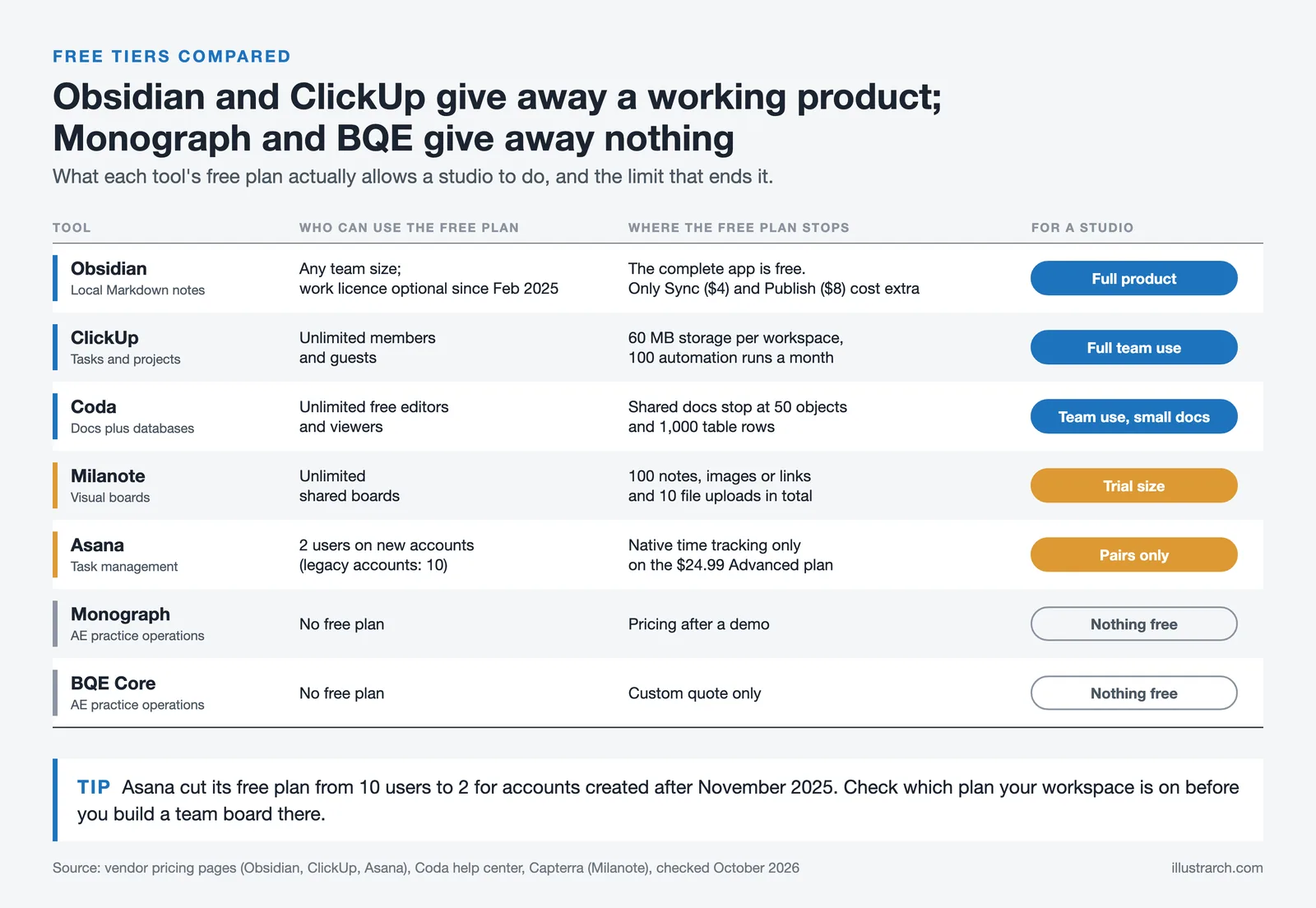
For architects, the strongest free Notion alternative is Obsidian for knowledge work and ClickUp for task work, since both give away a genuinely usable product rather than a trial. Obsidian’s free tier is the complete application, and ClickUp’s Free Forever plan supports unlimited users, which matters for project management software small business owners running lean.
Coda’s free tier deserves a mention too, because the Doc Maker model means a small studio can add unlimited free viewers from day one. The limits bite on doc size and automation runs rather than on headcount.
💡 Pro Tip
Run the export before you run the migration. Export one closed project from Notion as Markdown and CSV, then open it in the tool you are considering. Databases flatten into CSV files and linked relations arrive as plain text, so a drawing register that took a week to build often lands as a table nobody can use. Testing on a finished project tells you the real cost of switching without putting live work at risk.
One habit makes any of these switches easier. Keep the knowledge base and the operations tool separate from the start, so a change in one does not force a rebuild of the other. Studios that already run split toolsets, for example a rendering platform alongside documentation software, tend to move faster. The same logic applies to the tools that go quiet after acquisition, as the PlanGrid review shows, and to picking between assistants in the ChatGPT alternatives for architects comparison or between editors in the Photoshop alternatives breakdown.
Putting It All Together

Your Next Step: open your last completed project, add up the hours actually spent on each phase against the fee you charged, and see whether your current workspace could have told you that before the project closed. If it could not, the tool you need is a practice operations platform, not another wiki.
Architecture Students Hub
This guide is part of Software, Rendering and Gear, stage 4 of our student roadmap from the first diagram to the first internship. Next stage: Portfolio, CV and Internships, or browse every free tool and guide in the Architecture Students Hub.







Why Every Practice Ends Up With Five Versions of the Same Revit Family
Let’s learn why Revit family libraries accumulate duplicates, break schedules and slow...
 illustrarch Editoral Team5 Mins read

Visualizing Renovation Projects From Photographs: A Workflow for Existing-Building Work
Photo-based visualization turns a photograph of a building that already exists into...
illustrarch Editoral Team7 Mins read

Best Free CAD Blocks and Resources for Architects
A working guide to free CAD blocks for architects, covering ARCAT, CAD-Blocks.net,...
Furkan Sen7 Mins read
Houzz Pro Review: Does It Deliver for Residential Architects?
Houzz Pro combines CRM, estimates, invoicing, 3D floor plans, and a client...
 Sinan Ozen6 Mins read


Leave a comment