

5 BIM Collaboration Platforms You Can Use for Free in 2026
A practical breakdown of five BIM collaboration platforms that offer free access for architecture and construction teams. Each platform is reviewed for its free tier features, file format support, collaboration tools, and best use case, helping you pick the right cloud-based BIM platform without upfront cost.
 Sinan Ozen17 May 20269 Mins read226

Table of Contents Show
BIM collaboration platforms allow architects, engineers, and contractors to share, review, and coordinate building information models in a centralized cloud environment. The five free options covered here, including Trimble Connect, Speckle, BIMcollab Zoom, Dalux BIM Viewer, and Allplan BIMPLUS, each provide core collaboration features at no cost, making them accessible starting points for teams adopting cloud-based BIM workflows.
Working on a multi-discipline building project without a shared model environment leads to version conflicts, duplicated effort, and missed clashes. A cloud-based BIM platform solves this by giving every stakeholder access to the same up-to-date project data, whether they are sitting in the office or standing on the construction site. The good news is that several strong BIM collaboration platforms offer free tiers with enough functionality to get real work done. Below are five platforms worth evaluating, along with what you actually get at no cost and where the limits kick in.

What Makes a Good BIM Collaboration Platform?
Before comparing individual tools, it helps to know what separates a useful BIM collaboration platform from a basic file-sharing folder. The core function is model viewing: the platform should open IFC files and other common BIM formats directly in a browser or lightweight desktop app, without requiring expensive authoring software. Beyond viewing, look for issue tracking (the ability to flag problems tied to specific model locations), version control (so you can compare what changed between uploads), and role-based access (so external consultants see only what they need to see).
Support for open standards matters too. Platforms built around buildingSMART standards like IFC and BCF tend to play well with a wider range of authoring tools, which is especially relevant for teams where architects use one BIM platform and structural engineers use another. As discussed in our overview of the role of BIM technology in modern architecture, interoperability has become one of the most important factors in choosing any BIM tool.
💡 Pro Tip
See also our guide to Revit vs Archicad.
Before committing to any BIM collaboration platform, test it with your actual project files, not sample models. Upload a mid-sized IFC from your current project and invite two or three team members to flag a few test issues. You will quickly discover whether the platform handles your file sizes, loads models at an acceptable speed, and fits your team’s communication style.

1. Trimble Connect: Best Free BIM Platform for Small Teams
Trimble Connect is a cloud-based common data environment (CDE) designed for the construction industry. Its free Personal plan gives you one project, up to 10 GB of storage, and room for five project members. That is enough for a solo practitioner or a small studio coordinating with a couple of consultants on a residential or small commercial project.
The platform supports over 45 file types, including IFC, Revit (.rvt), SketchUp (.skp), DWG, and point cloud formats. You can view 2D drawings and 3D models side by side, measure directly in the viewer, and use markup tools to annotate models. Issue tracking is built in, and tasks can be assigned to specific team members. Trimble Connect also offers mobile apps for iOS and Android, which means you can review models on-site from a tablet.
The main limitation of the free tier is the single-project restriction. If you handle multiple active projects simultaneously, you will need to upgrade to the Pro plan, which starts at around $10 per user per month. For teams already working within the Trimble ecosystem (Tekla Structures, SketchUp), the native integrations make Trimble Connect a natural fit. Our guide to the best BIM software covers several tools that pair well with Trimble Connect for a complete workflow.
2. Speckle: Best Free Open-Source BIM Coordination Platform
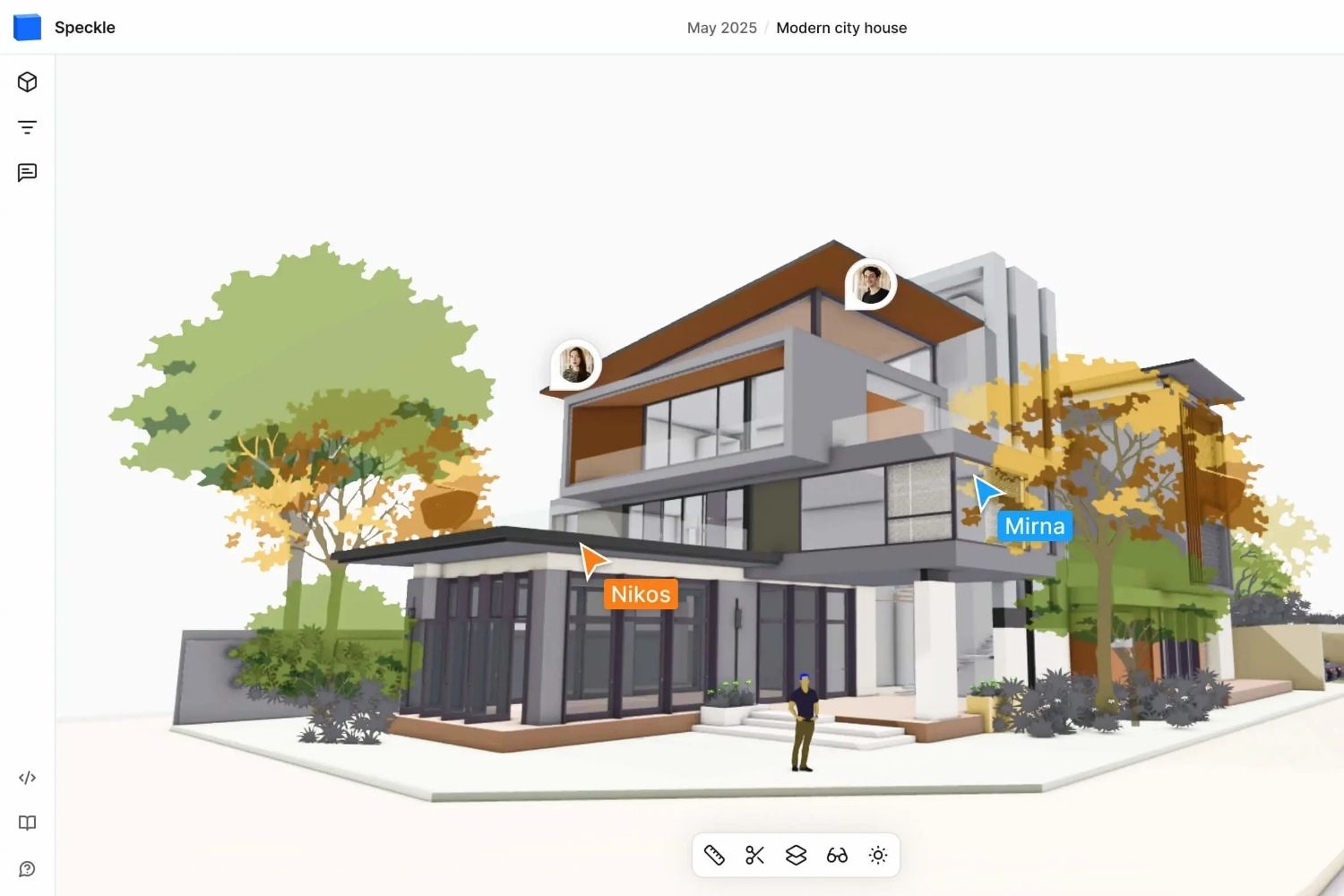
Speckle takes a fundamentally different approach from most BIM collaboration platforms. It is open-source software, originally developed from a research project at University College London, and it treats BIM data as a stream of versioned objects rather than static files. This means you can push geometry, parameters, and metadata from Revit, Rhino, Grasshopper, ArchiCAD, Blender, AutoCAD, and other tools into a centralized server, then pull that data into any other connected application.
If you self-host Speckle on your own server, the entire platform is free with no user or project limits. The hosted version on speckle.xyz offers a free tier with one project, five models, and seven days of version history. Paid plans start at around £12 per editor per month, with viewers always free on every plan.
Speckle’s real strength is data connectivity. Architects working in Rhino can share live model updates with structural engineers in Revit, without anyone needing to export IFC files manually. The web-based 3D viewer lets non-technical stakeholders review models in a browser and leave comments tied to specific objects. For teams that include computational designers or developers, Speckle’s GraphQL API and automation features (called Speckle Automate) open up workflows like automated clash detection, code compliance checks, and custom reporting.
🎓 Expert Insight
“Companies are locked out of the value of their own data, which is trapped in proprietary file formats and closed vendor clouds. This severely limits competition and sets the digital future of AEC at odds with our needs for better tools.” — Speckle Team, via AUGI (Autodesk User Group International) Publication
This observation highlights why open-source BIM platforms like Speckle are gaining traction. When project data flows freely between tools, teams spend less time on file conversions and more time on actual design coordination.
The learning curve is steeper than with more conventional platforms. Speckle works best for teams that are comfortable with connectors, APIs, and some technical setup. For a traditional practice that just needs to share IFC files and track issues, one of the other platforms on this list may be a faster starting point. But for studios pushing computational design or running custom data pipelines, Speckle is hard to match. Our article on architecture and digital construction workflows explains why this kind of data-first approach is becoming important in modern practice.
3. BIMcollab Zoom: Best Free IFC Viewer with Issue Management
BIMcollab Zoom is a desktop application that works as a free IFC model viewer with built-in issue management. Unlike browser-based tools, it runs locally on your machine, which means fast loading times and smooth navigation even with large, federated models containing hundreds of thousands of objects.
The free Viewer version lets you open and combine multiple IFC files, apply smart views to filter and color-code elements by property, measure distances, create sections, and connect to a BIMcollab Nexus project for issue tracking. Issues are tied to specific locations in the 3D model, with each issue carrying a responsible person, status, priority, and full audit trail. The BCF (BIM Collaboration Format) standard sits at the heart of BIMcollab’s workflow, so issues created in Zoom can be opened directly inside Revit, Navisworks, ArchiCAD, or Solibri through BIMcollab’s plugins.
The paid version adds rule-based clash detection, data extraction, and automated quality checking, but the free viewer already handles the day-to-day needs of reviewing models and coordinating issues. BIMcollab Nexus, the cloud platform behind the issue tracking, offers a free trial for teams wanting to test the full coordination workflow.
⚠️ Common Mistake to Avoid
Many teams try to manage BIM coordination through email threads and spreadsheets, sending screenshots of model clashes back and forth. This quickly breaks down because issues lose their spatial context. A platform like BIMcollab Zoom ties every issue to an exact position in the 3D model, so when a structural engineer opens the issue, they see the problem from the same viewpoint the architect flagged it from. That spatial link is what makes BIM-based issue tracking effective.
4. Dalux BIM Viewer: Best Free BIM Platform for Mobile and On-Site Use
Dalux BIM Viewer is built for getting BIM models out of the office and into the field. The free viewer handles IFC and Revit files, supports federated models (combining multiple discipline models into one view), and works on web, iOS, and Android devices. With over one million users across 115 countries, Dalux has become one of the most widely adopted free BIM viewers globally.
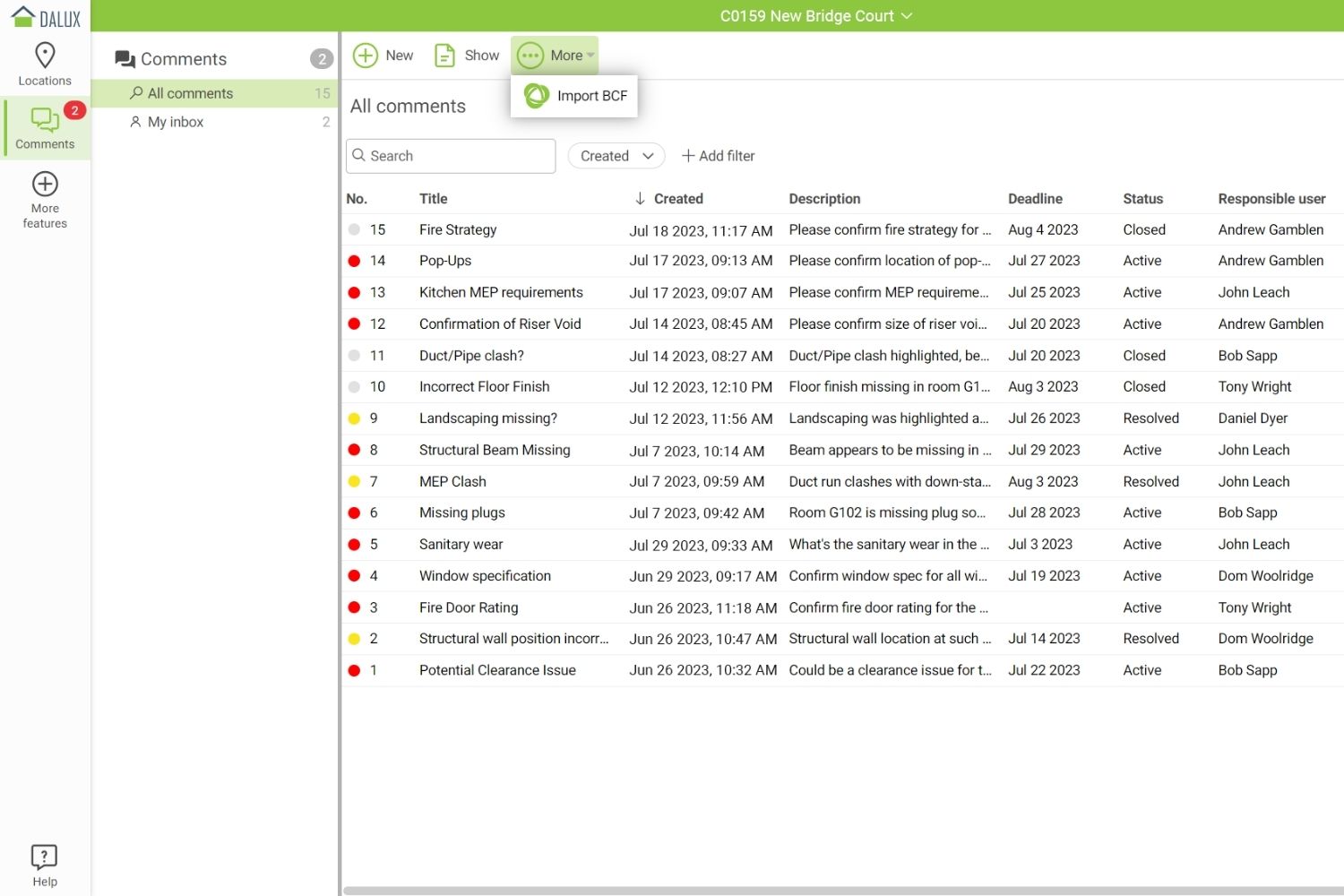
What sets Dalux apart from other free options is its mobile performance. The viewer engine handles large, complex models on smartphones and tablets without requiring a high-end device. You can overlay 2D drawings on top of 3D models, measure elements directly on-site, and use the built-in commenting system to flag issues. Comments carry a responsible person, an audit trail, and spatial links to the model. You can also import clashes from Solibri or Navisworks and manage them within Dalux’s interface.
Dalux also offers Field Basic, a separate free tool for defect management on construction sites. It handles snagging, task assignment, photo documentation, and subcontractor coordination at no cost. If your team needs a more structured CDE with approval workflows and document management, Dalux Box is the paid upgrade, but the free BIM Viewer and Field Basic combination already covers a significant portion of on-site coordination needs. For architects comparing different digital tools for practice, our article on must-have tools for architects covers additional options beyond BIM-specific platforms.
5. Allplan BIMPLUS: Best Free Cloud-Based BIM Platform for European Teams
Allplan BIMPLUS is a cloud-based BIM collaboration platform from the Nemetschek Group, designed to work across all disciplines in the AEC sector. The free standard package includes 2 GB of storage, which is enough for smaller projects or for testing the platform with your team before scaling up.
BIMPLUS is built around open standards, accepting IFC, BCF, and SAF (Structural Analysis Format) files alongside native Allplan data. It provides a web-based model viewer, issue tracking, task management, and revision control. A direct link to Allplan’s own BIM software creates a tighter workflow for firms already using Allplan for architectural or structural design, but the platform is open enough to accept models from Revit, ArchiCAD, and other tools through IFC import.
The platform is especially popular among European firms, where Nemetschek Group products (Allplan, Vectorworks, Graphisoft) have strong market presence. If your consultants or clients already work within the Nemetschek ecosystem, BIMPLUS provides a neutral collaboration space where everyone can contribute. For firms evaluating their BIM software options more broadly, our Archicad vs Revit comparison covers the authoring side of this decision.
Comparison of Free BIM Collaboration Platforms
The following table summarizes the key differences between these five platforms at their free tier level:
| Platform | Free Tier Limits | File Formats | Best For |
|---|---|---|---|
| Trimble Connect | 1 project, 10 GB, 5 members | IFC, RVT, SKP, DWG, point clouds (45+ types) | Small teams needing a full CDE |
| Speckle | Unlimited (self-hosted) or 1 project, 5 models (hosted) | Revit, Rhino, Grasshopper, ArchiCAD, Blender, AutoCAD, Excel | Dev-savvy teams, computational design |
| BIMcollab Zoom | Full viewer features, free desktop app | IFC (with BCF issue tracking) | Model review and issue coordination |
| Dalux BIM Viewer | Unlimited users, free web and mobile | IFC, RVT, Navisworks clash import | On-site mobile BIM access |
| Allplan BIMPLUS | 2 GB storage, standard features | IFC, BCF, SAF, native Allplan | European teams, Nemetschek ecosystem |
How to Choose the Right Free BIM Collaboration Platform
Picking the best free BIM platform depends on three factors: your team’s technical comfort level, the size and complexity of your projects, and which authoring tools your collaborators use. If you need a straightforward CDE with broad file format support and mobile access, Trimble Connect or Dalux BIM Viewer are the most accessible options. If your practice involves computational design or custom data workflows, Speckle gives you far more flexibility at the cost of a steeper setup process.
For teams focused specifically on issue tracking and model quality, BIMcollab Zoom’s free viewer combined with BCF-based workflows is hard to beat. And if your firm sits within the European Nemetschek ecosystem (Allplan, ArchiCAD, Vectorworks), BIMPLUS offers a collaboration space designed for that software family.
📌 Did You Know?
According to a buildingSMART International survey, 77% of AEC firms consider a common data environment the most effective way to share large volumes of project information. Yet many small and mid-sized practices still rely on email attachments and shared folders because they assume CDE platforms are expensive. Each of the five platforms listed here disproves that assumption with a functional free tier.
One practical approach is to start with the free tier of two platforms simultaneously, running a single project through both for two to three weeks. This real-world testing reveals usability differences that feature lists alone cannot show, from upload speeds and viewer responsiveness to how intuitive the issue tracking feels for your team’s workflow.
As your projects grow in complexity and your team becomes more comfortable with cloud-based BIM coordination, upgrading to a paid tier or switching platforms is straightforward. Most platforms allow IFC export, so you are not locked into any single vendor. For more context on how the BIM industry is changing design and construction, our dedicated article covers broader trends shaping these tools.
Video: Understanding BIM Collaboration Methods
This webinar from Vectorworks explains the different approaches to BIM collaboration, including reference models, file-based sharing, and cloud platforms, helping you understand which method fits your project type.
Final Thoughts
Free BIM collaboration platforms have matured significantly over the past few years. You no longer need a large software budget to give your entire project team access to shared 3D models, issue tracking, and version control. Trimble Connect, Speckle, BIMcollab Zoom, Dalux BIM Viewer, and Allplan BIMPLUS each approach the collaboration problem from a slightly different angle, and the best choice depends on your specific workflow, team size, and technical preferences.
The most important step is simply to start using one. Even a basic cloud-based BIM platform replaces hours of email-based coordination with a centralized, visual, and traceable workflow. Once your team experiences the difference, the case for BIM-based collaboration makes itself. For architects looking to improve their broader digital workflow, our article on the benefits of digital tools in architecture provides additional strategies for building a more efficient practice.
✅ Key Takeaways
- Trimble Connect’s free plan works well for small teams needing a full common data environment with broad file format support and mobile access.
- Speckle is the only open-source option and gives unlimited free access when self-hosted, making it ideal for tech-savvy teams running custom data workflows.
- BIMcollab Zoom provides the strongest free IFC viewing and BCF-based issue tracking experience as a desktop application.
- Dalux BIM Viewer leads in mobile and on-site performance, handling large federated models on smartphones and tablets at no cost.
- Allplan BIMPLUS fits European teams working within the Nemetschek ecosystem and offers a free tier with 2 GB of cloud storage.







Will Forma Replace Revit? Autodesk Finally Answers
Autodesk's own FAQ says Forma will replace Revit over time, as it...
 illustrarch Editoral Team3 Mins read

BIM vs CAD: Why the Shift Still Matters for Architects in 2026
BIM and CAD are both foundational to architectural practice, but they serve...
Sinan Ozen7 Mins read

Revit Alternative Software for Architects
A practical comparison of eight Revit alternatives, covering ArchiCAD, Vectorworks, BricsCAD BIM,...
 Elif Ayse Sen9 Mins read

Becoming a BIM Expert: How BIM Is Transforming Architectural Practice
Building Information Modeling is no longer just a technical requirement in architectural...
Sinan Ozen12 Mins read


Leave a comment