

Morpholio Trace Launches AI Scale Detection for iPad and iPhone
Morpholio Trace has added AI Scale, a feature that automatically detects and calibrates the scale of imported drawings on iPhone and iPad. Built on Apple VisionKit and running entirely on-device, it unlocks smart area, dimension, and measuring tools the moment a drawing is imported, removing one of the most persistent setup steps in digital sketching.
 Elif Ayse Sen17 April 20269 Mins read239

Table of Contents Show
Morpholio Trace has introduced AI Scale, a new feature that automatically reads the scale of imported drawings and calibrates the app’s measuring tools in the background. Built on Apple’s VisionKit and running entirely on-device, it removes one of the most persistent setup steps in digital sketching for architects, interior designers, and landscape architects.
For most of the profession’s history, the first action in any digital sketching session has been the same: open a drawing, set the scale, calibrate a reference dimension, and only then start thinking about the design itself. It is a small friction, but it repeats across thousands of hours of studio time every year. Morpholio’s latest release, announced in late March 2026, takes aim at exactly that friction.
The rollout also sits inside a larger shift in the company. In February 2026, Vectorworks acquired Morpholio, folding the iPad-first sketching suite into the broader Nemetschek Group family of AEC tools. AI Scale is the first major feature to ship under that new structure, and it offers an early read on how mobile sketching is being positioned inside a full BIM-to-sketch pipeline. For the wider context on how artificial intelligence is moving into daily practice, illustrarch has covered the AI tools that are replacing traditional architecture workflows in detail.
What Is AI Scale in Morpholio Trace?
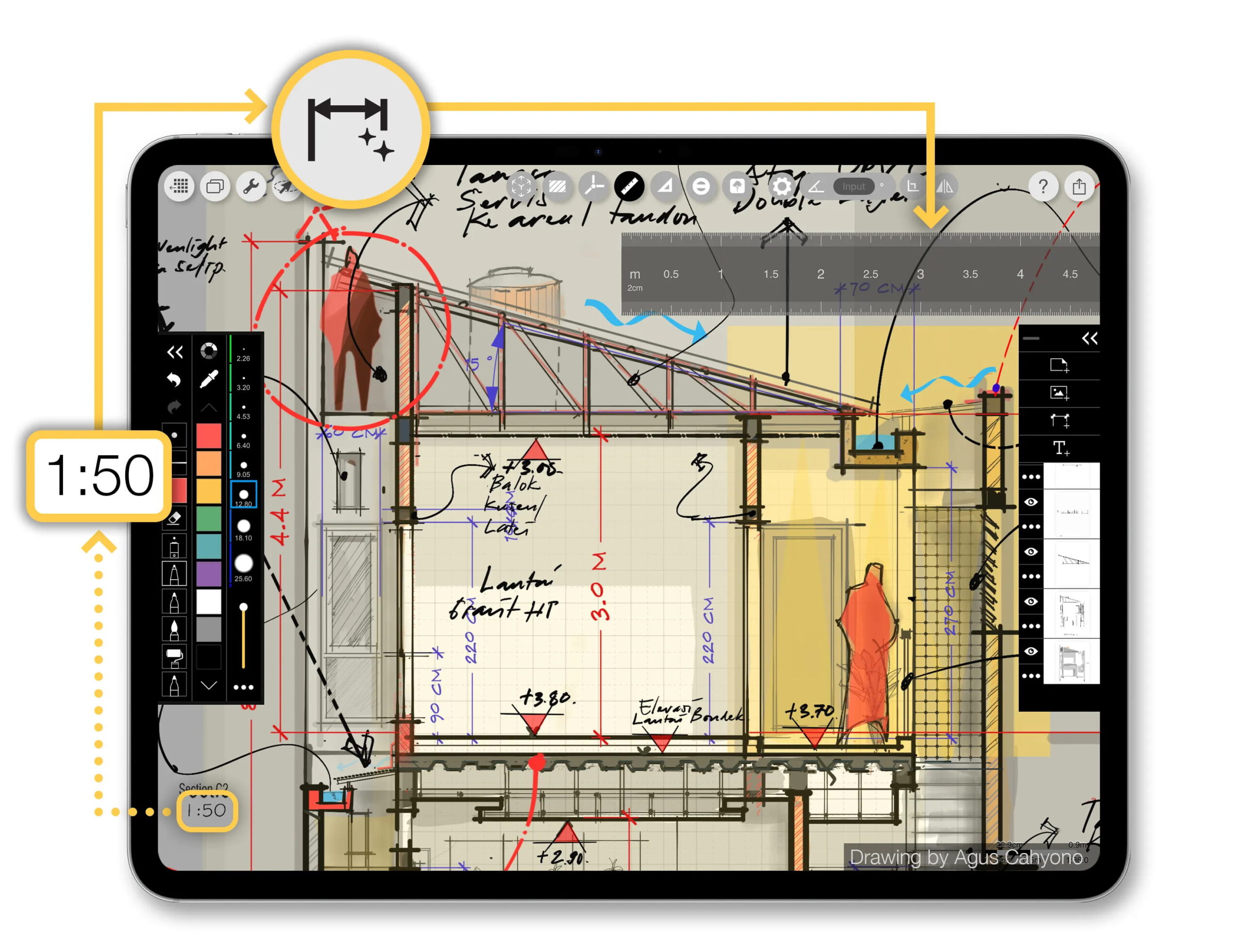
AI Scale is an automatic scale-detection system built directly into Morpholio Trace. When a user imports a drawing, whether a construction detail, a floor plan, or a site map, the app analyzes the content and recognizes the scale on its own. From that point, smart area, dimension, and measuring tools are activated in the drawing space and already calibrated to match the imported drawing.
The company positions the tool as a background assistant rather than a generative feature. Nothing about the drawing is changed, altered, or rebuilt. What changes is the setup time. A step that architects used to perform manually at the start of every session, by picking a known dimension and telling the software how long it should be, now happens before the pencil touches the screen.
Mark Collins, Morpholio co-founder, framed the intent as part of the app’s longer arc. “Over the last 15 years, Morpholio has thoughtfully integrated the latest technologies into digital drawing, always in service of the creative process,” he said in the launch announcement. “Tools like RoomPlan and Perspective Finder have shown how powerful intelligence can enhance sketching. With AI Scale, we’re taking that a step further by removing one of the most persistent points of friction in the workflow.”
💡 Pro Tip
Before importing a PDF drawing set into Morpholio Trace, flatten any marked-up or multi-layered sheets in your PDF reader. Clean, single-layer PDFs give AI Scale a clearer geometry to analyze, which improves detection on sheets with heavy annotations or overlapping revision clouds.
How Does the AI Scale Feature Work?

The technical story behind AI Scale matters, because it shapes how the feature behaves in practice. Morpholio has built the detection on top of Apple’s VisionKit framework, which handles image analysis on Apple silicon using the device’s own Neural Engine. This is the same family of APIs Apple exposes to developers for tasks like text recognition, data scanning, and document reading, all documented in the Apple VisionKit developer reference.
There are two practical consequences of that choice. First, the processing is local. Drawings never leave the iPad or iPhone, and no image is uploaded to a data center for analysis. Second, the feature runs with the speed expected from on-device neural work, which means the user sees calibrated tools almost immediately after an import rather than waiting for a network round-trip.
Co-founder Toru Hasegawa tied that design decision to a broader philosophy about AI for designers. He described AI Scale as a tool built to augment, not replace, the architect’s judgment. The automation is deliberately narrow: it handles a single technical chore and then gets out of the way, leaving the creative decisions to the user.
On-Device AI Versus Cloud AI
The distinction between on-device and cloud-based AI is becoming a meaningful one in professional design software. Tools that ship images to remote servers for processing gain access to larger models but introduce latency, data-handling questions, and offline limitations. Morpholio’s choice to keep AI Scale on the device reflects a narrower scope with a clearer daily benefit: predictable speed, offline capability, and no drawing data leaving the iPad.
📐 Technical Note
Apple VisionKit currently runs on iOS, iPadOS, macOS, and visionOS, and it executes its computer-vision requests entirely on the device using the Neural Engine. Because AI Scale inherits this architecture, no uploading or cloud inference is required, and the feature is available wherever Trace itself runs in the Apple App Store for iPhone and iPad.
Why Scale Matters in Architectural Sketching
It is easy to underestimate how much of an architect’s day is shaped by scale. Scale determines whether a detail reads as a structural joint or a joinery connection. It defines the relationship between a plan and the human body moving through it. It establishes hierarchy, influences perception, and ultimately shapes whether a design feels monumental, intimate, or generic.
Morpholio’s own framing in the launch material is that, from the first idea, understanding the context in which you are working is essential. The “dream state” the company points to, free-flow pencil sketching on top of and next to accurately scaled drawings, only exists when the underlying scale is already correct. A scale that is off by even a small factor quietly distorts every decision that follows.
That is why the setup step has always been worth doing, even when it interrupted the design process. AI Scale’s contribution is to preserve the discipline of scaled drawing while removing the manual cost of achieving it.
⚠️ Common Mistake to Avoid
A frequent error with any automatic scale detection is assuming the calibrated measurement is final. Even with AI Scale, it is worth verifying the result against a known reference dimension on the drawing, such as a door width or a dimensioned grid, before starting quantity take-offs or area studies. Automation speeds up setup, but the architect still signs off on accuracy.
Who Will Benefit Most From AI Scale?

Morpholio has positioned AI Scale as a broad-use feature, but the benefit concentrates in specific parts of the profession. Anyone who works with imported drawings on iPad, whether during schematic design, site visits, or construction administration, sees immediate time savings. The deeper value shows up in a few particular workflows.
Architects Working on Construction Detail and Markup
Architects reviewing shop drawings, sketching revisions over construction details, or producing on-site redlines import new PDFs constantly. Each one historically needed a manual scale calibration. With AI Scale, that calibration is removed from the critical path, and the smart dimension and area tools are available the moment the drawing opens.
Interior Designers Iterating Over Floor Plans
Interior design workflows often involve sketching several furniture arrangements over a single plan, then importing revised plans from a BIM or CAD tool. When layouts shift quickly across client meetings, scale calibration becomes a repeated bottleneck. Automatic detection means designers can drop in a new plan and start sketching or measuring within seconds, which supports a faster iteration rhythm.
Landscape Architects Working With Maps and Aerials
Landscape architecture routinely mixes site photographs, aerial images, survey PDFs, and topographic maps, all at different scales. Getting each reference correctly calibrated has traditionally been tedious. Trace has already been recognized as a core tool in this area, as illustrarch outlined in its overview of powerful iPad apps for landscape architecture and garden design, and AI Scale reduces one of the last friction points in that mobile workflow.
Architecture Students and Educators
Students encounter scale as both a technical skill and a conceptual framework. Removing the configuration barrier lowers the cost of experimentation and lets students focus on proportion, massing, and composition. Morpholio already offers an education subscription for Trace, and the broader move toward intelligent sketching tools aligns with how digital workflows are now being taught across architecture programs.
Morpholio Trace for Architects: Where AI Scale Fits

Morpholio Trace for architects has been, since its launch, the flagship iPad sketching environment in many offices. It combines layered drawing, CAD-style accuracy, Apple Pencil support, AR perspective tools, and Apple’s RoomPlan integration for LiDAR-based room scanning. AI Scale extends the intelligent side of the app without adding another tool to learn. It sits beside existing features like Perspective Finder and RoomPlan, all of which use narrow, focused AI behind the scenes.
For architects who already rely on the app, the practical change is subtle. There is no new panel, no new menu to learn. The automation happens when a drawing is imported, and the smart area, dimension, and measuring tools become available immediately. For new users, the feature lowers the onboarding curve by removing a step that often confuses first-time users of scale-aware software.
💡 Pro Tip
Pair AI Scale with Trace’s existing stencils and smart guides by organizing imports into distinct layers from the start. When each plan, elevation, and photo sits on its own labeled layer, you can compare scaled references side by side without losing track of which source set the active measurement.
Where the Feature Fits in a Broader AI Toolkit
AI Scale is a narrow-scope feature by design. It does not generate drawings, suggest layouts, or render renderings. In that sense, it sits at the opposite end of the spectrum from the broader class of generative AI for architecture, which illustrarch has examined at length in its guide to AI architecture design in 2026. The two approaches can coexist inside a single studio: generative tools for exploration and ideation, narrow on-device tools for the accurate technical setup that underpins serious design work.
🎓 Expert Insight
“With Morpholio now part of Vectorworks, AI Scale is a glimpse of the intelligent assistance we believe should be built into every stage of design. Features like this quietly handle the technical setup in the background so our customers and designers can stay in their creative flow.”
Jason Pletcher, CEO of Vectorworks
Pletcher’s framing signals that Vectorworks sees background AI, not generative novelty, as the connective tissue between mobile sketching and desktop BIM. That is a useful lens for architects trying to decide which AI features are worth adopting now and which are still experimental.
AI Scale, Privacy, and the On-Device Advantage

Privacy and data handling are quiet but important topics for any architecture office using mobile tools. Construction drawings, client floor plans, and site information often sit under nondisclosure obligations, and some public-sector projects have explicit restrictions on where and how project data can travel. Because AI Scale runs on Apple’s Neural Engine through VisionKit, drawings are analyzed locally. There is no cloud inference step and no transmission of drawing content for scale detection.
This matters practically. An architect using Trace on a plane, in a remote site visit, or inside a secure facility gets the same scale detection as in a studio. It also matters commercially, because it reduces the number of privacy and security questions an office has to answer before approving the app for use on sensitive projects.
🏗️ Real-World Example
Morpholio’s RoomPlan integration (2022): Before AI Scale, Morpholio shipped RoomPlan support that uses the iPad and iPhone LiDAR scanner to produce a scaled 3D model of an interior space, ready to sketch over. It is a useful precedent for AI Scale because it demonstrates the same pattern: a narrow Apple framework, local processing, and a specific output that removes a manual setup step. AI Scale extends that approach from physical rooms to imported drawings.
Getting Started With AI Scale in Morpholio Trace
AI Scale is available now through the Morpholio Trace app, which is distributed on the Apple App Store for iPhone and iPad. Users with an active Trace subscription receive the update automatically, and new users can download the app directly. More information about the feature and supported devices is available at morpholioapps.com, and the broader product context, following the Vectorworks acquisition, is documented on the Vectorworks newsroom.
For architects building a wider iPad workflow around scale-aware sketching, it is worth looking at how Trace fits alongside other apps. illustrarch’s overview of the best architecture apps for iPad covers complementary tools like Procreate, Shapr3D, and AutoCAD for iPad, each of which can sit next to Trace in a typical studio setup.
✅ Key Takeaways
- AI Scale automatically detects and calibrates the scale of imported drawings in Morpholio Trace, removing a manual setup step that used to happen at the start of every session.
- The feature runs entirely on-device using Apple’s VisionKit and Neural Engine, which means drawings never leave the iPad or iPhone during analysis.
- Smart area, dimension, and measuring tools are activated and calibrated the moment a drawing is imported, which benefits schematic sketching, markup, and site-visit workflows.
- The launch is the first major feature release since Vectorworks acquired Morpholio in February 2026, signaling a direction focused on background AI that supports design rather than generative AI that replaces it.
- Morpholio Trace for architects, interior designers, and landscape architects remains the core iPad sketching environment, and AI Scale lowers the onboarding curve while speeding up everyday imports.
AI Scale is not a dramatic feature, and that is its strength. It solves a single, boring, universal problem that every architect who sketches on iPad has hit thousands of times. By handling scale detection automatically, Morpholio has freed one more piece of the design process from configuration work and returned it to the pencil. For architects who already live inside Morpholio Trace, the change is immediate. For those who have not yet built their iPad workflow, it is a good reason to take another look.
Product pricing, subscription structures, and feature availability for Morpholio Trace may vary by region and over time. Always verify current details on the Apple App Store and the official Morpholio and Vectorworks websites before making purchasing decisions for a studio or office.







Notion Alternatives for Architects: 7 Tools That Fit Studio Work
Notion works until a studio needs fee tracking, phase budgets and timesheets....
 Furkan Sen7 Mins read

Why Every Practice Ends Up With Five Versions of the Same Revit Family
Let’s learn why Revit family libraries accumulate duplicates, break schedules and slow...
 illustrarch Editoral Team5 Mins read

Visualizing Renovation Projects From Photographs: A Workflow for Existing-Building Work
Photo-based visualization turns a photograph of a building that already exists into...
illustrarch Editoral Team7 Mins read

Best Free CAD Blocks and Resources for Architects
A working guide to free CAD blocks for architects, covering ARCAT, CAD-Blocks.net,...
Furkan Sen7 Mins read


Leave a comment