

Best Urban Planning Software in 2026: 10 Tools From GIS to 3D City Models
Ten urban planning tools checked in October 2026, from QGIS and ArcGIS Pro to ArcGIS Urban, CityEngine, Forma Site Design, Giraffe, UrbanFootprint, Conveyal, Remix and Streetmix, with list prices, free options and the weak spot of each.
 Elif Ayse Sen2 January 202513 Mins read686
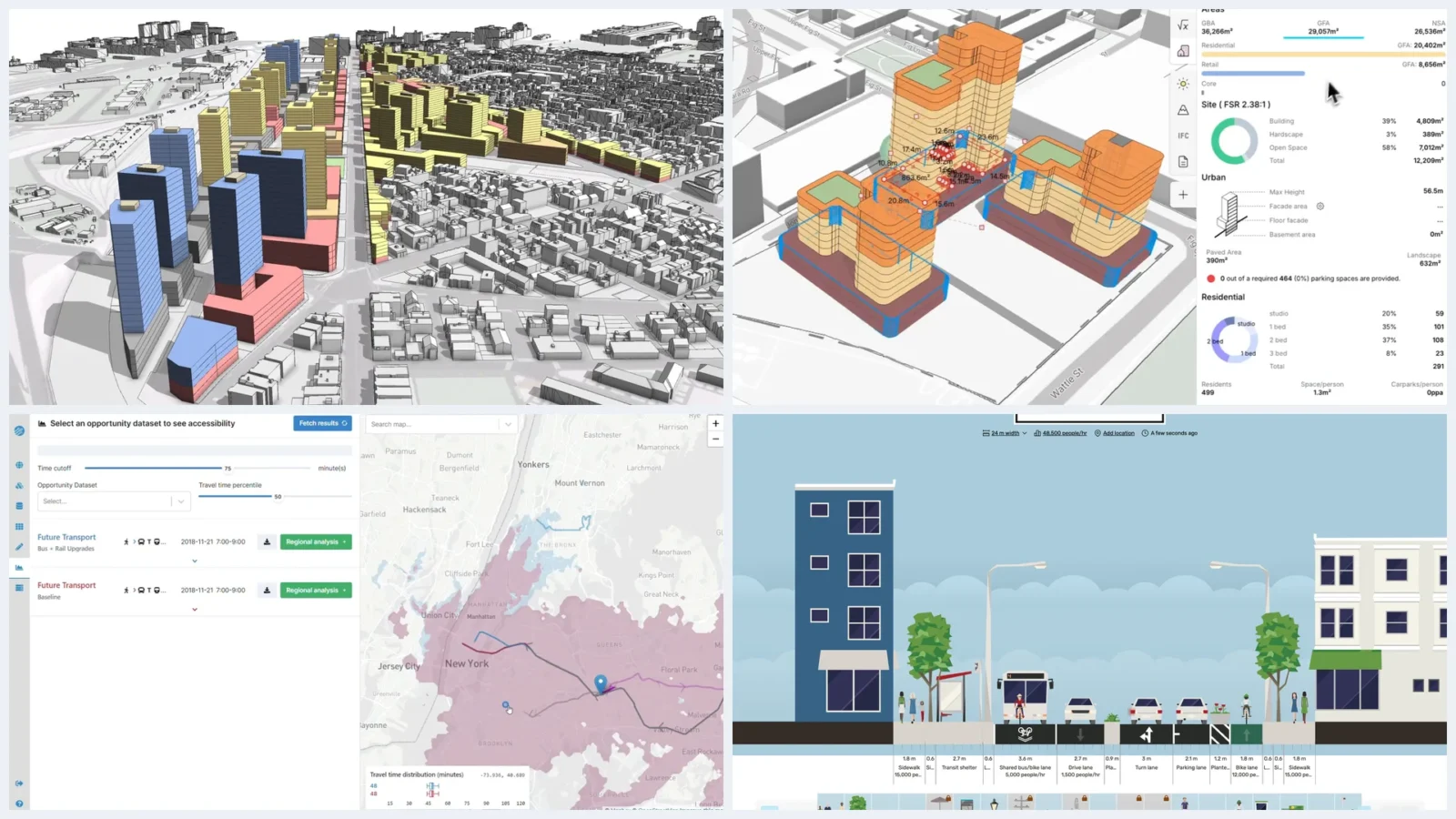
Table of Contents Show
Urban planning software covers the GIS, scenario, 3D city modeling and transport tools that planners use to map land, test zoning and model growth. In 2026 the core picks are QGIS and ArcGIS Pro for GIS, ArcGIS Urban and CityEngine for scenarios and 3D, Forma and Giraffe for online site planning, and Conveyal for accessibility.
Most planning offices run two or three of these side by side, because land use analysis, 3D massing and a public consultation map each call for different strengths. This update replaces the earlier list of urban mapping tools with ten named products, each checked on its own website in October 2026, and moves the mapping and data layers (OpenStreetMap, Google Earth Engine, Kepler.gl, Mapbox, CARTO) into their own section, since they feed planning software rather than replace it. If you are just getting started with spatial work, our overview of architecture and urban mapping is a useful companion read.
What Is Urban Planning Software?
Urban planning software is any program that helps planners collect, analyze and present spatial information about a city so they can decide on land use, zoning, transport, housing and climate risk. The products fall into five working groups, and most projects draw on at least two of them:
- GIS software for urban planning: desktop and web systems for mapping, editing and analyzing layers such as parcels, zoning and census data.
- Scenario and zoning tools: apps that turn a land use or zoning change into numbers such as housing units, jobs and floor area.
- 3D city models: procedural or massing tools that show what a rule or a development proposal looks like in context.
- Transport and accessibility tools: network models that measure how far people can travel, and what they can reach, under each scenario.
- Online and participation tools: browser apps that clients, councillors and residents can open without installing anything.
GIS sits underneath almost everything. In its Occupational Outlook Handbook entry for urban and regional planners, the US Bureau of Labor Statistics notes that planners often use GIS software to combine data such as population density with digital maps. The same page counts about 45,800 urban and regional planner jobs in the US in 2025, with a median annual wage of $89,320 in May 2025.
💡 Pro Tip
Before committing a whole team to a paid license, rebuild one recent project in QGIS. If the job only needs base maps, buffers, parcel joins and clean exports, an open-source stack covers it, and you can keep paid seats for the two or three people who run scenario models or advanced geoprocessing.

The Best Software for Urban Planning, Tool by Tool
Ten tools follow, ordered from desktop GIS through scenario and 3D modeling to browser-based planners, transport analysis and free street design. Nobody needs all ten. A typical municipal stack is one GIS, one scenario or 3D tool, and one web tool the public can use, and a small consultancy can often do with QGIS plus one online planner. Prices are US list prices taken from each vendor’s own site in October 2026.
QGIS
QGIS is a free, open-source desktop GIS for Windows, macOS and Linux. Gary Sherman started it as Quantum GIS in 2002, it joined the incubator of the Open Source Geospatial Foundation in 2007, and as of October 2026 the current release is QGIS 4.2.3, with the 3.44 line kept as the long-term release for offices that prefer stability. It reads shapefiles, GeoPackage, PostGIS, DXF, rasters, meshes and point clouds through the GDAL and PROJ libraries.
For planners it covers the daily work: land use maps, zoning overlays, parcel and census joins, catchment buffers and print layouts for committee reports. Python plugins add geoprocessing, 3D views and data downloads, and with no fee per seat every planner, consultant and student on a project can open the same file. It is also the quickest way to turn building footprints into a figure-ground diagram. Release notes and documentation are at qgis.org.
Best for: free GIS seats for everyone on a project, from intern to outside consultant.
Watch for: there is no vendor help desk, and plugins you depend on need checking for QGIS 4 compatibility before you leave the 3.x line.
ArcGIS Pro
ArcGIS Pro is Esri’s desktop GIS and the standard in many city and county planning departments. Esri sells it through annual user types listed on its ArcGIS Online pricing page: as of October 2026, Creator costs $700 a year and includes ArcGIS Pro Basic, Professional costs $2,200 and includes Pro Standard, and Professional Plus costs $4,200 and includes Pro Advanced with the main extensions. New features arrive twice a year.
The analysis toolbox is deep, from network analysis for service areas to suitability modeling, spatial statistics and 3D. Extensions such as Network Analyst or Spatial Analyst cost $650 a year each when your user type does not include them. The stronger reason planners stay on ArcGIS is data exchange: parcel, zoning and utility layers in many local governments already live in ArcGIS Online or ArcGIS Enterprise, and maps publish straight to StoryMaps and dashboards that residents can read. Details and license levels are at esri.com.
Best for: planning departments that share data with other city agencies already on ArcGIS.
Watch for: ArcGIS Pro runs on Windows only, per Esri’s system requirements, so Mac users need a virtual machine.
ArcGIS Urban
ArcGIS Urban is Esri’s web app for zoning and development scenarios. It starts from a 3D model of your city built from pre-made buildings and trees, so no 3D data is needed on day one, then lets planners apply land use and zoning changes and read the result as metrics such as housing units, jobs and floor area. It also works as a system of record for zoning rules and tracks the development pipeline, with BIM imports for project review.
Esri’s case material includes Sandy Springs, Georgia, whose GIS manager uses the built-in metrics to show the city council population change, jobs added and potential power use, and Nottingham City Council in the UK, which uses a city digital twin in planning decisions. If your plan is weighing mixed-use development against single-use zoning, Urban shows the change parcel by parcel. It is not priced on its own: in the ArcGIS Online list it comes only with the Professional Plus user type, $4,200 a year per user as of October 2026.
Best for: city planning departments testing zoning changes and development proposals in 3D.
Watch for: only the most expensive user type includes it, and the metrics are only as good as the zoning rules you structure inside it.
ArcGIS CityEngine
ArcGIS CityEngine is a procedural 3D city generator. It came out of Pascal Müller’s PhD research at ETH Zurich, debuted at SIGGRAPH in 2001, shipped commercially in 2008 and joined Esri when Esri bought Procedural Inc. in 2011, according to the CityEngine history on Wikipedia. Instead of modeling each building, you write CGA rules for height, setback, roof form and facade, and CityEngine applies them to every parcel, so editing one rule rebuilds the whole district.
That makes it one of the strongest 3D urban design tools for testing many massing options quickly. It imports shapefiles, geodatabases, CAD and BIM, pulls basemaps and terrain through its Get Map Data function, and exports to game engines through free Esri plugins for VR and AR reviews; Esri cites Foster + Partners using it on a master plan for a new city. As of October 2026 CityEngine comes with the Professional ($2,200 a year) and Professional Plus user types and links directly to ArcGIS Urban.
Best for: urban designers who need many 3D variants of a district or a design code, fast.
Watch for: CGA is a scripting language, so budget real training time before the procedural approach pays off.
Autodesk Forma Site Design
Autodesk Forma Site Design is a cloud tool for early-phase site planning and environmental analysis. It grew out of Spacemaker, the Oslo start-up that Autodesk acquired for $240 million net of cash in 2020; Autodesk released Forma on May 8, 2023, then retired Spacemaker and moved its subscribers across.
Planners and architects block out a neighborhood or a large site on automatically loaded context, then run sun hours, daylight potential, wind, noise, microclimate and total carbon studies on each option. It imports and exports IFC and OBJ and connects to Revit, Dynamo and Rhino. On Autodesk’s Forma Site Design buying page, as of October 2026, it costs $59 a month billed yearly ($700 a year) or $85 month to month, and it is also part of the AEC Collection. Our Autodesk Forma review covers each analysis in depth.
Best for: architect-planners testing massing on a site or a few blocks against sun, wind and noise.
Watch for: automated context data varies by country, so check what is available for your city before you subscribe.
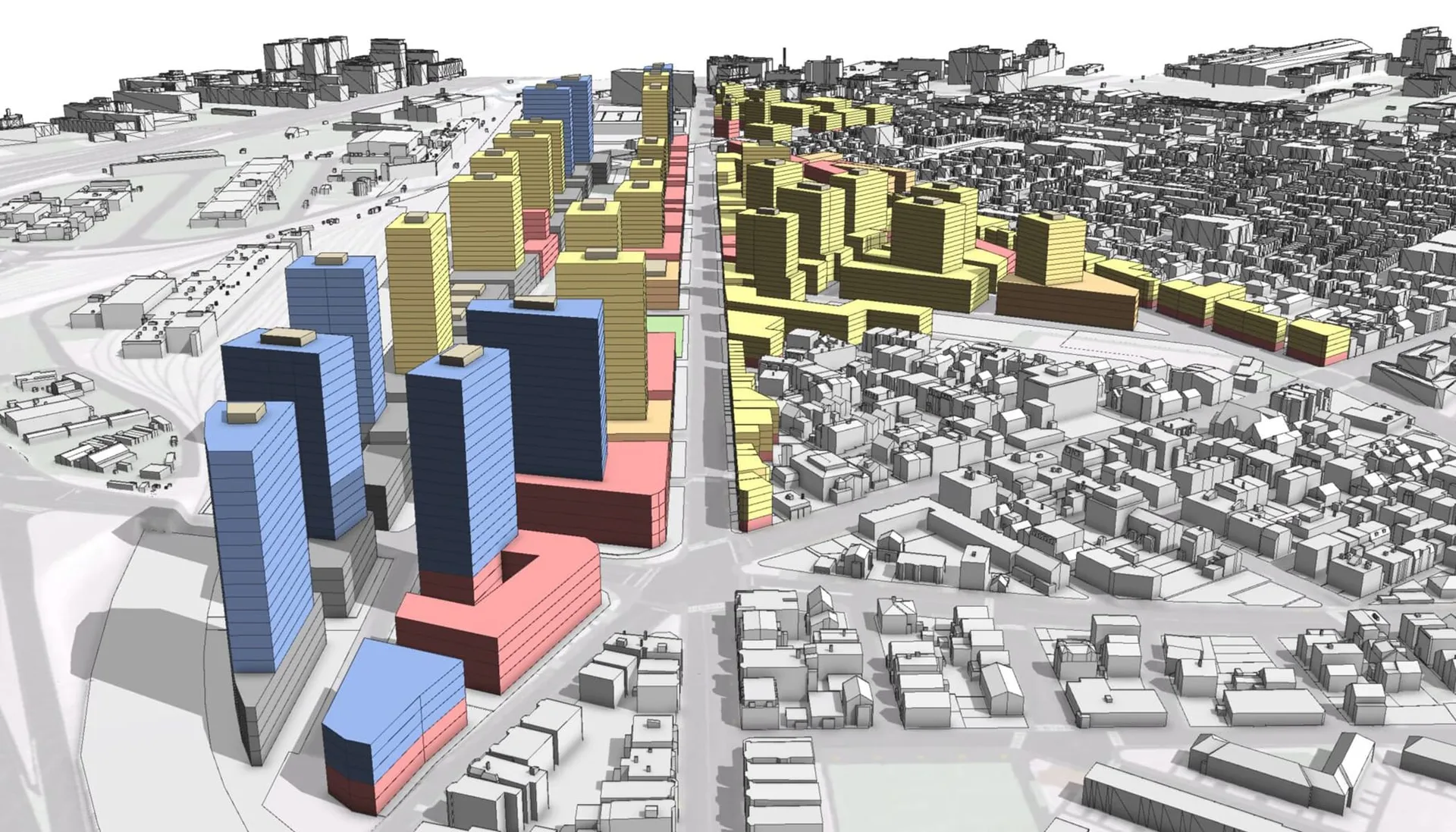
Giraffe
Giraffe is a browser-based planning and feasibility platform from Australia. AEC Magazine’s profile of Giraffe for urban planning traces it to CEO Rob Asher, formerly design and R&D lead at Cox Architecture in Sydney, who built it after years of stitching Grasshopper and QGIS together by hand. Its homepage lists clients such as the NSW Government, AECOM and WSP, and it is one of the few serious answers to a search for city planner software online.
You draw blocks and buildings on a live map and watch floor area, site coverage, unit mix and parking update as you edit. A visual scripting language and generative tools handle repetitive layouts, and you can connect Esri map servers or your own spatial data. On Giraffe’s self-serve pricing page, the Core plan costs US$45 a month with no contract and Teams costs US$1,500 per user per year, as of October 2026; Enterprise is quoted. For how tools like this sit against BIM on large schemes, see our comparison of Revit vs AI masterplan tools.
Best for: small teams that want massing, yield and site analysis in a browser without a GIS specialist.
Watch for: the product leans toward real estate feasibility, and Core shares projects as view-only, so shared editing needs Teams.
UrbanFootprint
UrbanFootprint was started in 2014, co-founded by urban planner Peter Calthorpe, as what the company calls the industry’s first web-based platform serving organized urban, environmental and economic data to planners. Its data core covers the entire United States, with land use, buildings, transport and infrastructure data across 160 million land parcels.
The product has moved since the earlier version of this list. It now sells Resilience Insights to energy utilities, financial institutions, government agencies and corporations, delivered through Analyst (a cloud GIS mapping and analytics app), Explorer (map dashboards) and direct data feeds. Planners still use it for scenario planning and climate risk screening, but access is by demo only; see urbanfootprint.com. For flood exposure, our list of web-based mapping tools for sea level rise and flood impacts covers free options.
Best for: US agencies that need parcel-level hazard, community and built environment data without assembling it themselves.
Watch for: US-only data, no published price, and a sales focus that has shifted from planners to utilities and finance.
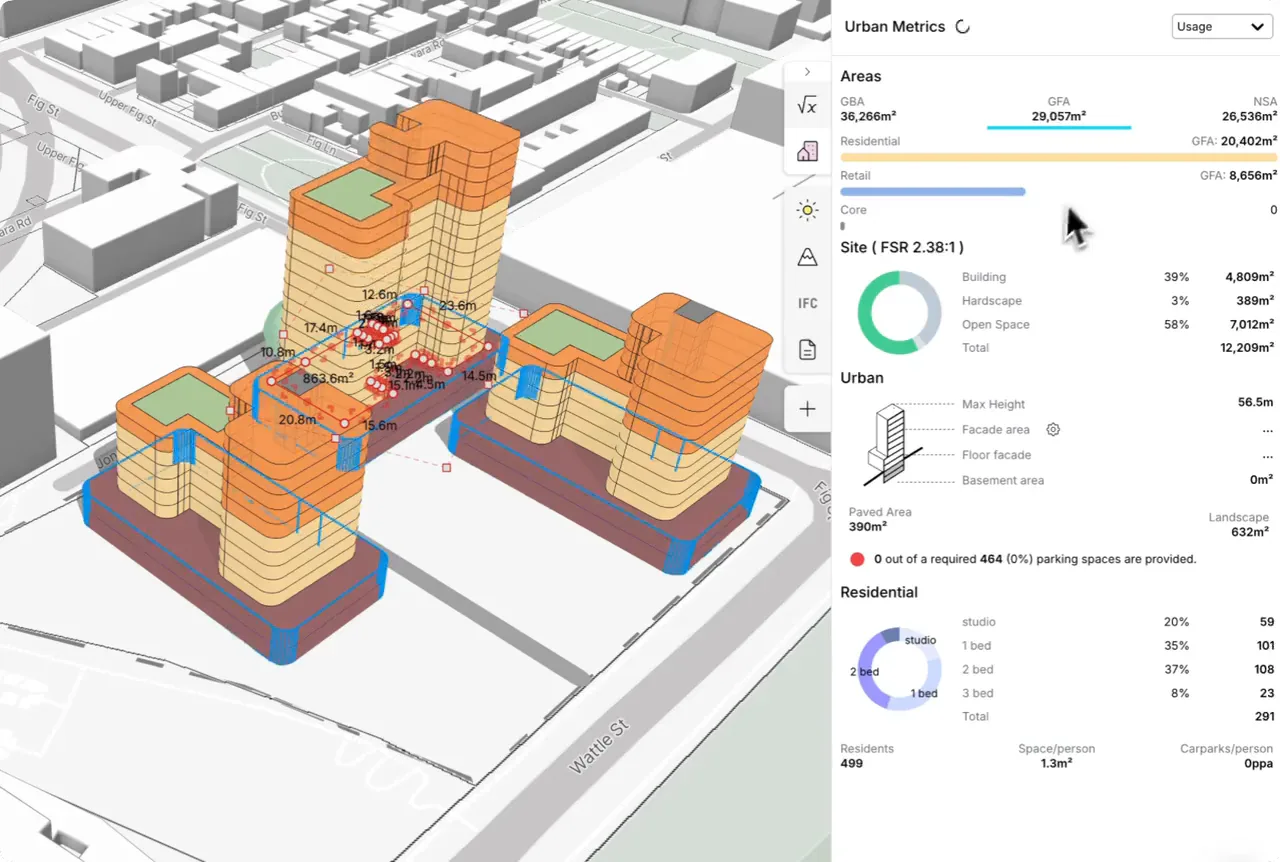
Conveyal
Conveyal is a web platform for accessibility analysis: it measures how many jobs, schools or other opportunities people can reach by walking, cycling and transit under different transport and land-use scenarios. Clients listed on its site include the Los Angeles Department of Transportation, the Massachusetts Department of Transportation, the World Bank and Swiss Federal Railways, and Conveyal’s about page notes that it has been part of the consultancy EBP since 2026.
You build a multimodal network automatically from open data sources, sketch a new bus line, rail upgrade or street change, and compare travel times and access for millions of origins and destinations in seconds, all in a browser. The routing engine underneath, R5, is open source under the MIT license. Pricing is not published. If your plan argues for walkability, our piece on why walkable cities make us happier pairs well with an accessibility map.
Best for: transport planners and regional agencies comparing how scenarios change access to jobs and services.
Watch for: reading travel-time percentiles takes transport modeling literacy, and it is not a general mapping tool.
Remix by Via
Remix was founded in San Francisco in 2014 as a transit planning platform and acquired by Via in March 2021. At that point, according to Via’s acquisition announcement, it worked with more than 350 local governments in 22 countries.
Today it bundles four modules: planning, on-demand planning, scheduling and Streets, the last one for data-driven street design. Transit planners redraw routes on a map and see cost, coverage and demographic impact as they edit, and street teams lay out safety projects on the same data. There is no public price list; you request a demo.
Best for: transit agencies and city transport teams redesigning bus networks or street projects.
Watch for: it is built around transit operations, so land use and zoning work still needs a GIS or a scenario tool.
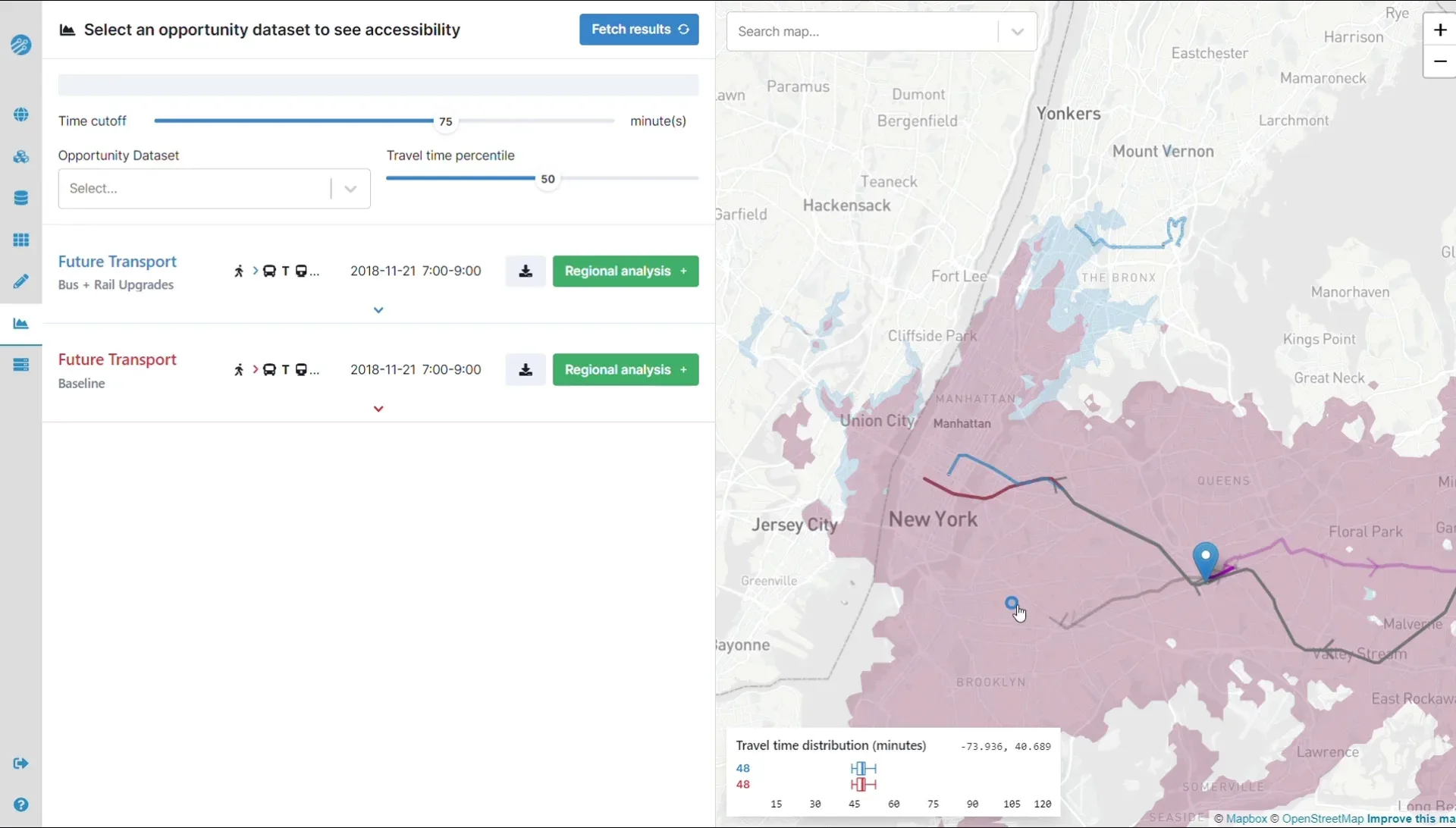
Streetmix
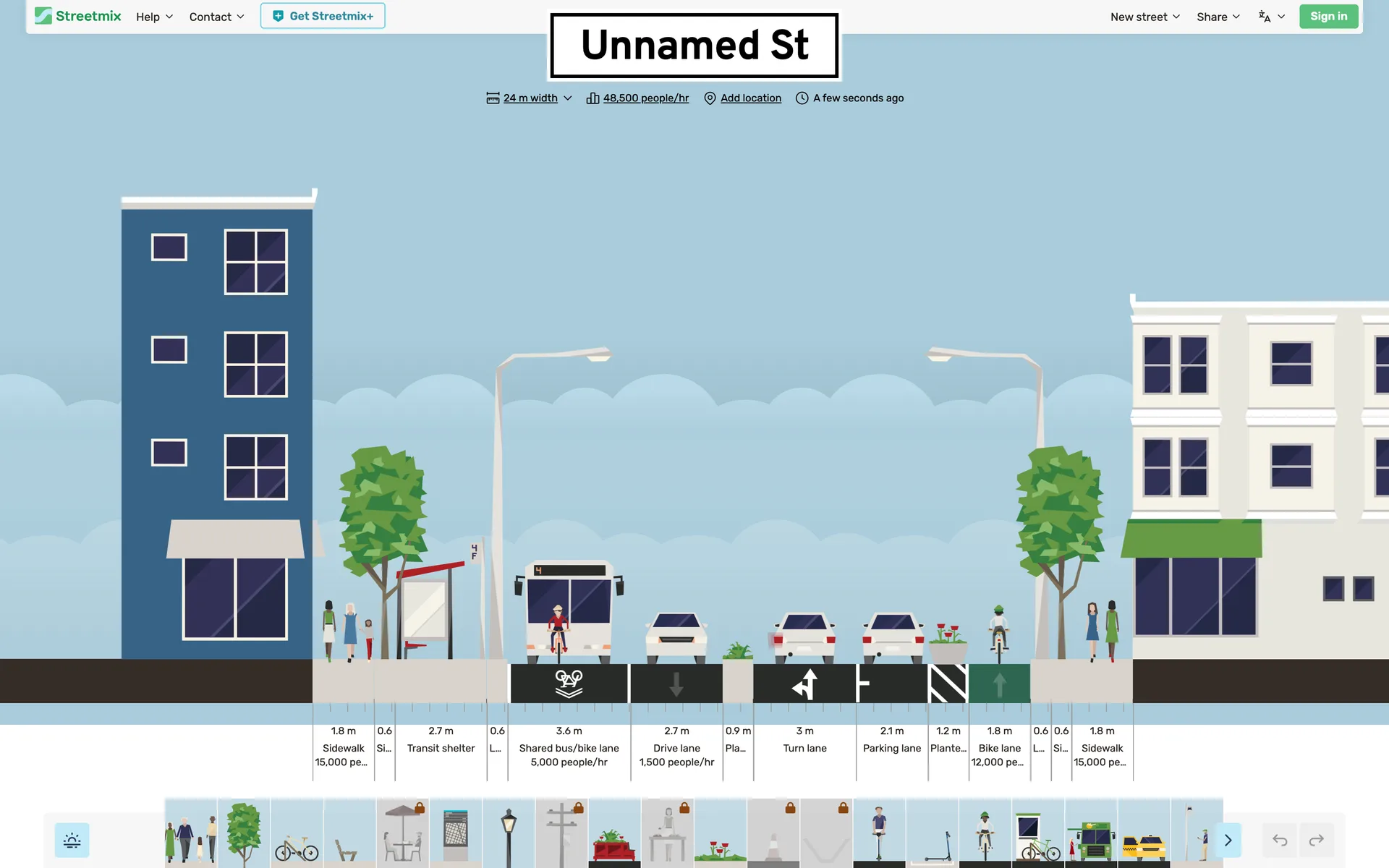
Streetmix is a free, browser-based editor for street cross-sections. It began as a Code for America hackathon project in January 2013, its code is open on GitHub, and Streetmix LLC has run it since 2019. You drag sidewalks, bike lanes, bus lanes, trees and parking into a section, and it labels each element with its width and an indicative capacity in people per hour.
For one specific job, community engagement on a street redesign, it answers the “online city planner” search better than most paid products. Planners share a link, residents remix the street, and both sides see what each lane costs in space. The editor is free and ad-free; an optional Streetmix+ membership, still in beta, adds renamed segments plus watermark-free and print-resolution exports.
Best for: public workshops and quick complete-street options.
Watch for: one section at a time, with no plan view, GIS layers or engineering checks, so capacity figures are illustrative only.
At a Glance
The table compares the ten tools on the points that usually decide a shortlist, including which one works as the best 3D city planner and which run fully online.
| Software | Category | Runs on | Price, October 2026 | Best for |
|---|---|---|---|---|
| QGIS | GIS | Windows, macOS, Linux | Free, open source | Everyday mapping on any budget |
| ArcGIS Pro | GIS | Windows | From $700 a year (Creator) | Departments sharing data on ArcGIS |
| ArcGIS Urban | Zoning and scenarios | Browser | With Professional Plus, $4,200 a year | Zoning changes tested in 3D |
| ArcGIS CityEngine | 3D city model | Desktop | With Professional, $2,200 a year | Rule-based 3D massing of districts |
| Autodesk Forma Site Design | Site planning and analysis | Browser | $700 a year or $85 a month | Sun, wind and noise on early options |
| Giraffe | Online planning and feasibility | Browser | US$45 a month; Teams US$1,500 a year | Massing and yield without a GIS team |
| UrbanFootprint | Data and resilience | Browser | Quote only | US parcel-level hazard data |
| Conveyal | Accessibility | Browser | Quote only | Access to jobs under transport scenarios |
| Remix by Via | Transit and streets | Browser | Quote only | Bus network and street redesigns |
| Streetmix | Street sections | Browser | Free; Streetmix+ optional | Public workshops on street layouts |
Mapping and Data Layers That Feed Planning Software
The earlier version of this guide listed several urban mapping tools that are better described as data or visualization layers. They still belong in a planner’s kit, but they sit beside the software above rather than replacing it. For a wider survey of GIS products, our roundup of architecture mapping GIS tools and resources goes further.
OpenStreetMap is the free, editable map of the world built by volunteers. For planners it is a data source rather than an application: roads, buildings, land use and points of interest that load into QGIS, ArcGIS, Giraffe or Conveyal. In cities where official data is thin or expensive, it often fills the gap. Access and edit the map at openstreetmap.org.
Google Earth Engine gives you decades of satellite imagery and a cloud engine to analyze it, which makes it the usual choice for tracking urban expansion, green cover and heat over time. It is free for noncommercial and research use, with paid access for commercial projects, and it rewards some coding comfort. Start at earthengine.google.com.
📌 Did You Know?
OpenStreetMap had 10,948,778 registered users on October 17, 2026, and its database held more than 1.2 billion ways (the lines that trace roads, rivers and building outlines), according to the project’s own data statistics page. The basemaps behind Conveyal and Giraffe in this guide carry OpenStreetMap credits.
Kepler.gl is an open-source, MIT-licensed web app for exploring large location datasets. Drop in a CSV of trips, sensor readings or building points and it renders heatmaps, arcs and 3D hexbins in the browser, handling millions of points without code. It is not a full GIS, so use it to explore movement and density rather than to edit geometry. Try it at kepler.gl.
For publishing, Mapbox styles custom base maps and vector tiles for consultation portals and city websites, with free tiers before usage-based pricing starts. CARTO is a cloud-native GIS that runs on data warehouses such as Snowflake, Databricks and BigQuery, suits teams that already keep their data there, and offers a free 30-day trial; learn more at carto.com.
For parametric urban form, many urban designers still model in Rhino and script with Grasshopper, which is included with Rhino. That pairing suits massing, solar and view studies when a project needs designed form rather than rules applied across a city; find both at rhino3d.com. For terrain-driven work, our guide to online 3D terrain mapping tools is a good next step.
Is There Free City Planning Software?
Yes. QGIS, Streetmix, OpenStreetMap and Kepler.gl are free for any use, and the last three run in a browser, which covers most searches for free city design software online. Google Earth Engine is free for noncommercial and research work, and Esri sells ArcGIS for Personal Use and ArcGIS for Student Use at $100 a year each, limited to personal, noncommercial projects.
Autodesk’s Forma buying page points students and educators to its free education software program, and Giraffe lets you sign up and explore without a credit card. What free tools rarely give you is support, scenario metrics and a 3D model of your own city out of the box. A practical free stack for a student or a small practice is QGIS for analysis, OpenStreetMap for base data, Kepler.gl for quick visuals and Streetmix for street options.
How Much Does Urban Planning Software Cost?
Published plans run from nothing to $4,200 per user per year, as of October 2026. A Giraffe Core seat costs $540 a year at its monthly price, Autodesk Forma Site Design and an ArcGIS Creator seat cost $700 a year each, and the ArcGIS user types that carry CityEngine and ArcGIS Urban cost $2,200 and $4,200.
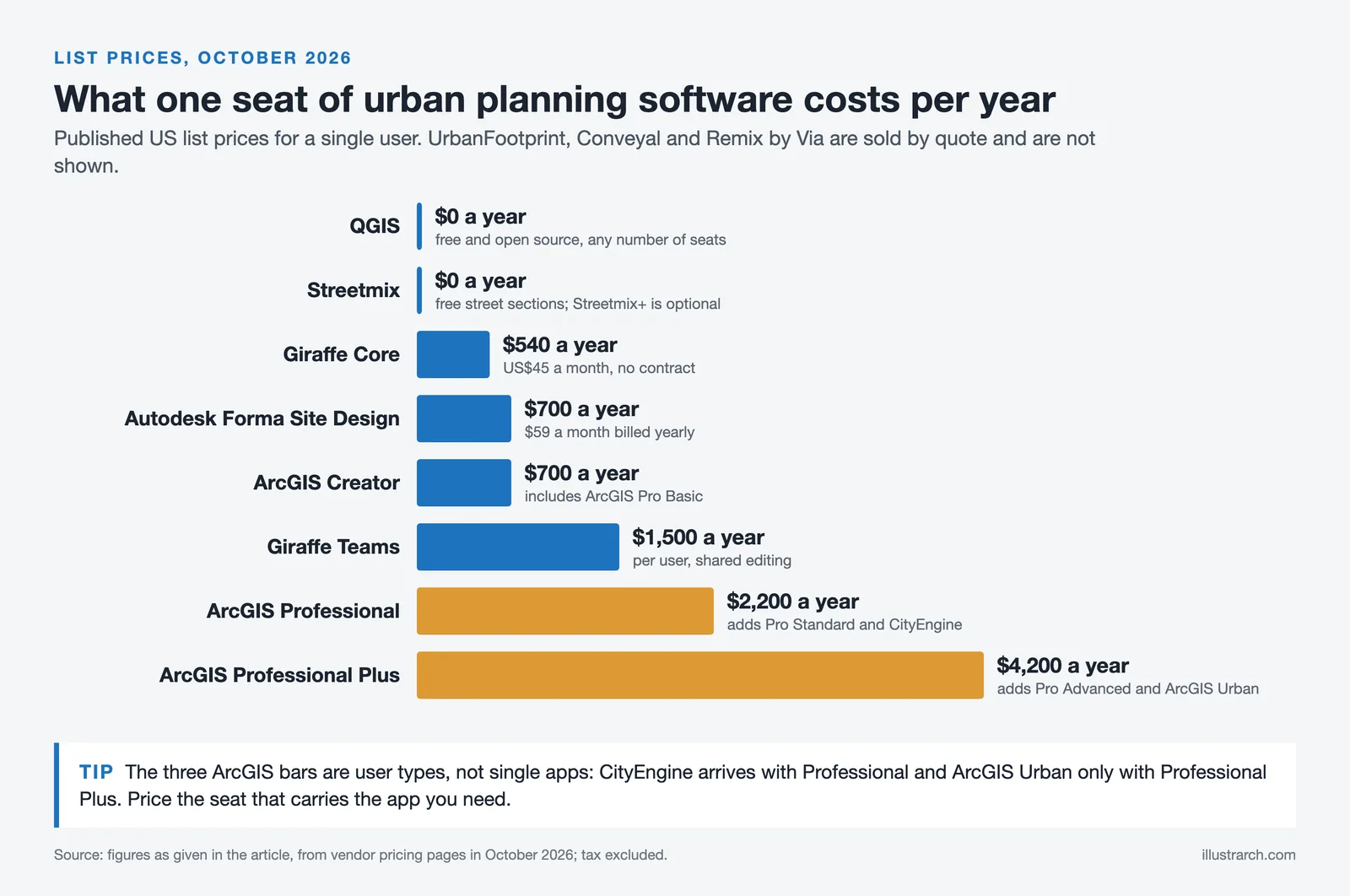
Three tools in this guide, UrbanFootprint, Conveyal and Remix by Via, sell only by quote, and their contracts usually cover an organization rather than a seat. For those, ask for the first-year total including data, onboarding and training, and ask which cities or regions the data covers. With ArcGIS, check whether the extensions you need are already inside your user type before you pay $650 a year for each one separately.
Prices are US list prices before tax, taken from vendor websites in October 2026; regional prices, education discounts and enterprise agreements differ.
How to Choose the Right Urban Planning Tools
Start with the question you need to answer, not the software. If the task is land use analysis or a zoning map, a GIS like QGIS or ArcGIS Pro is the base. To test zoning or density options in 3D, add ArcGIS Urban or CityEngine; for early site options with sun and wind studies, Forma Site Design or Giraffe; for transport scenarios, Conveyal or Remix; and for a public workshop on one street, Streetmix. Teams experimenting with machine learning on top of these should read our guide to AI urban planning before buying another subscription.
Budget matters too. Open-source urban mapping tools like QGIS, Kepler.gl and OpenStreetMap cover a surprising amount of everyday work, while paid platforms earn their price through support, scenario metrics and easier collaboration across a department. Match data coverage, file compatibility and the learning curve to your team before you buy, and run a real project through every trial rather than the vendor’s demo data. Planners looking for lighter field tools can also review the best mobile apps for architects. For professional standards and continuing education, the American Planning Association is a reliable reference, and the background on geographic information systems is a solid primer for newcomers.
Putting It All Together
Quick Recap:
- Pick one GIS first, QGIS for free seats or ArcGIS Pro for data sharing with city agencies.
- Add one scenario or 3D tool that matches your work: ArcGIS Urban for zoning, CityEngine for rule-based massing, Forma or Giraffe for early site options.
- Use Conveyal or Remix when the plan turns on transport, and Streetmix when residents need to shape a street.
- Price the seat that carries the app you need, and ask quote-only vendors for a first-year total.





Famous Sustainable Buildings: 6 Green Skyscrapers Leading the Future
From Milan's Bosco Verticale to Sydney's record hybrid timber tower, six green...
 Furkan Sen6 Mins read

Best Orientation for a House: Why North Orientation Matters
North orientation shapes a home's light, warmth, and running costs, and its...
Furkan Sen6 Mins read

Passive Design Architecture: A Practical Guide to Low-Energy Buildings
Passive design uses a building's orientation, form, and materials to control heat,...
Furkan Sen8 Mins read

Passive House vs LEED Certification: Which Green Standard Should You Pursue?
Passive House focuses on strict energy performance and airtightness, while LEED scores...
 Sinan Ozen8 Mins read


Leave a comment