

Beginner’s Guide to Arcadium 3D: Your First Room Design in 5 Easy Steps
Arcadium 3D is a free, browser-based room design platform that lets anyone build a photorealistic 3D model of their space in minutes. With dynamic components, parametric furniture editing, and instant walkthroughs, it delivers professional-grade results without any software to install.
 Bahattin Duran27 May 202510 Mins read846

Table of Contents Show
Arcadium 3D is a free, browser-based room design tool that lets anyone create a photorealistic 3D model of their space before spending a cent on furniture or paint. With dynamic components, parametric editing, and real-time walkthroughs, it brings professional-grade interior design capabilities to homeowners, DIY decorators, and first-time designers, all without any software to download or install.
(Short on time? Jump straight into the app and design a room online for free, no download needed.)
What Is Arcadium 3D and How Does It Work?
Arcadium 3D is an AI-powered, browser-based 3D modeling tool built for interior design and home planning. You draw your room’s floor plan directly in the browser, furnish it with real-scale 3D models from a built-in library, and instantly switch to a first-person walkthrough to experience the space before any real-world commitment. The platform runs entirely in the cloud, so there is nothing to install and nothing to update. Any device with a modern browser and an internet connection can run it.
The key distinction from standard room planners is Arcadium’s parametric approach. Furniture objects are not static models. Stretch a three-seat sofa and the cushions reflow. Extend a bookcase and new shelves and uprights appear automatically. This makes designing around awkward alcoves, bay windows, or non-standard wall lengths significantly faster than traditional drag-and-drop tools.
Why Arcadium 3D Outperforms Other Beginner Room Design Tools
Arcadium lives completely in your browser, with no installs, subscription fees, or GPU-hogging software. Yet it still offers features normally reserved for professional suites:
- Dynamic components that stretch, resize, or multiply doors, drawers, and shelves automatically, so custom cabinetry takes seconds, not hours.
- Precise parametric controls for millimetre-perfect furniture and wall edits, ideal when working around quirky alcoves or radiator nooks.
- Instant rendering and first-person walkthroughs that update in real time. Move a sofa and you see the new traffic flow immediately.
- One-click sharing via URL for feedback or client presentations. Friends and collaborators can walk the room on their phone, no account required.
In short, Arcadium delivers SketchUp-level power without the SketchUp learning curve or price tag, making it a practical starting point for first-time room designers. For a broader comparison of design software options, see illustrarch’s overview of architectural design software and features.

📌 Did You Know?
To preview a furnished room in augmented reality on a phone or tablet, see our ARki room planner review.
Many clients feel more confident approving a design after seeing a 3D model than a traditional 2D floor plan. Browser-based tools like Arcadium make this level of visualization accessible to everyday homeowners at zero cost, a shift that used to require expensive rendering software and professional hardware.
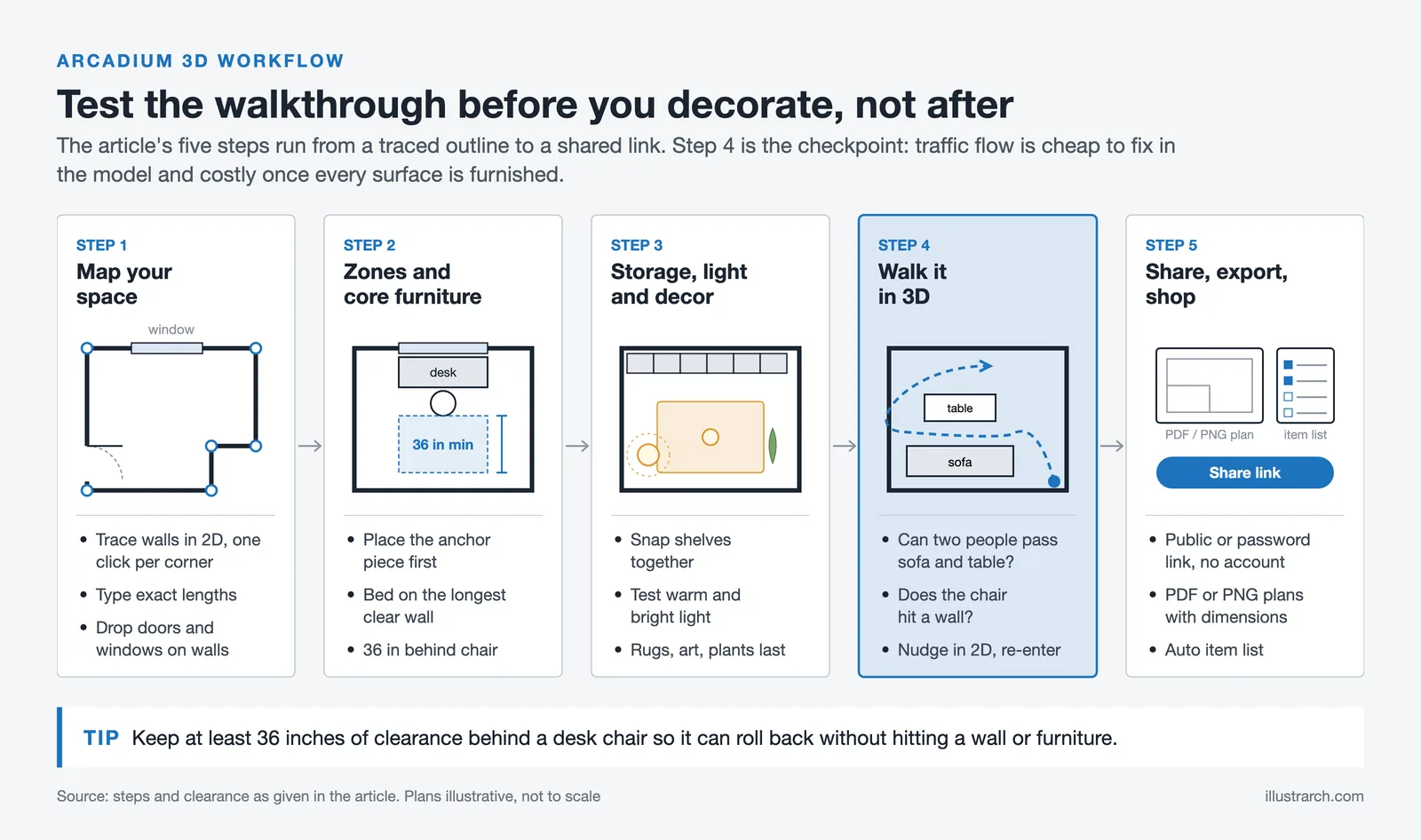
Design Your First Room in 5 Easy Steps
Step 1 – Map Your Space
Open Arcadium and choose New Project. In 2D view, trace the room’s outline: click once for each corner, double-click to close the shape. Type exact wall lengths in the dimension boxes that appear. If the room is not a perfect rectangle, say it has a bay window, simply add extra corner nodes to match reality. Drop doors and windows from the Openings palette and resize or drag them along the wall until measurements match your tape-measure notes.
💡 Pro Tip
Toggle to First-Person view early in the process. It is far easier to judge whether a window is centred on a wall or a doorway feels cramped when you are standing “inside” the space rather than looking down at a floor plan. Many beginners skip this step and only switch to 3D view at the end, which means they miss proportion problems that are immediately obvious at eye level.
Step 2 – Define Zones and Core Furniture
Every successful room begins with a purpose. Decide what must happen here, whether that is sleeping, working, entertaining, or cooking, and place the anchor piece that serves that function first:
- Bedroom: drag in a bed (queen, king, bunk, Arcadium’s library has them all) and position it on the longest uninterrupted wall.
- Living room: start with the sofa or sectional, then pull in a media console or fireplace.
- Office: choose a desk style, orient it toward a window for natural light, and keep at least 36 inches of clearance behind the chair for ergonomic comfort.
Because Arcadium furniture objects are parametric, you can stretch a three-seat sofa into a four-seat version or shrink a chunky executive desk to fit a studio apartment. The software automatically updates cushions, drawers, and leg spacing, saving hours of manual tweaking. For ideas on organizing functional zones within a single space, see this guide on interior layouts that prioritize ease and flow.
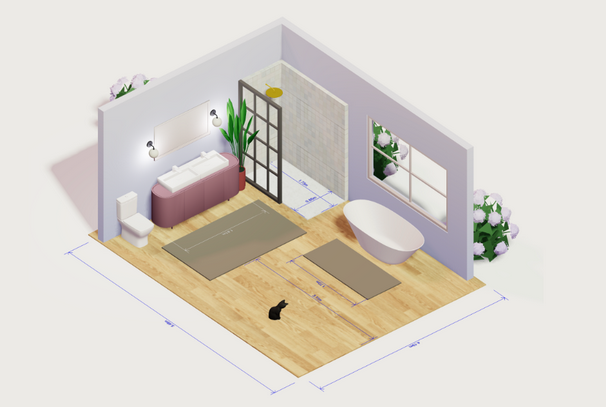
Step 3 – Layer Storage, Lighting and Decor
With anchor pieces placed, switch to the Furniture tab and explore thousands of items, from minimalist sideboards to mid-century bookshelves. Storage often means combining several units. Arcadium’s dynamic shelves snap together and automatically add extra uprights as you resize, letting you wall-to-wall a bookcase in seconds.
Lighting transforms mood, so drag in ceiling pendants, sconces, or floor lamps from the Fixtures library. Use the Light Settings dial to test warm evening ambience versus bright morning task light. The real-time render engine updates shadows and colour temperature instantly.
Finally, accessorize: rugs, art, plants. You can even import your own JPEG art files or OBJ models if you want an exact replica of a cherished print or custom armchair.
⚠️ Common Mistake to Avoid
Most beginners furnish every surface before testing the room’s traffic flow. The result is a beautifully decorated space where two people cannot pass each other between the sofa and the coffee table. Always run a quick walkthrough test (Step 4) before committing to decor placement. It is much easier to move a lamp in a 3D model than to rearrange a fully accessorized room in real life.
Step 4 – Test Flow in 3D Walkthrough
Click the Play icon to enter full immersive mode. Use WASD keys or your mouse to stroll around. Ask yourself:
- Can two people pass between sofa and coffee table without sidestepping?
- Does the office chair hit a wall when rolled back?
- Is there a clear line of sight from the kitchen island to the dining table?
If something feels off, press Esc, nudge furniture in 2D, and re-enter the walkthrough. Iteration takes seconds, not hours.
Halfway through, you might decide to try a completely different layout. Duplicate the entire project with File, then Save As, rename it, and experiment freely. Perhaps swap a neutral palette for bold colour blocking or flip the bedroom layout. Because Arcadium stores everything in the cloud, version control is effortless.
(Need inspiration? Explore ready-made templates under Room Designer, which are fully editable and great for jump-starting creativity.)
Step 5 – Share, Export and Execute
Happy with your design? Click Share to generate a public or password-protected URL. Friends, clients, or contractors can open the link on any device, no account required, and experience the room in 3D. They can even leave comments pinned to furniture pieces or walls, making feedback precise and fast.
For renovation hand-off, export floor plans as PDFs or high-resolution PNGs complete with dimensions. Builders appreciate the clarity, and fewer misunderstandings typically mean fewer change orders. Advanced users can download OBJ models or glTF packages for further work in rendering engines, but most DIYers find Arcadium’s built-in renderer sufficient for mood boards and social media reveals.
Finally, when you are ready to shop, open the Item List. Arcadium generates one automatically with product names, dimensions, and quantities. Tick off purchases and watch the virtual concept become a real room. For tips on translating a floor plan into a functional space, this guide to designing a floor plan covers the essential planning decisions.

How Does Arcadium 3D Compare to Other Free Room Planners?
Several free room design tools exist, but they differ significantly in precision, rendering quality, and ease of use. Here is how Arcadium 3D stacks up against the most common alternatives:
| Feature | Arcadium 3D | Planner 5D | SketchUp Free | Roomstyler |
|---|---|---|---|---|
| Browser-based, no install | Yes | Yes | Yes | Yes |
| Parametric / resizable furniture | Yes (auto-updates details) | Limited | Manual only | No |
| Real-time 3D rendering | Yes (live, no queue) | Server-side (credits) | Basic viewport only | Static 3D |
| First-person walkthrough | Yes | Yes | No | No |
| URL sharing (no login for viewer) | Yes | No | No | Limited |
| Learning curve for beginners | Very low (minutes) | Low | Moderate to high | Very low |
| PDF and OBJ export (free tier) | Yes | Premium only | Limited | No |
For a detailed side-by-side analysis, Rethinking The Future published a thorough comparison of Arcadium 3D against Roomstyler, Planner 5D, SketchUp Free, and Sweet Home 3D. And for context on where browser-based tools sit within broader architectural software ecosystems, e-architect has covered Arcadium’s dynamic component system in detail.
Arcadium 3D: What It Costs and Who It Suits
This guide covers getting started with Arcadium 3D, and the question most people ask first is whether it is worth the time at all. The short version:
It suits beginners who want to build a room in a browser without installing anything, students learning spatial arrangement before committing to a full CAD package, and anyone testing furniture layout quickly.
It does not suit production work. There is no BIM data behind the geometry, the dimensioned PDF and PNG plans it exports are layout aids rather than a scaled construction drawing set, and there is no path from the model into a documentation workflow. It is a learning and visualisation tool.
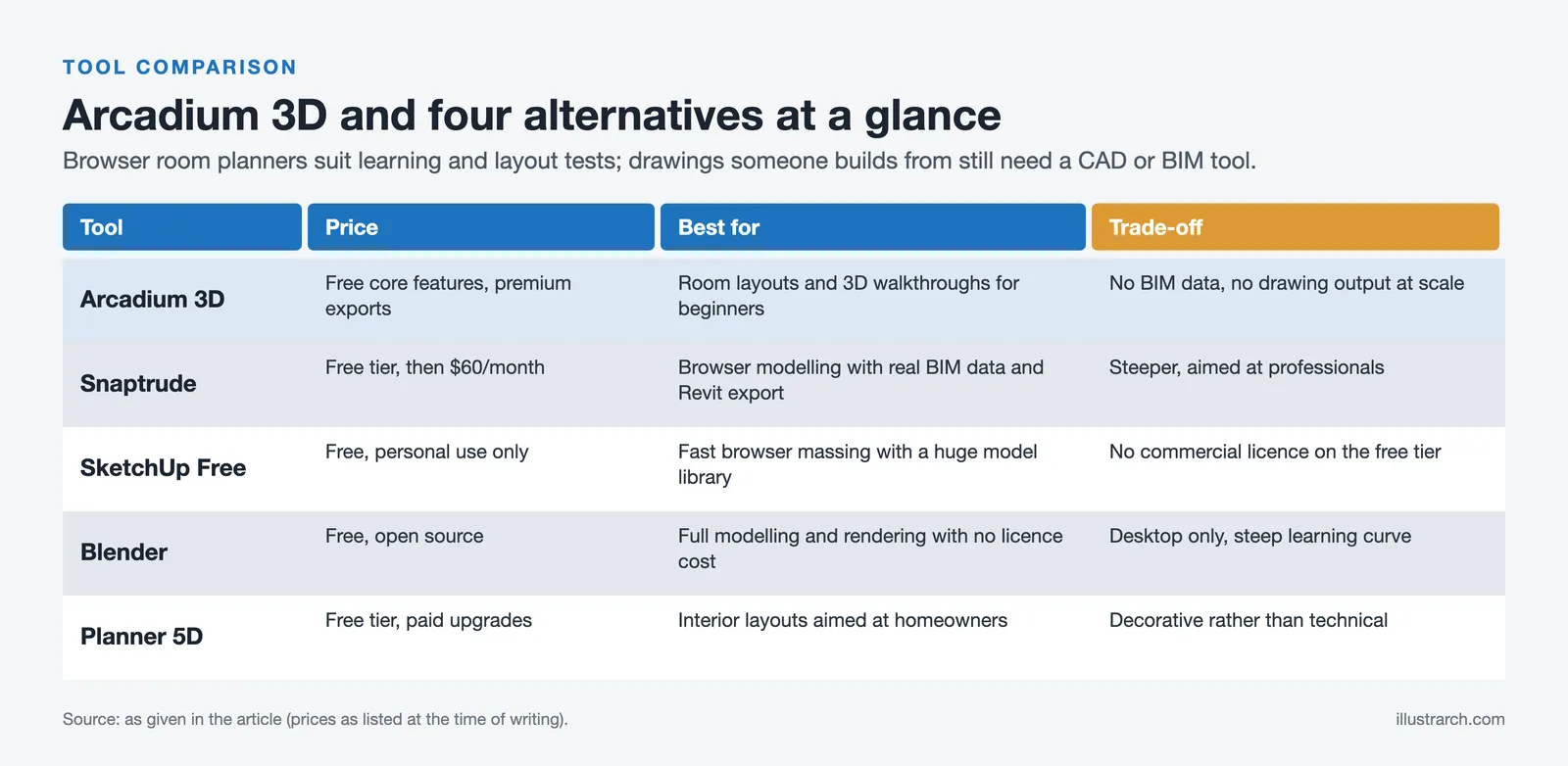
Arcadium 3D Alternatives
| Tool | Price | Best for | Trade-off |
|---|---|---|---|
| Snaptrude | Free tier, then $60/month | Browser modelling with real BIM data and Revit export | Steeper, aimed at professionals. |
| SketchUp Free | Free, personal use only | Fast browser massing with a huge model library | No commercial licence on the free tier. |
| Blender | Free, open source | Full modelling and rendering with no licence cost | Desktop only, steep learning curve. |
| Planner 5D | Free tier, paid upgrades | Interior layouts aimed at homeowners | Decorative rather than technical. |
If the goal is learning, the browser tools are the right starting point. If the goal is a drawing someone builds from, none of these produce one and the answer is a CAD or BIM tool instead.
Frequently Asked Questions
Is Arcadium 3D completely free to use?
Yes. The core features, including room layout design, parametric furniture placement, real-time 3D visualization, first-person walkthrough, and URL sharing, are all available at no cost. There is no time limit on free use and no credit card required to start. Premium plans exist for users who need advanced export options, but most DIY and residential projects can be completed entirely on the free tier. Check the official Arcadium 3D website for the most current pricing information.
Do I need to download any software to use Arcadium 3D?
No. Arcadium runs entirely in your web browser. Any computer, tablet, or device running Chrome, Firefox, Safari, or Edge can access it. The platform does its 3D processing in the cloud, so even mid-range hardware handles multi-room projects without lag. No plugins, no drivers, no updates to manage.
How accurate are the measurements in Arcadium 3D?
Arcadium supports millimetre-level precision through direct numerical input on walls, furniture, and architectural elements. You can type exact room dimensions, door widths, and furniture measurements rather than relying solely on drag-and-drop. This makes it suitable for planning real renovations where clearances and furniture fits need to be accurate before any purchase is made.
Can I share my Arcadium 3D design with someone who does not have an account?
Yes. Clicking Share generates a URL that anyone can open on any device without creating an account or downloading anything. Viewers can take a full 3D walkthrough of the room and, depending on sharing settings, leave pinned comments directly on furniture pieces or walls. This makes client presentation and contractor hand-off significantly more efficient than emailing static images.
What file formats can I export from Arcadium 3D?
Arcadium supports PDF and high-resolution PNG export for floor plans, which is useful for contractor hand-offs and renovation planning. Advanced users can export OBJ and glTF files for use in external rendering engines. The platform also auto-generates an Item List with product names, dimensions, and quantities to support purchasing decisions.
Why Arcadium 3D Remains the Best Choice for New Designers
- Zero cost to start: design unlimited rooms free in your browser and upgrade only if you need pro exports.
- Lightning learning curve: most users master basic layout in under an hour, far faster than heavyweight CAD tools.
- Dynamic components handle custom cabinetry, wardrobes, and built-ins without separate 3D modelling software.
- Instant renders and lighting: see accurate shadows, reflections, and materials without lengthy bake times.
- URL sharing removes friction with clients or collaborators, no downloads, no viewer installs.
- Growing object library always up-to-date, with new furniture and decor added weekly.
- Cross-device workflow: pick up a design on your laptop, tweak it on a tablet, demo it on a phone.
- Cloud saves and versioning give peace of mind and mean you never lose a late-night idea.
- Material editor supports real-world finishes, including importing your exact quartz countertop texture or wood stain.
- Community and tutorials: blog articles, video walkthroughs, and a Discord forum mean help is a click away.
✅ Key Takeaways
- Arcadium 3D is a free, browser-based room designer with no downloads, no subscriptions required to start.
- Parametric furniture means objects resize intelligently, saving time on custom layouts and built-in storage.
- The five-step workflow (map, furnish, decorate, walkthrough, share) takes most users from blank canvas to shareable 3D model in under an hour.
- Real-time rendering and first-person walkthroughs let you catch layout problems before spending money in the real world.
- URL sharing allows clients or contractors to experience the full 3D model without any account or software on their end.
In just five steps, map, furnish, decorate, walk through, share, you can transform blank room dimensions into a space that looks, flows, and feels exactly right. Ready to start? Try Arcadium 3D for free and let your space take shape in three dimensions.






Notion Alternatives for Architects: 7 Tools That Fit Studio Work
Notion works until a studio needs fee tracking, phase budgets and timesheets....
 Furkan Sen7 Mins read

Why Every Practice Ends Up With Five Versions of the Same Revit Family
Let’s learn why Revit family libraries accumulate duplicates, break schedules and slow...
 illustrarch Editoral Team5 Mins read

Visualizing Renovation Projects From Photographs: A Workflow for Existing-Building Work
Photo-based visualization turns a photograph of a building that already exists into...
illustrarch Editoral Team7 Mins read

Best Free CAD Blocks and Resources for Architects
A working guide to free CAD blocks for architects, covering ARCAT, CAD-Blocks.net,...
Furkan Sen7 Mins read


Leave a comment