

ARki Review: AR Room Planner and 3D Visualization on Mobile
ARki has been a fixture in architectural augmented reality since before AI rendering apps arrived. This review breaks down its LiDAR scanning, model import, AR walkthroughs, Apple ecosystem support, subscription pricing, and the tasks it actually fits.
 Sinan Ozen12 August 20265 Mins read217

Table of Contents Show
ARki is a mobile augmented reality and 3D room planning app from Darf Design for architects, designers, and homeowners who want to see a space at real scale. This ARki review covers what it does well, where it falls short, what it costs, and why it visualizes designs rather than generating them.
Mobile tools have quietly become part of how architects present work, and ARki is one of the older, more established names in the augmented reality corner of that shift. It arrived years before most AI rendering apps existed, and it has held a 4.4 rating on the App Store across 245 reviews. The useful question is not whether ARki is popular, but whether it fits the specific job you have in mind.

What Is ARki and Who Is It For?
ARki is an augmented reality visualization and room planning app built by Darf Design, a London studio led by architect and computational designer Sahar Fikouhi. You can draw floor plans, scan real rooms with LiDAR, place furniture from a library of more than a thousand 3D models, and then step into a life sized AR walkthrough of the result. It runs on iPhone, iPad, Mac, and Apple Vision Pro.
The app serves three fairly different groups. Homeowners and renters use it to test paint colors, flooring, and layout before committing. Interior designers reach for it to produce quick client visuals. Architecture and engineering teams use it to present massing and building models on the actual site. Apple has recognized ARki among its standout augmented reality tools and profiled Fikouhi in a Meet the Developer feature. For wider context, illustrarch’s guide to augmented reality apps for architecture and its roundup of the best architectural mobile apps both place ARki alongside its peers.

Is ARki an AI Architecture Concept Generator?
No, and this is the point most worth clearing up. ARki is not a text to architecture AI, and it is not a sketch to render AI app. You cannot type a description like “modern lakeside villa” and receive a building design in return. ARki works from geometry you already have: a plan you draw, a room you scan, or a 3D model you import from your desktop software.
The confusion is understandable. It is easy to shelve ARki with every other AI app for architecture design, and some listings even tag it as “Arki AI.” It does use automation for LiDAR room capture and smart drawing, which is why it often lands under the mobile AI architecture app label. That automation measures and assists, but it does not design. If you specifically want an ai architecture concept generator or an ai building design generator that produces form from a prompt, ARki is the wrong fit, and dedicated platforms handle that job. illustrarch’s look at AI tools for concept design and its guide to sketch to render AI tools both cover that separate category, and Architizer’s roundup of AI tools for architects shows how broad it has become. ARki lives one step later in the process, at presentation rather than generation.
⚠️ Common Mistake to Avoid
Treating ARki as a design generator. The app presents work you have already drawn, scanned, or modeled, and it does not invent layouts, massing, or facades from a written prompt. If you want early concept imagery from text, use a generative tool for that stage and bring ARki in afterward for on site presentation.
The Features That Define ARki
The core loop is drawing or scanning, then viewing in AR. Smart Draw tools and LiDAR scanning build a floor plan from a room in minutes, and the furniture library of over a thousand models lets you dress the space and swap materials, paint, and flooring in real time. From there, the 3D view and the 1:1 AR walkthrough are the point of the app. You see proportion and scale the way a client will, not as a flat image.
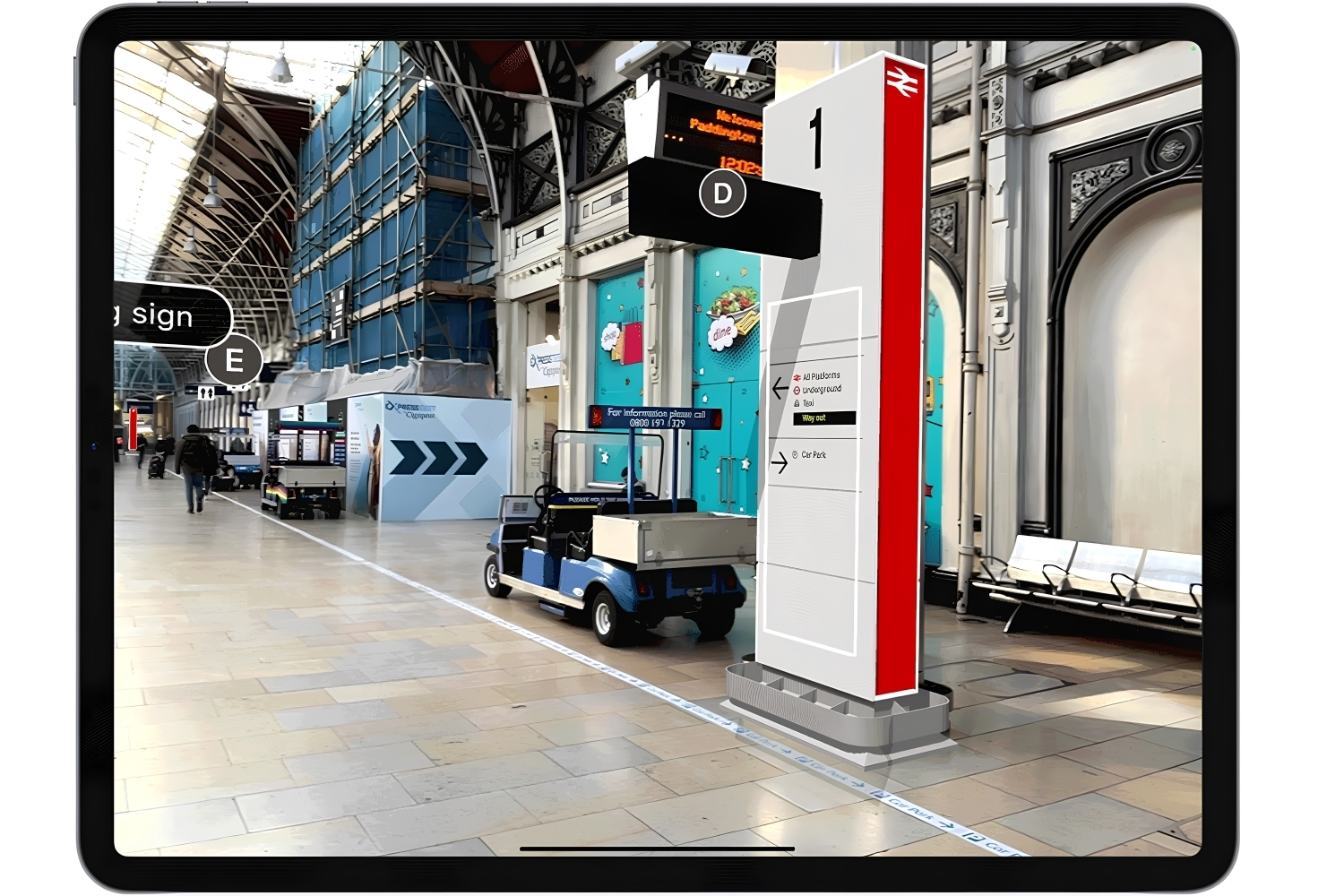
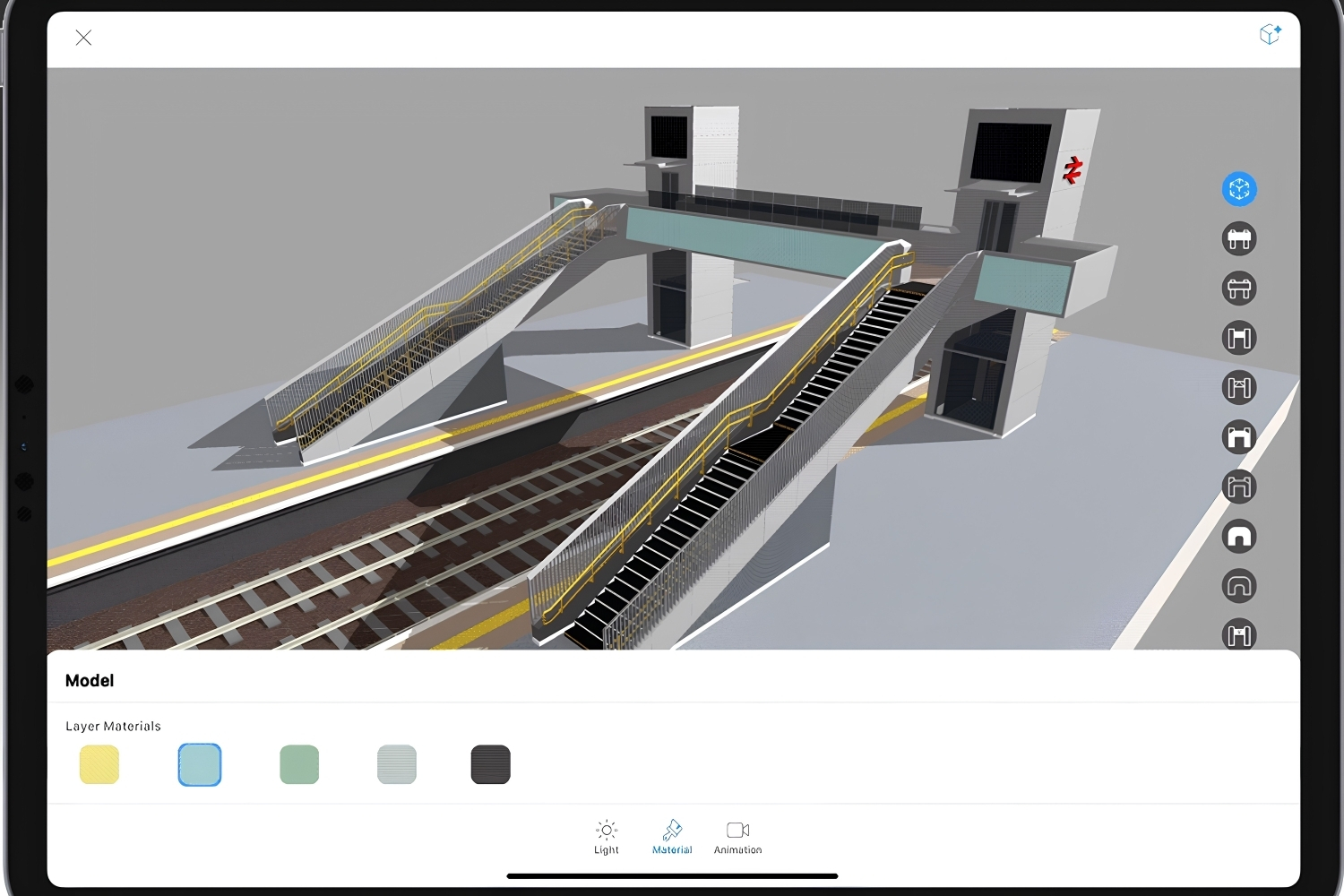
The professional tier is where architecture teams get value. ARki Pro imports FBX and GLB files from SketchUp, Revit, Blender, 3ds Max, and AutoCAD, so a model built on the desktop moves onto a phone without a third party preparing it or charging a per model fee. Mixed Reality mode overlays that model on a real site at true scale, with real time shadows, animation, an explode tool, and material palettes for presentation. Sharing works through 2D snapshots, videos, or interactive plans.
💡 Pro Tip
Run LiDAR scans in even, bright light and move the phone slowly around the room. The App Store notes that performance drops in poor lighting, and rushed scans are where wall alignment errors creep in. For imported models, set your unit scale before you upload, since correcting proportion once a model is already in AR is far more tedious than fixing it in your modeling app first.
For scanning accuracy specifically, ARki sits near tools like Magicplan. The Magicplan review is worth reading if measurement precision is your priority. If on device modeling matters more to you than AR presentation, the uMake review covers that adjacent option.
🏗️ Real-World Example
Network Rail Footbridge Catalogue (United Kingdom): Network Rail’s Buildings and Architecture department commissioned ARki to present its collaborative footbridge designs in augmented reality, so local teams and residents could preview station bridge options at real scale instead of reading 2D drawings.
How Much Does ARki Cost?
ARki is free to download, with the real utility behind two subscription tracks. A Personal plan opens the full furniture catalogue plus accurate edit and draw tools, while ARki Pro adds model import, mixed reality, and the professional toolkit. Prices are set through Apple’s App Store matrix, so the Personal tier shows at several price points for different billing periods. You can confirm current tiers on the App Store listing.
ARki Pricing at a Glance
The table below summarizes the current plans and who each one suits:
| Plan | Price (USD) | Who It Suits |
|---|---|---|
| Free | $0 | Testing core drawing, viewing, and basic AR |
| Personal | From $5.00 (also $12 and $29 tiers) | Homeowners and designers wanting the full model library and precise editing |
| ARki Pro (monthly) | $19.49 | Professionals importing 3D models and presenting in mixed reality |
| ARki Pro (yearly) | $219.99 | Frequent professional users wanting the lowest effective monthly cost |
Pricing reflects the app’s published App Store tiers at the time of writing and can change by region, billing cycle, or platform.
Strengths and Limitations
ARki’s strength is doing one thing genuinely well: putting a model in front of a client at real scale, on a device they already trust. The direct import path is a real advantage, since many AR apps still ask you to send a model away and wait. Cross device support across the Apple ecosystem and a track record stretching back years both count in its favor, and the client presentation value is where most professional users say it earns its keep.
The limits are just as clear. It is not a design generator, so it will not shortcut concept work. LiDAR scanning needs a Pro device and good lighting to stay accurate. Some users note that materials apply at the layer level, so giving separate elements within one import different finishes can be fiddly. The actively developed build is on iOS, iPadOS, macOS, and visionOS, while an Android version exists but trails the feature set. And like most apps in this space, the parts that matter sit behind a subscription. Weighed across this ARki review, the app is a specialist, not an all rounder.
⚖️ Pros & Cons at a Glance
✔️ Pros: Real scale AR walkthroughs, direct FBX and GLB import from major modeling apps, works across iPhone, iPad, Mac, and Vision Pro
✖️ Cons: No text to architecture generation, most useful features sit behind a subscription, LiDAR scanning needs a Pro device and good lighting
Where to Go From Here
Your Next Step: download ARki free, import one model you already know well or scan a single room, and run it through an AR walkthrough before paying for anything. A familiar project tells you within an afternoon whether the presentation quality justifies a Personal or Pro plan. For the wider toolkit around it, illustrarch’s overview of mobile apps for architects is a sensible next read.
Architecture Students Hub
This guide is part of Software, Rendering and Gear, stage 4 of our student roadmap from the first diagram to the first internship. Next stage: Portfolio, CV and Internships, or browse every free tool and guide in the Architecture Students Hub.






Architectural Visualization with Blender: Free Assets and PBR Materials Guide
This guide breaks down how free asset packs, PBR material libraries, and...
 Elif Ayse Sen13 Mins read
25 Best AI Architectural Rendering Tools in 2026
AI is revolutionizing architectural visualization in 2026, enabling faster iterations, richer creativity,...
 Bahattin Duran14 Mins read
Top 3D Visualization Outsourcing Picks for 2025
Looking to scale your 3D production without expanding headcount or software spend?...
 Begum Gumusel4 Mins read
What Does Rigged Mean in 3D Models
Rigging in 3D models involves creating a digital skeleton that allows for...
Bahattin Duran14 Mins read


Leave a comment