

Guide to Creating Effective Architectural Presentations
A well-crafted architectural presentation can help you communicate your design ideas and concepts to clients, colleagues, and stakeholders effectively. It can also help you showcase your creativity, problem-solving skills, and attention to detail. In this guide, we will outline some tips and best practices for creating effective architectural presentations.
 Elif Ayse Sen14 November 202512 Mins read1.1k

Table of Contents Show
As an architect, presenting your work is an essential part of your profession. A well-crafted architectural presentation can help you communicate your design ideas and concepts to clients, colleagues, and stakeholders effectively. It can also help you showcase your creativity, problem-solving skills, and attention to detail. Whether you are a student preparing for a jury review or a professional pitching to a client, your architecture presentation can make or break how your project is perceived. In this guide, we will walk you through proven tips and best practices for creating effective architectural presentations that leave a lasting impression.
Define Your Objective
Before starting your presentation about architecture, you need to define your objective. What message do you want to convey? Who is your audience? What do you want them to take away from your presentation? These are essential questions that you need to answer to ensure your presentation is effective.
A clear objective acts as the foundation for every design decision in your presentation. For example, if you are presenting a residential project to a homeowner, your objective might focus on livability and emotional appeal. If you are presenting to an investment committee, you would center the presentation around cost efficiency, timelines, and return on investment. Writing down your objective before you open any software keeps the entire process focused and purposeful.
Know Your Audience
Knowing your audience is crucial to creating an effective architectural presentation. Different stakeholders may have different levels of knowledge, interest, and expertise in architecture. You need to tailor your presentation to their needs and expectations.
For example, if you are presenting to a non-technical audience, you may need to explain technical terms and concepts in simpler terms. Conversely, if you are presenting to a technical audience, you may need to provide more detailed information and use more technical terms.
Consider creating audience personas before you design your slides or boards. Think about what motivates your viewers, what questions they might ask, and what concerns they may raise. A municipal planning board, for instance, will care about zoning compliance and community impact, while a developer will want to see financial feasibility and market positioning. Tailoring your presentation architecture to these specific needs separates good presenters from great ones.

Create a Clear Structure
A well-structured presentation can help your audience follow your ideas and understand your concepts better. Start with an introduction that outlines your objective and sets the context for your presentation. Follow with the main body, where you can present your ideas and concepts in a logical sequence. Finally, end with a conclusion that summarizes your main points and highlights the key takeaways.
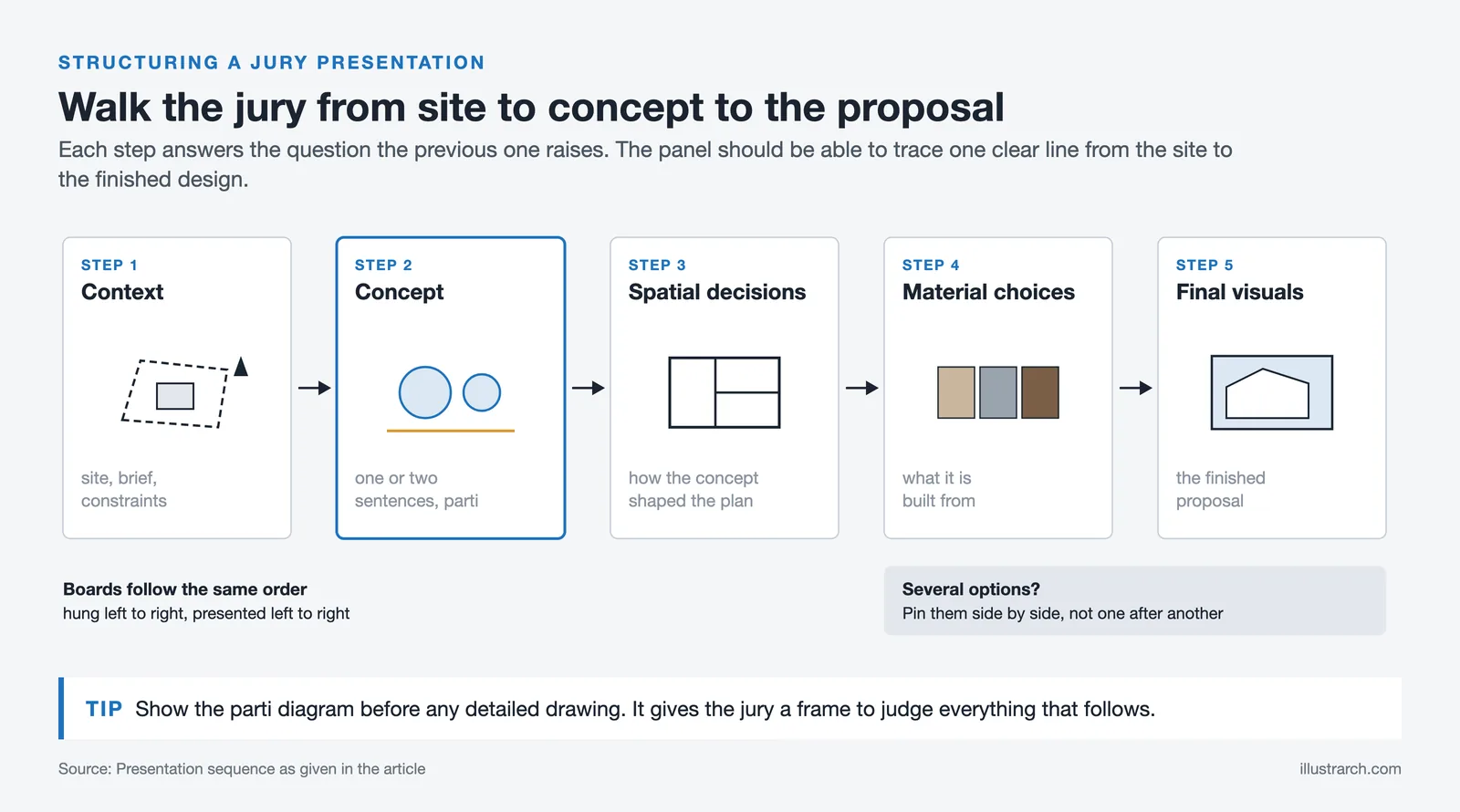
Most successful architect presentations follow a predictable yet effective flow. You begin with context (site, brief, constraints), move into your architecture concept, then demonstrate how that concept shaped spatial decisions, material choices, and the final design. Ending with strong visuals of the finished proposal ties everything together. If you are presenting multiple options, compare them side by side rather than sequentially so that your audience can see the differences at a glance.
Use Visual Aids
Visual aids such as images, diagrams, sketches, and videos can help you illustrate your ideas and make them more engaging for your audience. You can use them to show your design process, highlight key features, and explain technical details.
Ensure your visual aids are of high quality and relevant to your presentation. Use a consistent style and format to make your presentation look professional and cohesive. High-resolution renderings, clean diagrams, and well-composed photographs all contribute to a polished result. Avoid cluttering slides with too many images; instead, let each visual breathe and support your narrative.
Practice and Rehearse
Practice and rehearse your presentation before the actual event. This will help you identify any issues with your structure, flow, or timing. It will also help you build confidence and deliver your presentation more smoothly.
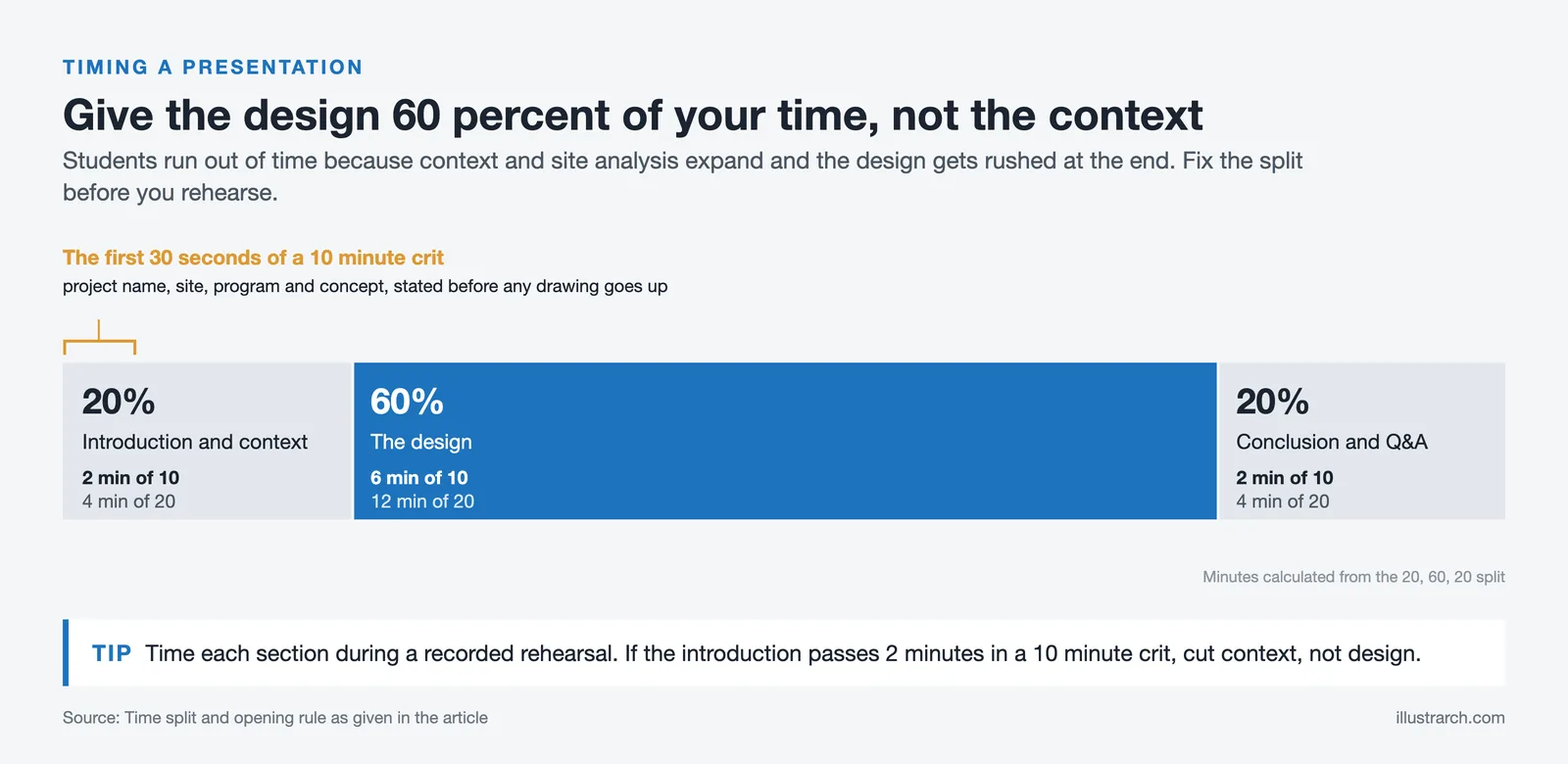
Record yourself on video during rehearsal so you can review your pacing, posture, and delivery. Time each section to ensure you stay within your allotted window. Many architecture students run out of time during crits because they spend too long on context and rush through the design itself. Allocate roughly 20% of your time to introduction and context, 60% to the design, and 20% to the conclusion and Q&A.
Use Storytelling
Storytelling can be a powerful tool for creating an emotional connection with your audience. You can use storytelling to describe your design process, explain your design choices, and highlight the benefits of your design for the end-users.
Every strong architectural presentation tells a story. Start by identifying the “problem” or “opportunity” that your design addresses. Walk your audience through the journey of how you analyzed the site, developed your concept, tested ideas, and arrived at the final solution. Use before-and-after comparisons, process diagrams, and user scenarios to make the narrative tangible. A presentation about architecture becomes memorable when the audience can follow the reasoning behind each design decision.
Be Confident and Engaging
Finally, be confident and engaging during your presentation. Speak clearly and loudly, maintain eye contact with your audience, and use body language to emphasize your points. Engage your audience by asking questions, encouraging discussion, and providing examples.

Visual Aids for Architectural Presentations
Visual aids can be a powerful tool to help communicate complex design concepts and ideas. Here are some options to consider when selecting visual aids for your presentation:
Images
Photographs, renderings, and other visual representations of your design can help your audience better understand your ideas. Make sure the images you use are high quality and visually appealing. You can also use images to illustrate the context of your design, such as the site location or surrounding environment.
Sketches and Drawings
Hand-drawn sketches and drawings can add a personal touch to your presentation and convey a sense of authenticity. You can use sketches and drawings to illustrate your design process or to highlight specific design elements. Including early conceptual sketches alongside polished final drawings shows the evolution of your thinking and gives your audience confidence in the depth of your process.
Diagrams
Diagrams can help simplify complex concepts and make them more accessible to your audience. Use diagrams to illustrate the relationship between different elements of your design or to show how your design addresses specific design challenges. Site analysis diagrams, circulation studies, and sun path analyses are particularly useful for architectural presentation boards because they translate abstract data into visual evidence that supports your design rationale.

3D Models and Virtual Reality
3D models and virtual reality can help your audience visualize your design in a more immersive way. This can be particularly helpful for complex designs or designs with unique spatial qualities.
With tools like real-time rendering engines such as Lumion, Enscape, and Twinmotion, you can walk clients through your design during the presentation itself. This interactive approach allows stakeholders to request camera angle changes, lighting adjustments, and material swaps on the spot. Virtual reality headsets take this a step further by letting viewers experience the space at full scale, which is especially effective for interior spaces where the sense of volume and proportion matters most.
Videos and Animations
Videos and animations can help bring your design to life and show how it functions in real-time. You can use videos and animations to illustrate design features, such as lighting or circulation, or to show how your design responds to different environmental conditions.
When selecting visual aids, it’s important to consider what will be most effective for your specific presentation and audience. To be original, consider creating custom visual aids that reflect your design style and approach. For example, you could create hand-drawn illustrations that showcase your unique design process, or use creative techniques like collage or mixed media to illustrate your ideas in a visually engaging way. Whatever you choose, make sure your visual aids are relevant, high quality, and effectively communicate your design concepts.
Choosing the Right Presentation Format
Your presentation format should match the context in which you are presenting. Architecture students typically present on large-format boards (A1 or A0), while professionals more often use digital slide decks or interactive 3D walkthroughs. Each format has distinct advantages.
Printed presentation boards work well for design competitions, studio crits, and exhibitions where the audience can walk up close and examine details. Digital presentations (PowerPoint, Keynote, or PDF slides) suit formal meetings with clients and stakeholders because they allow you to control the pacing and narrative flow. Interactive formats, including real-time renders and VR walkthroughs, shine in one-on-one client meetings where personalization and immediacy create a stronger connection.
Consider combining formats when possible. You might use a slide deck for the verbal presentation, then switch to a 3D walkthrough for the Q&A, and leave printed boards behind as reference material. This layered approach reinforces your message through multiple channels.
Presentation Format Comparison
The table below compares common presentation formats used in architecture to help you select the best option for your situation:
| Format | Best For | Advantages | Limitations |
|---|---|---|---|
| Printed Boards (A1/A0) | Studio crits, competitions, exhibitions | High visual impact, close-up detail viewing | Static content, expensive to print |
| Digital Slides (PPT/Keynote) | Client meetings, formal presentations | Controlled pacing, easy to update | Limited viewer interaction |
| 3D Walkthroughs / VR | Client reviews, spatial design proposals | Immersive, real-time interaction | Requires hardware, steep learning curve |
| Physical Models | Design development, community presentations | Tactile, intuitive scale understanding | Time-consuming to build, fragile |
| Video Animation | Online portfolios, marketing, social media | Cinematic quality, shareable | Time-intensive to produce, no live interaction |
Software Tools for Architectural Presentations
The software you use plays a significant role in the quality and efficiency of your architectural presentation. Different stages of the presentation process call for different tools.
For layout and board design, Adobe InDesign remains the industry standard. It gives you precise control over typography, grid systems, and image placement. Many architecture firms also use Adobe Illustrator for diagrams and vector graphics, while Photoshop handles image editing and post-production on renderings.
For 3D visualization, tools like SketchUp, Rhino, Revit, and ArchiCAD generate models, while rendering engines such as V-Ray, Lumion, Enscape, and Twinmotion produce photorealistic or stylized images. If you are working on real-time visualization, Unreal Engine offers cinematic quality, though it comes with a steeper learning curve.
For slide-based presentations, PowerPoint and Keynote are widely used, but tools like Figma and Canva are gaining popularity for their collaborative features and template libraries. Choose tools that match your skill level and project requirements rather than chasing the most advanced option available.
Common Mistakes to Avoid in Architectural Presentations
Even talented designers can undermine their work with presentation errors. Here are some of the most frequent pitfalls to watch for:
Overloading slides or boards with too much information is one of the biggest mistakes. Your audience cannot absorb everything at once, so prioritize clarity over completeness. Each board or slide should communicate one main idea.
Using inconsistent graphic styles creates visual confusion. If your site plan uses one color palette and your floor plans use another, the presentation feels disjointed. Maintain consistency in fonts, line weights, colors, and rendering styles throughout.
Neglecting the narrative is another common issue. Jumping straight into floor plans without establishing the site context, architecture concept, or design drivers leaves your audience without a framework to evaluate your decisions.
Reading directly from your slides signals a lack of preparation. Your slides should support your verbal presentation, not replace it. Use them as visual anchors while you speak naturally and confidently about your project.
Finally, ignoring time management causes presenters to rush through the most important parts. Practice with a timer and plan buffer time for questions and unexpected discussion.

How to Present Your Architecture Concept Effectively
Your architecture concept is the backbone of any design project, and presenting it clearly can determine whether your audience buys into your vision. A concept is not a vague inspiration; it is a specific idea that shaped every decision you made throughout the design process.
Start by articulating your concept in one or two sentences. If you cannot explain it simply, it may need further refinement. Use a parti diagram or a simple sketch to visualize the concept before showing any detailed drawings. This gives your audience a mental framework they can use to evaluate everything that follows.
Support your concept with evidence from your design process. Show how site analysis, user research, or precedent studies led you to the concept. Then demonstrate how the concept influenced spatial organization, material selection, structural decisions, and environmental response. When your audience can trace a clear line from concept to final design, your presentation becomes persuasive rather than merely informative.
Tips for Architecture Students
Architecture school presentations (studio crits, juries, thesis reviews) have their own set of challenges. You are often presenting to multiple critics with different perspectives, under strict time limits, and after weeks of intense work.
Prepare a strong opening statement. The first 30 seconds set the tone for the entire review. State your project name, site, program, and concept clearly before showing any drawings.
Organize your presentation boards in a logical sequence that mirrors your verbal narrative. If your boards are arranged left to right, present left to right. Jumping between boards confuses both you and your audience.
Anticipate questions and prepare answers. Critics often ask about structural systems, material choices, circulation logic, and how the design responds to its context. Having thought through these topics in advance lets you answer with confidence rather than hesitation.
Use the floor plan as a communication tool, not just a technical document. Annotated plans with clear labels, color coding for different zones, and human figures for scale make your plans accessible even to viewers who are not trained architects.
Architectural Presentations in Professional Practice
Professional architectural presentations differ from academic ones in several key ways. Client presentations need to address budget, timelines, regulatory requirements, and return on investment alongside design quality. The audience expects polished, professional deliverables that inspire confidence.
Begin every client presentation by restating the brief and confirming the project goals. This shows that you have listened carefully and that your design responds directly to their requirements. Then present your solution as the logical outcome of their brief rather than as a standalone artistic exercise.
Include key presentation elements such as site plans, floor plans, sections, elevations, and at least two to three high-quality exterior and interior renderings. Provide a materials palette board so clients can see and touch proposed finishes. If the project involves phased construction, include a timeline graphic that makes the schedule easy to understand.
Follow up every presentation with a concise summary document that recaps the key points and next steps. This gives the client a reference they can share with other decision-makers and keeps the project moving forward.
Download Presentation Templates
Frequently Asked Questions
What makes a good architectural presentation?
A good architectural presentation combines a clear narrative, high-quality visuals, and confident delivery. It starts with a well-defined concept, follows a logical structure from site analysis through design development to the final proposal, and uses consistent graphic language throughout. The best presentations tailor their content and tone to the audience, whether that audience is a university jury, a client, or a planning committee.
What should be included in an architecture presentation?
An architecture presentation should include site analysis, your design concept, floor plans, sections, elevations, 3D renderings, and a materials palette. Depending on your audience, you may also want to include sustainability strategies, structural diagrams, cost estimates, and a project timeline. The key is to include everything your audience needs to understand and evaluate your design, without overloading them with unnecessary detail.
How do you present an architecture concept in a presentation?
Present your architecture concept early in the presentation using a simple diagram or sketch that captures the core idea. Explain how the concept emerged from your research and site analysis, then show how it influenced each major design decision. Use before-and-after comparisons and process diagrams to make the connection between concept and final design visible and convincing.
What are the best tools for creating architectural presentations?
The best tools depend on your presentation format. For board layouts, Adobe InDesign is the industry standard. For renderings, Lumion, V-Ray, Enscape, and Twinmotion are popular choices. PowerPoint and Keynote work well for slide-based presentations, while Figma offers collaborative design features. For 3D visualization, SketchUp, Rhino, and Revit are widely used alongside specialized rendering software.
How can architects improve their presentation skills?
Architects can improve their presentation skills by practicing regularly, studying successful presentations from peers and professionals, and seeking feedback after every presentation. Recording rehearsals helps identify weak points in delivery. Reading about visual communication principles, attending public speaking workshops, and analyzing how leading firms like BIG, OMA, and Zaha Hadid Architects present their work can also accelerate improvement.








Architecture Crit Presentation: How to Present Your Project With Confidence
The crit is where a good project can fall apart and an...
 Sinan Ozen6 Mins read
Why Do Architects Use Architectural Models Instead of Just Drawings?
Physical architectural models remain a core tool even in a digital studio....
 Furkan Sen6 Mins read
How to Make an Architecture Mood Board: A Step-by-Step Guide
A practical walkthrough for building an architecture mood board, covering how to...
Furkan Sen6 Mins read
How to Build an Architecture Physical Model From Scratch
Building an architecture physical model from scratch takes the right scale, tools,...
Furkan Sen6 Mins read


Leave a comment