

KeyShot Architectural Rendering: 7 Best Alternatives for Architects
KeyShot is built for product visualization, which leaves gaps for architectural work. This breakdown compares seven alternatives by price, platform, render type, and the workflows each one fits best, including real-time plugins and free tools.
 Furkan Sen6 July 20266 Mins read171
Table of Contents Show
KeyShot architectural rendering produces photorealistic images, but the software is built for product visualization rather than buildings. Architects who need deeper CAD integration, real-time previews, or a lower price point often turn to KeyShot alternatives like Enscape, Lumion, Twinmotion, D5 Render, V-Ray, Blender, and AI-powered tools such as ArchFine.
Luxion built KeyShot around a simple idea: import a CAD model, assign materials, and get a clean studio render within minutes. That approach made it a fixture in product design and industrial engineering. For buildings, the fit is looser. Architectural scenes need site context, vegetation, daylight that shifts across seasons, and direct links to modeling tools like Revit, SketchUp, and Rhino, which is where purpose-built visualization software pulls ahead. A move to subscription-only pricing has also pushed many architects to compare their options before the next renewal. If you are weighing a switch, this guide to 3D rendering software for architects works alongside the seven alternatives covered here.
Why Architects Look Beyond KeyShot for Rendering
KeyShot renders buildings perfectly well, but its feature set is aimed at product visualization, not architecture. The material library leans toward plastics, metals, and finishes common in consumer goods, and the scene tools assume a single object on a turntable rather than a building in its surroundings. The official KeyShot positioning reflects this, putting product designers and engineers first.
Cost is the second factor. KeyShot Studio Professional runs $1,299 per year, and Luxion has retired perpetual licenses, so a one-time purchase is no longer possible. For a studio rendering daily product shots, that price makes sense. For an architect who renders in bursts around deadlines, the cost per image climbs quickly.
📌 Did You Know?
KeyShot began life as a CPU-only renderer, and that heritage still shapes its performance today. Its render speed scales almost linearly with processor core count, which is why some studios still run it for overnight batch jobs on high-core machines, even as GPU-based tools dominate real-time work.
Then there is workflow. Live, in-model visualization has become a standard deliverable, with firms producing the kind of imagery that fills publications like ArchDaily. Most architects want lighting and massing to update as they model, not a separate export for every iteration. KeyShot’s strengths in controlled studio lighting matter less when the goal is showing a space at 4pm in October. These gaps explain why keyshot architectural rendering, strong as it is, tends to lose ground to dedicated tools once a project moves from object to building.
The 7 Best KeyShot Alternatives for Architectural Rendering

Each tool below fills a different role: real-time previews inside your modeling software, offline photorealism, and AI-generated concept renders. Match the choice to where you render in the design process and what hardware you run.
1. Enscape: Best for Revit and BIM Workflows
Enscape is a plugin that renders directly inside Revit, SketchUp, Rhino, ArchiCAD, and Vectorworks. Click one button and a rendered view opens beside your model, updating within seconds as you change geometry or materials. There is no export step, which is part of why it is used by 85 of the top 100 architecture firms according to Chaos. Enscape Solo starts around $575 per year. The trade-off is that its output, while clean and quick, is less atmospheric than standalone renderers. For BIM-centered practices, the integration depth is hard to match. Our Enscape overview covers its workflow in detail.
2. Lumion: Best for Cinematic Exterior Scenes
Lumion is a standalone application known for polished exterior and landscape renders. You export your model, then build the scene inside Lumion using its library of over 13,000 assets, including vegetation, people, and vehicles. Its atmospheric effects and animation tools give visualization specialists fine control over the final image, which suits competition boards and marketing work. Lumion Pro, now its only plan, costs around $1,149 per year as of October 2026. It is Windows-only and needs a strong NVIDIA GPU. The Lumion site lists current tiers, and our Lumion vs Enscape vs Twinmotion comparison shows where it wins.
💡 Pro Tip
Before switching renderers, rebuild a scene you have already finished in KeyShot inside the new tool, then compare both the output and the time it took. A one-hour test on a real project file tells you more about workflow fit than any feature list, and it surfaces hardware bottlenecks before you commit to a subscription.
3. Twinmotion: Best Free Option for Walkthroughs
Built on Unreal Engine by Epic Games, Twinmotion offers the full version free to firms earning under $1 million in annual revenue, including path tracing, VR output, and the Quixel Megascans library. Above that threshold, a commercial seat runs around $445 per year. It syncs with Revit, SketchUp, Rhino, and ArchiCAD through Datasmith, and runs on both Windows and Mac, which makes it a rare option for Apple-based studios. Its Unreal foundation gives it an edge for animated walkthroughs and interactive client presentations.
4. D5 Render: Best Value for Photorealism
D5 Render has grown fast on the strength of GPU ray tracing and a free Community tier. Its global illumination and AI denoising produce soft shadows and realistic glass that rival pricier tools, and it holds a 4.8-star rating on G2 from over 1,000 reviewers. D5 Render Pro starts around $360 per year, below both Enscape and Lumion, with plugin support for SketchUp, Revit, Rhino, ArchiCAD, and 3ds Max included. It is Windows-only and needs a DirectX 12 GPU. The D5 Render site has current pricing.
5. V-Ray: Best for Offline Photorealistic Stills
V-Ray, developed by Chaos, is the long-standing benchmark for offline photorealism. Instead of rendering in real time, it calculates light physically and produces frames over minutes or hours, which yields a polish that real-time tools still cannot fully match. V-Ray for SketchUp and V-Ray for Rhino are the versions architects use most, with pricing starting around $540 per year. It is the right pick when final presentation stills are the deliverable and you have the hardware and time to support longer renders.
6. Blender (Cycles): Best Free Open-Source Option
Blender is a professional-grade, open-source 3D platform whose Cycles engine produces path-traced output that competes with paid renderers. It is completely free, runs on Windows, macOS, and Linux, and supports Apple Silicon natively. With the BlenderBIM add-on, it also handles IFC and OpenBIM workflows. The trade-off is a steeper learning curve, since the interface comes from a general 3D application rather than an architecture-specific one. For studios willing to invest the time, Blender removes the cost barrier for both modeling and rendering.
7. ArchFine: Best AI-Powered Option for Fast Client Renders
ArchFine takes a different route. It is a browser-based AI rendering platform built for architects, accepting sketches, CAD exports, or basic massing models and returning detailed interior and exterior renders within seconds. Because the work happens in the cloud, it sidesteps the GPU requirements that constrain D5 Render, Lumion, and Enscape, and it runs on any operating system, including Mac. It fits concept and client-facing visuals during early design phases rather than final production stills. For quick option-testing in a meeting, ArchFine covers the gap that hardware-heavy renderers leave open.
How These KeyShot Alternatives Compare
Price, platform, and render type are the three factors that separate these tools in practice. The table compares each option against keyshot architectural rendering on the points that matter for buildings. For a closer look at the real-time category on its own, our roundup of Enscape alternatives covers several of these tools in more depth.
Pricing and Platform at a Glance
| Tool | Starting Price (per year) | Platform | Render Type | Best For |
|---|---|---|---|---|
| KeyShot | From $1,299 | Windows, Mac | Studio / offline | Product-focused renders |
| Enscape | From ~$575 | Windows, Mac | Real-time plugin | Revit and BIM workflows |
| Lumion | ~$1,149 | Windows | Real-time standalone | Cinematic exteriors |
| Twinmotion | Free / ~$445 | Windows, Mac | Real-time (Unreal) | Walkthroughs and VR |
| D5 Render | Free / ~$360 | Windows | Real-time (GPU) | Value photorealism |
| V-Ray | From ~$540 | Windows, Mac | Offline | Final presentation stills |
| Blender (Cycles) | Free | Windows, Mac, Linux | Offline path-traced | Budget studios |
| ArchFine | Free trial, then paid | Any (browser) | AI rendering | Fast concept renders |
🔢 Quick Numbers
- KeyShot offers a 93% student discount, dropping the license from $1,299 to $95 per year (KeyShot pricing page, 2026)
- Enscape is used by 85 of the top 100 architecture firms worldwide (Chaos, 2026)
- D5 Render holds a 4.8-star rating on G2 from over 1,000 reviewers (G2, 2026)
Pricing figures are approximate and reflect publicly listed rates as of mid-2026. Subscription costs vary by region, billing cycle, and vendor promotions. Confirm current rates on each vendor’s official site before purchasing.
How Do You Choose the Right KeyShot Alternative?
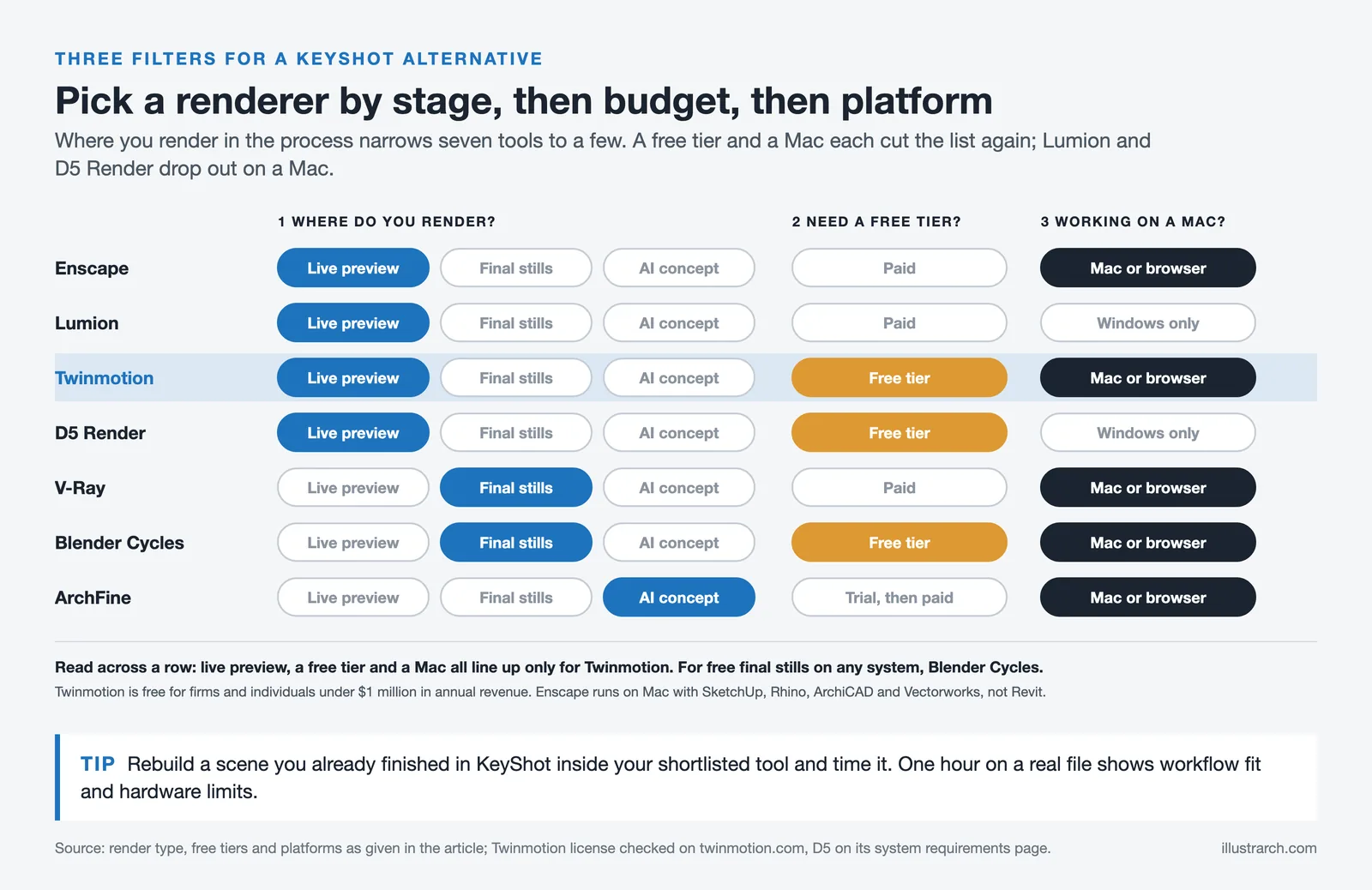
Start with where you render in the design process. If you want lighting and massing to update as you model, a real-time tool that stays linked to your CAD software, such as Enscape, D5 Render, or Twinmotion, will serve you best. If your deliverable is a final competition board, V-Ray or Blender’s Cycles engine gives output quality that real-time tools cannot match.
Budget is the next filter. Twinmotion, D5 Render, and Blender all offer usable free tiers, which matters for students and small studios where a rendering license lands directly on the overhead. Platform is the third. Mac-based teams should look at Twinmotion, Blender, Enscape, or a browser tool like ArchFine, since Lumion and D5 Render are Windows-only. For a wider view across drafting and modeling too, our guide to architecture software for small firms maps tools to budget, and the rundown of the best rendering engines goes deeper on output quality.
What This Means for Your Next Project
Bottom Line: KeyShot is a strong product renderer that happens to render buildings, not a tool built for architectural work. If you render occasionally, want real-time feedback, or need Mac support, one of these seven alternatives will fit your workflow and budget better. Test two or three on a real project file before you renew anything.
- architectural rendering in keyshot
- architectural rendering in keyshot 8
- architectural renders keyshot
- keyshot architectural rendering
- keyshot architectural rendering tutorial
- keyshot architectural renderings
- keyshot architecture
- keyshot architecture materials
- keyshot architecture render
- keyshot architecture renders
- keyshot render architecture






From SketchUp View to Client-Ready Render: A Hands-On Look at Vizbase
Vizbase co-founder Mikus Zarāns shows how the browser-based AI renderer turns SketchUp...
 illustrarch Editoral Team4 Mins read

Best 3D Rendering Companies for Quick Turnaround Time
Discover the top 3D rendering companies that excel in delivering fast, quality...
illustrarch Editoral Team5 Mins read
Twinmotion Architectural Rendering: 7 Best Alternatives for Architects
Twinmotion is a strong free option for real-time architectural visualization, but not...
Furkan Sen8 Mins read
Lumion vs Enscape vs Twinmotion: Best Renderer for Architects in 2026
A side-by-side comparison of Lumion, Enscape, and Twinmotion covering pricing tiers, CAD...
 Elif Ayse Sen9 Mins read


Leave a comment