

Easier 3D Visualization with D5 Render’s Free Downloadable Assets & PBR Materials
High-quality visualization depends on speed, realism, and access to reliable assets. This article explores how D5 Render’s built-in asset and material library helps architects and designers create rich, lifelike scenes with minimal effort. From advanced texture editing to dynamic environmental elements, D5 Render streamlines the entire visualization workflow.
 Sinan Ozen18 December 20257 Mins read1.1k

Table of Contents Show
Quick Answer: D5 Render is a real-time 3D rendering tool that produces photorealistic architectural visuals using ray tracing and a large built-in asset library. It offers a free version, LiveSync with software like SketchUp, Revit and 3ds Max, and fast scene-population tools, making high-quality rendering accessible to architects and designers.
The D5 Render asset library gives architects, interior designers and landscape professionals direct access to thousands of ready-to-use 3D models, PBR materials, particles and scatter templates inside the rendering software. Instead of searching multiple websites for assets, designers can drag and drop high-quality furniture, vegetation, vehicles, decals and terrain presets straight into their scenes, cutting hours from every project.Why Asset Libraries Matter in Architectural Visualization
Whether you work on architectural, landscape or interior design, it is often the case that visualizers would have to rummage around on the Internet for assets they need, which holds back the whole process until they find suitable resources. Sourcing individual models, textures and cutout files from scattered websites eats into productive design time and introduces inconsistency in material quality across a project. A built-in asset library solves this problem by keeping every resource inside the rendering environment. There is no need to convert file formats, rebuild material nodes or worry about licensing for each downloaded model. For a broader look at how different rendering tools handle assets and materials, see our guide to architectural rendering software and must-have features.🔢 Quick Numbers
- 43,000+ total assets (as of October 2026) available through D5 Render’s library and D5 Works platform (D5 Render, 2026)
- 4,500+ landscape element models including trees, bushes, grasses and rocks (D5 Render Features page, 2026)
- 2,000+ PBR-ready materials covering wood, stone, metal, fabric and ceramic surfaces (D5 Render, 2026)
What Is Inside the D5 Render Asset Library?
The D5 Render asset library is organized into three core categories: Models, Materials and Particles. Each category is accessible through the Assets panel (shortcut: M) and can be searched, filtered and previewed in real time before placement.Material Library and Texture Editing
Material editing, a laborious yet essential process, plays a key role in achieving photorealism. From the D5 Material Library, which is regularly updated, you can use glass, ceramic, wooden, marble and thousands of more preset exquisite textures onto any model surface, saving you time and energy collecting or even purchasing them from different sites. If you need inspiration on where to find additional textures beyond D5, check out our list of 10 textile and material libraries for 3D architectural models. Of course, you can also make adjustments to give them a new look as you like. Getting rid of all those nerve-wracking material nodes, D5 Render has made it possible for 3d designers to create satisfactory custom textures with only a few drags and pulls in the map slot. The texture-editing system of D5 Render
D5 Render now has over 2000 ready-to-use materials that are widely used in architectural, interior and landscape design.
The texture-editing system of D5 Render
D5 Render now has over 2000 ready-to-use materials that are widely used in architectural, interior and landscape design.
💡 Pro Tip
When applying PBR materials in D5 Render, batch import your texture maps (albedo, roughness, normal) and the software will automatically assign each map to the correct slot. This eliminates manual material node setup and reduces texturing time by roughly 80% compared to traditional node-based workflows.
How Does AI PBR Material Snap Work in D5 Render?
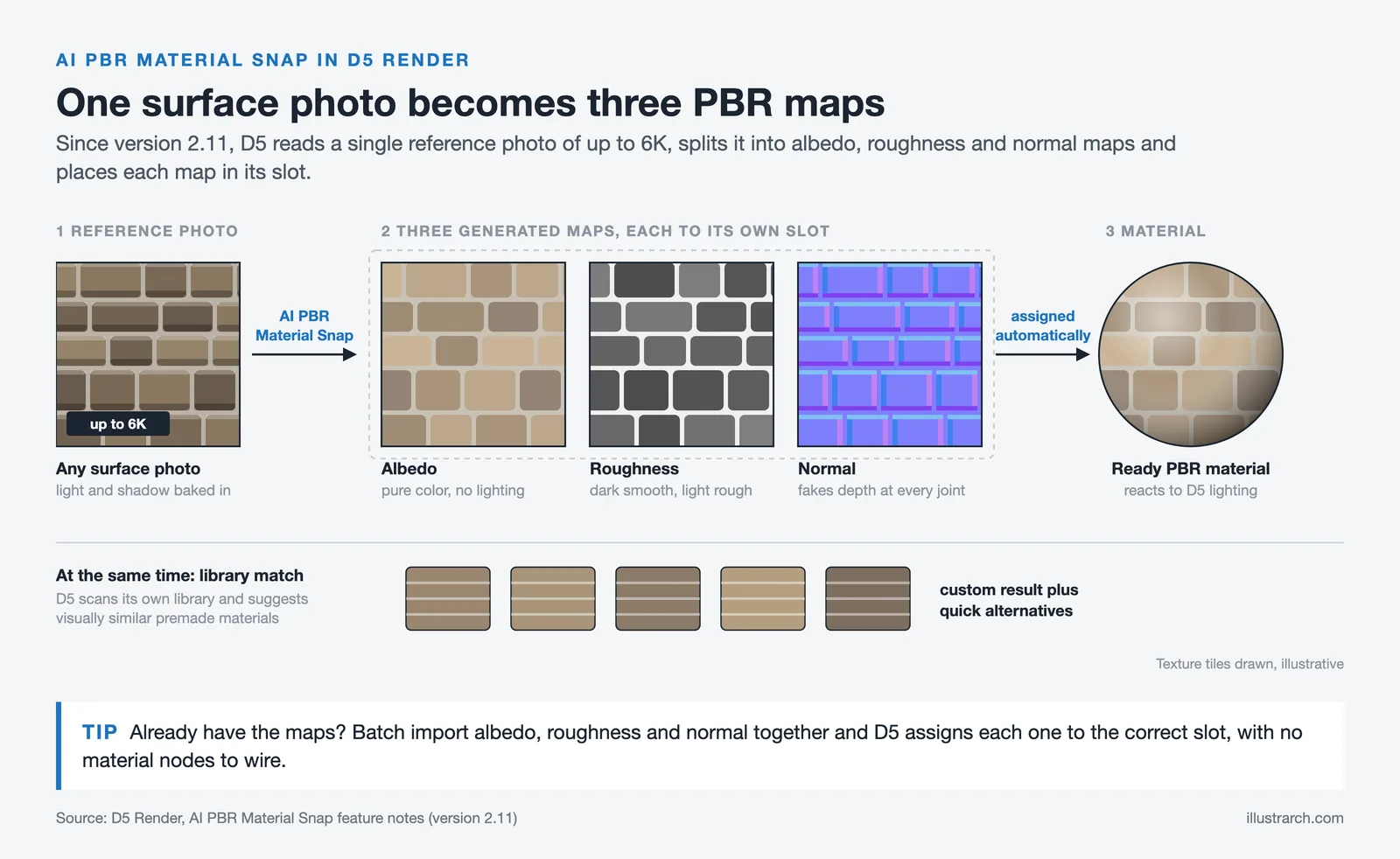
Starting with version 2.11, D5 Render introduced AI PBR Material Snap, a feature that converts a single reference photograph into a full PBR material set. You upload any surface photo (up to 6K resolution), and the AI generates albedo, roughness and normal maps automatically. The system also scans the built-in library to suggest visually similar premade materials, giving you both a custom result and quick alternatives. This is especially useful for matching on-site material samples to digital textures without manual sculpting. You can learn more about this feature on the D5 Render features page.Realistic Scene Examples with D5 Materials
If you want a sustainable house built with eco-friendly materials, wood and bamboo are the ideal choices for the roof, walls and floors. Wooden house interior by Jimmy 3D with D5 Render
Or you can create a modern beach villa with the combo of floor-to-ceiling glass windows, cozy white fabric sofa and emissive floor lanterns.
Wooden house interior by Jimmy 3D with D5 Render
Or you can create a modern beach villa with the combo of floor-to-ceiling glass windows, cozy white fabric sofa and emissive floor lanterns.
 Beach villa by Filip Lekawski with D5 Render
How to Add Life to Your Architectural Renderings with D5 Models
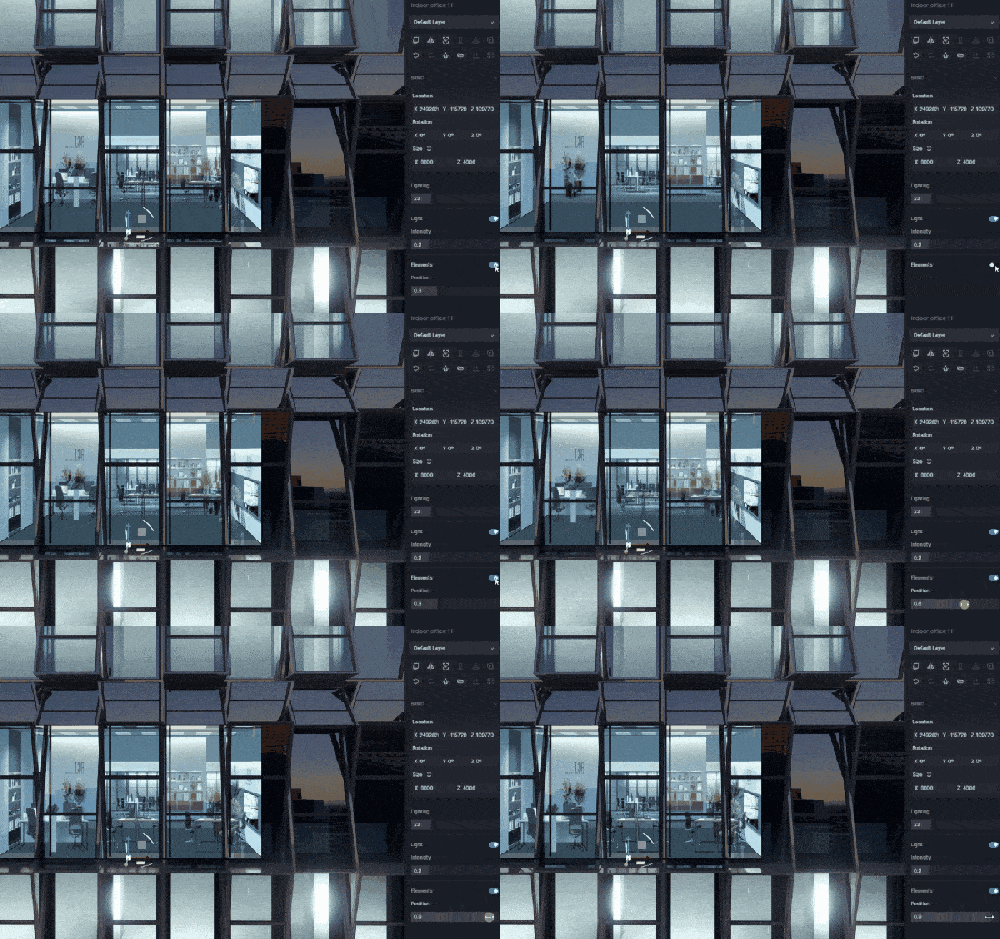
Outstanding visualization is much more than just the rendering of the model itself. It’s about a rich and harmonious overall environment. As of October 2026, D5 Render’s Pro library has 16,000+ official assets, from modern furniture for the interior to vegetation and vehicles for the exterior. To make the scene look more vibrant, you can also add dynamic characters or animals to render a nice animation. With D5 Model Library, furnishing up the scene is no longer a time-consuming process. You can find the out-of-the-box interior decor tool, Interior Parallax, a great time-saver especially when you have dozens of rooms in an architectural visualization project. In order to make a dark, dull building become lively and bright, all you need to do is drag and drop the Interior Parallax behind the window, scale it properly, and adjust its built-in accessories as you like.
🏗️ Real-World Example
AO Architecture Firm (Global, 2025): Architecture firm AO adopted D5 Render’s real-time collaboration and asset library tools to unite distributed teams across offices. By working from a shared asset environment, the firm reduced review cycles and accelerated client presentations, according to a case study published on the D5 Render website.
Dynamic Models, Particles and Decals
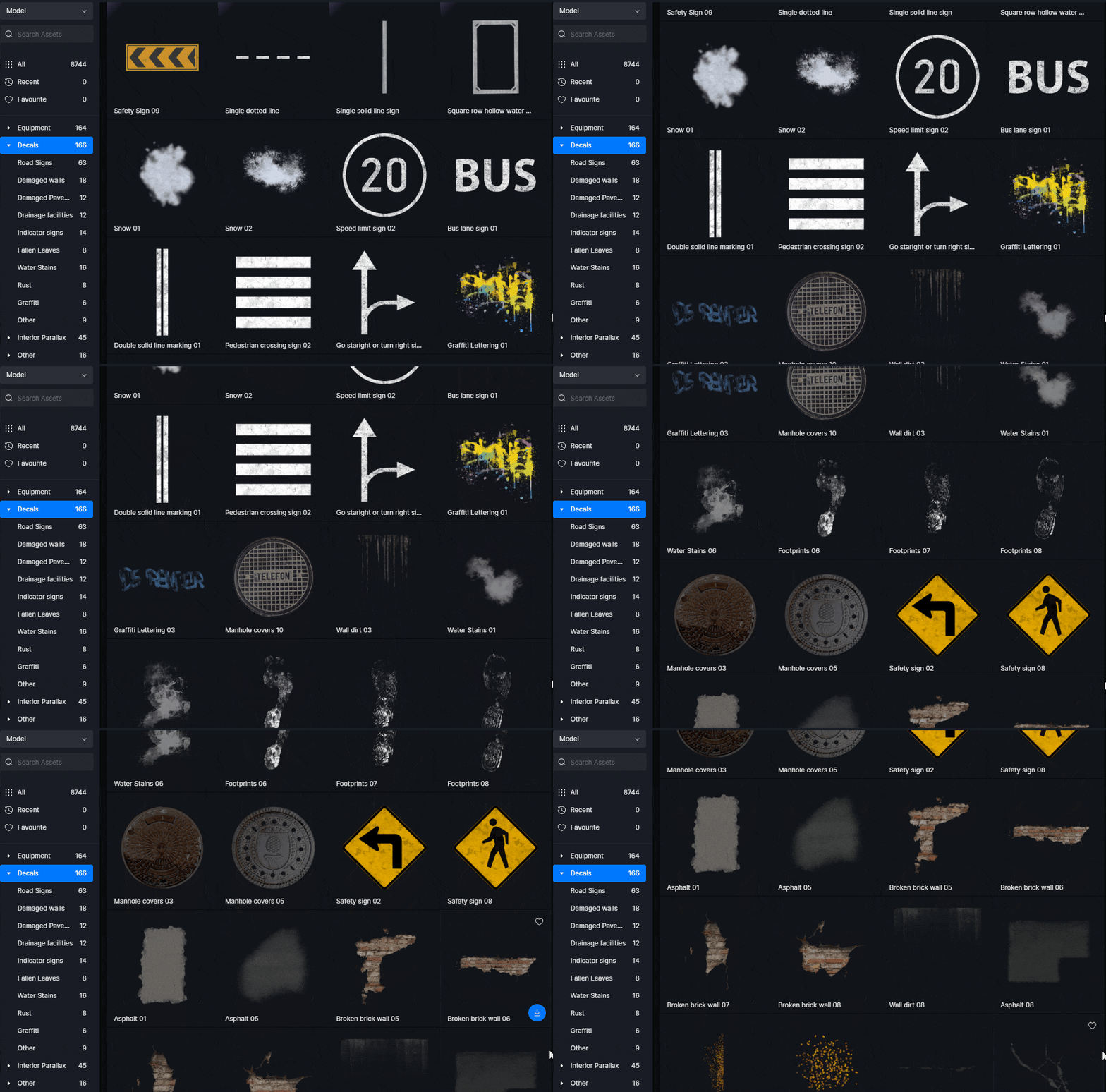
To further enrich the environment like a neighbourhood, D5 offers a lot of dynamic models and particle assets. For example, you can add to the street a fountain particle, a speeding car, or a crowd of people from D5 Model Library, bringing your render to life. Think about the real world: walls have water stains after rain; fallen leaves scatter around the lawn; manholes can be found everywhere on the road. Missing these tiny yet necessary things would make your render rigid and dull. This is where the decals from D5 Model Library play a key role. Decals let you overlay road signs, water stains, graffiti, tire marks and fallen leaves onto any surface, adding the subtle imperfections that separate a convincing render from a sterile one.
⚠️ Common Mistake to Avoid
Many architects skip adding environmental details like decals and particles, leaving their renders looking overly clean and artificial. Real buildings have water stains near drains, tire marks on driveways and dust on window sills. Adding two or three well-placed decal layers makes the difference between a render that looks “CG” and one that clients mistake for a photograph.
Scatter, Brush and Path Tools for Fast Scene Population
Now that you know D5 has thousands of assets for you to choose from, here is a better and faster way to use them. D5 Render provides Scatter, Brush and Path tools to work with the built-in asset library. As the name suggests, you can add models wherever your mouse is, or simply fill a certain face with the assets you selected. The Scatter tool distributes vegetation presets across terrain in seconds. Brush lets you paint models along surfaces with adjustable radius, density and size. Path aligns plants and barriers along walkways or fences automatically. Together, these tools turn landscape population from a multi-hour chore into a few minutes of clicking and dragging. For more on how 3D tools are transforming design workflows, read our article on how 3D modeling is changing the design process.
💡 Pro Tip
Use D5 Render’s terrain heightmap presets before scattering vegetation. Drop a heightmap template onto flat ground to create realistic topography, then apply a scatter vegetation preset on top. This two-step approach produces convincing landscapes in under five minutes, compared to manually placing hundreds of individual plant models.
How Does D5 Render’s Asset Library Compare to Others?
Architects often use external sources like Quixel Megascans, 3D Warehouse or TurboSquid alongside their rendering software. Each platform has trade-offs in terms of cost, format compatibility and asset quality. The table below compares D5 Render’s built-in library against common alternatives.| Feature | D5 Render Asset Library | External Asset Marketplaces |
|---|---|---|
| Integration | Built into software, drag-and-drop | Requires download, import and format conversion |
| Material Setup | PBR materials pre-configured, ready to render | Often requires manual material re-linking |
| Architecture Focus | Purpose-built for architecture, interiors and landscape | General purpose, may lack AEC-specific assets |
| Cost | Included with D5 Pro subscription (~$360/year) | Per-asset pricing, subscriptions vary ($50-$500+/year) |
| Dynamic Models | Animated people, vehicles, vegetation included | Static models common, animation often extra |
What Software Is D5 Render Compatible With?
D5 Render supports direct file import for SKP, FBX, OBJ and other common 3D formats. It also offers LiveSync plugins for popular modeling software including SketchUp, 3ds Max, Rhino, Revit, Archicad, Blender, C4D and Vectorworks. Any change made in the modeling software syncs into D5 in real time, so you can adjust geometry in SketchUp and see updated results in your D5 scene instantly. This real-time feedback loop removes the traditional export-import-render cycle that slows down many visualization workflows. You can download the latest version and LiveSync plugins from the D5 Render download page.How Much Does D5 Render Cost?
D5 Render offers three tiers. The free Community edition provides access to 2,100+ official assets (as of October 2026), suitable for learning and personal projects. The Pro plan costs approximately $38 per month (or $360 billed annually) and unlocks the full library of 16,000+ official assets, 4K+ output resolution, watermark-free rendering and commercial-use rights. The Teams plan starts at $75 per seat per month, adding shared asset management for studios. Students and educators can apply for a free Education license with Pro-level features through the D5 Render website. For a comparison with other rendering tools, the ArchDaily product page for D5 Render provides additional context on how the library compares to competitors.Conclusion
D5 Render asset library is constantly updated to serve users from all walks of life. One past library update alone added 900+ assets, including landscape models, crops, and more. If you still feel like something is missing from the collection, don’t worry. Feedback is welcome and valued. Everyone can share ideas and requests for the D5 Asset Library here.✅ Key Takeaways
- D5 Render’s built-in asset library provides 43,000+ (as of October 2026) models, materials, particles and presets purpose-built for architectural visualization.
- PBR materials come pre-configured with albedo, roughness and normal maps, eliminating manual material node setup.
- Scatter, Brush and Path tools allow rapid landscape population in minutes rather than hours.
- Interior Parallax assets create fully decorated window interiors with a single drag-and-drop action.
- AI PBR Material Snap converts reference photos into production-ready textures automatically.
- The free Community edition provides access to 2,100+ assets, while Pro unlocks 16,000+ assets as of October 2026 with commercial rights.
Last updated:








Notion Alternatives for Architects: 7 Tools That Fit Studio Work
Notion works until a studio needs fee tracking, phase budgets and timesheets....
 Furkan Sen7 Mins read

Why Every Practice Ends Up With Five Versions of the Same Revit Family
Let’s learn why Revit family libraries accumulate duplicates, break schedules and slow...
 illustrarch Editoral Team5 Mins read

Visualizing Renovation Projects From Photographs: A Workflow for Existing-Building Work
Photo-based visualization turns a photograph of a building that already exists into...
illustrarch Editoral Team7 Mins read

Best Free CAD Blocks and Resources for Architects
A working guide to free CAD blocks for architects, covering ARCAT, CAD-Blocks.net,...
Furkan Sen7 Mins read


Leave a comment