

Essential Architecture Tools in 2026: Software, AI, and Physical Equipment
Architecture in 2026 demands more than design talent alone. From BIM and AI-driven platforms to visualization tools, sketching devices, and ergonomic workspaces, architects rely on a hybrid toolkit that blends digital intelligence with physical craft. This article explores the essential tools shaping architectural practice today.
 Elif Ayse Sen31 December 202510 Mins read556

Table of Contents Show
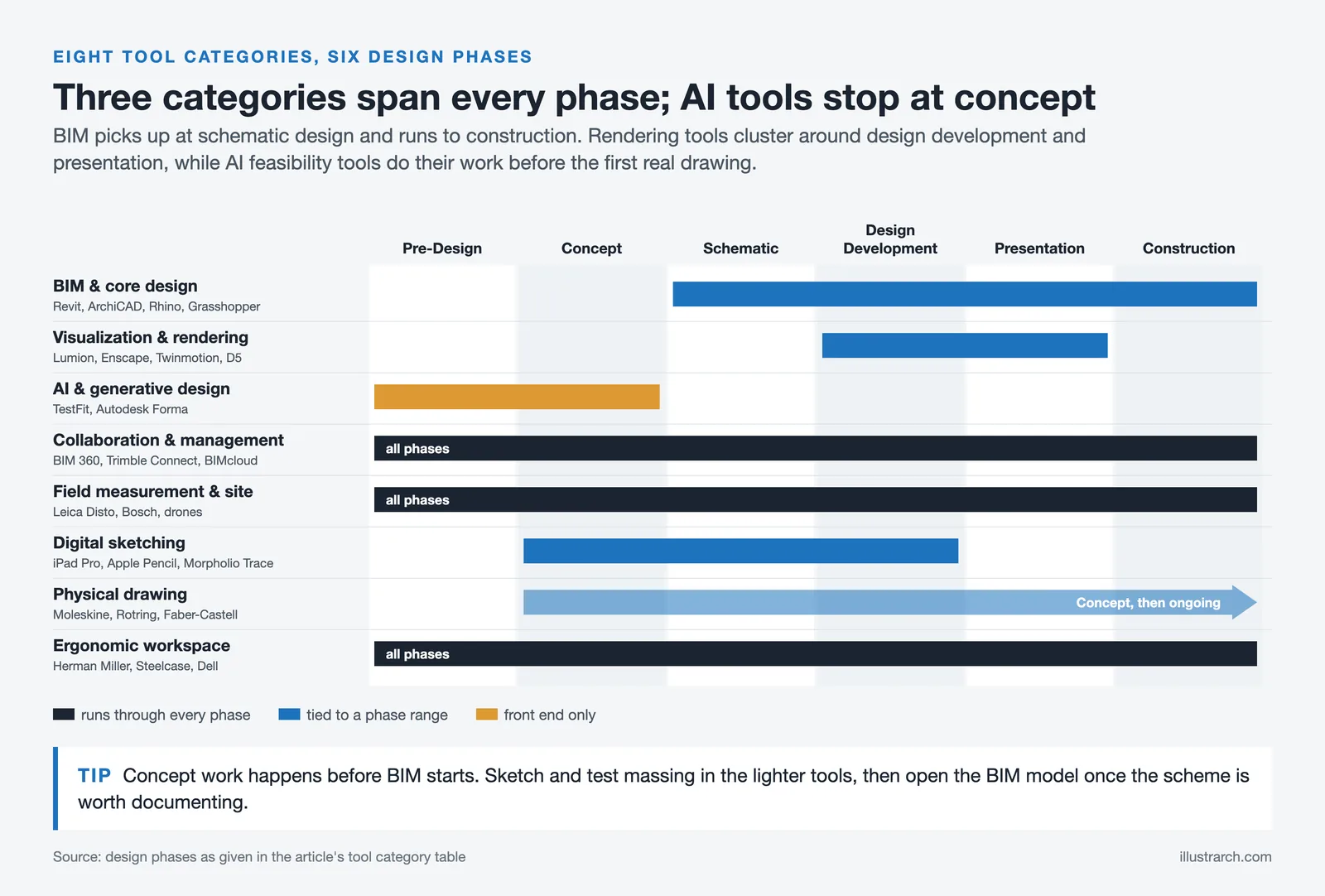
Architecture in 2026 is shaped by speed, precision, collaboration, and adaptability. Architects are no longer defined only by how well they draw or model, but by how efficiently they combine digital intelligence with physical craft. From AI-supported design platforms to simple sketching tools, today’s architectural toolkit reflects a balance between technology and human thinking.
Below are 8 essential tool categories every architect should master not as 2026 trends, but as everyday professional necessities.

| # | Tool Category | Primary Purpose | Design Phase | Key Examples |
|---|---|---|---|---|
| 1 | BIM & Core Design Software | Coordinated modeling, documentation & lifecycle data | Schematic → Construction | Revit, ArchiCAD, Rhino, Grasshopper |
| 2 | Visualization & Real-Time Rendering | Spatial testing, material behavior & client presentations | Design Development → Presentation | Lumion, Enscape, Twinmotion, D5 Render |
| 3 | AI & Generative Design Platforms | Feasibility studies, massing & site optimization | Pre-Design → Concept | TestFit, Spacemaker (Autodesk Forma) |
| 4 | Collaboration & Project Management | Team coordination, version control & information flow | All Phases | BIM 360, Trimble Connect, BIMcloud |
| 5 | Field Measurement & Site Technology | Accurate site capture, surveying & terrain data | Pre-Design → Construction | Leica Disto, Bosch, Drones |
| 6 | Digital Sketching & Concept Devices | Quick ideation, annotations & mobile design | Concept → Design Development | iPad Pro, Apple Pencil, Morpholio Trace |
| 7 | Physical Drawing & Thinking Tools | Reflective thinking, spatial exploration & abstraction | Concept → Ongoing | Moleskine, Leuchtturm1917, Rotring, Faber-Castell |
| 8 | Ergonomic Workspace & Hardware | Productivity, health & sustained creative focus | All Phases | Herman Miller, Steelcase, Dell UltraSharp |
BIM & Core Design Software
Building Information Modeling continues to define how architecture is produced, coordinated, and delivered. In 2026, BIM is no longer limited to documentation; it functions as a shared intelligence system that connects design intent with construction logic, cost, performance, and lifecycle data.
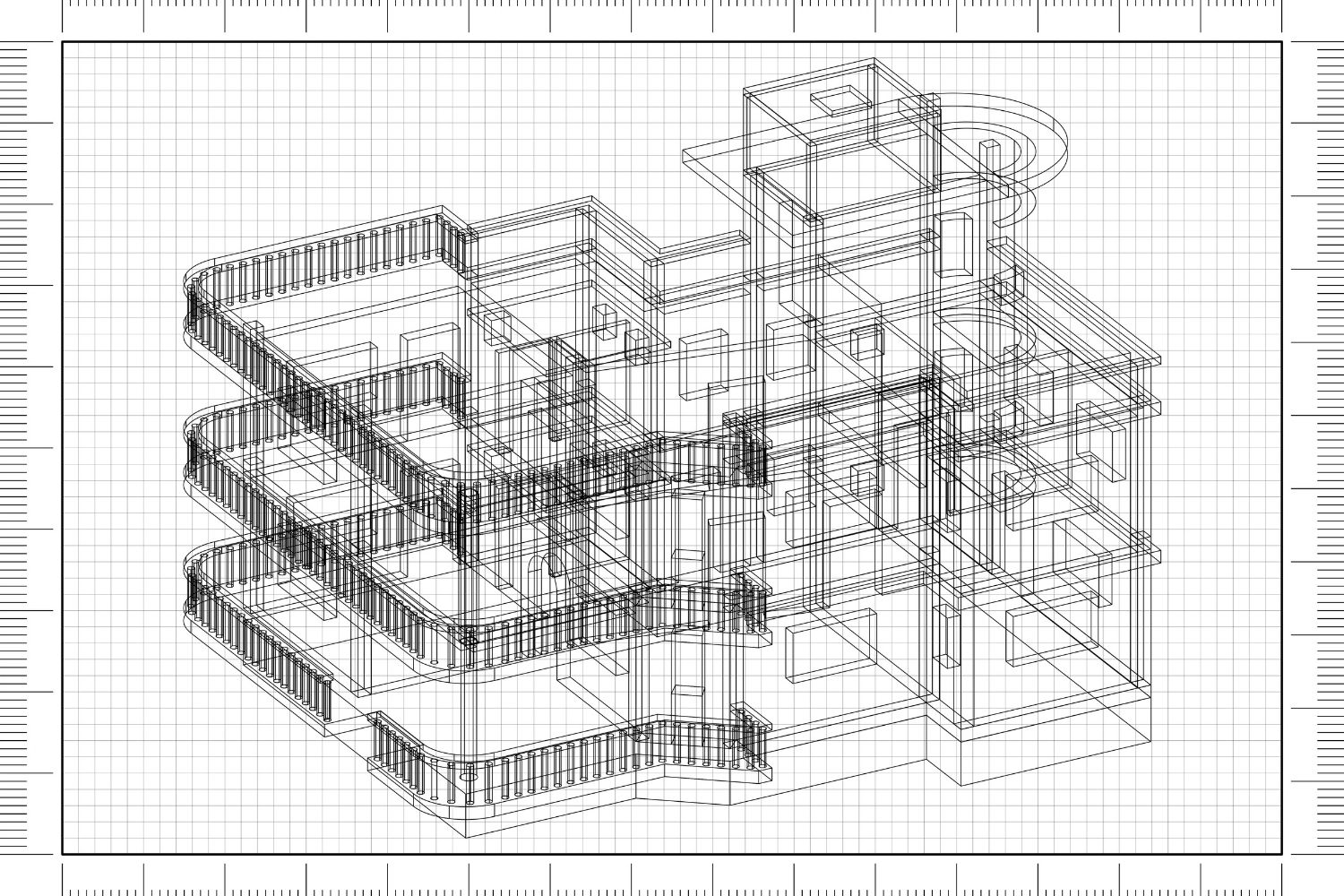
Architects rely on BIM tools to manage increasingly complex projects involving multiple consultants, regulatory requirements, and tight schedules. These platforms allow teams to work within a single coordinated model, reducing conflicts, minimizing errors, and improving clarity between disciplines. Changes made at one stage automatically affect related components, allowing architects to design with greater confidence and control.
Alongside BIM, flexible 3D modeling and parametric tools remain essential. They allow architects to explore geometry freely, test structural or spatial logic, and develop complex forms that respond to site, program, and performance constraints. Together, these tools form the technical foundation of architectural practice in 2026.
| Software | Developer | Primary Strength | Best For | Platform |
|---|---|---|---|---|
| Autodesk Revit | Autodesk | Full BIM documentation & coordination | Large-scale commercial & institutional projects | Windows |
| ArchiCAD | Graphisoft | Intuitive BIM with design-first approach | Mid-size firms & design-focused practices | Windows, macOS |
| Rhinoceros (Rhino) | Robert McNeel | NURBS modeling & complex geometry | Parametric design & computational workflows | Windows, macOS |
| Grasshopper | McNeel (Rhino plugin) | Visual programming & parametric logic | Generative forms & performance-driven design | Windows, macOS |
| AutoCAD | Autodesk | 2D/3D drafting precision | Construction documentation & detail drawings | Windows, macOS, Web |
| SketchUp | Trimble | Quick 3D conceptual modeling | Early-stage massing & small practices | Windows, macOS, Web |
| Vectorworks Architect | Vectorworks | Hybrid 2D/3D BIM with design flexibility | Small to mid-size firms & landscape integration | Windows, macOS |
Visualization & Real-Time Rendering Tools
In 2026, visualization and real-time rendering tools are no longer limited to final presentations; they have become essential instruments for understanding space during the design process itself. Architects use platforms such as Lumion, Enscape, Twinmotion, and D5 Render to test lighting conditions, material behavior, and spatial atmosphere while the project is still flexible. The ability to adjust design elements in real time allows architects to make more confident decisions earlier, reducing the need for major revisions later in the process. These tools support a more intuitive understanding of scale and proportion, helping designers move beyond abstract drawings toward spatial clarity.
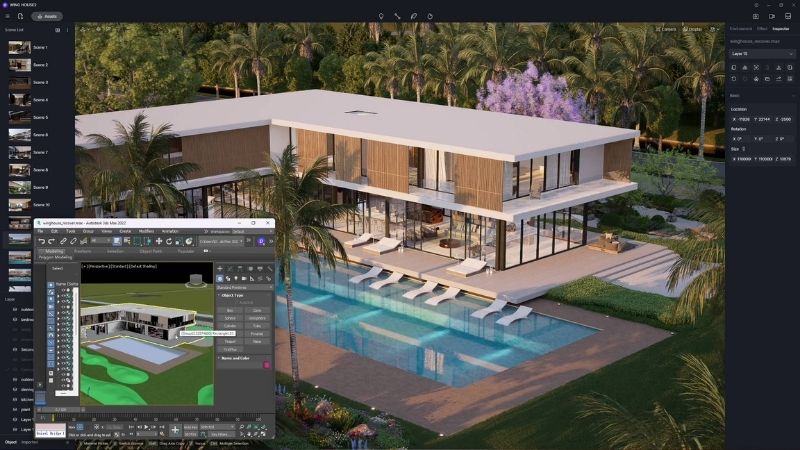
At a more advanced level, immersive platforms such as Unreal Engine allow architects to experience projects at human scale through interactive walkthroughs and virtual reality environments. This level of immersion improves communication with clients and consultants by transforming complex architectural ideas into easily understandable spatial experiences. In 2026, real-time visualization tools function as active design partners rather than decorative software, enabling architects to refine atmosphere, circulation, and user experience with greater precision and confidence.
| Tool | Type | Pricing (Annual) | Key Strength | VR Support | Compatible Software |
|---|---|---|---|---|---|
| Lumion | Standalone | ~$790-$1,575 | Vast asset library, atmospheric effects & post-processing | 360° Panoramas | Revit, SketchUp, ArchiCAD, Rhino, Vectorworks |
| Enscape | Plugin | $574.80 to $670.80/year (as of October 2026) | Deep BIM integration, fastest setup, one-click VR | Meta Quest 3, HTC Vive | Revit, SketchUp, Rhino, ArchiCAD, Vectorworks |
| Twinmotion | Standalone | Free under $1M revenue; $445/seat/year above (as of October 2026) | Easiest learning curve, Quixel Megascans, Unreal Engine base | VR Walkthroughs | Revit, SketchUp, Rhino, ArchiCAD (via Datasmith) |
| D5 Render | Standalone | ~$30/mo billed annually, $360/year (free version available, as of October 2026) | AI Atmosphere Match, cinematic GI, best value for money | VR Panoramas | Revit, SketchUp, ArchiCAD, Rhino, Vectorworks, 3ds Max |
| Unreal Engine | Standalone Engine | Free (royalty-based for commercial products) | Highest visual fidelity, interactive walkthroughs, cinematic output | Full VR/XR | Revit, Rhino, 3ds Max, SketchUp (via Datasmith) |
AI & Generative Design Platforms
Artificial intelligence plays a growing role in early-stage architectural thinking. In 2026, AI-driven design platforms are used to support architects during feasibility studies, site analysis, zoning evaluation, and massing exploration, phases that traditionally require extensive manual testing and interpretation. Tools such as TestFit and Spacemaker help architects quickly understand what is possible on a site before committing to a specific design direction.
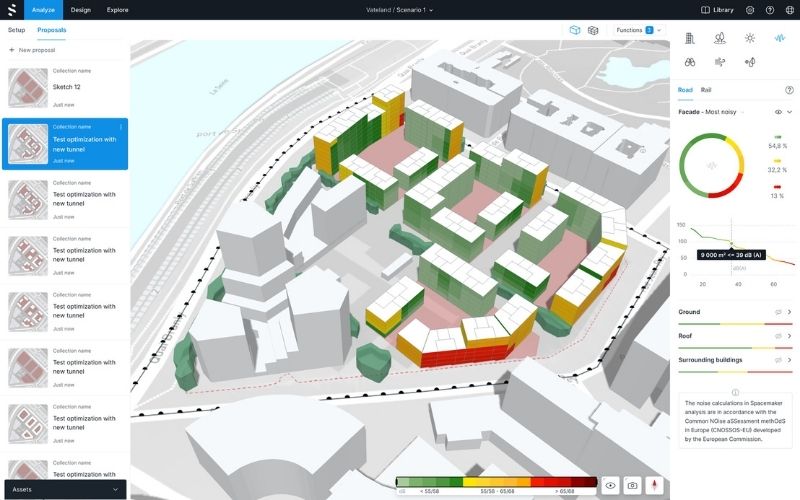
These platforms can generate multiple design scenarios based on predefined criteria such as density limits, sunlight access, circulation efficiency, views, and regulatory constraints. Instead of drawing and recalculating countless options, architects can compare alternatives side by side and evaluate their performance within minutes. This speed allows design teams to focus their time on refining the strongest ideas rather than getting lost in repetitive technical work.
Importantly, AI does not replace architectural judgment or creativity. It functions as an analytical partner that reveals hidden patterns, constraints, and opportunities within complex data sets. By reducing time spent on calculations and rule-checking, AI tools give architects more space to concentrate on concept development, spatial quality, narrative, and the human experience, the aspects of design that technology cannot automate.
| Platform | Focus Area | AI Capabilities | Best For | Integration |
|---|---|---|---|---|
| TestFit | Individual parcel feasibility | Generative site planning, parking layout, unit optimization, deal analysis | Multi-family housing, mixed-use & parking-intensive projects | Revit export |
| Autodesk Forma (Spacemaker) | Neighborhood-scale analysis | Sun, wind, noise simulation; massing optimization; environmental analysis | Urban planning & sustainable site design | Revit (bi-directional) |
| SWAPP | Construction documentation | Auto-generates complete drawing sets from 3D models | Automating CD production at scale | BIM model input |
| Hypar | Computational design workflows | Cloud-based generative design, parametric option generation | Rapid option studies & developer presentations | IFC, Revit |
| Midjourney / DALL·E / Stable Diffusion | Conceptual visualization | AI image generation for mood boards, conceptual imagery & client vision | Early concept exploration & visual communication | Standalone / API |
Collaboration & Project Management Systems
Architecture is increasingly collaborative and interdisciplinary. In 2026, architectural projects often involve remote teams, international consultants, and parallel workflows running across different time zones. This complexity makes strong coordination systems essential, as architects must manage design information while maintaining clarity and authorship throughout the project lifecycle.
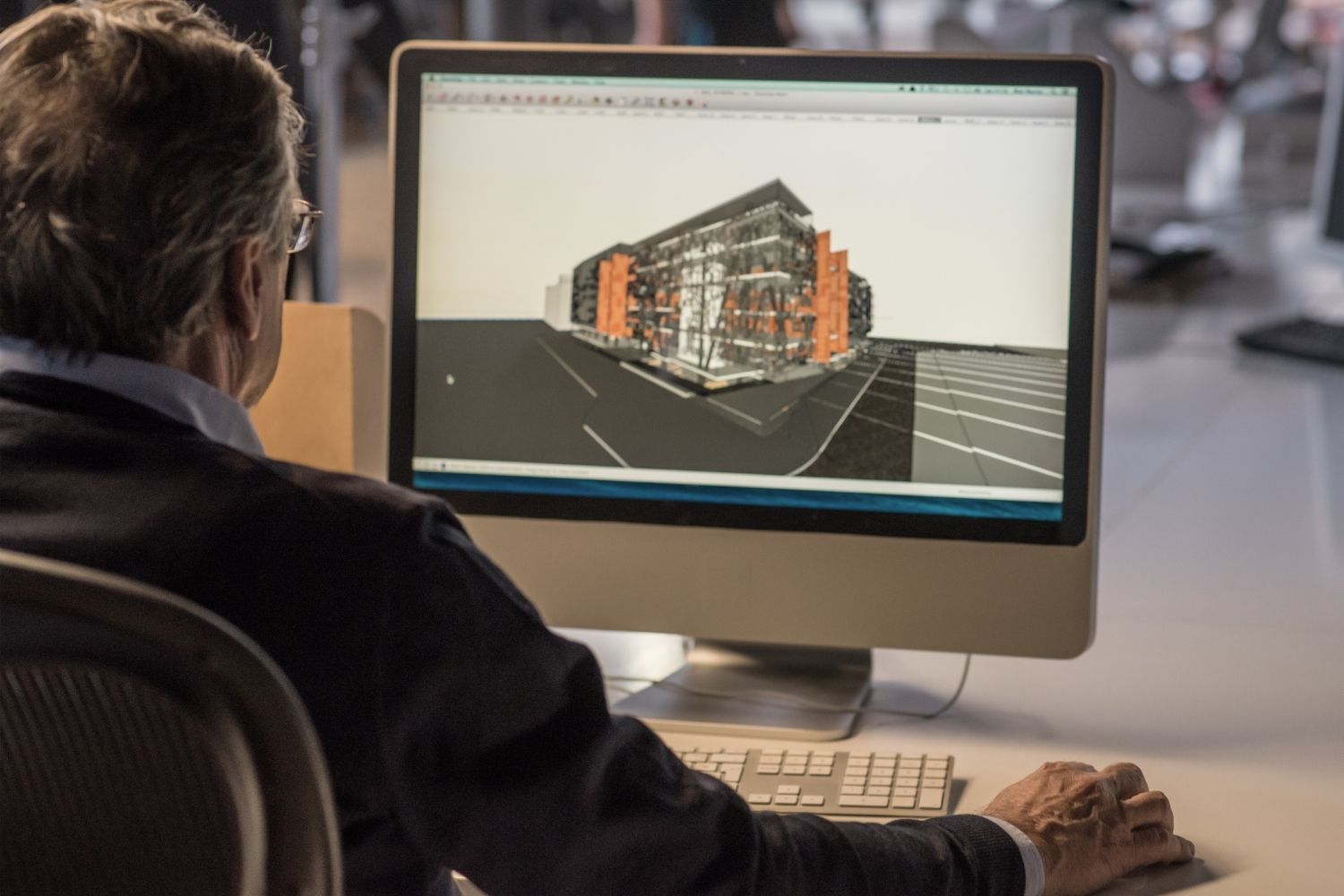
Cloud-based collaboration platforms such as BIM 360, Trimble Connect, and BIMcloud function as centralized digital environments where drawings, models, comments, and revisions are stored and shared transparently. These systems reduce miscommunication, prevent version conflicts, and allow all stakeholders to work from the same up-to-date information. By creating a clear project history, they support accountability and smoother decision-making across disciplines.
For architects, collaboration platforms are not just organizational tools, they actively protect design intent. By controlling information flow, tracking changes, and structuring feedback, architects can ensure that core ideas remain intact as projects move from concept to detailed design and construction. In 2026, effective collaboration systems are fundamental to delivering coherent architecture within increasingly complex professional networks.
| Platform | Developer | Core Function | Key Features | Best Paired With |
|---|---|---|---|---|
| Autodesk BIM 360 / ACC | Autodesk | Cloud BIM coordination & document management | Model coordination, clash detection, RFI management, field tools | Revit, AutoCAD, Navisworks |
| Trimble Connect | Trimble | Open BIM collaboration platform | IFC support, multi-discipline model viewing, task management | SketchUp, Tekla, any IFC software |
| BIMcloud | Graphisoft | Real-time BIM teamwork server | Live model sharing, delta server technology, role-based access | ArchiCAD |
| Procore | Procore Technologies | Construction project management | Budget tracking, scheduling, quality & safety management | Any design software (via integrations) |
| Notion / Asana / Monday | Various | General project management & team communication | Task boards, timelines, file sharing, team dashboards | Any workflow (non-BIM specific) |
Field Measurement & Site Technology
Accurate site data remains the foundation of good architecture. In 2026, architects rely on advanced field technologies to capture real-world conditions quickly and precisely, especially in renovation, adaptive reuse, and dense urban contexts where existing conditions are complex and often undocumented. Reliable site information at early stages allows architects to design with confidence and avoid costly corrections later in the process.
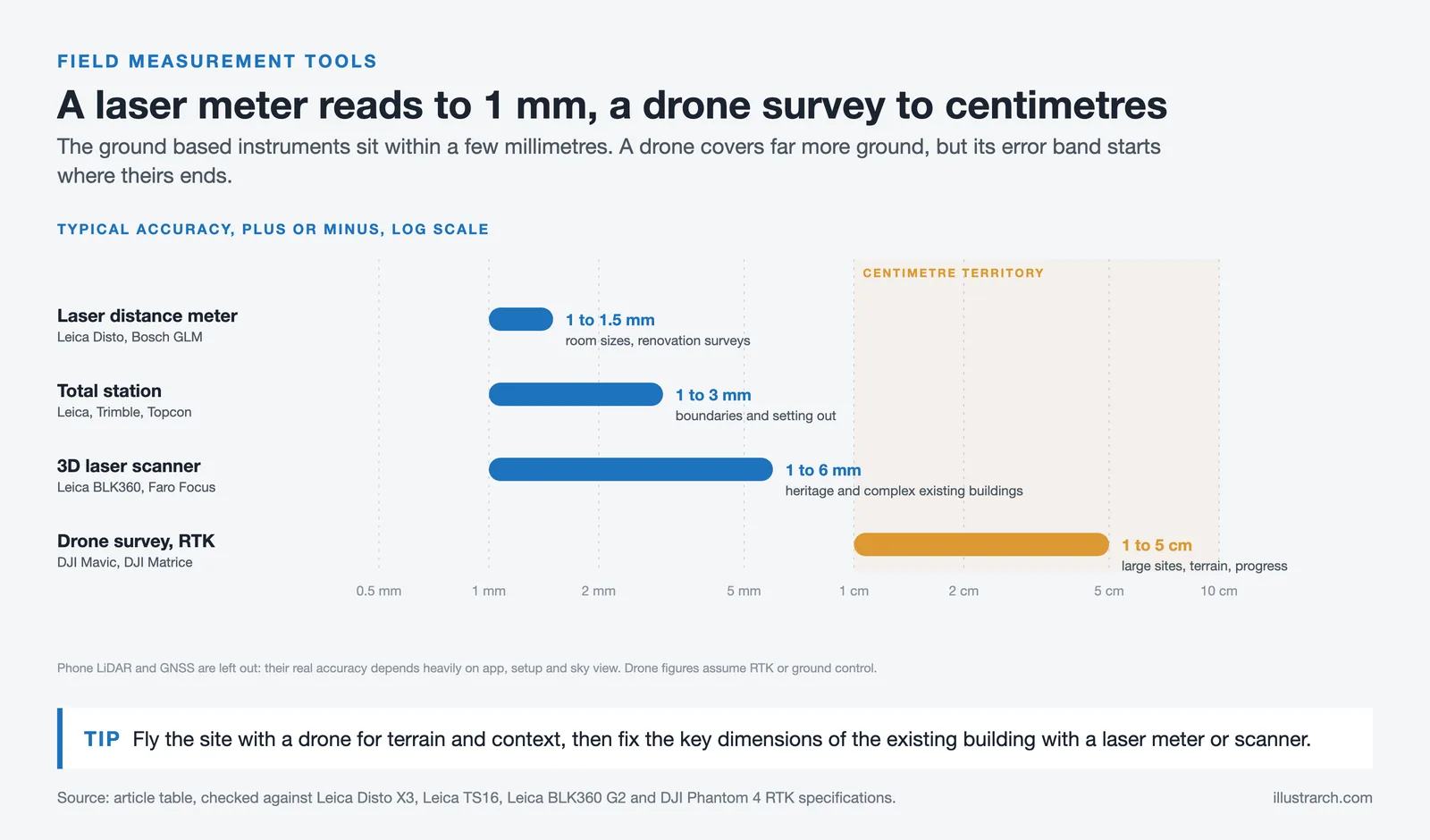

Laser measurement tools such as Leica Disto and Bosch devices enable fast and accurate documentation of existing spaces, significantly reducing the risk of dimensional errors. In parallel, drones and digital survey methods are increasingly used to capture aerial views, surrounding context, and terrain data. These technologies support more informed decisions related to access, orientation, massing, and environmental response.
By strengthening the connection between physical sites and digital models, field measurement technologies help architects design with greater realism and responsibility. They ensure that drawings and BIM models are grounded in actual conditions rather than assumptions, reinforcing the credibility of architectural work from concept through construction. In 2026, precise site documentation is not just a technical task, it is a critical design tool.
| Technology | Key Products / Brands | What It Captures | Accuracy Range | Best Use Case |
|---|---|---|---|---|
| Laser Distance Meters | Leica Disto, Bosch GLM series | Room dimensions, heights, diagonals | ±1.0-1.5 mm | Interior surveys, renovation projects |
| 3D Laser Scanners | Leica BLK360, Faro Focus | Full 3D point clouds of spaces | ±1-6 mm | Complex existing buildings, heritage & adaptive reuse |
| Drones (UAV) | DJI Mavic, DJI Matrice | Aerial photography, terrain mapping, orthomosaics | ±1 to 5 cm (with RTK or ground control points) | Large sites, topographic surveys, construction monitoring |
| LiDAR (Mobile) | iPhone Pro (built-in), Polycam, 3D Scanner App | Quick 3D scans of rooms and objects | Centimeter level (app dependent) | Quick site documentation, preliminary surveys |
| Total Stations / GNSS | Leica, Trimble, Topcon | Precise coordinates, boundary lines, elevation data | ±1 to 3 mm (total station); about 8 mm + 1 ppm horizontal (GNSS RTK) | Land surveys, site boundary verification, construction layout |
Digital Sketching & Concept Devices
Sketching remains central to architectural thinking, but its tools have evolved significantly. In 2026, digital sketching devices allow architects to combine the spontaneity of hand drawing with the efficiency and flexibility of digital workflows. Tools such as tablets and stylus-based interfaces enable designers to think visually without being constrained by traditional software environments.

These devices are widely used for early concepts, diagrams, annotations, and quick design discussions. Architects can sketch directly over plans, sections, and images, capture ideas during meetings, or develop concepts while traveling, all while staying connected to their digital project files. This immediacy supports faster communication within teams and helps translate abstract ideas into shareable visual language.
Digital sketching supports a fluid design process where ideas move seamlessly between hand, screen, and model. Rather than replacing traditional drawing, these tools extend it, allowing architects to work intuitively while remaining integrated with BIM and modeling platforms. In 2026, digital sketching strengthens creativity by removing barriers between thinking and making, not by limiting expression.
| Device / App | Type | Key Feature for Architects | Price Range |
|---|---|---|---|
| iPad Pro + Apple Pencil | Tablet + Stylus | Pressure sensitivity, portability, app ecosystem | $999+ |
| Wacom Cintiq / Intuos | Pen Display / Tablet | Professional-grade pen accuracy, desktop integration | $80-$3,300 |
| Samsung Galaxy Tab S series | Tablet + S Pen | S Pen included, AMOLED display, Android flexibility | $700+ |
| Morpholio Trace | App (iOS) | Tracing paper layers, scale drawings, CAD import | Free / Pro subscription |
| Procreate | App (iPadOS) | Brush variety, layer system, time-lapse recording | $12.99 (one-time) |
| Concepts App | App (iOS, Android, Windows) | Infinite canvas, vector-based sketching, precision tools | Free / Pro subscription |
Physical Drawing & Thinking Tools
Despite rapid technological advances, physical drawing tools remain deeply relevant to architectural practice. In 2026, sketchbooks, pens, pencils, and tracing paper continue to support a slower and more reflective mode of thinking, one that digital tools often struggle to replicate. Many architects still rely on sketchbooks from brands such as Moleskine and Leuchtturm1917, which are valued for their paper quality, durability, and suitability for daily design exploration.

Hand drawing allows architects to simplify complex problems, focus on spatial relationships, and explore abstraction without technical constraints. Pens and pencils from Staedtler, Rotring, and Faber-Castell are commonly used for diagramming, concept sketches, and layered thinking on tracing paper. These tools encourage experimentation, personal expression, and iterative design, especially during early stages when ideas are still forming and precision is less important than clarity.
In 2026, many architects intentionally balance digital efficiency with physical drawing as a way to maintain conceptual depth and creative independence. Tracing paper from professional suppliers and simple analog tools remain essential companions to online platforms, helping architects think through space before committing ideas to software. Rather than competing with digital workflows, physical drawing tools continue to ground architectural thinking in observation, intuition, and human touch.
| Category | Brand | Popular Model | Why Architects Prefer It |
|---|---|---|---|
| Sketchbooks | Moleskine | Classic Hard Cover (A5 / Large) | Durable binding, smooth paper, iconic pocket for references |
| Leuchtturm1917 | Master (A4+) / Medium (A5) | Numbered pages, table of contents, dot/grid options | |
| Technical Pens | Rotring | Rotring 600 / Rapid Pro | Weighted metal body, precise line work, professional feel |
| Staedtler | Pigment Liner / Mars Lumograph | Varied tip sizes, archival ink, smudge-proof | |
| Pencils | Faber-Castell | 9000 Series (2B: 6H) / TK-Fine Vario L | Consistent graphite grades, ideal for layered sketching |
| Markers | Copic | Sketch / Ciao series | Refillable, blendable tones, ideal for concept presentations |
| Tracing Paper | Canson, Bienfang, Gateway | Rolls (12″ / 18″ / 24″ wide) | Layered iterative design, overlay comparisons, quick studies |
Ergonomic Workspace & Hardware Setup
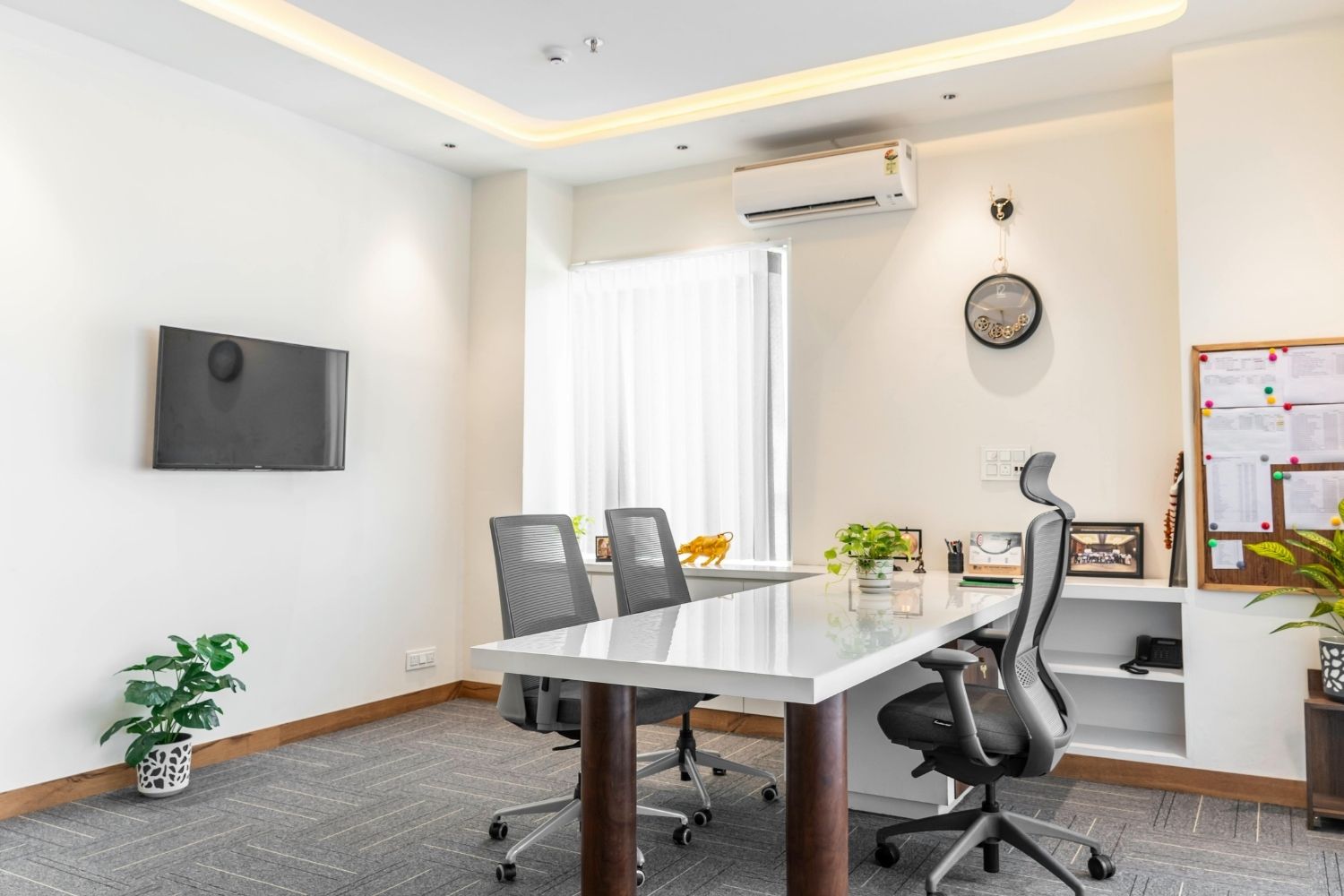
The quality of architectural work is closely linked to working conditions. In 2026, ergonomic workspaces are widely recognized as essential professional infrastructure rather than optional upgrades. Architects spend long hours modeling, drawing, and reviewing details, making comfort, posture, and visual clarity critical to both productivity and long-term well-being.

High-resolution monitors from brands such as Dell UltraSharp, LG, and Apple support precise modeling, drawing accuracy, and color consistency. Adjustable desks from FlexiSpot or Fully, combined with ergonomic chairs from Herman Miller or Steelcase, help reduce physical strain during long design sessions. Proper task lighting further improves concentration and visual comfort, especially in detail-intensive architectural work.
A well-designed workspace supports not only daily productivity, but also long-term health and creative focus. In 2026, architects increasingly understand that their studio environment directly affects how they think, design, and sustain their careers. An ergonomic setup becomes one of the most overlooked yet critical tools, quietly supporting better architecture through better working conditions.
| Category | Recommended Brands | Key Specs to Look For | Price Range |
|---|---|---|---|
| Monitors | Dell UltraSharp, LG UltraFine, Apple Studio Display | 4K+ resolution, 27″, 32″, 99% sRGB, USB-C connectivity | $350-$1,600 |
| Ergonomic Chairs | Herman Miller (Aeron, Embody), Steelcase (Leap, Gesture) | Adjustable lumbar, seat depth, armrests, 12-year warranty | $1,000-$2,000 |
| Standing Desks | FlexiSpot, Fully Jarvis, Uplift V2 | Electric height adjustment, memory presets, cable management | $400-$1,200 |
| Task Lighting | BenQ ScreenBar, Dyson Lightcycle, Koncept | Adjustable color temperature, anti-glare, auto-dimming | $100-$600 |
| Keyboard & Mouse | Logitech MX Master, Logitech Ergo K860, Apple Magic | Ergonomic angle, programmable buttons, multi-device pairing | $80-$200 |
| Workstation PC / Laptop | Lenovo ThinkStation, Dell Precision, Apple MacBook Pro | NVIDIA RTX GPU, 32 GB+ RAM, SSD storage, multi-monitor output | $2,000-$5,000+ |
The tools architects use in 2026 are not neutral instruments. They shape architectural thinking, collaboration, and design. The strongest practices are those that combine advanced digital systems with human-centered physical tools, using each intentionally rather than automatically. By mastering these eight tool categories, architects can respond more intelligently to complexity, communicate ideas more clearly, and design spaces that are both technically sound and emotionally meaningful.




Interior Design for Commercial Spaces: Enhancing Functionality and Brand Identity
Commercial interior design has to serve brand, function and regulation at once....
 Begum Gumusel4 Mins read

Futuro House Production Revived in Finland After Decades-Long Hiatus
A Facebook listing for abandoned moulds led to the first new Futuro...
 illustrarch Editoral Team3 Mins read

Building Your Dream Home in NSW: What You Should Know About Montgomery Homes
Montgomery Homes has been building across Sydney, Newcastle, the Hunter, Wollongong and...
illustrarch Editoral Team4 Mins read

Designing a Home Theater: Where Drapery Fits Into the Plan
In a media room the curtains are a performance layer, not decoration....
illustrarch Editoral Team3 Mins read


Leave a comment