

Best Online Bubble Diagram Makers for Architects & Students
Looking for the best bubble diagram maker for architecture projects? Explore top-rated online bubble diagram creator tools — from free browser-based apps to professional-grade platforms — that help architects, interior designers, and students visualize spatial relationships, plan layouts, and streamline early-stage design workflows in 2026.
 Furkan Sen24 April 202614 Mins read1.2k
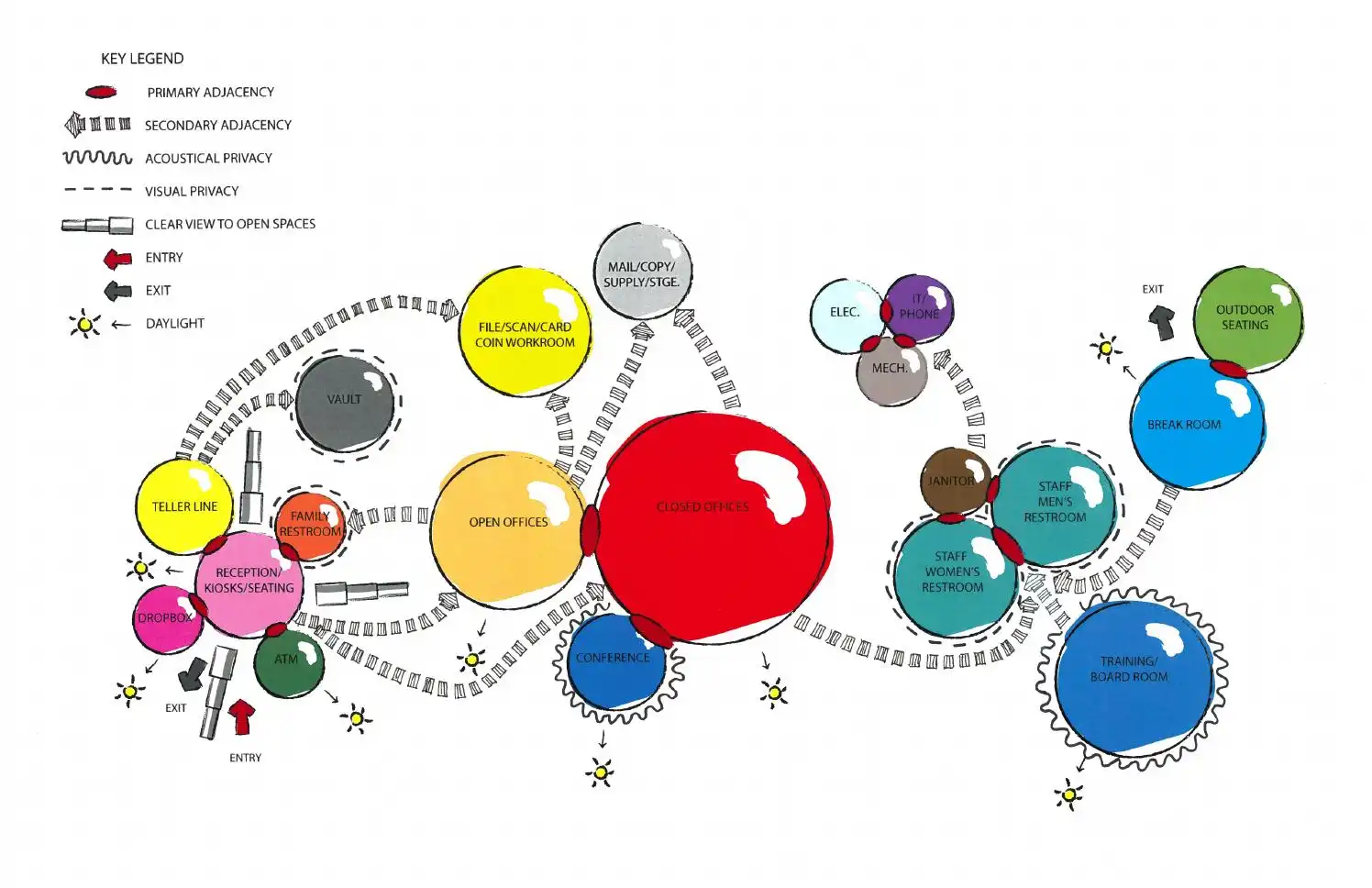


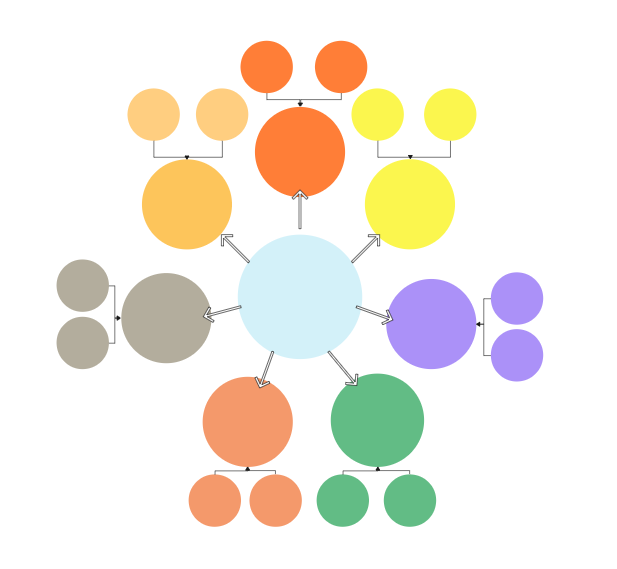
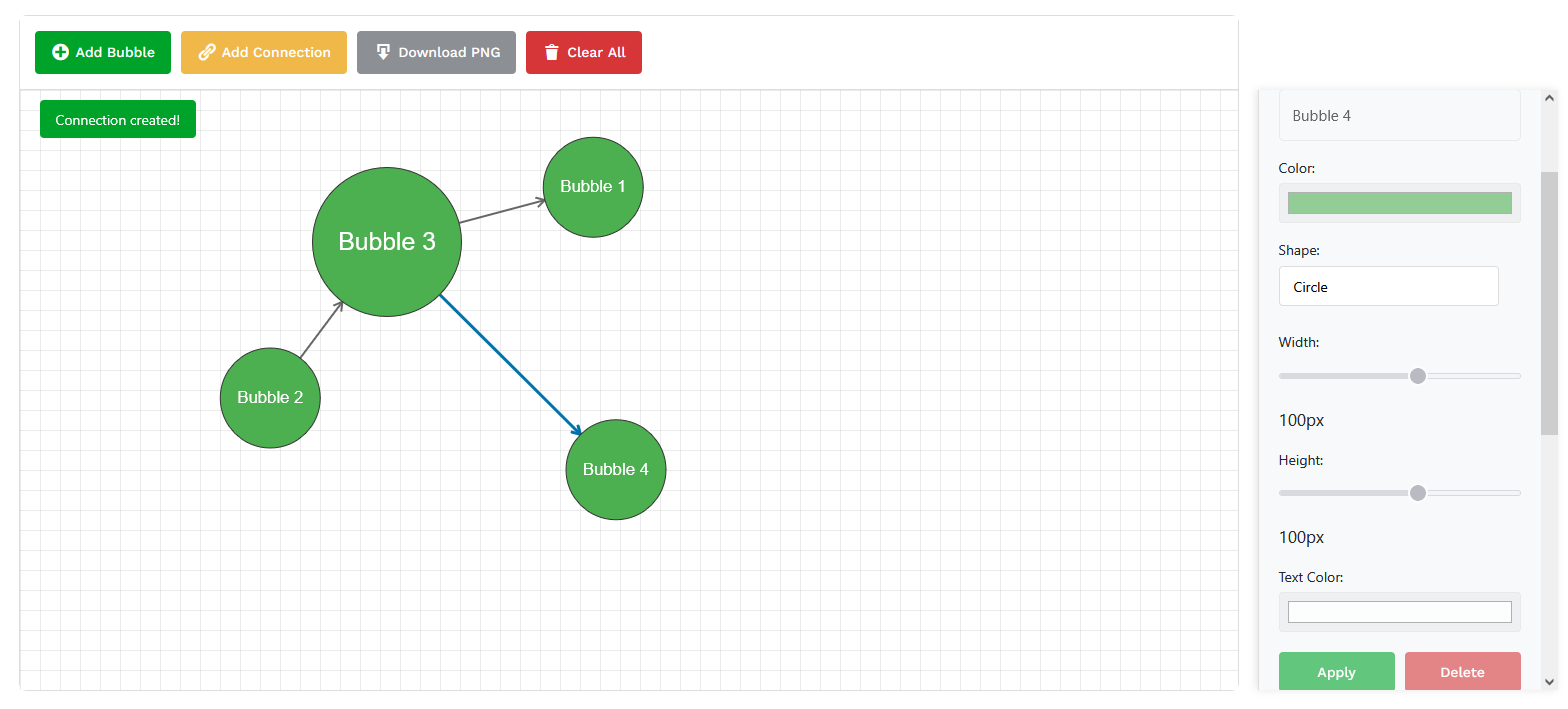


Table of Contents Show
Quick Answer: The best online bubble diagram makers let architects and students map space relationships quickly with drag-and-drop circles and connectors. Free tools cover simple diagrams, while paid plans add exports and collaboration, helping you plan adjacencies before drawing a floor plan.
A bubble diagram maker is a browser-based tool that helps architects and students map spatial relationships between rooms, zones, and functions using simple interconnected shapes. Used in the earliest stage of design, these tools let you test multiple program arrangements before any floor plan is drawn, saving time and sharpening design intent from the start.
Bubble diagrams have become indispensable tools across fields ranging from education and business to design and project management. These simple yet powerful visual aids allow users to map out their ideas, organize thoughts, and clearly illustrate the relationships between concepts. A reliable bubble diagram maker represents ideas as interconnected bubbles, fostering creativity, enhancing clarity, and streamlining complex problem-solving processes. Whether you’re brainstorming for a school project, planning a strategic business move, designing an interior design bubble diagram, or developing an architectural bubble diagram for a studio presentation, a well-crafted bubble diagram can be your go-to bubble organizer for structured spatial thinking.
Creating bubble diagrams has become more accessible than ever, thanks to the growing number of intuitive, feature-rich online tools. Today’s bubble diagram creator platforms offer sleek, user-friendly interfaces and powerful customization options that cater to all skill levels. With a wide array of templates, drag-and-drop functionality, and real-time collaboration features, these websites enable users to turn their ideas into polished, professional diagrams in minutes. Whether you need a bubble chart maker, a bubble graph maker, or a dedicated bubble map maker, the platforms below cover every workflow, from quick concept sketches to detailed spatial programs. This article reviews the best bubble chart maker and bubble graph maker websites, each offering unique features to help you achieve your creative and organizational goals.
What Is an Online Bubble Diagram Maker for Architects?
An online bubble diagram maker is a web-based tool that helps architects visualize spatial relationships using simple shapes. It works by arranging labeled bubbles to represent rooms, zones, or functions and their adjacencies. For architects and architecture students, this type of bubble diagram creator is important because it accelerates early-stage design thinking and concept clarity, allowing you to test multiple program arrangements before committing to a floor plan.
Unlike generic diagramming software, a purpose-built architectural bubble diagram tool is optimized for spatial logic. It lets you define adjacencies, circulation paths, and hierarchical relationships between spaces such as public versus private zones. Interior designers also rely on bubble diagram interior design workflows to map furniture groupings, traffic flow, and functional zones within a room or open-plan layout. A bubble design approach turns abstract program requirements into a visual framework that the whole team can understand. This makes the bubble diagram a universal starting point for any space-planning project, from residential concepts to large-scale urban design strategies.
📌 Did You Know?
Bubble diagrams have been part of architectural practice since at least the mid-20th century. Architects such as Le Corbusier used freeform spatial sketches to test programmatic logic before formal plans began. Today, the same core method is embedded in digital tools used by studios worldwide. According to the Royal Institute of British Architects (RIBA), spatial programming remains one of the most critical early-stage activities in any design project.
How to Choose the Right Bubble Diagram Creator
With so many options available, selecting the right bubble diagram creator depends on your specific workflow. Here are key factors to consider when evaluating any bubble map generator or bubble graph maker:
Ease of use: The best tools let you start immediately without a steep learning curve. Look for drag-and-drop interfaces, pre-built templates, and minimal setup time, especially important during fast-paced studio critiques or client meetings.
Export formats: Architects need outputs that integrate with downstream tools. Prioritize platforms that export to PNG (with transparency), SVG, PDF, or formats compatible with CAD and BIM workflows.
Collaboration features: Remote work is now standard in architecture practice. Choose a bubble chart maker that supports real-time co-editing, commenting, and sharing, so your team stays aligned from concept through to schematic design.
Customization depth: Being able to adjust bubble sizes proportionally to program area, change connection styles to indicate circulation intensity, and color-code functional zones makes a diagram far more communicative. A good bubble diagram interior design tool should offer these options without cluttering the interface.
⚠️ Common Mistake to Avoid
Many students and early-career architects treat the bubble diagram as a one-time sketch rather than an iterative tool. Creating only a single diagram and moving straight to floor plans skips the most valuable part of the process: testing multiple spatial configurations. Always produce at least three distinct bubble layouts before settling on a direction. Each version will reveal different adjacency trade-offs that a single diagram cannot show.
How to Create a Bubble Map Using an Online Bubble Creator
If you want to create a bubble map for an architecture or interior design project, the process is straightforward with any of the tools listed below. Here is a quick overview of the typical steps to make a bubble map from scratch:
First, list your program requirements, covering every room, zone, or function that needs to appear in the diagram. Next, open your preferred bubble map maker or bubble map creator tool and add a bubble for each space. Resize bubbles proportionally to reflect the intended square footage or importance of each area. Then, draw connections between bubbles that need direct adjacency, for instance, linking the kitchen to the dining area, or the reception to the waiting room.
A good bubble creator lets you color-code zones (public, private, service) and adjust line weights to show primary versus secondary circulation. Once your layout feels balanced, export the diagram as a PNG or PDF and drop it into your presentation deck or pin-up board. The ability to quickly create a bubble map and iterate on it is what makes these tools so valuable in the early concept phase. If you are looking for a more creative bubble map approach, try experimenting with overlapping bubbles, gradient fills, or freeform shapes to convey design atmosphere alongside spatial logic. For reference samples, the Best Bubble Diagram Samples collection on illustrarch shows a range of hand-drawn and digital approaches used in real projects.
💡 Pro Tip
When setting up your bubble diagram, size each bubble relative to the actual square footage of the space it represents, not its programmatic importance. A utility core and a main hall may both be “important,” but their size on the diagram should reflect their real-world floor area. This one habit keeps spatial proportions honest from day one and prevents costly rework when you transition to schematic floor plans.
Mini Update: Bubble Diagram Tools in 2026
In 2026, online bubble diagram makers have evolved beyond simple drag-and-drop tools. Many platforms now support real-time collaboration, cloud saving, and export to PDF, SVG, or CAD-friendly formats. This makes them especially useful for architecture students working on studio projects and teams collaborating remotely.
Another noticeable trend is the integration of AI-assisted layout suggestions. Some tools can now recommend spatial adjacencies or automatically balance bubble sizes based on program requirements, helping users move faster from concept to schematic design without losing design intent. This shift has transformed every modern bubble chart generator and bubble graph software tool into something far more capable than a basic drawing canvas.
The rise of bubble graph generator features powered by AI means that even a rough list of program areas, such as living room, kitchen, and bedrooms, can be automatically converted into a proportional bubble map with suggested adjacency links. These advances save significant time in both academic and professional settings, making the modern bubble chart creator far more than a simple drawing tool. For a deeper understanding of how diagrams fit into the design process, the American Institute of Architects (AIA) provides useful resources on architectural design methodology.
1. Illustrarch Free Bubble Diagram Maker
Illustrarch Bubble Diagram Maker is our own, architecture-focused web tool that turns early design brainstorming into a friction-free digital workflow. Because it runs entirely in the browser, there is nothing to install or configure; just open the page and start sketching bubbles. Each node can be resized, recolored, or reshaped on the fly (circle or ellipse), and you can label spaces directly on-canvas, making it effortless to communicate program, hierarchy, or adjacencies. Connections are equally customizable: tweak line styles, widths, and colors to express circulation intensity or visual links. When a concept clicks, a single-click Download PNG export preserves transparency, so diagrams drop cleanly into project decks or BIM presentations. The interface is deliberately minimal, with Add Bubble, Add Connection, and Clear All as the core controls, so students and professionals alike stay focused on spatial thinking rather than software menus. Whether you’re mapping a campus masterplan or a compact apartment layout, Illustrarch’s maker keeps the spontaneity of hand sketching while giving you pixel-perfect clarity for the next design phase.
As a free bubble diagram creator built specifically for architecture, this tool is ideal for generating quick architectural bubble diagrams that communicate spatial intent clearly, whether for a design presentation or an internal review.
Try Our Free Bubble Diagram Maker Tool2. Visual Paradigm Online
Visual Paradigm Online is an intuitive, browser-based diagramming tool that simplifies the process of creating bubble diagrams. Its straightforward interface ensures that even first-time users can start designing immediately without the hassle of signing up. This platform is particularly well-suited for individuals and teams looking for a no-frills, efficient solution. The drag-and-drop editor enables you to create clean, professional bubble diagrams in minutes. Its integration with MS Office allows users to embed diagrams directly into Word, Excel, or OneNote, making it a favorite for professionals. While the free version covers basic needs, users can upgrade to access more robust features and advanced templates.
Visual Paradigm also functions as a capable bubble graph generator, making it useful beyond architecture, for UX flows, business process mapping, and educational brainstorming sessions. Its template library includes several pre-built bubble chart maker layouts that you can customize to fit your project requirements.
3. Canva
Canva is renowned for its simplicity and versatility, making it an excellent choice for creating bubble diagrams. This graphic design platform provides a wealth of pre-designed templates, giving users a head start. Canva’s library of icons, shapes, and customizable design elements ensures a polished final product. Its collaborative tools enable team members to work on a bubble diagram in real-time, streamlining group brainstorming sessions. Whether you’re designing for business, education, or personal use, Canva’s user-friendly interface caters to every need. While most features are free, a Canva Pro subscription unlocks premium templates, advanced design elements, and additional export options.
For interior designers, Canva doubles as an effective bubble diagram interior design tool. Its rich shape library and color palette let you create visually appealing spatial plans that communicate mood and function simultaneously, perfect for client-facing presentations. Canva is also a solid pick if you want to make a bubble map with a polished, creative bubble map aesthetic for portfolio use.
4. Creately
Creately offers a unique visual workspace that combines diagramming, mind mapping, and planning tools into one cohesive platform. Its bubble map maker is designed to be both powerful and easy to use. The drag-and-drop editor is complemented by intelligent formatting options that automatically align and organize your bubbles. Creately excels in collaborative environments, allowing multiple users to contribute to diagrams in real-time. Whether you’re working on a desktop, tablet, or mobile device, Creately ensures a consistent experience. Users can export their creations in various formats, making it a flexible choice for presentations and reports. While the basic version is sufficient for personal use, professionals may find value in the advanced features offered in premium plans.
With built-in bubble map generator capabilities and smart connectors, Creately is especially helpful for teams that need to go from a rough architectural bubble diagram to a polished presentation board. Its data-linked shapes also allow you to attach program area data directly to each bubble, a feature that saves time when developing detailed space programs.
5. Venngage
Venngage stands out for its focus on creating visually striking and engaging bubble diagrams. Known for its rich collection of templates, this platform is perfect for users looking to make their diagrams as aesthetically pleasing as they are functional. Venngage’s editor offers a range of customization options, from font styles to color schemes, ensuring that your diagram aligns with your brand or theme. Teams can collaborate on projects, and the platform supports easy sharing and exporting options. While beginners can access many features for free, upgrading to a premium plan provides access to advanced design tools and high-resolution exports.
As a bubble chart creator, Venngage excels at producing presentation-ready graphics. If you need a bubble graph maker that prioritizes visual impact, for portfolio pages, client proposals, or architecture competition boards, Venngage delivers polished results with minimal effort.
6. EdrawMax
EdrawMax is a powerhouse in the world of diagramming, offering over 280 diagram types, including bubble diagrams. This platform is ideal for users who need a professional-grade tool with robust capabilities. The bubble diagram maker is equipped with extensive symbol libraries and templates, allowing users to create intricate diagrams with ease. EdrawMax’s compatibility across Windows, Mac, and Linux ensures flexibility, and its advanced exporting options cater to professional environments. While beginners might feel overwhelmed by the extensive features, experienced users will appreciate the depth and versatility of this tool. The free version offers basic functionality, while the paid version unlocks advanced options for seasoned professionals.
EdrawMax is also a strong bubble graph generator choice for professionals who work across disciplines. Its library includes dedicated architectural bubble diagram symbols, such as room labels, circulation arrows, and zone overlays, making it suitable for both early concept diagrams and more developed space-planning exercises.
Bubble Chart Generator & Software Options for Architects
Beyond the six tools above, the terms bubble chart generator, bubble chart software, and bubble graph software are often used interchangeably with bubble diagram maker. There is a subtle distinction worth knowing: a bubble chart generator typically refers to data-visualization tools that plot three variables on an X-Y axis using bubble size as the third dimension (common in business analytics), whereas a bubble diagram maker focuses on spatial relationship mapping. For architects who need both capabilities, say, overlaying program area data onto a spatial adjacency diagram, platforms like EdrawMax and Creately bridge this gap effectively. If your primary goal is data-driven bubble chart software for visualizing project metrics or cost analyses alongside your bubble design layouts, consider pairing a dedicated charting tool such as Flourish or Datawrapper with one of the spatial diagram makers listed here.
Bubble Diagram Maker for Interior Design Projects
While bubble diagrams are most commonly associated with architecture, they are equally valuable in interior design practice. An interior design bubble diagram helps designers map out the functional relationship between zones within a single space, for example, how a living area connects to a dining zone and kitchen in an open-plan apartment. Using a bubble diagram interior design approach during early consultations helps clients understand spatial flow before any furniture is specified or walls are planned. Think of the bubble diagram as a visual bubble organizer that clarifies how people will move through and use every part of a room.
Several of the tools listed above work well for interior design workflows. Canva and Venngage offer visually rich templates ideal for client presentations, while Illustrarch’s free bubble diagram maker is built for quick spatial studies. Interior designers working on commercial projects, such as retail stores, restaurants, or co-working spaces, can use these tools to explore zoning strategies, test adjacency options, and present multiple layout concepts. For additional guidance, ArchDaily and Dezeen regularly publish case studies that show how professional designers use diagrams in their workflows.
Easy Org Chart Maker & Organizational Chart Templates
Many users searching for a bubble diagram maker are also looking for an easy org chart maker or an online organizational chart builder. While organizational charts and bubble diagrams serve different purposes, org charts visualize team hierarchies, while bubble diagrams map spatial or conceptual relationships, several of the tools reviewed here handle both formats. Visual Paradigm, Creately, and EdrawMax all offer dedicated organizational chart word template exports and free organizational chart template word downloads, making it simple to produce both diagram types from a single platform. If you need a powerpoint organizational chart template for a firm presentation, EdrawMax and Canva include ready-made slide decks. For architecture firms, org charts are useful for mapping project team structures alongside bubble diagrams that outline spatial programs. Users looking for organization charts free of charge can start with the free tiers of Canva, Creately, or Visual Paradigm, which cover basic templates for organizational charts in Word and PowerPoint formats.
Comparison Table: Best Bubble Diagram Maker Tools at a Glance
| Tool | Best For | Free Plan | Collaboration | Export Formats |
|---|---|---|---|---|
| Illustrarch | Architecture-focused diagrams | Yes (fully free) | No | PNG (transparent) |
| Visual Paradigm | MS Office integration | Yes (limited) | Yes | PNG, SVG, PDF |
| Canva | Visual design & templates | Yes (limited) | Yes | PNG, PDF, MP4 |
| Creately | Team collaboration | Yes (limited) | Yes (real-time) | PNG, SVG, PDF |
| Venngage | Presentation-ready graphics | Yes (limited) | Yes | PNG, PDF |
| EdrawMax | Professional-grade features | Yes (limited) | Yes | PNG, SVG, PDF, Visio |
What Makes a Good Bubble Diagram Maker for Architecture Students?
Architecture students face a specific set of constraints that differ from professional practice. Tight deadlines, frequent pin-ups, and limited budgets mean that the ideal bubble diagram maker for a student needs to be free or low-cost, fast to launch, and easy to print or export at short notice. The tools reviewed in this article all offer free tiers, but the experience varies considerably.
Illustrarch’s tool is the most purpose-built for architecture students, offering zero setup time and a transparent PNG export that drops cleanly into any presentation layout. Visual Paradigm’s free tier handles more complex diagrams with richer shape libraries, which suits students working on large-scale programs with many functional zones. Canva works well for students who also manage their own portfolio website or social media, since diagrams created there can be repurposed directly as graphics. Creately’s real-time collaboration is a genuine advantage for group design studios and joint project submissions.
For students studying spatial planning or urban design, the role of bubble diagrams in architectural design goes beyond just adjacency mapping. Understanding how different diagram types relate to each phase of the design process, from bubble diagram to block diagram to schematic floor plan, is a core skill that these tools help develop. The guide to creating effective bubble diagrams on illustrarch covers this progression in detail.
💡 Pro Tip
Before your next studio pin-up, export your bubble diagram as a transparent PNG and layer it directly over a site plan or base floor plate in your layout software. This immediately communicates both spatial logic and site response in a single image, something reviewers and clients respond to much better than a standalone diagram with no context.
✅ Key Takeaways
- A bubble diagram maker is most useful in the earliest design phase, before floor plans or structural decisions are made.
- Illustrarch’s free tool is built specifically for architecture workflows and exports transparent PNGs for direct use in presentations.
- For team-based studio projects, Creately offers the most capable real-time collaboration of all six tools reviewed.
- Choosing a tool based on your export needs matters: SVG exports are needed for CAD integration, while PNG is sufficient for most presentation boards.
- Interior designers benefit as much as architects from bubble diagramming, particularly for open-plan layouts and commercial fit-outs.
- Always create at least three different diagram variations before committing to a single spatial arrangement.
Final Thoughts: Choosing the Best Online Bubble Diagram Maker
Choosing the best online bubble diagram maker comes down to how well the tool supports your way of thinking and designing. In the early concept phase, speed and clarity are far more valuable than complexity. A good bubble diagram tool should help you explore spatial relationships freely, test multiple program arrangements, and communicate ideas without slowing down your creative momentum.
For architecture students, online tools offer a major advantage by reducing setup time and allowing quick revisions before critiques or submissions. The ability to iterate fast, duplicate diagrams, and visually explain design logic can significantly improve studio presentations. For professional architects, cloud-based bubble diagram makers help bridge the gap between conceptual thinking and team communication, especially when working remotely or across disciplines.
The six platforms reviewed here, from Illustrarch to EdrawMax, each address a different part of that workflow. Whether you need a fully free tool for a student project, a real-time collaboration platform for a remote team, or a professional-grade diagramming suite with export to Visio, there is a reliable option in this list. The best approach is to try two or three and settle on the one that matches how you think spatially. Digital bubble diagrams are now a standard part of architectural practice. Investing a small amount of time finding the right tool will pay back across every project you take on.
Frequently Asked Questions
The best bubble diagram makers are easy-to-use online tools that let you drag, connect and label spaces quickly. Popular options include general diagramming tools with free tiers suited to architects.
Yes. Several online diagramming tools offer free tiers that are enough to create simple architectural bubble diagrams, with paid plans adding more features, exports and collaboration.
Architects use both general diagramming apps and dedicated design tools. Many start with simple drag-and-drop online makers, then move adjacencies into CAD or BIM software for the floor plan.
Last updated:
- 3D bubble diagram software
- architectural bubble diagram
- best architecture bubble diagram maker online
- best bubble diagram creators for architecture students
- best online bubble diagram makers
- bubble diagram app for students
- bubble diagram creator
- bubble diagram generator for architects
- Bubble Diagram Interior Design
- free online bubble diagram tool



13 Comments






The 10 Longest Bridges in the World
The world's longest bridges are dominated by Asian high-speed rail viaducts, led...
 Elif Ayse Sen9 Mins read

Apaulinha: Nine Architect-Designed Homes Across the Alentejo Landscape
In the rural territory of Grândola, close to Melides and Portugal’s Atlantic...
 illustrarch Editoral Team2 Mins read

Best 3D Rendering Companies for Quick Turnaround Time
Table of Contents Show 1. NoTriangle Studio2. Render 3D Quick3. Rapid Renders4....
illustrarch Editoral Team5 Mins read

How to Read a Commercial Construction Spec Book Without Getting Lost
Table of Contents Show Why the spec book exists at allThe organizing...
illustrarch Editoral Team4 Mins read


This article talks about bubble diagrams and how they can help with organizing ideas. It seems useful for different purposes like school or work. I think the online tools mentioned might make it easier for people to create these diagrams.
I really loved reading this article! Bubble diagrams sound super helpful for organizing my thoughts. I can’t wait to try out these tools, especially Canva and Visual Paradigm Online. Thank you for sharing!
This article explains how bubble diagrams are useful in many areas like school and work. It talks about different websites where you can make these diagrams easily, such as Visual Paradigm Online, Canva, and others. Each tool has special features that help you design your ideas clearly. I learned that these tools are good for teamwork and making presentations look nice.
I found this article about bubble diagrams interesting. It seems like they can help with organizing ideas.
The tools mentioned for making bubble diagrams look useful. I might try one of them for my projects.
Bubble diagrams seem like a good way to visualize things. The different websites could be helpful for beginners.
This article gives a good overview of bubble diagram makers. I like that it mentions different tools for different needs. It seems useful for organizing ideas.
This article talks about bubble diagrams and different tools to create them. It seems helpful for organizing ideas. I might try one of these tools for my project.
I really loved this article! Bubble diagrams sound so helpful for organizing ideas. It’s great to know there are easy tools like Canva and Visual Paradigm. I can’t wait to try making my own diagrams!
I learned that bubble diagrams are very useful for organizing ideas and showing how they connect. The article talks about different online tools that can help make these diagrams easily. I think it’s great that there are simple options for beginners and more advanced features for professionals. This will help anyone who wants to create clear and creative diagrams.
This article talks about bubble diagrams and how they can help in different fields. It mentions some tools that make creating them easier, which is nice. I think they can be useful for organizing ideas.
I found this article interesting. Bubble diagrams seem useful for organizing thoughts, but I don’t know if I’ll use them.
This article talks about bubble diagrams and their uses in different fields. It mentions tools that help create them easily. Some tools are free, which is nice for students and beginners. Overall, it seems useful for organizing ideas.