

How to Structure an Interior Design Presentation for an Empty Room
A client can like a furnished image and still leave unsure what happens next. This step-by-step structure for an interior design presentation of an empty room helps you agree a direction and next steps.
 illustrarch Editoral Team27 October 20266 Mins read2
Table of Contents Show
A client can like a furnished image and still leave a meeting unsure about what happens next. Did they agree to the overall atmosphere, the seating arrangement or the particular sofa? An interior design presentation needs to state what you are asking the client to choose. For an empty room, start with the existing space, introduce a furniture direction and finish by recording what the client wants you to develop.
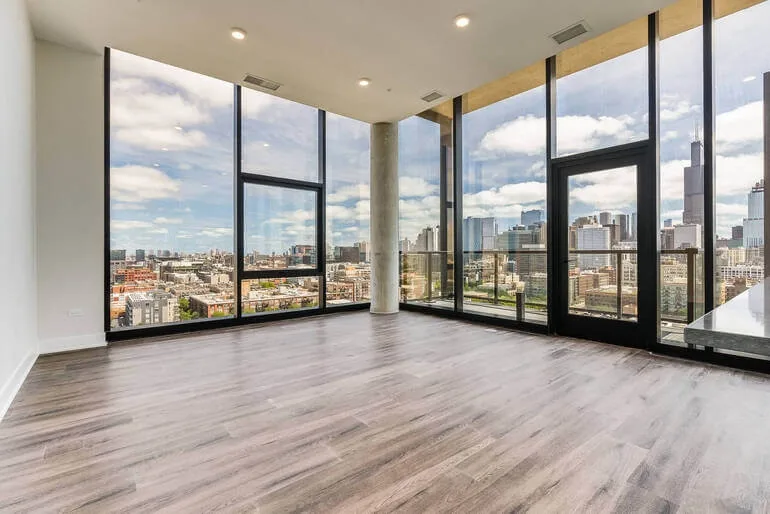
Empty-room reference: glazing, balcony access and a structural column are visible.
This structure is for an early furnishing discussion, when you are exploring movable furniture and decor. Adapt it to the work you have agreed to do. Use the meeting to settle the questions you can answer, and identify the measurements or product details you need before deciding the rest.
1. State the decision you want from the meeting
Write the purpose of the presentation before making the slides. “Review the living room” is too broad to guide either person. “Choose a furniture direction for a room used mainly for conversation and reading” gives you a more useful starting point.
Put that purpose on the opening page, followed by a short description of the client’s routine. For example, the room might need to seat the household comfortably, accommodate occasional visitors and leave access to the balcony. Use the priorities gathered from your client, and distinguish everyday needs from occasional ones.
Include the agreed spending range and the furniture that will stay. If those details are still unsettled, name them as open questions. An appealing image can otherwise pull the discussion toward pieces that were never part of the brief.
Explain what you will ask the client to respond to during this meeting. You might want a preference on the visual weight of the seating, the contrast between upholstery and wood, or the balance of furniture and open floor. The exact item specifications can follow once the direction is clearer.
Also establish whose input you need. If two people use the room differently, give both a chance to describe their priorities. Ask how they will combine their comments before the next revision, especially if one person cannot attend. Agree on who will send you the combined feedback.
2. Show the room before showing the proposal
Begin with a clear photograph of the empty space. Identify the features that the furnishing scheme must work around: glazing, doors, structural columns, fixed cabinetry and any furniture being retained. In the room pictured here, the large windows and balcony door deserve attention before anyone discusses a coffee table.
Keep a measured plan available where you have one. The photograph helps the client recognize the room; the plan helps you discuss its dimensions. Label measurements you still need to verify, and carry those labels into any revised drawings.
The British Institute of Interior Design’s client guide describes measured surveys and photographic records as preparation for concept drawings and accurate plans. That distinction is useful in a presentation: label your material clearly so a photograph, an atmosphere reference and a measured drawing each have an obvious purpose.
For a remote meeting, include another photograph if the main view hides an entrance or an awkward corner. Give the views simple labels, such as “from the kitchen” and “toward the balcony.” Check that both you and the client know which part of the room a comment refers to.
Keep the room information brief enough to use during the conversation. A page full of small dimensions is hard to discuss on a shared screen. Put the measurements relevant to the current decision in view and keep the detailed survey nearby. If a sofa position raises an access question, you can turn to that information immediately.
3. Explain one furniture direction in the room
Introduce a preferred direction with a short sentence tied to the brief. For a conversation-focused living room, you might propose seating that faces inward, a restrained palette and occasional tables within reach. Explain which needs those choices address before asking for a reaction.
InteriorStage creates furniture and decor concepts from photos of empty rooms. Its virtual room designer can help you illustrate a direction by adding movable furniture and decor to an empty-room photo. Choose a room type and style, then use the generated image as a reference for the conversation.
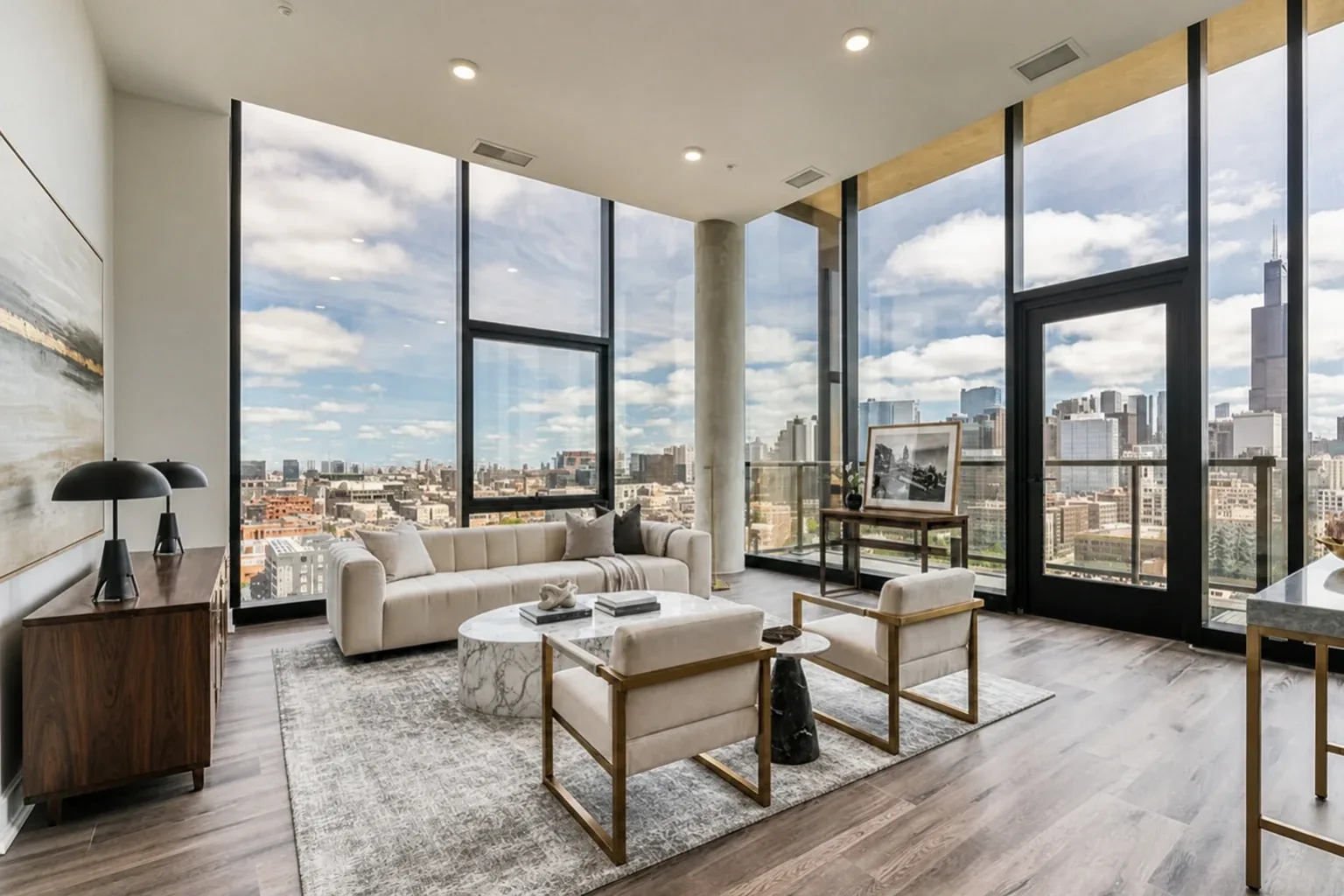
AI-generated furniture concept for discussion. Product dimensions, availability and circulation require separate checks.
In this concept, the pale sofa and wood-framed chairs give the client something specific to discuss. You can ask about the contrast of light upholstery against darker furniture, or whether the amount of seating feels appropriate. Those are more focused questions than whether the client likes the entire image.
Label the image as an AI-generated concept. Review it against the original photograph before presenting it, checking doors, windows, the column and other fixed features for visual changes. Explain that the furniture shown does not establish exact products, dimensions or availability. A clear route in the image still needs checking on a measured plan.
If you show another direction, say what you are comparing. It might be a lighter palette or furniture with a less substantial appearance. Keep the client’s brief consistent across the alternatives, and point out any unrelated differences introduced by the generated images. Otherwise, a preference for the lighting in one picture can be mistaken for a decision about its furniture.
4. Ask questions that identify the reason for a reaction
Give the client a moment to look before you explain every detail. Start with what draws their attention, then ask about the features connected to the brief. Try questions such as:

- Which part of this seating arrangement would you use most often?
- Does the pale upholstery appeal to you, or do you prefer a stronger contrast?
- Which piece feels unnecessary for the way you use this room?
- What would you want to see more clearly before choosing a direction?
Follow the answer rather than working through the list mechanically. If the client says the room feels formal, find out what creates that impression. It could be the matching chairs, the furniture arrangement or the dark console. Each answer suggests a different revision.
Return to the original photograph when a comment concerns the room itself. A request for more open space might mean fewer pieces, a different furniture shape or a route that needs closer examination. Note the question accurately before proposing a solution.
Avoid treating enthusiasm as approval of every visible detail. Someone can like the overall atmosphere while disliking a fabric or wanting to keep a piece that is absent from the concept. Ask which features they want you to carry forward and what remains undecided.
On a video call, check that the client can read any labels you are discussing. Leave the relevant image on screen while taking comments. Moving through slides too quickly can make a specific observation sound like a vague objection once its visual reference has disappeared.
5. Record what to keep, revise and verify
Keep a decision page open during the discussion. Record comments against the version of the image the client is seeing, with a date and a short description of the feature. A note attached only to “the second picture” becomes hard to interpret after the deck changes.

A sample record for the pictured room might read:
- Keep the light upholstery and the contrast with darker wood.
- Revisit the number of occasional seats after discussing how often guests visit.
- Check the proposed furniture footprints and access to the balcony on the measured plan.
- Leave fabric selection open until the client has reviewed physical samples.
Use the client’s wording where it captures something specific. Ask them to clarify a comment if two people could reasonably read it differently. “Lighter chairs,” for example, could mean a paler fabric or a slimmer frame.
Separate a design preference from the work needed to verify it. “We prefer a round coffee table” is a direction. The table’s dimensions, material and position remain questions for development. Record those checks alongside the preference so the team knows what to investigate.
Read the notes back before ending the meeting. Resolve any contradictory requests and name the information you still need. Send the agreed record with the relevant images, keeping the same version labels. A short note that both sides can understand will be more useful during revisions than an unedited transcript of the entire conversation.
6. End with a defined next step
The final page should say what you will develop and what the client will receive next. Be specific about the task and who is responsible. For example, you might revise the furniture concept after receiving the dimensions of a retained cabinet, then present a measured arrangement and a shortlist for discussion.
Match the next step to the issue that remains open. A disagreement about color calls for a different response from uncertainty about whether a chair will fit. Physical samples can help with material preferences; dimensions belong on drawings or product specifications. Generating another attractive picture will not resolve every question.
For the room shown here, follow-up work could include checking the furniture footprints around the column and confirming balcony access. The concept can remain beside the plan as a reminder of the visual direction. Assess any real product against its published specifications and the requirements of the room.
Keep a small closing checklist in your presentation file:
- The client knows which image and version the discussion covered.
- The preferred direction and requested revisions are written down.
- Open measurements, materials or product questions have an owner.
- The next deliverable and review date are understood.
Before sending the deck, read it without your spoken explanation. Can the client tell which images are references, which comments are agreed and which questions are still open? Add the missing labels while the conversation is fresh. The presentation should remain useful when the client opens it again a few days later.



Spa-Like Serenity: 5 Accessible Luxury Upgrades to Transform Your Master Bathroom
Five accessible upgrades, from decluttering and layered lighting to plush textiles, natural...
illustrarch Editoral Team3 Mins read
How to Fill a Large TV Wall?
A broad living room wall poses an immediate spatial challenge the moment...
illustrarch Editoral Team4 Mins read

Layout for Kitchen: How to Choose the Right One for Your Space
Choosing the right layout for your kitchen affects how you cook, move,...
 Elif Ayse Sen15 Mins read

Your Dream Bedroom: How to Bring the Outdoors In
Incorporating natural elements like wooden furniture, linen textiles, earth-inspired colors, and indoor...
 Bahattin Duran2 Mins read


Leave a comment