

ArchiCAD vs Revit: Which BIM Software Is Right for You?
Struggling to decide between ArchiCAD and Revit for your architectural practice? This in-depth 2026 comparison breaks down pricing, user interface, interoperability, rendering capabilities, and learning curve differences between these two leading BIM platforms. Whether you run a small studio or manage a large multidisciplinary team, discover which software best fits your workflow, budget, and project needs.
 Elif Ayse Sen22 January 20269 Mins read840

Table of Contents Show
Quick answer: Revit and ArchiCAD are both BIM platforms for designing and documenting buildings. Revit leads on large multidisciplinary projects and is common in the United States, while ArchiCAD is praised for an intuitive interface and strong early design tools. The best choice depends on your team and project type.
Quick Answer: ArchiCAD and Revit are both leading BIM software but suit different users. Revit dominates large, multi-discipline projects and is the industry standard in many regions, with deep structural and MEP integration. ArchiCAD is praised for an intuitive, design-focused interface and strong architecture-led performance. The right choice depends on your projects, team and local market.
When choosing between the leading BIM platforms for architectural design, the ArchiCAD vs Revit debate remains one of the most important decisions architects face in 2026. Revit and ArchiCAD are two of the most widely used software programs in the field of architectural design. Both of these software programs have unique features and capabilities that make them ideal for different types of projects. In this comprehensive ArchiCAD vs Revit comparison, we will explore the key differences, advantages, and disadvantages of each program to help you determine which architecture software is right for your practice.
Revit: Autodesk’s Flagship BIM Platform
Revit is a Building Information Modeling (BIM) software program that was developed by Autodesk. Revit is a comprehensive software program that allows architects, engineers, and construction professionals to create 3D models of buildings, structures, and other physical objects. Revit’s BIM approach enables users to model each component of a building, from the walls and windows to the electrical and mechanical systems. As part of the broader Autodesk AEC Collection, Revit architecture software integrates tightly with civil engineering, structural analysis, and MEP workflows, making it a go-to choice for multidisciplinary teams.

Advantages of Using Revit
One of the main advantages of using Revit is its ability to create highly detailed and accurate 3D models. Revit’s BIM approach enables users to create a detailed model of a building and then extract information from that model to create detailed construction documents. This can save time and reduce errors during the construction process. Another advantage of using Revit is its interoperability with other Autodesk software programs, such as AutoCAD and 3ds Max. This allows users to create highly detailed 3D models and then use them in other programs to create photorealistic renderings or animations.
When comparing autocad architecture vs revit, it is worth noting that Revit goes beyond 2D drafting by offering intelligent parametric objects and real-time schedule generation, whereas AutoCAD remains primarily a drafting tool. Revit also benefits from a massive global user community, abundant online tutorials, and a rich library of third-party plugins available through the Autodesk App Store.

Disadvantages of Using Revit
One of the disadvantages of using Revit is that it can be difficult to learn and master. Revit’s comprehensive set of features can be overwhelming for new users, and it may take some time to become proficient in using the software. One of the disadvantages of using Revit is its cost. Revit is a commercial software program, and its cost can be prohibitive for small architectural firms or independent designers.
Revit Architecture Software Cost in 2026
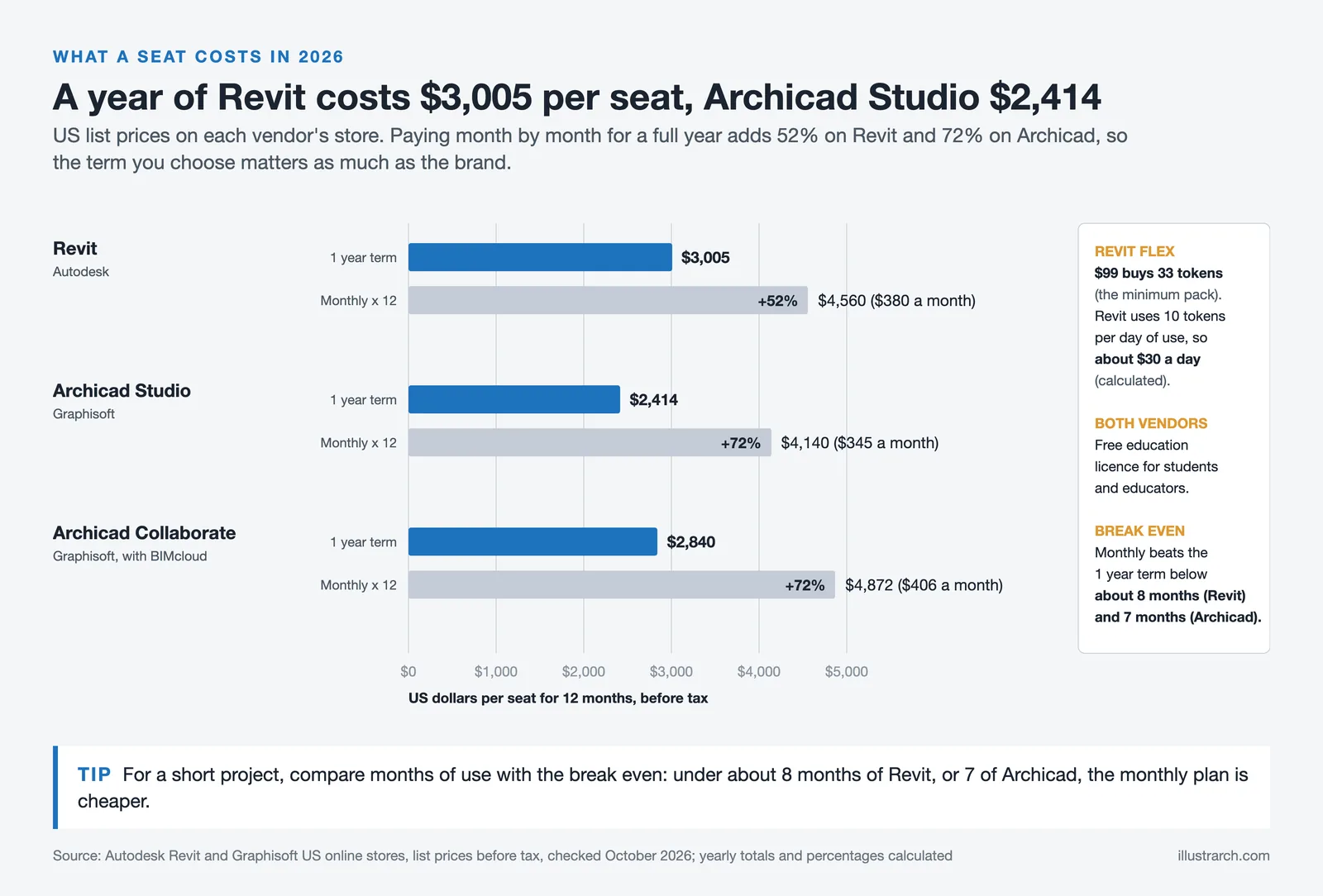
Understanding the Revit architecture software cost is essential before making a decision. As of 2026, Autodesk offers Revit through a subscription model with multiple tiers. The annual subscription for a single seat is $3,005 per year, while a monthly plan runs $380 per month (Autodesk US store, as of October 2026). A three-year commitment reduces the per-year cost further. Autodesk also offers a Flex pay-as-you-go option at 10 tokens per day, starting at $99 for 33 tokens. Students and educators can access Revit for free through the Autodesk Education plan. The cost includes access to Twinmotion for real-time visualization, cloud worksharing features, and regular software updates.
ArchiCAD: Graphisoft’s Architect-Focused BIM Solution
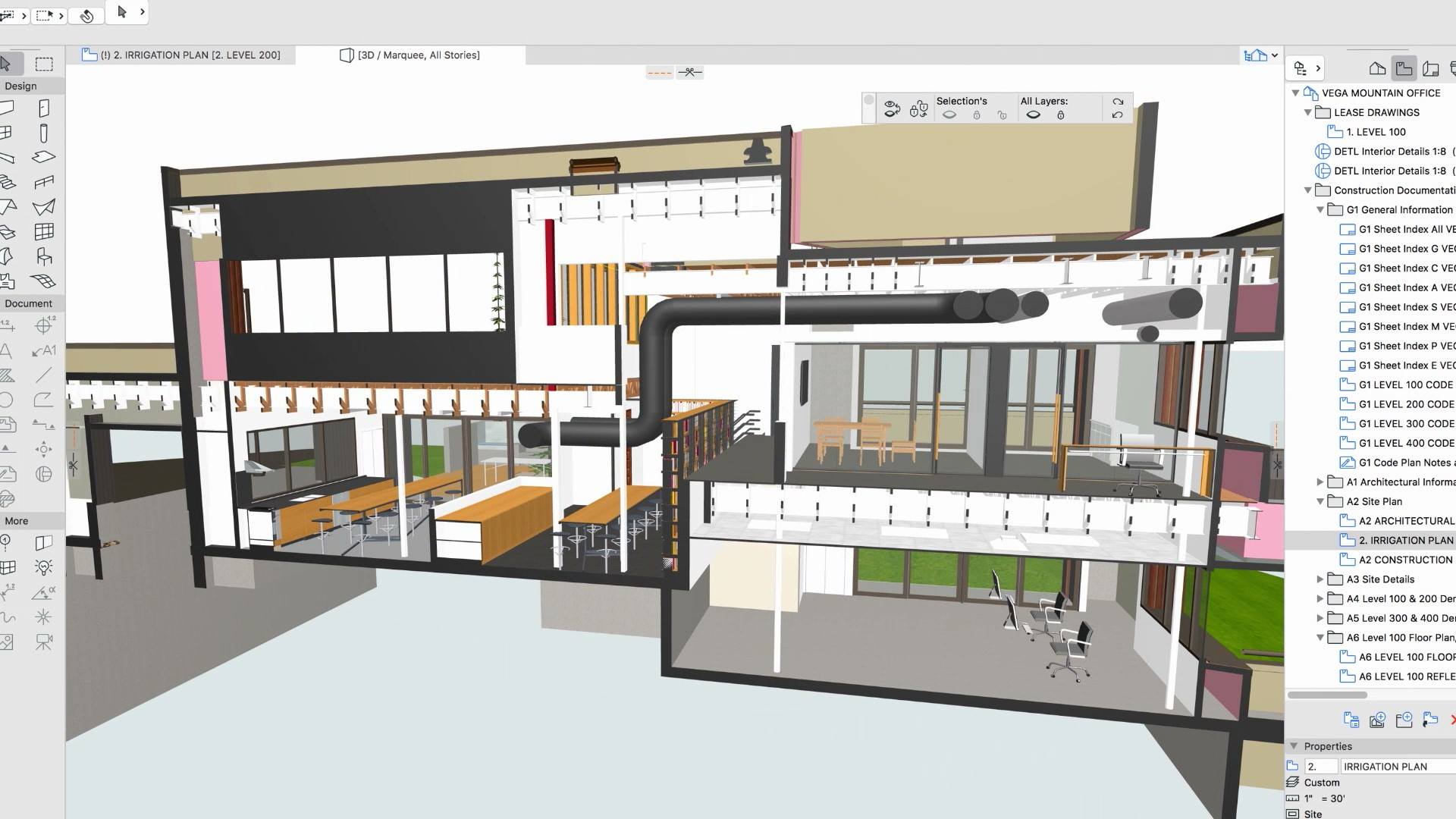
ArchiCAD is a BIM software program that was developed by Graphisoft. ArchiCAD is a comprehensive software program that allows architects and designers to create 3D models of buildings and other physical objects. ArchiCAD’s BIM approach enables users to model each component of a building, from the walls and windows to the electrical and mechanical systems. With the release of ArchiCAD 28, Graphisoft has introduced AI-enhanced design automation, improved parametric modeling tools, and native Apple Silicon optimization, reinforcing its position as a leading BIM platform for architects.
Advantages of Using ArchiCAD
One of the main advantages of using ArchiCAD is its ease of use. ArchiCAD’s intuitive interface and streamlined workflow make it easy for new users to learn and master the software. According to user reviews, achieving intermediate proficiency in ArchiCAD takes under 40 hours of training, which is significantly less than what Revit typically requires. Another advantage of using ArchiCAD is its cost. ArchiCAD is a commercial software program, but its cost is lower than that of Revit, making it more accessible to small architectural firms or independent designers. ArchiCAD’s subscription pricing starts at around $200 per month with annual billing, and the Collaborate Bundle (which includes BIMcloud and BIMx Pro) is available at approximately $237 per month (Graphisoft US, as of October 2026).
ArchiCAD also stands out for its native macOS support, making it a preferred choice for architects who work on Apple hardware. Its BIMx technology enables portable 3D model viewing on mobile devices, which is particularly useful for client presentations and on-site reviews.
Disadvantages of Using ArchiCAD
One of the disadvantages of using ArchiCAD is its limited interoperability with other software programs. ArchiCAD is primarily designed to work within the Graphisoft ecosystem, and it may be difficult to use CAD models in other programs. Another disadvantage of using ArchiCAD is its lack of advanced features. ArchiCAD is a comprehensive software program, but it may not have all of the advanced features that Revit has. This can limit the capabilities of ArchiCAD for certain types of projects.
When comparing archicad vs autocad, it is important to note that ArchiCAD is a full BIM solution while AutoCAD is primarily a 2D/3D drafting tool. Architects who need intelligent object-based modeling will benefit more from ArchiCAD, whereas those who primarily need to produce technical 2D drawings may find AutoCAD sufficient. However, ArchiCAD’s market share is smaller than Revit’s, which can create collaboration challenges when working with engineering firms that predominantly use Autodesk products.
ArchiCAD vs Revit: Quick Comparison Video
Watch the following video for a visual overview of BIM software and how it impacts architectural design workflows — a key context for understanding the ArchiCAD vs Revit comparison:
ArchiCAD vs Revit: Detailed Feature Comparison Table
The following table provides a comprehensive side-by-side comparison of ArchiCAD and Revit across all critical categories to help architects and firms make an informed decision:
| Feature / Criteria | Revit (Autodesk) | ArchiCAD (Graphisoft) |
|---|---|---|
| Developer | Autodesk (USA) | Graphisoft (Hungary, Nemetschek Group) |
| First Release | 2000 (acquired by Autodesk in 2002) | 1987 (first BIM software ever released) |
| Latest Version (2026) | Revit 2026 | ArchiCAD 28 |
| Platform Compatibility | Windows only | Windows & macOS (native Apple Silicon support) |
| BIM Approach | Parametric Families & data-driven modeling | Virtual Building concept with Open BIM / IFC |
| Disciplines Covered | Architecture, Structural, MEP (all-in-one) | Primarily Architecture (MEP/Structural via add-ons) |
| Learning Curve | Steep – extensive toolset requires significant training | Moderate – intuitive interface, ~40 hours to intermediate level |
| User Interface | Ribbon-based, similar to AutoCAD; structured and data-focused | Graphical, drag-and-drop; follows architectural workflow logic |
| 3D Modeling | Parametric families with Family Editor; strong for orthogonal designs | Morph, Shell & Curtain Wall tools; better for organic/freeform geometry |
| Interoperability | Excellent within Autodesk ecosystem (AutoCAD, Navisworks, BIM 360, 3ds Max) | Open BIM via IFC; supports DWG, DXF, SKP, DGN; Revit connection add-on available |
| Collaboration Tools | Autodesk BIM 360 / ACC (cloud-based worksharing for large teams) | BIMcloud (real-time teamwork, version control); best for small-to-mid teams |
| Rendering Engine | Built-in Raytracer + Twinmotion included; integrates with Enscape, V-Ray, Lumion | CineRender (Maxon) + Redshift GPU engine; integrates with Enscape, Lumion, Twinmotion |
| Visual Programming | Dynamo (built-in visual scripting for automation) | GDL (Geometric Description Language) for custom objects; Grasshopper–Archicad Live Connection |
| Documentation & Schedules | Advanced scheduling, automatic sheet generation, detailed annotation tools | Automated documentation, Navigator Palette for easy publishing; good scheduling capabilities |
| Plugin Ecosystem | Extensive – Autodesk App Store with thousands of plugins (pyRevit, Cove.tool, etc.) | Growing but smaller – Graphisoft Add-Ons and third-party plugins |
| Mobile / On-Site Review | Autodesk Construction Cloud mobile apps | BIMx – dedicated mobile 3D model viewer (iOS & Android) |
| Performance / System Requirements | Resource-heavy; requires powerful hardware for large models | More lightweight; optimized for Apple Silicon; handles large files with less hardware demand |
| Pricing (2026, approx.) | $3,005/year or $380/month (as of October 2026); Flex option at $99/33 tokens | ~$201 to $237/month (annual billing, as of October 2026); Collaborate Bundle ~$237/month |
| Licensing Model | Subscription-only (no perpetual license) | Subscription-only as of 2026 (perpetual licenses discontinued for new customers) |
| Free Student/Education Version | Yes – Autodesk Education Plan (free) | Yes – 1-year renewable educational license (free) |
| Free Trial | 30-day free trial | 30-day free trial |
| Market Dominance | Dominant in North America, government projects, large AEC firms | Strong in Europe, Asia, Australia; popular with small-to-mid-size studios |
| User Ratings (Software Advice) | 4.61 / 5 (434+ reviews) | 4.47 / 5 (276+ reviews) |
| Best For | Large firms, multidisciplinary teams, complex commercial/institutional projects | Small-to-mid studios, design-focused practices, solo practitioners, Mac users |
ArchiCAD vs Revit: Head-to-Head Comparison
Choosing between Revit or ArchiCAD ultimately depends on your firm’s size, project complexity, budget, and collaboration requirements. Below is a side-by-side look at the key differences in the revit vs archicad comparison:
User Interface and Learning Curve: ArchiCAD is widely regarded as more intuitive. Its interface follows a logical architectural workflow, allowing designers to begin modeling quickly. Revit, on the other hand, has a steeper learning curve due to its extensive toolset and rigid parametric framework. However, once mastered, Revit’s structured approach can yield more consistent documentation.
Platform Compatibility: ArchiCAD runs natively on both macOS and Windows, which is a significant advantage for firms using Apple hardware. Revit is Windows-only, requiring Mac users to rely on virtualization solutions like Parallels or Boot Camp.
Interoperability and Collaboration: Revit integrates seamlessly with the broader Autodesk ecosystem, including AutoCAD, Navisworks, and BIM 360. This makes revit architecture vs archicad a clear win for Revit in large multidisciplinary projects. ArchiCAD supports Open BIM via IFC standards, which enables cross-platform collaboration, but real-world interoperability is still smoother within the Autodesk suite.
Pricing: ArchiCAD generally offers a lower subscription cost than Revit. Note that as of 2026, Graphisoft has fully transitioned to subscription-based licensing, discontinuing perpetual licenses for new customers.
Rendering and Visualization: Both programs offer built-in rendering capabilities, but Revit’s included access to Twinmotion and tight integration with 3ds Max gives it an edge for high-end visualization workflows. ArchiCAD’s Cinerender engine is competent but less powerful for complex photorealistic output.
Which BIM Software Is Better for Your Practice?
Revit and ArchiCAD are two of the most widely used software programs in the field of architectural design. Both programs have unique features and capabilities that make them ideal for different types of projects. Choosing between Revit and ArchiCAD can be a difficult decision for architects. Revit’s advanced features and interoperability with other Autodesk software programs make it ideal for large-scale, complex projects. ArchiCAD’s ease of use and lower cost make it ideal for small architectural firms or independent designers. Ultimately, the choice between Revit and ArchiCAD will depend on the specific needs of each project and the preferences of the user.
For large firms and multidisciplinary teams working on complex commercial, institutional, or infrastructure projects, Revit is typically the better choice. Its dominance in the AEC industry means most consultants and contractors will already be working in the Autodesk ecosystem, streamlining coordination and reducing file-exchange issues.
For small to mid-size architectural studios, solo practitioners, and firms that prioritize design-focused workflows, ArchiCAD offers an attractive combination of lower cost, faster onboarding, and cross-platform flexibility. Its Open BIM approach also appeals to firms working in regions where ArchiCAD has a strong market presence, such as parts of Europe, Asia, and Australia.

User Interface and Workflow: Revit or ArchiCAD?
Both Revit and ArchiCAD have their own user interface and workflow. Architects should try out both programs to see which one they feel more comfortable using. Revit is known for its steep learning curve, which may require more time and effort to master. On the other hand, ArchiCAD has a more intuitive interface and may be easier to learn for beginners.
Ultimately, architects should choose the software program that best fits their specific needs and preferences. It may be helpful to try out both programs before making a decision or seek advice from other architects who have experience using Revit or ArchiCAD. Both Autodesk and Graphisoft offer free trials, so you can evaluate the revit vs archicad comparison firsthand before committing to a subscription. You may also consider exploring our guide on the best BIM software for architects to see how these two platforms compare against other tools on the market.

Related Guides
- Archicad vs SketchUp: Which Design Software is Right for Your Projects?
- Beginner’s Guide to Arcadium 3D: Your First Room Design in 5 Easy Steps
More Related Guides


3 Comments




Notion Alternatives for Architects: 7 Tools That Fit Studio Work
Notion works until a studio needs fee tracking, phase budgets and timesheets....
 Furkan Sen7 Mins read

Why Every Practice Ends Up With Five Versions of the Same Revit Family
Let’s learn why Revit family libraries accumulate duplicates, break schedules and slow...
 illustrarch Editoral Team5 Mins read

Visualizing Renovation Projects From Photographs: A Workflow for Existing-Building Work
Photo-based visualization turns a photograph of a building that already exists into...
illustrarch Editoral Team7 Mins read

Best Free CAD Blocks and Resources for Architects
A working guide to free CAD blocks for architects, covering ARCAT, CAD-Blocks.net,...
Furkan Sen7 Mins read


LOL!
This “comparison” was written by an OBVIOUS Revit user pretending to be an unbiased judge.
This article talks about Revit and ArchiCAD. I don’t know much about these programs, but it seems like they have their good and bad sides. It might be helpful for people to read more about them.
I found the comparison of Revit and ArchiCAD interesting. The post explains how each software works, but I still need to figure out which one is better for my needs. More examples would be nice.